
Works with
Optional integrations and compatible files.

About OreGolems
Turn ordinary ore nodes into massive, animated boss encounters in Rust.
Mining resources should not always be a predictable activity. Sometimes, the rocks you are mining should fight back.
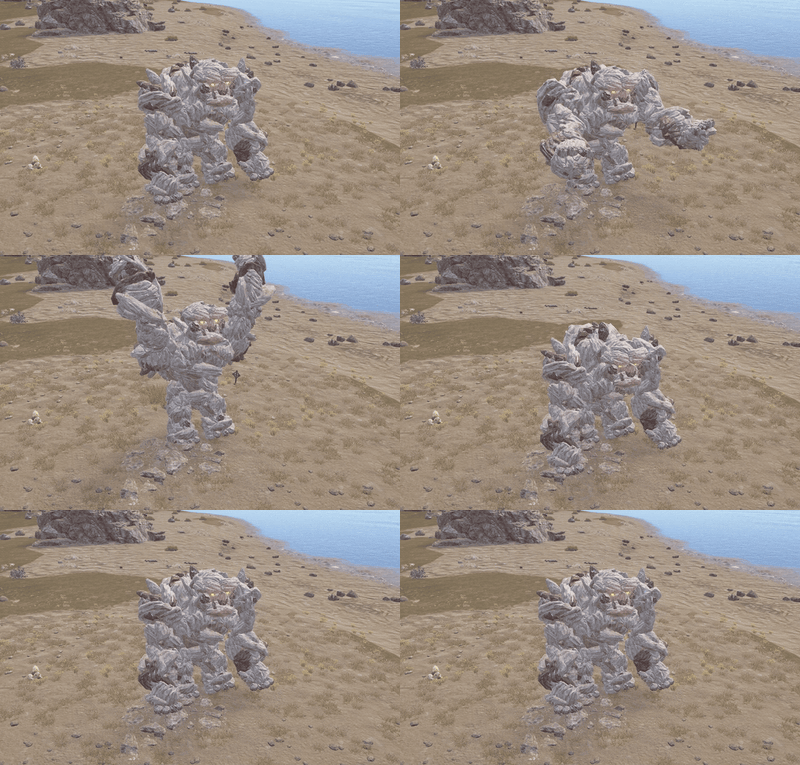
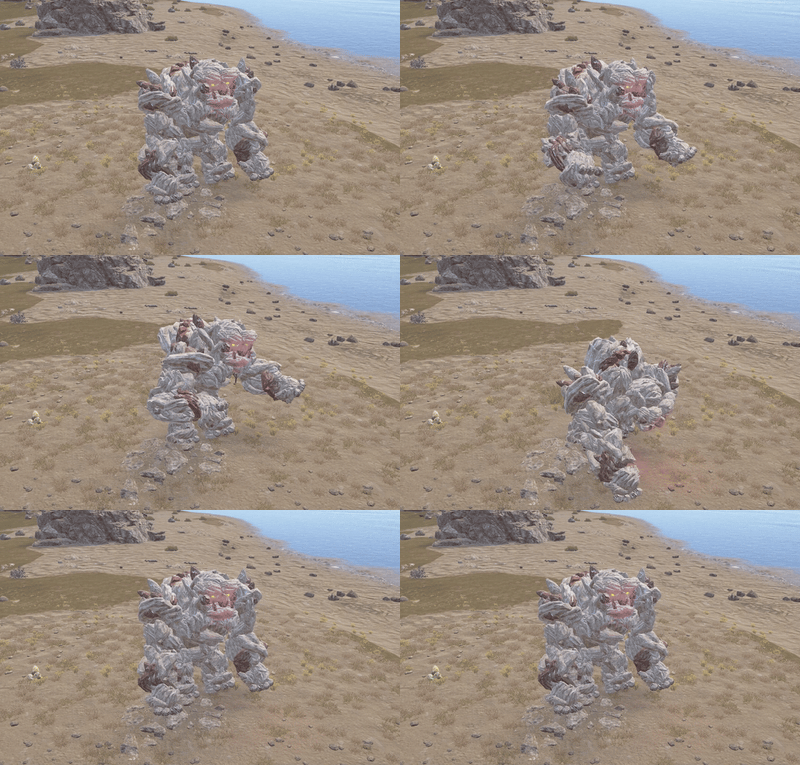
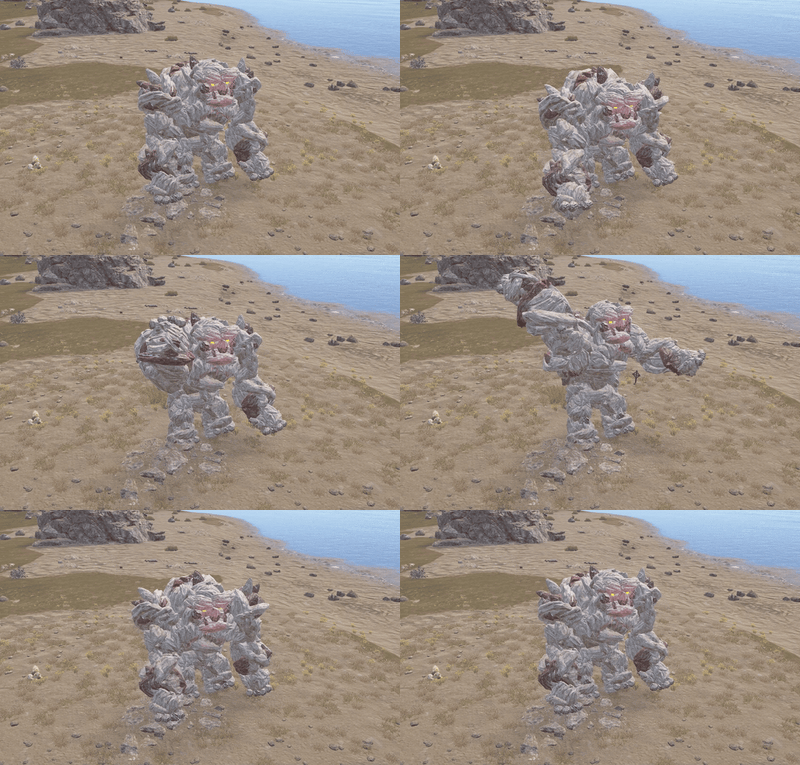
OreGolems introduces powerful, animated ore golems that can awaken from resource nodes and attack nearby players. Each golem is constructed from Rust entities and features custom animations, multiple attack abilities, destructible armor, and rewarding loot when defeated.
Server owners can customize different golem types, health, damage, spawn chances, attack behavior, fixed spawn locations, rewards, health bars, map markers, and performance settings.
Perfect for PvE, PvP, Vanilla+, modded, RPG/RP, survival, custom progression, and boss-event Rust servers.

 Features
- Adds massive, animated ore golems that players can encounter while mining resources.
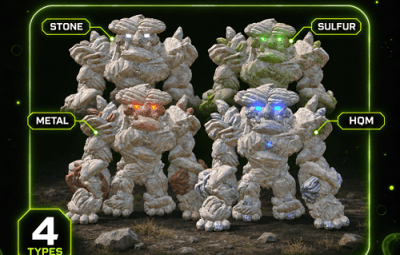
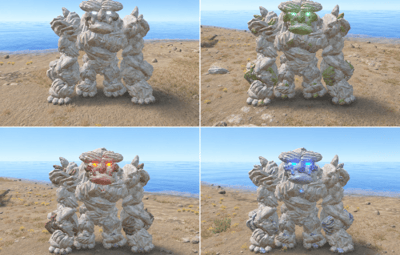
- Four configurable golem types: Stone, Sulfur, Metal, and HQM.
- Unique appearances for different golem types using matching ore nodes, collectables, and colored lights.
- Golems are assembled from Rust entities using a custom bone, model, and animation system.
- Natural spawning system with configurable awakening chances for each ore type.
- Ore nodes can shake and display warning effects before a golem awakens.
- Configurable number of warning hits before awakening.
- Configurable maximum number of active golems for automatic awakening.
- Optional fixed spawn points with configurable ore types and respawn delays.
- In-game admin commands to create, remove, and list fixed spawn points.
- Admin commands to spawn golems manually and remove active golems.
- Custom animations for walking, waking, punching, ground slamming, grabbing, throwing rocks, staggering, sleeping, and dying.
- Four configurable attack abilities: Grab and Throw, Rock Throw, Ground Slam, and Punch.
- Separate damage, range, and cooldown settings for each attack.
- Per-golem-type attack damage multipliers.
- Rock throwing with configurable projectile speed, size, and target movement prediction.
- Grab and Throw attack that can pick up players and throw them through the air.
- Ground Slam attack with configurable area damage and impact effects.
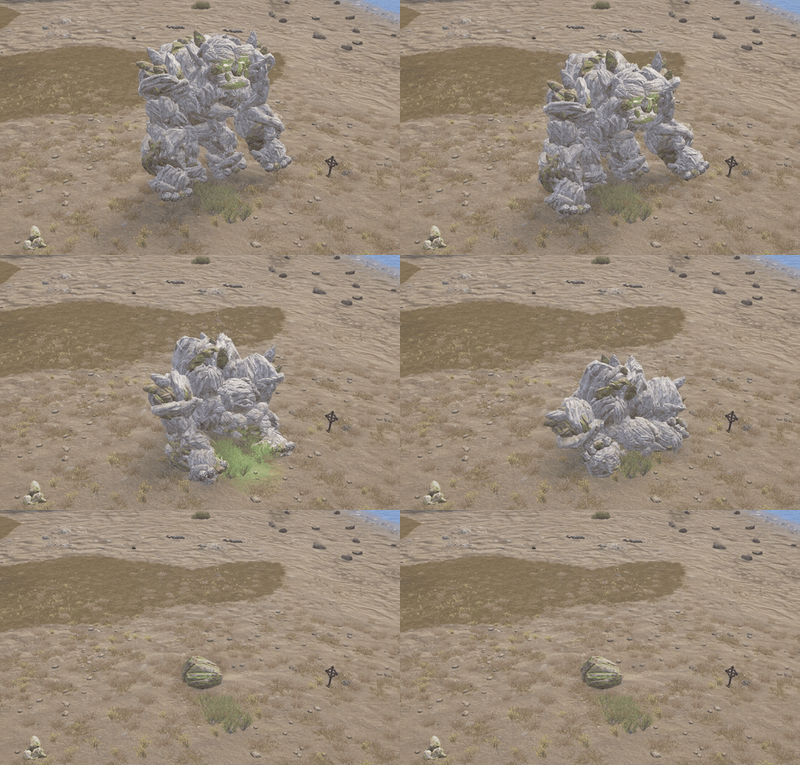
- Destructible armor that breaks away as the golem loses health.
- Configurable armor-breaking stages based on remaining health.
- Heavy hits can stagger golems and interrupt their attacks.
- Custom targeting, movement speed, chasing distance, and sleeping behavior.
- Golems can return to a sleeping ore node while preserving their remaining health.
- Custom reward ore nodes appear when a golem is defeated.
- Configurable reward node amounts and resource contents for each golem type.
- Reward crates with configurable skins and vanilla or custom loot.
- Custom loot supports item amounts, drop chances, skin IDs, names, and text.
- Optional economy payouts to the player credited with defeating a golem.
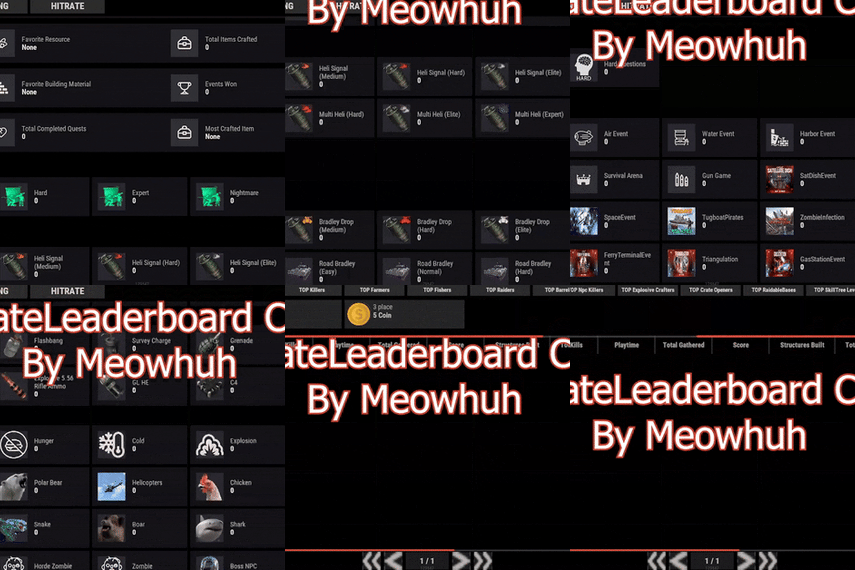
- Optional UltimateLeaderboard integration for recording golem victories.
- Configurable lifetimes for reward nodes, debris, and loot crates.
- Optional in-game health bar displaying the golem type and remaining HP.
- Optional map markers with configurable radius or shop-style icons.
- Configurable animation update rate and distance-based network update optimization.
- Automatic cleanup of golem entities, temporary objects, and expired rewards.
- Plugin hooks for controlling targeting, awakening, and defeated events.
- No additional NPC framework required.
 Golem Types
OreGolems includes four different golem types, each with its own appearance, health, damage multiplier, rewards, and loot settings.
| Golem Type | Default Health | Resource Type |
|---|---|---|
| Stone Golem | 12,000 HP | Stone |
| Sulfur Golem | 18,000 HP | Sulfur |
| Metal Golem | 24,000 HP | Metal Ore |
| HQM Golem | 32,000 HP | High Quality Metal Ore |
 Stone Golem
The Stone Golem is the lowest-health default golem type.
- Health: 12,000 HP.
- Appearance: Stone ore body with standard industrial lights.
- Default reward: Stone resource nodes.
- Default crate loot: Normal crate loot.
 Sulfur Golem
A stronger golem made from sulfur ore resources.
- Health: 18,000 HP.
- Appearance: Sulfur ore body with green industrial lights.
- Default reward: Sulfur Ore and Stones.
- Default crate loot: Normal crate loot.
 Metal Golem
A powerful golem made from metal ore resources.
- Health: 24,000 HP.
- Appearance: Metal ore body with red industrial lights.
- Default reward: Metal Ore and Stones.
- Default crate loot: Normal crate loot.
 HQM Golem
The strongest default golem type, offering a more challenging encounter.
- Health: 32,000 HP.
- Appearance: HQM ore body with blue industrial lights.
- Default reward: High Quality Metal Ore and Stones.
- Default crate loot: Elite crate loot.
Tip
Custom Golem Difficulty
Each golem type has its own configuration for health, attack damage multiplier, reward nodes, reward items, loot crates, and awakening chance.
This allows server owners to create different difficulty and reward levels for each resource type.
 Golem Attacks
OreGolems includes four animated combat abilities with separate settings for damage, cooldowns, range, and additional attack behavior.
| Attack | Default Damage | Cooldown | Range |
|---|---|---|---|
| Grab and Throw | 20 | 15 seconds | 6.5 m |
| Rock Throw | 35 | 10 seconds | 35 m |
| Ground Slam | 40 | 8 seconds | 7 m |
| Punch | 25 | 4 seconds | 7 m |
 Grab and Throw
The golem can grab nearby players and throw them away.
- Animated grabbing and throwing sequence.
- Configurable grab damage.
- Configurable attack range and cooldown.
- Configurable reach distance from the golem's hand.
- Adjustable forward and upward throwing speeds.
- Player throwing uses Rust's ragdoll mechanics.
 Rock Throw
The golem can attack distant players by throwing large rocks.
- Animated rock pickup and throwing sequence.
- Configurable minimum and maximum attack ranges.
- Configurable rock damage and cooldown.
- Adjustable projectile speed.
- Configurable rock size.
- Target movement prediction to help aim at moving players.
- Rock impact detection and damage.
 Ground Slam
The golem can slam the ground to damage nearby players.
- Animated ground slam attack.
- Configurable attack damage.
- Adjustable attack range and hit radius.
- Configurable cooldown.
- Ground impact visual effects.
- Optional custom impact effect prefab.
 Punch
The golem can attack nearby players using animated punches.
- Animated punching sequence.
- Configurable damage and cooldown.
- Adjustable attack range.
- Configurable hit radius.
- Directional hit detection.
Tip
Example: Increase the Ground Slam damage to 60 and reduce its cooldown to 5 seconds to create a more aggressive boss encounter.
Each attack can also be enabled or disabled separately in the configuration.
 Destructible Armor & Staggering
OreGolems features an armor-breaking system that makes fights more visually dynamic as the golem takes damage.
Instead of remaining visually unchanged throughout the fight, golems can lose parts of their outer armor as their health decreases.
| Armor Stage | Remaining Health |
|---|---|
| Stage 1 | 75% HP |
| Stage 2 | 50% HP |
| Stage 3 | 25% HP |
- Armor pieces detach when configured health thresholds are reached.
- Detached pieces fall away from the golem.
- Armor stages can be customized in the configuration.
- Powerful hits can trigger a stagger animation.
- Configurable minimum hit damage required to stagger a golem.
- Configurable stagger cooldown.
- Staggering can interrupt the golem's current actions.
Tip
Example: Set [Armor] Damage in one hit needed to stagger the golem (0.04 = 4% of max health) to 0.04 to allow individual hits dealing at least 4% of the golem's maximum health to trigger a stagger, subject to the configured cooldown.
For a Stone Golem with 12,000 HP, this means a hit dealing at least 480 damage can trigger a stagger.
 Awakening & Natural Spawning
OreGolems can turn normal resource gathering into unexpected boss encounters.
When a player mines an eligible ore node, the plugin can randomly select that node to become a sleeping golem.
Once selected, the ore node begins displaying warning effects as the player continues mining.
After the configured warning hits, the golem awakens and begins attacking.
Awakening Settings
| Setting | Default |
|---|---|
| Wake chance per ore type | 1% |
| Warning hits before awakening | 3 |
| Maximum active golems | 3 |
| Target radius | 30 meters |
| Chase radius | 40 meters |
- Different wake chances can be configured for each ore type.
- Warning effects indicate that a selected ore node may awaken.
- Golems emerge from their corresponding ore nodes.
- Golems automatically search for nearby valid player targets.
- Natural awakening is limited by the configured maximum active golem count.
- The spawning system checks surrounding terrain and obstacles before selecting natural spawn locations.
Note
Natural Spawn Notes
-
The default wake chance is
0.01, equal to 1%. - The chance applies when an eligible ore node is first considered for awakening.
- Selected nodes display warning effects during subsequent mining hits.
- Natural spawn checks avoid unsuitable locations such as monuments, water, nearby Tool Cupboards, steep terrain, and obstructed areas.
- When fixed spawns are enabled, the plugin uses the fixed-spawn system instead of random awakening from ordinary ore nodes.
 Fixed Spawn Points
Server owners can optionally create permanent golem encounter locations.
Fixed spawn points create sleeping ore nodes at configured positions, allowing players to trigger golem encounters by mining them.
- Enable or disable fixed spawning.
- Create spawn points directly in-game.
- Select the ore type for each spawn point.
- Assign a unique name to each location.
- Automatically save spawn coordinates to the configuration.
- List all configured spawn locations.
- Remove unwanted spawn locations.
- Configurable respawn delay.
- Fixed spawn nodes can return after their encounter has ended.
Fixed Spawn Commands
/golem point add <name> [type] - Saves a fixed spawn point at your current position.
/golem point remove <name> - Removes a saved spawn point.
/golem point list - Lists all saved spawn points and their coordinates.
Command Examples
/golem point add StoneBoss stone
/golem point add SulfurBoss sulfur
/golem point add MetalBoss metal
/golem point add HQMBoss hqm
/golem point list
/golem point remove StoneBoss
Note
Fixed Spawn Setup
Fixed spawns are disabled by default.
Set [Fixed Spawns] Enabled to true under Fixed spawns in the configuration.
The default respawn delay is 900 seconds (15 minutes).
You can create spawn points while the system is disabled, but they will not become active until fixed spawning is enabled and the plugin is reloaded.
 Golem Behavior
OreGolems includes configurable movement and targeting behavior.
| Setting | Default |
|---|---|
| Target radius | 30 m |
| Chase radius | 40 m |
| Walk speed | 1.3 m/s |
| Time without target before sleeping | 30 seconds |
| Sleeping node lifetime | 1,800 seconds |
- Searches for nearby valid players.
- Moves toward its target using animated walking.
- Uses configured attacks depending on the player's distance.
- Limits how far it can chase players from its awakening location.
- Can return toward its original position.
- Can return to a sleeping ore node after losing its target.
- Preserves remaining health when returning to sleep.
- Sleeping nodes can awaken again when mined.
- Temporary sleeping nodes expire after their configured lifetime.
Tip
Example: Increase [Behavior] Walk speed (meters per second) to 2.0 and [Behavior] Maximum chase distance from where the golem woke up (meters) to 60 to make golems move faster and pursue players across a larger area.
 Rewards & Loot
Defeating a golem can reward players with collectible resource nodes, loot crates, and optional economy payouts.
Reward Ore Nodes
Each golem type supports custom reward nodes containing configurable resource items.
| Golem Type | Default Resource Contents per Node |
|---|---|
| Stone | 1,000 Stones |
| Sulfur | 600 Sulfur Ore + 300 Stones |
| Metal | 600 Metal Ore + 300 Stones |
| HQM | 60 HQM Ore + 300 Stones |
By default, each golem can produce up to 3 reward nodes when defeated, depending on available ore parts.
Reward nodes can be mined to collect their configured resources.
Loot Crates
Each defeated golem also creates a reward crate.
- Configurable crate skin for each golem type.
- Option to use vanilla loot.
- Configurable vanilla loot source crate.
- Optional custom loot tables.
- Configurable item shortnames.
- Minimum and maximum item amounts.
- Individual item drop chances.
- Custom item skin IDs.
- Custom item display names.
- Custom item text, including personalized messages on notes.
Tip
Example: Configure a special HQM Golem reward crate using custom loot instead of the default elite crate loot.
You can add valuable items, set custom chances, and customize how much loot players receive when defeating the boss.
The default custom loot examples include Scrap with a configurable drop chance and a custom-named Golem Hunter's Note containing a message.
Note
Custom Loot Settings
- Each golem type has its own custom loot list.
- You can configure item shortnames, amounts, chances, skins, names, and text.
- The included examples contain Scrap with a 50% chance and a Golem Hunter's Note with a 100% chance.
- Standard Rust crate loot is enabled by default. Custom loot is used only when standard Rust loot is disabled for that golem type.
Reward Lifetimes
| Reward Object | Default Lifetime |
|---|---|
| Reward ore nodes | 900 seconds |
| Golem debris | 60 seconds |
| Loot crates | 900 seconds |
These values can be customized in the configuration.
 Economy & Leaderboard Integration
OreGolems supports optional integrations for rewarding and tracking boss victories.
Economy Payouts
Server owners can configure economy rewards for each golem type.
- Configurable economy plugin name.
- Configurable balance addition hook.
- Separate payout amount for each golem type.
-
Set the amount to
0to disable economy rewards. - Payouts are awarded to the player credited with defeating the golem.
The default economy plugin name is Economics, using the Deposit hook.
Other economy plugins can be configured using their supported balance hooks.
UltimateLeaderboard
OreGolems includes optional UltimateLeaderboard integration.
When a golem is defeated, the plugin can record an event victory for the credited player through UltimateLeaderboard's API.
Note
Integration Notes
- Economy integration is optional.
- Economy payouts are disabled by default.
- UltimateLeaderboard integration is optional.
- The plugin determines the credited killer using recorded damage contributions.
- Both integrations require their respective plugins to be installed and compatible.
 Health Bar & Map Markers
OreGolems includes optional visual information to help players identify and track active golems.
Health Bar
- Configurable in-game health bar.
- Shows the golem's ore type.
- Displays current and maximum health.
- Automatically updates during combat.
- Configurable display distance.
- Shows nearby active golems without requiring a chat command.
Default health bar distance: 50 meters.
Map Markers
- Optional map markers for active golems.
- Supports a radius-style map marker.
- Optional shop-style map icon.
- Configurable marker radius.
- Markers are removed when the golem is defeated or removed.
Note
Default Settings
- Health bars are enabled by default.
- Map markers are disabled by default.
- Both features can be configured separately.
 Performance Settings
OreGolems includes configurable performance settings for controlling animation and network updates.
- Configurable animation ticks per second.
- Distance-based update behavior.
- Reduced network update frequency for distant golems.
- Configurable distance for far update rates.
- Configurable distance beyond which pose network updates are suppressed.
- Automatic removal of temporary combat effects and objects.
- Configurable maximum active golem count for automatic awakening.
| Setting | Default |
|---|---|
| Animation ticks per second | 20 |
| Far update distance | 80 m |
| Far update rate | 10 updates/second |
| Network update cutoff distance | 200 m |
Tip
Performance Tip
For servers expecting frequent boss encounters, adjust the maximum active golems, animation tick rate, and distance-based update settings to suit your server performance.
 Admin Commands
/golem spawn <type> - Spawns the selected golem type in front of the admin.
/golem play <sequence> - Plays an animation sequence on the nearest active golem.
/golem clear - Removes all active golems.
/golem point add <name> [type] - Creates a fixed spawn point at the admin's current location.
/golem point remove <name> - Removes a fixed spawn point.
/golem point list - Lists all configured fixed spawn points.
Command Examples
/golem spawn stone
/golem spawn sulfur
/golem spawn metal
/golem spawn hqm

/golem play wake
/golem play punch
/golem play slam
/golem play grab
/golem play rock
/golem play stagger
/golem play sleep
/golem play death
/golem play walk

/golem clear

/golem point add StoneBoss stone
/golem point add SulfurBoss sulfur
/golem point add HQMBoss hqm
/golem point list
/golem point remove StoneBoss
Note
Command Notes
-
All
/golemcommands requireoregolems.admin. -
The
spawncommand defaults to Stone when no ore type is provided. -
The
playcommand targets the nearest active golem. -
The
clearcommand removes active golems. - Fixed spawn points are saved in the plugin configuration.
- The default ore type for new fixed spawn points is Stone.
 Console Commands
oregolems.spawn <type> - Spawns the selected golem type in front of the player using the client console.
oregolems.clear - Removes all active golems.
Note
Console Access
-
The spawn console command requires a player context and
oregolems.admin. - The clear console command supports authorized players and the server console.
 Permissions
oregolems.admin - Grants access to all OreGolems admin commands, including spawning, animation playback, clearing golems, and managing fixed spawn points.
Normal players do not need permissions to encounter, fight, or collect rewards from ore golems.
 Installation
OreGolems supports both Oxide (uMod) and Carbon.
The downloaded ZIP contains two required files:
-
OreGolems.cs- Main plugin file. -
data/OreGolems/Golem.json- Golem model, parts, poses, and animation data.
Installation Steps
- Extract the downloaded ZIP archive.
-
Upload
OreGolems.csto your server's plugin folder:-
Oxide:
oxide/plugins/ -
Carbon:
carbon/plugins/
-
Oxide:
-
Upload
Golem.jsonto your server's data folder:-
Oxide:
oxide/data/OreGolems/ -
Carbon:
carbon/data/OreGolems/
-
Oxide:
- Make sure both files are in the correct directories.
- Load or reload the OreGolems plugin.
-
Edit the generated configuration:
-
Oxide:
oxide/config/OreGolems.json -
Carbon:
carbon/configs/OreGolems.json
-
Oxide:
- Grant the admin permission if you want to use the management commands.
Oxide File Structure
oxide/
├── plugins/
│   └── OreGolems.cs
├── data/
│   └── OreGolems/
│       └── Golem.json
└── config/
    └── OreGolems.json
Carbon File Structure
carbon/
├── plugins/
│   └── OreGolems.cs
├── data/
│   └── OreGolems/
│       └── Golem.json
└── configs/
    └── OreGolems.json
Warning
Important Installation Requirement
The Golem.json data file is required for OreGolems to function.
This file contains the custom model and animation definitions used to construct and animate the golems.
If the file is missing or cannot be loaded, the plugin will report an error and unload.
Do not upload only the .cs file. Make sure to include the supplied data folder.
Example Configuration
{
  "Ore types": {
    "stone": {
      "[Ore] Wake chance on the first hit of a natural ore node (0.50 = 50%)": 0.01,
      "[Ore] Maximum health (HP)": 12000.0,
      "[Ore] Attack damage multiplier": 1.0,
      "[Ore] Maximum ore nodes dropped on death": 3,
      "Items in each dropped ore node": [
        {
          "Item shortname": "stones",
          "Amount": 1000
        }
      ],
      "Loot crate dropped on death": {
        "[Loot] Crate skin ID": 2538049119,
        "[Loot] Use standard Rust crate loot": true,
        "[Loot] Rust crate prefab to copy loot from (e.g. crate_normal)": "crate_normal",
        "Custom loot (used when standard Rust loot is disabled)": [
          {
            "Item shortname": "scrap",
            "Minimum amount": 25,
            "Maximum amount": 50,
            "Chance to include this item (0.5 = 50%)": 0.5,
            "Skin ID": 0,
            "Custom name": "",
            "Custom text": ""
          },
          {
            "Item shortname": "note",
            "Minimum amount": 1,
            "Maximum amount": 1,
            "Chance to include this item (0.5 = 50%)": 1.0,
            "Skin ID": 0,
            "Custom name": "Golem Hunter's Note",
            "Custom text": "You defeated an Ore Golem. The loot is yours!"
          }
        ]
      },
      "Economy reward for the player who dealt the most damage": {
        "[Economy] Economy plugin name": "Economics",
        "[Economy] Economy plugin hook that adds to the player's balance": "Deposit",
        "[Economy] Reward amount (0 = no payout)": 0.0
      },
      "[Ore] Ore node prefab used for the golem body": "stone-ore",
      "[Ore] Ore collectible prefab used for body parts and thrown rocks": "stone-collectable",
      "[Ore] Lamp prefab used for the golem's eyes": "industrial.wall.lamp.deployed"
    },
    "sulfur": {
      "[Ore] Wake chance on the first hit of a natural ore node (0.50 = 50%)": 0.01,
      "[Ore] Maximum health (HP)": 18000.0,
      "[Ore] Attack damage multiplier": 1.0,
      "[Ore] Maximum ore nodes dropped on death": 3,
      "Items in each dropped ore node": [
        {
          "Item shortname": "sulfur.ore",
          "Amount": 600
        },
        {
          "Item shortname": "stones",
          "Amount": 300
        }
      ],
      "Loot crate dropped on death": {
        "[Loot] Crate skin ID": 2517917450,
        "[Loot] Use standard Rust crate loot": true,
        "[Loot] Rust crate prefab to copy loot from (e.g. crate_normal)": "crate_normal",
        "Custom loot (used when standard Rust loot is disabled)": [
          {
            "Item shortname": "scrap",
            "Minimum amount": 25,
            "Maximum amount": 50,
            "Chance to include this item (0.5 = 50%)": 0.5,
            "Skin ID": 0,
            "Custom name": "",
            "Custom text": ""
          },
          {
            "Item shortname": "note",
            "Minimum amount": 1,
            "Maximum amount": 1,
            "Chance to include this item (0.5 = 50%)": 1.0,
            "Skin ID": 0,
            "Custom name": "Golem Hunter's Note",
            "Custom text": "You defeated an Ore Golem. The loot is yours!"
          }
        ]
      },
      "Economy reward for the player who dealt the most damage": {
        "[Economy] Economy plugin name": "Economics",
        "[Economy] Economy plugin hook that adds to the player's balance": "Deposit",
        "[Economy] Reward amount (0 = no payout)": 0.0
      },
      "[Ore] Ore node prefab used for the golem body": "sulfur-ore",
      "[Ore] Ore collectible prefab used for body parts and thrown rocks": "sulfur-collectable",
      "[Ore] Lamp prefab used for the golem's eyes": "industrial.wall.lamp.green.deployed"
    },
    "metal": {
      "[Ore] Wake chance on the first hit of a natural ore node (0.50 = 50%)": 0.01,
      "[Ore] Maximum health (HP)": 24000.0,
      "[Ore] Attack damage multiplier": 1.0,
      "[Ore] Maximum ore nodes dropped on death": 3,
      "Items in each dropped ore node": [
        {
          "Item shortname": "metal.ore",
          "Amount": 600
        },
        {
          "Item shortname": "stones",
          "Amount": 300
        }
      ],
      "Loot crate dropped on death": {
        "[Loot] Crate skin ID": 2509860100,
        "[Loot] Use standard Rust crate loot": true,
        "[Loot] Rust crate prefab to copy loot from (e.g. crate_normal)": "crate_normal",
        "Custom loot (used when standard Rust loot is disabled)": [
          {
            "Item shortname": "scrap",
            "Minimum amount": 25,
            "Maximum amount": 50,
            "Chance to include this item (0.5 = 50%)": 0.5,
            "Skin ID": 0,
            "Custom name": "",
            "Custom text": ""
          },
          {
            "Item shortname": "note",
            "Minimum amount": 1,
            "Maximum amount": 1,
            "Chance to include this item (0.5 = 50%)": 1.0,
            "Skin ID": 0,
            "Custom name": "Golem Hunter's Note",
            "Custom text": "You defeated an Ore Golem. The loot is yours!"
          }
        ]
      },
      "Economy reward for the player who dealt the most damage": {
        "[Economy] Economy plugin name": "Economics",
        "[Economy] Economy plugin hook that adds to the player's balance": "Deposit",
        "[Economy] Reward amount (0 = no payout)": 0.0
      },
      "[Ore] Ore node prefab used for the golem body": "metal-ore",
      "[Ore] Ore collectible prefab used for body parts and thrown rocks": "metal-collectable",
      "[Ore] Lamp prefab used for the golem's eyes": "industrial.wall.lamp.red.deployed"
    },
    "hqm": {
      "[Ore] Wake chance on the first hit of a natural ore node (0.50 = 50%)": 0.01,
      "[Ore] Maximum health (HP)": 32000.0,
      "[Ore] Attack damage multiplier": 1.0,
      "[Ore] Maximum ore nodes dropped on death": 3,
      "Items in each dropped ore node": [
        {
          "Item shortname": "hq.metal.ore",
          "Amount": 60
        },
        {
          "Item shortname": "stones",
          "Amount": 300
        }
      ],
      "Loot crate dropped on death": {
        "[Loot] Crate skin ID": 2446262619,
        "[Loot] Use standard Rust crate loot": true,
        "[Loot] Rust crate prefab to copy loot from (e.g. crate_normal)": "crate_elite",
        "Custom loot (used when standard Rust loot is disabled)": [
          {
            "Item shortname": "scrap",
            "Minimum amount": 25,
            "Maximum amount": 50,
            "Chance to include this item (0.5 = 50%)": 0.5,
            "Skin ID": 0,
            "Custom name": "",
            "Custom text": ""
          },
          {
            "Item shortname": "note",
            "Minimum amount": 1,
            "Maximum amount": 1,
            "Chance to include this item (0.5 = 50%)": 1.0,
            "Skin ID": 0,
            "Custom name": "Golem Hunter's Note",
            "Custom text": "You defeated an Ore Golem. The loot is yours!"
          }
        ]
      },
      "Economy reward for the player who dealt the most damage": {
        "[Economy] Economy plugin name": "Economics",
        "[Economy] Economy plugin hook that adds to the player's balance": "Deposit",
        "[Economy] Reward amount (0 = no payout)": 0.0
      },
      "[Ore] Ore node prefab used for the golem body": "hqm-ore",
      "[Ore] Ore collectible prefab used for body parts and thrown rocks": "hqm-collectable",
      "[Ore] Lamp prefab used for the golem's eyes": "industrial.wall.lamp.blue.deployed"
    }
  },
  "Wake-up settings": {
    "[Wake] Warning hits before a natural ore node wakes up": 3,
    "[Wake] Maximum golems awake at once": 3
  },
  "Fixed spawns": {
    "[Fixed Spawns] Enabled": false,
    "[Fixed Spawns] Respawn delay (seconds)": 900.0,
    "Saved spawn points": {}
  },
  "Golem behavior": {
    "[Behavior] Distance to detect players (meters)": 30.0,
    "[Behavior] Maximum chase distance from where the golem woke up (meters)": 40.0,
    "[Behavior] Walk speed (meters per second)": 1.3,
    "[Behavior] Wait without a target before returning to sleep (seconds)": 30.0,
    "[Behavior] Time before a sleeping golem outside a fixed spawn disappears (seconds)": 1800.0
  },
  "Attacks": {
    "Grab and throw": {
      "[Attack] Enabled": true,
      "[Attack] Damage": 20.0,
      "[Attack] Wait before using this attack again (seconds)": 15.0,
      "[Attack] Maximum distance to start this attack (meters)": 6.5,
      "[Attack] Distance the hand can grab a player from (meters)": 4.0,
      "[Attack] Player throw speed forward (meters per second)": 12.0,
      "[Attack] Player throw speed upward (meters per second)": 9.0
    },
    "Rock throw": {
      "[Attack] Enabled": true,
      "[Attack] Damage": 35.0,
      "[Attack] Wait before using this attack again (seconds)": 10.0,
      "[Attack] Maximum distance to start this attack (meters)": 35.0,
      "[Attack] Minimum distance to throw a rock (meters)": 12.0,
      "[Attack] Rock speed (meters per second)": 24.0,
      "[Attack] How much to aim ahead of moving players (0 to 1)": 0.8,
      "[Attack] Rock size multiplier (1 = normal size)": 1.4
    },
    "Ground slam": {
      "[Attack] Enabled": true,
      "[Attack] Damage": 40.0,
      "[Attack] Wait before using this attack again (seconds)": 8.0,
      "[Attack] Maximum distance to start this attack (meters)": 7.0,
      "[Attack] Hit radius (meters)": 4.0
    },
    "[Slam] Extra ground slam effect prefab (leave blank to disable)": "assets/bundled/prefabs/fx/impacts/physics/phys-impact-stone-hard.prefab",
    "Punch": {
      "[Attack] Enabled": true,
      "[Attack] Damage": 25.0,
      "[Attack] Wait before using this attack again (seconds)": 4.0,
      "[Attack] Maximum distance to start this attack (meters)": 7.0,
      "[Attack] Hit radius (meters)": 3.0
    }
  },
  "Armor": {
    "[Armor] Remaining health levels where armor falls off (0.75 = 75%)": [
      0.75,
      0.5,
      0.25
    ],
    "[Armor] Damage in one hit needed to stagger the golem (0.04 = 4% of max health)": 0.04,
    "[Armor] Minimum time between staggers (seconds)": 12.0
  },
  "Rewards": {
    "[Rewards] Time before dropped ore nodes disappear (seconds)": 900.0,
    "[Rewards] Time before golem debris disappears (seconds)": 60.0,
    "[Rewards] Time before the loot crate disappears (seconds)": 900.0
  },
  "Performance": {
    "[Performance] Use fewer network updates beyond this distance (meters)": 80.0,
    "[Performance] Network updates per second for distant golems": 10.0,
    "[Performance] Stop sending movement updates beyond this distance (meters)": 200.0
  },
  "Health bar": {
    "[Health Bar] Enabled": true,
    "[Health Bar] Distance at which players can see the health bar (meters)": 50.0
  },
  "Map markers": {
    "[Map Markers] Enabled": false,
    "[Map Markers] Use a shop icon (false = circle marker)": false,
    "[Map Markers] Circle marker size": 0.15
  },
  "[Animation] Updates per second": 20.0,
  "Config Version": {
    "Major": 1,
    "Minor": 0,
    "Patch": 0
  }
}
Note
Configuration Notes
- Ore Types: Configure individual golem health, wake chance, damage multipliers, rewards, crate loot, economy payouts, and appearance prefabs.
- Wake-up Settings: Control warning hits and the maximum number of automatically awakened golems.
- Fixed Spawns: Enable permanent encounter locations and configure their respawn delays.
- Golem Behavior: Configure targeting range, chasing distance, movement speed, and sleeping behavior.
- Grab and Throw: Configure grabbing range, damage, cooldown, and throwing force.
- Rock Throw: Configure projectile damage, range, speed, size, and target prediction.
- Ground Slam: Configure area damage, hit radius, cooldown, and impact effects.
- Punch: Configure melee damage, hit radius, and cooldown.
- Armor: Configure armor-breaking stages and stagger behavior.
- Rewards: Configure temporary reward node, crate, and debris lifetimes.
- Performance: Adjust distance-based network update behavior.
- Health Bar: Enable or disable the in-game boss health bar and configure its display distance.
- Map Markers: Enable optional map indicators for active golems.
- Animation Rate: Configure animation updates per second.
 Developer Hooks
OreGolems exposes hooks that other plugins can use to control encounters or respond to golem events.
CanOreGolemWake
Called before a golem awakens.
object CanOreGolemWake(BasePlayer player, string type, Vector3 position)
Return false to prevent the golem from awakening.
OnOreGolemWake
Called when a golem awakens.
void OnOreGolemWake(BasePlayer player, string type, Vector3 position)
Useful for integrations such as event notifications or custom encounter tracking.
CanOreGolemTarget
Called when checking whether a player can be targeted by a golem.
object CanOreGolemTarget(BasePlayer player, string type)
Return false to exclude the player from golem targeting.
OnOreGolemDefeated
Called when a golem is defeated and its rewards are created.
void OnOreGolemDefeated(BasePlayer killer, string type, Vector3 position)
Useful for custom rewards, statistics, achievements, and event integrations.
Note
Hook Notes
-
typeidentifies the golem type, such asstone,sulfur,metal, orhqm. - The killer is determined using recorded player damage contributions.
-
killercan be null when no valid credited player is available. - These hooks allow other plugins to integrate with OreGolems without modifying its source code.
 Why Choose OreGolems?
Mining in Rust should not always be a simple, predictable activity. OreGolems transforms ordinary resource nodes into unexpected boss encounters that challenge players and reward them for surviving.
With four different golem types, custom animations, multiple attack abilities, destructible armor, dynamic spawning, configurable rewards, optional economy integration, and detailed behavior controls, OreGolems adds a new layer of danger and excitement to resource gathering.
Whether you want rare boss encounters while mining, dedicated boss locations with fixed spawns, or challenging PvE content with valuable rewards, OreGolems gives server owners the flexibility to create memorable encounters using Rust's existing world and entities