Build a trader where you stand — the whole shop, in-game
Walk to a spot, type one command, and a named NPC vendor is standing there wearing your outfit. Everything after that — every lot, price, skin, stock counter and wipe limit — is edited by looking at him and clicking. No JSON, no reloads, no restart. Pin him to a monument and he finds the same corner on every new map.
|
17
Fields per lot
|
3
Economy plugins supported
|
|
99
Lots per single purchase
|
1
Required dependency — zero on Carbon
|
|
✓
|
The whole shop is built in-game — add, reorder, copy and delete lots by clicking
|
|
✓
|
Traders pinned to monuments — the same vendor at the same spot after every wipe
|
|
✓
|
Stock that refills on a timer — and survives a restart at the count it was on
|
|
✓
|
Traders that react to players — gestures and voice lines on approach, purchase and idle
|
|
✓
|
Sell items, currency or commands — kits and ranks are just another lot
|
|
✓
|
On the map like a vending machine — players see the vendor and what he sells
|
See it in action
A vendor that belongs to your map
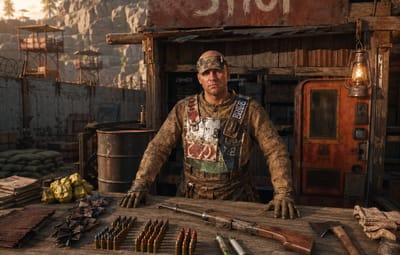
Not a wooden box with a UI on it — a standing NPC with a name, an outfit and a place in the world.
Spawned where you stand, dressed like you
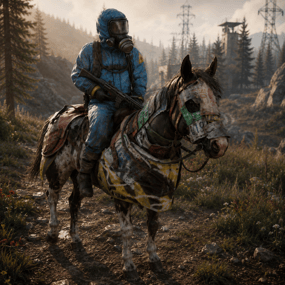
One command drops a trader at your feet, facing where you face, wearing a copy of your clothes and holding whatever is in your hands. Change your own outfit later and one button re-copies it onto him — another button hands the set back to you.
Pinned to a monument, not to coordinates
Spawn him inside Bandit Camp, Outpost or any monument and his position is stored relative to it. Next wipe, on a completely different map, he stands in exactly the same corner of that monument — no repositioning, no re-spawning.
Visible on the map, with his stock
Toggle the vending marker and the trader shows up on the map under his display name, with his item-for-item lots listed on the map screen — exactly like a vending machine, so players know where to go and what for.
Locked to a group, if you want
Give a trader a permission and only that group can open him — with your own refusal message instead of the default one. A VIP-only black market is one field.
Bulletproof, literally
Traders can't be shot, damaged, targeted by NPCs or destroyed, and they aren't written into the map save — so they never duplicate, never leave corpses and never end up as debris in your save file.
A trader who notices you
He waves when you walk up, thanks you for a purchase and shrugs when your pockets are empty — with his own voice, if you give him one.
Greets a player who comes closer
Set a radius in meters and the trader reacts the moment somebody steps inside it — once per approach, not once per second. Walk away and come back and he greets you again.
A reaction for every moment of the trade
Walking up, opening the shop, buying a lot, coming up short on resources, closing the menu, and an idle line every N seconds while nobody is around. Each one carries a gesture, a voice line, or both.
Random variants, weighted the way you want
Every reaction holds a list of variants and one is picked by weight, so the same trader never greets two players in exactly the same way. Set a weight to zero to park a variant without deleting it.
Voice lines are your own .ogg files
Drop the files into oxide/data/NPCShop/sounds and write the file name in the config. Cut a long file where the phrase ends with a playback duration, and set the volume per trader. The speaker itself is invisible — players hear a voice coming from the vendor, not from a boombox at his feet.
Heard by everyone, or by one player only
A voice line can be global, so everybody around the trader hears it, or personal — delivered to the player who triggered it and to nobody else. Handy for greetings on a crowded Outpost.
Every gesture the game has
Wave, thumbs up, shrug, point, the dances — the npcshop.gestures console command prints the exact list your Rust build accepts, and an unknown name is reported at load instead of failing silently.
Any price for anything
A lot is three item slots — what's sold, what it costs, and an optional second cost. Each slot can be a real item, a skinned item, or your server currency.
Two-item prices
Charge 500 metal and 20 scrap for one lot. Turn the second slot off with a single value when you don't need it.
Currency in either direction
Flip a slot to money and the lot is priced in ServerRewards, Economics or IQEconomic. Flip the sale slot to money instead and the trader buys from players — a scrap-to-cash buyback counter, same editor, no second plugin.
Skins, custom names, custom icons
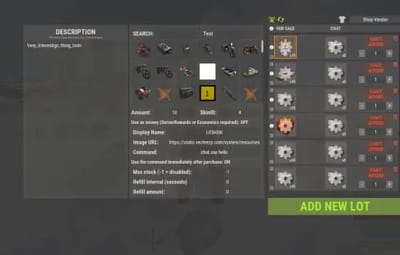
Every slot takes a skin ID, so a skinned item is a different product with a different price. Override the display name, point the icon at any image URL, and attach a description of up to 2500 characters that players open with an info button.
Buy in bulk without spam-clicking
A per-lot multiplier from 1 to 99 with plus, minus and a typed field. It clamps itself to what the player can actually afford, what's left in stock and what their wipe limit allows, so the number on screen is always a purchase that will go through. Oversized results are split into proper stacks.
Permission discounts
Map any permission to a percentage. Discounted players see an OFF badge on the price and pay less on both price slots; stacked groups resolve to the single best discount.
Copy a lot, or a whole shop
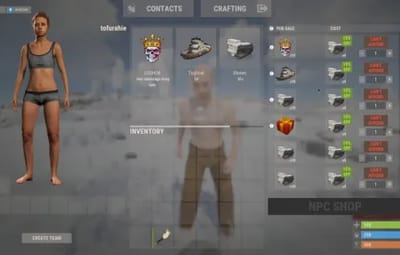
Copy one lot or every lot at once, walk to another trader and paste. Reorder with arrows, delete with one click, and hit preview to see the shop exactly as a player will before you close it.
Scarcity you can schedule
An unlimited shop is a vending machine with extra steps. Two independent systems keep a trader from flooding your wipe.
Stock that ticks back up
Per lot: a maximum stock, a refill interval in seconds and how much comes back each interval. Sell out and the button turns grey with OUT OF STOCK until it recovers. Ten rockets an hour, and the first player there gets them.
Per-player wipe limits
A separate cap on how many of a lot each player may buy for the whole wipe, counted per skin. One VIP kit per person per wipe, enforced without a second plugin and reset automatically on the next map.
Counts survive a reboot
Remaining stock, refill timers and everyone's wipe counters are written on every server save and on unload. A restart doesn't hand out a fresh batch of rockets.
Sell anything a command can do
Kits, ranks, teleports, cars, raid bases — if another plugin exposes a command, it's a lot.
Run it now, or wrap it as a gift
Put a command on a lot and choose: fire it the moment the purchase clears, or hand the player a wrapped present they can save, carry and unwrap whenever they want — the command runs on unwrap. Give it a name and an icon and it looks like a real product in their inventory. %steamid% is substituted for you.
A command on the trader himself
Fire a command every time a player opens a given trader — a greeting in chat, a quest check, a log line. Also keyed by Steam ID.
Item search that finds things
The item picker searches display names and shortnames as you type and shows icons, so filling a shop doesn't mean keeping a shortname list open on your second monitor.
Built to be left alone
|
✓
|
Oxide and Carbon — on Carbon the built-in image database is used and no extra plugin is needed at all
|
|
✓
|
Nothing is written into the map save — traders are recreated from config on boot, so they can't duplicate or survive as junk entities
|
|
✓
|
Clean unload — every trader is removed, open interfaces are closed for all players and stock is saved first
|
|
✓
|
One editor at a time — while an admin has a shop open it's locked for everyone else, so two people can't overwrite each other's lots
|
|
✓
|
A missing monument disables its trader with a console warning instead of dropping him into the ocean
|
|
✓
|
Optional 1-second buy cooldown against double-clicks and click macros
|
Three admin commands, none for players
All three require the npcshop.admin permission. Players never type anything — they walk up to the trader and press use. Command names are configurable.
|
/settrader
|
Spawn a trader at your position, in your clothes
|
|
/remtrader
|
Look at a trader and delete him
|
|
/newtraderpos
|
Look at a trader to select him, walk to the new spot, then /newtraderpos update. cancel aborts, and /newtraderpos <display name> moves a trader by name from anywhere
|
|
npcshop.admin
|
Spawn, edit, move and remove traders
|
|
npcshop.vip
|
15% discount by default — rename it, change the number, or add as many discount tiers as you like
|
For plugin developers
void OnNPCShopItemBuy(BasePlayer player, Item saleItem, Item priceItem, Item additionalPriceItem)
Fired after a successful item-for-item purchase, with the final amounts already multiplied and discounted. additionalPriceItem is null when the lot has no second price. Currency purchases don't raise it — track those through your economy plugin.
Before you buy
What do I need installed?
On Oxide, ImageLibrary — it's free and the plugin tells you in console if it's missing. On Carbon, nothing. MonumentFinder is optional and only needed for monument-pinned traders. An economy plugin (ServerRewards, Economics or IQEconomic) is optional and only needed for money prices; the right one is detected automatically.
Do my traders survive a wipe?
Yes. Traders, lots and prices live in the config, so they come back on the new map. Monument-pinned ones land in the right place automatically; free-standing ones keep their world coordinates and may need one /newtraderpos if the terrain changed. Stock counters and per-player wipe limits reset on a new map, which is the point of them.
Can players sell things to the trader?
Yes, in both forms. Item-for-item barter is what a lot does by default, and setting the sale slot to money turns the lot into a buyback: the player hands over items and gets currency.
Can I sell a kit, a rank or a teleport?
Anything that has a command. Either it runs immediately on purchase, or the player receives a named, custom-iconed present that runs it when unwrapped — which also makes the purchase tradeable between players.
How many traders and lots can I have?
No limit on either. The shop interface scrolls, and lots are reordered with arrow buttons.
Why don't all my lots show on the map marker?
The marker is a real vending-machine listing, and Rust's own format can only express one item for one item. Lots priced in currency, or with a second price item, are hidden from the marker — they work normally in the shop itself.
Can I run different shops for different groups?
Yes. Each trader takes its own permission and its own refusal message, so a VIP trader can stand next to the public one and simply refuse everyone else.
Do I ever have to edit the config file?
Only for server-wide settings: discount tiers, the currency icon, the buy cooldown, and a trader's access permission or greeting command. Everything about the goods themselves — lots, prices, skins, names, icons, stock, limits, descriptions — is done in-game.