Vinni_TV_'s Wishlist
-
XBuildingSkinMenu
XBuildingSkinMenu - building block skins menu for your server.
- Optimization of the interface for different monitor resolutions.
- Storing player data in - oxide/data/XDataSystem/XBuildingSkinMenu
- There is a lang ru/en/uk/es.
- Sound effects when interacting with the menu.
- Possibility to allow only the owner of the cupboard to paint the building blocks of the house.
- Possibility to paint building blocks only when authorized in the cupboard.
- Possibility to paint building blocks with a hit of a hammer.
[ Each player can turn on/off in the main menu for convenience. ]
- Possibility to paint building blocks when upgraded.
- Possibility to use effects when painting.
- Possibility to paint each house separately.
[ You can paint an unlimited number of houses at the same time. ]
- Plugin support - BGrade and IQGradeRemove.
- Chat messages about the started/completed of painting the house.
[ The number of painted building blocks. ]
- Chat messages about the started/completed of painting items/constructions inside the house.
[ The number of painted items/constructions. ]
- Chat messages: the house is already being painted - items/constructions in the house are already being painted.
- To paint the containers, the color chosen by the player through the Spray can is used.
- UI button for easy transition from the XBuildingSkinMenu menu to the XSkinMenu menu. [ And vice versa. ]
- Possibility to choose color in UI.
- Automatic replenishment of the configuration with new skins of building blocks.
- Permissions for each skin.
- Automatically reset selected skins from a player, if revoke away their permission.
Permissions
xbuildingskinmenu.use - access to plugin functionality. [ Skins menu, hammer, building. ] xbuildingskinmenu.painting - access to paint the entire house through the cupboard. xbuildingskinmenu.simpleblock - access to paint high Walls/Gates. [ Hammer hit only. ] xbuildingskinmenu.entity - access to painting items/constructions inside the house. [ Requires XSkinMenu plugin version 1.1.14 and above. ] xbuildingskinmenu.default - default permission for skins. Commands
/bskin - open the building block skins menu. API
ulong GetBuildingSkin(BasePlayer player, string grade) - returns the skin of the building block selected by the player. ulong GetBuildingSkin(BasePlayer player, BuildingGrade.Enum grade) - returns the skin of the building block selected by the player. ulong GetBuildingSkin(BasePlayer player, BuildingBlock block) - returns the skin of the building block selected by the player. Config
{ "General setting": { "Automatically add actual skins of building blocks to the configuration": true, "Only the owner of the cupboard can start painting the house": false, "Use effects when painting home": true, "Use effects when painting items/constructions in the house": true, "Use effects when painting building blocks by hitting a hammer": false, "Enable painting of items/constructions in the house using player skins from the XSkinMenu plugin": false, "Skins for buildings": { "Wood": { "0": { "ImageURL": "", "Permission": "" } }, "Stone": { "0": { "ImageURL": "", "Permission": "" }, "10220": { "ImageURL": "", "Permission": "xbuildingskinmenu.default" }, "10223": { "ImageURL": "", "Permission": "xbuildingskinmenu.default" }, "10225": { "ImageURL": "", "Permission": "xbuildingskinmenu.default" } }, "Metal": { "0": { "ImageURL": "", "Permission": "" }, "10221": { "ImageURL": "", "Permission": "xbuildingskinmenu.default" } }, "TopTier": { "0": { "ImageURL": "", "Permission": "" } } }, "Default skins for new players": { "Wood": 0, "Stone": 0, "Metal": 0, "TopTier": 0 } }, "GUI setting": { "Close the menu by tapping on an empty area of the screen": false, "Material_background_0": "assets/icons/greyout.mat", "Color_background_0": "0 0 0 0", "Color_background_1": "0.517 0.521 0.509 0.95", "Color_background_2": "0.217 0.221 0.209 0.95", "Skin background color": "0.517 0.521 0.509 0.5", "Background color of the selected skin": "0.53 0.77 0.35 0.8", "Close button (icon) color": "1 1 1 0.75", "Color of buttons in cupboard": "0.35 0.45 0.25 1", "Button text color in cupboard": "0.75 0.95 0.41 1", "Hammer button color - On": "0.35 0.45 0.25 1", "Hammer button text color - On": "0.75 0.95 0.41 1", "Hammer button color - Off": "0.65 0.29 0.24 1", "Hammer button text color - Off": "0.92 0.79 0.76 1", "AnchorMin - button 1": "0.5 0", "AnchorMax - button 1": "0.5 0", "OffsetMin - button 1": "395 621.5", "OffsetMax - button 1": "572.5 641.5", "AnchorMin - button 2": "0.5 0", "AnchorMax - button 2": "0.5 0", "OffsetMin - button 2": "395 646.5", "OffsetMax - button 2": "572.5 666.5" } } -
Crafts
Crafting system that allows you to create items, cars, vehicles, recyclers, etc!
Commands
craft open interface crafts.setwb [categories: cat1 cat2 ...] set new custom workbench
Permissions
You can set permission in config, for example:
"Permission (ex: crafts.use)": "crafts.use", crafts.setworkbench - allows you to use the "crafts.setwb" command (set custom workbenches)
Craft Types
Command Vehicle Item Recycler ModularCar
How to install a custom workbench
1. Spawn the workbench (for example, in RustEdit or a plugin) 2. In the game, go to him and use the command "crafts.setwb" and specify the necessary categories. Example: /crafts.setwb Misc 3. Go to config (oxide/config/Crafts.json) and configure this workbench (use SafeZone, workbench level, etc.)
VIDEO
FAQ
Q: Where can I see an example of a config?
A: Config
-
Automated Messages
Automated chat messages based on chat keywords, timer or various other triggers. Plugin comes with an easy to use Admin UI for complete setup, and supports special localization for your messages. You can define messages to be sent only to specific Groups or Permissions, and you can allow players to toggle on/off messages if they do not find them useful.
SUPPORTED TRIGGERS If what you need is not here and still falls under the scope of the plugin description, reach out to me
Timed | ChatCommand | AutoReply | NewPlayerJoined | PlayerConnected | PlayerDisconnected | PermissionGranted | PermissionRevoked | AddedToGroup | RemovedFromGroup | PlayerDead | CrateHacked | EnteredZone | LeftZone | EnteredMonument | LeftMonument
COMMANDS
/am.edit - (Admin UI for complete setup) - requires automatedmessages.admin permission /tips - (Player command for toggling on/off messages) command can be changed in the config file
MESSAGES LOCALIZATION
You can switch between languages in Admin UI to setup localized replies for every language the game supports. Check config section below for how to add languages.
Game Tips
You can utilize Rust's native game tip UI to show specific messages instead or along with sending it to chat.
VARIABLES
Variables can be included in the messages text to show further info based on the trigger or player. The plugin also supports https://umod.org/plugins/placeholder-api with the extensive list of variables it brings.
{playername} {playerid} - Player steam id {playercountry} {hacklocation} - Specific to messages with type CrateHacked {wipetimeremaining} - Days/Hours till wipe (based on rust convar settings if a missile silo monument is present) {online} - # of players online {sleeping} - # of players sleeping {joining} - # of players joining
CONFIG SETTINGS Below are only settings not currently available in Admin UI, highly recommended to edit triggers or actions using /am.edit
Chat Icon (Steam Id) - Icon that will be used for all messages sent by the plugin, must be a steam id. Toggle Chat Command - "tips" - Chat command that allows a player to toggle on/off messages. AutoReply Cooldown (in seconds) - Per action cooldown timer when players type a keyword set. ChatCommand Cooldown (in seconds) - Per player cooldown timer when a player types a chat command. ZoneManager Cooldown (in seconds) - Per player cooldown timer on enter or exit zone. MonumentWatcher Cooldown (in seconds) - Per player cooldown timer on enter or exit monument. Replies Server Languages - Languages your server will support. Available options: af, ar, ca, cs, da, de, el, en-PT, en, es-ES, fi, fr, hu, it, ja, ko, nl, no, pl, pt-PT, pt-BR, ro, ru, sr, sv, tr, uk, vi, zh-CN, zh-TW Default Server Language - Fallback language if player client language had no available replies, you must have at least one reply for this language for the action to function. AutoReply `Broadcast to all` option to broadcast to team only if keywords sent from team chat - true/false -
Tugboat Pirates
By The_Kiiiing in Plugins
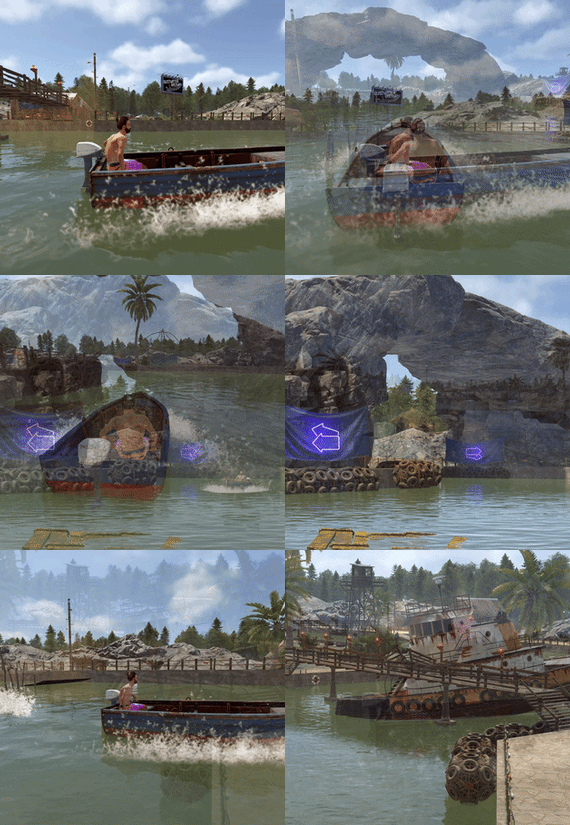
Experience the thrill of high-seas plunder with "Tugboat Pirates". Encounter a Tugboat, brimming with NPC pirates protecting their valuable loot. Engage in intense battles, eliminate the captain for an access code, and seize the treasure.
Features
Tugboat with Pirate NPCs and loot patrols the ocean Kill the captain to get access to the loot room Fully configurable boat interior Boat location marked on the map Fully customizable NPCs (you can even give them rocket launchers in their kits) Event starts automatically (configurable time, can be disabled) Announcements via gametip and/or chat NPC are turret NPC that do not move from their station on the Tugboat
Door code of the loot room can be found in the captain's corpse (pirate quotes can be changed in the config)
Commands
All Commands require the admin permission
tugboatstart - Manually start the event tugboatstop - Manually end the event tugboatentity - Add entitys to the tugboat config. Documented below.
Tugboat Editor
The tugboat editor can be used to add entites to the configuration file without manually editing it.
Make sure you have the permission tugboatpirates.admin, Place an entity where you want it on a tugboat, look at it and use the command tugboatentity add Save the entity to the config file with tugboatentity save, Reload the plugin for the changes to take effect
Hooks
(void) OnTugboatPiratesStarted() // Called when the event has started (void) OnTugboatPiratesCompleted(ulong steamId) // Called when the event has been completed (void) OnTugboatPiratesEnded() // Called after the event has ended
Permissions
tugboatpirates.admin - Required to use admin commands
Configuration
{ "Time between events (minutes, set to -1 to disable scheduled events)": 60, "Event duration (seconds)": 3600, "Show toast when event starts": true, "Announce event in chat": true, "Boat leave time before despawning (seconds)": 120, "Time before boat despawn when captain is killed (seconds)": 1200, "Boat configurations": [ { "Location offset (used when spawning multiple boats)": { "x": 0.0, "y": 0.0, "z": 0.0 }, "Npc profile for captain (must be a valid profile)": "captain", "Npc spawn locations and profiles": { "back_right": "pirate_lr", "back_left": "pirate_lr", "upper_front_right": "pirate_lr", "upper_front_left": "pirate_lr", "upper_back_right": "pirate_lr", "upper_back_left": "pirate_lr", "roof_back": "pirate_lr", "entrance_right": "pirate_lr", "entrance_left": "pirate_lr", "roof_right": "pirate_lr", "roof_left": "pirate_lr", "front": "pirate_lr", "right": "pirate_mp5", "left": "pirate_mp5" }, "Interior objects (crates, decoration, etc.)": [ { "Prefab path": "assets/prefabs/deployable/chinooklockedcrate/codelockedhackablecrate.prefab", "Rotation": 180.0, "Position on boat": { "x": 0.0, "y": 2.0, "z": 4.2 }, "Skin id": 1394363785, "Loot profile (only for crates, leave empty for default loot)": "" }, // Removed some lines for readability reasons ] } ], "Npc profiles": { "pirate_lr": { "name": "Pirate", "health": 200.0, "enableRadio": true, "senseRange": 50.0, "visionCone": 135.0, "damageScale": 1.0, "memoryDuration": 60.0, "lootProfile": "pirate", "kit": "", "Clothing items": [ { "shortName": "hat.boonie", "amount": 1, "skinId": 965553937 }, { "shortName": "hoodie", "amount": 1, "skinId": 2984978438 }, { "shortName": "pants", "amount": 1, "skinId": 2984977257 }, { "shortName": "attire.hide.boots", "amount": 1, "skinId": 861468674 } ], "Belt items": [ { "shortName": "rifle.lr300", "amount": 1, "skinId": 0 } ] }, "pirate_mp5": { "name": "Pirate", "health": 150.0, "enableRadio": true, "senseRange": 50.0, "visionCone": 135.0, "damageScale": 1.0, "memoryDuration": 60.0, "lootProfile": "pirate", "kit": "", "Clothing items": [ { "shortName": "hat.boonie", "amount": 1, "skinId": 965553937 }, { "shortName": "hoodie", "amount": 1, "skinId": 2984978438 }, { "shortName": "pants", "amount": 1, "skinId": 2984977257 }, { "shortName": "attire.hide.boots", "amount": 1, "skinId": 861468674 } ], "Belt items": [ { "shortName": "smg.mp5", "amount": 1, "skinId": 0 } ] }, "captain": { "name": "Captain", "health": 100.0, "enableRadio": false, "senseRange": 0.0, "visionCone": 0.0, "damageScale": 1.0, "memoryDuration": 0.0, "lootProfile": "pirate", "kit": "", "Clothing items": [ { "shortName": "hat.boonie", "amount": 1, "skinId": 965553937 }, { "shortName": "tshirt", "amount": 1, "skinId": 811762477 }, { "shortName": "pants.shorts", "amount": 1, "skinId": 849256923 }, { "shortName": "attire.hide.boots", "amount": 1, "skinId": 861468674 } ], "Belt items": [ { "shortName": "mace.baseballbat", "amount": 1, "skinId": 0 } ] } }, "Loot profiles": { "crate_2": [ { "Short name": "scrap", "Min amount": 2, "Max amount": 20, "Chance": 1.0, "Skin id": 0 }, { "Short name": "metal.refined", "Min amount": 4, "Max amount": 8, "Chance": 0.5, "Skin id": 0 }, { "Short name": "gears", "Min amount": 1, "Max amount": 3, "Chance": 0.2, "Skin id": 0 }, { "Short name": "sewingkit", "Min amount": 1, "Max amount": 3, "Chance": 0.2, "Skin id": 0 }, { "Short name": "rope", "Min amount": 1, "Max amount": 3, "Chance": 0.2, "Skin id": 0 }, { "Short name": "sheetmetal", "Min amount": 1, "Max amount": 2, "Chance": 0.2, "Skin id": 0 }, { "Short name": "grenade.molotov", "Min amount": 1, "Max amount": 2, "Chance": 0.1, "Skin id": 0 }, { "Short name": "grenade.f1", "Min amount": 1, "Max amount": 4, "Chance": 0.1, "Skin id": 0 }, { "Short name": "telephone", "Min amount": 1, "Max amount": 1, "Chance": 0.1, "Skin id": 0 }, { "Short name": "multiplegrenadelauncher", "Min amount": 1, "Max amount": 1, "Chance": 0.1, "Skin id": 0 } ], "pirate": [ { "Short name": "scrap", "Min amount": 2, "Max amount": 6, "Chance": 1.0, "Skin id": 0 }, { "Short name": "bottle.vodka", "Min amount": 1, "Max amount": 1, "Chance": 0.7, "Skin id": 0 }, { "Short name": "pistol.eoka", "Min amount": 1, "Max amount": 1, "Chance": 0.2, "Skin id": 0 }, { "Short name": "ammo.handmade.shell", "Min amount": 5, "Max amount": 10, "Chance": 0.2, "Skin id": 0 }, { "Short name": "rope", "Min amount": 1, "Max amount": 3, "Chance": 0.3, "Skin id": 0 }, { "Short name": "sewingkit", "Min amount": 1, "Max amount": 2, "Chance": 0.3, "Skin id": 0 } ] }, "Priate quotes (inluded in captain's note)": [ "If rum can’t fix it, ye are not using enough rum.", "But… why is the rum gone?", "Be who you arrrr...", "All for rum and rum for all!", "Land was created to provide a place for boats to visit.", "If ye can read this ye be stupid." ] }
-
Skin Controller
Skin Controller is meant to bring together a ton of skinning options for your player all in one place! Easy for the player, easy for the server owner.
FEATURES
- Supports backpacks - Saving of outfits (A list of skins for doors, weapons, clothing, etc*) - Add infinite items in an outfit - Skin stacks of items - Skin your whole inventory with one click - Skin items in containers that you're looking at with one command - Skin all the deployed items in your base with one command - Search items in the skin list to easily find the skin you're looking for - Auto skin items when crafted and picked up - Auto imports all accepted workshop skins (for test servers if enabled) - Manual imports of non-accepted workshop skins and collections - Infinite outfit saves, you can limit the amount of outfit saves someone has via perms. - Server owners can toggle whether they want players to be able to skin items on pickup and craft - If server owners allow skinning on craft and pickup, players can toggle that on and off for themselves - Set your own custom commands for all available types of commands - Blacklist skins COMMANDS
/skin or /sb (Configurable) - Opens the skin menu /skinc (Configurable) - Skins the items in the container that you're looking at /skinbase (Configurable) - Skins all the deployed items in your base /skinitem (Configurable) - Skins the item you're looking at /addskin - Command for admins to add workshop skins /addcollection - Command for admins to add collections of workshop skins /preloadskins - Populates ~600 random skins allowed by FP /saveskins - Saves your skinlist /importskins - Place a "Skins.json" in the /Data/SkinsController folder and run command to import any allowed skins from file PERMISSIONS
skincontroller.addskins skincontroller.use skincontroller.skinoncraft skincontroller.skinonpickup skincontroller.skinbase skincontroller.skinitem skincontroller.skincontainer To set the amount of outfits someone can save, go into the config, there will be a setting where you can set custom permission and how many outfits each outfit can save Need support or want updates about what is coming to the plugin? Join the support discord here https://discord.gg/RVePam7pd7