


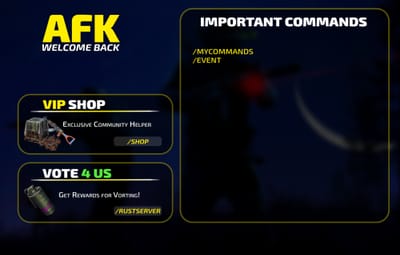
About AfkSystem
Description
AfkSystem automatically detects when a player is AFK and then either:
shows a fullscreen image overlay (recommended), or
executes a chat command on the player
It’s event-based (no constant polling): the AFK timer resets on real player input and triggers after your configured delay.
Features
Event-based AFK detection (no polling!)
Starts a per-player timer on join and resets it on movement / actions.
After X seconds without input, the player is marked AFK and the AFK action triggers.
Fullscreen AFK screen (Image mode)
Shows a full-screen CUI overlay with your configured image.
Requires ImageLibrary.
Closes as soon as the player presses a key (input is detected).
Command mode
If you set a command in the config, AfkSystem will run it on AFK instead of showing an image.
Useful for: switching UI, teleporting to AFK area, warnings, etc.
Admin overview
Command to list currently AFK players.
Freeze Metabolism while AFK (no hunger/thirst loss)
Prevent Damage while AFK (no health loss)
Dependencies
Optional (only for Image mode)
ImageLibrary plugin (required if you use Image URL mode)
If Image mode is enabled but ImageLibrary is missing, AfkSystem will warn in console and won’t display images.
Commands
/afk
Toggles AFK screen/action manually (for testing or manual AFK).
If the screen is open, it will close it and restart AFK detection.
/checkafk
(admin)
Lists all currently AFK players tracked by the plugin.
Permissions
afksystem.use
Enables AFK detection for the player and allows /afk.
afksystem.admin
Allows /checkafk.
Config
AfkSystem is simple: leave Command to Execute empty to use Image mode.
If you set a command, the plugin switches to Command mode automatically.
Default config
{
  "AFK Detection Time (seconds)": 300.0,
  "Command to Execute (leave empty to use image mode)": "",
  "Image URL (only used if command is empty)": "",
  "Freeze Metabolism while AFK (no hunger/thirst loss)": true,
  "Prevent Damage while AFK (no health loss)": true
}
Note: Commands are executed as a chat command (the plugin internally does /yourcommand).
Notes / Behavior
AFK is detected based on common inputs (movement, jump, duck, sprint, primary/secondary fire, use).
The UI overlay is added to Overlay and is removed when the player presses a key.
Players without afksystem.use are ignored (no timers, no AFK tracking).
load, run, enjoy 

![More information about "[Beta] MonumentChoice"](https://codefling.com/cdn-cgi/image/width=285,height=285,quality=80,fit=cover,format=webp/https://codefling.com/uploads/monthly_2026_07/MonumentChoice_Icon.thumb.png.5b7a9b9c64b652853f7dd24af35e560c.png)



![More information about "FileWatcher [OXIDE | CARBON]"](https://codefling.com/cdn-cgi/image/width=285,height=285,quality=80,fit=cover,format=webp/https://codefling.com/uploads/monthly_2026_02/FileWatcher_Icon.thumb.png.a851866dfa44982bc36084ecc0f13baa.png)









![More information about "Raidable Sleeper Event [Works with HallOfShame]"](https://codefling.com/cdn-cgi/image/width=285,height=285,quality=80,fit=cover,format=webp/https://codefling.com/uploads/monthly_2024_09/RaidableSleeper_Ico.thumb.jpg.2042e2f935013d513f9f4e4d0cc5f3e5.jpg)
![More information about "Hall Of Shame [Works with RaidableSleeper]"](https://codefling.com/cdn-cgi/image/width=285,height=285,quality=80,fit=cover,format=webp/https://codefling.com/uploads/monthly_2024_09/HallOfShame_Icon.thumb.jpg.50c8a34fccd4f5f665d26e89d37354a2.jpg)