

Works with
Compatible add-ons, packages, or tools that pair well with this resource.
-
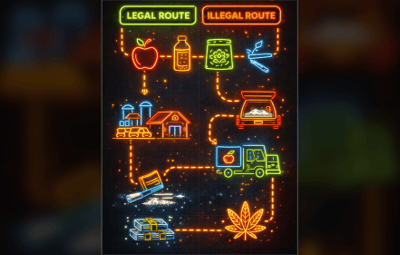
 BlackMarket | Black Market & Money Wash Dealer: Ultimate Underground Trading Plugin Optional
 -
 ProtectiveVest - You probably know it from GTA RP Optional
 -
 My Tutorial - A tutorial plugin for servers with progressive tasks and group verification" Optional
 -
 AfkSystem Optional
About Farm Route
Description
FarmRoute is a zone-based farming system for Rust that spawns configurable farmable prefabs inside a defined farming area and guides players through a simple loop: Farm (pick up spawned prefab) → (optional) Convert → Buy Each route is fully configurable and stored as its own JSON file in the Oxide data folder.
Features:
Route-based zones (Farm / Buyer / optional Converter):
Create a route by placing zones in-game. A route becomes active as soon as at least FarmingZone + BuyerZone are set.
Prefab spawning inside the farming zone:
Spawns `SpawnMax` prefabs using `SpawnPrefab` and keeps the amount stable by respawning when a spawned entity is removed/killed.
Controlled farming interaction (blocks default pickup):
Spawned route entities can’t be picked up normally; instead an interaction is started (permission + “busy” checks included).
Automatic menu UI inside Converter/Buyer zones:
If a player stands inside Converter or Buyer zone, a small UI opens with a START (1x) button and auto-closes when leaving the zone.
Per-route permissions:
Every route registers its own permissions (farm / convert / buy) for clean access control.
Optional per-skin stack caps:
The plugin can enforce stack limits per item+skin (and split overflow into multiple stacks).
Commands:
Admin command:
/farmroute
/farmroute setfarm <name> <radius>
/farmroute setbuyer <name> <radius>
/farmroute setconvert <name> <radius> (optional)
/farmroute removefarm <name>
/farmroute removebuyer <name>
/farmroute removeconvert <name>
/farmroute list
/farmroute show <n>
/farmroute interact <name> <convert|buy> (manual start for testing)
Permissions:
farmroute.admin – Admin commands.
farmroute.use – Basic usage permission.
Per-route permissions (auto-registered per route name):
farmroute.route.<routeName>
farmroute.converter.<routeName>
farmroute.buyer.<routeName>
Config:
FarmRoute has a small config focused on UI + spawn/interaction tuning.
UI Background Color (HEX)
UI Text Color (HEX)
UI Accent Color (HEX)
UI Progress Bar Color (HEX)
UI Error Color (HEX)
Allow Global Stack Size Override
Interaction Cancel Distance
Minimum Spawn Distance Between Prefabs
Maximum Spawn Attempts Per Prefab
Data / Persistence
Routes are stored per folder under:
oxide/data/FarmRoute/<routeName>/<routeName>route.json
Quick setup (minimal)
Stand where you want the farming zone center and run:
/farmroute setfarm myroute 30
Stand where you want the buyer zone center and run:
/farmroute setbuyer myroute 10
Optional converter zone:
/farmroute setconvert myroute 10
As soon as farming + buyer are set, the route becomes active and starts spawning prefabs.
load, run, enjoy 

![More information about "[Beta] MonumentChoice"](https://codefling.com/cdn-cgi/image/width=285,height=285,quality=80,fit=cover,format=webp/https://codefling.com/uploads/monthly_2026_07/MonumentChoice_Icon.thumb.png.5b7a9b9c64b652853f7dd24af35e560c.png)



![More information about "FileWatcher [OXIDE | CARBON]"](https://codefling.com/cdn-cgi/image/width=285,height=285,quality=80,fit=cover,format=webp/https://codefling.com/uploads/monthly_2026_02/FileWatcher_Icon.thumb.png.a851866dfa44982bc36084ecc0f13baa.png)














![More information about "Raidable Sleeper Event [Works with HallOfShame]"](https://codefling.com/cdn-cgi/image/width=285,height=285,quality=80,fit=cover,format=webp/https://codefling.com/uploads/monthly_2024_09/RaidableSleeper_Ico.thumb.jpg.2042e2f935013d513f9f4e4d0cc5f3e5.jpg)
![More information about "Hall Of Shame [Works with RaidableSleeper]"](https://codefling.com/cdn-cgi/image/width=285,height=285,quality=80,fit=cover,format=webp/https://codefling.com/uploads/monthly_2024_09/HallOfShame_Icon.thumb.jpg.50c8a34fccd4f5f665d26e89d37354a2.jpg)