

About ProtectiveVest - You probably know it from GTA RP
ProtectiveVest
Description
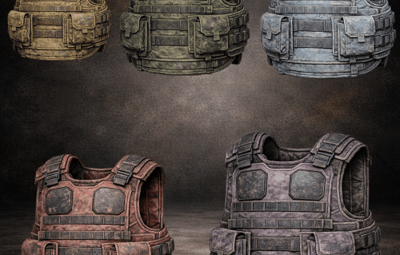
ProtectiveVest adds consumable vests that players activate from their hotbar via a hold-to-equip action.
After a successful equip, 1 vest is consumed and the player gains temporary bonus max HP (and is healed up to that new max).
The effect lasts until death. Optionally, you can configure the vest to be consumed/removed once health drops below a threshold, so players can activate another vest again.
Features
- Hold-to-equip from hotbar (no chat commands)
- Consumes 1 item on successful activation
- Adds bonus max health and heals up to the new max immediately
- Optional auto reset below HP (removes the active vest once HP drops below a configured threshold)
- Built-in equip progress UI with multiple styles
- One active vest at a time (no stacking)
Please note that you must deliver the vests to the players via loot tables or other methods.
Feel free to check out my BlackMarket plugin or FarmRoute plugin!
Commands
No commands.
Permissions
1. `protectivevest.use` — Allows using protective vests.
How it works (Player flow)
1. Put a configured vest item into your belt/hotbar.
2. Select it as your active item.
3. Hold the USE key until equip completes. Releasing USE cancels.
4. When completed, 1 item is consumed and the vest bonus is applied.
Equip cancellation rules (important)
Equip will cancel if the player:
- releases USE
- switches active item / changes away from the vest item
- moves the item out of the belt
- changes the item (UID/skin/shortname mismatch) while holding
Example config
{

  "UI": {

    "Style": "HorizontalBar",

    "Enabled": true,

    "UpdateIntervalSeconds": 0.10,

    "BackgroundAlpha": 0.65,

    "BarAlpha": 0.90

  },

  "Vests": [

    {

      "Name": "Aramid Armor Vest",

      "ItemShortName": "wood.armor.jacket",

      "SkinID": 3643174653,

      "BonusHealth": 50.0,

      "EquipDurationSeconds": 5.0

    }

  ],

  "AutoResetBelowHealth": 100.0,

  "ActiveVestsCheckIntervalSeconds": 0.75

}
UI Settings
UI style name. Valid values are:
- `HorizontalBar`
- `CircularProgress`
- `MinimalCorner`
- `LargeCenter`
See Images or video
Auto reset (optional: “remove vest when low HP”)
- `AutoResetBelowHealth`
If **<= 0**, this feature is disabled.
If **> 0**, the plugin periodically checks active vest users and removes the active vest when their HP drops below the threshold.
- `ActiveVestsCheckIntervalSeconds`
How often the plugin checks active vests (only used if AutoResetBelowHealth > 0).
Multilingual Support:
The plugin supports multiple languages. Language files are located in the lang folder and can be edited or expanded as needed. Currently supported languages:
default: EN
DE
load, run, enjoy