
Vinni_TV_'s Wishlist
-
$25.00
Dungeon Events
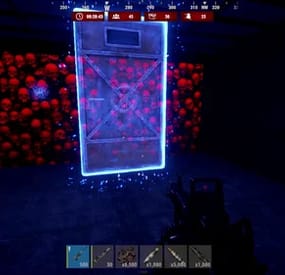
Dungeon Events adds fully procedural dungeon raids to your Rust server, creating high-replayability PvE content with unique layouts every time.
Each dungeon is dynamically generated with randomized rooms, corridors, NPCs, bosses, animals, auto turrets, loot crates, custom visuals, and portal access. Whether you want automated world events or private player-purchased dungeon runs, this plugin gives you full control over difficulty, rewards, access, and cleanup.
Perfect for servers that want challenging, customizable, and rewarding endgame-style PvE content.
Main Features
Procedural Dungeon Generation - Every dungeon is generated dynamically, so each run feels different. Multiple Difficulty Tiers - Create fully customizable tiers such as Easy, Normal, Medium, Hard, Nightmare, Impossible, or anything you want, with per-tier rooms, size, limits, cooldowns, rewards, visuals, and purchase settings. Custom NPCs, Bosses & Animals - Configure NPCs, bosses, and dungeon animals with custom health, damage, gear, names, movement limits, attack distance, loot, prefab chances, speed, sense range, and spawn limits. Auto Turrets - Add dangerous turret encounters with configurable health, weapons, and behavior. Visual Customization - Customize dungeon building grades, skins, container colors, garage door skins, dungeon lights, marker names, marker colors, and dungeon time-of-day overrides per tier. Custom Per-Tier Loot System - Each dungeon tier has its own data files for NPC loot, boss loot, and loot box rewards, making it easy to create different reward pools for every difficulty. Buyable Private Dungeons - Let players purchase their own dungeon using Economics, ServerRewards, or a custom item like scrap. Access Control - Lock dungeons to the buyer or first player, with optional support for teams and friends. Portal Protection Bubble - Protect the portal area with configurable radius, build/deploy rules, vehicle protection, and optional damage blocking to help reduce portal camping on PvP servers. Anti-Abuse Dungeon Rules - Block selected commands inside dungeons, prevent unwanted pickup/build/deploy actions, prevent backpack drops, teleport players outside on death, and optionally close dungeon doors when a player dies. Auto Spawn & Manual Spawn - Spawn dungeons automatically, by admin command, player purchase, or console/RCON. Smart Spawn Checks - Avoid bad locations, terrain issues, safe zones, rocks, monuments, and plugin-controlled areas. Advanced Spawn Control - Configure global and per-tier active dungeon limits, buy cooldowns, auto-spawn delay, post-wipe tier unlocks, dungeon height, map marker settings, and retry behavior when a valid location cannot be found. Automatic Cleanup - Remove dungeons when inactive, expired, or fully cleared. Per-Entity & Clear Rewards - Reward players for NPCs, animals, turrets, loot boxes, and full dungeon clears using Economics, ServerRewards, and SkillTree XP, including optional SkillTree XP team sharing. Live Dungeon UI & Map Markers - Show remaining time, entity counts, and map markers for active dungeons.
Commands
All default chat and console command names can be customized in the config.
Admin
/createdungeon <tierName> /removeinactivedungeons /removealldungeons /forceremovealldungeons /de.removenearest /de.reloadconfig /de.toggle Players
/buydungeon /buydungeon <tierName> /removedungeon Console
buydungeon <tierName> <playerID> spawnrandomdungeon spawnfixeddungeon <tierName> spawnfixeddungeon <tierName> <playerID>
Permissions
dungeonevents.admin dungeonevents.buy dungeonevents.enter
Per-Tier Loot Configuration
Dungeon Events uses separate data files for loot configuration, making it much easier to manage rewards for each difficulty tier.
Each tier has its own loot files inside:
oxide/data/DungeonEvents/<TierName>/
Available loot files per tier:
npc_loot.json - Loot dropped by regular dungeon NPCs.
boss_loot.json - Loot dropped by dungeon bosses.
lootbox.json - Loot spawned inside dungeon loot containers.
This allows you to create completely different reward pools for each tier. For example, Easy dungeons can have basic loot, while Hard, Nightmare, or Impossible dungeons can have much stronger rewards.
If a tier loot file is empty, the plugin can fall back to the default loot file:
oxide/data/DungeonEvents/Default_Loot.json
Hooks
void OnDungeonSpawn(ulong OwnerID, Vector3 Position, string Grid, string TierName) void OnDungeonDespawn(ulong OwnerID, Vector3 Position, string Grid, string TierName) void OnDungeonWin(ulong playerID, string tierName)
Supported Integrations
Economics ServerRewards Friends Notify NightVision ZoneManager Duelist RaidableBases AbandonedBases RestoreUponDeath SkillTree
Languages
EN PT-BR DE ES RU If you want a powerful, replayable PvE dungeon system with deep customization and strong plugin integration, Dungeon Events is built to deliver exactly that.
The plugin includes a deep configuration system where you can customize tiers, room counts, room sizes, dungeon visuals, loot tables, NPCs, bosses, animals, turrets, portal protection, access rules, cooldowns, active dungeon limits, spawn validation, auto-removal conditions, command blocking, economy settings, SkillTree XP rewards, map markers, and more.
-
$10.00
The Red Button
Just a small plugin with a button to troll your players with A fun game . with some punishments on button press
punishments is set to random with a weight value (higher the number the more change of spawn . 0 means don't spawn)
just a fun way to troll your players
Get your Payback Plugin's at:
Payback
if Using Payback be sure to turn on payback use in config.
Permissions
TheRedButton.use (player with this permission can use the commands)
TheRedButton.admin (player with this permission can use the UI)
Chat Commands
/button - Spawns button in player INV
/buttonui - opens the UI // can be bound . ex. bind "p" chat.say /buttonui
/buttonconfig - opens config UI // change weights and customcommands without plugin reload
/spawnbutton - spawns button where you look and facing towards you (only works for IsAdmin tag) ex .auth 1 and 2
/clearallbuttons - deletes all buttons on server (admin only)
Placeholders
{playername} {playerid} {playerlocation} {timeremaining} //Lang file only {cooldowntotal} //Lang file only
Config
{ "1. The Button Settings": { "1. Sign Picture URL": "www.noobhub.co.za/dont.png", "2. Cooldown Time on Button Press": 5, "3. Broadcast Button Action to Server": true, "4. Broadcast Font Size [18 default]": 18, "5. Send Discord embeds on punishments": false, "6. Discord WebHook URL": "https://support.discord.com/hc/en-us/articles/228383668-Intro-to-Webhooks", "7. Use Payback Plugin Punishments": true, "8. Timed C4 (false will be instant explosion": true, "9. Use Random location for swim location": true }, "2. Punishment Weights": { "Slap": 2, "Mlrs": 0, "Swim": 2, "Fall": 0, "C4": 1, "Bear": 0, "Scientist": 0, "Scarecrow": 0, "Radiation": 0, "Landmine": 1, "Cactus": 2, "Scrapheli": 2, "PVELord": 2, "Shredder": 2, "Guntrap": 1, "Fireball": 2, "ExplosiveDiarrhea": 2, "PayBack:Rocketman": 2, "Payback:Shark": 2, "Payback:Shocker": 0, "Payback:Naked": 0, "Payback:Chicken": 2, "Payback2:Train": 2, "Payback2:F15": 2, "BombVest:Boom": 0 }, "3. Custom Commands": { "CustomCommand1": { "CCname (DONT CHANGE THIS)": "customcommand1", "Command": "giverank {playerid}", "Message": "Just got a Rank", "Weight": 0 }, "CustomCommand2": { "CCname (DONT CHANGE THIS)": "customcommand2", "Command": "", "Message": "", "Weight": 0 }, "CustomCommand3": { "CCname (DONT CHANGE THIS)": "customcommand3", "Command": "", "Message": "", "Weight": 0 }, "CustomCommand4": { "CCname (DONT CHANGE THIS)": "customcommand4", "Command": "", "Message": "", "Weight": 0 }, "CustomCommand5": { "CCname (DONT CHANGE THIS)": "customcommand5", "Command": "", "Message": "", "Weight": 0 }, "CustomCommand6": { "CCname (DONT CHANGE THIS)": "customcommand6", "Command": "", "Message": "", "Weight": 0 }, "CustomCommand7": { "CCname (DONT CHANGE THIS)": "customcommand7", "Command": "", "Message": "", "Weight": 0 }, "CustomCommand8": { "CCname (DONT CHANGE THIS)": "customcommand8", "Command": "", "Message": "", "Weight": 0 }, "CustomCommand9": { "CCname (DONT CHANGE THIS)": "customcommand9", "Command": "", "Message": "", "Weight": 0 }, "CustomCommandA": { "CCname (DONT CHANGE THIS)": "customcommandA", "Command": "", "Message": "", "Weight": 0 } }, "4. Button Press Settings": { "Prefix": "Server", "Message": "{playername} Pressed The </color><color=red>RED</color><color=green> Button and" } } The numbers assigned to punishment is the weight value. the higher the number the higher chance of spawn . Rule of thumb 1-10 . 0 will cancel that punishment
With CustomCommands if weight is 0 , it will not be loaded.
LangFile
{ "FallMessage": "Fell From 50meters High", "SwimMessage": "Went for a Swim and found 3 sharks", "ScarecrowMessage": "Found that Tinder only has Scarecrows", "ScrapheliMessage": "Helicopters are Heavy . ACME style Murder", "CactusMessage": "Found a Cactus and poke his way to heaven", "C4Message": "Made a new Friend , C4", "BearMessage": "Noticed that YogiBear is no fun in 3's", "ScientistMessage": "Playing with A Scientist that loves him", "LandmineMessage": "Needs to dance or DIE!!!!", "RadiationMessage": "Bit a Nuclear Rod", "SlapMessage": "Got Slapped so hard, his kids felt it", "MlrsMessage": "could not hold on to that rocket", "ChickensMessage": "got a Winner,Winner and is now chicken dinner", "ButtonCooldownMessage": "The Button is on a cooldown for you . {timeremaining} remaining from {cooldowntotal} Min's", "Payback:RocketManMessage": "and found himself singing Rocketman from Elton John", "Payback:SharkMessage": "will never order Sushi again", "Payback:NakedMessage": "lost all his stuff", "Payback:ShockerMessage": "had a shocking experience", "PVELordMessageLargeOil": "Became a PVE SweatLORD on Large Oil", "PVELordMessageSmallOil": "Became a PVE SweatLORD on Small Oil", "PVELordMessageCargo": "Became a PVE SweatLORD on Cargo", "ShredderMessage": "Found his long lost CRUSH , The CarShredder!", "DiarrheaMessage": "and will never eat Taco's again !!", "GuntrapMessage": "and got stuck in a TRAP !!", "FireBallMessage": "should never play with Matches!!!" }
Punishments
c4 locked to player slap player with -90 health fall TP player up in air swim TP player way out in ocean bear spawns 3 bears scarecrow spawns 3 scarecrows radiation makes plyer burn :d landmine spawns landmine under player cactus kills player with a cactus scrapheli drops heli on player scarecrow spawns 3 scarecrows // requires Better Scarecrows to work ( https://umod.org/plugins/better-scarecrows ) mlrs drops 3 rockers on player pvelord send player to ether Cargo or Oilrigs chickens do i even need to state the obvious carshredder tp players into car shredder guntap spawns 6 guntraps around player fireball Do i need to explain fire:D explosivediarrhea Poop till you drop CustomCommand 1 what ever you want (consolecommand)
Future Plans
ability to pickup button more punishments and ability to choice your own Video preview
The button in action . Provided by Enardo . Much love brother🧙
SHADOWFRAX Review
- #red button
- #button
- (and 2 more)
-
$18.99$15.19XBuildingSkinMenu
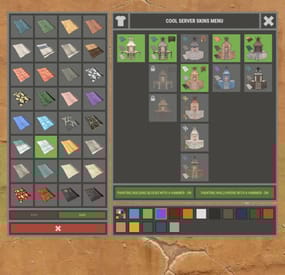
XBuildingSkinMenu - building block skins menu for your server.
- Optimization of the interface for different monitor resolutions.
- Storing player data in - oxide/data/XDataSystem/XBuildingSkinMenu
- There is a lang ru/en/uk/es.
- Sound effects when interacting with the menu.
- Possibility to allow only the owner of the cupboard to paint the building blocks of the house.
- Possibility to paint building blocks only when authorized in the cupboard.
- Possibility to paint building blocks with a hit of a hammer.
[ Each player can turn on/off in the main menu for convenience. ]
- Possibility to paint building blocks when upgraded.
- Possibility to use effects when painting.
- Possibility to paint each house separately.
[ You can paint an unlimited number of houses at the same time. ]
- Plugin support - BGrade and IQGradeRemove.
- Chat messages about the started/completed of painting the house.
[ The number of painted building blocks. ]
- Chat messages about the started/completed of painting items/constructions inside the house.
[ The number of painted items/constructions. ]
- Chat messages: the house is already being painted - items/constructions in the house are already being painted.
- To paint the containers, the color chosen by the player through the Spray can is used.
- UI button for easy transition from the XBuildingSkinMenu menu to the XSkinMenu menu. [ And vice versa. ]
- Possibility to choose color in UI.
- Automatic replenishment of the configuration with new skins of building blocks.
- Permissions for each skin.
- Automatically reset selected skins from a player, if revoke away their permission.
Permissions
xbuildingskinmenu.use - access to plugin functionality. [ Skins menu, hammer, building. ] xbuildingskinmenu.painting - access to paint the entire house through the cupboard. xbuildingskinmenu.simpleblock - access to paint high Walls/Gates. [ Hammer hit only. ] xbuildingskinmenu.entity - access to painting items/constructions inside the house. [ Requires XSkinMenu plugin version 1.1.14 and above. ] xbuildingskinmenu.default - default permission for skins. Commands
/bskin - open the building block skins menu. API
ulong GetBuildingSkin(BasePlayer player, string grade) - returns the skin of the building block selected by the player. ulong GetBuildingSkin(BasePlayer player, BuildingGrade.Enum grade) - returns the skin of the building block selected by the player. ulong GetBuildingSkin(BasePlayer player, BuildingBlock block) - returns the skin of the building block selected by the player. Config
{ "General setting": { "Automatically add actual skins of building blocks to the configuration": true, "Only the owner of the cupboard can start painting the house": false, "Use effects when painting home": true, "Use effects when painting items/constructions in the house": true, "Use effects when painting building blocks by hitting a hammer": false, "Enable painting of items/constructions in the house using player skins from the XSkinMenu plugin": false, "Skins for buildings": { "Wood": { "0": { "ImageURL": "", "Permission": "" } }, "Stone": { "0": { "ImageURL": "", "Permission": "" }, "10220": { "ImageURL": "", "Permission": "xbuildingskinmenu.default" }, "10223": { "ImageURL": "", "Permission": "xbuildingskinmenu.default" }, "10225": { "ImageURL": "", "Permission": "xbuildingskinmenu.default" } }, "Metal": { "0": { "ImageURL": "", "Permission": "" }, "10221": { "ImageURL": "", "Permission": "xbuildingskinmenu.default" } }, "TopTier": { "0": { "ImageURL": "", "Permission": "" } } }, "Default skins for new players": { "Wood": 0, "Stone": 0, "Metal": 0, "TopTier": 0 } }, "GUI setting": { "Close the menu by tapping on an empty area of the screen": false, "Material_background_0": "assets/icons/greyout.mat", "Color_background_0": "0 0 0 0", "Color_background_1": "0.517 0.521 0.509 0.95", "Color_background_2": "0.217 0.221 0.209 0.95", "Skin background color": "0.517 0.521 0.509 0.5", "Background color of the selected skin": "0.53 0.77 0.35 0.8", "Close button (icon) color": "1 1 1 0.75", "Color of buttons in cupboard": "0.35 0.45 0.25 1", "Button text color in cupboard": "0.75 0.95 0.41 1", "Hammer button color - On": "0.35 0.45 0.25 1", "Hammer button text color - On": "0.75 0.95 0.41 1", "Hammer button color - Off": "0.65 0.29 0.24 1", "Hammer button text color - Off": "0.92 0.79 0.76 1", "AnchorMin - button 1": "0.5 0", "AnchorMax - button 1": "0.5 0", "OffsetMin - button 1": "395 621.5", "OffsetMax - button 1": "572.5 641.5", "AnchorMin - button 2": "0.5 0", "AnchorMax - button 2": "0.5 0", "OffsetMin - button 2": "395 646.5", "OffsetMax - button 2": "572.5 666.5" } } -
$19.95$11.95Crafts
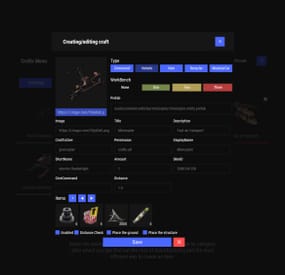
Crafting system that allows you to create items, cars, vehicles, recyclers, etc!
Commands
craft open interface crafts.setwb [categories: cat1 cat2 ...] set new custom workbench
Permissions
You can set permission in config, for example:
"Permission (ex: crafts.use)": "crafts.use", crafts.setworkbench - allows you to use the "crafts.setwb" command (set custom workbenches)
Craft Types
Command Vehicle Item Recycler ModularCar
How to install a custom workbench
1. Spawn the workbench (for example, in RustEdit or a plugin) 2. In the game, go to him and use the command "crafts.setwb" and specify the necessary categories. Example: /crafts.setwb Misc 3. Go to config (oxide/config/Crafts.json) and configure this workbench (use SafeZone, workbench level, etc.)
VIDEO
FAQ
Q: Where can I see an example of a config?
A: Config
-
$14.99
Automated Messages
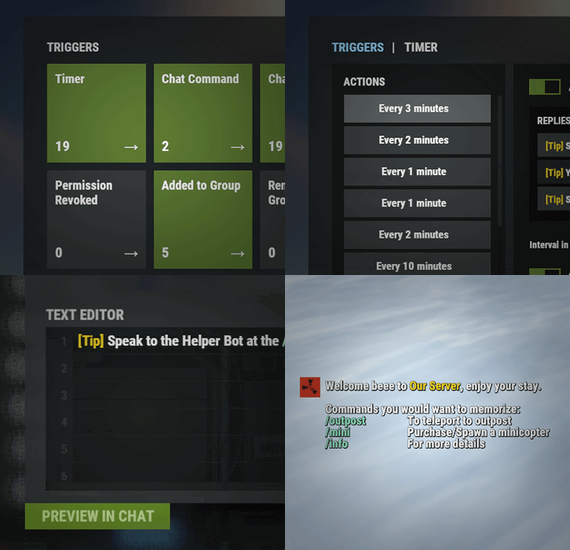
Automated chat messages based on chat keywords, advanced scheduling modes (Interval, Server Time, Game Time, and Countdown), or various other triggers. In addition to sending messages, the plugin can also automatically run server console commands when an action triggers. It comes with an easy to use Admin UI for complete setup, and supports special localization for your messages. You can define messages to be sent only to specific Groups or Permissions, and you can allow players to toggle on/off messages if they do not find them useful.
SUPPORTED TRIGGERS If what you need is not here and still falls under the scope of the plugin description, reach out to me
Timed | ChatCommand | AutoReply | NewPlayerJoined | PlayerConnected | PlayerDisconnected | PermissionGranted | PermissionRevoked | AddedToGroup | RemovedFromGroup | PlayerDead | CrateHacked | EnteredDeepSea | LeftDeepSea | EnteredZone | LeftZone | EnteredMonument | LeftMonument
COMMANDS
/am.edit - (Admin UI for complete setup) - requires automatedmessages.admin permission /tips - (Player command for toggling on/off messages) command can be changed in the config file
MESSAGES LOCALIZATION
You can switch between languages in Admin UI to setup localized replies for every language the game supports. Check config section below for how to add languages.
Game Tips
You can utilize Rust's native game tip UI to show specific messages instead or along with sending it to chat.
VARIABLES
Variables can be included in the messages text to show further info based on the trigger or player. The plugin also supports https://umod.org/plugins/placeholder-api with the extensive list of variables it brings.
{playername} {playerid} - Player steam id {playercountry} {hacklocation} - Specific to messages with type CrateHacked {wipetimeremaining} - Days/Hours till wipe (based on rust convar settings if a missile silo monument is present). By default, displays like 2d 5h. You can format this by using the following specific placeholders: {wipetimeremaining:d} - Days remaining {wipetimeremaining:h} - Hours remaining (0-23) {wipetimeremaining:th} - Total hours remaining {online} - # of players online {sleeping} - # of players sleeping {joining} - # of players joining {target} - The target string associated with the triggered action. {countdown} - Live time remaining for actions using the Countdown scheduling mode. By default, displays time automatically. You can format this by using the following specific placeholders: {countdown:m} - Minutes remaining (0-59) {countdown:s} - Seconds remaining (0-59) {countdown:tm} - Total minutes remaining {countdown:ts} - Total seconds remaining
CONFIG SETTINGS Below are only settings not currently available in Admin UI, highly recommended to edit triggers or actions using /am.edit
Chat Icon (Steam Id) - Icon that will be used for all messages sent by the plugin, must be a steam id. Toggle Chat Command - "tips" - Chat command that allows a player to toggle on/off messages. AutoReply Cooldown (in seconds) - Per action cooldown timer when players type a keyword set. ChatCommand Cooldown (in seconds) - Per player cooldown timer when a player types a chat command. ZoneManager Cooldown (in seconds) - Per player cooldown timer on enter or exit zone. MonumentWatcher Cooldown (in seconds) - Per player cooldown timer on enter or exit monument. Replies Server Languages - Languages your server will support. Available options: af, ar, ca, cs, da, de, el, en-PT, en, es-ES, fi, fr, hu, it, ja, ko, nl, no, pl, pt-PT, pt-BR, ro, ru, sr, sv, tr, uk, vi, zh-CN, zh-TW Default Server Language - Fallback language if player client language had no available replies, you must have at least one reply for this language for the action to function. AutoReply `Broadcast to all` option to broadcast to team only if keywords sent from team chat - true/false