
SLATE's Wishlist
-
$39.99
Rust Manager
Rust Manager is a robust and user-friendly windows application designed to streamline the management of your Rust game server. Built on the latest .NET 8 framework, Rust Manager offers a comprehensive suite of tools to help you efficiently manage your server and its users, all from a local environment without the need to log on to any rust servers.
Key Features:
• User Management: Easily register, edit, and manage user accounts with a secure and intuitive interface. The application supports user authentication and email confirmation to ensure the integrity of your user base.
• Local Management: All management tasks are performed locally, ensuring that your data remains secure and private. There is no need to log on to your rust servers, providing you with complete control over your server management.
• Email Notifications: Integrated email sending capabilities allow you to send confirmation emails and other notifications directly from the application.
• Profile Editing: Users can update their profiles, including changing their passwords, directly within the application.
• Secure Authentication: The application uses ASP.NET Core Identity for secure user authentication and management, ensuring that your server remains protected from unauthorized access.
• Permission Group Management: Easily manage permission groups and individual permissions through the intuitive UI. Create, delete, and sync groups across multiple Rust servers seamlessly.
• Group Synchronization: Sync permission groups across multiple Rust servers, ensuring consistency and ease of management.
• Permission Comparison: Compare permissions and groups across different servers to identify discrepancies and ensure uniformity.
Rust Manager is the easiest way to manage permissions across a single or multiple servers. It runs on windows as a stand alone application and you maintain 100% of the information. No subscriptions or hosting is required.
Rust Manager is the perfect solution for Rust server administrators who want a powerful, secure, and easy-to-use tool for managing their servers locally.
DEMO VIDEO
- #permissions
- #groups
- (and 4 more)
-
$45.99$36.79XStatistics
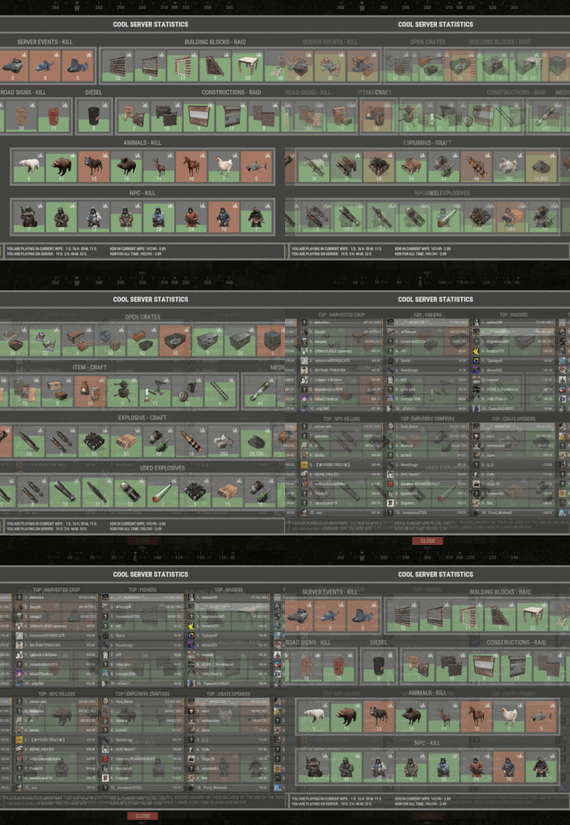
XStatistics - statistics for your server.
- Optimization of the interface for different monitor resolutions.
- Storing player data in - oxide/data/XDataSystem/XStatistics or MySQL or SQLite.
- There is a lang ru/en/uk/es.
- Sound effects when interacting with the menu.
- UI settings in the configuration.
- Display TOPs in game chat.
- Ability to customize the privacy of the default statistics.
- Ability to delete a player's stats after they have been banned.
- Ability to customize grades of building blocks. [ To be recorded in statistics. ]
- Ability to add a player to the blacklist. [ Player's statistics will not be displayed in the TOPs and will not be available to other players. ]
- Ability to use MySQL or SQLite database.
- Ability to automatically give awards and clear data after a WIPE. [ Settings in the configuration. ]
[ Plugin economics or any other. Also [ RU ] GameStores. ]
- A player can hide/open his statistics. [ Need permission. ]
- A player can view the statistics of other players. [ Need permission. ]
- A player can reset their statistics to zero. [ Need permission. ]
- The player can view the entire list of players and search. [ Need permission. ]
- Creating an unlimited number of categories, subcategories and pages.
- Creating custom TOPs, coefficients and awards. [ Unlimited number. ]
- Various admin commands to manage player statistics.
- Support and compatibility with many plugins.
- Server events (Bradley, Chinook, and Patrol Helicopter) count as stats for the player who did the most damage.
- Checking OwnerID of Building blocks, Constructions and other entities.
- Ability to create a Global TOP of your project. [ For this purpose it is enough to enter MySQL data and server name into the configuration.]
[ This TOP can be disabled in the configuration and only the TOP players of the server can be used. Or you can use two TOPs at the same time! ]
- Ability to use pages for categories with subcategories.
- Administrator Mode. [ View hidden player stats, open player search and more ].
- Automatic deletion of statistics of players who have not logged connection the server for N days.
- Ability for players to disable messages with the TOP players in chat.
If your server is visited by more than 500 players, it is recommended to use SQLite or MySQL.
Statistics were tested on a server with 120 online and 5000 players in the database. Excellent result on optimization.
To display player avatars you need to customize the configuration of the ImageLibrary plugin!
What are the statistics at this point?
Global TOP data is manually deleted from the MySQL database. [ It is important that the servers are turned off so that online players data is not written to the database ].
Or after all servers are wiped, run the command - player_stats_reset globaldata null - on one of the servers.
[ Also take into account the servers parameters, for a fair TOP they should be the same! ]
Shortnames to customize statistics
Permissions
xstatistics.use - access to the statistics menu. xstatistics.top - access to the TOPs of subcategories. xstatistics.coefficients - access to view the coefficients. xstatistics.player - access to view player statistics, player list and player search. xstatistics.resetwipe - access to the ability for a player to reset his statistics - WIPE. xstatistics.resetall - access to the ability for a player to reset his statistics - ALL TIME. xstatistics.shstats - access to the ability to hide/open your statistics. [ If the permission has been revoked, the statistics privacy will automatically change to default. ] xstatistics.admin - access to admin mode. Commands
/stat, /stats, /statistic, /statistics - to open the statistics menu. [ Commands can be changed in the config. ] Server console --- Admin commands. stats_ct <customTopName> - to see the top players. [ Custom TOP. ] stats_t <subcategoryName> - to see the top players. [ TOP subcategory. ] player_stats_reset statswipe <steamID> - to reset a player stats to zero - WIPE. player_stats_reset statsall <steamID> - to reset a player stats to zero - ALL TIME. player_stats_reset all <steamID> - to reset a player stats to zero - WIPE and ALL TIME. player_stats_reset global <steamID> - delete a player from the database Global TOP. [ Player must be offline! ] player_stats_reset globaldata null - Delete data from a table in a MySQL database - Global TOP. [ Use this command after all of your servers have been wiped. ] [ The command can be used on any of the Global TOP servers. ] player_actstats global true/false - change statistics privacy for all players. player_actstats <steamID> true/false - change statistics privacy for a player. stats_give_award - start giving out awards for TOPs. stats_clear_data_wipe - to clear all statistics - WIPE. [ Same as after a server wipe ] API
- void API_AddSubcategoryValue(BasePlayer player, string subcategoryName, long amount) - Add a value for the subcategory. player - must be online and not equal to null. - void API_SetSubcategoryValue(BasePlayer player, string subcategoryName, long amount) - Set a value for the subcategory. player - must be online and not equal to null. - bool API_CheckForSubcategory(ulong userID, string subcategoryName) - Check if a subcategory exists. - long API_GetSubcategoryValue(ulong userID, string subcategoryName) - Get the subcategory value. Config
-

$2.99
Polls
By ziptie.entity in Plugins
Polls is a plugin that allows you to receive feedback from your players via a GUI. When a player joins your server, if a poll is active, they will be presented by a GUI with the poll questions you set in the config. Alternatively, if they don't want to participate in the poll, they can close out of the GUI.
Run polls for a specified amount of time. Store poll results in a file. Send poll results to Discord via a webhook.
/startpoll <duration> - Start a poll using the settings in the config file. /stoppoll - Stop the active poll and store the results.
polls.start - Allows the player to start and stop polls
Below is a config for Polls that was used on my own server.
{ "Chat Options": { "ChatColor": "#3aaa45", "ChatPrefix": "Polls: " }, "Discord Options": { "Send embed to Discord when the poll ends": true, "Webhook URL": "REDACTED" }, "Questions": [ { "Answers (MAX 7)": [ "Procedural", "Barren", "Custom PVP Map" ], "Question": "What map should be used for Central?" }, { "Answers (MAX 7)": [ "Yes", "No" ], "Question": "Should we add more kits?" }, { "Answers (MAX 7)": [ "Yes", "No", "Yes, but only within marked grids" ], "Question": "Should you be allowed to build over water again?" } ], "Debug": false }
If you need support, want to find all of my other plugins, or just talk, feel free to join my Discord @ https://discord.gg/4ahpdSBThj
-
$19.99
Discord Clan Bot | Discord clans
By Amino in Discord Bots
Clans for discord
Recently, some of the top servers have been making clan bots for their Discord which can drive a thriving Discord community which is one of the most important things
for a Rust server. Having a thriving Discord community means you are able to hold onto those players for your servers.
Users can make a clan, invite their friends, promote and demote their friends within the clan, and even if they wanted to disband the clan they can.
You can set the bot to make a clan text chat, displaying clans separately from online members, give the leader a special role, ETC*
The non admin commands are: - clan create - clan invite - clan promote - clan demote - clan info - clan kick - clan leave - clan disband The admin commands are: - clan edit - clan force disband - clan force kick member - clan force invite member
All clans and everything are stored in a database that you provide, so the clan data cannot messed up VIA roles and what not.
All the commands are slash commands for ease of use as seen in the attached photos.
All commands are protected by user checks. So people cannot do actions for clans that they are not in unless they are given an admin role that is defined in the bot config.
The bot is very simple to install
The file also includes a readme.md file which includes the info that you need to know.
Need support or want updates about what is coming to the bot? Join the support discord here https://discord.gg/RVePam7pd7
-
.thumb.gif.b29f93ebb36cb68c1b5eee520fded103.gif)
$18.00$11.16The Trapper
Purchase a License, Trap, Sell, Profit.
Works with Kits.
Requires Economics or Server Rewards to handle sales.
With "The Trapper” you open a new lane of Economic gameplay for your server.
Set a License fee in order to be able to skin and claim customizable items from animals and sell for monetary gain.
Set drop rates on all of your Custom Trapper Items, Sell to the Trapper with Economics or Server Rewards.
Spawn the Trapper House, Via Copy Paste, MarkerManager & ZoneManager Or AutoSpawn at Outpost Automatically with Copy Paste to handle paste, ZoneManager to handle decay and looting prevention etc.
Output all Sales to Discord to track your Economy and make Adjustments as needed to The Trapper NPCS "Bonus Buy” & "Discount Buy” as needed to suit your taste.
CopyPaste Base for NPC.
Trapper.json
ANIMAL #'S FOR DROP SETUP
(You can use more than one for example [1 , 2 , 3])
0 - ALL
1 - POLAR BEAR
2 - BEAR
3 - WOLF
4 - BOAR
5 - STAG
6 - CHICKEN
7 - CROCODILE
8 - SHARK
9 - PANTHER
10 - SNAKE
11 - TIGER
Commands
/gw – Requires Admin Permission – Will spawn your custom Trapper items into your inventory, Good for testing sale rates.
/spawntrapper – Requires Admin Permission – Will spawn a Trapper NPC in your Position.
/removetrapper – Requires Admin Permission – Will remove the Trapper NPC you are looking at.
/BuyTL – With Sufficient funds, the player can purchase a Trapper License
/pastetrapperhouse - places the trapper building in front of you, creating a zone if you have zone manager installed, that handles no build no decay and more.
Config
{ "Enable Skill Tree Yield Boost": true, "Tool Blacklist": [ "axe.salvaged", "knife.bone", "knife.combat", "rock" ], "Position of Building for Outpost Spawn": { "x": 89.42, "y": 0.34, "z": 81.47 }, "Rotation Correction of The Building": 77.0, "NPC Positioning If using Outpost Spawn": { "x": 88.03, "y": 0.74, "z": 81.56 }, "Rotation Correction of The NPC": -90.0, "Dynamic (Outpost) Spawn Of The NPC Building and NPC Enabled?(CopyPaste Req. MarkerManager & Zone Manager Recommended)": true, "Discord Webhook URL": "", "Chat Icon": 0, "NPC Kit Enabled?": false, "NPC Kit Name?": "", "Trapper license Fee?": 10000, "Console Command to Purchase a Trapper License? (For GUI Shops)": "buytl", "Chat Command to Purchase a Trapper License?": "buytl", "Remove license on Death?": true, "Sales to NPC Enabled?": true, "Map Markers Enabled via Marker Manager Plugin?": true, "Maximum Amount of Items Sold at a Time": 50, "NPC Interaction Cooldown In Seconds": 2.0, "Economy Plugin - 1 Economics - 2 Server Rewards": 1, "Amount of each Item to spawn via Command?": 5, "Custom Wares": [ { "Item Name": "Common Pelt", "Item Shortname": "blood", "Min Item Amount": 2, "Max Item Amount": 5, "Skin ID": 3150749844, "Is Marketable?": true, "Sale Price?": 40.0, "Max Discount Buy Variation in %? (Negative Values) (To Simulate Supply & Demand)": -10.0, "Maximum Bonus Variation in %? (Positive Values) (To Simulate Supply & Demand)": 5.0, "Chance out of 100% to Spawn on Skinning?": 10.0 }, { "Item Name": "Rare Pelt", "Item Shortname": "blood", "Min Item Amount": 2, "Max Item Amount": 5, "Skin ID": 3150751184, "Is Marketable?": true, "Sale Price?": 124.0, "Max Discount Buy Variation in %? (Negative Values) (To Simulate Supply & Demand)": -10.0, "Maximum Bonus Variation in %? (Positive Values) (To Simulate Supply & Demand)": 5.0, "Chance out of 100% to Spawn on Skinning?": 5.0 }, { "Item Name": "Legendary Pelt", "Item Shortname": "blood", "Min Item Amount": 2, "Max Item Amount": 5, "Skin ID": 3150751925, "Is Marketable?": true, "Sale Price?": 220.0, "Max Discount Buy Variation in %? (Negative Values) (To Simulate Supply & Demand)": -10.0, "Maximum Bonus Variation in %? (Positive Values) (To Simulate Supply & Demand)": 5.0, "Chance out of 100% to Spawn on Skinning?": 1.0 }, { "Item Name": "Low Quality Meat Cut", "Item Shortname": "blood", "Min Item Amount": 2, "Max Item Amount": 5, "Skin ID": 3150796688, "Is Marketable?": true, "Sale Price?": 40.0, "Max Discount Buy Variation in %? (Negative Values) (To Simulate Supply & Demand)": -10.0, "Maximum Bonus Variation in %? (Positive Values) (To Simulate Supply & Demand)": 5.0, "Chance out of 100% to Spawn on Skinning?": 10.0 }, { "Item Name": "Mid Quality Meat Cut", "Item Shortname": "blood", "Min Item Amount": 2, "Max Item Amount": 5, "Skin ID": 3150796598, "Is Marketable?": true, "Sale Price?": 124.0, "Max Discount Buy Variation in %? (Negative Values) (To Simulate Supply & Demand)": -10.0, "Maximum Bonus Variation in %? (Positive Values) (To Simulate Supply & Demand)": 5.0, "Chance out of 100% to Spawn on Skinning?": 5.0 }, { "Item Name": "High Quality Meat Cut", "Item Shortname": "blood", "Min Item Amount": 2, "Max Item Amount": 5, "Skin ID": 3150796490, "Is Marketable?": true, "Sale Price?": 220.0, "Max Discount Buy Variation in %? (Negative Values) (To Simulate Supply & Demand)": -10.0, "Maximum Bonus Variation in %? (Positive Values) (To Simulate Supply & Demand)": 5.0, "Chance out of 100% to Spawn on Skinning?": 1.0 } ], "NPC Clothing Options": [ { "Shortname": "burlap.trousers", "Skin": 1760352876 }, { "Shortname": "burlap.shirt", "Skin": 719989461 }, { "Shortname": "burlap.shoes", "Skin": 1594058564 }, { "Shortname": "hat.wolf", "Skin": 0 } ] }
Lang
{ "NoPerms": "[<color=#8b0101>The Trapper</color>] You do not have permission to run this <color=red>Command</color>!", "NoWares": "[<color=#8b0101>The Trapper</color>] :nervous: You have no <color=yellow>Items</color> on you that I am in the Market for. \nSwing by when you do, though! \n\n:happy:", "WaresSpawned": "[<color=#8b0101>The Trapper</color>] :wave: <color=green>All</color> <color=#8b0101>Trapper Wares</color> have been deposited to your Inventory.", "TrapperCooldownMessage": "[<color=#8b0101>The Trapper</color>] :wave: Hold on, give me <color=green>{0}</color> second(s), I'm cleaning this carcass...", "EconomicsMessage": "[<color=#8b0101>The Trapper</color>] :eyes: \n\n Best I can offer is <color=#85bb65>$</color><color=yellow>{0}</color> for your <color=orange>{1}x</color> <color=green>{2}</color>(s).", "SrMessage": "[<color=#8b0101>The Trapper</color>] :eyes: \n\n Best I can offer is <color=orange>{0}</color> <color=#cd5c5c>RP</color> for your <color=yellow>{1}x</color> <color=green>{2}</color>(s).", "SaleDisabled": "[<color=#8b0101>The Trapper</color>] <color=orange>Sales</color> are Disabled in the Config, Enable and Try again.", "NoTrapperLicense": "[<color=#8b0101>The Trapper</color>] You don't have a valid <color=orange>Trapper License</color>. \nUse <color=orange>/BuyTL</color> to purchase one if you have the means.", "AlreadyHasLicense": "[<color=#8b0101>The Trapper</color>] You already have a <color=orange>Trapper License</color>.", "BuyTrapperLicenseSuccess": "[<color=#8b0101>The Trapper</color>] Trapper License Obtained. \nYou were charged {0}<color=#3e9c35>{1}</color> Happy Hunting <color=#8b0101>{2}</color>!", "InsufficientFunds": "[<color=#8b0101>The Trapper</color>] You don't have enough funds to purchase the Trapper License. \nIt costs <color=orange>{0}</color><color=green>{1}</color>." }