
ELF's Wishlist
-
$24.00
IMPROVED ICONS / PNG
By DesignCrew in Graphics
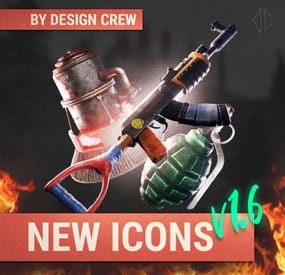
Our studio has long noticed that icons in Rust are outdated. They look boring and inexpressive. Sometimes even of poor quality.
Have you ever looked closely at the blackberry icon?
We have prepared for you 196 3D icons for all categories of items in Rust.
Items:
ammo - 21 clothes - 22 components - 16 buildings and furniture - 37 explosives - 5 food - 17 modifiers - 11 resources - 14 tools - 8 weapons - 28 other - 8 boxes - 9
We have uploaded, created, and thought up icons manually. Each of them. We have processed them, added color correction. I hope many will be satisfied with these icons.
They can be used in the store or on the server.
If you have any questions or notice that we haven't made some of the icons, write to us - we'll add them
-
$20.00
RaidCrate
Overview
RaidCrate is a powerful, highly customizable raid event plugin for Rust servers. It creates epic, clan-driven battles over loot, territory, and bragging rights. Admins hand out special "Raid Crate Signals" to chosen players, who can then trigger a raid event at a base where they have TC authorization.
When a signal is thrown, a hackable crate is dropped at the target base. Raiders must destroy the main TC and then dominate the area, known as the control zone for a set duration against defenders and rival clans.
Transform regular raids into unforgettable server-wide events!
Key Features
Admin-Only Raid Crate Signals: Only admins can distribute signals, keeping events legit and organized. TC Authorization Check: Only TC-auth’d players can start events - no random trolling. Hackable Crate Mechanic: Crate remains locked until the main TC is destroyed and raiders secure the control zone for a specified time or the defenders win. Optional fetures such as "UseCrate, UseEconomics & ServerRewards" Dynamic Clan Contest System: All clans in the control zone are recognized as attackers and credited in the event outcome. Real-Time Area Control: Visible UI progress for all participants in the zone; more raiders = faster capture. Map Markers: Customizable event markers are shown to all players. Live Broadcast & Discord Integration: All major events are announced in-game and (optionally) via Discord webhooks. Highly Configurable: Control loot, timers, UI, permissions, zone radius, and more. Visual Feedback: The crate and control zone are rendered with visible spheres. Full Cleanup: All UIs, markers, and event entities are cleaned up at event end or plugin unload. Explosive Damage All explosive damage, is default set to 2x damage on buildings within the raidevent. How the Raid Event Works
1. Admin gives a Raid Crate Signal:
/raidcrate give [player]`
2. Player throws the signal on their base where they have TC authorization.
3. A locked raid crate spawns, and raid event starts:
A map marker appears. All nearby players are notified. 4. Raiders must destroy the main TC to progress.
After TC destruction, the control zone activates around the TC. 5. Raiders must control the zone for a configurable duration:
The zone is a circular area (default 7m radius) centered on the destroyed TC. A UI progress bar is shown to all involved, updating in real-time. More raiders = faster progress. If rival clans enter the zone, they become recognized as attackers and can contest or steal the event. 6. If raiders control the zone for the required time, the crate unlocks.
Loot is claimable. Event results are broadcast and optionally sent to Discord. Understanding the Control Zone
The control zone is the heart of the RaidCrate event. Once the main Tool Cupboard is destroyed, a spherical zone (by default, 7 meters in radius) is projected around the former TC. Raiders must occupy and hold this area without defenders reclaiming it or rival clans contesting. Progression: Each tick, the plugin counts the number of unique raider players (excluding former defenders) inside the zone. The more raiders present, the faster the control timer advances, thanks to the configurable progress acceleration. Contesting: If multiple clans are in the zone, all present clans are recognized in the event outcome (e.g., [XYZ x DEF] have successfully RAIDED [ABC]'s base!). If defenders manage to prevent full control or retake the area, they can win the event instead. Visibility: The zone is visually rendered as a glowing sphere and all involved see their progress via an on-screen UI. Example In-Game Messages
> [RaidCrate] Raid event started! Clan: [ABC]*
> Check your map for the event marker!
> Tool Cupboard destroyed! Raiders must now control the area (7m radius) for 0h 20m 00s to unlock the crate!
> Raid event in progress! 07:45 left to unlock the crate.
> RaidCrate Event: [XYZ x DEF] have successfully RAIDED [ABC]'s base!
> RaidCrate Event: [ABC] have DEFENDED and WON the event! (against XYZ x DEF)
Configuration Example
{ "Use Crate" true; "Use Economics": false; "Economics Reward Amount": 100; "Crate Timer Duration (seconds)": 3600, "Explosive Damage Multiplier": 2.0, "Control Zone Radius": 7.0, "Control Time Required (seconds)": 1200, "Progress Acceleration Per Player": 1.5, "Progress Update Interval (seconds)": 1.0, "Admin Permission": "raidcrate.admin", "Map Marker Display Name": "RAID EVENT", "Discord Webhook URL": "https://discord.com/api/webhooks/xxxx/yyyy", "Discord Announce Events": true, "UI Progress Bar Background Color": "0.2 0.6 0.2 0.8", "UI Progress Bar Foreground Color": "0.2 0.8 0.2 1", "UI Progress Bar Outside Color": "0.6 0.2 0.2 0.8", "UI Progress Bar OutsideFg Color": "0.8 0.2 0.2 1", "UI Progress Bar Text InZone": "IN CONTROL ZONE", "UI Progress Bar Text OutZone": "OUTSIDE ZONE", "Broadcast Event Start": true, "Broadcast Event Complete": true, "Loot Table": [ { "ShortName": "supply.signal", "Amount": 2 }, { "ShortName": "explosive.timed", "Amount": 4 }, { "ShortName": "rifle.ak", "Amount": 1 }, { "ShortName": "metal.refined", "Amount": 150 }, { "ShortName": "ammo.rifle", "Amount": 256 }, { "ShortName": "sulfur", "Amount": 3000 }, { "ShortName": "explosives", "Amount": 10 }, { "ShortName": "gunpowder", "Amount": 1000 }, { "ShortName": "scrap", "Amount": 500 } ] } Multi-Clan Raid Result Example
If several clans are present in the control zone, all are credited as attackers in the event result:
> RaidCrate Event: [XYZ x DEF] have successfully RAIDED [ABC]'s base!
If defenders win against multiple attacking clans:
> RaidCrate Event: [ABC] have DEFENDED and WON the event! (against XYZ x DEF)
Commands
/raidcrate give [player] — Give yourself or another player a Raid Crate signal. /raidcrate reload — Reload the plugin configuration. Permissions
raidcrate.admin — Required to use admin commands. Requirements
Clans plugin for clan detection. Rust server with Oxide/uMod. Support & Customization
For support, feature requests, or help with advanced setup, contact me via private message.
-
$10.00$6.00Launch Extended
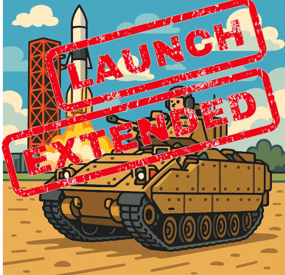
LaunchExtended adds a extra puzzle to Launch site with extra loot.
Example usage
find button ontop of Rocket Launch platform find code on Launch site main building enter code at codelock below rocket defeat 3 sets of bradleys for all the loot
Config
{ "Event Cooldown in minutes": 45.0, "Use Tiered Bradleys": true, "Bradley Tier Settings": { "1": { "Name": "Easy", "BradleyHealth": 1000.0, "BradleyBDamage": 1.0, "BradleyMaxFireRange": 100.0, "BradleySpeed": 10.0, "BradleyCratesAmount": 1 }, "2": { "Name": "Medium", "BradleyHealth": 2000.0, "BradleyBDamage": 1.2, "BradleyMaxFireRange": 100.0, "BradleySpeed": 13.0, "BradleyCratesAmount": 2 }, "3": { "Name": "Hard", "BradleyHealth": 3000.0, "BradleyBDamage": 1.5, "BradleyMaxFireRange": 150.0, "BradleySpeed": 15.0, "BradleyCratesAmount": 3 } }, "Extraloot Settings": [ { "Tier2 Loot Add": [ { "Item Display Name": "C4", "Short Prefab Name": "explosive.timed", "Minimum Amount": 5, "Maximum Amount": 10, "Skin ID": 0 }, { "Item Display Name": "Rocket", "Short Prefab Name": "ammo.rocket.basic", "Minimum Amount": 3, "Maximum Amount": 6, "Skin ID": 0 }, { "Item Display Name": "Scrap", "Short Prefab Name": "scrap", "Minimum Amount": 75, "Maximum Amount": 125, "Skin ID": 0 } ], "Tier3 Loot Add": [ { "Item Display Name": "C4", "Short Prefab Name": "explosive.timed", "Minimum Amount": 8, "Maximum Amount": 12, "Skin ID": 0 }, { "Item Display Name": "Rocket", "Short Prefab Name": "ammo.rocket.basic", "Minimum Amount": 5, "Maximum Amount": 8, "Skin ID": 0 }, { "Item Display Name": "Scrap", "Short Prefab Name": "scrap", "Minimum Amount": 100, "Maximum Amount": 200, "Skin ID": 0 } ] } ], "Tier3Reward": { "DisplayName": "Scrap", "DisplayNameColor": "#0000ff", "ItemName": "scrap", "MaxAmount": 100, "SkinID": 0 } }
The Extra Tier3Reward . is a from button press a 15min timer starts . and up until 15 min max amount is placed in last hack crate, from there it will decreased to 0 at 40min mark ... 3de bradly must be dead before applies
so the quicker you get it done the more you can get
- #launchsite
- #event
- (and 1 more)
-
$5.00
2025 PACK 1VS1 or 2VS2 CAVE
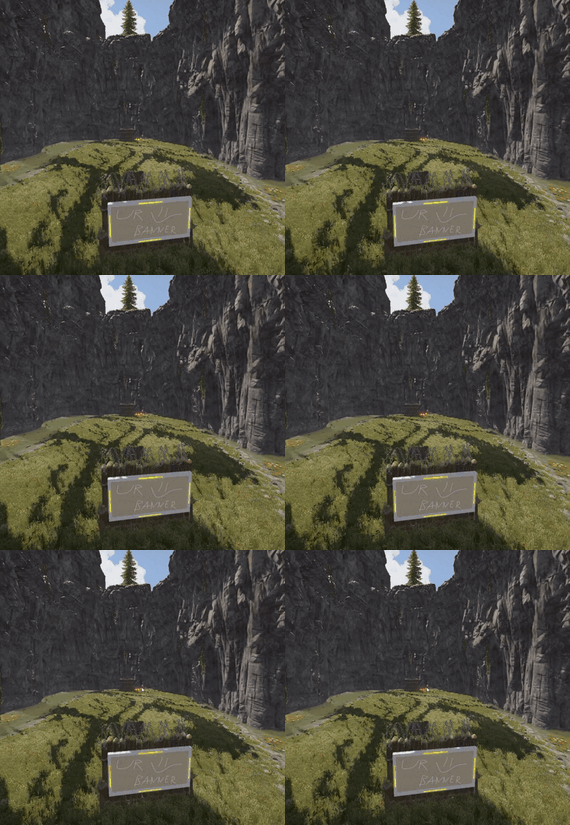
The pack includes three unique arenas, perfectly suited for intense 1vs1 duels or exciting 2vs2 battles in scenic canyons.
Each arena gives you complete freedom to arrange everything exactly the way you want!
-
![More information about "Dynamic Monuments [Jungle Bundle]"](https://codefling.com/cdn-cgi/image/width=285,height=275,quality=80,fit=cover,format=webp/https://codefling.com/uploads/monthly_2026_02/adem_prev_aztec_prev.thumb.jpg.33a76c6b835053171351d3129d5bbe88.jpg)
$39.99
Dynamic Monuments [Jungle Bundle]
‼️Note: This is an add-on, not a standalone plugin. It requires the Dynamic Monuments plugin to be installed (sold separately).
🌴Enhance your Rust world with Jungle Bundle — a rich and immersive monument pack for the Dynamic Monuments plugin!
Explore dense jungle environments and mysterious ancient sites, or configure them to appear in any biome you prefer.
Included in the addon:
7 land monuments 1 coastal location 1 dam 2 modified in-game locations Player-placeable locations:
The Mayan Pyramid The Tree House Eye of the Jungle Eclipse Fort Bone Cape The Ancient Dam Installation Instructions:
Make sure you have the latest version of the Dynamic Monuments plugin installed Move the contents of the data/DynamicMonuments folder from the archive you downloaded into the oxide/data/DynamicMonuments folder on your server Reload the plugin
Check out the rest of my work: Adem's Codefling Library
Join the Mad Mappers Discord!