
Chill Roleplay's Wishlist
-
$19.99
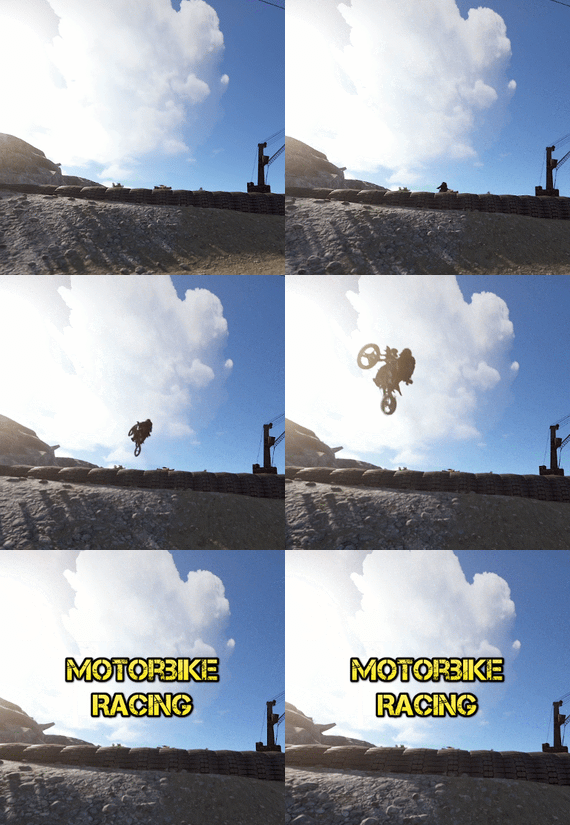
Motorbike Racing
By imthenewguy in Plugins
Motorbike racing is a plugin that allows you to build and host motorbike race tracks in-game.
The plugin is integrated with a track building system that gives you full control over where and how you build your race tracks.
Players can compete for prizes for winning, or compete for the fastest lap times on a map for bragging rights.
Races are associated with the .map file name that they were built on, and will automatically load when a map with the same name is loaded.
I would like to extend a special thanks to @monsterqueen for the idea and supplying the prefab. You can test out the plugin and prefab on her server: us.themonsterden.net.
Features
Map building system that is easy to use and powerful. Global scoreboard to track the amount of wins for each race track, as well as the fastest times. Seamless enrollment into the event - players will be teleported to the race when it begins, and their items will be stored safely until it's completion (or they leave). Start to finish race handling - the plugin will restrict the contestants to the configured value or the number of motorbike spawns (whatever is lower), and will handle the race, scoring and prizes. Customizable prizes based on placement - you can set customizable prices (including economics, server rewards and items), based on the position that the player finished. EventHelper support - the plugin will work with EventHelper's auto start and event vote features.
Permissions
motorbikeracing.admin - allows for the user of the buildmap command and the manual starting of races
Chat commands
buildmap <race name> - Starts the map building process. Avoid using the dash (-) symbol in the map name. buildclearspawns - removes all spawns from a map while in building mode. savemap - Only usable during the map builder. It saves the map file you are working on. startrace <race name> - Manually starts the desired race. Run the command with no parameters to see valid races for the current map. endrace <race name> - Ends the selected race. If there is only 1 race active, you don't need to use the race name parameter. rscore - Opens up the hi scores. joinrace <race name> - Joins the desired race. leaverace - Leaves the active race. racerestoreitems - restores the players items if they weren't restored automatically (ie they died somehow). raceprize - redeems any prizes that the player is owed.
Video and pictures were taken using this prefab:
-
.thumb.png.ef8419f11a36990e7df0310e715d0685.png)
$14.99
KOTH Event - King of the Hill: Battle of Supremacy
By Iftebinjan in Plugins
The King of the Hill event is an exhilarating competition that dares participants to rack up the highest number of kills within a set time limit on a confined island where there's no escape. Join the KOTH event when it kicks off, whether you're going solo or teaming up with your squad or clan. With the ability to rejoin multiple times, aim to secure the most kills and claim the coveted KOTH rewards.
⭐ Features
Easy setup Repeatable event with easy configuration Choose the winner from Top Player or Top Clan Kills Shows TOP players or TOP clans Shows Personal or Clan statistics Set up rewards for the KOTH winner Discord event webhook messages 📌 Commands
KOTH Player COMMANDS: /koth - Join KOTH event when it starts. /koth_stats - Show koths top players & Clans. KOTH Event COMMANDS: /kotheventstart - Randomly start a event from the list. /kotheventstart <ArenaName> - Start KOTH event in the selected arena. /kotheventstop - Stop if any event is running. SETUP COMMANDS: /koth setup - Show all available setup commands /koth create <ArenaName> - Creates a KOTH arena /koth edit <ArenaName> - Select the KOTH arena to change Radius or Location /koth radius <Number> - Change KOTH arena radius /koth location - Change KOTH arena location /koth setspawn - Set spawn point location for players KOTH Data COMMANDS: /koth_reset_players - Reset all player data. /koth_reset_clans - Reset all clans data.
⚙️Configurations
Event Screenshots
💬 Support
- #koth
- #king of the hill
- (and 6 more)
-
$5.99
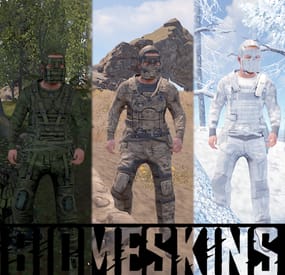
BiomeSkins | Camouflage at its finest!
By Reximian9k in Plugins
BiomeSkins is a Rust server plugin that dynamically customizes player clothing, armor, and sleeping bag skins based on the biome and topology of their location. By matching gear and sleeping bags to the surrounding environment, it enhances player immersion and camouflaging. Players can easily activate and control reskinning functions through simple chat commands, including options for key bindings and toggling automatic reskinning.
Installation
Download the BiomeSkins.cs plugin file. Place the plugin file into your server’s plugins directory.
Usage/Commands
/biomeskin
Reskins the player’s clothing and armor to match their current biome.
/biomeskin [<a|w|b|m>]
Reskin player all and/or wear and/or belt and/or main inventory items (w - wear, b - belt, m - main, a - all). Example - /biomeskin wb will reskin items in wear and belt inventories. Not specifying an inventory parameter defaults to wear/armor items.
/biomeskin skin <player> [q|a|w|b|m]
Reskins the target player's target inventory items (see command above). Intended for admins and other plugins.
/biomeskin bind <key>
Displays the command for binding the /biomeskin command to a specified key, allowing players to quickly activate biome-based reskinning.
/biomeskin bag <on|off>
Toggles automatic reskinning for sleeping bags based on the biome and topology where they are placed.
/biomeskin <wear|belt|main|> <on|off>
Sets automatic reskinning for wear/belt/main inventory items based on the biome of the player's location.
/biomeskin toggle <wear|belt|main|all>
Toggles automatic reskinning for wear/belt/main inventory items based on the biome of the player's location.
Permissions
biomeskins.reskin.bag - Allows for sleeping bag reskinning on placement and access to the /biomeskin bag <on|off> command.
biomeskins.reskin.equipment - Allows for inventory item reskinning via the /biomeskin base command.
biomeskins.reskin.equipment.other - Allows for inventory item reskinning of other players via the /biomeskin skin <player> [q|a|w|b|m] command.
biomeskins.reskin.equipment.auto - Allows for player automatic inventory item reskinning when crossing between biomes as well as the /biomeskin <wear|belt|main|> <on|off> command.
Configuration
The plugin offers customizable options in the configuration file, enabling admins to tailor the reskinning behavior:
{ "Version (DO NOT EDIT)": 3, "Command aliases": [ "biomeskin" ], "Sleeping bag skins": { "Forest": 2131151567, "Arctic": 2162368881, "Desert": 2922792064, "Tundra": 3080447496, "Rock": 3144409492 }, "Equipment skins": { "Temperate": { "mask.metal.item": 2551475709, "metal_plate_torso.item": 2551474093, "pants.roadsign.item": 2570237224, "hoodie.red.item": 2563940111, "pants.cargo.item": 2563935722, "shoes.boots.brown.item": 2575506021, "gloves.roadsign.item": 2575539874, "hat.coffeecan.item": 2570227850, "roadsign_armor.item": 2570233552, "jacket.vagabond.item": 2582710266, "largebackpack": 3360828867 }, "Tundra": { "mask.metal.item": 2551475709, "metal_plate_torso.item": 2551474093, "pants.roadsign.item": 2570237224, "hoodie.red.item": 2563940111, "pants.cargo.item": 2563935722, "shoes.boots.brown.item": 2575506021, "gloves.roadsign.item": 2575539874, "hat.coffeecan.item": 2570227850, "roadsign_armor.item": 2570233552, "jacket.vagabond.item": 2582710266, "largebackpack": 3377499512 }, "Arctic": { "mask.metal.item": 2432948498, "metal_plate_torso.item": 2432947351, "pants.roadsign.item": 2469019097, "hoodie.red.item": 2416648557, "pants.cargo.item": 2416647256, "shoes.boots.brown.item": 2752873720, "gloves.roadsign.item": 2469031994, "hat.coffeecan.item": 2503956851, "roadsign_armor.item": 2503955663, "rifle.ak.item": 2525948777, "burlap.shirt.item": 2911362787, "mask.bandana.item": 10062, "attire.hide.boots.item": 2408298830, "attire.hide.poncho.item": 2856159140, "riot.helmet.item": 801095823, "burlap.trousers.item": 2911361380, "burlap.gloves.item": 10128, "largebackpack.item": 3361128718, "jacket.vagabond.item": 2496913595 }, "Arid": { "mask.metal.item": 2475428991, "metal_plate_torso.item": 2475407123, "pants.roadsign.item": 2496523983, "hoodie.red.item": 2503910428, "pants.cargo.item": 2503903214, "shoes.boots.brown.item": 2510093391, "gloves.roadsign.item": 2510097681, "hat.coffeecan.item": 2496517898, "roadsign_armor.item": 2496520042, "jacket.vagabond.item": 2865011686, "largebackpack": 3362212704 } }, "Reskin items in wear inventory": true, "Reskin items in belt inventory": false, "Reskin items in main inventory": false, "Automatic equipment reskinning": { "Enabled": false, "Enabled by default for players with permission?": false, "Time interval between player biome checks": 5.0, "Reskin items moved into wear inventory": true, "Reskin items moved into belt inventory": false, "Reskin items moved into main inventory": false }, "Hooks": { "OnBiomeSkin": true } } Developer API
// Reskin player items in corresponding inventories (wear/belt/main) with the skins specified in the plugin config bool API_SkinPlayerItems(BasePlayer player, bool skinWear = true, bool skinBelt = true, bool skinMain = true) // Reskin player items in corresponding inventories (wear/belt/main) with the skins specified in the "skins" parameter (item name -> skinID) bool API_SkinPlayerItems(BasePlayer player, Dictionary<string, ulong> skins, bool skinWear = true, bool skinBelt = true, bool skinMain = true) // Returns true if target player has sleeping bag biome-based reskinning enabled bool API_IsSleepingBagReskinEnabled(BasePlayer player) // Enables/disables target player sleeping bag biome-based reskinning void API_SetEnabledAutoSleepingBagReskin(BasePlayer player, bool enabled) // Returns true if target player has automatic biome-based inventory item reskinning enabled bool API_IsAutoEquipmentReskinEnabled(BasePlayer player) // Enables/disables target player automatic biome-based inventory item reskinning void API_SetAutoEquipmentReskinEnabled(BasePlayer player, bool wear, bool belt, bool main) // Hooks // Invoked when a player's inventory items are about to be reskinned by the plugin // First argument - BasePlayer - Target player // Second argument - Action source // 0 = Command, 1 = Automatic (player crossing biomes), 2 = Third party plugin or console command // Returning bool 'true' will cancel the action OnBiomeSkin(BasePlayer, int)
-
$15.00
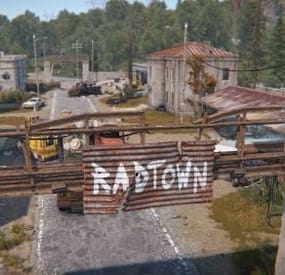
RadTown Puzzles
Adds a unique green and blue card puzzle to the Radtown that players can go into to get some extra loot.
{ "Green Room Spawns": { "Loot Information": [ { "LootContainer prefab to use": "assets/bundled/prefabs/radtown/crate_normal_2.prefab", "LootContainer respawn time after looted in minutes": 30, "Position of the LootContainer": { "x": 6.231558, "y": 0.6286445, "z": -14.76554 }, "Rotation of the LootContainer": { "x": 0.0, "y": 0.0, "z": 0.0 } }, { "LootContainer prefab to use": "assets/bundled/prefabs/radtown/crate_normal_2.prefab", "LootContainer respawn time after looted in minutes": 30, "Position of the LootContainer": { "x": -2.074273, "y": 0.6468282, "z": -18.84206 }, "Rotation of the LootContainer": { "x": 0.0, "y": 0.0, "z": 0.0 } }, { "LootContainer prefab to use": "assets/bundled/prefabs/radtown/foodbox.prefab", "LootContainer respawn time after looted in minutes": 30, "Position of the LootContainer": { "x": -4.595845, "y": 1.493383, "z": -16.61216 }, "Rotation of the LootContainer": { "x": 0.0, "y": 0.0, "z": 0.0 } } ] }, "Blue Room Spawns": { "Loot Information": [ { "LootContainer prefab to use": "assets/bundled/prefabs/radtown/crate_normal.prefab", "LootContainer respawn time after looted in minutes": 30, "Position of the LootContainer": { "x": 7.25617, "y": 4.363087, "z": -19.05 }, "Rotation of the LootContainer": { "x": 0.0, "y": 0.0, "z": 0.0 } }, { "LootContainer prefab to use": "assets/bundled/prefabs/radtown/crate_elite.prefab", "LootContainer respawn time after looted in minutes": 1, "Position of the LootContainer": { "x": 4.8, "y": 4.363087, "z": -14.74765 }, "Rotation of the LootContainer": { "x": 0.0, "y": 90.0, "z": 0.0 } } ] }, "Version": { "Major": 1, "Minor": 0, "Patch": 0 } }
-
$39.99
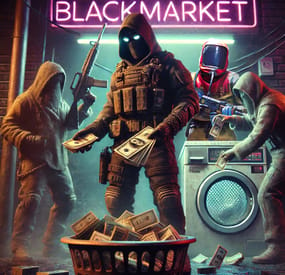
BlackMarket | Black Market & Money Wash Dealer: Ultimate Underground Trading Plugin
BlackMarket is a complex plugin that awakens the dark dealings of the underground. It offers players a completely new gaming experience by introducing illegal trading activities with special currencies. Thanks to the various customization options, the plugin can be perfectly adapted to individual needs.
⇨ MoneyWash Dealer:
➤ The MoneyWash Dealer offers the possibility to exchange black money for a special currency. By default, Scrap is exchanged for Golden Scrap - my exclusive currency that is used on my server. Players can thus safely launder their illegal winnings to use them for other transactions.
⇨ Black Market Merchant:
The Black Market Merchant provides access to various stores:
➤ Weapons Shop: Players can purchase exclusive weapons here.
➤ Ammoshop: A place to stock up on ammunition.
➤ Special Items & Fun Items: Players can purchase unique items or fun items that can only be paid for with special currencies such as Golden Scrap. You can, of course, customize the stores to suit your needs.
⇨ Dynamic dealer behavior:
➤ The two dealers don't stay in one place for long. To avoid being caught, they change their position every X minutes. As a result, they always remain hidden and ensure an immersive and dynamic gaming experience.
➤ no Commands
➤ blackmarket.moneywash - Allows basic use of the Money Wash Dealer.
➤ blackmarket.dealer - Allows basic use of the Black Market Dealer.
➤ The plugin offers numerous configuration options so that it can be easily customized to the needs of each server.
See this one:
How can I set up BlackMarket?
load, run, enjoy 💝
Support Discord ⇽ Free Download GoldenScrap Plugin
*Attention because there are frequent questions after the purchase I would like to explain 1-2 things here!
If you buy the plugin, it is naked!
You must define your monuments before putting it into operation.
Since everyone has different needs, I have made the plugin simple so that everyone can adjust these settings with copy/paste and numbers. I have made you an example using airfield. You can set this for each monument. You make these settings only once! The dealers spawn at a map wipe regardless of the direction of the monument, how high it is or how it is inclined again at this point. Do the work for yourself.
If you find great spots, please share them on discord via ticket.
Maybe I’ll make a long list of choices if enough people get in touch
- #blackmarket
- #market
- (and 12 more)