
-
Posts
104 -
Joined
-
Last visited
Content Type
Profiles
Warranty Claims
Downloads
Forums
Store
Services
Downloads Plus Support
DOWNLOADS EXTRA
Reels
Everything posted by Damo
-
There are instructions on the plugin sales page: Reminder : If Backpack entity model (false = Small stash , true = Backpack) = false, If the admin uses F3 to switch the perspective, it will feel pressed by something,Also sinks when swimming 1.Players can use /bbset to turn off the 3D backpack model of the small stash while swimming 2.Or you can just give the player a 3D backpack model with the default backpack appearance Thanks for the reminder and have a nice life!
-
This error reporting problem has nothing to do with backpackpro~ There is a problem with the server. Usually, such a problem rarely occurs, There are many reasons for this, such as repeatedly starting the server and loading and unloading plug-ins in an incorrect way (the interval between loading and unloading of the same plug-in needs to be greater than at least 1 second): C:\buildslave\unity\build\Runtime/Export/Debug/Debug. bindings This path is a problem that starts at the server It is recommended that you shut down the server computer and restart the server This can directly empty the running stuck server program
-
Changed Status from Pending to Not a Bug Changed Fixed In to 1.1.2
-
Tips in update instructions: If you are updating to this version from a version before 1.1.1,Need delete config/BackPackPro.json and let it regenerate Did you delete config/BackPackPro.json?
-
 可以啊
可以啊 -
Changed Status from Pending to Closed Changed Fixed In to 1.0.7
-
I recorded a video for this and he didn't have any problems
-
Changed Status from Pending to Closed
-
Plugin sale page description: Player wings special mode : If it’s true, then the wings to the player will be a little longer But if the player uses a third perspective (admin F3 to switch perspective) there will be no collision problem
-
Changed Status from Pending to Not a Bug
-
I'm not sure what's wrong with it, it's sold a lot and no one has reported the problem you're talking about 1.You can uninstall the plugin first, and then see if the 3D backpack model behind the player disappears,If the 3D backpack model doesn't disappear Solution : This needs to restart the server to solve the problem 2. After uninstalling the plugin, if the 3D backpack model disappears normally Then it means that there is still a problem with giving the player or permission group permission. Then the problem is still that you gave the player multiple 3D backpack model permissions o.show user {player id} Check the permissions that the player has to see if there are multiple 3D backpack model permissions, if there is more than one 3D backpack model permission, please only keep the one you want it to display After deleting the permission, use o.show user {player id} to continue to check, if the redundant 3D backpack model permission has not been deleted, it means that the permission is in the group You need to delete permissions from the corresponding group Example : o.revoke group {group name} backpackpro.backpack.mgian
-
The permissions to specify the backpack model are as follows : Its judgment order is from bottom to top 1 backpackpro.smallstash.mini 2 backpackpro.smallstash.small 3 backpackpro.smallstash.medium 4 backpackpro.smallstash.large 5 backpackpro.smallstash.mgiant 6 backpackpro.backpack.mini 7 backpackpro.backpack.small 8 backpackpro.backpack.medium 9 backpackpro.backpack.large 10 backpackpro.backpack.mgiant If you give the player backpackpro.backpack.mgiant and then give it to backpackpro.smallstash.mgiant then it will still show the backpack model of backpackpro.backpack.mgiant you need to delete the backpackpro.backpack.mgiant permission before it will show the backpack model of backpackpro.smallstash.mgiant If you want to give players a unified 3D backpack model, you can set it under config "Default 3D Model Settings": { "Default 3D model (false = Small stash , true = Backpack)": true, "Default 3D Model size (giant,large,medium,small,mini)": "medium", "Enable default model Display": true } Example of deleting a specified player permission : o.revoke user "Player ID" backpackpro.backpack.mgiant delete group permission release : o.revoke group "group name" backpackpro.backpack.mgiant I will add judgment in the next version. When you give the player backpack model permission, it will delete other backpack model permissions it has, which is convenient for operation. Thank you for your support, my English is not good, the above content is using Google Translate !
-

yo could you send one of my payments back please, for some reason ive payed twice, and i only did one transaction
Damo replied to TeeJayAwreka's Support Report in Support
Changed Status from Pending to Not a Bug -
yo could you send one of my payments back please, for some reason ive payed twice, and i only did one transaction
Damo replied to TeeJayAwreka's Support Report in Support
I only received one payment from you, please check your successful payment record, maybe you made a mistake, if there are multiple payments, please contact the site administrator, because I don't have this permission... -
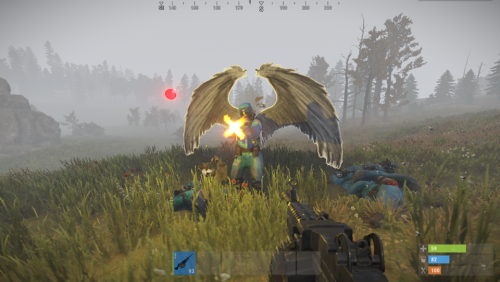 You need to give the player permission: customwings.2687914104 or customwings.all The player then uses the chat command : /wing set (and turn on) Considering that many panel servers will limit the distance of entity display, I optimized the code logic. Please download the latest version,If you have any questions, please contact me again
 -
 The configuration file rules of each plugin are different My plugin description page contains configuration file information { "➊ Global Messages settings": { "Enable About Animal": true, "Enable About Entitys": true, "Enable About NPC": true }, "Display name modification and activation": { "➔ Animal name": { "bear": { "Display name": "bear", "Enable": true }, "boar": { "Display name": "boar", "Enable": true }, "chicken": { "Display name": "chicken", "Enable": true }, "horse": { "Display name": "horse", "Enable": true }, "stag": { "Display name": "stag", "Enable": true }, "testridablehorse": { "Display name": "testridablehorse", "Enable": true }, "wolf": { "Display name": "wolf", "Enable": true }, "zombie": { "Display name": "zombie", "Enable": true } }, "➁ NPC name": { "bandit_conversationalist": { "Display name": "bandit_conversationalist", "Enable": true }, "bandit_shopkeeper": { "Display name": "bandit_shopkeeper", "Enable": true }, "boat_shopkeeper": { "Display name": "boat_shopkeeper", "Enable": true }, "missionprovider_bandit_a": { "Display name": "missionprovider_bandit_a", "Enable": true }, "missionprovider_bandit_b": { "Display name": "missionprovider_bandit_b", "Enable": true }, "missionprovider_fishing_a": { "Display name": "missionprovider_fishing_a", "Enable": true }, "missionprovider_fishing_b": { "Display name": "missionprovider_fishing_b", "Enable": true }, "missionprovider_outpost_a": { "Display name": "missionprovider_outpost_a", "Enable": true }, "missionprovider_outpost_b": { "Display name": "missionprovider_outpost_b", "Enable": true }, "missionprovider_stables_a": { "Display name": "missionprovider_stables_a", "Enable": true }, "missionprovider_stables_b": { "Display name": "missionprovider_stables_b", "Enable": true }, "npc_bandit_guard": { "Display name": "npc_bandit_guard", "Enable": true }, "npc_tunneldweller": { "Display name": "npc_tunneldweller", "Enable": true }, "npc_underwaterdweller": { "Display name": "npc_underwaterdweller", "Enable": true }, "player": { "Display name": "player", "Enable": true }, "scarecrow": { "Display name": "scarecrow", "Enable": true }, "scientistnpc_patrol": { "Display name": "scientistnpc_patrol", "Enable": true }, "scientistnpc_peacekeeper": { "Display name": "scientistnpc_peacekeeper", "Enable": true }, "scientistnpc_roam": { "Display name": "scientistnpc_roam", "Enable": true }, "scientistnpc_roamtethered": { "Display name": "scientistnpc_roamtethered", "Enable": true }, "stables_shopkeeper": { "Display name": "stables_shopkeeper", "Enable": true } }, "➂ Entity name": { "autoturret_deployed": { "Display name": "autoturret_deployed", "Enable": false }, "beartrap": { "Display name": "beartrap", "Enable": false }, "bradleyapc": { "Display name": "bradleyapc", "Enable": true }, "flameturret.deployed": { "Display name": "flameturret.deployed", "Enable": false }, "guntrap.deployed": { "Display name": "guntrap.deployed", "Enable": false }, "landmine": { "Display name": "landmine", "Enable": false }, "patrolhelicopter": { "Display name": "patrolhelicopter", "Enable": true }, "sam_site_turret_deployed": { "Display name": "sam_site_turret_deployed", "Enable": false }, "sentry.scientist.static": { "Display name": "sentry.scientist.static", "Enable": false } }, "➃ Weapon name": { "Assault Rifle": "Assault Rifle", "Bolt Action Rifle": "Bolt Action Rifle", "Bone Club": "Bone Club", "Bone Knife": "Bone Knife", "Butcher Knife": "Butcher Knife", "Candy Cane Club": "Candy Cane Club", "Chainsaw": "Chainsaw", "Combat Knife": "Combat Knife", "Compound Bow": "Compound Bow", "Crossbow": "Crossbow", "Custom SMG": "Custom SMG", "Double Barrel Shotgun": "Double Barrel Shotgun", "Eoka Pistol": "Eoka Pistol", "explosive": "explosive", "Flame Thrower": "Flame Thrower", "Flashlight": "Flashlight", "grenade": "grenade", "Hatchet": "Hatchet", "heat": "heat", "Hunting Bow": "Hunting Bow", "Jackhammer": "Jackhammer", "L96 Rifle": "L96 Rifle", "Longsword": "Longsword", "LR-300 Assault Rifle": "LR-300 Assault Rifle", "M249": "M249", "M39 Rifle": "M39 Rifle", "M92 Pistol": "M92 Pistol", "Mace": "Mace", "MP5A4": "MP5A4", "Multiple Grenade Launcher": "Multiple Grenade Launcher", "Nailgun": "Nailgun", "Pickaxe": "Pickaxe", "Pump Shotgun": "Pump Shotgun", "Python Revolver": "Python Revolver", "Revolver": "Revolver", "Rock": "Rock", "Rocket Launcher": "Rocket Launcher", "Salvaged Axe": "Salvaged Axe", "Salvaged Cleaver": "Salvaged Cleaver", "Salvaged Hammer": "Salvaged Hammer", "Salvaged Icepick": "Salvaged Icepick", "Salvaged Sword": "Salvaged Sword", "Semi-Automatic Pistol": "Semi-Automatic Pistol", "Semi-Automatic Rifle": "Semi-Automatic Rifle", "Spas-12 Shotgun": "Spas-12 Shotgun", "Stone Hatchet": "Stone Hatchet", "Stone Pickaxe": "Stone Pickaxe", "Stone Spear": "Stone Spear", "Thompson": "Thompson", "Torch": "Torch", "Waterpipe Shotgun": "Waterpipe Shotgun", "Wooden Spear": "Wooden Spear" }, "➄ Body part name": { "Arm": "Arm", "Body": "Body", "Chest": "Chest", "Foot": "Foot", "Hand": "Hand", "Head": "Head", "Leg": "Leg", "Stomach": "Stomach" } }, "➈ Other settings": { "Chat Icon Id": "0", "Click on FloatUI switch to the chat box in seconds": 10, "Default command": "dm", "Default display(true = FloatUI , false = Chat box)": true, "FloatUI message closing time second": 10 }, "➉ Lang settings": { "AnimalKillPlayer": "<color=#66FF00>{0}</color> Kill <color=#FFFF00>{1}</color> <color=#FF9900>{2}</color> m", "BradleyapcKillPlayer": "<color=#66FF00>{0}</color> Kill <color=#FFFF00>{1}</color> <color=#FF9900>{2}</color> m", "ButtonSwitch": "Auto switch death message to <color=#FFFF00>ChatBox</color> <color=#FF0000>{0}</color> seconds", "ChatTitle": "", "DisplayNumber": "Display number", "DIY": "DIY control panel", "EntityKillPlayer": "<color=#66FF00>{0}</color> Kill <color=#FFFF00>{1}</color> <color=#FF9900>{2}</color> m", "FloatUILocation": "UI Location", "FontPosition": "Font position", "FontSize": "Font size", "IntervalStretch": "Interval stretch", "LengthWidth": "Length Width", "MessageTochat": "Toggle death message to <color=#FFFF00>ChatBox</color>", "MessageToFloatUI": "Toggle death message to <color=#66FF00>FloatUI</color>", "NoPermission": "Not have permission !", "NPCKillPlayer": "<color=#66FF00>{0}</color> <color=#66FFFF>{1}</color> Kill <color=#FFFF00>{2}</color> <color=#FF9900>{3}</color> m", "PatrolHelicopterKillPlayer": "<color=#66FF00>{0}</color> Kill <color=#FFFF00>{1}</color> <color=#FF9900>{2}</color> m", "PlayerKillAnimal": "<color=#66FF00>{0}</color> <color=#66FFFF>{1}</color> Kill <color=#FFFF00>{2}</color> <color=#FF9900>{3}</color> m", "PlayerKillBradleyapc": "<color=#66FF00>{0}</color> <color=#66FFFF>{1}</color> Kill <color=#FFFF00>{2}</color> <color=#FF9900>{3}</color> m", "PlayerKillEntity": "<color=#66FF00>{0}</color> <color=#66FFFF>{1}</color> Kill <color=#FFFF00>{2}</color> <color=#FF9900>{3}</color> m", "PlayerKillNPC": "<color=#66FF00>{0}</color> <color=#66FFFF>{1}</color> Kill <color=#FFFF00>{2}</color> <color=#6699FF>{3}</color> <color=#FF9900>{4}</color> m", "PlayerKillPatrolHelicopter": "<color=#66FF00>{0}</color> <color=#66FFFF>{1}</color> Kill <color=#FFFF00>{2}</color> <color=#FF9900>{3}</color> m", "PlayerKillPlayer": "<color=#66FF00>{0}</color> <color=#66FFFF>{1}</color> Kill <color=#FFFF00>{2}</color> <color=#6699FF>{3}</color> <color=#FF9900>{4}</color> m", "PlayerSuicide": "<color=#FFFF00>{0}</color> suicide", "Reset": "Reset" } }
 -
Regarding the display of weapon pictures, this is easy to achieve But it will greatly increase your calculation and memory consumption (And it's a very serious burden) Check the memory occupied by the text and the memory occupied by the image in your computer, make a comparison and you will know The memory usage is a thousand times difference, and the occupied memory will not be released immediately.. If the frequency of displaying pictures is high enough, the player's client will soon need to be restarted to release the memory And it takes up too much screen area to display multiple death messages Of course, if your server CPU is good enough, memory is large enough, and the player’s computer is the same, you can ignore its advantages
- 82 comments
-
- 1
-

-
- #death tips
- #death notice
- (and 8 more)
-
Obtaining the object type is officially designated, and the official shark belongs to the entity type instead of the animal. In the entity type, enable shark He can now display normally, and the kill information includes the weapon used spear or others The new version is 1.0.3
-
Changed Status from Pending to Gremlins Changed Fixed In to 1.0.2
-
You first try this hidden mode, I think it is more reasonable than the previous hidden button
-
You should try this hidden frame first. I think it is more reasonable than the previous hidden button.
-
In the current version, I cancelled the floating button and used other hiding methods. When the player uses the map grid, the possible floating death message will cause obstruction, At this time, the player will click on the hidden button, and he will temporarily switch the death message to the chat box for display. This will not cause blocking. Temporarily hide the death message for switching the chat box. The default time can be set in the settings file
-
I'm very sorry, please download the latest version 1.0.2 and just overwrite it... The console will prompt after killing the shark [DeathMessage] Added a new ShortPrefabName To be activated.. simpleshark Then enable the shark in the settings and it can display normally (In ➂ Entity name type )
-
I'll record one later