
.gif.953391bcc7a1bf59be4f2318c9b6d691.gif)

ThePitereq
-
Posts
2,054 -
Joined
-
Last visited
-
Days Won
7
Content Type
Profiles
Warranty Claims
Downloads
Forums
Store
Services
Downloads Plus Support
DOWNLOADS EXTRA
Reels
Everything posted by ThePitereq
-

Interacting with a mixing table that is currently in use will cause it to stop working
ThePitereq replied to Ryuu's Support Report in Support
Just checking reopening mixing table and no issue at all. About the effect i see the issue, will be fixed in next version. -
 What is the command output printing?
 -
Interacting with a mixing table that is currently in use will cause it to stop working
ThePitereq replied to Ryuu's Support Report in Support
Hey, you sure other plugin doesnt collide with the first issue? Didnt had something like that while ago. About the visual thing im pretty sure it worked but maybe facepucnh changed something, will take a look tomorrow. -
Changed Status from Pending to Closed
-
Hey, yeah know about the issue. Will be fixed in next release, probably tomorrow.
-
Hey, will push an update today with few more updates, sorry for waiting.
-
 Hey, answered to your DM 2 days ago asking for your config, can you share it there please, so can help solving the issue?
 -
Generateconfigs Fails (Trying to Convert to V2)
ThePitereq replied to ColorMehJewish's Support Report in Support
It's not present yet, there will be bigger admin menu introduced in 2.1.0 with a lot more features. -
And i see you have more invalid shortnames like "easy" "medioum" etc. clear them all.
-
You have xmas.present.small{2}-0 with "Item Shortname": "2863540162", and it throws an error. just make it empty.
-
Hey, any way how to replicate that? Can you share me your config and data folder?
-
 Hey, yeah It would be possible.
 -
Generateconfigs Fails (Trying to Convert to V2)
ThePitereq replied to ColorMehJewish's Support Report in Support
But regarding what I need to do to finish converting the files I sent, would I just need to place the 1.0 config into that old folder and reboot the server? Would that get everything to finish converting? YOu just load the config there, reload the plugin and run command to convert. Also, do I remove the converter plugin once the 1.0 shop converts to 2.0? And is there any way for me to identify the 1.0? (file extension type, or if I have a backup of my files... where would I grab the 1.0 file again?) Yes, you don't need converter anymore. In 1.0 you don't have any config groups, so instead of one group for all comamnd things you just have list of command fields, so in 1.0 config it starts with "Commands": [... and then is list of commands While in 2.0 it startas iwth "Commands": {... and then you have another fields which then they contain commands. Also the 2.0 config ends with "Last Config Version (do not modify)": "2.0.0" -
Generateconfigs Fails (Trying to Convert to V2)
ThePitereq replied to ColorMehJewish's Support Report in Support
You have the default config with some preview values generated, if you need any help with anything, just feel free to ask. It's hard for me to answer for "everything" as there is hundrets of possibilities -
Hey, yeah sorry for that there was another similar issue, but this one has also been found and the 2.0.8 will contain an fix with this.
-
Generateconfigs Fails (Trying to Convert to V2)
ThePitereq replied to ColorMehJewish's Support Report in Support
Based on what you've sent you've put new config from 2.0 into Old folder, where 1.0 should be, This is why it prints that error. -
Hey, oh. Just realised idk why but everything is checked backwards Instead of finding biggest discord it searches for smallest lol. Will be fixed in next version, sorry for that. If you need fix now you can message me on discord so i can share an new version of plugin with you faster. Just I don't want to push many version updated with small fixes few times a week, it's better to make bulk one
-
 Plugin automatically sets paths on all available roads and find these blocked ones and removed them from pool. YEs, damage to other player tanks can be limited to only owner and/or friends and/or clan. Yes, you can prevent damage to buildings. Yes, crates are locked to the player who spawned the tank and/or to frends and/or clan. Crate loot can be set to vanilla default, then it works with AlphaLoot, but you can also set custom loot table in config.
 -
Wdym? If you own DLC it means you own the blueprint so it cannot be splitted.
-
I think so, but the update is out already.
-
Should be fixed now, sorry for problems.
-
Oh, i know where is the issue, it doesnt came up to me in tests as i had this data part empty, will push update in few mins
-
Having issue putting this into my server
ThePitereq replied to Fusion.net's Support Report in Support
If you need any help with anything feel free to message me on discord, it's a lot faster than here to respond. -
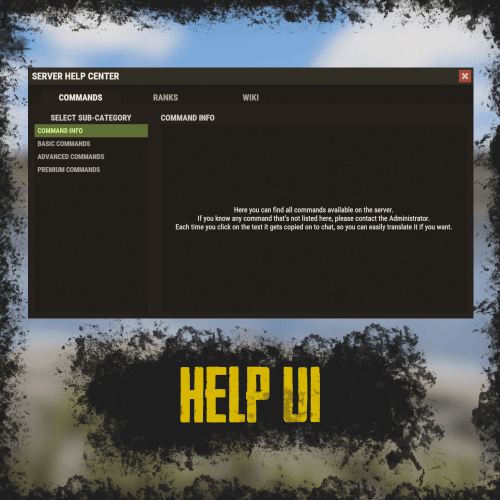 Unfortunately no, as whole UI is made on Carbon LUI and Oxide doesn't have this implementation. But the extension is very rarely updated and only big rust changes would break exisitng functionality so the updates arent that common.
 -
YEah sorry, the DLC check option is Player Blueprint Ownership Required make sure to keep this one to true and Player Skin Ownership Required to false
