.gif.953391bcc7a1bf59be4f2318c9b6d691.gif)

ThePitereq
-
Posts
2,051 -
Joined
-
Last visited
-
Days Won
7
Content Type
Profiles
Warranty Claims
Downloads
Forums
Store
Services
Downloads Plus Support
DOWNLOADS EXTRA
Reels
Everything posted by ThePitereq
-
 Hey, I'm working on new bradley time displaying that's currently during testing. It should be fixed on new version.
 -
Hey, yeah post an error code, can't do much without that.
-
 Profile is here only for node selection. It doesn't count the time, it just falls a while. You can increase chance by setting Spawn Chance (0-100)
 -
Changed Status from Pending to Closed
-
Hey. Make sure the extension has been loaded. There is no need to restart the server if you installed extension first time, but you can try. You can always stop the server and paste the dll manually to the folder.
-

I would like to ask you about a possible performance issue with Waystones v1.1.4.
ThePitereq replied to hid333's Support Report in Support
Changed Status from Pending to Fixed Changed Fixed In to 1.1.5 -
I would like to ask you about a possible performance issue with Waystones v1.1.4.
ThePitereq replied to hid333's Support Report in Support
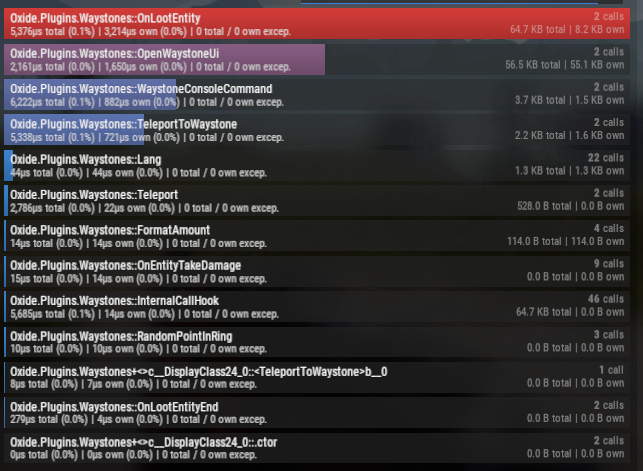
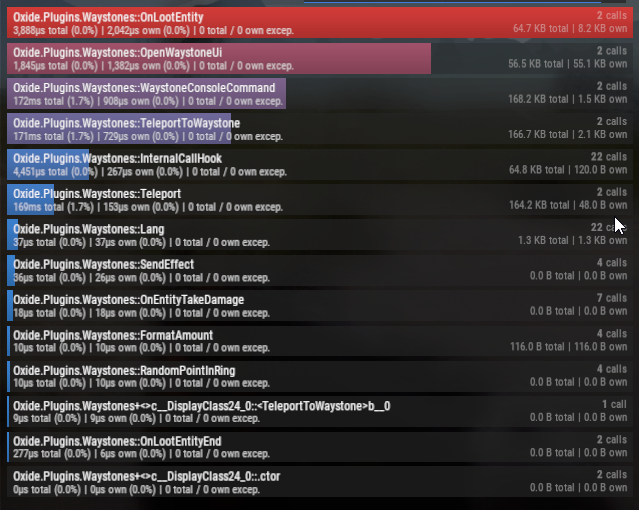
Hey! @hid333 Just updated teleportation code to current code from BasePortal used in halloween/christmas events. Before: After: The OnLootEntity still takes a bit, because of the UI drawing. Maybe in one of the future updates i'll switch to Carbon LUI to improve performance by ~70% (LUI wasn't a thing when plugin was released).
-
You can go there to shop configuration and add item to shop from your hands.
-
Oh sorry its /adminshop by default
-
DO you have an CarbonAliases on your server?
-
I would like to ask you about a possible performance issue with Waystones v1.1.4.
ThePitereq replied to hid333's Support Report in Support
Hey. Will do some research today about it. As i remember, i took the teleporting directly from rust code if i'm not mistaken, didn't thought about any changes there as it worked and i thought it's fine Will do some profiling with it. -
Hey, TO add items to shop you can do it through /adminmenu or by going to /data/ShoppyStock/Shops/Configs/<shopName>.json and add item to one of shop category or add new one, just copy-paste whole config section. TO add selling items to server you can also do it through admin menu, but doing it directly through JSON is faster when you learn it. To add sell items just go to /data/ShoppyStock/StockMarkets/Configs/<stockName>.json and add the item into Sell Items section on the bottom "Server Sell Items (shortname : [ skinId : ItemConfig ])": { "wood": { "0": { "Default Sell Amount Calculation (DSAC) (Read On Website)": 8562857, "Price - Min": 0.002, "Price - Max": 0.007, "Price Parent - Shortname (ignore, if empty)": "", "Price Parent - Skin ID": 0, "Price Parent - Min Boost": 0.0, "Price Parent - Max Boost": 0.0, "Minimal Sell Amount": 1, "Max Daily Sell Amount (-1, to disable)": -1, "Max Daily Sell Amount Permissions (permission: limit)": {}, "Allow Re-Purchase From Server": true, "Override Skinned Items As Unskinned (works only for configuration of skinId 0)": false } }, The "wood" is shortname and the "0" is skin id.
-
Changed Status from Pending to Fixed Changed Fixed In to 2.2.3
-
Hey! Should be fixed now, sorry for problems!
-
 These settings is when the wipe trigger occur. BAsed on this all actions like "Clear Sell Requests On Wipe": true will make that sell requests are cleared when conditiosn from there are met.
 -
Hey, sure can add withdrawal limit in next update.
-
What's your error. Make sure you've installed the CarbonAliases
-
PopUpAPI IP Verification Prevents Shoppy Stock Installation
ThePitereq replied to CHE7's Support Report in Support
Yeah, feel free to send it in DMs as this ticket isn't private and i don't want You to leak something. -
Hey, It's in your configuration. You need to make plugin target Economics and then it should work on Economics.
-
Hey, install PopUpAPI so you will see the message that you need to press SPRINT button to remove.
-
I would like to ask you about a possible performance issue with Waystones v1.1.4.
ThePitereq replied to hid333's Support Report in Support
Hey. Do you know which action exactly causes this issue? Like teleportation or UI clicking? All things that could lag are secured after many checs and cached if possible. The thing that could "lag" the most in the plugin is the spawnpoint search, but if plugin found one spawn point, it won't search for new one untl next plugin reload. I didn't saw any performance issues on my side. -
PopUpAPI IP Verification Prevents Shoppy Stock Installation
ThePitereq replied to CHE7's Support Report in Support
It's also mine plugin, so thats why i have no idea why it doesn't work. It doesnt have any IP checks or anything like that, it should just work straight-forward. -
PopUpAPI IP Verification Prevents Shoppy Stock Installation
ThePitereq replied to CHE7's Support Report in Support
Most recent version from codefling should work, this error isn't like an lock from my side - never saw something like that, maybe it's some license verification failure or something? Not sure about this. -
Hey, yeah you can select which shops you want to wipe, each shop have its own check for wipe. Currently there is no command to wipe shops, but can add it in one of next updates.
-
Hey! You've probably set Make Item Names Multilingual (generates a lot of text in lang file) to true and you can translate this field in language file.