
-
Posts
102 -
Joined
-
Last visited
-
Days Won
1
Content Type
Profiles
Warranty Claims
Downloads
Forums
Store
Services
Downloads Plus Support
DOWNLOADS EXTRA
Reels
Support Center
Everything posted by TimFS
-
You're reviving dead post bro. Maybe cuz @Death is in it.
-
 Should be example in config, this website cms/site is deprecated, were going to launch a free new one later this year.
 -
That be discussed with that developer that i choose.
-
Hi all, Looking for well-known and reputable C# plugin developer for one of my projects. We will negotiate price. Kind regards, NH
-
config.php file no database needed, you need rust-servers.net account and servers linked to get api code
-
@Raul-Sorin Sorban helped us to get our API support into the EasyVote plugin on an abbonend Plugin. We are really gratefull he wanted to pickup the project and willing to maintain it, for the beneficial of all rust related sites and not cherry picking one over the other. So i'd say Raul thumbs up to you!
-
 EasyVote recently received an update with support for https://rustservers.gg
 -
-
Config file Under //Shop URL (Your Tebex Shop) $SRV_SHOP= "https://example.tebex.io"; <- Edit this within the ""
-
 Awesome! Nice work. But i meant like native support in suggestions.
 -
Could you add support for Rustservers.gg? API: https://rustservers.gg/api
-
ahh sorry, this is coming soon! Misunderstood.
-
Does it with all the commands, if you setup the API right.
-
I tried, but none of the admins of Codefling wanted to pickup the project.
-
Ah, yeah maybe contact Codefling support, and ask them if they can pickup the EasyVote plugin because that developer is gone, and no one is going to bring any updates to it.
-
You can change the chat commands in the config, then it works along. So for exampe /vote2 /votes2 /claim2 The author from EasyVote is not responsible, he quit Rust. Same for the other pluhgin. We didn't want to make our own plugin and rather have it in the other ones, but they are all non-responsive.
-
I think because we had some downtime.
-
Changed Status from Pending to Not a Bug
-
Then you're using the wrong website its: https://rustservers.me if you want to use rust-servers.net then there are couple vote plugins 1. EasyVote 2. Voter Rewards (On uMod)
-
Hi, Are you using: https://rustservers.me and not on accident the other Rust Servers Site? Also, make sure ID And API key are the right position, i had this also one time. Also i think economics needs to be set on the commands section.
-
Version 1.3.1
1,827 downloads
Vote Rewards Plugin for RustServers.gg Information This plugin is created for the website rustservers.gg, which is one of the largest platform for searching Rust servers. It is intended to reward players for voting on your server. Features Random or Static rewards for voting. On screen message with a note to copy and paste the url of your server (NEW) Simplicity, easy to configure. Multiple Chat commands, work all the same way /vote /claim etc. Will show where the player can vote and claims the reward is egible. No permissions needed, only edit the config file and you are ready to go. Lightweight, does barely use resources on your server, perfect for beginning servers on Shared Game Hosting Servers. How do i setup Vote Rewards? Go to Control Panel if you are logged in [Skip step 2 if you are loged in] If not logged in it requires you to register an account, takes 20 seconds. Check if you claimed your server [Skip to 4 if you claimed your server] if not go to Add / Claim Server and follow the instructions In the My Servers tab click on the pecil icon next to your server name In this tab you can see your server ID replace the your-server-id text with your ID Below the ID you find the API key replace the your-api-key with your own API key Reload your plugin to finish the setup For Oxide o.reload RSVote For Carbon c.load RSVote Chat Commands /vote - Check Votes/ Shows where to vote / Claims votes /claim - ^ /votes - ^ Config Example { "API Key": "your-api-key", "Server Id": "your-server-id", "Chat Commands": [ "claim", "vote", "votes" ], "Reward items": [ { "Item Shortname": "wood", "Description": null, "Item Amount Min": 1000, "Item Amount Max": 2000, "Item Skin id": 0 }, { "Item Shortname": "stones", "Description": null, "Item Amount Min": 1000, "Item Amount Max": 2000, "Item Skin id": 0 }, { "Item Shortname": "metal.refined", "Description": null, "Item Amount Min": 1000, "Item Amount Max": 2000, "Item Skin id": 0 } ], "Reward Commands Help": "use {steamid} to add user steam id\nExamples:\nsr add {steamid} 10 - to add ServerRewards points\ndeposit {steamid} 10 - to add Economics points\n", "Reward Commands": [ { "Command": "example {steamid} 1d", "Description": "example Description (will appear on Message)", "Type": "example type of Reward (Kit, Permission etc.)" }, { "Command": "example {steamid} 1d", "Description": "example Description (will appear on Message)", "Type": "example type of Reward (Kit, Permission etc.)" }, { "Command": "example {steamid} 1d", "Description": "example Description (will appear on Message)", "Type": "example type of Reward (Kit, Permission etc.)" } ] }Free -
Dark
-
Version 1.4.4.1
943 downloads
V1.4 A simple Rust template for a beginner server, to start out with. V2 (Project RustCMS) Discontinued project. Due to health issues, i wasn't able to continue development on RustCMS. What started as an ambitious project ended quickly, leaving people behind that pre-ordered it. @Death made a note if you pre-ordered the v2.0 version you can refund the project. For the people who bought v1 you can't refund, it's only for the pre-orders that have been made. V1 will still be supported and will become free, all screenshots and references to V2 have been removed. ©Copyright: @TimRS For Version 1.x Back-end @Kodak VAC For Version 1.0 Front-endFree -
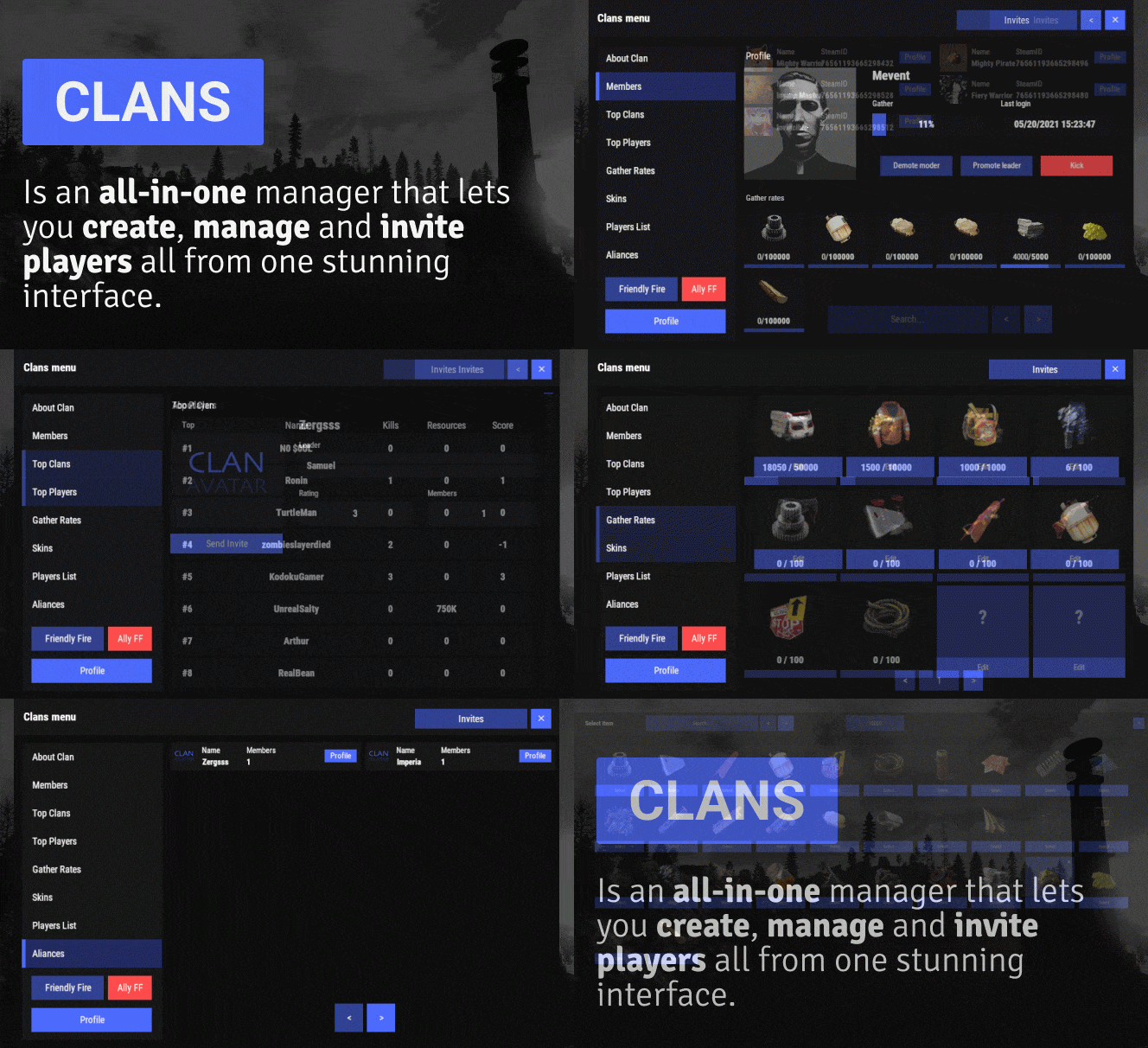 Updated I see the author still working hard on the plugin and it came to my attention that it deserves to be upgraded to 4 stars review. Some off points might have been fixed check the update logs. UI is great, some small bugs here and there, could use some fixes thats why 3 stars. The Skinbox section for clans is really cool but it needs some rework especially people cant unforce the clan skinbox and adding custom skins doesn't seem to work for me ingame (only through config) Could use some bug fixes. - UI typing isn't really optimised - If you invite someone to the team they can join without joining the clan, this is a cool option but it sends out also clan invite. - Inviting players is hard when typing in names it doesn't really function as it should, like when you search them it doesn't do exactly what you type in.