Depends on
Required for this file to work correctly.

Works with
Optional integrations and compatible files.




About Furnace Upgrades
Furnace Upgrades
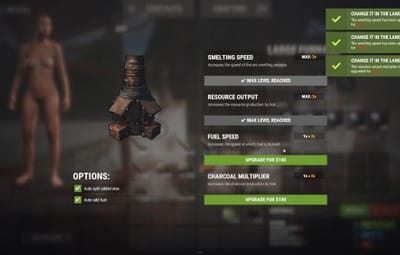
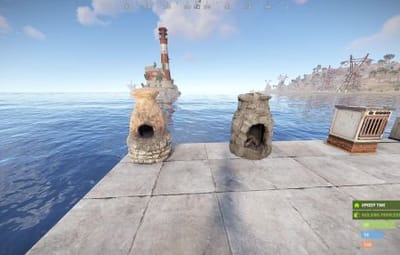
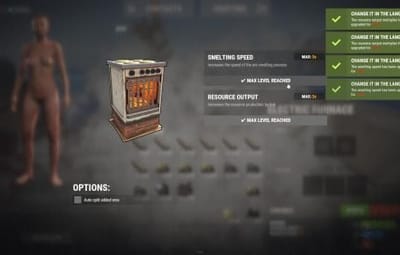
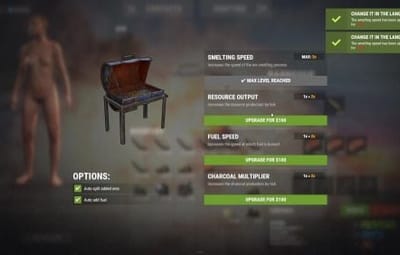
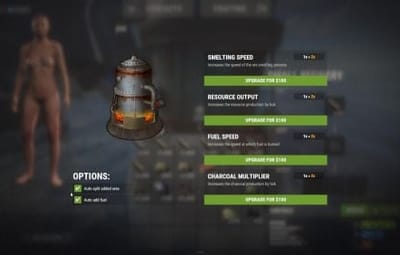
Level up your smelting. Players upgrade each furnace on its own: faster smelting, faster fuel burn, more ore output and more charcoal. They pay with scrap, Economics or ServerRewards. Works on furnaces, large and electric furnaces, refineries, campfires, BBQs and even the Mixing Table.
It replaces the classic "quick smelt" with a real progression. Every oven grows with the player who owns it.
Video Showcase
Features
Upgrades
-
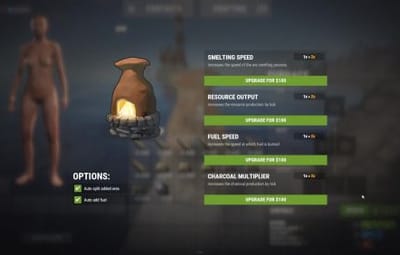
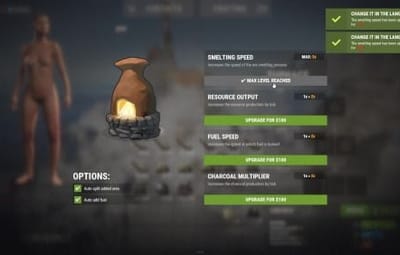
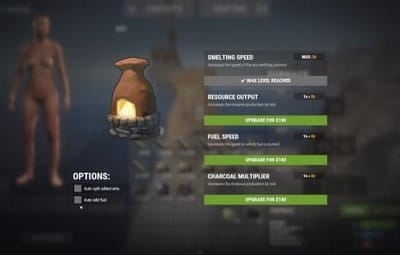
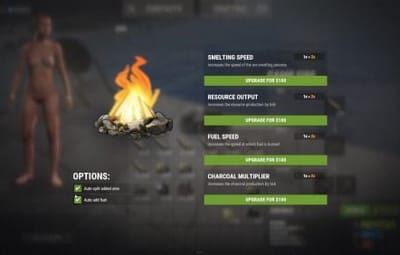
Four upgrades per oven:
- Smelting speed: cooks faster.
- Fuel speed: burns fuel faster, so wood turns into charcoal quicker.
- Resource output: more metal per ore.
- Charcoal: more charcoal from wood.
- Unlimited levels. Add as many levels as you want, each with its own cost and multiplier.
- Per-oven settings. Every oven type has its own upgrade tree.
- Mixing Table speed. Mix faster, up to 100% quicker.
- Upgrades stay with the oven. Pick it up and place it again and it keeps its levels (optional).
Quality of life
- Auto split. Ores spread evenly across the slots on their own.
- Auto fuel. Adds exactly the fuel needed for the batch, calculated from the oven's upgrades. Faster smelting also burns fuel faster, and Auto fuel accounts for that.
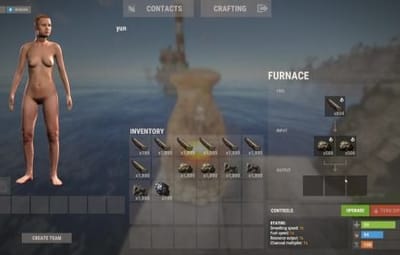
- Status panel. Shows the oven's levels, time left and fuel needed right on the oven screen.
- Server-wide defaults. Set a base speed and output for every oven, without upgrades. That's your quick smelt replacement.
- Charcoal chance. Control how often wood turns into charcoal.
Control
- Pay how you like. Scrap (or any item, even skinned), Economics or ServerRewards.
- Owner or team only. Limit upgrades, or even turning the oven on and off, to the owner and their team.
- Permission-based levels. Each upgrade level can need its own permission, for example Level 3 for VIPs only.
- Feature permissions. Auto fuel, auto split, the upgrade button and the status panel can each be locked behind a permission.
- Turn any feature off you don't want.
- Notifications by chat, GameTip, Toastify or Notify, with an upgrade effect.
- Every message is in the lang file.
Supported ovens
| Oven | Short name |
|---|---|
| Furnace |
furnace
|
| Large Furnace |
furnace.large
|
| Industrial Large Furnace |
industrial.furnace.large
|
| Electric Furnace |
electric.furnace
|
| Industrial Electric Furnace |
industrial_electric_furnace
|
| Legacy Furnace |
legacyfurnace
|
| Small Oil Refinery |
small.oil.refinery
|
| Campfire |
campfire
|
| BBQ |
bbq
|
| Mixing Table | (own settings section) |
How it works
- Open a furnace. An UPGRADE button and a status panel appear on the oven screen.
- Click UPGRADE to see all four upgrades with the current level, the next level and the cost.
- Buy a level. The cost is taken and the oven upgrades at once.
- Turn on Auto split and Auto fuel in the same window if you have them.
Tip
Want quick smelt without upgrades? Leave the upgrades off and raise the values in Default Settings. Every oven on the server then smelts faster.
Permissions
| Permission | Allows |
|---|---|
furnaceupgrades.use
|
Required. Buying upgrades |
furnaceupgrades.autofuel
|
Using the Auto fuel option |
furnaceupgrades.autosplit
|
Using the Auto split option |
furnaceupgrades.showupgrade
|
Seeing the UPGRADE button (only when "Requires upgrade button permission" is on) |
furnaceupgrades.showstatus
|
Seeing the status panel (only when "Requires show status permission" is on) |
furnaceupgrades.level2 / furnaceupgrades.level3
|
Buying those levels (only when permission-based upgrades are on) |
Note
Permission-based upgrades: turn on Use permission based upgrade in General Settings, then set a permission on any level under Upgrades Settings. Leave it empty for no permission. Every permission you type is registered automatically, so you can create furnaceupgrades.vip, furnaceupgrades.mvp or whatever you like.
Hosting partner
Game hosting perfected, that's Physgun.
Join the thousands of server owners using Physgun to take their game server communities to the top.
Installation
-
Upload
FurnaceUpgrades.cstooxide/plugins. - Grant the permissions:
oxide.grant group default furnaceupgrades.use
oxide.grant group default furnaceupgrades.autofuel
oxide.grant group default furnaceupgrades.autosplit
- (Recommended) Install ImageLibrary to show the oven picture in the upgrade window.
- Open a furnace and click UPGRADE.
Warning
Using a stacks plugin? (StackModifier, StacksExtended, StackSizeController…)
Set the stack size of every oven item to 1 (vanilla). If ovens stack, their upgrades are lost when they stack. The plugin warns you in console when it detects one of these plugins.
Items to keep at stack 1: furnace, furnace.large, industrial.furnace.large, electric.furnace, industrial.electric.furnace, legacyfurnace, campfire, bbq, small.oil.refinery, mixingtable.
Also use only one furnace splitter: the built-in Auto split or another plugin, not both.
Configuration
Config (oxide/config/FurnaceUpgrades.json), with the upgrade tree shown for one oven
{
  "General Settings": {
    "Only the owner can upgrade the furnace": false,
    "Only teammates can upgrade the furnace": true,
    "Only Allow Oven Toggling by Owner & Team": false,
    "Keep attributes when removing": true,
    "Requires upgrade button permission": false,
    "Requires show status permission": false,
    "Show furnace item cooking animation": true,
    "Use permission based upgrade (each upgrade level can require its own permission)": false
  },
  "Currency Settings": {
    "Currency type (0 - Scrap | 1 - Economics | 2 - Server Rewards)": 0,
    "Currency item (if the currency type is '0')": {
      "Short name": "scrap",
      "Skin ID": 0
    }
  },
  "Visual Settings": {
    "Use chat messages": true,
    "Use Game Tip messages": true,
    "Notification plugin (0 - None | 1 - Toastify | 2 - Notify)": 1,
    "Toastify notification ID": "success",
    "Notify notification type": 0,
    "Upgrade effect (empty = disabled)": "assets/bundled/prefabs/fx/build/promote_stone.prefab"
  },
  "UI Settings": {
    "Disable status panel": false,
    "Upgrade button": {
      "Anchor": "0.5 0 0.5 0",
      "Offset": "400 109.5 480 141.5",
      "Background color": "0.45 0.63 0.19 1",
      "Font size": 13
    },
    "Upgrade button on electric furnaces": {
      "Anchor": "0.5 0 0.5 0",
      "Offset": "492 354.5 572 386.5",
      "Background color": "0.45 0.63 0.19 1",
      "Font size": 13
    },
    "Upgrade button on mixing table": {
      "Anchor": "0.5 0 0.5 0",
      "Offset": "338 79.5 418 101.5",
      "Background color": "0.45 0.63 0.19 1",
      "Font size": 13
    },
    "Status panel": {
      "Anchor": "0.5 0 0.5 0",
      "Offset": "193 17 420 103",
      "Background color": "0.969 0.922 0.882 0.035",
      "Font size": 12
    }
  },
  "Features Settings": {
    "Smelting speed multiplier": true,
    "Fuel speed": true,
    "Resource output multiplier": true,
    "Charcoal multiplier": true,
    "Auto split cookables": true,
    "Auto add fuel": true
  },
  "Default Settings": {
    "Smelting speed": 1.0,
    "Fuel speed": 1.0,
    "Resource output multiplier": 1.0,
    "Charcoal multiplier": 1.0,
    "Charcoal byproduct chance(1.0 = 100%, 0.5 = 50%)": 0.5
  },
  "Mixing Table Upgrade Settings": {
    "Enable Mixing Table upgrade": true,
    "Mixing Table speed upgrade": true,
    "Mixing Table Speed in %(Max 100)": [
      { "Cost": 100, "Multiplier": 10.0 },
      { "Cost": 300, "Multiplier": 30.0 },
      { "Cost": 500, "Multiplier": 50.0 }
    ]
  },
  "Upgrades Settings": {
    "furnace": {
      "Smelting speed": [
        { "Cost": 100, "Multiplier": 2.0, "Permission (leave empty for no permission)": "FurnaceUpgrades.Level2" },
        { "Cost": 200, "Multiplier": 3.0, "Permission (leave empty for no permission)": "FurnaceUpgrades.Level3" }
      ],
      "Fuel speed": [
        { "Cost": 100, "Multiplier": 2.0, "Permission (leave empty for no permission)": "FurnaceUpgrades.Level2" },
        { "Cost": 200, "Multiplier": 3.0, "Permission (leave empty for no permission)": "FurnaceUpgrades.Level3" }
      ],
      "Resource output multiplier": [
        { "Cost": 100, "Multiplier": 2.0, "Permission (leave empty for no permission)": "FurnaceUpgrades.Level2" },
        { "Cost": 200, "Multiplier": 3.0, "Permission (leave empty for no permission)": "FurnaceUpgrades.Level3" }
      ],
      "Charcoal multiplier": [
        { "Cost": 100, "Multiplier": 2.0, "Permission (leave empty for no permission)": "FurnaceUpgrades.Level2" },
        { "Cost": 200, "Multiplier": 3.0, "Permission (leave empty for no permission)": "FurnaceUpgrades.Level3" }
      ]
    }
  },
  "Version": {
    "Major": 2,
    "Minor": 6,
    "Patch": 14
  }
}
Every other oven (furnace.large, electric.furnace, industrial.furnace.large, industrial_electric_furnace, legacyfurnace, campfire, bbq, small.oil.refinery) has the same block under Upgrades Settings.
Key settings explained
| Setting | What it does |
|---|---|
Multiplier
|
The value at that level: 2.0 = twice as fast, or twice as much
|
Cost
|
Price of that level in your currency |
Default Settings
|
Base values for every oven before upgrades (1.0 = vanilla)
|
Charcoal byproduct chance
|
How often wood makes charcoal (0.5 = 50%, vanilla-like)
|
Mixing Table Speed in %
|
How much faster mixing gets at each level (max 100)
|
Keep attributes when removing
|
A picked-up oven keeps its upgrades |
Only Allow Oven Toggling by Owner & Team
|
Only the owner and their team can turn the oven on or off |
Show furnace item cooking animation
|
The vanilla cooking visuals on items in the oven |
Currency item
|
Any item as payment, including a skinned one (Skin ID)
|
Plugins
| Plugin | Required? | Used for |
|---|---|---|
| ImageLibrary | Recommended | The oven picture in the upgrade window |
| Economics | Optional | Paying with money |
| ServerRewards | Optional | Paying with points |
| Toastify / Notify | Optional | Pop-up notifications |
FAQ
My upgrades disappear when I pick up a furnace.
Your stacks plugin lets ovens stack. Set every oven item's stack size to 1. See the warning under Installation.
Can I use it as a simple quick smelt?
Yes. Raise Smelting speed and Resource output multiplier in Default Settings. Every oven gets that boost with no upgrades needed.
Can I make the top level VIP only?
Yes. Turn on Use permission based upgrade, put a permission like furnaceupgrades.vip on that level, and grant it to your VIP group.
Can other players upgrade my furnace?
Not by default. Only you and your teammates can. Set Only the owner can upgrade the furnace to make it owner only.
Ores aren't splitting.
Make sure the player has furnaceupgrades.autosplit and has the option turned on in the upgrade window. Don't run another furnace splitter plugin at the same time.
Can I charge something other than scrap?
Yes. Set Currency type to 1 for Economics or 2 for ServerRewards, or change Currency item to any item.
Support
Need help or found a bug? Open a support ticket on this page or join the Discord.