
Vinni_TV_'s Wishlist
-

$22.00
Npc Random Raids
By Iftebinjan in Plugins
Optional Dependency Raidable Bases - https://codefling.com/plugins/raidable-bases
Optional Dependency Custom Loot - https://codefling.com/plugins/custom-loot
How To Call In Random Raids
Randomly calls in npc raids with options for Mlrs and Attack Hele Set a configurable timer and chance to auto call in raid
With Raidable bases plugin set a chance with configurable options for the npc's to come back and attack the raiders at one of there bases.
After a certain amount of npc kills have a random chance.
With item found in loot containers or given in shops by admins.
If the players base is by water the npc may go under the water and still fight.
SEE ALL CONFIG SETTINGS!
Chat Command - Permission = randomraids.admin
/randomraid -- Will display command usage.
/randomraid item list - will display list of raid item for admin to give them self.
/randomraid item <type> - example config types = easy, medium, hard
Server command
randomraid <playerid> <type> - Gives player raid item to start a raid.
{ "Random settings": { "GUI AnchorMin": "0.807 0.96", "GUI AnchorMax": "0.996 0.99", "GUI2 AnchorMin": "0.807 0.92", "GUI2 AnchorMax": "0.996 0.95", "GameTip display time in seconds": 2.0, "Total raids allowed at once": 10, "A player on the tc must be online": true, "Use random raid timer": false, "Random raid timer time": 3600, "Chance of random raid at time (1-100)": 10, "Authorized players Cooldown minutes before random raided again by chance": 1440, "The maximum amount of time a rocket will fly before exploding": 4.0, "Npc spawn damage delay": 2.0, "Display global chat message on raid start": true, "Display global map marker on raid start": true, "Display Gui to base owners": false, "Use GameTip announcement to player": false, "Disable radio chatter": false, "Wait until all NPC are dead before sending in next wave": false, "Player must have randomraids.use inorder to get raided": false, "Use world text to show base location": false, "World text display time": 60.0, "Use discord Webhook": false, "Discord Webhook URL": "", "Discord Avatar URL": "http://images.myvector.xyz/discordimage.png" }, "All Random Raid Types": { "Random raid types": { "easy": { "Total auth players on tc needed": 1, "Total npcs per wave": 10, "How many extra waves": 1, "Seconds untell next wave": 120, "Npc fires Mlrs at base": false, "Send in Attack Copter support": false, "Total event time in seconds": 640, "Npc drop loot on death": true, "Spawn health of the npc": 100.0, "Total rockets npc can fire": 20, "Total explosives npc can toss": 10, "Total AirDrops on event win": 1, "Rocket damage scale": 1.0, "Player damage scale from npc": 1.0, "Auto turret damage scale to npc": 1.0, "Raiders aimConeScale": 2.0, "Throw Explosive item shortnames": [ "explosive.timed", "explosive.satchel" ], "Spawn Attack Heli profile": [ "easy" ], "Spawn kits for the npcs": [], "Names to give the npcs": [ "Cobalt Scientist" ], "CustomLoot config profile name": [], "CustomLoot config profile names for AirDrop": [], "AlphaLoot config profile names": [], "AlphaLoot config profile names for AirDrop": [], "Juggernaut config": [ "easy" ], "Surrender costs": 200 }, "medium": { "Total auth players on tc needed": 2, "Total npcs per wave": 15, "How many extra waves": 1, "Seconds untell next wave": 120, "Npc fires Mlrs at base": false, "Send in Attack Copter support": true, "Total event time in seconds": 900, "Npc drop loot on death": true, "Spawn health of the npc": 200.0, "Total rockets npc can fire": 20, "Total explosives npc can toss": 10, "Total AirDrops on event win": 1, "Rocket damage scale": 1.0, "Player damage scale from npc": 1.0, "Auto turret damage scale to npc": 1.0, "Raiders aimConeScale": 2.0, "Throw Explosive item shortnames": [ "explosive.timed", "explosive.satchel" ], "Spawn Attack Heli profile": [ "easy" ], "Spawn kits for the npcs": [], "Names to give the npcs": [ "Cobalt Scientist" ], "CustomLoot config profile name": [], "CustomLoot config profile names for AirDrop": [], "AlphaLoot config profile names": [], "AlphaLoot config profile names for AirDrop": [], "Juggernaut config": [ "easy" ], "Surrender costs": 400 }, "hard": { "Total auth players on tc needed": 3, "Total npcs per wave": 20, "How many extra waves": 1, "Seconds untell next wave": 120, "Npc fires Mlrs at base": false, "Send in Attack Copter support": true, "Total event time in seconds": 1200, "Npc drop loot on death": true, "Spawn health of the npc": 400.0, "Total rockets npc can fire": 20, "Total explosives npc can toss": 10, "Total AirDrops on event win": 1, "Rocket damage scale": 1.0, "Player damage scale from npc": 1.0, "Auto turret damage scale to npc": 1.0, "Raiders aimConeScale": 2.0, "Throw Explosive item shortnames": [ "explosive.timed", "explosive.satchel" ], "Spawn Attack Heli profile": [ "easy" ], "Spawn kits for the npcs": [], "Names to give the npcs": [ "Cobalt Scientist" ], "CustomLoot config profile name": [], "CustomLoot config profile names for AirDrop": [], "AlphaLoot config profile names": [], "AlphaLoot config profile names for AirDrop": [], "Juggernaut config": [ "easy" ], "Surrender costs": 600 }, "expert": { "Total auth players on tc needed": 4, "Total npcs per wave": 30, "How many extra waves": 1, "Seconds untell next wave": 120, "Npc fires Mlrs at base": false, "Send in Attack Copter support": true, "Total event time in seconds": 1500, "Npc drop loot on death": true, "Spawn health of the npc": 400.0, "Total rockets npc can fire": 20, "Total explosives npc can toss": 10, "Total AirDrops on event win": 1, "Rocket damage scale": 1.0, "Player damage scale from npc": 1.0, "Auto turret damage scale to npc": 1.0, "Raiders aimConeScale": 2.0, "Throw Explosive item shortnames": [ "explosive.timed", "explosive.satchel" ], "Spawn Attack Heli profile": [ "easy" ], "Spawn kits for the npcs": [], "Names to give the npcs": [ "Cobalt Scientist" ], "CustomLoot config profile name": [], "CustomLoot config profile names for AirDrop": [], "AlphaLoot config profile names": [], "AlphaLoot config profile names for AirDrop": [], "Juggernaut config": [ "medium" ], "Surrender costs": 800 }, "nightmare": { "Total auth players on tc needed": 5, "Total npcs per wave": 30, "How many extra waves": 1, "Seconds untell next wave": 120, "Npc fires Mlrs at base": false, "Send in Attack Copter support": true, "Total event time in seconds": 2100, "Npc drop loot on death": true, "Spawn health of the npc": 400.0, "Total rockets npc can fire": 20, "Total explosives npc can toss": 10, "Total AirDrops on event win": 1, "Rocket damage scale": 1.0, "Player damage scale from npc": 1.0, "Auto turret damage scale to npc": 1.0, "Raiders aimConeScale": 2.0, "Throw Explosive item shortnames": [ "explosive.timed", "explosive.satchel" ], "Spawn Attack Heli profile": [ "easy" ], "Spawn kits for the npcs": [], "Names to give the npcs": [ "Cobalt Scientist" ], "CustomLoot config profile name": [], "CustomLoot config profile names for AirDrop": [], "AlphaLoot config profile names": [], "AlphaLoot config profile names for AirDrop": [], "Juggernaut config": [ "medium" ], "Surrender costs": 1000 } } }, "AttackCopter profiles": { "Profile Names": { "easy": { "Heli float health": 1000.0, "Total crates to drop": 2, "Heli strafe cooldown": 50.0, "Heli can strafe x times": 3 } } }, "Block Random raid in colider": { "Blocked": [ "iceberg", "ice_berg", "ice_sheet", "icesheet", "cliff", "cave" ] }, "Raidable Base plugin settings": { "Raid player on Raidable Base Completed": false, "Warn player in chat of upcoming revenge on them": false, "Raidable Base Settings": { "0": { "Total amount of mode complete before ever has chance": 3, "Reset kill count after chance happened": false, "Raidable Base Completed Delay Before Raid chance happens": 320.0, "raid chance (1-100)": 10, "Random raid to send them if chance": [ "easy" ] }, "1": { "Total amount of mode complete before ever has chance": 3, "Reset kill count after chance happened": false, "Raidable Base Completed Delay Before Raid chance happens": 320.0, "raid chance (1-100)": 10, "Random raid to send them if chance": [ "easy", "medium" ] }, "2": { "Total amount of mode complete before ever has chance": 3, "Reset kill count after chance happened": false, "Raidable Base Completed Delay Before Raid chance happens": 320.0, "raid chance (1-100)": 10, "Random raid to send them if chance": [ "easy", "medium" ] }, "3": { "Total amount of mode complete before ever has chance": 3, "Reset kill count after chance happened": false, "Raidable Base Completed Delay Before Raid chance happens": 320.0, "raid chance (1-100)": 10, "Random raid to send them if chance": [ "easy", "medium", "hard" ] }, "4": { "Total amount of mode complete before ever has chance": 3, "Reset kill count after chance happened": false, "Raidable Base Completed Delay Before Raid chance happens": 320.0, "raid chance (1-100)": 10, "Random raid to send them if chance": [ "hard", "expert", "nightmare" ] } } }, "Trigger by npc kills": { "Enable log kills and random raid on kills": false, "Reset npc kills on player raided.": false, "Warn player in chat of upcoming revenge on them": false, "Use total players on tc check on type": false, "Enable combine npc kills list": false, "Combine npc kills list": [ "scientistnpc_patrol", "scientistnpc_oilrig", "scientistnpc_heavy", "sentry.scientist.barge", "sentry.scientist.barge.static", "sentry.scientist.static", "heavyscientist_youtooz.deployed", "ch47scientists.entity", "scientist_corpse", "scientistnpc_arena", "scientistnpc_cargo", "scientistnpc_cargo_turret_any", "scientistnpc_cargo_turret_lr300", "scientistnpc_ch47_gunner", "scientistnpc_excavator", "scientistnpc_full_any", "scientistnpc_full_lr300", "scientistnpc_full_mp5", "scientistnpc_full_pistol", "scientistnpc_full_shotgun", "scientistnpc_junkpile", "sientistnpc_peacekeeper", "scientistnpc_roam", "scientistnpc_roam_nvg_variant", "scientistnpc_roamtethered", "npc_tunneldweller", "npc_tunneldwellerspawned", "npc_underwaterdweller", "scarecrow" ], "Combine Profile to use": { "Total amount of Npc killed before chance can happen": 70, "Reset kill count after chance happened": false, "Delay before chance happens": 320.0, "Raid chance (1-100)": 10, "Cooldown minutes before chance can happen again": 1440, "Random raid to send them if chance": [ "easy" ] }, "Npc kills settings": { "scientistnpc_heavy": { "Total amount of Npc killed before chance can happen": 30, "Reset kill count after chance happened": false, "Delay before chance happens": 320.0, "Raid chance (1-100)": 10, "Cooldown minutes before chance can happen again": 1440, "Random raid to send them if chance": [ "medium" ] }, "scientistnpc_oilrig": { "Total amount of Npc killed before chance can happen": 60, "Reset kill count after chance happened": false, "Delay before chance happens": 320.0, "Raid chance (1-100)": 10, "Cooldown minutes before chance can happen again": 1440, "Random raid to send them if chance": [ "easy" ] }, "scientistnpc_patrol": { "Total amount of Npc killed before chance can happen": 60, "Reset kill count after chance happened": false, "Delay before chance happens": 320.0, "Raid chance (1-100)": 10, "Cooldown minutes before chance can happen again": 1440, "Random raid to send them if chance": [ "easy" ] }, "scientistnpc_junkpile": { "Total amount of Npc killed before chance can happen": 60, "Reset kill count after chance happened": false, "Delay before chance happens": 320.0, "Raid chance (1-100)": 10, "Cooldown minutes before chance can happen again": 1440, "Random raid to send them if chance": [ "easy" ] } } }, "Juggernaut profiles": { "easy": { "Juggernaut spawns on witch Wave number/Total to spawn": { "1": 1 }, "Spawn health of the juggernaut": 500.0, "Player damage scale from the juggernaut": 1.0, "juggernaut aimConeScale": 2.0, "Names to give the juggernaut": [ "Juggernaut Raider" ], "Spawn kits for the juggernaut": [] }, "medium": { "Juggernaut spawns on witch Wave number/Total to spawn": { "1": 2 }, "Spawn health of the juggernaut": 700.0, "Player damage scale from the juggernaut": 1.0, "juggernaut aimConeScale": 2.0, "Names to give the juggernaut": [ "Juggernaut Raider" ], "Spawn kits for the juggernaut": [] } }, "Item profiles": { "easy": { "Raid call item skin": 2893480896, "Raid call item name": "Npc Raid Level 1", "LootContainer Spawn enabled": false, "Can Spawn In LootContainer types": [ "crate_normal", "crate_normal_2" ], "LootContainer Spawn Chance 1-100": 5.0 }, "medium": { "Raid call item skin": 2893480635, "Raid call item name": "Npc Raid Level 2", "LootContainer Spawn enabled": false, "Can Spawn In LootContainer types": [ "crate_normal", "crate_normal_2", "heli_crate" ], "LootContainer Spawn Chance 1-100": 5.0 }, "hard": { "Raid call item skin": 2893481009, "Raid call item name": "Npc Raid Level 3", "LootContainer Spawn enabled": false, "Can Spawn In LootContainer types": [ "bradley_crate", "crate_elite" ], "LootContainer Spawn Chance 1-100": 5.0 }, "expert": { "Raid call item skin": 2893481137, "Raid call item name": "Npc Raid Level 4", "LootContainer Spawn enabled": false, "Can Spawn In LootContainer types": [ "bradley_crate", "crate_elite" ], "LootContainer Spawn Chance 1-100": 5.0 }, "nightmare": { "Raid call item skin": 2893482048, "Raid call item name": "Npc Raid Level 5", "LootContainer Spawn enabled": false, "Can Spawn In LootContainer types": [ "bradley_crate", "crate_elite" ], "LootContainer Spawn Chance 1-100": 5.0 } }, "Version": { "Major": 1, "Minor": 7, "Patch": 7 } }
WARNING: Npc will go in and under water if there base is by water
-
![More information about "Build Tools [grade/remove/skins]"](https://codefling.com/cdn-cgi/image/width=285,height=275,quality=80,fit=cover,format=webp/https://codefling.com/uploads/monthly_2024_02/v4final.thumb.gif.47c01c6bcae439a1dad6cea581e5ec41.gif)
$21.95$15.95Build Tools [grade/remove/skins]
Introducing a feature-rich plugin that will take your in-game building experience to new heights - Build Tools!
This plugin is not just a tool, it is the key to creating incredible builds and will make the processes of upgrading, removing and even downgrading buildings easy and fun!
!ATTENTION! After the last update of the game, the additional slot does not work
⭐ Features of Build Tools
Beautiful user interface: Our plugin has a lovely and easy-to-use interface that makes building tasks smooth and functional; Bar progress display: Keep track of your building progress with a clear progress bar, so you can see your upgrades easily; Upgrade of the entire building at once: You can make them stronger and more secure quickly; Interface customization: Personalize the user interface to match your preferences and workflow. Returning an item to remove: Don't worry about losing items when removing structures; our plugin ensures you get them back; Returning items with condition as in the game: Items are returned to the same condition as in the game, with the option to set their condition as a percentage; Blocked list items for remove: You can specify which items should not be removed for precise construction control. Ability to use icons both from the game and your own Work with Clans/Friends/NoEscape Building Skins (+ automatic parsing command) Downgrade: Make structure downgrades simple and adapt your base to changing needs with just a few clicks Edit config via in-game interface (no JSON editing required)
🎮 Commands
/up [1-4] - enable upgrading mode /up all - allows you to upgrade the entire building at once /remove - enable removing mode /remove all - allows you to remove the building at once /down - enable downgrading mode /down all - allows you to downgrade building at once buildtools.parse.skins – allows parsing new building skins from the game + images to them /bskin – open settings menu
🛡️ Permissions
buildtools.all – allows you to upgrade/remove the entire building at once buildtools.free – allows you to upgrade buildings for free buildtools.edit – allows you to enable edit mode buildtools.vision – allows you to toggle the remove mode on in the vision mode
🎥 Video
🧩 Hooks
object canDowngrade(BasePlayer player, BaseEntity entity) object canRemove(BasePlayer player, BaseEntity entity) object CanBuildToolsGiveRefund(BasePlayer player, BaseEntity entity)
📚 FAQ
Q: Where can I see an example of a config?
A: Config
- #building
- #foundation
- (and 27 more)
-
$16.00
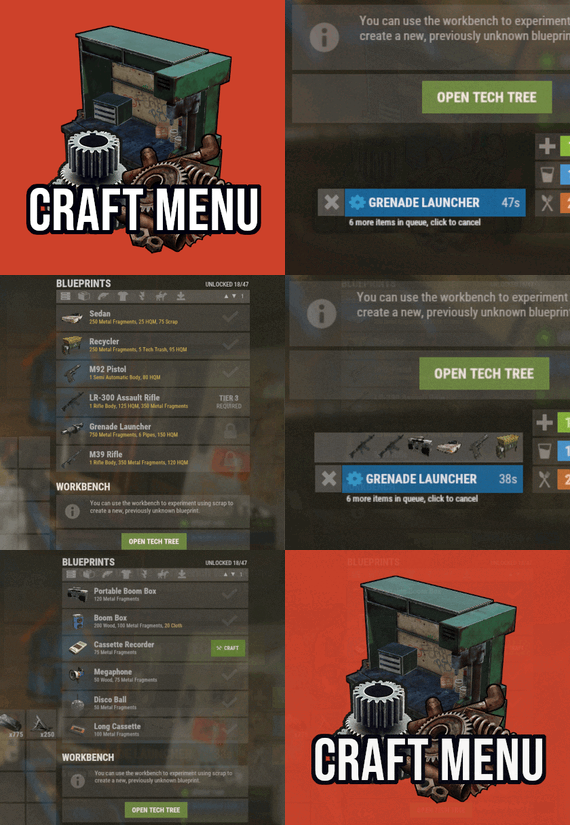
Craft Menu
Custom crafting panel at player's workbenches.
Craft custom or non-craftable items, create your own blueprints.
No chat commands required!
oxide permission - craftmenu.use
• How to create default blueprint.
Simply leave ResearchCost as 0.
• Crafting Recycler.
Plugins for placing entities usually utilizes specific item together with skin id.
Here you can find list of examples PlaceableEntities.txt
• Adding same shortname multiple times.
When you using same shortname for more than one blueprint you have add {number} at
the end of it to prevent duplicates. Ex.: "box.wooden.large{1}"
• Item is name too long.
Inside lang file you can create replacements for default item names.
• Wiping blueprints manualy.
There are two admin console commands.
"craftmenu_admin wipe" will wipe blueprints for all players
"craftmenu_admin wipe <steamID>" wipes blueprints only for certain player.
Premade blueprints from screenshots Blueprints.json
-
$15.00$11.95Quarry Levels
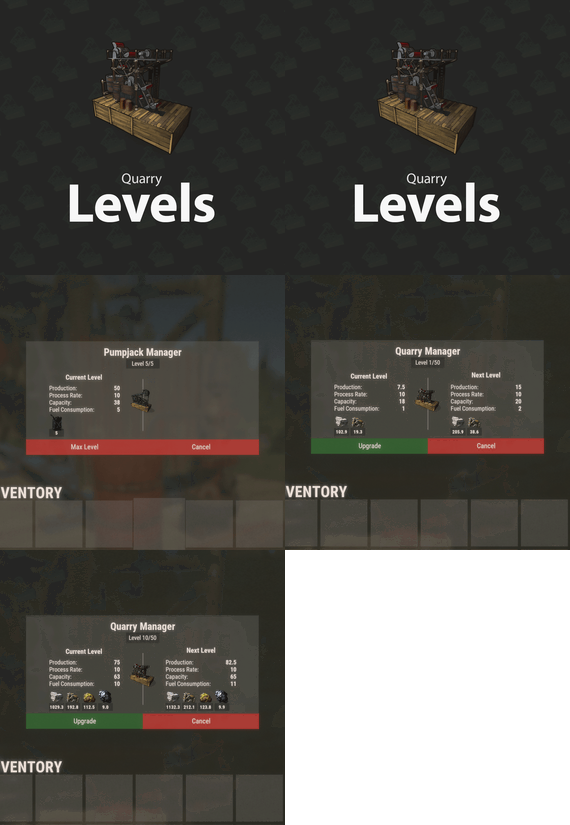
Allows players to upgrade their quarries or pumpjacks with another quarry or pumpjack effectively allowing them to stack up to x quarries and pumpjacks together instead of having them placed individually causing clutter. This plugin is very performant and was designed to run on very high-pop servers.
A level 2 quarry will produce the same amount as 2 level 1 quarries. Same for pumpjacks. Every quarry level will also unlock the next tier of production. Level 3 will unlock metal, level 4 sulfur and level 5 HQM. The production rates for each output are default but can be adjusted in the config.
The GUI displays the production amount, process rate, capacity and fuel consumption for each level. The production of each type is also displayed under it's respective icon each time fuel is consumed. The time it takes to complete 1 cycle is based on process rate.
Permissions
quarrylevels.use - Required to use the quarry levels system.
Config
ChatIconId - Set the Steam ID to the account with your server's icon. UnlockMetalAtLevel - Set what level metal unlocks at while upgrading. UnlockSulfurAtLevel - Set what level sulfur unlocks at while upgrading. UnlockHQMAtLevel - Set what level HQM unlocks at while upgrading. PreventUnauthorizedToggling - When enabled, only authorized players can toggle quarries/pumpjacks PreventUnauthorizedLooting - When enabled, only authorized players can access the quarry/pumpjack. EnableOilCraters - When enabled, oil craters will have a chance to spawn while surveying. OilCraterChance - The chance an oil crater will spawn while surveying. QuarryMaxLevel - Sets the maximum level a player can upgrade their quarry to. PumpjackMaxLevel - Sets the maximum level a player can upgrade their pumpjack to. QuarryCapacityPerLevel - Sets the number of slots unlocked per level. PumpjackCapacityPerLevel - Sets the number of slots unlocked per level. EnableEconomics - Enables the Economics plugin for upgrades. Leaving disable will use the old upgrade method. EconomicsCost - Sets the price per upgrade for both quarries and pumpjacks. EconomicsCurrency - Sets the vanity name of the currency to be displayed in the GUI and info text. EnableServerRewards - Enables the ServerRewards plugin for upgrades. Leaving disable will use the old upgrade method. ServerRewardsCost - Sets the price per upgrade for both quarries and pumpjacks. ServerRewardsCurrency - Sets the vanity name of the currency to be displayed in the GUI and info text. Metal_Production - Increases the amount produced each process rate. Lower = higher. Sulfur_Production - Increases the amount produced each process rate. Lower = higher. HQM_Production - Increases the amount produced each process rate. Lower = higher. ButtonBounds - Change the position of the "upgrade" button. ButtonColor - Change the container color of the "upgrade" button. ButtonOpacity - Change the background opacity of the "upgrade" button. ButtonFontColor - Change the font color of the "upgrade" button. PanelBounds - Change the position of the upgrade panel. PanelColor - Change the container color of the upgrade panel. PanelOpacity - Change the background opacity of the upgrade panel. PanelFontColor - Change the font color of the upgrade panel.
Commands
QL reload - Hot loads the config to apply config changes without having to reload the plugin. (Console command)
- #rust plugin
- #custom rust plugin
- (and 2 more)
-
$15.00
Meteor Event
By ThePitereq in Plugins
RUST Plugin Test Server
TEST MY PLUGINS THERE!
connect play.thepitereq.ovh:28050
Meteor Event plugin allows you to create custom meteor shower events on your server.
You can set up timed events that initiate a meteor shower, containing unlimited possible entities and the option to activate big rocks that require explosives to destroy.
The resources from meteors can be multiplied and modified.
Additionally, you can create custom global events with fully customized gathering sources.
Set up custom timed events. Create an infinite number of meteor presets. Supports two types of meteors: normal and large meteors that require explosives. Configure various aspects such as meteor scale, yield, explosive damage, radiation, item output, and more. Run custom events, per-player events, and random player events. Number of meteors adjustable based on the online player count. Fully customize drops for any RUST entity and ambient events, and choose which tools are used to gather meteors. Players can call their own meteor showers, and you can configure random meteors to strike players while destroying regular rocks around the map. Features a highly configurable calling command. Configurable Discord webhook shower announcements Customizable falling angles for events. Set multiple different timed events.
/ms - Opens the Meteor Event Control UI. msadmin run <profileName> <amount> - Starts a custom meteor shower of profile <profileName> with <amount> meteors. (Console Command) msadmin direct <profileName> [amount] [playerId] - Spawns [amount] meteors of profile <profileName> above [playerId]'s head. (Console Command) msadmin kill - Kills all meteors around the map. (Console Command)
meteorevent.admin - Allows you to use admin features meteorevent.use - Allows use of the /ms command, if permission required. (Configurable) meteorevent.purchase.{profile.Key} - Allows to purchase & call certain meteor events. (Configurable)
Configuration Hints
Used Economy Plugin
0 - None
1 - Economics
2 - ServerRewards
3 - BankSystem
4 - ShoppyStock Explosive Config
The key value - shortname of the damage entity, it's not an item shortname, it's an 3D model that's visible in-game. For explosive ammo use ammo.rifle.explosive. Config Walkthrough
Global Meteor Config
Configuration part for any type and any spawned meteor.
Meteor Prefabs
This is a full list of available meteors that can fall from the sky. Here is a default list of them:
barrel - The Big Barrel Event Prefab. It's a very big barrel with a fully custom gather method that contains 2000 Scrap and 10,000 Metal by default. falling_star - The ambient event that runs sometimes in the sky but never falls onto the ground. All it does is spawn falling stars in the sky, so you can have a cool effects at night. metal_ore - Regular metal ore meteor prefab. stone_ore - Regular stone ore meteor prefab. sulfur_ore - Regular sulfur ore meteor prefab. toilet - Funny meteor that was made during plugin development. It also contains a fully custom gather that contains HQM and Metal. Meteor Profiles
This part of the config is what's visible when you open the /ms command. If you want to make a working meteor event, you need to add a new section here. By default, there are 4 profiles:
barrel - Runs Big Barrel Event that contains "barrel" prefabs. default - Runs regular Meteor Event that contains "metal_ore", "stone_ore" and "sulfur_ore" prefabs. falling_stars - Runs Falling Stars Event that contains "falling_star" prefabs. toilets - Runs Falling Stars Event that contains "toilet" prefabs. IMPORTANT!
The keys in `Meteor Profiles And Spawn Weights (profile: spawn weight)` must be equal to the keys in the `Meteor Prefabs` section, or the plugin won't work correctly!
The Angle in the Falling Angle Config represents how fast and in which direction the meteors are falling. X and Z are diagonal values, and Y is a vertical value. Making values higher will make meteors fall faster, and the opposite.
Timed Events
Random timed events for your server. You don't need to put all Meteor Profiles here, just those that you want to make automatic.
Enable Random Direct Falling Meteors On Mining Regular Ones and Random Direct Falling Meteor Options
This option will mean that if a player breaks a regular meteor on the map, there will be a chance to call a direct meteor on him. The default config contains an annotation to the "default" meteor profile, but this event takes 30 seconds by default, so the meteor will fall in the next 30 seconds, not instantaneously.
void OnMeteorShowerStart(int meteorAmount, string profile, bool isDirect, BasePlayer directPlayer) - When meteor event is starting. void OnFallingMeteorSpawned(string meteorPrefabKey, SphereEntity parentEntity, BaseEntity meteorEntity) - When falling meteor has been spawned. void OnMeteorLanded(BaseEntity meteorEntity, string meteorPrefabKey) - When meteor lands on the ground. void OnMeteorsKilled() - When all meteors are removed. void OnFallingMeteorsKilled() - Ran when last still falling meteor is destroyed.
{ "Commands": [ "ms", "meteor" ], "Command Require Permission": false, "Enable Logs": true, "Enable Plugin Hooks": false, "Global Meteor Config": { "Destroy Meteors Underwater": false, "Destroy Trees On Impact Radius (0 to disable)": 25.0, "Max Meteors On Map At One Time": 80, "Falling Meteor Ground Check Radius (increase might be required if meteors are falling slowly)": 25.0, "Kill Meteors On Roads": true, "Kill Meteors On Rail Tracks": true, "Kill Meteors On Monuments": false, "Fix For Meteor MeshCollider Message (console spam fix only, might have performance impact if enabled)": false, "Meteor Spread On Map (higher = smaller impact radius)": 2.5, "Explosive Ammo Max Shoot Distance": 50.0 }, "Meteor Prefabs": { "barrel": { "Meteor Prefab Path": "assets/bundled/prefabs/radtown/loot_barrel_1.prefab", "Max Meteor Flight Time (0, to not destroy)": 0.0, "Meteor Lifetime (0, to not destroy)": 1800.0, "Minimum Scale": 12.0, "Maximum Scale": 12.0, "Yield Multiplier": 2.0, "Scale Yield By Size": true, "Meteor Radiation Chance (0-100)": 100.0, "Meteor Radiation Amount": 12.5, "Scale Radiation With Size": true, "Run Atmosphere Enter Sound": true, "Enable Meteor Flame": true, "Enable Meteor Smoke": true, "Falling - Randomize Meteor X Rotation": false, "Falling - Randomize Meteor Y Rotation": true, "Falling - Randomize Meteor Z Rotation": false, "Landed - Randomize Meteor X Rotation": false, "Landed - Randomize Meteor Y Rotation": true, "Landed - Randomize Meteor Z Rotation": false, "Landed Entity Offset": { "x": 0.0, "y": 0.0, "z": 0.0 }, "Required Tool To Destroy - Whitelist (shortnames)": [], "Required Tool To Destroy - Blacklist (shortnames)": [], "Fully Custom Gather System Tools": { "Items Per Meteor": [ { "Shortname": "scrap", "Skin ID": 0, "Amount": 2000, "Display Name": "", "Only On Last Hit": false }, { "Shortname": "metal.fragments", "Skin ID": 0, "Amount": 10000, "Display Name": "", "Only On Last Hit": false } ], "Fully Custom Gather System Tools (key value is tool shortname)": { "hammer.salvaged": { "Require Exact Skin ID": false, "Tool Skin ID": 0, "Tool Damage Dealt Percentage": 3.0 } } }, "Additional Output Per Hit": [], "Big Meteor Config": { "Chance (0-100)": 0.0, "Minimum Scale": 5.0, "Maximum Scale": 7.0, "Output Per Hit": [], "Call OnDispenserGather hook": true, "Explosive Config (key value is explosive prefab shortname, see website for more info)": {}, "Crate Inside Chance (0-100)": 0.0, "Crates Spawned Inside (prefab names: spawn weight)": {} }, "Marker Config": { "Marker Type (None/Normal/Explosion)": "Normal", "Marker Alpha (normal only)": 0.75, "Marker Color #1 (normal only)": "#E0D5C30", "Marker Color #2 (normal only)": "#6E665A", "Marker Radius (normal only)": 0.15, "Map Marker Text (normal only, disabled if empty)": "Space Barrel" } }, "falling_star": { "Meteor Prefab Path": "assets/bundled/prefabs/modding/cinematic/cinelights/cinelight_point_cool.prefab", "Max Meteor Flight Time (0, to not destroy)": 1.5, "Meteor Lifetime (0, to not destroy)": 30.0, "Minimum Scale": 2.0, "Maximum Scale": 5.0, "Yield Multiplier": 2.0, "Scale Yield By Size": true, "Meteor Radiation Chance (0-100)": 0.0, "Meteor Radiation Amount": 0.0, "Scale Radiation With Size": true, "Run Atmosphere Enter Sound": false, "Enable Meteor Flame": false, "Enable Meteor Smoke": false, "Falling - Randomize Meteor X Rotation": true, "Falling - Randomize Meteor Y Rotation": true, "Falling - Randomize Meteor Z Rotation": true, "Landed - Randomize Meteor X Rotation": false, "Landed - Randomize Meteor Y Rotation": true, "Landed - Randomize Meteor Z Rotation": false, "Landed Entity Offset": { "x": 0.0, "y": 0.0, "z": 0.0 }, "Required Tool To Destroy - Whitelist (shortnames)": [], "Required Tool To Destroy - Blacklist (shortnames)": [], "Fully Custom Gather System Tools": { "Items Per Meteor": [], "Fully Custom Gather System Tools (key value is tool shortname)": {} }, "Additional Output Per Hit": [], "Big Meteor Config": { "Chance (0-100)": 0.0, "Minimum Scale": 5.0, "Maximum Scale": 7.0, "Output Per Hit": [], "Call OnDispenserGather hook": true, "Explosive Config (key value is explosive prefab shortname, see website for more info)": {}, "Crate Inside Chance (0-100)": 0.0, "Crates Spawned Inside (prefab names: spawn weight)": {} }, "Marker Config": { "Marker Type (None/Normal/Explosion)": "Explosion", "Marker Alpha (normal only)": 0.75, "Marker Color #1 (normal only)": "#E01300", "Marker Color #2 (normal only)": "#7D0B00", "Marker Radius (normal only)": 0.4, "Map Marker Text (normal only, disabled if empty)": "" } }, "metal_ore": { "Meteor Prefab Path": "assets/bundled/prefabs/autospawn/resource/ores/metal-ore.prefab", "Max Meteor Flight Time (0, to not destroy)": 0.0, "Meteor Lifetime (0, to not destroy)": 1800.0, "Minimum Scale": 0.5, "Maximum Scale": 2.0, "Yield Multiplier": 2.0, "Scale Yield By Size": true, "Meteor Radiation Chance (0-100)": 0.0, "Meteor Radiation Amount": 0.0, "Scale Radiation With Size": true, "Run Atmosphere Enter Sound": true, "Enable Meteor Flame": true, "Enable Meteor Smoke": true, "Falling - Randomize Meteor X Rotation": true, "Falling - Randomize Meteor Y Rotation": true, "Falling - Randomize Meteor Z Rotation": true, "Landed - Randomize Meteor X Rotation": false, "Landed - Randomize Meteor Y Rotation": true, "Landed - Randomize Meteor Z Rotation": false, "Landed Entity Offset": { "x": 0.0, "y": 0.0, "z": 0.0 }, "Required Tool To Destroy - Whitelist (shortnames)": [], "Required Tool To Destroy - Blacklist (shortnames)": [ "rock", "stone.pickaxe" ], "Fully Custom Gather System Tools": { "Items Per Meteor": [], "Fully Custom Gather System Tools (key value is tool shortname)": {} }, "Additional Output Per Hit": [ { "Required Gather Per Hit (0 to disable)": 20, "Shortname": "metal.ore", "Skin ID": 0, "Amount": 35, "Display Name": "", "Chance (0-100)": 35.0, "Only On Last Hit": false }, { "Required Gather Per Hit (0 to disable)": 20, "Shortname": "metal.refined", "Skin ID": 0, "Amount": 2, "Display Name": "", "Chance (0-100)": 2.0, "Only On Last Hit": false } ], "Big Meteor Config": { "Chance (0-100)": 5.0, "Minimum Scale": 5.0, "Maximum Scale": 7.0, "Output Per Hit": [ { "Shortname": "metal.ore", "Skin ID": 0, "Amount": 900, "Display Name": "", "Chance (0-100)": 100.0, "Only On Last Hit": false }, { "Shortname": "hq.metal.ore", "Skin ID": 0, "Amount": 20, "Display Name": "", "Chance (0-100)": 100.0, "Only On Last Hit": true } ], "Call OnDispenserGather hook": true, "Explosive Config (key value is explosive prefab shortname, see website for more info)": { "ammo.rifle.explosive": { "Damage Dealt": 5.0, "Resource Multiplier": 0.1 }, "explosive.timed.deployed": { "Damage Dealt": 50.0, "Resource Multiplier": 1.0 }, "rocket_basic": { "Damage Dealt": 35.0, "Resource Multiplier": 0.7 } }, "Crate Inside Chance (0-100)": 5.0, "Crates Spawned Inside (prefab names: spawn weight)": { "assets/bundled/prefabs/radtown/crate_normal.prefab": 3, "assets/bundled/prefabs/radtown/crate_normal_2.prefab": 5, "assets/prefabs/misc/supply drop/supply_drop.prefab": 1 } }, "Marker Config": { "Marker Type (None/Normal/Explosion)": "Normal", "Marker Alpha (normal only)": 0.75, "Marker Color #1 (normal only)": "#E01300", "Marker Color #2 (normal only)": "#7D0B00", "Marker Radius (normal only)": 0.15, "Map Marker Text (normal only, disabled if empty)": "" } }, "stone_ore": { "Meteor Prefab Path": "assets/bundled/prefabs/autospawn/resource/ores/stone-ore.prefab", "Max Meteor Flight Time (0, to not destroy)": 0.0, "Meteor Lifetime (0, to not destroy)": 1800.0, "Minimum Scale": 0.5, "Maximum Scale": 2.0, "Yield Multiplier": 2.0, "Scale Yield By Size": true, "Meteor Radiation Chance (0-100)": 0.0, "Meteor Radiation Amount": 0.0, "Scale Radiation With Size": true, "Run Atmosphere Enter Sound": true, "Enable Meteor Flame": true, "Enable Meteor Smoke": true, "Falling - Randomize Meteor X Rotation": true, "Falling - Randomize Meteor Y Rotation": true, "Falling - Randomize Meteor Z Rotation": true, "Landed - Randomize Meteor X Rotation": false, "Landed - Randomize Meteor Y Rotation": true, "Landed - Randomize Meteor Z Rotation": false, "Landed Entity Offset": { "x": 0.0, "y": 0.0, "z": 0.0 }, "Required Tool To Destroy - Whitelist (shortnames)": [], "Required Tool To Destroy - Blacklist (shortnames)": [ "rock", "stone.pickaxe" ], "Fully Custom Gather System Tools": { "Items Per Meteor": [], "Fully Custom Gather System Tools (key value is tool shortname)": {} }, "Additional Output Per Hit": [ { "Required Gather Per Hit (0 to disable)": 20, "Shortname": "stones", "Skin ID": 0, "Amount": 50, "Display Name": "", "Chance (0-100)": 35.0, "Only On Last Hit": false }, { "Required Gather Per Hit (0 to disable)": 20, "Shortname": "metal.refined", "Skin ID": 0, "Amount": 2, "Display Name": "", "Chance (0-100)": 2.0, "Only On Last Hit": false } ], "Big Meteor Config": { "Chance (0-100)": 5.0, "Minimum Scale": 5.0, "Maximum Scale": 7.0, "Output Per Hit": [ { "Shortname": "stones", "Skin ID": 0, "Amount": 1500, "Display Name": "", "Chance (0-100)": 100.0, "Only On Last Hit": false } ], "Call OnDispenserGather hook": true, "Explosive Config (key value is explosive prefab shortname, see website for more info)": { "ammo.rifle.explosive": { "Damage Dealt": 5.0, "Resource Multiplier": 0.1 }, "explosive.timed.deployed": { "Damage Dealt": 50.0, "Resource Multiplier": 1.0 }, "rocket_basic": { "Damage Dealt": 35.0, "Resource Multiplier": 0.7 } }, "Crate Inside Chance (0-100)": 5.0, "Crates Spawned Inside (prefab names: spawn weight)": { "assets/bundled/prefabs/radtown/crate_normal.prefab": 3, "assets/bundled/prefabs/radtown/crate_normal_2.prefab": 5, "assets/prefabs/misc/supply drop/supply_drop.prefab": 1 } }, "Marker Config": { "Marker Type (None/Normal/Explosion)": "Normal", "Marker Alpha (normal only)": 0.75, "Marker Color #1 (normal only)": "#E01300", "Marker Color #2 (normal only)": "#7D0B00", "Marker Radius (normal only)": 0.15, "Map Marker Text (normal only, disabled if empty)": "" } }, "sulfur_ore": { "Meteor Prefab Path": "assets/bundled/prefabs/autospawn/resource/ores/sulfur-ore.prefab", "Max Meteor Flight Time (0, to not destroy)": 0.0, "Meteor Lifetime (0, to not destroy)": 1800.0, "Minimum Scale": 0.5, "Maximum Scale": 2.0, "Yield Multiplier": 2.0, "Scale Yield By Size": true, "Meteor Radiation Chance (0-100)": 0.0, "Meteor Radiation Amount": 0.0, "Scale Radiation With Size": true, "Run Atmosphere Enter Sound": true, "Enable Meteor Flame": true, "Enable Meteor Smoke": true, "Falling - Randomize Meteor X Rotation": true, "Falling - Randomize Meteor Y Rotation": true, "Falling - Randomize Meteor Z Rotation": true, "Landed - Randomize Meteor X Rotation": false, "Landed - Randomize Meteor Y Rotation": true, "Landed - Randomize Meteor Z Rotation": false, "Landed Entity Offset": { "x": 0.0, "y": 0.0, "z": 0.0 }, "Required Tool To Destroy - Whitelist (shortnames)": [], "Required Tool To Destroy - Blacklist (shortnames)": [ "rock", "stone.pickaxe" ], "Fully Custom Gather System Tools": { "Items Per Meteor": [], "Fully Custom Gather System Tools (key value is tool shortname)": {} }, "Additional Output Per Hit": [ { "Required Gather Per Hit (0 to disable)": 20, "Shortname": "sulfur.ore", "Skin ID": 0, "Amount": 20, "Display Name": "", "Chance (0-100)": 35.0, "Only On Last Hit": false }, { "Required Gather Per Hit (0 to disable)": 20, "Shortname": "metal.refined", "Skin ID": 0, "Amount": 2, "Display Name": "", "Chance (0-100)": 2.0, "Only On Last Hit": false } ], "Big Meteor Config": { "Chance (0-100)": 5.0, "Minimum Scale": 5.0, "Maximum Scale": 7.0, "Output Per Hit": [ { "Shortname": "sulfur.ore", "Skin ID": 0, "Amount": 450, "Display Name": "", "Chance (0-100)": 100.0, "Only On Last Hit": false } ], "Call OnDispenserGather hook": true, "Explosive Config (key value is explosive prefab shortname, see website for more info)": { "ammo.rifle.explosive": { "Damage Dealt": 5.0, "Resource Multiplier": 0.1 }, "explosive.timed.deployed": { "Damage Dealt": 50.0, "Resource Multiplier": 1.0 }, "rocket_basic": { "Damage Dealt": 35.0, "Resource Multiplier": 0.7 } }, "Crate Inside Chance (0-100)": 5.0, "Crates Spawned Inside (prefab names: spawn weight)": { "assets/bundled/prefabs/radtown/crate_normal.prefab": 3, "assets/bundled/prefabs/radtown/crate_normal_2.prefab": 5, "assets/prefabs/misc/supply drop/supply_drop.prefab": 1 } }, "Marker Config": { "Marker Type (None/Normal/Explosion)": "Normal", "Marker Alpha (normal only)": 0.75, "Marker Color #1 (normal only)": "#E01300", "Marker Color #2 (normal only)": "#7D0B00", "Marker Radius (normal only)": 0.15, "Map Marker Text (normal only, disabled if empty)": "" } }, "toilet": { "Meteor Prefab Path": "assets/bundled/prefabs/static/toilet_b.static.prefab", "Max Meteor Flight Time (0, to not destroy)": 0.0, "Meteor Lifetime (0, to not destroy)": 1800.0, "Minimum Scale": 1.2, "Maximum Scale": 3.0, "Yield Multiplier": 2.0, "Scale Yield By Size": true, "Meteor Radiation Chance (0-100)": 100.0, "Meteor Radiation Amount": 12.5, "Scale Radiation With Size": true, "Run Atmosphere Enter Sound": true, "Enable Meteor Flame": true, "Enable Meteor Smoke": true, "Falling - Randomize Meteor X Rotation": true, "Falling - Randomize Meteor Y Rotation": true, "Falling - Randomize Meteor Z Rotation": true, "Landed - Randomize Meteor X Rotation": false, "Landed - Randomize Meteor Y Rotation": true, "Landed - Randomize Meteor Z Rotation": false, "Landed Entity Offset": { "x": 0.0, "y": 0.0, "z": 0.0 }, "Required Tool To Destroy - Whitelist (shortnames)": [], "Required Tool To Destroy - Blacklist (shortnames)": [], "Fully Custom Gather System Tools": { "Items Per Meteor": [ { "Shortname": "metal.refined", "Skin ID": 0, "Amount": 300, "Display Name": "", "Only On Last Hit": false }, { "Shortname": "metal.fragments", "Skin ID": 0, "Amount": 5000, "Display Name": "", "Only On Last Hit": false } ], "Fully Custom Gather System Tools (key value is tool shortname)": { "hammer.salvaged": { "Require Exact Skin ID": false, "Tool Skin ID": 0, "Tool Damage Dealt Percentage": 3.0 }, "paddle": { "Require Exact Skin ID": false, "Tool Skin ID": 0, "Tool Damage Dealt Percentage": 2.5 } } }, "Additional Output Per Hit": [], "Big Meteor Config": { "Chance (0-100)": 5.0, "Minimum Scale": 5.0, "Maximum Scale": 7.0, "Output Per Hit": [ { "Shortname": "metal.refined", "Skin ID": 0, "Amount": 50, "Display Name": "", "Chance (0-100)": 100.0, "Only On Last Hit": false } ], "Call OnDispenserGather hook": true, "Explosive Config (key value is explosive prefab shortname, see website for more info)": { "ammo.rifle.explosive": { "Damage Dealt": 5.0, "Resource Multiplier": 0.1 }, "explosive.timed.deployed": { "Damage Dealt": 50.0, "Resource Multiplier": 1.0 }, "rocket_basic": { "Damage Dealt": 35.0, "Resource Multiplier": 0.7 } }, "Crate Inside Chance (0-100)": 0.0, "Crates Spawned Inside (prefab names: spawn weight)": {} }, "Marker Config": { "Marker Type (None/Normal/Explosion)": "Normal", "Marker Alpha (normal only)": 0.75, "Marker Color #1 (normal only)": "#E0D5C30", "Marker Color #2 (normal only)": "#6E665A", "Marker Radius (normal only)": 0.15, "Map Marker Text (normal only, disabled if empty)": "Space Toilet" } } }, "Meteor Profiles": { "barrel": { "Randomized Impact Radius (if direct meteor)": 10.0, "Direct Meteor Falling Angle": { "x": 0.0, "y": -2.0, "z": 0.0 }, "Meteor Event Length (in seconds)": 10.0, "Incoming Shower Sound Effect Prefab (disabled if empty)": "assets/prefabs/tools/pager/effects/beep.prefab", "Send Message About Meteor Event On Chat": true, "Spawn Height": 500.0, "Falling Angle Config": [ { "Appear Weight": 1, "Angle": { "x": 0.0, "y": -0.6, "z": 0.0 }, "Falling Radius Offset": { "x": 0.0, "y": 0.0, "z": 0.0 } } ], "Meteor Profiles And Spawn Weights (profile: spawn weight)": { "barrel": 1 }, "Purchase Config": { "Allow Purchasing": false, "Used Economy Plugin (see website for reference)": 0, "Used Economy Currency (if ShoppyStock used)": "rp", "Required Permission": true, "Direct Meteor Shower (on player)": false, "Allow To Spawn Large Meteors": false, "Meteors Amount": 10, "Item Shortname Required To Purchase Meteor Shower (empty if currency)": "scrap", "Item Skin ID Required To Purchase Meteor Shower (empty if currency)": 0, "Item/Currency Amount Required To Purchase Meteor Shower": 1000, "Cooldown After Purchasing Meteor Shower (in seconds)": 3600 } }, "default": { "Randomized Impact Radius (if direct meteor)": 10.0, "Direct Meteor Falling Angle": { "x": 0.0, "y": -9.0, "z": 0.0 }, "Meteor Event Length (in seconds)": 30.0, "Incoming Shower Sound Effect Prefab (disabled if empty)": "assets/prefabs/tools/pager/effects/beep.prefab", "Send Message About Meteor Event On Chat": true, "Spawn Height": 500.0, "Falling Angle Config": [ { "Appear Weight": 1, "Angle": { "x": 3.5, "y": -4.6, "z": 0.0 }, "Falling Radius Offset": { "x": -300.0, "y": 0.0, "z": 0.0 } }, { "Appear Weight": 1, "Angle": { "x": -3.5, "y": -4.6, "z": 1.2 }, "Falling Radius Offset": { "x": 300.0, "y": 0.0, "z": -100.0 } } ], "Meteor Profiles And Spawn Weights (profile: spawn weight)": { "metal_ore": 1, "stone_ore": 1, "sulfur_ore": 1 }, "Purchase Config": { "Allow Purchasing": true, "Used Economy Plugin (see website for reference)": 0, "Used Economy Currency (if ShoppyStock used)": "rp", "Required Permission": true, "Direct Meteor Shower (on player)": true, "Allow To Spawn Large Meteors": false, "Meteors Amount": 3, "Item Shortname Required To Purchase Meteor Shower (empty if currency)": "scrap", "Item Skin ID Required To Purchase Meteor Shower (empty if currency)": 0, "Item/Currency Amount Required To Purchase Meteor Shower": 1000, "Cooldown After Purchasing Meteor Shower (in seconds)": 3600 } }, "falling_stars": { "Randomized Impact Radius (if direct meteor)": 10.0, "Direct Meteor Falling Angle": { "x": 0.0, "y": -9.0, "z": 0.0 }, "Meteor Event Length (in seconds)": 60.0, "Incoming Shower Sound Effect Prefab (disabled if empty)": "", "Send Message About Meteor Event On Chat": false, "Spawn Height": 500.0, "Falling Angle Config": [ { "Appear Weight": 1, "Angle": { "x": 45.5, "y": -4.2, "z": 12.7 }, "Falling Radius Offset": { "x": 0.0, "y": 0.0, "z": 0.0 } }, { "Appear Weight": 1, "Angle": { "x": -56.5, "y": -3.2, "z": -14.2 }, "Falling Radius Offset": { "x": 0.0, "y": 0.0, "z": 0.0 } } ], "Meteor Profiles And Spawn Weights (profile: spawn weight)": { "falling_star": 1 }, "Purchase Config": { "Allow Purchasing": false, "Used Economy Plugin (see website for reference)": 0, "Used Economy Currency (if ShoppyStock used)": "rp", "Required Permission": true, "Direct Meteor Shower (on player)": false, "Allow To Spawn Large Meteors": false, "Meteors Amount": 10, "Item Shortname Required To Purchase Meteor Shower (empty if currency)": "scrap", "Item Skin ID Required To Purchase Meteor Shower (empty if currency)": 0, "Item/Currency Amount Required To Purchase Meteor Shower": 1000, "Cooldown After Purchasing Meteor Shower (in seconds)": 3600 } }, "toilets": { "Randomized Impact Radius (if direct meteor)": 10.0, "Direct Meteor Falling Angle": { "x": 0.0, "y": -9.0, "z": 0.0 }, "Meteor Event Length (in seconds)": 60.0, "Incoming Shower Sound Effect Prefab (disabled if empty)": "assets/prefabs/tools/pager/effects/beep.prefab", "Send Message About Meteor Event On Chat": true, "Spawn Height": 500.0, "Falling Angle Config": [ { "Appear Weight": 1, "Angle": { "x": 3.5, "y": -4.6, "z": 0.0 }, "Falling Radius Offset": { "x": -300.0, "y": 0.0, "z": 0.0 } }, { "Appear Weight": 1, "Angle": { "x": -3.5, "y": -4.6, "z": 1.2 }, "Falling Radius Offset": { "x": 300.0, "y": 0.0, "z": -100.0 } } ], "Meteor Profiles And Spawn Weights (profile: spawn weight)": { "toilet": 1 }, "Purchase Config": { "Allow Purchasing": false, "Used Economy Plugin (see website for reference)": 0, "Used Economy Currency (if ShoppyStock used)": "rp", "Required Permission": true, "Direct Meteor Shower (on player)": false, "Allow To Spawn Large Meteors": false, "Meteors Amount": 10, "Item Shortname Required To Purchase Meteor Shower (empty if currency)": "scrap", "Item Skin ID Required To Purchase Meteor Shower (empty if currency)": 0, "Item/Currency Amount Required To Purchase Meteor Shower": 1000, "Cooldown After Purchasing Meteor Shower (in seconds)": 3600 } } }, "Timed Events": { "default": { "Event Every X Seconds (minimal time, in seconds)": 1200, "Event Every X Seconds (maximal time, in seconds)": 2400, "Used Meteor Config Keys (profile: spawn weight)": { "default": 10, "falling_stars": 1 }, "Direct Meteors To Players": false, "Meteor Amount Based On Player Count": true, "Meteor Count (if based on player count - per player)": 4.0, "Max Meteor Count": 40, "Chance To Start Event (0-100)": 100.0, "Commands Ran On Start": [], "Webhook Message": { "Enabled": false, "Embed": true, "Webhook": "", "Inline": true, "Color": 0, "Title": "Meteor Shower", "Message": "Meteor Shower with {0} meteors is incoming!" } }, "toilets": { "Event Every X Seconds (minimal time, in seconds)": 28800, "Event Every X Seconds (maximal time, in seconds)": 50400, "Used Meteor Config Keys (profile: spawn weight)": { "toilets": 1 }, "Direct Meteors To Players": true, "Meteor Amount Based On Player Count": false, "Meteor Count (if based on player count - per player)": 10.0, "Max Meteor Count": 10, "Chance To Start Event (0-100)": 5.0, "Commands Ran On Start": [ "say There is {meteorCount} falling toilets in the sky!" ], "Webhook Message": { "Enabled": false, "Embed": true, "Webhook": "", "Inline": true, "Color": 0, "Title": "Meteor Shower", "Message": "Meteor Shower with {0} meteors is incoming!" } } }, "Enable Random Direct Falling Meteors On Mining Regular Ones": true, "Random Direct Falling Meteor Options": [ { "Spawn Chance (0-100)": 1.0, "Meteor Profile Name (not prefab key)": "default", "Meteor Min Amount": 1, "Meteor Max Amount": 3, "Allow To Spawn Large Meteors": false }, { "Spawn Chance (0-100)": 0.0, "Meteor Profile Name (not prefab key)": "toilets", "Meteor Min Amount": 1, "Meteor Max Amount": 3, "Allow To Spawn Large Meteors": false } ] }