
Vinni_TV_'s Wishlist
-

$34.95$21.95Daily Rewards
Daily Rewards helps Rust admins keep players engaged until the end of the wipe. Players get a different reward for each day they log in, which livens up the game and gets them to play longer. It also helps you draw in new players and keep the ones who come back. 🎁 🎮
🌟 Features of Daily Rewards
Beautiful and user-friendly interface Daily rewards for logging in Gives players a reason to stay in the game longer Keeps players on the server until the end of the wipe Compatibility with many plugins Edit rewards and config via in-game interface (no JSON editing required) By default, the plugin supports English, Russian, and Chinese languages Cooldown time before receiving an award Rewards are saved in the plugin's inventory Players can't claim rewards from the inventory while under a build block, raid block, or combat block
🎮 Commands
daily: open the daily rewards interface dailyrewards.wipe: wipe player data dailyrewards.top [format: csv, empty (default)] [limit (10 is default)]: list players with the reward day each one has reached. dailyrewards.manage: manage daily reward settings dailyrewards.manage playtime set <steam_id> <amount>: sets the playtime for the specified player. dailyrewards.template [fullscreen/inmenu] [target_template]: sets the interface template for daily rewards.
Parameters: [fullscreen/inmenu]: Type of interface template to set. Valid values: fullscreen or inmenu. [target_template]: For the inmenu template, you must specify the template number (1 or 2).
🛡️ Permissions
dailyrewards.use: lets you open the DailyRewards menu dailyrewards.edit: lets you enable edit mode
🎥 Video
⚙️ Web Config Editor
Manage the DailyRewards settings in our web config editor. You change the config in a browser form instead of editing files on the server by hand.
P.S. The web config editor is open to members of the "DailyRewards" group in our Discord server. Join at https://discord.gg/mevent and ask for the group.
📚 FAQ
Q: Where can I see an example of a config?
A: Config
Q: How do I add DailyRewards to the ServerPanel menu?
A: You can do this directly from the ServerPanel in-game:
1. Open the ServerPanel menu in-game.
2. If you have permission to edit, switch the panel to edit mode so you can see the blue "EDIT CATEGORY" and "EDIT PAGES" buttons.
3. Choose the category where you want DailyRewards to appear and click the "EDIT CATEGORY" button for that category.
4. While you are in this category in the ServerPanel, click the "EDIT PAGES" button to create a new page (or edit an existing one) for DailyRewards.
5. For that page, set these exact parameters:
Type: Plugin Plugin Name: DailyRewards Plugin Hook: API_OpenPlugin 6. Save the changes. The DailyRewards button will now appear in the ServerPanel in the category you selected.
-
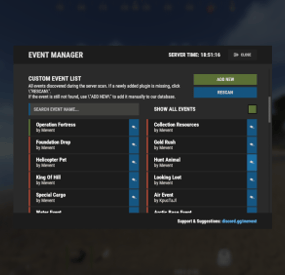
$24.95$21.95Events Manager
EventsManager runs official Facepunch events and events from custom plugins through one in-game interface. Instead of scattered timers, you build event rotations and tune your wipe schedule in a single menu to keep players engaged.
🌟 Features of Events Manager
Multi-Event Support: Manage multiple events, each with its own settings. Customizable Display: Assign distinct names, commands, and colors for UI buttons to each event. Scheduling Flexibility: Schedule events to run on specific days and at designated hours. Administrative Control: Admins can launch events with commands. Enhanced Player Experience: Run regular events to keep players engaged. Random Event Start: Let the plugin pick events at random from a pool, so players get a surprise. Integration of Facepunch Events: Popular Facepunch events are included in the plugin.
🎮 Commands
/em: Set up events, including start time and day. eventmanager.convert.v2: Migrates V2 data to V3 (console only)
💬 Permissions
eventsmanager.use: Lets users open the menu and manage events.
🎥 Video Overview
⚙️ Web Config Editor
Manage the EventsManager settings in our web config editor. You change the config in a browser form instead of editing files on the server by hand.
P.S. The web config editor is open to members of the "EventsManager" group in our Discord server. Join at https://discord.gg/mevent and ask for the group.
📚 FAQ
Q: Where can I see an example of a config?
A: Config
Q: Do I need to configure anything special for events?
A: Yes, disable autostart in your events when you use EventsManager. The plugin schedules and starts events itself, so autostart can cause conflicts or unexpected behavior.
- #eventmanager
- #manager
- (and 5 more)
-
$7.95$5.95MultiEvents (Pack 3) - Plugin sold separately. Bundle available.
MultiEvents Expansion Pack 3 adds 5 more events: rare items, a helicopter fight, a battle in the underwater lab and resource gathering. Requires the base MultiEvents plugin.
🏆 Included Events
The pack includes 5 events, each with its own mechanics:
Corn Collector: gather as much corn as you can. A peaceful farming event for a break from the combat ones. Gold Rush: gather ores and trees for a chance to get rare items. Mushroom Madness: collect as many mushrooms as you can before time runs out. Race across the map to find mushroom spawns. NPC Underwater Lab: kill scientists in the underwater lab monument, fighting through its flooded areas. Patrol Helicopter Hit: deal damage to the Patrol Helicopter. Points depend on the damage dealt.
🔧 Requirements
Requires the base MultiEvents plugin Copy files to MultiEvents directory and reload the plugin Comes with rare item tables already set up
📚 FAQ
Q: Do I need the base MultiEvents plugin?
A: Yes, this expansion pack requires the base MultiEvents plugin.
Q: How do rare items work?
A: Players have a configurable chance to receive rare items when gathering ores and wood in Gold Rush event.
Q: Can I customize rare item drop rates?
A: Yes, you set every rare item chance and type in the visual editor.
🧪 TEST SERVER
Join our test server to try these events!
connect 155.103.86.38:28015
- #multievents
- #expansion
- (and 10 more)
-

$21.00$15.95Servers
Servers adds a server browser interface to your Rust server. Players browse the servers in your network, view their details and connect to them. Whether you run a single server or a network of several Rust communities, Servers lists them all for your players.
⭐️ Features of Servers
Server browser interface Multiple UI template options (Fullscreen, V1, V2) Battlemetrics integration View server details, including player count, description, and status Customizable server banners Automatic server information updates at configurable intervals One-click connection to listed servers Works with ServerPanel Available in English and Russian
🖼️ Showcase
Fullscreen
V1 Template
V2 Template
🎮 Commands
/servers: opens the server browser interface
🛡️ Permissions
servers.use: access to the servers command and the interface
⚙️ Web Config Editor
Manage the Servers settings in our web config editor. You change the config in a browser form instead of editing files on the server by hand.
P.S. The web config editor is open to members of the "Servers" group in our Discord server. Join at https://discord.gg/mevent and ask for the group.
📚 FAQ
Q: How do I add a server to the list?
A: Edit the Servers.json configuration file and add a new entry under "Servers" with the server's IP, port, optional Battlemetrics ID, and scroll height for the description.
Q: Can I use Battlemetrics to show server information?
A: Yes. Set a Battlemetrics Server ID in the configuration to show server information from Battlemetrics. This helps when the server can't be found by IP and port alone.
Q: How often does server information update?
A: You can configure the update interval in the Servers.json file under "Interval updates servers info (in seconds, min 30 sec)". The minimum interval is 30 seconds.
Q: Does the plugin support custom server banners?
A: Yes, the plugin automatically displays server banners from Battlemetrics data. You can also set a default banner to use when images can't be loaded.
🧪 TEST SERVER
Join our test server to try Servers and our other plugins.
Copy the IP address below to connect.
connect 155.103.86.38:28015- #servers
- #server list
- (and 3 more)
-
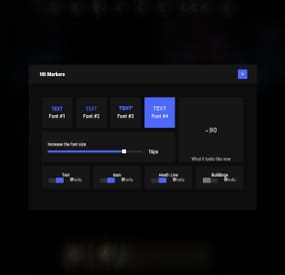
$19.95$11.95Hit Markers
Each player picks the hit marker that suits them. 🙂
Commands
marker - open the UI
Permissions
You can set permission in config, for example:
"Permission (ex: hitmarkers.use)": "hitmarkers.use", You can also set your own permission for each font and button.
Config
{ "Commands": [ "marker", "hits" ], "Permission (ex: hitmarkers.use)": "", "Work with Notify?": true, "Fonts": { "0": { "Font": "robotocondensed-bold.ttf", "Permission (ex: hitmarkers.font)": "" }, "1": { "Font": "robotocondensed-regular.ttf", "Permission (ex: hitmarkers.font)": "" }, "2": { "Font": "permanentmarker.ttf", "Permission (ex: hitmarkers.font)": "" }, "3": { "Font": "droidsansmono.ttf", "Permission (ex: hitmarkers.font)": "" } }, "Min Font Size": 8, "Max Font Size": 18, "Buttons": [ { "Enabled": true, "Title": "Text", "Type": "Text", "Description": "<b>Damage numbers</b> will pop up in the center of the screen!", "Permission (ex: hitmarkers.text)": "hitmarkers.text" }, { "Enabled": true, "Title": "Icon", "Type": "Icon", "Description": "The familiar hit icon changes color after a <b>headshot!</b>", "Permission (ex: hitmarkers.text)": "hitmarkers.icon" }, { "Enabled": true, "Title": "Heath Line", "Type": "HealthLine", "Description": "A bar appears above the slots, showing the <b>remaining</b> health of the enemy", "Permission (ex: hitmarkers.text)": "hitmarkers.line" }, { "Enabled": true, "Title": "Buildings", "Type": "Buildings", "Description": "Displaying damage by buildings", "Permission (ex: hitmarkers.text)": "hitmarkers.buildings" } ], "Info Icon": "https://i.imgur.com/YIRjnIT.png", "Show damage to NPC": true, "Show damage to animals": false, "Marker removal time": 0.25, "Default Values": { "Font ID": 0, "Font Size": 14, "Text": true, "Icon": false, "Health Line": false, "Buildings": false } }
⚙️ Web Config Editor
Manage the HitMarkers settings in our web config editor. You change the config in a browser form instead of editing files on the server by hand.
P.S. The web config editor is open to members of the "HitMarkers" group in our Discord server. Join at https://discord.gg/mevent and ask for the group.