
MARKUS's Wishlist
-
$5.99
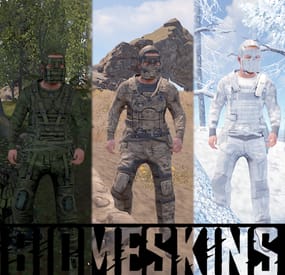
BiomeSkins | Camouflage at its finest!
By Reximian9k in Plugins
BiomeSkins is a Rust server plugin that dynamically customizes player clothing, armor, and sleeping bag skins based on the biome and topology of their location. By matching gear and sleeping bags to the surrounding environment, it enhances player immersion and camouflaging. Players can easily activate and control reskinning functions through simple chat commands, including options for key bindings and toggling automatic reskinning.
Installation
Download the BiomeSkins.cs plugin file. Place the plugin file into your server’s plugins directory.
Usage/Commands
/biomeskin
Reskins the player’s clothing and armor to match their current biome.
/biomeskin [<a|w|b|m>]
Reskin player all and/or wear and/or belt and/or main inventory items (w - wear, b - belt, m - main, a - all). Example - /biomeskin wb will reskin items in wear and belt inventories. Not specifying an inventory parameter defaults to wear/armor items.
/biomeskin skin <player> [q|a|w|b|m]
Reskins the target player's target inventory items (see command above). Intended for admins and other plugins.
/biomeskin bind <key>
Displays the command for binding the /biomeskin command to a specified key, allowing players to quickly activate biome-based reskinning.
/biomeskin bag <on|off>
Toggles automatic reskinning for sleeping bags based on the biome and topology where they are placed.
/biomeskin <wear|belt|main|> <on|off>
Sets automatic reskinning for wear/belt/main inventory items based on the biome of the player's location.
/biomeskin toggle <wear|belt|main|all>
Toggles automatic reskinning for wear/belt/main inventory items based on the biome of the player's location.
Permissions
biomeskins.reskin.bag - Allows for sleeping bag reskinning on placement and access to the /biomeskin bag <on|off> command.
biomeskins.reskin.equipment - Allows for inventory item reskinning via the /biomeskin base command.
biomeskins.reskin.equipment.other - Allows for inventory item reskinning of other players via the /biomeskin skin <player> [q|a|w|b|m] command.
biomeskins.reskin.equipment.auto - Allows for player automatic inventory item reskinning when crossing between biomes as well as the /biomeskin <wear|belt|main|> <on|off> command.
Configuration
The plugin offers customizable options in the configuration file, enabling admins to tailor the reskinning behavior:
{ "Version (DO NOT EDIT)": 3, "Command aliases": [ "biomeskin" ], "Sleeping bag skins": { "Forest": 2131151567, "Arctic": 2162368881, "Desert": 2922792064, "Tundra": 3080447496, "Rock": 3144409492 }, "Equipment skins": { "Temperate": { "mask.metal.item": 2551475709, "metal_plate_torso.item": 2551474093, "pants.roadsign.item": 2570237224, "hoodie.red.item": 2563940111, "pants.cargo.item": 2563935722, "shoes.boots.brown.item": 2575506021, "gloves.roadsign.item": 2575539874, "hat.coffeecan.item": 2570227850, "roadsign_armor.item": 2570233552, "jacket.vagabond.item": 2582710266, "largebackpack": 3360828867 }, "Tundra": { "mask.metal.item": 2551475709, "metal_plate_torso.item": 2551474093, "pants.roadsign.item": 2570237224, "hoodie.red.item": 2563940111, "pants.cargo.item": 2563935722, "shoes.boots.brown.item": 2575506021, "gloves.roadsign.item": 2575539874, "hat.coffeecan.item": 2570227850, "roadsign_armor.item": 2570233552, "jacket.vagabond.item": 2582710266, "largebackpack": 3377499512 }, "Arctic": { "mask.metal.item": 2432948498, "metal_plate_torso.item": 2432947351, "pants.roadsign.item": 2469019097, "hoodie.red.item": 2416648557, "pants.cargo.item": 2416647256, "shoes.boots.brown.item": 2752873720, "gloves.roadsign.item": 2469031994, "hat.coffeecan.item": 2503956851, "roadsign_armor.item": 2503955663, "rifle.ak.item": 2525948777, "burlap.shirt.item": 2911362787, "mask.bandana.item": 10062, "attire.hide.boots.item": 2408298830, "attire.hide.poncho.item": 2856159140, "riot.helmet.item": 801095823, "burlap.trousers.item": 2911361380, "burlap.gloves.item": 10128, "largebackpack.item": 3361128718, "jacket.vagabond.item": 2496913595 }, "Arid": { "mask.metal.item": 2475428991, "metal_plate_torso.item": 2475407123, "pants.roadsign.item": 2496523983, "hoodie.red.item": 2503910428, "pants.cargo.item": 2503903214, "shoes.boots.brown.item": 2510093391, "gloves.roadsign.item": 2510097681, "hat.coffeecan.item": 2496517898, "roadsign_armor.item": 2496520042, "jacket.vagabond.item": 2865011686, "largebackpack": 3362212704 } }, "Reskin items in wear inventory": true, "Reskin items in belt inventory": false, "Reskin items in main inventory": false, "Automatic equipment reskinning": { "Enabled": false, "Enabled by default for players with permission?": false, "Time interval between player biome checks": 5.0, "Reskin items moved into wear inventory": true, "Reskin items moved into belt inventory": false, "Reskin items moved into main inventory": false }, "Hooks": { "OnBiomeSkin": true } } Developer API
// Reskin player items in corresponding inventories (wear/belt/main) with the skins specified in the plugin config bool API_SkinPlayerItems(BasePlayer player, bool skinWear = true, bool skinBelt = true, bool skinMain = true) // Reskin player items in corresponding inventories (wear/belt/main) with the skins specified in the "skins" parameter (item name -> skinID) bool API_SkinPlayerItems(BasePlayer player, Dictionary<string, ulong> skins, bool skinWear = true, bool skinBelt = true, bool skinMain = true) // Returns true if target player has sleeping bag biome-based reskinning enabled bool API_IsSleepingBagReskinEnabled(BasePlayer player) // Enables/disables target player sleeping bag biome-based reskinning void API_SetEnabledAutoSleepingBagReskin(BasePlayer player, bool enabled) // Returns true if target player has automatic biome-based inventory item reskinning enabled bool API_IsAutoEquipmentReskinEnabled(BasePlayer player) // Enables/disables target player automatic biome-based inventory item reskinning void API_SetAutoEquipmentReskinEnabled(BasePlayer player, bool wear, bool belt, bool main) // Hooks // Invoked when a player's inventory items are about to be reskinned by the plugin // First argument - BasePlayer - Target player // Second argument - Action source // 0 = Command, 1 = Automatic (player crossing biomes), 2 = Third party plugin or console command // Returning bool 'true' will cancel the action OnBiomeSkin(BasePlayer, int)
-
.thumb.gif.9df0dc8dd79b5d51a1c2bafab3e451b0.gif)
$40.00
Crimson Tide Custom Map
Details
Crimson Tide is a large-sized map designed from the start to be great with cars with special attention given to the roads to add a nice mix of smooth and bumpy parts in the network of interlacing roads. To complement the map there is a rail network and full river system to add even more transport options.
There are a lot of custom monuments in this map in all shapes and sizes from underwater to underground not to mention the huge lift and cable bridges.
Size: 4000k
Railway
Features a working surface railway with twin directional lines that runs around the full map and through underground tunnels and over rivers and even down to the subways and with no dead ends its perfect for other plugins like cargo train event also map comes with its own custom work cart and wagon spawning plugin.
Editing
Yes, you are allowed to edit the map and add stuff etc.
Custom NPC
Normal RustEdit Scientist’s have been replaced with my own set of NPC’S from the various factions from the rust world (Normal Scientist, Arctic Scientist, Tunnel Dweller and Underwater Dweller) if you do not like my NPC’s simply don’t install the plug-in and supply your own with any bot plugin you want.
A special thank you to Steenamaroo for building the plugin for me.
Monuments
Rad Town 1 Nuclear Missile Silo Airfield Railway Maintenance Nuclear Submarine Submarine Base Felling Field The Forth Bridges Deep Water Harbour Bandit Camp Excavator Fishing Village Gas Station Horse Stables Launch Site Lighthouse Military Tunnels Oil Rig Large Oil Rig Small Outpost Powerplant Sphere Tank Supermarket Trainyard Junkyard Underwater Labs Desert Military Base Arctic Research base Ferry Terminal Help And Contact
If you need to contact me discord is best: RobJ2210#2553
For help/support my discord group is best: Join Rust Maps By RobJ Discord
-
$9.90
MyF15
By ChipShopMan in Plugins
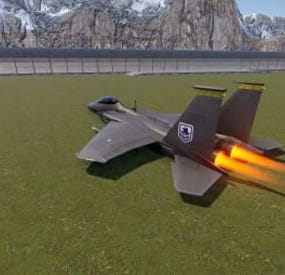
The MyF15 plugin modifies a standard Rust minicopter into an F15 fighter jet. It spawns the F15 asset on top of the minicopter and keeps it from flying. F15 is not an asset that can normally be kept in place or flown, it does not have collision. Players can use chat commands to spawn or despawn their aircraft, which behaves similarly to noclip movement. Permissions are required to use these commands, ensuring controlled access.
W,A,S,D up, down, left, right
SHIFT moves forward(speed can be configured in the cfg - higher speeds make it a bit jankier so be mindfull. The F15 is not meant to be static)
Commands:
/f15 - Spawns your personal F15 jet.
/nof15 - Despawns your F15.
Permissions:
myf15.spawn - Grants permission to spawn an F15 using the /f15 or /myf15 commands.
Features:
Cooldown Mechanism: Spawning an F15 has a 2-second cooldown to prevent excessive aircraft spawning.
Automatic Despawn: The F15 automatically despawns when a player disconnects, maintaining server performance and tidiness.
No Explosion Effects: Fireball and explosion effects are disabled upon destruction, ensuring a smoother experience without visual clutter.
Immediate Mounting: Players are automatically mounted to their F15 when spawned, making it quick and easy to take off.
Configurable Settings:
Spawn Distance: The distance at which the F15 spawns from the player can be adjusted, allowing for customization to fit different gameplay styles.
Cooldown Duration: The cooldown period for spawning an F15 can be configured to suit server preferences, preventing abuse or enabling faster respawns.
Speed Multipliers: The speed multiplier for regular flight and sprint-boosted flight can both be adjusted to modify how fast the F15 can travel.
-
$7.49
Vehicle Spawner Plus
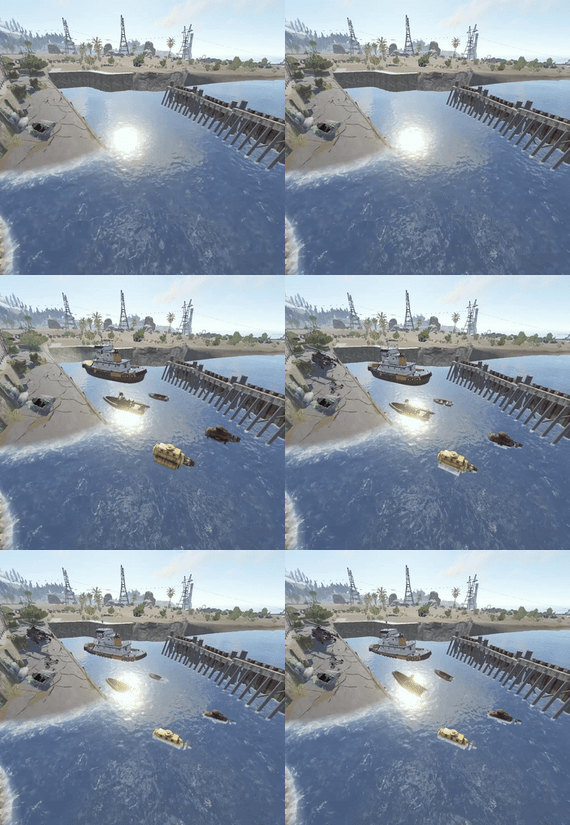
Adds re-spawnable vehicles with command.
About Vehicle Spawnper Plus
With this plugin, you can:
• Define spawn points for different vehicles anywhere in your server's world.
• Set custom intervals for spawning vehicles, allowing you to control the frequency of vehicle respawns.
• Specify random interval for spawning vehicles, adding an element of unpredictability to your server's spawnpoints.
Whether you're looking to establish vehicle spawn zones, simulate dynamic vehicle distribution, or simply enhance the gameplay experience on your Rust server, this plugin gives you the flexibility and control to do so with ease.
Commands (ONLY ADMIN);
• /addvehiclespawn <name> <x> <y> <z> <vehicleName> <interval> ▶️ You can create a spawn point with static time and vehicle.
• /addvehiclespawnr <name> <x> <y> <z> <vehicleName> <intervalMin> <intervalMax> ▶️ You can create a spawn point with random interval.
• /deletevehiclespawn <name> ▶️ You can delete spawn points with this command.
• /showvehiclespawns ▶️ Prints out spawn points in f1 console.
➡️ "<name>" This defines your spawn points name which you can use in /deletevehiclespawn.
➡️ "<x> <y> <z>" This is positions for vehicles to be spawned you can use console command "client.printpos" to see where you're standing at.
➡️ "<vehicleName>" You need to use the short name for the item you want to be spawned, available vehicles are "minicopter", "scrapheli", "tugboat", "rowboat", "rhib", "motorbikesolo", "motorbikeduo", "bikesolo", "bikeduo", "subsolo" and "subduo".
➡️ "<interval>" This defines the respawn time in seconds.
➡️ "<intervalMin>", "<intervalMax>" you can adjust those values for how much time later the item will be respawned for random time. Ex; 1 10, Item will respawn every 1 to 10 seconds.
Here is the default config file;
{ "Spawn1": { "Interval": 300.0, "IsRandomInterval": false, "RandomIntervalMax": 180.0, "RandomIntervalMin": 600.0, "SpawnPosition": { "x": 100.0, "y": 10.0, "z": 50.0 }, "VehicleName": "minicopter" }, "Spawn2": { "Interval": 300.0, "IsRandomInterval": true, "RandomIntervalMax": 600.0, "RandomIntervalMin": 180.0, "SpawnPosition": { "x": 100.0, "y": 10.0, "z": 50.0 }, "VehicleName": "scrapheli" } }- #vehicle
- #submarine
- (and 13 more)
-
$11.95$7.95Necronomicon
A player puts all his blueprints in a book and then he can gift that book to another one who can unlock all of the blueprints the player had
So it allows players to put all their blueprints in a book that can be unwrapped
Features
Beautiful user interface Performance Interface customization Access by permission (optional) Auto wipe (optional) Sound effect (optional)
Commands
necronomicon.give [name/userId] [all/itemIDs...]: give a book with a specific set of blueprints
Config Examples
{ "Book Item Settings": { "Display Name": "Necromonicon", "ShortName": "xmas.present.small", "Skin": 2537078809 }, "Work with Notify?": true, "Cost": 100, "Permission": "", "Economy": { "Type (Plugin/Item)": "Plugin", "Plugin name": "Economics", "Balance add hook": "Deposit", "Balance remove hook": "Withdraw", "Balance show hook": "Balance", "ShortName": "scrap", "Display Name (empty - default)": "", "Skin": 0 }, "Active Color": { "HEX": "#74884A", "Opacity (0 - 100)": 95.0 }, "Disactive Color": { "HEX": "#595651", "Opacity (0 - 100)": 75.0 }, "Effect (empty - disable)": "assets/prefabs/deployable/research table/effects/research-success.prefab" } VIDEO
⚙️ Web Config Editor
Manage the Necronomicon settings in our web config editor. You change the config in a browser form instead of editing files on the server by hand.
P.S. The web config editor is open to members of the "Necronomicon" group in our Discord server. Join at https://discord.gg/mevent and ask for the group.
- #bps
- #blueprints
- (and 12 more)