
MARKUS's Wishlist
-

$24.99
Item Perks
By imthenewguy in Plugins
Item Perks is a plugin that enhances everyday weapons, tools and armour with over 50 different types of perks.
Items with perks can be obtained a variety of ways, including:
Finding them randomly in crates or barrels during your morning scrap farm. Randomly crafting an enhanced version of your equipment while you roof camp noobs from your base. Recycling enhanced equipment and finding enhancement kits stuck in the teeth of the recycler. Using a console or chat command that can be ran through seedy plugin traders like GUIShop.
The plugin gives a large amount of control to server owners when it comes to implementation. You can:
Enable/disable perks, or modify the minimum and maximum values that they roll when applied to gear. Blacklist or whitelist items to each perk, so they will be exclusively excluded or included (based on the list you choose). Adjust the weight of each perk, so it is more or less likely to be seen on gear., or adjust the chances amount of perks that items can potentially have. Fully adjust or disable the chance for item drops to be found, or enable the enhancement kit system so players can recycle gear. So much more (watch the configuration section of the video below to see the full extent).
There are over 50 perks included with the plugin. The following list will describe briefly what each perk does.
Name: Prospector Description: This perk increases your mining yield when mining stone, metal and sulfur nodes. Name: Lumberjack Description: This perk increases your woodcutting yield when chopping living or dead trees. Name: Butcher Description: This perk increases the resources gained from skinning humans and animals. Name: Horticulture Description: This perk increases the amount of resources gained when harvesting grown plants. Name: Forager Description: This perk increases the amount of resources gained when picking up map generated collectibles. Name: Angler Description: This perk increases the amount of fish you receive upon a successful catch. Name: BeastBane Description: This perk increases the damage dealt to animals. Name: ScientistBane Description: This perk increases the damage dealt to scientists. Name: FlakJacket Description: This perk reduces the damage received from explosions. Name: Elemental Description: This perk reduces damage from received from cold and heat sources. Name: Scavenger Description: This perk provides you with a chance to find additional scrap from crates and barrels. Name: Manufacture Description: This perk increases the speed of your crafting. Name: Durable Description: This peark reduces the durability damage of all equipped items. Name: BeastWard Description: This perk reduces the damage received from animals. Name: ScientistWard Description: This perk reduces the damage received from scientists. Name: Builder Description: This perk provides you with a chance for your building upgrades to be free. Name: Thrifty Description: This perk provides you with a chance for your crafting components to be refunded upon a successful craft. Name: Fabricate Description: This perk provides you with a chance to duplicate an item upon a successful craft. Name: Pharmaceutical Description: This perk increases the amount of healing received from all sources. Name: MeleeWard Description: This perk reduces the damage received from melee weapons. Name: Academic Description: This perk provides you with a chance to receive a scrap refund when researching an item at the research bench. Name: FallDamage Description: This perk reduces the impact damage received from falling. Name: Lead Description: This perk reduces the damage from radiation. Name: Smasher Description: This perk will provide you with a chance to instantly destroy barrels with any amount of damage. Name: Environmentalist Description: This perk will increase the speed of recyclers that you activate. Name: Smelter Description: This perk will increase the smelting speed of furnaces you activate. Name: Paramedic Description: This perk provides players that you revive with additional health. Name: Prepper Description: This perk provides you with a chance to not consume food when eating. Name: Regeneration Description: This perk will passively regenerate you. Name: SharkWard Description: This perk will reduce the amount of damage received from sharks. Name: SharkBane Description: This perk will increase the amount of damage dealt to sharks. Name: Deforest Description: This perk provides you with a chance to cut down nearby trees when successfully cutting a tree down. Name: BlastMine Description: This perk provides you with a chance to mine out nearby nodes when successfully mining out a node. Name: Tanner Description: This perk provides you with a chance to skin nearby corpses when successfully skinning out a corpse. Name: Vampiric Description: This perk will heal you for a percentage of the damage dealt to certain enemies. Name: Reinforced Description: This perk will reduce the the amount of damage that your vehicles receive when mounted. Name: ComponentLuck Description: This perk will provide you with a chance to receive additional components when looting barrels and crates. Name: ElectronicsLuck Description: This perk will provide you with a chance to receive additional electronics when looting barrels and crates. Name: UncannyDodge Description: This perk provides you with a chance to dodge incoming damage, reducing it to 0. Name: LineStrength Description: This perk increases the tensile strength of your fishing line. Name: HealShare Description: This perk will share healing effects with nearby players. Name: Attractive Description: This perk will provide you with a chance to automatically pick up components when destroying barrels. Name: WoodcuttingLuck Description: This perk provides you with a chance to find a random item when you cut down a tree. Name: MiningLuck Description: This perk provides you with a chance to find a random item when you mine out a node. Name: SkinningLuck Description: This perk provides you with a chance to find a random item when you skin out a corpse. Name: FishingLuck Description: This perk provides you with a chance to find a random item when you catch a fish. Name: Sated Description: This perk will increase the amount of calories and hydration you receive from food and water sources. Name: IronStomach Description: This perk provides you with a chance to negate negative effects when consuming food. Name: TreePlanter Description: This perk will provide a chance for a tree to instantly regrow when cut down. Name: RockCycler Description: This perk will provide a chance for a node to instantly respawn when mined out. Name: BradleyDamage Description: This perk increases the damage dealt to Bradley Tanks. Name: HeliDamage Description: This perk increases the damage dealt to Patrol Helicopters. Name: Thorns Description: This perk reflects a % of the damage done back to the attacker
Command: ipgive
Type: console/chat
Parameters: <target ID/Name> <optional: shortname> <optional: perks>
Description: Gives the target player an enhanced item. If shortname is specified, it will base the enhancement off of that item. If perks are specified, it will add only those perks to the item.
Command: ipgivekit
Type: console/chat
Parameters: <target ID/Name> <perk>
Description: Gives an enhancement kit to the target.
itemperks.use - Required to receive any benefit from enhanced items. itemperks.loot - Required to loot enhanced items from crates and barrels. itemperks.craft - Required for a chance to received enhanced versions of crafted gear. itemperks.admin - Required to use admin commands. itemperks.enhance - Required to add enhancement kits to items via the workbench. itemperks.recycle - Required to receive enhancement kits from recycling enhanced items.
IPAPI_CreateItem - creates and returns an enhanced item using the details fed into the method. If shortname is left blank, it will pick a random valid item. If api_perks is null it will pick random perk(s) and add them.
Returns Item
[HookMethod("IPAPI_CreateItem")] public object IPAPI_CreateItem(string shortname = null, ulong skin = 0, Dictionary<string, float> api_perks = null) { List<KeyValuePair<Perk, float>> perks = Pool.GetList<KeyValuePair<Perk, float>>(); foreach (var perk in api_perks) { Perk _perk; if (parsedEnums.TryGetValue(perk.Key, out _perk)) perks.Add(new KeyValuePair<Perk, float>(_perk, perk.Value)); } var result = CreateItem(shortname, skin, perks); Pool.FreeList(ref perks); // Returns an Item class return result; } Example usage:
[ChatCommand("testipapi")] void TestIPAPI(BasePlayer player) { Dictionary<string, float> perks = new Dictionary<string, float>() { ["Prospector"] = 1f, ["Lumberjack"] = 1f, ["Butcher"] = 1f, ["Horticulture"] = 0.5f }; var item = (Item)ItemPerks.Call("IPAPI_CreateItem", "hammer.salvaged", (ulong)2830083288, perks); if (item == null) { Puts("Failed"); return; } item.name = "tool of the trade"; player.GiveItem(item); }
- #items
- #enhancement
- (and 6 more)
-
$15.00
PveMode
By KpucTaJl in Extensions
This plugin does not have its own functionality
This plugin is only used as an API for other plugins
Creates a configurable PVE mode out of compatible events and plugins
Supported Plugins
AirEvent HarborEvent WaterEvent Satellite Dish Event Power Plant Event JunkyardEvent Defendable Bases BossMonster BetterNpc Convoy
API
void EventAddPveMode(string shortname, JObject configJson, Vector3 position, float radius, HashSet<uint> crates, HashSet<uint> scientists, HashSet<uint> tanks, HashSet<ulong> owners, BasePlayer owner)
Creates a PVE event mode
shortname – name of event configJson – PVE mode configuration (more details below in the description) position – event position on the map radius – radius of the event zone crates – list of all event crates (including locked crates) scientists – list of all NPCs active during event tanks – list of all Bradley events owners – list of all event owners (this parameter is necessary if you need to create an event zone several times) owner – event owner (this parameter is required if you need to run an event with the owner) void EventRemovePveMode(string shortname, bool addCooldownOwners)
Removes PVE mode for the event
shortname – name of event addCooldownOwners – should there be a cooldown for all event owners if this parameter is active in the PVE mode configuration? (this parameter is necessary if you need to create an event zone several times and issue a cooldown only in the last iteration) void EventAddCrates(string shortname, HashSet<uint> crates)
Adds crates to the event if active in PVE mode
shortname – name of event crates – list of event crates to be added (including locked crates) void EventAddScientists(string shortname, HashSet<uint> scientists)
Adds NPCs to the event if active in PVE mode
shortname – name of event scientists – list of added event NPCs to be added void EventAddTanks(string shortname, HashSet<uint> tanks)
Adds Bradley to the event if active in PVE mode
shortname – name of event tanks – list of added Bradleys event to be added HashSet<ulong> GetEventOwners(string shortname)
Returns a list of SteamID for all of the Event Owners during the operation of an event
shortname – name of event ulong GetEventOwner(string shortname)
Returns the SteamID of the current Event Owner (if there is no Event Owner, it returns 0)
shortname – name of event void SetEventOwner(string shortname, ulong owner)
Sets the current Event Owner
shortname – name of event owner – SteamID of the player HashSet<string> GetEventsPlayer(ulong id)
Returns a list of event zones where the player is located
id - SteamID of the player Dictionary<string, double> GetTimesPlayer(ulong id)
Returns a list of events and the time when the player participated in the event the last time
id - SteamID of the player
PVE Mode Configuration
float Damage – The amount of damage that the player has to do to become the Event Owner HashSet<ScaleDamageConfig> ScaleDamage – Damage coefficients for calculation to become the Event Owner bool LootCrate – Can other players and teams loot the crates if not Event Owner or their team? [true/false] bool HackCrate – Can other players and teams hack locked crates if not Event Owner or their team? [true/false] bool LootNpc – Can other players and teams loot NPC corpses if not Event Owner or their team? [true/false] bool DamageNpc – Can other players and teams deal damage to the NPC if not Event Owner or their team? [true/false] bool DamageTank – Can other players and teams do damage to Bradley if not Event Owner or their team? [true/false] bool TargetNpc – Can an Npc attack other players and teams if not Event Owner or their team? [true/false] bool TargetTank – Can Bradley attack other players and teams if not Event Owner or their team? [true/false] bool CanEnter – Allow other players and teams to enter the Event Zone if not Event Owner or their team? [true/false] bool CanEnterCooldownPlayer – Allow a player who has an active cooldown as the Event Owner to enter the event zone? [true/false] int TimeExitOwner – The time that the Event Owner can leave the Event Zone and retain title [sec.] int AlertTime – The Warning time until Event Owner status will end [sec.] bool RestoreUponDeath – Prevent RestoreUponDeath plugin from functioning in the Event Zone? (Player will drop gun and inventory when in Event Zone) [true/false] double CooldownOwner – Cooldown timer for Event Owner until they can achieve the title again, after the end of an event where the player was its owner [sec.] int Darkening – Darkening of the dome (0 – disables the dome) Example:
JObject config = new JObject { ["Damage"] = 500f, ["ScaleDamage"] = new JArray { new JObject { ["Type"] = "NPC", ["Scale"] = 1f }, new JObject { ["Type"] = "Bradley", ["Scale"] = 2f } }, ["LootCrate"] = false, ["HackCrate"] = false, ["LootNpc"] = false, ["DamageNpc"] = false, ["DamageTank"] = false, ["TargetNpc"] = false, ["TargetTank"] = false, ["CanEnter"] = false, ["CanEnterCooldownPlayer"] = true, ["TimeExitOwner"] = 300, ["AlertTime"] = 60, ["RestoreUponDeath"] = true, ["CooldownOwner"] = 86400, ["Darkening"] = 12 };
Chat commands
EventsTime - shows the player a list of how much time has passed since participating in the event the last time
Console commands (RCON only)
ClearTimePveMode {steamid} - clears the list of the time when the player with SteamID ({steamid}) participated in the event the last time
My Discord: KpucTaJl#8923
Join the Mad Mappers Discord here!
Check out more of my work here!
-

$10.00
Custom Icon Creator
This is a simple tool for developers who want to make custom items, this allows you to chose a item name (Workshop Name) and item image anywhere on your computer (.png) and upload it to your rust steam workshop. This will allow you to get the workshop ID in which you use to create a "custom" item.
Requirements
- Must have steam running
- Must have rust in steam library
Installation
Download the zip and extract the folder to chosen location
Run the unity game named, Rust Custom Icons.exe
Tips
I recommend running this in windowed which you can get to by pressing ALT + ENTER
GIF of how it work
-
$11.99
Better Tin Can Alarm
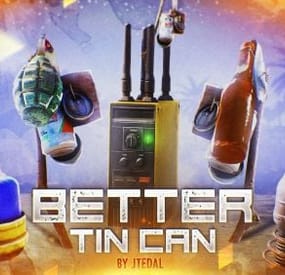
This plugin will add 5 new types of traps to your server based on Tin Can Alarm. Make the players be careful about the clinking sticks with cans. There are also some parameters in the config that you can adjust, and most importantly, you can set the rules for whom the trap should work and who should not.
Trap Types
Tin Can Alarm Boom - This trap is complemented by a regular grenade, which falls at the moment when the player passes through it. Tin Can Alarm Flame - This trap is complemented by the usual Molotov cocktail, which falls at the moment when the player passes through it. Tin Can Alarm Tesla - This trap is based on a Tesla coil that shocks players. Tin Can Alarm Electrical - This trap is based on a flasher that can sell N amounts of energy to other electrical appliances that the player will connect Tin Can Alarm Broadcaster - this trap will send a signal to the pager or Rf Receiver when someone passes through it.
Video
Console Command (RCON only)
givetincan <type trap> {amount} {SteamID64} - give a custom trap to a given player.
Example: givetincan Boom 1 76561198334533025
Types:
Boom (SkinID: 3299661003)
Flame (SkinID: 3299661403)
Tesla (SkinID: 3299661633)
Electrical (SkinID: 3299661847)
Broadcaster (SkinID: 3299662188)
Plugin Config
config
Check out more of my work here JTedal's library.
Come see our whole teams work Mad Mapper Library.
Come by the Mad Mapper Discord for support, feedback, or suggestions!
- #jtedal
- #mad mappers
- (and 10 more)
-
$59.90$50.91Decay: The Last Haven | Custom Map By Shemov
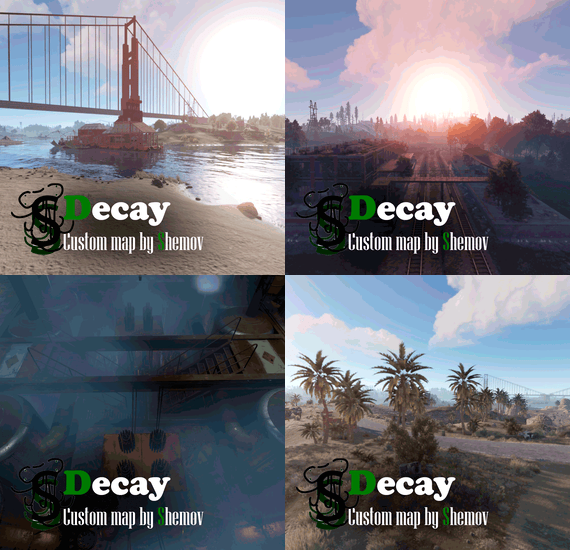
Welcome to "Decay: The Last Haven," a custom map for the game RUST that immerses players in a post-apocalyptic world where survival is a luxury. This expansive map, with a size of 4500, boasts around 70,000 prefabs, creating a rich and detailed environment. It's fully compatible with BetterNPC plugins(Config for bots in the file), and Train Homes, featuring three stations for the plugin. The map showcases a double-track surface railway, offering two metro entrances with separate branches for spawning trains, complemented by an intricate underground railway system.
The layout includes evenly spaced monuments to optimize the FPS load for clients, ensuring smooth gameplay. Players can find custom building spots in the subway, marked as 'XU' on the minimap, amidst a network of bridges that are navigable by tugboats. The map's design incorporates a multitude of rivers, allowing tugboats and other water transport to access any point on the map with ease.
For those seeking a strategic advantage, the map presents custom monuments in ample quantity for a comfortable and engaging gaming experience. Builders will appreciate the custom sites, indicated by 'X' on the minimap, while the heart of the map features fresh water and lush vegetation, ideal for farmers.
Explorers can discover a large number of small settlements and standalone buildings, not marked on the road map, offering hidden gems throughout the landscape. Adventurous players can delve into underwater farm zones, denoted by 'O' on the minimap, and explore the depths of an underwater laboratory. To add to the excitement, the map is equipped with ziplines, providing a thrilling way to traverse this desolate yet captivating world.
"Decay: The Last Haven" is not just a map; it's a testament to the resilience of humanity in the face of desolation, offering a sanctuary for those brave enough to claim it.
Features:
Map size: 4500; Prefabs count: ~65K; Compatible with BetterNPC plugins (Config for bots in the file) & Train Homes ( 3 stations for plug-in ); Double-track surface railway with 2 entrances to the metro with separate branches for spawn trains; Underground railway; Evenly spaced monuments to spread the FPS load of client; Custom places for building in the subway (XU on the minimap); A lot of bridges ( The tugboat passes ); A large number of rivers, tugboats and other water transport can pass to any point on the map; Designed custom monuments in sufficient quantity for a comfortable game; Custom building sites (X on the minimap); Fresh water and vegetation for farmers are in the center of the map; A large number of small settlements/single buildings not marked on the road map by road; Underwater farm zones (O on the minimap); Underwater Laboratory; Ziplines. Custom monuments:
Nuclear Cargo; Settlement; Bandit Settlement; Wood Industry; Industrial Settlement; Office Area; Reverpost; Shorpek; Warehouse Settlement; Bandit Ship; Slave Ship; Rebel Ship; RW Station; A large number of small settlements/single buildings not marked on the road map by road; A lots custom places to build a base. ( "X"/"XU" on map ); Underwater farm zones ( "O" on map ). Monuments:
Combined Outpost; Launch Site; The Dome; Apartments complex; Ziggurat; PowerPlant; JunkYard; Harbor; Airfield; Arctic Research Base; Desert Military Base; Ferry Terminal; Large fishing village; Oxum`s Gas Station; Abandoned supermarket; Fishing villages; Lighthouses; Satellite Dish; Nuclear Missile Silo; Water Treatment Plant; Train Yard; Giant Excavator Pit; Underwater laboratory; Ranch; Underground railway; Quarries(HQM,Stone, Sulfur); Large oilrig; Oilrig. My Discord: shemov
A password is attached to the map. You can edit it.