
general2811's Wishlist
-
$19.99
Survival Arena
By imthenewguy in Plugins
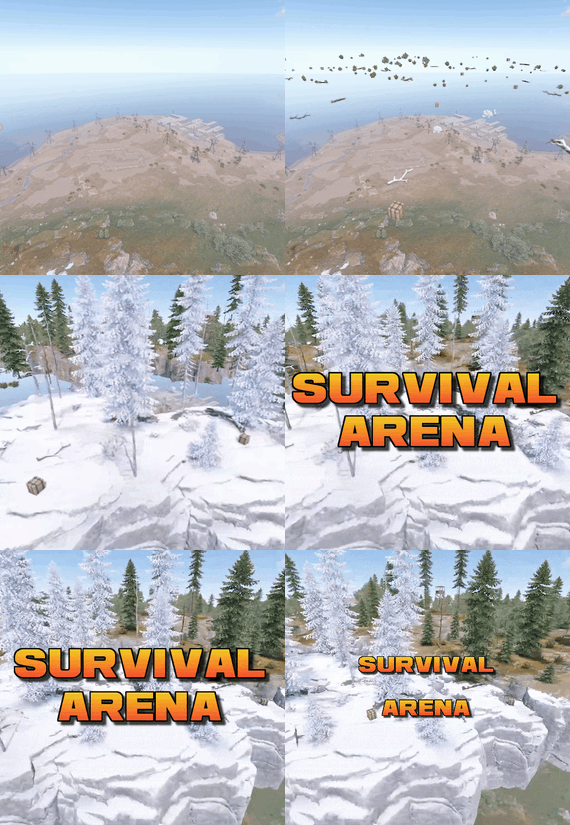
Survival Arena is a plugin that spawns a Battle-royal style game, where players must scavenge for equipment and fight to the death, all while staying inside of a shrinking, non-radiated zone.
The plugin spawns a large play area high in the sky and inherits the biome type from the ground below. This means that if the area is suspended above an arctic biome, all of the rocks, trees, logs and bushes will be spawned mirroring that biome type.
Players are teleported into the center building when they join, and once the game begins, they must loot containers to gear up to survive. Players are returned to their original locations when they leave the event or respawn after dying at the event.
Server owners can change or add loot profiles via the config. The plugin will select a random profile when the arena begins and fill the loot containers based on your specifications.
It comes with 2 default loot profiles:
Primitive - spears, melee weapons, bows, crossbows, burlap equipment, revolvers etc GunLoot - more modern weapons.
The plugin uses EventHelper to run automatically, handle joining and leaving, and will allow players to vote to start the game.
Admins can also add additional trees, bushes, logs and loot spawns to the arena via command.
Type: Chat Command: survivalarena Function: Sends the user the UI to start up the game. Loot profiles, spawn height and lobby time can be adjusted here before starting the game. Type: Chat/Console Command: startarena <heightMod> <lobbytime> <arenaName> <lootProfile> Function: Spawns and starts the game using the specified heightmod and lobbytime parameters. You can simply use the command with no parameters to start it using the default settings and a random arena/lootprofile. Type: Chat/Console Command: endarena Function: Ends any active games and despawns the arena. Type: Chat Command: spawnarena <name> Function: Spawns the arena, but does not start the game. Useful for debugging and development. Type: Chat Command: setcentrepoint Function: Sets the arena's new center point at the players location. Useful if you want to move the spawn so it has more biome variety. Be sure not to make it too high or too close to the ground. Type: Chat Command: survival Function: Used to join the game when the lobby is active. Type: Chat Command: saremove Function: Removes the tree, loot container, log or bush that the player is looking at. This will no longer spawn in future games. Type: Chat Command: addtree Function: adds a tree spawn at the players position. Type: Chat Command: addbush Function: adds a bush spawn at the players position. Type: Chat Command: addlog Function: adds a log spawn at the players position. Type: Chat Command: addloot Function: adds a loot spawn at the players position. Type: Chat Command: saleave Function: Leaves the event Type: Console/Chat Command: wipeoldarena Function: Wipes any entities that are at the same height or higher than the arena.
survivalarena.admin
survivalarena.autojoin
If you wish to create your own arena, you may follow this tutorial here: https://youtu.be/BxmcjHjIJDU
Please note that the map file name needs to contain survivalarena or it will not allow the getarena command to work. Also I will not be offering support for this, so use at your own risk.
API
Hook Calls
void OnSurvivalArenaStart() - Called when the lobby starts. void OnSurvivalArenaEnd() - Called when the game is ending. void OnSurvivalArenaWin(BasePlayer player) - Called when a player wins the game. void OnEventLeave(BasePlayer player, string pluginName) - Called when a player leaves the event. object OnEventJoin(BasePlayer player, string pluginName) - Called when a player is attempting to join the event. Returning a string will prevent the player from joining and will print the string to them. void OnEventJoined(BasePlayer player, string pluginName) - Called when a player has successfully joined the arena. void OnPlayerItemsRestored(BasePlayer player) - called when a players items have been restored.
Hook Methods
bool IsEventPlayer(BasePlayer player) - returns true or null if the player is an EventPlayer.
-
$19.95$11.95Genie
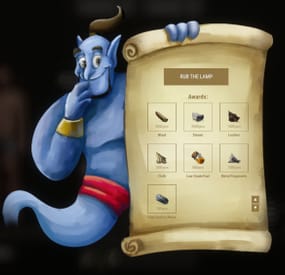
Adds a Genie Lamp to the game: you unwrap it and receive an award. My advice is to add the lamps to your underwater crates and use Dynamic Config to set up rewards over the course of the wipe.
Commands
genie.give [targetId] (give a lamp)
Permissions
You can set permission in config, for example: "Permission to rub the lamp": "genie.use",
Config
{ "Genie Image": "https://i.imgur.com/aNIcQzk.png", "Enable opening progress?": true, "Work with Notify?": true, "Delay to receive": 5.0, "Update Frequency": 0.1, "Opening effect (empty - disable)": "assets/bundled/prefabs/fx/gestures/lick.prefab", "Progress effect (empty - disable)": "assets/bundled/prefabs/fx/notice/item.select.fx.prefab", "Finish effect (empty - disable)": "assets/prefabs/misc/xmas/presents/effects/wrap.prefab", "Permission to rub the lamp": "", "Genie lamp Settings": { "Display Name": "Lamp", "ShortName": "xmas.present.small", "Skin": 2540200362 }, "Awards": [ { "Type": "Item", "Image": "", "Title": "", "Command (%steamid%)": "", "Plugin": { "Hook": null, "Plugin name": null, "Amount": 0 }, "Display Name (empty - default)": "", "ShortName": "wood", "Skin": 0, "Amount": 3500, "Chance": 70.0 }, { "Type": "Item", "Image": "", "Title": "", "Command (%steamid%)": "", "Plugin": { "Hook": null, "Plugin name": null, "Amount": 0 }, "Display Name (empty - default)": "", "ShortName": "stones", "Skin": 0, "Amount": 2500, "Chance": 70.0 }, { "Type": "Item", "Image": "", "Title": "", "Command (%steamid%)": "", "Plugin": { "Hook": null, "Plugin name": null, "Amount": 0 }, "Display Name (empty - default)": "", "ShortName": "leather", "Skin": 0, "Amount": 1000, "Chance": 55.0 }, { "Type": "Item", "Image": "", "Title": "", "Command (%steamid%)": "", "Plugin": { "Hook": null, "Plugin name": null, "Amount": 0 }, "Display Name (empty - default)": "", "ShortName": "cloth", "Skin": 0, "Amount": 1000, "Chance": 55.0 }, { "Type": "Item", "Image": "", "Title": "", "Command (%steamid%)": "", "Plugin": { "Hook": null, "Plugin name": null, "Amount": 0 }, "Display Name (empty - default)": "", "ShortName": "lowgradefuel", "Skin": 0, "Amount": 500, "Chance": 50.0 }, { "Type": "Item", "Image": "", "Title": "", "Command (%steamid%)": "", "Plugin": { "Hook": null, "Plugin name": null, "Amount": 0 }, "Display Name (empty - default)": "", "ShortName": "metal.fragments", "Skin": 0, "Amount": 1500, "Chance": 65.0 }, { "Type": "Item", "Image": "", "Title": "", "Command (%steamid%)": "", "Plugin": { "Hook": null, "Plugin name": null, "Amount": 0 }, "Display Name (empty - default)": "", "ShortName": "metal.refined", "Skin": 0, "Amount": 150, "Chance": 65.0 } ], "Drop Settings": [ { "Prefab": "assets/bundled/prefabs/radtown/crate_normal.prefab", "Chance": 50 }, { "Prefab": "assets/bundled/prefabs/radtown/loot_barrel_2.prefab", "Chance": 5 }, { "Prefab": "assets/bundled/prefabs/radtown/loot_barrel_1.prefab", "Chance": 5 } ] }
VIDEO
⚙️ Web Config Editor
Manage the Genie settings in our web config editor. You change the config in a browser form instead of editing files on the server by hand.
P.S. The web config editor is open to members of the "Genie" group in our Discord server. Join at https://discord.gg/mevent and ask for the group.
- #genie
- #genie lamp
- (and 9 more)
-

$10.00
Bank Heist
Spawns custom bank hesits at specified locations.
Optional Plugins
Kits umod
Part 1: Optional Bank Prefab Setup
Part 2: Bank Plugin Setup
Custom Prefabs:
Prefab name should be labled as "bankheist" or "bankheist_1" for multiple banks.
Permission
bankheist.manage // Allow admins to setup bank events bankheist.worker // Stop guards attacking bank workers Commands
1. /bse <type>, spawn prefab entity of type for setup 2. /blp create|remove|update <profile-name>, manage bank loot profiles 3. /bgp create|remove|update|stationary <profile-name>, manage bank guard profiles 4. /bdp create|remove|update <profile-name>, manage bank door profiles 5. /bhm create|remove <bank-name>, create or remove a bank 6. /bhm parent <bank-name> <monument-name>, setup a parent monument for the bank 7. /bhm <guard|loot|door> profile <bank-name> <id> <profile-name>, setup profile for a door or loot to use 8. /bhm <guard|loot|door> remove <bank-name> <id>, remove entity from a specified bank 9. /bhm <guard|loot|door> create <bank-name>, create entity for the specified bank 10. /bhm mmr <bank-name> <radius>, map marker radius 11. /bhm pdr <bank-name> <radius>, player detection radius 12. /bhm tbr <bank-name> <seconds>, seconds before bank will reset 13. /bhm ato <bank-name> <seconds>, seconds before alarm will disable 0 = until bank reset 14. /bhm debug <bank-name> <option>, enable debug information options: loot, door, guard, info, everything 15. /bhm monuments Data
{ "BankEntries": [ { "bank display name": "Test Bank", "parent monument name": null, "time between resets": 1800.0, "alarm timeout seconds": 120.0, "alarm disable when all crates are looted": true, "spawn position": { "x": -668.1162, "y": 24.8576756, "z": 15.70411 }, "spawn rotation": { "x": 0.0, "y": 0.0, "z": 0.0 }, "player detection origin": { "x": 0.0, "y": 0.0, "z": 0.0 }, "player detection radius": 100.0, "map marker origin": { "x": 0.0, "y": 0.0, "z": 0.0 }, "map marker radius": 100.0, "map marker opacity": 0.6, "map marker ready color": "#2eff74", "map marker reset color": "#ff2e2e", "map marker outline color": "#ffffff", "loot spawn group entries": [ { "Id": 3177, "Prefab": "assets/prefabs/deployable/chinooklockedcrate/codelockedhackablecrate.prefab", "Profile": "loot1", "Position": { "x": -0.04071045, "y": 0.04530716, "z": 0.196435928 }, "Rotation": { "x": -0.00194311875, "y": 283.140167, "z": 359.913574 } } ], "door spawn group entries": [ { "Id": 3593, "Prefab": "assets/prefabs/building/wall.frame.garagedoor/wall.frame.garagedoor.prefab", "Profile": "door1", "Position": { "x": 1.49249268, "y": 0.166625977, "z": -6.467394 }, "Rotation": { "x": 0.0, "y": 13.3333187, "z": 0.0 } }, { "Id": 9537, "Prefab": "assets/prefabs/building/wall.frame.garagedoor/wall.frame.garagedoor.prefab", "Profile": "door1", "Position": { "x": 4.67230225, "y": 0.354122162, "z": 5.18401432 }, "Rotation": { "x": 0.0, "y": 13.3333187, "z": 0.0 } } ], "npcs spawn group entries": [ { "Id": 1765, "Prefab": null, "Profile": "guard1", "Position": { "x": 3.79986572, "y": -0.289468765, "z": -7.350936 }, "Rotation": { "x": 0.0, "y": 0.0, "z": 0.0 } }, { "Id": 1227, "Prefab": null, "Profile": "guard1", "Position": { "x": 7.863037, "y": -0.0256900787, "z": 4.15430927 }, "Rotation": { "x": 0.0, "y": 0.0, "z": 0.0 } }, { "Id": 2957, "Prefab": null, "Profile": "guard1", "Position": { "x": 1.5680542, "y": 0.0291461945, "z": 4.185258 }, "Rotation": { "x": 0.0, "y": 0.0, "z": 0.0 } }, { "Id": 3914, "Prefab": null, "Profile": "guard1", "Position": { "x": -0.6699219, "y": 0.08488846, "z": -3.12963676 }, "Rotation": { "x": 0.0, "y": 0.0, "z": 0.0 } } ] } ] } Loot Profiles Example
{ "ProfileEntries": { "loot1": { "MinItems": 2, "MaxItems": 5, "SkinId": 0, "HackableSeconds": 60.0, "LootItems": [ { "Shortname": "shotgun.m4", "ItemName": null, "SkinID": 0, "MinAmount": 1, "MaxAmount": 1, "IsBlueprint": false }, { "Shortname": "rifle.m39", "ItemName": null, "SkinID": 0, "MinAmount": 1, "MaxAmount": 1, "IsBlueprint": false }, { "Shortname": "rifle.semiauto", "ItemName": null, "SkinID": 0, "MinAmount": 1, "MaxAmount": 1, "IsBlueprint": false }, { "Shortname": "military flamethrower", "ItemName": null, "SkinID": 0, "MinAmount": 1, "MaxAmount": 1, "IsBlueprint": false }, { "Shortname": "weapon.mod.extendedmags", "ItemName": null, "SkinID": 0, "MinAmount": 1, "MaxAmount": 1, "IsBlueprint": false }, { "Shortname": "smg.2", "ItemName": null, "SkinID": 0, "MinAmount": 1, "MaxAmount": 1, "IsBlueprint": false }, { "Shortname": "smg.thompson", "ItemName": null, "SkinID": 0, "MinAmount": 1, "MaxAmount": 1, "IsBlueprint": false }, { "Shortname": "homingmissile.launcher", "ItemName": null, "SkinID": 0, "MinAmount": 1, "MaxAmount": 1, "IsBlueprint": false }, { "Shortname": "rifle.bolt", "ItemName": null, "SkinID": 0, "MinAmount": 1, "MaxAmount": 1, "IsBlueprint": false }, { "Shortname": "rifle.l96", "ItemName": null, "SkinID": 0, "MinAmount": 1, "MaxAmount": 1, "IsBlueprint": false }, { "Shortname": "ammo.rocket.basic", "ItemName": null, "SkinID": 0, "MinAmount": 100, "MaxAmount": 100, "IsBlueprint": false }, { "Shortname": "ammo.rocket.hv", "ItemName": null, "SkinID": 0, "MinAmount": 100, "MaxAmount": 100, "IsBlueprint": false }, { "Shortname": "ammo.rifle.explosive", "ItemName": null, "SkinID": 0, "MinAmount": 1000, "MaxAmount": 1000, "IsBlueprint": false }, { "Shortname": "ammo.rocket.mlrs", "ItemName": null, "SkinID": 0, "MinAmount": 100, "MaxAmount": 100, "IsBlueprint": false }, { "Shortname": "ammo.rocket.fire", "ItemName": null, "SkinID": 0, "MinAmount": 100, "MaxAmount": 100, "IsBlueprint": false }, { "Shortname": "submarine.torpedo.straight", "ItemName": null, "SkinID": 0, "MinAmount": 100, "MaxAmount": 100, "IsBlueprint": false }, { "Shortname": "rifle.ak", "ItemName": null, "SkinID": 0, "MinAmount": 1, "MaxAmount": 1, "IsBlueprint": false }, { "Shortname": "hmlmg", "ItemName": null, "SkinID": 0, "MinAmount": 1, "MaxAmount": 1, "IsBlueprint": false }, { "Shortname": "smg.mp5", "ItemName": null, "SkinID": 0, "MinAmount": 1, "MaxAmount": 1, "IsBlueprint": false }, { "Shortname": "rifle.sks", "ItemName": null, "SkinID": 0, "MinAmount": 1, "MaxAmount": 1, "IsBlueprint": false }, { "Shortname": "rocket.launcher", "ItemName": null, "SkinID": 0, "MinAmount": 1, "MaxAmount": 1, "IsBlueprint": false }, { "Shortname": "lmg.m249", "ItemName": null, "SkinID": 0, "MinAmount": 1, "MaxAmount": 1, "IsBlueprint": false } ] } } } Door Profiles Example
{ "ProfileEntries": { "Test": { "Health": 10000.0, "SkinId": 0 } } } Guard Profiles Example
{ "ProfileEntries": { "Test": { "Version": 0.0, "Prefab": "assets/rust.ai/agents/npcplayer/humannpc/scientist/scientistnpc_heavy.prefab", "Names": "Bank Guard", "Gender": 0, "SkinTone": 0, "Underwear": 0, "WearItems": [ { "ShortName": "jumpsuit.suit.blue", "SkinID": 0 } ], "BeltItems": [ { "ShortName": "pistol.prototype17", "Amount": 1, "SkinID": 0, "Mods": [], "Ammo": "ammo.pistol" }, { "ShortName": "syringe.medical", "Amount": 4, "SkinID": 0, "Mods": [], "Ammo": null }, { "ShortName": "smg.mp5", "Amount": 1, "SkinID": 0, "Mods": [], "Ammo": "ammo.pistol" } ], "Kit": "", "DestroyTrapsOnDeath": false, "Health": 100.0, "InstantDeathIfHitHead": false, "RoamRange": 10.0, "ChaseRange": 80.0, "SenseRange": 40.0, "ListenRange": 20.0, "DamageRange": 80.0, "ShortRange": 10.0, "AttackLengthMaxShortRangeScale": 2.0, "AttackRangeMultiplier": 1.0, "CheckVisionCone": false, "VisionCone": 286.0, "HostileTargetsOnly": false, "DisplaySashTargetsOnly": false, "IgnoreSafeZonePlayers": true, "IgnoreSleepingPlayers": true, "IgnoreWoundedPlayers": true, "NpcAttackMode": 2, "NpcSenseRange": 40.0, "NpcDamageScale": 1.0, "NpcWhitelist": "FrankensteinPet,14922524", "NpcBlacklist": "11162132011012", "AnimalAttackMode": 0, "AnimalSenseRange": 20.0, "AnimalDamageScale": 1.0, "AnimalWhitelist": "", "AnimalBlacklist": "11491311214163", "DamageScale": 0.75, "CanTurretTarget": true, "DamageScaleFromTurret": 0.5, "DamageScaleToTurret": 1.0, "AimConeScale": 2.0, "DisableRadio": false, "SleepDistance": 100.0, "Speed": 5.0, "AreaMask": 1, "AgentTypeID": -1372625422, "BaseOffSet": 0.0, "HomePosition": "", "MemoryDuration": 10.0, "States": [ "RoamState", "ChaseState", "CombatState" ], "LootPreset": "Default-Npc-KpucTaJl", "CratePrefab": "", "IsRemoveCorpse": true, "GroupAlertEnabled": false, "GroupAlertRadius": 40.0, "GroupAlertReceivers": "", "HeadDamageScale": 1.0, "BodyDamageScale": 1.0, "LegDamageScale": 1.0, "CanRunAwayWater": true, "CanSleep": true, "CanRaid": false, "Stationary": false, "UseUnderGround": false } } } Configuration
{ "enable notifications": true, "enable visible bubble": true, "enable visible marker": true, "enable alarm trigger": true, "enable eliminate guards": true, "enable zone messages": true, "prevent worker looting bank": true, "prevent teleport from bank": false, "blocked zone commands": [ "home", "tpr", "kit", "bandit", "outpost" ], "spawnable prefabs": { "vault-door": "assets/bundled/prefabs/modding/asset_store/bankheist_package/bankheist_vol03/prefabs/door.vault.static.prefab", "garage-door": "assets/prefabs/building/wall.frame.garagedoor/wall.frame.garagedoor.prefab", "single-door": "assets/prefabs/building/door.hinged/door.hinged.toptier.prefab", "double-door": "assets/prefabs/building/door.double.hinged/door.double.hinged.toptier.prefab", "elite-crate": "assets/bundled/prefabs/radtown/crate_elite.prefab", "crate-normal": "assets/bundled/prefabs/radtown/crate_normal.prefab", "crate-normal_2": "assets/bundled/prefabs/radtown/crate_normal_2.prefab", "hackable-crate": "assets/prefabs/deployable/chinooklockedcrate/codelockedhackablecrate.prefab" } }
-

$7.98
AI Translation (PRO)
Translate plugin files and global chat.
Translate English plugin files for a multilingual server, and let players read global chat in their own language.
Plugin files: choose several target languages per command, or translate loaded plugins in bulk. Global chat: translate messages for players with permission who have enabled translation. File checks and backups: JSON keys and recognized placeholders must be preserved; existing targets are backed up before replacement. Oxide + Carbon · BetterChat optional · Own OpenAI key required. The Pro purchase and API usage are separate costs.
Illustrated chat example. Global chat only. Both players need chat permission and /ait.chat on. If translation fails, the original message is delivered.
What will the API cost?
Estimated API costs in USD.
Usage GPT-5.6 Luna GPT-6 Luna 1 file → 1 language 0.0028 0.0012 10 files → 3 languages 0.084 0.036 30,000 chat translations / month 2.16 0.96 Open PimpMyRust to estimate file or chat costs →
Files: 2,000 input + 2,000 output tokens per file and language. Chat: 120 input + 40 output tokens per translation, with 1,000 eligible messages/day × one target language × 30 days.
For each chat message, players sharing a target language share one translation. Additional target languages add requests.
Standard USD prices, 18 October 2026. Actual costs depend on token usage, model and retries; taxes and extra reasoning are excluded. No cache or Batch discount is assumed. Pricing: GPT-5.6 Luna · GPT-6 Luna.
Configure and translate with PimpMyRust
Illustrated overview based on the PimpMyRust interface.
Visual configuration: edit settings in guided fields, import existing JSON and export your configuration. Server sync: load your server's configuration, edit it in the browser and apply changes to your connected server. File translation: open a plugin's language files from its configuration and translate its English messages into your chosen languages with Pro on your server. Cost estimates: estimate file translation before sending a request. Use the chat-cost simulator to compare message volume, length, target languages and time period. Configure AITranslation Pro →
Server features require a signed-in account and a configured server connection. Translation requires Pro and your own OpenAI key with credit.
Browser file translation requires Pro 1.1.3. Cost estimation also works with Pro 1.1.2.
Which edition fits your server?
You need… Free Pro Plugin language files One target per command Several targets per command Bulk loaded plugins — Yes Global player chat — Yes, after activation Oxide / Carbon Yes Yes Choose Pro for several languages, bulk work and chat. Only translating an occasional file? Free covers that workflow. Run one edition at a time.
Start with one plugin
Install AITranslationPro.cs and configure your OpenAI key, model and limits. Run from server console/RCON: aitpro.translateplugin MyPlugin fr de On Oxide, the English source is oxide/lang/en/MyPlugin.json; Carbon uses its own language directory. Check the French and German output files before using them with players.
Enable global chat for a group
From server console/RCON, grant chat permission to your group, for example default:
oxide.grant group default aitranslationpro.chat.use Each player who wants to send and receive translated chat also runs this in game:
/ait.chat on /ait.chat off disables it; /ait.chat status checks activation. The recipient's Oxide/Carbon language setting determines the translation language.
Full guide · Support