
frizzo420's Wishlist
-

$29.90
The World Beyond The Ice Wall
🌍 THE WORLD BEYOND THE ICE WALL
Step into The World Beyond the Ice Wall, a massive vanilla Rust map (size 5000) crafted for the upcoming Naval Update of November 2025. This world pushes survival to the edge, blending land, sea, and ice into one breathtaking battleground.
At its core lies a vast central region, encircled by towering frozen rings — the legendary Ice Wall. From this mysterious heartland, players can venture outward using a network of powerline ziplines, offering thrilling high-speed escapes and daring infiltration routes.
A fully connected railway system winds through the islands, linking to the underground metro via two major entrances, allowing fast travel and tactical movement across every biome.
Iconic monuments like Launch Site, Military Tunnel, The Dome, Power Plant, and Oil Rigs are strategically scattered across the islands, while Fishing Villages and Underwater Labs fill the ocean with opportunities for trade, exploration, and naval warfare.
Designed with balance, immersion, and next-gen naval gameplay in mind, The World Beyond the Ice Wall offers a true endgame experience — where icy horizons hide danger, mystery, and the promise of dominance for those bold enough to cross the wall.
General Information:
Map Size: 5000
Approx. Prefabs: 14442
Optimized For: Naval Update (November 2025)
Key Features: Functional ziplines, connected rail & metro network, massive ice rings, and extensive ocean zones
Monuments:
Airfield
Power Plant
Arctic Research Base
Missile Silo
Water Tractament
Desert Military Base
Launch Site
Train Yard
Military Tunel
Giant Excavator
Ferry Terminal
Harbor 1
Harbor 2
Junkyard
Lighthouse
Large and Small Oil Rig
Satellite Dish
Gas Station
Supermarket
Warehouse
Swamp
Quarrys
Ice Lake
Underwater Labs
Caves
Compound
Bandit Town
Fishing Villages
oilrigs 3
If you need to contact me send me a private message or write me on Discord. j4v1rust
-

$49.99$39.99Dynamic Monuments
DynamicMonuments is a groundbreaking plugin for Rust servers that breathes new life into your maps!
Say goodbye to tedious manual map editing or relying on RustEdit.
With just a few clicks, your server will be transformed, featuring 18 unique monuments that blend seamlessly into any environment.
Key Features:
Dynamic Spawning:
- Monuments can spawn randomly during wipes or with each server restart (optional)
- Customize spawn frequency and zones through the plugin's configuration
- A variety of monument complexities, ranging from cozy hideouts to sprawling fortresses
18 Unique Monuments:
- Water Monuments
- Coastal Monuments
- River Monuments
- Roadside Monuments
- Modifications for Standard Monuments: (Metro entrances, power line towers, substations, quarries, and more).
Personalization:
- Give players personal monuments
Versatility:
- Compatible with both custom and procedural maps.
- Automatically adapts to terrain, water, and roads.
- No RustEdit required! Everything is managed through the plugin's configuration.
Giving a monument to a player
9 out of 18 monuments can be given to players for personal placement.
The dynamic monument is represented as a flare with a unique skin, which can be given to players in any way, such as through an in-game store.
To spawn the monument, the player must hold the flare and find a suitable location, receiving instructions in the chat and notifications.
Once placed, the monument is locked to the player, and only they can loot it.
Chat commands (admin only)
/killmonument - destroys the DynamicMonument you're looking at /replacecrate NewCratePresetName - replaces the crate you're looking at on the location with NewCratePresetName /spawnmonument PresetName - spawns a monument in a random position /spawnmonumentmypos PresetName - spawns the monument in your position /killallmonuments - destroys all DynamicMonuments on the server /respawnmonuments - forcibly launches automatic respawn of DynamicMonuments /givemonument PresetName - give the monument to yourself /addprefabspawnpoint PresetName — adds a crate or static NPC spawn point to a monument at your current position (only for Static Npc and crates) /removemonumententity command — removes entity spawn point you're looking at. (only for StaticNpc/crates/Entities for respawn) Console commands (RCON only)
spawnmonument PresetName - spawns a monument in a random position killallmonuments - destroys all DynamicMonuments on the server respawnmonuments - forcibly launches automatic respawn of DynamicMonuments givemonument PresetName userID - give the DynamicMonument to the player Plugin Config
en – example of plugin configuration in English ru – example of plugin configuration in Russian
Check out the rest of my work: Adem's Codefling Library
You can reach out to me in Discord: Adem's Discord Profile
Join the Mad Mappers Discord!
-
$25.00
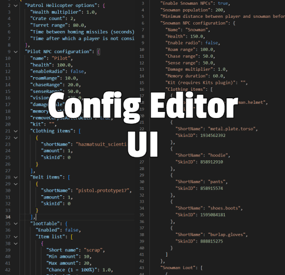
Config Editor UI
By The_Kiiiing in Plugins
Are you tired of editing config files in a text editor? This plugin allows you to edit configurations and data files directly in-game.
Features:
Edit config files and data files via in-game UI Prevents syntax errors like missing commas Option to reload plugin when saving a config file Intuitive UI Works with any JSON file
Command:
/config
Permission:
configeditorui.use
-
$14.99
Sound Library Api
Sound Library Api allows you to store & play recorded sounds for players, attach them to npcs, trigger them via in-game events
Use Sound Library API Encoder which allows you to convert any audio file to our own format (after converting the file, rename it and move it to /data/SoundLibraryApi):
Sound Library Encoder
Configuration:
{ "Scheduled message interval (seconds)": 900.0, "Audio events": { "ScheduledMessage": { "Enable audio event": true, "Global audio event (set false in order to be heard only by the player that triggered the audio event)": true, "Audio files": [ "placeholder1", "placeholder2" ] }, "Welcome": { "Enable audio event": true, "Global audio event (set false in order to be heard only by the player that triggered the audio event)": false, "Audio files": [ "placeholder1", "placeholder2" ] }, "PatrolHelicopter": { "Enable audio event": true, "Global audio event (set false in order to be heard only by the player that triggered the audio event)": true, "Audio files": [ "placeholder1", "placeholder2" ] }, "Airdrop": { "Enable audio event": true, "Global audio event (set false in order to be heard only by the player that triggered the audio event)": true, "Audio files": [ "placeholder1", "placeholder2" ] }, "CargoShip": { "Enable audio event": true, "Global audio event (set false in order to be heard only by the player that triggered the audio event)": true, "Audio files": [ "placeholder1", "placeholder2" ] }, "Chinook": { "Enable audio event": true, "Global audio event (set false in order to be heard only by the player that triggered the audio event)": true, "Audio files": [ "placeholder1", "placeholder2" ] }, "CrateHack": { "Enable audio event": true, "Global audio event (set false in order to be heard only by the player that triggered the audio event)": false, "Audio files": [ "placeholder1", "placeholder2" ] }, "MissionStarted": { "Enable audio event": true, "Global audio event (set false in order to be heard only by the player that triggered the audio event)": false, "Audio files": [ "placeholder1", "placeholder2" ] }, "MissionFinished": { "Enable audio event": true, "Global audio event (set false in order to be heard only by the player that triggered the audio event)": false, "Audio files": [ "placeholder1", "placeholder2" ] }, "MissionFailed": { "Enable audio event": true, "Global audio event (set false in order to be heard only by the player that triggered the audio event)": false, "Audio files": [ "placeholder1", "placeholder2" ] }, "DeepSeaEnter": { "Enable audio event": true, "Global audio event (set false in order to be heard only by the player that triggered the audio event)": false, "Audio files": [ "placeholder1", "placeholder2" ] }, "DeepSeaLeave": { "Enable audio event": true, "Global audio event (set false in order to be heard only by the player that triggered the audio event)": false, "Audio files": [ "placeholder1", "placeholder2" ] }, "DeepSeaOpened": { "Enable audio event": true, "Global audio event (set false in order to be heard only by the player that triggered the audio event)": true, "Audio files": [ "placeholder1", "placeholder2" ] }, "DeepSeaClosed": { "Enable audio event": true, "Global audio event (set false in order to be heard only by the player that triggered the audio event)": true, "Audio files": [ "placeholder1", "placeholder2" ] }, "FishCaught": { "Enable audio event": true, "Global audio event (set false in order to be heard only by the player that triggered the audio event)": false, "Audio files": [ "placeholder1", "placeholder2" ] }, "RouletteWin": { "Enable audio event": true, "Global audio event (set false in order to be heard only by the player that triggered the audio event)": false, "Audio files": [ "placeholder1", "placeholder2" ] }, "RouletteLoss": { "Enable audio event": true, "Global audio event (set false in order to be heard only by the player that triggered the audio event)": false, "Audio files": [ "placeholder1", "placeholder2" ] }, "ShopFrontTradeComplete": { "Enable audio event": true, "Global audio event (set false in order to be heard only by the player that triggered the audio event)": false, "Audio files": [ "placeholder1", "placeholder2" ] }, "FeedbackReport": { "Enable audio event": true, "Global audio event (set false in order to be heard only by the player that triggered the audio event)": false, "Audio files": [ "placeholder1", "placeholder2" ] }, "PlayerReport": { "Enable audio event": true, "Global audio event (set false in order to be heard only by the player that triggered the audio event)": false, "Audio files": [ "placeholder1", "placeholder2" ] } } } Language:
{ "NoPermission": "<color=#e3e3e3>You do not have permission to use this command</color>", "AlreadyRecording": "<color=#e3e3e3>You're already recording. Please save or cancel your previous recording before starting a new one.</color>", "InvalidAddSyntax": "<color=#e3e3e3>Invalid Syntax. Ex: <color=#de8732>/sl add soundname</color></color>", "AddAlreadyExists": "<color=#e3e3e3>This sound already exists. </color><color=#e3e3e3>Please add <color=#de8732>overwrite</color> to your arguments to allow overwriting an existing sound.</color><color=#e3e3e3>Ex: <color=#de8732>sl add {{0}} overwrite</color></color>", "AddRecording": "<color=#e3e3e3>You can now start recording.\n</color><color=#e3e3e3>The recording will automatically start once your start sending audio.\n</color><color=#e3e3e3>Once you have completed you can use <color=#de8732>/sl save</color> or <color=#de8732>/sl cancel</color>.\n</color><color=#e3e3e3>You can listen to your recording using <color=#de8732>/sl play</color>\n</color><color=#e3e3e3>If you want to rerecord your recording use <color=#de8732>/sl reset</color></color>", "NotRecording": "<color=#e3e3e3>You're not currently recording.</color>", "RecordingSaved": "<color=#e3e3e3>We have saved your recording as '{0}'</color>", "CanceledRecording": "<color=#e3e3e3>We have canceled your recording</color>", "ResetRecording": "<color=#e3e3e3>Your recording has been reset.</color>", "PlayInvalidSyntax": "<color=#e3e3e3>Invalid Syntax. Ex: <color=#de8732>/sl play soundname</color> - to play the sound with the given name.</color>", "NoSoundFileFound": "<color=#e3e3e3>No sound file found with name '{0}'</color>", "HelpText": "<color=#e3e3e3>Allows players to record sound that can be played back to a player\n<color=#de8732>/sl add soundname</color> - to start the creation of a new sound.\n<color=#de8732>/sl npc add hookActionType fileName</color> - to add one or more filenames to a human npc (hook action types are: <color=#de8732>OnUseNPC/OnEnterNPC/OnLeaveNPC/OnHitNPC</color>)\n<color=#de8732>/sl npc remove hookActionType fileName</color> - to remove a filename from a human npc (hook action types are: <color=#de8732>OnUseNPC/OnEnterNPC/OnLeaveNPC/OnHitNPC</color>)\n<color=#de8732>/sl save</color> - to save your recorded sound.\n<color=#de8732>/sl reset</color> - to clear your current recording.\n<color=#de8732>/sl cancel</color> - to cancel your recording and not save.\n<color=#de8732>/sl play</color> - to player your current recording back to you.\n<color=#de8732>/sl</color> - to view this help text again.</color>", "AudioMessagesHelpText": "<color=#e3e3e3><color=#66B2FF>/audio send playerName audioName</color> - Sends an audio message to a player</color>\n<color=#e3e3e3><color=#66B2FF>/audio sendall audioName</color> - Sends an audio message to everyone on the server\n<color=#e3e3e3><color=#66B2FF>/audio sendlooped playerName audioName 2 (loop times amount)</color> - Sends a looped audio message to a player\n<color=#e3e3e3><color=#66B2FF>/audio sendalllooped audioName 2 (loop times amount)</color> - Sends a looped audio message to everyone on the server\n<color=#e3e3e3><color=#66B2FF>/audio files</color> - Shows a list of all audio files on the server\n<color=#e3e3e3><color=#66B2FF>/sl</color> - Shows the help page for the Sound Library API\n<color=#e3e3e3><color=#66B2FF>/audio help</color> - Shows these help messages", "PlayingText": "<color=#e3e3e3>Playing the file with the name of <color=#de8732>{0}</color></color>", "PlayingAudioMessageText": "<color=#e3e3e3>Playing the file with the name of <color=#66B2FF>{0}</color></color>", "InvalidTarget": "<color=#e3e3e3>Invalid target, try using his steamid/name</color>", "NullFileName": "<color=#e3e3e3>This file name is null, use /audio files</color>", "AvailableFileNames": "<color=#e3e3e3>Available files:\n<color=#66B2FF>{0}</color></color>", "FileNameNotFound": "<color=#e3e3e3><color=#66B2FF>{0}</color> does not exist, use <color=#66B2FF>/audio files</color></color>", "NpcNotFound": "<color=#e3e3e3>Couldn't find any human npc, make sure you have created one using <color=#de8732>/npc_add</color> and you are looking at it!</color>", "InvalidHookActionType": "<color=#e3e3e3><color=#de8732>{0}</color> is invalid, list of hook action types:<color=#de8732>\nOnUseNPC\nOnEnterNPC\nOnLeaveNPC\nOnHitNPC</color></color>", "NpcSoundAdded": "<color=#e3e3e3><color=#de8732>{0}</color> was added and will play when <color=#66B2FF>{1}</color> is triggered</color>", "NpcSoundRemoved": "<color=#e3e3e3><color=#de8732>{0}</color> was removed from this NPC!</color>", "FileNameAlreadyAdded": "<color=#e3e3e3><color=#de8732>{0}</color> was already added to this NPC!</color>" } Human NPC Integration example:
{ "Npc Data": { "303133854": { "Action type of the npc & Filenames that are played": { "OnUseNPC": [ "testing", "testing" ] } }, "986905907": { "Action type of the npc & Filenames that are played": { "OnEnterNPC": [ "testing" ] } }, "1543143931": { "Action type of the npc & Filenames that are played": { "OnHitNPC": [ "messagesound" ] } }, "1205925446": { "Action type of the npc & Filenames that are played": { "OnUseNPC": [ "testing", "pop" ], "OnHitNPC": [ "testing" ] } }, "45461627": { "Action type of the npc & Filenames that are played": { "OnUseNPC": [ "messagesound" ], "OnHitNPC": [ "messagesound" ] } }, "942954162": { "Action type of the npc & Filenames that are played": { "OnHitNPC": [ "waveeffect", "messagesound" ], "OnEnterNPC": [ "messagesound" ] } } } }
Human NPC Integration Video:
Permissions:
soundlibraryapi.use - In order to use /sl
soundlibraryapi.audio - In order to use /audio
Console Command:
audio.message
-
$29.99
Skill Tree
By imthenewguy in Plugins
This plugin adds a character progression system to your server in the form of a leveling and skill tree system.
Players gain xp by cutting trees, mining rocks, killing NPCs etc, and are rewarded with skill points when they level up.
These points can be used to unlock perks and buffs across a number of different skill trees.
The plugin is extremely customizable and server owners can change, move, scale or disable any perk to tailor the setup to their server.
It features:
140 unique buff types across 155 skill nodes. 13 unique skill trees. 67+ sources of xp, along with custom xp settings for BotRespawn and NpcSpawn. An extremely large amount of xp options to really tweak the plugin for your server. A functional tree system that prevents unlocking/upgrading of nodes if the player has not invested enough skill points into a tree. Fun & unique ultimate abilities across most trees. Global yield settings for servers that want to run 2x/3x etc. Ability to create custom skill trees and nodes using permissions from other plugins. Considerable amount of options for persistent data through server wipes. A prestige system to reward your most hardcore players. SkillTree allows users to focus on multiple skill trees and unlock nodes in each tree as they level, to make their characters more powerful and unique.
Plugins that work well with Skill Tree
RaidableBases - SkillTree integrates with RaidableBases by rewarding raiders with xp (either handled via SkillTree directly or via RaidableBases directly). The raiding tree can also exclusively work with RaidableBases if servers don't allow raiding. Economics & ServerRewards - integrated as a way to pay for the respec cost. SurvivalArena - Rewards the winner of the event with xp. Cooking - adds new skills to the Cooking tree as well as xp rewards when successfully cooking meals. BotRespawn - Adds additional xp sources for each NPC profile. NpcSpawn - Adds additional xp sources for each NPC profile. UINotify - Shows notifications relevant to leveling etc. ZombieHorde - Provides xp for killing zombies generated by this plugin. LootDefender - Provides the ability for shared xp when killing BradleyAPC. Configured through LootDefender. EpicLoot - Adds a skill to the Scavenging tree FishingHotspots - Allows for modified XP gain while fishing in a hotspot. ZoneManager - Allows you to disable buffs while in a zone.
skilltree.chat - required to use the chat commands to access the skill tree menu. skilltree.xp - required to obtain xp from xp sources. skilltree.tree - required to access and use the skill tree. skilltree.admin - required to use the admin commands. skilltree.all - allows user access to all trees. skilltree.Mining - allows the user to access the mining tree. skilltree.Woodcutting - allows the user to access the woodcutting tree. skilltree.Skinning - allows the user to access the skinning tree. skilltree.Harvesting - allows the user to access the harvesting tree. skilltree.Combat - allows the user to access the combat tree. skilltree.Medical - allows the user to access the medical tree. skilltree.Build_Craft - allows the user to access the build craft tree. skilltree.Scavenging - allows the user to access the scavenging tree. skilltree.Vehicles - allows the user to access the vehicles tree. skilltree.Cooking - allows the user to access the cooking tree. skilltree.bag.keepondeath - prevents the ExtraPockets bag from dropping on death. skilltree.notitles - Removes the level title from the player (Requires BetterChat) skilltree.noxploss - Prevents xp loss. skilltree.roguelike - If enabled via the config, will be required to participate in the Roguelike system. skilltree.teabonus - Ignores the config option preventing the yield increases from working with mining and woodcutting teas. skilltree.noscoreboard - Prevents players with this permission from being added to the scoreboard. skilltree.respec.bypass - removes the cost for respeccing skilltree.togglebc - required to toggle BetterChat titles on/off //Custom permission settings "Modified max skill points based on permissions [must be higher than default]": { "vip": 120 }, "Cost per point to respec based on permissions [must be lower than default]": { "vip": 10.0 }, "Maximum amount of xp a player can lose when they die based on permissions [must be less than default]": { "vip": 500.0 }, "Permissions to adjust xp gain modifiers (skilltree.<perm>) [1.0 is default modifier]": { "vip": 1.2 }, The permission for "vip" would be skilltree.vip Assigning this perm to players would override the default values for the respective settings (max skill points, respec cost, xp gain and xp loss).
Command: st Description: Opens the skill tree menu. Requires skilltree.chat permissions. Command: updatexptable Description: Recalculates the xp table based on the config values. Requires Command: togglexpdrops Description: Toggles the xp popup when obtaining xp. Command: togglexphud Description: Toggles the xp hud on the players screen. Command: givexp Parameters: <name> <amount> <apply bonus true/false> Description: Gives the player matching the name parameter, xp equal to the amount parameter. Ignore modifiers will ignore all forms of xp boosts such as rested xp. Command: givesp Parameters: <name> <amount> Description: Gives the player matching the name parameter, skill points equal to the amount parameter. Command: resetdata Parameters: <name> Description: Resets the target players data. Command: turbo Description: Toggles the turbo on the boat if the player has the relevant perk. Command: togglebc Description: Toggles the BetterChat title on/off for the user. Command: movebar Description: brings up a ui that can be used to relocate the xp bar on the players screen. Command: stresetalldata Description: Resets all players data. Command: sb or score or scoreboard Description: Chat and console command that brings up the scoreboard, showing who has the most xp. Command: sttogglenotifications Description: Toggle notifications from buff triggers. Command: stgiveitem Parameters: <id> <shortname> <quantity> <skin ID> <optional: displayName> Description: gives an item to the target ID that matches the parameters. Command: givexpdebt Parameters: <id/name> <amount> Description: Gives the target player xp debt. Console Command: strespecallplayers Description: Resets skills for all online and offline players. Console Command: strespecplayer Parameters: <target name/userID> Description: Resets the target online/offline players skills. Console Command: givexptoall Parameters: <amount> <online only: true/false> Description: Will give the amount of xp to all players. If online only is true, it will only give it to those that are online. Console Command: givesptoall Parameters: <amount> <online only: true/false> Description: Will give the amount of skill points to all players. If online only is true, it will only give it to those that are online. Console Command: stremoveplayerdata Parameters: <userid> Description: Will remove the player data file for the specified userid. Console Command: sttogglebuffs Parameters: <true/false> Description: Disables/enableds buffs globally for all players.
Experience can be gained from a number of different sources. The value for each source can be adjusted via the config.
NodeHit - Hitting a stone, metal or sulfur mining node. NodeHitFinal - Finishing a stone, metal or sulfur mining node. TreeHit - Hitting a tree. TreeHitFinal - Knocking down a tree. SkinHit - Hitting an animal with a skinning tool. SkinHitFinal - Finishing off an animal with a skinning tool. CollectWildPlant - Collecting any map generated collectible, such as hemp, corn, pumpkin, stone, sulfur or metal. CollectGrownPlant - Collecting any player grown produce. BuildingBlockDeployed - Placing down a twig building block. FishCaught - Catching a fish. Crafting - Whenever a craft is successfully completed. XP is calculated based on the duration of the craft. ScientistNormal - Killing a blue scientist. ScientistHeavy - Killing a heavy scientists. SmallAnimal - Killing a small animal such as a chicken. MediumAnimal - Killing a medium animal such as a boar, wolf or stag. LargeAnimal - Killing a large animal such as a horse, shark or bear. Barrel - Destroying barrels. RoadSign - Destroying road signs. Scarecrow - Killing scarecrows or a zombie in ZombieHorde. Mission - Completing a mission in rust. BradleyAPC - Getting the last hit on Bradley. LootHackedCrate - First player to loot a locked crate. LootHeliCrate - First player to loot a heli crate. LootBradleyCrate - First player to loot a bradley crate. CookingMealXP - (Requires cooking plugin) XP is calculated per ingredient used. Example 2 tomatos and 8 bear meat would yield 100xp. RaidableBaseCompletion - Awards raiders of a RaidableBase xp upon the completion of the raid. Win_HungerGames - Awards xp to the winner of the Hunger Games arena. Win_ScubaArena - Awards xp to the winner of the Scuba arena. Win_Skirmish - Awards xp to the winner of the Skirmish arena. Gut_Fish - Awards xp when gutting a fish. default_botrespawn - default amount xp given when killing a bot made using botrespawn. Overriding values can be added to the config based on the bot group. crate_basic - when opening crates crate_elite - when opening crates crate_mine - when opening crates crate_normal - when opening crates carte_normal_2 - when opening crates crate_normal_2_food - when opening crates crate_normal_2_medical - when opening crates crate_tools - when opening crates crate_underwater_advanced - when opening crates crate_underwater_basic - when opening crates crate_ammunition - when opening crates crate_food_1 - when opening crates crate_food_2 - when opening crates crate_fuel - when opening crates crate_medical - when opening crates Harbor_Event_Winner - Winner of the Harbor event plugin Junkyard_Event_Winner - winner of the Junkyard event plugin PowerPlant_Event_Winner - winner of the Power plant event plugin Satellite_Event_Winner - winner of the Satellite event plugin Water_Event_Winner - winner of the Water event plugin Air_Event_Winner - winner of the Air event plugin. Armored_Train_Winner - winner of the Armored train plugin Convoy_Winner - winner of the Convoy event plugin. Supply_drop - first player that opens a supply drop. SurvivalArena_Winner - winning the SurvivalArena event. swipe_card_level_1 - using a green swipe card reader swipe_card_level_2 - using a blue swipe card reader swipe_card_level_3 - using a red swipe card reader boss_monster - killing an NPC from boss monster Zombie - Killing a ZombieHorde zombie UnderwaterDweller NPCs - NPCs in underwater labs JetPilot - JetPilot plugin ArcticBaseEvent_Winner - winner of the Arctic Base Event GasStationEvent_Winner - winner of the Gas Station Event SputnikEvent_Winner - winner of the Sputnik Event detect_diggable - triggered when a metal detector site is dig up. ShipWreckEvent_Winner - winner of the Ship Wreck Event pvp - when a player kills another player (default: off). Triangulation_Winner - winner of the triangulation event Caravan_Winner - winner of the Caravan event SupermarketEvent_Winner - winner of the Supermarket event
Name: Mining Yield Description: Increases the amount of resources gained while mining. Name: Instant Mine Description: Gives the user a chance to instantly mine out a stone, sulfur or metal node. Name: Smelt On Mine Description: Gives the user a chance to smelt some of the ore as its mined from sulfur and metal nodes. Name: Mining Luck Description: Gives the user a chance to obtain items from the Mining luck loot table when they finish mining a node. Name: Mining Tool Durability Description: Decreses the durability loss of mining tools. Name: Woodcutting Yield Description: Increases the amount of resources gained while woodcutting. Name: Instant Chop Description: Gives the user a chance to instantly chop down a tree. Name: Woodcutting Coal Description: Gives the user a chance to obtain some charcoal while woodcutting. Name: Woodcutting Luck Description: Gives the user a chance to obtain items from the Woodcutting luck loot table when they finish cutting down a tree. Name: Woodcutting Tool Durability Description: Decreses the durability loss of woodcutting tools. Name: Skinning Yield Description: Increases the amount of resources gained while skinning. Name: Instant Skin Description: Gives the user a chance to instantly cut up an animal. Name: Skinning Tool Durability Description: Decreases the durability loss of skinning tools. Name: Skinning Cook Description: Gives the user a chance to received cooked meat, instead of raw meat, while skinning an animal. Name: Harvest Wild Yield Description: Increases the yield when harvesting map generated collectibles, such as berries, hemp, stone, sulfur and mushrooms. Name: Harvest Grown Yield Description: Increases the yield when harvesting player grown produce. Name: Extra Fish Description: Gives the user a chance of receiving an extra fish while fishing. Name: Double Bandage Heal Description: Doubles the healing power of cloth bandages. Name: Radiation Reduction Description: Reduces the amount of radiation damage taken by the player. Name: Extra Food Description: Increases the amount of calories the player receives when consuming food. Name: Fire Damage Reduction Description: Reduces the amount of fire damage received. Name: Fall Damage Reduction Description: Reduces the amount of fall damage received. Name: No Cold Damage Description: Removes all cold damage from the player. Name: Wounded Resist Description: Gives the player a chance to get straight back on their feet after entering the wounded state. Name: Animal Damage Resist Description: Reduces the damage taken by animals. Name: Riding Speed Description: Increases the speed of a horse while riding it. Name: Free Bullet Chance Description: Gives the player a chance to not expend a bullet when firing a gun. Name: Primitive Expert Description: Removes durability loss for primitive weapons. Name: Upgrade Refund Description: Gives the player a chance to receive their resources back when upgrading a building block. Name: Craft Speed Description: Increases the crafting speed of a player. Name: Research Refund Description: Gives the player a chance to receive their scrap back when researching an item on the research bench. Name: Craft Refund Description: Gives the player a chance to receive their crafting materials back when crafting an item. Name: Extra Scrap Barrel Description: Gives the player a chance to receive additional scrap when destroying a barrel. Name: Barrel Smasher Description: Allows the player to instantly smash a barrel with any weapon. Name: Extra Scrap Crate Description: Gives the player a chance to obtain extra scrap when looting a crate for the first time. Name: Component Chest Description: Gives the player a chance to obtain additional components when looting a crate for the first time. Name: Electronic Chest Description: Gives the player a chance to obtain additional electronics when looting a crate for the first time. Name: Component Barrel Description: Gives the player a chance to obtain additional components when smashing a barrel. Name: Electronic Barrel Description: Gives the player a chance to obtain additional electronics when smashing a barrel. Name: Melee Resist Description: Reduces the damage taken by melee weapons. Name: Iron Stomach Description: Allows the player to eat spoiled and raw food without being poisoned. Name: Boat Speed Description: Allows the user to activate a turbo boost while on a boat, increasing the boats speed. Name: Recycler Speed Description: Increases the speed of recycling for the player. Name: Smelt_Speed Description: Adds a chance for ore to smelt whenever wood is consumed, in addition to the standard smelt rate. Name: Heli_Fuel_Rate Description: Reduces the fuel consumption for your helicopters. Name: Boat_Fuel_Rate Description: Reduces the fuel consumption for your boats. Name: Vehicle_Mechanic Description: Allows the user to repair a vehicle at no cost. Name: Reviver Description: Brings a wounded player up with additional health if the reviving player has the buff. Name: Rationer Description: Provides the consumer a chance to receive their food/tea back once consumed. Name: PVP_Critical Description: Gives the attacker a chance to critically damage the target in PVP. Name: PVP_Damage Description: Increases the damage of all PVP attacks. Name: PVP_Shield Description: Reduces the damage of all incoming PVP attacks. Name: Metabolism_boost Description: Increases your calories and hydration above the maximum. Name: LootPickup Description: Chance to have the loot from destroyed barrels given moved directly to their inventory. Name: Node_Spawn_Chance Description: Chance to spawn a new node when a new one is mined out. Name: HealthRegen Description: Passively regenerates x health per second Name: AnimalTracker Description: Allows the user to use the /track command to find the direction of the closest animal. Name: ExtraPockets Description: Creates a backpack style storage system, providing players the ability to access the storage using a chat command (/pouch). Slots are given based on points spent. Name: Human_NPC_Damage Description: Increases damages against scientists. Name: Animal_NPC_Damage Description: Increases damages against animals. Name: Human_NPC_Defence Description: Decrease damage from scientist. Name: Craft_Duplicate Description: Chance to duplicate an item while crafting. Name: WaterBreathing Description: Breath underwater. Name: SharkResistance Description: Reduce damage taken from sharks. Name: SharkSkinner Description: Chance to receive random items while skinning sharks. Name: DeepSeaLooter Description: Chance to receive additional items while looting sunken crates. Name: InstantUntie Description: Instantly untie sunken crates. Name: UnderwaterDamageBonus Description: Increase damage to all living things while underwater (including underwater labs). Name: Permission Description: Used for permission based skills. Name: MaxRepair Description: Resets the max condition for any items that are repaired. Name: Durability Description: Reduces condition loss for all items that the player is using. Name: Regrowth Description: Provides a chance for a tree to respawn when cut down. Name: Skinning_Luck Description: Provides a chance to receive an item when skinning an animal. Name: Fishing_Luck Description: Provides a chance to receive an item when catching a fish. Name: Trap_Damage_Reduction Description: Reduces the damage received from traps. Name: Trap_Damage_Increase Description: Increases the damage done to traps. Name: Personal_Explosive_Reduction Description: Reduces the damage received from your own explosives. Name: Double_Explosion_Chance Description: Provides a chance for your explosives to trigger twice. Name: Lock_Picker Description: Provides a chance to open a locked entity that you do not have access to. Name: Explosion_Radius Description: Increases the explosion radius of your explosives. Name: Dudless_Explosive Description: Reduces the chance of your satchels and beancans being duds. Name: Woodcutting_Hotspot Description: Treats each hit on a tree as though you hit the hotspot. Name: Mining_Hotspot Description: Treats each hit on a node as though you hit the hotspot. Name: Extended_Tea_Duration Description: Increases the duration of tea buffs by x% per level. Name: Extended_Mag Description: Increases the magazine capacity of weapons by x% per level. Name: Tea_Looter Description: Provides you with a x% chance per level to find tea in certain containers. Name: Bite_Speed Description: Decreases the time it takes to hook a fish by x% per level. Name: Heli_Speed Description: Increases the max thrust speed of the heli by x% per level. Name: Sonar Description: Allows the user to run a command to find all nearby submerged objects (dive sites, sharks, scientists etc). Name: Comfort Description: Provides the player and all nearby team mates with a % of comfort per level. Name:Heal_Share Description: Provides surrounding team mates with a % of health received per level. Name:XP_Share Description: Provides surrounding team mates with a % of the xp you gain per level. Name: Tea_Share Description: Provides surrounding team mates with a % of tea buffs when you consume tea per level. Name: Metabolism_Share Description: Provides surrounding team mates with a % of hydration and calories received per level. Name: Human_Workbench Description: Creates a workbench aura on the player. The player and nearby team mates can use them as a workbench (the level of which is based on the skill level). Name: Recycler_Efficiency Description: Increases the recycler efficiency by x%. Name: Metal_Detector_Luck Description: Provides the player with a chance per level to obtain an additional item when they excavate metal detection sites. Name: Efficient_Digger Description: Provides the player with a chance per level to automatically dig up metal detection sites when they are flagged. Name: Magnetic_Digger Description: Provides the player with a chance per level to automatically collect dug up items. Name: RadiationBaseValue Description: Provides you with a base radiation resistance of % per level, even when naked. Name: RadiationResistModifier Description: Increases the effectiveness of your clothings radiation resistance by % per level. Name: BikeEnginePower Description: Increases the engine power of all bikes (peddal and motor) by x % per level. Name: DriverCollisionResistance Description: Decreases the damage taken from collisions while driving a vehicle by x% per level. Name: Harvesting_Luck Description: Provides a drop table when a player collects harvesting materials. Grown and wild collectibles have their own loot tables. Name: Awareness Description: This skill will show the nearby location of (configurable): npcs, animals, dropped items, droppted item containers, corpses within x meters. Name: Cooking_Speed Description: This skill reduces the amount of time it takes to cook items using the cooking workbench by x% per level. Name: Rocket_Velocity Description: This skill increases the velocity of all missiles launched by the player by x% per level. Name: Armor_Slots Description: Sets the minimum armor slots rolled based on level of skill (1 slot per level). Name: ShieldReflect Description: Provides a %X chance per level for projectile damage blocked by a shield to be reflected to the attacker. Name: Free_Repairs Description: Allow repairing of items for free. Name: Bradley_Damage_Bonus Description: Bonus damage to the bradley tank. Name: Heli_Damage_Bonus Description: Bonus damage to the patrol heli. Name: Loot_Spotter Description: Highlights nearby BoxStorage container entities. Name: Hatch_Speed Description: This skill reduces the time it takes for an egg to hatch in a chicken coop by x% per level. At 100% the egg will hatch. Name: Pet_Effectiveness Description: This skill increases the amount of love a chicken gains when you pet it by x% per level. Name: Coop_Capacity Description: This skill allows your chicken coops to hold x additional chickens per level. Name: Boat_Refund Description: This skill refunds x% per level of the materials used when placing boat building pieces. Name: Cannon_Damage Description: This skill increases the damage dealt by cannons by x% per level. Name: Sailing_Speed Description: This skill increases the speed of player-made boats by x% per level while you are at the helm. Name: Siege_Damage Description: This skill increases the damage dealt by catapults, battering rams and ballistas by x% per level. Name: Collectible_Respawn Description: This skill gives you a x% chance per level for a collectible to grow back after you pick it up. Name: Friendly_Fire_Reduction Description: This skill reduces the damage that you deal to your team mates by x% per level. Name: Woodcutting_Ultimate Description: Harvests the surrounding trees when cutting down a tree. Name: Mining_Ultimate Description: Provides access to a chat command to see all surrounding node locations. Name: Combat_Ultimate Description: Heals the player for a percentage of the damage that they deal to all sources. Name: Vehicle_Ultimate Description: Reduces damage dealt to the players mounted vehicle (default 100% deduction). Name: Harvester_Ultimate Description: Allows the player to set the genetic composition of plants. Name: Medical_Ultimate Description: Gives the player a chance to resurrect at their point of death if they choose to. Name: Skinning_Ultimate Description: Killing an animal with this buff active will provide the player with an enhanced ability for a period of time, depending on the animal killed. - Chicken: No fall damage. - Boar: Chance to find components while harvesting mushrooms and berries. - Wolf: Increased healing while near team mates. - Stag: Notification when a neutral player is nearby, and their last known location (configurable). - Bear: Scientists will not attack the player unless attacked. - Polarbear: Overshield. Name: Build_Craft_Ultimate Description: Use any coloured swipe cards in any reader. Name: Scavengers_Ultimate Description: Will automatically recycle components from barrels when they are broken.
The xp table uses a common equation to calculate its levels and xp requirements. You can read more about the method here: https://blog.jakelee.co.uk/converting-levels-into-xp-vice-versa/
There is also a spreadsheet you can make a copy of and adjust the x value at the top of. Increasing the number minimizes the xp between levels. Find a good value, then put it in the "x" value under the "Leveling information" section in the config.
It is recommended that you leave the y value at 2 or 3, and adjust the x value only.
Rule of thumb:
- 0.07: default
- 0.04: grindy.
API
API documentation: https://codefling.com/files/documentation/11-skill-tree-api/
- #leveling
- #progression
- (and 19 more)