
ELF's Wishlist
-

$17.99
Custom Oil Rig
By Wonder_Fox in Monuments
Custom Oil Rig, here players can find very good loot, lots of green, blue,red doors and puzzles. There is also an underwater entrance and automatic lighting. Custom loot presets that you can edit.
Npc: 17 heavy scientists
Prefab count: ~12,7k
- #oil rig
- #custom oilrig
- (and 6 more)
-

$10.00
Mevent Shop – Ready Balanced Config
By GTx in Customizations
Balanced Config for Mevent Shop
A ready-to-use balanced configuration for the Mevent Shop plugin with carefully adjusted economy settings, item prices, and multiple setup options for different Rust server types.
This configuration is suitable for both classic servers and servers with faster economy progression.
Included Configuration Options:
Configuration with player-to-player currency transfer Configuration without currency transfer Support for: Economics & ServerRewards Combined configuration for servers using both economy systems simultaneously When using both economy plugins together, players will be able to choose which currency to use when purchasing items.
Inside the Shop Items folder, you can choose:
Version with item sell-back enabled Version without sell-back Price presets: x1 prices & x2 prices
Economy Balance
The ability to sell items back to the server is intentionally not enabled for every item.
Sell-back is mainly available for:
High-tier weapons Some resources Certain valuable items This helps maintain a balanced in-game economy and prevents players from generating currency too quickly.
Price Recommendations:
x1 Configuration - Balanced for servers where players can typically earn around: 1000–2000 currency within 7 days of a wipe x2 Configuration - Recommended for servers where economy currency is easier and faster to obtain. You can preview the full item list and x1 pricing configuration on the test server:
connect 65.109.110.74:20540- #shop
- #shop config
- (and 8 more)
-
.thumb.png.9044ce3f654eaeb9ed17a0e1eb3ebc46.png)
$60.00
Advanced BattleMetrics Ticket System
By RustNIte in Discord Bots
Advanced BattleMetrics Ticket System
Table of Contents
Overview Key Features BattleMetrics Features Snippet System Database Requirements Installation Windows Linux / Pterodactyl Setting Up the Bot FAQ Terms and Conditions ────────────────────────────────────────
Overview
The Advanced BattleMetrics Ticket System is a powerful, fully supported Discord ticket bot built with Rust server communities in mind, it integrates directly with BattleMetrics, Steam and Echo to give your staff everything they need right inside the ticket without switching between tools or tabs during high volume situations.
Built on a stable MySQL base and fully compatible with both Simple Link and standard MySQL based Discord and Steam linking systems, it is designed to work with your existing setup with minimal friction and a short setup time.
All configuration is done through clean YAML files with inline comments explaining every field, no more guessing what a setting does or hunting through JSON for the right key.
Full 24/7 support is available via our Discord server at discord.gg/reecepage, which also includes video tutorials and text based guides in a dedicated tutorials section.
────────────────────────────────────────
Key Features
Modal Ticket Questions — Passive ticket creation through custom modal forms, collecting the right information before a ticket is even opened. Up to 10 Ticket Types — Each with its own custom styles, permissions, questions, channel name template and options for a wide variety of support categories. Custom Channel Names — Per ticket type channel name templates using tokens like {username}, {id}, {type} and {emoji}, sanitised and length enforced automatically. Allow Multiple Tickets — Configure per ticket type whether a user can have multiple open tickets simultaneously, useful for player reports and general inquiries. MySQL Database — Fully MySQL based infrastructure, supports Simple Link and standard MySQL Discord and Steam linking systems. Pending Channel — Tickets do not open automatically, staff can accept or deny incoming tickets to prevent spam and keep things organised. Pending Ticket Timeout — Automatically denies pending tickets left unreviewed for too long, configurable timer, notifies the user and logs the denial. Inactivity Auto-Close — Tickets with no activity for a configurable number of hours are automatically closed with a transcript generated before deletion. Ticket Cooldown — Prevents users from immediately resubmitting after a denial, configurable cooldown timer in minutes. Ticket Rate Alerts — If too many tickets are submitted within a short window the logs channel receives an alert, configurable threshold and time window. Ticket Claiming — Staff can claim and unclaim tickets using /claim or the buttons on the pinned embed, the pinned info embed updates in real time to show who is handling the ticket. Ticket Transfer — /transfer @staffmember hands a ticket off to another staff member, updates the claimed state and pings them in the channel. Ticket Reopen — /reopen @user recreates a ticket channel from closed history, posts the original form answers and context, notifies the user. Ticket Priority — /priority sets none, low, medium, high or urgent priority, the pinned embed color changes to reflect the level immediately. Close Reason Templates — /closetemplate lets staff save common close reasons, they appear as autocomplete suggestions in /close for faster, more consistent closings. Ticket History — /history @user shows the last ten closed tickets for any user including type, close reason, who closed it and the original form answers. DM Fallback Channel — If a user has their DMs closed the bot does not error, it creates a private channel visible only to them and the bot which acts as their inbox, all messages that would normally go to DMs appear there instead. Echo Integration — Full API integration with Echo, one of the leading cheater detection tools for Rust. Staff Statistics — /statistics get and /statistics leaderboard give a detailed view of staff performance with role-colored embeds. Snippet System — Staff with the right permissions can create, delete and use custom snippets for faster responses. HTML Transcripts — Generated on every ticket close, sent to a dedicated transcripts channel with opening and closing info and user mentions. Customisable Permissions — Different ticket types can be restricted to specific staff roles, per type accept, deny and Echo scan permissions. Ban and Blacklist System — /ban add and /ban remove to block specific users from creating tickets entirely. Application Commands — /m for custom message replies, /sm for hidden messages, /attachment for sending files without needing external links. Security Measures — Non-image file attachments are sent as links rather than files to prevent accidental malware execution. Activity Logs Channel — A dedicated logs channel receives clean activity events covering accepts, denials, closes, claims, transfers, priority changes and snippet management. Errors stay in console and file logs only. YAML Configuration — All config files are YAML with inline comments throughout, no JSON knowledge required. Rate-Limit Protection — Constant rate-limit tracking with RPM logging so you can monitor request volume at a glance. ────────────────────────────────────────
BattleMetrics Features
Full Combat Log pulled directly into the ticket from the BattleMetrics activity API — no RCON triggers or commandID configuration required. Clan and team activity extracted from the activity stream covering join, leave, create and kick events — no RCON setup needed. BattleMetrics bans paginated across multiple embeds for players with large ban histories, flagged bans highlighted with a warning icon and a red embed color. Org server history shown in its own paginated embeds, up to six servers per page, with online status, playtime and last seen for each. Player notes pulled directly from BattleMetrics and uploaded as a text file for easy reference inside the ticket. K/D ratio, F7 reports and hour breakdowns all sourced from the activity feed, broken down by today and all time. See what server the user is currently on and how long they have spent on your organisation's servers for quicker and more relevant support. ────────────────────────────────────────
Snippet System
Use /snippets get {identifier} to retrieve and preview any snippet. Use /snippets create {identifier} {output} to create a new snippet and improve response speed. Use /snippets delete {identifier} to remove unwanted snippets. Default snippets seeded from snippets.yaml use the updatable flag to control whether they can be deleted via Discord. Default snippets can be configured and customised directly from snippets.yaml, many free configurations are included out of the box. ────────────────────────────────────────
Database
The system uses MySQL as its base database, it is reliable, fast and easy to manage, it fully supports both Simple Link and standard MySQL based Discord and Steam linking systems so it should work with your existing setup with very little configuration needed.
Run setup.sql once to create the base tables, then run setup_additions.sql to add the feature tables for history, claims, cooldowns, close reason templates and priority tracking.
────────────────────────────────────────
Requirements
Node.js 18.18+ — Required Discord Bot Token — Required MySQL Database — Required YAML config editing (comments provided) — Required BattleMetrics API Token — Optional Steam API Token — Optional Simple Link or MySQL Linking System — Optional Full support is available for Pterodactyl Panels running on OVHcloud VPS and similar setups.
────────────────────────────────────────
Installation
Make sure to follow each step carefully, if you run into issues specific to your OS version or environment please reach out on our Discord server at discord.gg/reecepage.
Windows
1. Download the zip and unpack it to your desired location. 2. Edit the YAML config files to your specifications — config.yaml, tickets.yaml, snippets.yaml. 3. Copy .env.example to .env and fill in your Discord token, database credentials and any API keys. 4. Run the start.bat file to automatically install all npm modules and start the bot. Built-in error restart handling is included. Linux / Pterodactyl (UNIX/Mac — No ARM CPU Support)
1. Download the zip and unpack it to your desired location. 2. Copy .env.example to .env and fill in your values. 3. Run npm install to install all npm modules. 4. Install PM2 by running npm install -g pm2, start the bot with pm2 start index.js --name abmts and monitor logs with pm2 logs. ────────────────────────────────────────
Setting Up the Bot
After creating your bot application on the Discord Developer Portal at discord.com/developers/applications, make sure you have enabled all Privileged Gateway Intents under the Bot section in the sidebar.
Use the link below to invite the bot to your server with the correct permissions, replace {APPLICATION_ID} with your Bot Application ID found under General Information in the Developer Portal.
https://discord.com/api/oauth2/authorize?client_id={APPLICATION_ID}&permissions=2147871824&scope=bot applications.commands
────────────────────────────────────────
FAQ
Where do I get support?
Join our Discord server at discord.gg/reecepage, we offer 24/7 support including video tutorials, text guides and direct ticket support.
Is there developer support?
Yes, free developer support is available 24/7 on our Discord server.
How do I customise bot messages and responses?
All user facing messages are in locale.yaml, every string has an inline comment explaining what it is for and where it appears.
How do I customise the create a ticket embed?
Edit the createTicketDescription and createATicketTitle values in locale.yaml, or set createTicketEmbed to false in config.yaml to manage the channel yourself.
Can I use a dropdown instead of buttons for ticket creation?
Yes, set createTicketStyle to dropdown in config.yaml. Add a description field to each ticket type in tickets.yaml for the select menu subtitle.
Can users have multiple tickets open at the same time?
Yes, set allowMultiple: true on the relevant ticket type in tickets.yaml.
- #ticket bot
- #ticket
- (and 5 more)
-

$49.95
Abscondita
Niko Jones and the Island of Abscondtia is a 4600 size map of exploration and adventure
Main features of this map are there are no monument markers, by adding fog of war the map will be hidden and with no monument markers the whole map is to be discovered.
You all start in the safezone where your ship has been wreaked.
Plugins included allow for a map wide search for treasure. Watch the video for a visual explanation of the quest. As you loot boxes you may be rewarded with a treasure map clue (random chance). It will be a picture showing X marks the spot. There will be a direction indicated in degrees from the location you found the clue. There will also be a number of grid squares, these are the squares to start looking for more clues. The more clues you have the better chance you have of locating the treasure and the picture becomes more clear. The final long number at the bottom of each clue is a unique identifier.
All those with the same number are for the same treasure. Head to the X and start scanning with the metal detector. Dig without a shovel and you get a standard reward, with the shovel and you will find a very special elite crate.
Because this is a Niko Jones adventure you will find features such as the mine cart chase, the rolling rock and other similar and familiar puzzles within the realm of Rust. Get your whip and fedora and start exploring.
-
$29.99
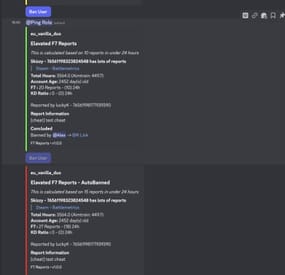
F7 Alert Manager (w Autoban)
By AlexDev101 in Discord Bots
Bored of your simple battlemetrics trigger for F7 Reports? Want a fancy system to search previous f7's & ban from discord or autoban if they are going nuts?
F7 Manager (w Autoban) Offers
Generic F7 logging to discord (Customisable per guild -> can be sent to muliple channels if desired) Alert style Logging FULLY CUSTOMISABLE e.g. 4 reports in 12h 12 in 7d etc Ping Staff Ping Certain Discord Channel Provide basic account data (Age & Hours etc) Ban Button with pre written reason (Both length and reason can be overriden) Autoban optionality Custom Embed colour dependant on severity (Red for going crazy!) Report History searching /report-info ID Display all Previous f7 reports across your entire org Scroll with buttons (Next & Previous) Sorted by Date Sorted in Teaming Reports & Cheating Reports Bot also has a cool cycling status about how many f7's in the last hour,week,month all time etc
Requirements
An active subscrption to a Battlemetrics RCON Subscription is required Free database with mongo cloud DB (Instructions easily guide through setup) RCON access to the rust servers you wish to record F7 Data on
Support & Setup
A full instruction.pdf file is added however i can setup the system for a small fee for you.
All support can be found @ https://discord.gg/G7BgXntn7S