
bobin5's Wishlist
-
$16.99
Welcome Panel
Site
In case you having issues with plugin feel free to open support ticket on site here. I will usually respond within 24 hours not including weekends.
Discord
I'm also available at my discord server where I provide support for my customers. You can also find small community here and get answers for your questions. Invite link here.
Documentation
To find out what can be customized within config file please refer to full plugin documentation here. Any questions prior to purchasing forward into DM here or into ticket at my discord.
Default configs available as template with plugin.
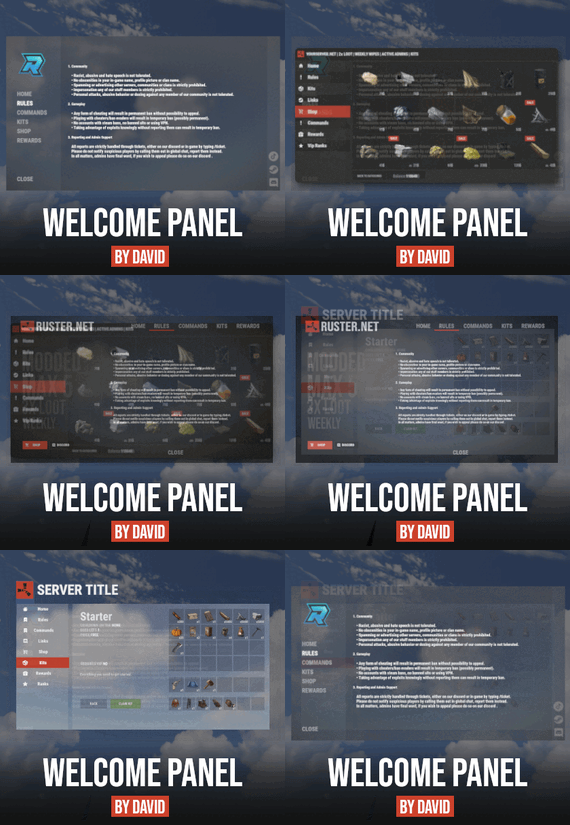
Screenshots bellow showcasing configurations created by customers. These are not available with the plugin but I decided to post them here since it's good demonstration of how customizable this plugin is.
BOOBLEJ
Tide
Neighigh
Paul
Leunal17
BOOBLEJ
How to start using plugin? Simply drop WelcomePanelLite.cs file into your plugin folder. After successfully loading plugin you can use default command /info in game. Configuration is handled in config file (oxide/config/WelcomePanelLite.json).
How hard is to get this plugin all set up? It's fairly simple. Plugin comes with default configuration which showcases everything you need to know regarding text, styling and changing images.
How hard it is to customize your own layout?
When it comes to changing color or images it's simple, any inexperienced user can do it however if you want to customize positions of UI or add extra tab buttons, it requires understanding of "ui anchors". Anchors are not that complicated but it takes hour or two to fully understand it. For more info check documentation.
Can I add multiple pages into WelcomePanel?
Yes, you can add unlimited amount of pages.
Can I add images into WelcomePanel?
Yes, you can add image to any panel and you can set background for each tab
What image sizes I should use?
This is different for each panel across different templates. Basically images parented to any panel are stretched to its size. Best approach is to take screenshot of the panel and try to fit image size into that prior to uploading it.
How to add addons?
Each text tab has addon option at bottom, just type in plugin name. List of available addons can be found at the top of the plugin description, listed as "Works with".
-

$24.00
XDStatistics
XDStatistics - The most advanced statistics!
It has great functionality and a nice design that will please the eyes of your players.
Some useful information about the plugin:
Opportunities:
The plugin has very detailed statistics. In it, the player will be able to see everything that he will be interested in! Players can hide their statistics from other players , for this you need to issue permissions and enable this feature in the config Players can reset their statistics, for this you need to issue permissions and enable this feature in the config The administrator can add (remove) a player to the ignore list, the player's statistics will not be deleted, it will only be hidden and will not be visible to other players. There is an opportunity to award top 1 players in each category or in a certain one. The reward is given when the player enters the server after the vape. It is possible to issue awards in Economics | Server Rewards | IQEconomic | You can also grant a privilege or something else with the command There is also a points system in the plugin. The glasses are configured in the config in a very detailed and convenient way. The best player is the one with the most points. The plugin also knows how to clean data when wiping (configured in the configuration) Interface:
Very nice and simple interface Some parts of the interface can be configured in the config At the moment there are 3 main pages (my statistics, top 10, search) The player can view the pages of other players if they have not hidden them Chat Alerts:
Also in the configuration, you can set up chat alerts with the top 5 players in different categories, which are selected using random Messages can be configured in detail in the lang file You can also configure the frequency of alerts in the configuration Commands:
[CHAT] /stat - (Open statistics (can be changed in the config)) [CONSOLE] stat - (Open statistics (can be changed in the config)) [CONSOLE] stat.ignore <add/remove> <Steam ID|Name> - (Adds the player to the ignore list. Also removes it from the statistics) [CONSOLE] stat.wipe - To clear progress and distribute rewards (if it didn't happen automatically) Permissions:
XDStatistics.admin - (To use the stat.ignore command) XDStatistics.reset - (Allows the player to reset his stats. You need to enable this feature in the config) XDStatistics.availability - (Allows the player to hide his stats from other players. Need to enable in the configuration) What is planned in the future:
[Discord] - Add the ability to send a message at the end of the wipe with the best players behind the wipe Add a tab with weapons so that players can view their detailed statistics on certain weapons API:
private JObject API_GetAllPlayerStat(ulong id) private JObject API_GetPlayerPlayedTime(ulong id) private Dictionary<string, int> API_GetGathered(ulong id) private int? API_GetAllGathered(ulong id) private int? API_GetGathered(ulong id, string shortname) The lang file is available in English and Russian
Configuration example -
{ "Basic plugin settings": { "Chat command for opening statistics": "stat", "Console command to open statistics": "stat", "Send chat messages with top 5 players in different categories": true, "Once in how many seconds will a message be sent ?": 600, "Enable the ability to reset your stats ? (requires XDStatistics.reset)": false, "Enable the ability to hide your statistics from users ? (requires XDStatistics.availability)": true, "Clear data when wiped": true, "Once in a rowman, the data will be saved.": 30 }, "Setting up the issuance of points": { "Points for crafting": 1.0, "Points for barrels": 1.0, "Points for installing building blocks": 1.0, "Points for using explosive items": { "explosive.timed": 2.0, "explosive.satchel": 0.7, "grenade.beancan": 0.3, "grenade.f1": 0.1, "ammo.rocket.basic": 1.0, "ammo.rocket.hv": 0.5, "ammo.rocket.fire": 0.7 }, "Points for resource extraction": { "wood": 0.3, "stones": 0.6, "metal.ore": 1.0, "sulfur.ore": 1.5, "hq.metal.ore": 2.0 }, "Points for found scraps": 0.5, "Points for harvesting (from the plantation)": 0.2, "Points for killing animals": 1.0, "Points for shooting down a helicopter": 5.0, "Points for tank explosion": 5.0, "Points for killing NPCs": 5.0, "Points for killing players": 10.0, "Points for time (for every minute of the game on the server)": 0.2, "How many points to take away for suicide ?": 2.0, "How many points to take away for death ?": 1.0 }, "Customize rewards for top 1 players in each category": { "Reward the best players at the end of the wipe": false, "Award for the top 1 in the SCORE category": { "Use command as a prize ?": true, "[RU]Использовать магазин GameStore для выдачи награды": false, "[RU]Использовать магазин MoscowOVH для выдачи награды": false, "Use [IQEconomic or Economics or Server Rewards] to issue a reward": false, "Command for the prize": [ "say %STEAMID%" ], "[RU][GameStores] ID магазина": "", "[RU][GameStores] ID сервера": "", "[RU][GameStores] Секретный ключ": "", "[RU][GameStores или MoscowOVH] Сколько начислять денег на баланс": 30, "[IQEconomic or Economics or ServerRewards] How much money to add to the balance": 100 }, "Award for the top 1 in the Killer category": { "Use command as a prize ?": true, "[RU]Использовать магазин GameStore для выдачи награды": false, "[RU]Использовать магазин MoscowOVH для выдачи награды": false, "Use [IQEconomic or Economics or Server Rewards] to issue a reward": false, "Command for the prize": [ "say %STEAMID%" ], "[RU][GameStores] ID магазина": "", "[RU][GameStores] ID сервера": "", "[RU][GameStores] Секретный ключ": "", "[RU][GameStores или MoscowOVH] Сколько начислять денег на баланс": 30, "[IQEconomic or Economics or ServerRewards] How much money to add to the balance": 100 }, "Award for the top 1 in the gathering category": { "Use command as a prize ?": true, "[RU]Использовать магазин GameStore для выдачи награды": false, "[RU]Использовать магазин MoscowOVH для выдачи награды": false, "Use [IQEconomic or Economics or Server Rewards] to issue a reward": false, "Command for the prize": [ "say %STEAMID%" ], "[RU][GameStores] ID магазина": "", "[RU][GameStores] ID сервера": "", "[RU][GameStores] Секретный ключ": "", "[RU][GameStores или MoscowOVH] Сколько начислять денег на баланс": 30, "[IQEconomic or Economics or ServerRewards] How much money to add to the balance": 100 }, "Award for the top 1 in the raider category": { "Use command as a prize ?": true, "[RU]Использовать магазин GameStore для выдачи награды": false, "[RU]Использовать магазин MoscowOVH для выдачи награды": false, "Use [IQEconomic or Economics or Server Rewards] to issue a reward": false, "Command for the prize": [ "say %STEAMID%" ], "[RU][GameStores] ID магазина": "", "[RU][GameStores] ID сервера": "", "[RU][GameStores] Секретный ключ": "", "[RU][GameStores или MoscowOVH] Сколько начислять денег на баланс": 30, "[IQEconomic or Economics or ServerRewards] How much money to add to the balance": 100 }, "Award for the top 1 in the Big Online category": { "Use command as a prize ?": true, "[RU]Использовать магазин GameStore для выдачи награды": false, "[RU]Использовать магазин MoscowOVH для выдачи награды": false, "Use [IQEconomic or Economics or Server Rewards] to issue a reward": false, "Command for the prize": [ "say %STEAMID%" ], "[RU][GameStores] ID магазина": "", "[RU][GameStores] ID сервера": "", "[RU][GameStores] Секретный ключ": "", "[RU][GameStores или MoscowOVH] Сколько начислять денег на баланс": 30, "[IQEconomic or Economics or ServerRewards] How much money to add to the balance": 100 } }, "Interface Settings": { "Background color in the top 10 for 1st place": "1 0.8431373 0 0.49", "Background color in the top 10 for 2st place": "0.7529412 0.7529412 0.7529412 0.49", "Background color in the top 10 for 3st place": "0.8039216 0.4980392 0.1960784 0.49" } } I also accept any ideas for improving this plugin. You can offer me ideas and I will implement them in the future.
My discord for communication! DezLife#1480
- #stats
- #statistic
- (and 3 more)
-
$14.99
Extraction Rare Minerals
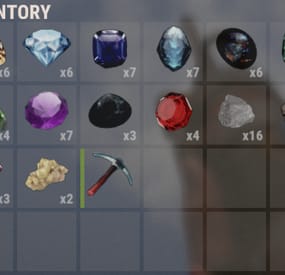
💎 This plugin adds the ability to extract new rare minerals from stone, iron, gray cobblestones.
Each type of mineral has its own settings. There are two types of minerals, those that can be melted down in stoves, and those that can be processed. With each blow on the cobblestone, there is a chance of a stone falling out.
🛑 Does not work with: Furnace Splitter.
❔ You can add gems to loot tables using its short name and skinID alongside the ability to customise the loot from each Gem/Piece.
⚠️ Regarding remelting and processing:
You can remelt a maximum of 1 piece. The output of the furnace can only be: metal.fragments, sulfur, metal.refined, charcoal. You can specify several items for recycling, but you will get only 1 random item from the list at the output. 🔥 Minerals that can be melted down:
A large sulfur crystal, gives the item: Sulfur from 1000-2500pcs. A large metal piece, gives the item: Metal fragments from 1000-2500-pcs. Black Opal, gives the item,: Charcoal from 100-1500 pcs. Obsidian, gives the item: Metal-refined from 10-30 pcs. 🗜️ Minerals that can be recycled:
A large stone, gives an item: A stone from 1500-3500 pcs. Emerald, gives an item: Wood from 2000-3500 pcs. Amethyst, gives one of the following: A large pharmacy from 1-3 pcs., A medical syringe from 3-7 pcs. Topaz, gives one of the following: Scrap metal from 50-100 pcs. Ruby, gives one of the following: Gears from 1-5 pcs., Metal pipe from 1-5 pcs., Metal blade from 1-5 pcs., Metal spring from 1-5 pcs. Diamond, gives one of the items: Homemade Shotgun, Python Revolver, Revolver, Pump-action Shotgun, Semi-automatic Pistol, Semi-automatic Rifle, Thompson Submachine Gun, Double-barreled Shotgun, MP5A4 Emerald, gives one of the following: Wood from 2000-3500 pcs. Jade , gives one of the following: Rope from 3-15 pcs., Cloth from 50-200 pcs., Leather from 50-200 pcs., Fat animal from 70-300 pcs., Lowgradefuel from 30-120 pcs. Tanzanite, gives one of the following: Chocolate from 3-15 pcs., Beans from 3-15 pcs., Tuna from 3-15 pcs., Bandage from 10-30 pcs. Mustgravite, gives one of the following: Hazmatsuit from 1-1 pcs. Pink Diamond, gives one of the following: Riflebody from 1-2 pcs., Semibody from 1-4 pcs., Smgbody from 1-2 pcs., Targeting computer from 1-2 pcs., CCTV camera from 1-2 pcs. ⚙️ Configuration:
What can be melted and what can be recycled depends on the setting of two parameters:
ItemAfterSmelting; PossibleItemsAfterRecycler. These two parameters can be both filled in or they can be both not filled in. They determine whether an item can be melted or recycled. If you need, you can add your custom items, you just need to specify skin and other parameters.
If you want, you can change the pickaxe and the skin of a special pickaxe. You can also prohibit spawn pickaxe and sell it, for example, in your store.
⚙️ Learn more about other parameters in the configuration:
MaxMineralsPerHit - this parameter determines how many maximum objects can fall in 1 hit on a cobblestone; MaxStackable - this parameter is not set by default, since I assume that you have another plugin controlling stacks, but if there is no such thing, then you can specify a number in this parameter. CanExtractOnlySpecialTool - indicates that the mineral can only be extracted with a special pickaxe. If true is specified, then PermittedTool is ignored. 🔒 Permissions:
extractionrareminerals.use - gives access to the extraction of minerals. extractionrareminerals.allowSmelting - allows melting precious minerals; extractionrareminerals.allowRecycler - allows recycled of precious minerals. 📄 Console commands:
give.rare.mineral PLAYER ID AMOUNT (example: give.rare.mineral DAez obsidian 1); give.special.tool PLAYER (example: give.special.tool DAez); 📄 Chat commands:
/erm (allows you to enable or disable the extraction of rare minerals); Example Item:
{ "ID": "jade", "SkinID": 2901473542, "Name": "Jade", "PermittedTool": [ "stone.pickaxe", "pickaxe", "hammer.salvaged", "icepick.salvaged", "jackhammer" ], "ExtractionInfo": [ { "PrefabShortName": "sulfur-ore", "DropChance": 2.5, "Amount": 1 }, { "PrefabShortName": "metal-ore", "DropChance": 2.5, "Amount": 1 } ], "ItemAfterSmelting": { "Name": "default", "ShortName": "metal.fragments", "SkinID": 0, "MinAmount": 1000, "MaxAmount": 2500 }, "PossibleItemsAfterRecycler": [ { "Name": "default", "ShortName": "sticks", "SkinID": 2901473839, // tanzanite skinID "MinAmount": 1, "MaxAmount": 1 } ], "CanExtractOnlySpecialTool": false } Note: parameters ItemAfterSmelting and PossibleItemsAfterRecycler can be null
- #rust
- #rust-server
- (and 4 more)
-
.thumb.gif.878ab3064f98f856ae6fbb58162fa69d.gif)
$34.95$21.95Daily Rewards
Daily Rewards is a strong tool for Rust admins who want to keep their players engaged until the end of the wipe. You can provide your gamers with distinct daily rewards for logging in with this plugin. This way, you not only liven up gameplay, but also encourage longer playtime. With Daily Rewards, don't lose the chance to draw in new players and keep returning ones! 🎁 🎮
🌟 Features of Daily Rewards
Beautiful and user-friendly interface Daily rewards for logging Motivating players to stay in the game longer Retention of players until the end of the wipe Compatibility with many plugins Edit rewards and config via in-game interface (no JSON editing required) By default, the plugin supports English, Russian, and Chinese languages Cooldown time before receiving an award Saving rewards in the plugin's inventory Do not receive rewards from inventory while in the build block, raid block, or combat block
🎮 Commands
daily – open daily rewards interface dailyrewards.wipe – wipe of player data dailyrewards.top [format: csv, empty (default)] [limit (10 is default)] – get a list of players with the day their award. dailyrewards.manage – manage daily reward settings dailyrewards.manage playtime set <steam_id> <amount> – sets the playtime for the specified player. dailyrewards.template [fullscreen/inmenu] [target_template] – sets the interface template for daily rewards.
Parameters: [fullscreen/inmenu]: Type of interface template to set. Valid values: fullscreen or inmenu. [target_template]: For the inmenu template, you must specify the template number (1 or 2).
🛡️ Permissions
dailyrewards.use – allows you to open the DailyRewards menu dailyrewards.edit - allows you to enable edit mode
🎥 Video
📚 FAQ
Q: Where can I see an example of a config?
A: Config
Q: How do I add DailyRewards to the ServerPanel menu?
A: You can do this directly from the ServerPanel in-game:
1. Open the ServerPanel menu in-game.
2. If you have permission to edit, switch the panel to edit mode so you can see the blue "EDIT CATEGORY" and "EDIT PAGES" buttons.
3. Choose the category where you want DailyRewards to appear and click the "EDIT CATEGORY" button for that category.
4. While you are in this category in the ServerPanel, click the "EDIT PAGES" button to create a new page (or edit an existing one) for DailyRewards.
5. For that page, set these exact parameters:
Type: Plugin Plugin Name: DailyRewards Plugin Hook: API_OpenPlugin 6. Save the changes. The DailyRewards button will now appear in the ServerPanel in the category you selected.
-

$8.99
XDFriends
Friends Plugin for Rust Server
"Friends" is a robust and flexible plugin designed to enhance the in-game friends system in Rust.
It will help streamline the interaction between friends, simplify the process of authorization,
and access to important game elements, and manage damage between friends.
Key Features:
Damage Control: An integrated feature of damage blocking among friends helps prevent accidental damage.
This feature can be easily enabled or disabled by command.
Enhanced Friends Authorization System: The plugin allows activating friends' authorization for a wide range of elements, including:
Turrets SAM site Code locks Key locks Cupboards Upon removal from the friends' list, the player will automatically be deauthorized from all the listed elements.
Remote Friend Invitation: With a special command, you can invite a player to be friends, even from afar.
Authorization Settings Flexibility: Choose between two authorization methods for code locks - guest authorization ("guestPlayers") or full authorization ("whitelistPlayers").
Compatibility and Optimization: The "Friends" plugin is optimized for maximum performance and is compatible with many other plugins.
Extensive API: The plugin offers a comprehensive API for developers, providing flexibility and the possibility of further customization.
Detailed Logging System: "Friends" includes a logging system, providing transparency and control over activities.
Optimize your gameplay with the "Friends" plugin for Rust server.
It will help improve your gaming experience, simplify interactions with friends, and make your server safer and more manageable.
Commands:
/team - Additional info /team invite/add <Nickname> /team ff - Friendly fire
Default Configuration:
{ "Chat commands": [ "team", "ff", "friend" ], "Maximum number of friends": 3, "Time to accept team invite (in seconds)": 20.0, "Enable friend authorization for turrets?": true, "Enable friend authorization for SAM sites?": true, "Enable friend authorization for code locks?": true, "Enable friend authorization for key locks?": true, "Enable friend authorization for cupboards?": true, "Authorization method for code locks (guestPlayers - guest authorization, whitelistPlayers - full authorization)": "guestPlayers", "Enable logging system ?": false, "Chat prefix (IQChat)": "<color=#5cd6skykey>[Friends]</color>\n" }
API for Developers
HasFriend(ulong playerId, ulong friendId) //Checks if the specified user is a friend of the player. HasFriends(string playerS, string friendS) //Checks if the player has friends by their string identifiers. IsFriend(ulong playerId, ulong friendId) //Checks if the specified user is a friend of the player. AreFriends(ulong playerId, ulong friendId) //Checks if the specified players are friends. AreFriends(string playerS, string friendS) //Checks if the specified players are friends by their string identifiers. IsFriends(string playerS, string friendS) //Checks if the player has friends by their string identifiers. GetFriends(ulong playerId) //Returns the player's friends list. GetFriendList(string playerS) //Returns the player's friends list by the string identifier. GetFriends(string playerS) //Returns the player's friends list by the string identifier. IsFriendOf(ulong playerId) //Returns a list of players who are friends of the specified player. IsFriendOf(string playerS) //Returns a list of players who are friends of the specified player by the string identifier. GetFriendList(ulong playerId) //Returns the friends list of the specified player.