
Jump to content

Gt403cyl2

Creator
  • Posts

    315
  • Joined

  • Last visited

Everything posted by Gt403cyl2

  1. Gt403cyl2

    Loot Audit

    It is triggered when something is put in the players inventory so as it sits not really in it's current state, something I could look into in the future.
  2. Gt403cyl2

    Loot Audit

    Causing lag?, no, taking up drive space space? yes. I recommend only granting the permission (logging) players that are suspect..... it won't impact performance as it just writes to the data file, it doesn't check against anything which would consume resources...
  3. SRTBull explains it better than I can...:
  4. You literally can, read the page. Just change the upkeep period... if twig was 3600, to set the multi to 2x change it to 1800, so in a 24 hour span it costs 2x as much.
  5. There are native convars in rust for this: https://www.corrosionhour.com/rust-decay-upkeep-variable/
  6. Kinda sounds like Timed Execute fits your needs... https://umod.org/plugins/timed-execute
  7. Gt403cyl2

    Custom Buttons

    No i know that they aren’t created until the buttons are made, and that’s how that is…. but for example, i am working on a server, i copied the cui data file from another server load the plugin, and obviously the perms are created then, but then i go into permissions and want to take grant or revoke a perm for a group and i do so but that perms change still doesn’t take effect until i reload the plugin.
  8. Gt403cyl2

    Custom Buttons

    Also on that note, this is kinda hard to explain but I'll try... When I either make a new button or make perms changes in-game, the changes don't take effect until I reload the plugin, this is kinda annoying mainly when changing perms, like with most other plugins when you either grant or revoke a perm it's instant with no need to reload the plugin. Hopefully that makes sense... Would be nice if that could be sorted out.
  9. Why not just update to the latest version that already has it in the config? https://umod.org/plugins/rust-kits
  10. Gt403cyl2

    Oxide not working

    Update the server files and oxide, in that order, first thursday of every month is force update, and generally speaking both facepunch and Oxide (umod) put out multiple updates.
  11. Gt403cyl2

    Clear Groups

    No, your first comment was something to do with the plugin being useless because it didn't expose 150 scrap????? Also the logs don't show you ever downloading the plugin when it was free, (which prices are subject to change at the discretion of the seller)
  12. Gt403cyl2

    Clear Groups

    Sorry I don't understand what your talking about.... Can you explain better?
  13. Gt403cyl2

    Custom Buttons

    Is it possible to disable the normal in-game commands while creating/editing a button, having keybinds as admin while trying to set this up can lead to some.... headaches.
  14. I'm also interested in this.
  15. Version 1.2.6

    517 downloads

    Clear Groups is a simple plugin that allows admin to remove all players from specific groups with a single command. In the configuration file you can: Specify which groups you want to clear. Specify to ignore admin. Set the command for clearing the group(s). Set the command for clearing the data file. Chat Commands: /cleargroups - Clear groups /cleargroupsdata - Clear data file Console Commands: cg - Clear groups cgd - Clear data file Permissions: "cleargroups.admin" - Allows admin to clear the data file and clear the selected group(s). Default Configuration File: { "Change Commands": { "Manually clear groups": "cleargroups", "Delete clear groups data": "cleargroupsdata" }, "Main Options": { "Ignore Admin": true, "Clear Data on wipe": false }, "Group Names": [ "", "" ] } Default Data File: { "RemovedFromGroup": [] } For support: Contact me here or on Discord: gt403cyl2
    Free
  16. Version 1.3.7

    171 downloads

    Allows your admin, moderators and staff members to instantly toggle between their authority role and the player role while logging each swap to discord as well as a data file to keep accountability in check! **************** NOTE: When granting permissions be sure to apply the permission to the specific player, NOT a group as it will not allow them to regain their permissions. **************** In the configuration file you can: Specify which groups the authorized player will be put into when they toggle in and out of their authority role for each. (Admin/moderator/staff) Specify your Admin player role display name (includes chat, permissions, console, team/clan). Set the commands for each group. Specify a list of commands to run for Admin/Mods when they toggle to and from authorized roles. Add your Discord webhook to log each time the person toggles roles. (If you do not wish to use the Discord logging feature then leave that line as is in the config.) Choose to work with other plugin features. (true/false options) And more! Default groups and commands: Admin toggles to default - /tadmin Mods toggles to default - /tmod Staff toggles to default - /tstaff Permissions: "authtoggle.admin" - allows admin to toggle groups. "authtoggle.moderator" - allows moderators to toggle groups. "authtoggle.staff" - allows staff to toggle groups. Default Configuration File: { "Chat Prefix": "<color=#32CD32>Auth Toggle</color>: ", "Discord Prefix": "Auth Toggle: ", "Discord WebHook": "https://support.discord.com/hc/en-us/articles/228383668-Intro-to-Webhooks", "Change Commands": { "Admin swap Groups": "tadmin", "Moderator swap Groups": "tmod", "Staff swap Groups": "tstaff" }, "Groups": { "Admin player group name": "default", "Admin group name": "admin", "Moderator player group name": "default", "Moderator group name": "mods", "Staff group name": "staff", "Default group name": "default" }, "Main Options": { "Change name as Admin": true, "Admin player name to use": "yourchosennamehere", "Empty Admin inventory on disconnect": false, "Store and restore inventory when swapping Auth levels (Admin Only)": true, "Auto run Admin commands": true, "Auto run Moderator commands": true, "Auto run player commands": true }, "Optional Dependencies": { "Vanish": true, "AdminRadar": false, "Godmode": false }, "Auto Commands": { "Admin chat commands to run when toggled to Admin": [ "" ], "Moderator chat commands to run when toggled to Moderator": [ "", "" ], "Admin / Moderator chat commands to turn off when toggled to Player": [ "", "" ] } } Default Data File: { "AdminSwapped": [], "ModsSwapped": [], "StaffSwapped": [] } Default Lang File: { "ToPlayer": "You have swapped to player mode and have been placed in the", "ToStaff": "You have swapped to staff mode and have been placed in the", "ToModerator": "You have swapped to moderator mode and have been placed in the", "ToAdmin": "You have swapped to admin mode and have been placed in the", "SwappedToPlayer": "{0} ({1}) swapped to player mode.", "SwappedToStaff": "{0} ({1}) swapped to staff mode.", "SwappedToModerator": "{0} ({1}) swapped to moderator mode.", "SwappedToAdmin": "{0} ({1}) swapped to admin mode.", "SwapDenied": "{0} ({1}) tried to toggle {2} authority without permission.", "Pradar": "Please disable AdminRadar before swapping.", "PGround": "Please get safely on the ground before swapping roles." }
    $4.99
  17. There is no such thing as light mode on my devices.
  18. Gt403cyl2

    Loot Audit

    Demands won't get you very far. I am working on it now, will Update when I have it sorted out.
  19. Gt403cyl2

    Loot Audit

    Thanks will look into it.
  20. Gt403cyl2

    Loot Audit

    I will take the suggestion into consideration. Loot Audit wasn't designed to be used for logging all players all the time as noted.
  21. Gt403cyl2

    Loot Audit

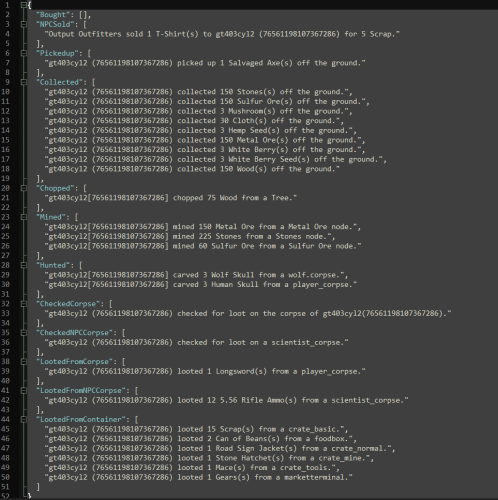
    By default Loot Audit is set to use permissions, first make sure you have granted the uselog permission to those you want to log. Second the logs can be found in oxide\Data\LootAudit.json
  22. Already exists if I understand what you want... https://chaoscode.io/resources/ubertool-admins-new-friend.78/
  23. Gt403cyl2

    Loot Audit

    Replied on Discord, but will post here as well if it helps others. It only logs if you give the permission (player/group) if you don't give a permission then it doesn't log. As for do they reset, you can manually clear the logs in-game with the command "clrla" (default, you can change it in the config) if you have the admin permission. Other than that on wipe it will recognize a wipe and reset on the first load. If you give it to an entire group (eg: Default) it will log all, it could start to have some impact on higher pop servers if you do this...
  24. Gt403cyl2

    Loot Audit

    It's something I can look into, added to the update list.
  25. Gt403cyl2

    Loot Audit

    In that scenario, you would be able to see what item(s) the raiding player looted, the type of container it was looted from and who owns the container. I am adding who owns the container in a coming update. Updated to log who the container is owned by in a separate category..
2.3m

Downloads

Total number of downloads.

10.6k

Customers

Total customers served.

152.6k

Files Sold

Total number of files sold.

3.3m

Payments Processed

Total payments processed.

×
×
  • Create New...

Important Information

We have placed cookies on your device to help make this website better. You can adjust your cookie settings, otherwise we'll assume you're okay to continue.