
-
Posts
313 -
Joined
-
Last visited
Content Type
Profiles
Warranty Claims
Downloads
Forums
Store
Services
Downloads Plus Support
DOWNLOADS EXTRA
Reels
Everything posted by Pepuni.
-
 Can i add my own monuments as prefabs?
 -
Is there a way to import skins in bulk from an Excel spreadsheet to the console? Or do I have to do it one at a time?
-
Error while compiling RaidableBases: The type or namespace name 'BlowPipeWeapon' could not be found (are you missing a using directive or an assembly reference?) | Line: 14422, Pos: 36 Can u fix?
-
And how do I delete the databases? I mean, I delete them with copy-paste, but they still appear. I added them with the add command. Is there another way to remove them?
-
Can I clean up containers from the copy-paste folder? Or do I have to copy the database and overwrite it?
-
Can I clean up containers from the copy-paste folder? Or do I have to copy the database and overwrite it?
-
Hi, I have a question about loot. I have the loottable configured, but it seems that the toolcupboard doesn't pay much attention. For example, I have the following configuration with the HQ and look what happened when raiding the base. How can I fix this?
-
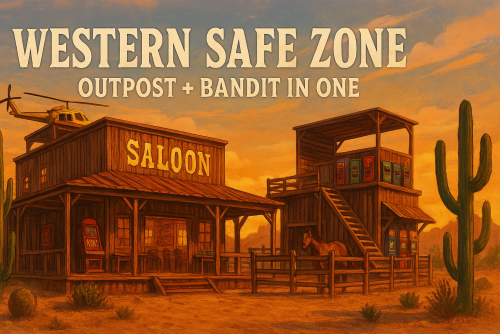
Version 1.0.0
11 downloads
Bring the Wild West to your Rust server with this highly optimized prefab that merges the utility of both Outpost and Bandit Camp — all in one compact, immersive location. Designed to save performance and space, Western Outpost is perfect for custom maps that need to do more with less. By combining essential monuments into a single prefab, you reduce the number of entities and prefabs required, helping your server run smoother while keeping players fully engaged. What’s inside: Full safe zone with Outpost-style protection (NPCs included). Dedicated Blackjack and Poker areas for in-server tournaments. Western saloon atmosphere: rustic decor, flamenco chairs, ambient lighting. Gambling machines, vending stations, recycler, horse and heli vendors. Performance stage with scenic view — perfect for roleplay moments or singing in front of a crowd. All in a compact and efficient footprint to improve map performance and reduce clutter. Perfect for PvP, PvE, and Roleplay servers alike — Western Outpost turns a small area into a vibrant, multi-functional community hub. Image Suggestions: Exterior shot showing the western façade and building shape. Interior shot with the saloon vibe — warm lights, tables, decor. Poker/Blackjack area with players or setup visible. Gambling machine section showing the slot machines. Stage area with chairs in front, suggesting community gatherings. Overview from above, showing the prefab’s compact design.$3.99 -
Hello, I have this setup, but a player told me that the 45-minute delay isn't being met. What happened? Just as the raid was about to start, the player disconnected and couldn't raid him. Is this correct? Or is it a glitch? "Wipe Data On New Save": false, "Plugin Enabled": true, "Raid Proximity Threshold (in meters)": 140.0, "Offline Raid Session Limit (per day)": 1, "Base Session Cooldown (in minutes)": 45.0, "Discord Webhook URL for Raid Alerts": "", "Debug Discord Webhook URL": "https://discord.com/api/webhooks/1348745209726369872/3Cf2aAYNIgOl30didJte1Pmn0cjVFIZyA7IVN3tFS-BDaWe2vFg0vSHyFkBeeZRQDeem", "Enable Debug Logging to Discord": false, "Enable Debug Logging to Console": false, "Discord Queue Delay (in seconds)": 1.0, "Is Server Vanilla?": false, "Block Damage on Raid Limit Reached": true, "Show Offline Raid Count (on modded servers)": true, "Enable API Integration": false, "API Authentication Token": null, "API Base URL": null, "Offline Raid Counter Format (Placeholders: {0}=Used, {1}=Limit, {2}=Remaining) example: {2} Left": "{0}/{1}", "Should decaying bases be flagged as abandoned only if they have no upkeep materials left?": false, "The health threshold at which a base is considered decayed (e.g. 1.0 = fully intact, 0.8 = 80% health, etc.).": 0.8, "Reset Time (24-hour format, e.g., '00:00' or '03:00')": "00:00:00", "Exclude bases genrated by raidable bases": true, "Version": { "Major": 1, "Minor": 7, "Patch": 3
-
Failed to run a 5.00 timer in 'BetterTeams v1.3.1' (NullReferenceException: ) at (wrapper managed-to-native) UnityEngine.Component.get_transform(UnityEngine.Component) at Oxide.Plugins.BetterTeams.FillGridInfo (Oxide.Game.Rust.Cui.CuiElementContainer container, Oxide.Plugins.BetterTeams+PlayerSettings playerSettings, BasePlayer target) [0x0007b] in <9c24b01195844a0f9e2e1cc33da0d3b0>:0 at Oxide.Plugins.BetterTeams.<CreateSquareUpdateTimer>b__61_0 () [0x00037] in <9c24b01195844a0f9e2e1cc33da0d3b0>:0 at Oxide.Core.Libraries.Timer+TimerInstance.FireCallback () [0x00018] in <d646191a355d43a6b3ab36b7ee14c740>:0
-
.thumb.jpg.8ba68c865b56475c000bd36f532e3920.jpg) Have you been able to verify that it works? I'd like to buy it. A while ago, I tried it on a server where I played one of their plugins, Survival Arena, and the players were losing loot at the end of the event. I'm afraid of implementing the plugin on my server and having this happen.
Have you been able to verify that it works? I'd like to buy it. A while ago, I tried it on a server where I played one of their plugins, Survival Arena, and the players were losing loot at the end of the event. I'm afraid of implementing the plugin on my server and having this happen. -
Can u test? Maybe ill buy some arena from u with event helper sound good
-
its working?
-
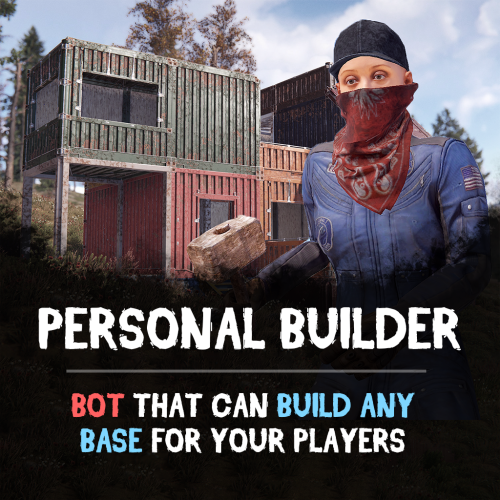 Does the plugin have any predefined bases? Or do they have to be created first by copying and pasting? Regarding the height of the base, does it adjust to the ground when you paste it? Or does it sometimes remain elevated in copying and pasting? Do you have permission to only give it to VIP players?
 -
Would it be possible, since the team leader is passed to the first person online, to pass it to the first player who connects? I mean, it often happens to me on my server that the leader is the last to go to sleep, and then a teammate comes online, and I might have to change a team member. Could that be?
-
These are the permissions I currently have active. And this is my configuration. Would it be correct for what I need? "Apply Cooldown To Entire Clan And Team": true, "Apply All Cooldowns": true, "Cooldown Override Applied To All Other Difficulties": 0.0, "Easy": { "VIP Permission: raidablebases.vipcooldown": 1800.0, "Admin Permission: raidablebases.allow": 1800.0, "Server Admins": 1800.0, "Normal Users": 1800.0 }, "Medium": { "VIP Permission: raidablebases.vipcooldown": 18000.0, "Admin Permission: raidablebases.allow": 1800.0, "Server Admins": 1800.0, "Normal Users": 18000.0 }, "Hard": { "VIP Permission: raidablebases.vipcooldown": 86400.0, "Admin Permission: raidablebases.allow": 86400.0, "Server Admins": 86400.0, "Normal Users": 86400.0 }, "Expert": { "VIP Permission: raidablebases.vipcooldown": 86400.0, "Admin Permission: raidablebases.allow": 86400.0, "Server Admins": 86400.0, "Normal Users": 86400.0 }, "Nightmare": { "VIP Permission: raidablebases.vipcooldown": 86400.0, "Admin Permission: raidablebases.allow": 86400.0, "Server Admins": 86400.0, "Normal Users": 86400.0