Jump to content

imthenewguy

Curator
  • Posts

    4,593
  • Joined

  • Last visited

  • Days Won

    57

Everything posted by imthenewguy

  1. Hey mate add me on discord. im the new guy#0001
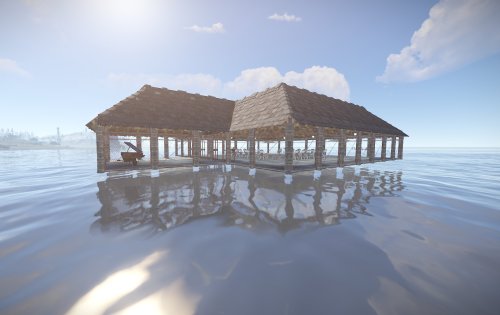
  2. Updated the posted config. Not sure if I'll add markers unless I extend it and add make it cycle through locations randomly. I added the functionality as I created a fishing platform on my server that I wanted to have as a permanent hotspot.
  3. im heading to bed. Add me on discord and send me the config and I will take a look at it im the new guy#0001
  4. Is there already an entry called "stones" in the config?
  5. Do you mean 10000 stones in the config? Did you want to add a screenshot?
  6. Is what I am using it for on my server Have disabled tech tree, so this is a good source of blueprints. Will hopefully introduce some more content shortly. Glad you are enjoying this
  7. The plugin doesn't adjust any loot chances, it simply looks to see if you caught any of the configured fish then rolls the dice to see if you also get a casket
  8. You can add a custom item using the chat command. For example: /tbadditem <Display Name> <item shortname> <skin id> <max quantity> /tbadditem "Gold Nugget" battery.small 2405961582 5 The only thing with custom items is that it uses the defaut image from the shortname. I may update this in the future.
  9. 1. I will change it to function using the propper hooks if they are released. I did this as an interim method so I could get it working. Has been running on my server since wipe and it appears to be working well. 2. The plugin includes all items in the configuration file, including the ones you mentiond. They are easy to disable and once done, won't need to be done again unless there is a major change to the config. 3. Turning off chat messages only stops the message "You are no longer fishing" and "You are now fishing". The purple casket message will always appear, as will the messages when a player tries to pick up an item, open a container or move items around in their inventory while fishing. Hope this helps.
  10. Version 2.0.7

    398 downloads

    Buried beneath the deep blue oceans of rust lay a trove of lost treasures. This plugin introduces a casket system for fishing that your players will absolutely love! FishingTreasure is a plugin that uses the newly introduced fishing mechanic in Rust, to provide your players with the chance to obtain a casket. When opened, the casket will roll on the loot table 3 times, rewarding the players with 3 random items of varying rarity. Fully customisable loot system that automatically adds all new items to the game (configurable). Items can also be manually added via the config or a chat command in game. Supports custom items with unique DisplayNames and skins. Includes 3 tiers of rarity – common, rare and elite. Each can have its drop chance configured to the desired rarity. Hotspot system that allows for areas to be added as a "hot spot", which increases the drop chance of a casket by a multiplier (configurable). fishingtreasure.admin – allows users to spawn caskets, add items, force an update of items and remove items. { "General Settings": { "Base chance of obtaining a casket when catching a fish [%]": 3.0, "Permission based chance modifiers [1.0 = 100% increase to the base chance value]": {}, "Loot rolls per casket": 3, "Casket info": { "shortname": "halloween.lootbag.medium", "skin": 2560835553, "displayName": "casket" }, "Sounds when opened": { "Common": "assets/prefabs/misc/halloween/lootbag/effects/bronze_open.prefab", "Rare": "assets/prefabs/misc/halloween/lootbag/effects/silver_open.prefab", "Epic": "assets/prefabs/misc/halloween/lootbag/effects/gold_open.prefab" }, "Should this plugin handle the item splitting for caskets? [set to false if using a stacks plugin]": false }, "Hotspot Settings": { "Enable fishing treasure hotspots": false, "Name the hotspot shows when it appears on the map": "Fishing Treasure Hotspot", "Sphere darkness": 6, "Hotspot size": 50.0, "Minimum time a hotspot can be alive for [seconds]": 1600.0, "Maximum time a hotspot can be alive for [seconds]": 2000.0, "Delay between hotspot deployments [seconds]": 3600.0, "Minimum modifier that will be applied to a hotspot": 1.0, "Maximum modifier that will be applied to a hotspot": 4.0, "Should the hotspot check to see if players have entered/left the zone and notify them?": true, "If monitoring for players, how often should we check for players in the hotspot?": 1.0 }, "SkillTree settings": { "Set to true if you want to add the FishingTreasure buff to the skill tree": true, "Maximum level for the modifier buff": 5, "Chance increase per level for finding caskets [0.2 = 20%]": 0.2 }, "Loot Table": { "Common": { "enabled": true, "tableWeight": 100, "loot": [ // Loot here ] }, "Rare": { "enabled": true, "tableWeight": 25, "loot": [ // Loot here ] }, "Epic": { "enabled": true, "tableWeight": 10, "loot": [ // Loot here ] } } } /casket - spawns a casket in the users inventory API object OnCalculateFishingTreasureChance(BasePlayer, float highestMod) - Used to override the default casket chance.
    $14.99
  11. add me on discord. I have added the feature but its untested. im the new guy#0001
  12. Hi mate, it's a static location. Always the same.
  13. /givedefib /givemedbox
  14. Version 1.0.19

    2,769 downloads

    This plugin allows for your players to receive or purchase personal recyclers that they can place inside of their base. The primary benefit of this plugin vs other similar plugins, is that this plugin will restrict usage of the recyclers to only a user or their team (configurable), and has commands built in that will allow players to purchase it directly via payment gateways like Tebex etc. It will also work with the VIP Token plugin, allowing for a token to be purchased and traded in game, providing the consumer with a redeemable recycler. The plugin itself is fairly straight forward - players type the command into chat, which will provide them with a recycler item. This item is a reskinned box, and will be placed using the box prefab, but once deployed, it will spawn a recycler in with the same positioning as the box, then despawn the box. Recyclers can also be picked up using a hammer or toolgun by pressing mouse 3. Features Automatically clears data on map wipe. Allows players to keep their unredeemed recyclers between wipes (configurable). Prevents other players from accessing the recycler (configurable). Team mate support (configurable). Configurable starting amount of recyclers. Additional recycler(s) are accrued upon a map wipe, if the player had not redeemed their recycler (configurable). External payment gateway support, allowing for you to sell individual recyclers to your players. VIP Tokens support. Check below for the configuration example. Can pick up own recyclers using your hammer/toolgun and mouse 3. Recyclers will lost max condition each time they are picked up to prevent players from deploying them while grinding the roads (configurable). Permissions personalrecycler.use personalrecycler.admin personalrecycler.place personalrecycler.use commands /recyclers - will print out how many recyclers a player has left to redeem. /redeemrecycler - will spawn a recycler in the players inventory and deduct a recycler from their redeemable count. /crecycler - Will pickup the targeted recycler (requires a hammer to be wielded) if the player has permission. Players with this permission will automatically get the configured number of starting recyclers upon using the commands for the first time, and will have have recyclers added to their redemption pool at the start of each wipe (configurable). personalrecycler.admin commands /addrecycler <player name> - will increase the amount of redeemable recyclers a player has by 1. /clearrecyclers <player name> - will remove all of the saved recycler IDs from the data file, making all of their recyclers publically accessible. /clearrecyclerdata - removes all of the saved recycler IDs from the data file, making all recyclers publically accessible. (Console command) subtractrecycler <target> <optional: amount> - removes recyclers from the players available recyclers pool. API This plugin allows for you to add a command to a payment gateway such as Tebex, or via my VIP Tokens plugin. The command is structured as below: addrecycler <Steam ID> <quantity> Most payment gateways required the player to log in with their steam ID. An example command using tebex would be: addrecycler {id} 1 This would add 1 recycler for the steam ID of the account that logged into Tebex. You can also add this as a VIP Token. See configuration options below: "recycler": { "name": "Personal Recycler", "days_to_add": 0, "vip_group": null, "vip_description": "Allows you to place a personal recycler that only you can access.", "remove_tokens_on_wipe": false, "token_item": { "name": "Recycler Token", "skin": 2544601457, "item_shortname": "radiationresisttea.pure" }, "_command": { "command": "addrecycler {id} 1", "message": "You redeemed a recycler token.", "public_message": null, "hook": false } } As you can see, the command follows Tebex's variable style, using {id} to capture the players steam ID. If you require help setting this up with VIP Tokens, or need any assistance with anythign else, feel free to send me a PM. Enjoy!
    $4.99
    Everythig this bloke makes is amazing. I had a tool I was using before I downloaded this that was a lot more manual. This makes the creation process for custom items so much faster. Also recommend checking out his UI builder, is a game changer.
  15. Version 1.1.10

    440 downloads

    Monetize and fund your server! This plugin will allow players to purchase a token that represents a current group on your server, such as VIP, which can be traded/sold/gifted to other players in-game. It is functionally similar to bonds in Runescape, Plex in Eve Online and WOW tokens in WOW. The main benefit of this plugin is that it will allow your more generous donators to purchase tokens and sell them in game for items/resources etc to players who otherwise would not financially support the server. The RP server I run has been a shining success for this, increasing our VIP count by almost 50%. Customizable tokens to suit most servers monetary requirements. Scalable quantities of VIP perks. A GUI to manage the show the players token balance, perks that each token provides, and end date of their subscription, all of which is configurable. Supports automatic payments via platforms such as Tebex, allowing for complete automation of purchasing. Automatically adds and removes the player from the designated oxide group. Days are completely configurable via the config file. Fail safes to prevent abuse, restrict the amount of VIP time for each token (configurable), and prevent overlapping of existing group access (configurable). Can optionally run a console command in addition to/instead of adding a player to an oxide group. Update (not mentioned in the video): Added the ability to run a command in addition to/instead of adding a player to a VIP group. Added the option to trigger a hook when a token is consumed (for developers). You will need to delete your old config and load the new config in order to use these new features. Command: givetoken Arguments: <token id> <optional: quantity> Example: /givetoken vip 10 -this would give you 10x tokens called "vip" Permissions: viptoken.admin Command: removevip Arguments: <player name/id> <token id> Example: /removevip "new guy" vip - would remove the vip token from a player matching the name "new guy". Use quotation marks when inputting names with spaces, otherwise they aren't required. Permissions: viptoken.admin Command: tokenmenu Arguments: none Example: /tokenmenu Permissions: none Watch the video for more information on the plugin, how it works and how to set it up on a platform such as Tebex. Token links from my video: Thumbs up - https://steamcommunity.com/sharedfiles/filedetails/?id=2544603563 Recycler token - https://steamcommunity.com/sharedfiles/filedetails/?id=2544601457 VIP T1 - https://steamcommunity.com/sharedfiles/filedetails/?id=2529344523 VIP T2 - https://steamcommunity.com/sharedfiles/filedetails/?id=2529343385 VIP T3 - https://steamcommunity.com/sharedfiles/filedetails/?id=2529344741 Bitcoin - https://steamcommunity.com/sharedfiles/filedetails/?id=2530111676 The skin ID is the numbers at the end of each URL. Command syntax for your payment platform: addtoken <password> <steam ID> <tier> An example of a basic vip setup for tebex would be: This function can be triggered if the configuration has hook = true. It will fire when the token is successfully consumed. void OnTokenConsumed(BasePlayer player, string tokenKey) { Puts($"{player.displayName} consumed a {tokenKey} token"); }
    $15.00
  16. Version 1.0.4

    187 downloads

    Medical items to help those in need! The plugin includes 2 unique medical items that your players can find, research and craft. Defibrillator The defibrillator can do 2 things: Recover a player from a wounded state immediately, with a risk of the defibrillator breaking (default: 10% chance), removing any bleeding effects that the target has and bringing them back on 10hp. Resurrect a dead player, spawning them back at the position of their body, but breaking the defibrillator. The player spawns a "new" body, and must still loot their items. Medical Box The medical box is a deployable, reskinned, wooden box that heals any player within x metres for x amount of health per every x seconds, x amount of times. For example, using the default values, the box will heal any player within 5m for 20 health every 3 seconds, for a maximum of 10 times. The items are researchable via a workbench for a configurable amount of scrap, and can be built using a level 2 or 3 workbench for a configurable amount of items. They can also be found in normal_crate's and normal_crate_2's. Full config: { "Chance that the defibrillator will break when bringing a wounded player up [%].": 10, "Defib Research Cost": 300, "How many Tesla coils are required to craft the Defibrillator?": 2, "How many medical kits are required to craft the Defib?": 2, "Maximum time before a player is no longer revivable.": 30.0, "Add loot to crate_normal & crate_normal_2 entities?": true, "Loot chance for crate_normal_2 [Out of 1000]": 2, "Loot chance for crate_normal [Out of 1000]": 10, "Medical Box Skin": 787716105, "Medical Box heal distance": 5.0, "Medical Box heal amount per tick": 20.0, "Medical box heal tick time [seconds]": 3.0, "How many health ticks should we output?": 10, "Allow the defibrillator and the medbox to be researched & crafted?": true, "How often should the timer update while using a research bench": 3.0, "Medical Box Research Cost": 300, "How many medical syringes are required to craft the med box?": 2, "How many medical kits are required to craft the med box?": 2, "Crafting time": 30 } Have added APIs to prevent the /remove from removing the medical box. It also cannot be picked up by a hammer. Chat Commands /givemedbox - spawns a medbox in your inventory /givedefib - spawns a defibrillator in your inventory
    $4.99
  17. It's generally simple enough to get a plugin working together, as long as there are valid hooks or APIs to work with. Make sure you have the latest version of both as Krungh Crow patched it the Huntsman to work with this.
  18. I updated the plugin and added a simple API call to see if the killed entity is part of the entities spawned with the bow. You can adjust the code in the HuntsMan plugin so it matches the attached image, and it SHOULD ignore the chickens (untested).
  19. Hi mate, do you have a link to the plugin?
  20. Version 1.0.3

    105 downloads

    A quest to obtain the "Bow of the chickens", allowing the weilder to create chickens when fired. Overview This plugin will allow your players to complete the "Chicken Hunter" quest, by killing x amount of chickens (default 100). This will reward them with a skinned Huting bow called "Bow of the Chickens". When fired, the bow will spawn a chicken at the arrows location. Players can spawn a configurable number of chickens this way. When a chicken that was spawned by the bow dies, it will run 1 of 6 random effects. These effects can be added to/reduced etc in the config file. Chat Commands - /chickenkc: This will display the users current kill count. - /chickenbow: Spawns a chicken bow (requires permission: chickenbow.admin). Permissions - chickenbow.allow: Allows the player to participate in the chicken killing quest to obtain the bow. - chickenbow.admin: Allows the player to spawn the chickenbow with the command, and will ignore the maximum chicken limit. See the youtube video for more information on setup and configuration.
    $4.99
  21. Yes. I made one. It is included with the download files.
  22. Version 1.1.18

    280 downloads

    This plugin and prefab combo adds a unique game arena to your map with very minimal effort. The plugin automates the game play entirely, and can be scheduled to run at an interval along side other plugins that use EventHelper. The game revolves around finding loot from crates (primitive by default), and killing each other while a radiation zone closes in around you. The zone is represented by a dome that will shrink in size at a configurable rate, as the game progresses. This will force players back to the centre for a final showdown. The winner will be awarded a prize (configurable). This package includes everything required to run the game manually or automatically, and features: Customizable weapon/armor lists (primitive and guns come default). A lobby with 8x elevators to bring contestants into the game. A configurable plugin to handle gameplay completely (more info below). Custom UI for the radiation zone. Running the game: The game will run automatically every hour (by default). It will give players 5 minutes to join (by default), or can be manually started by typing in /starthg <seconds>. Players join by typing in /hg (by default), which will strip and save all of their equipment, note down their metabolism stats (hunger, thirst, health etc) and teleport them into the lobby. The players will then be added to the "roster" and will be told to get into an elevator. A player cannot join if they have a car key in their inventory, or an active crafting que. Upon the game commencing, players will be taken to the surface via an elevator and the game will begin when the doors open. The dome spawns after 60 seconds (by default), and will start shrinking. Leaving the bounds of the dome will bring up a hud indicating that the player is in a radiation zone, and will start giving the player radiation stacks for as long as they are outside. Dying removes the player from the game, returning their equipment on respawn, and teleporting them back to the location that they were at originally. A player can also manually leave the game by typing in /leave (by default). The game ends when there is 1 player left standing. The player will be returned to their original location, with their original health and metabolism stats, and will have the ability to claim a prize by typing /claimprize. Commands: /starthg <seconds> - starts the game manually and resets the automatic start timer. Seconds = how many seconds before the game actually begins. /endhg - ends the current round of hungergames. /hg - joins the hungergames event. This command is configurable. /leave - leaves the hugnergames event. This command is configurable. /addfinalpoint - adds a potential end zone. /hgplayers - Lists all players who are still alive in the current event. Optional plugin - Night Vision You can the Nightvision plugin on Umod to allow for players to enjoy the event, even during pitch black nights. The plugin will enable/authorise a user to use nightvision when they join the event, and will then remove that privilege when they leave. Link: https://umod.org/plugins/night-vision Installation Follow the youtube guide for installation. The plugin will automatically acquire the button IDs when loaded for the first time. Be sure to delete the data file when you wipe the server so that it can acquire the new .net.IDs. Permissions "hungergames.admin" - Required to start/stop hungergames manually. "hungergames.list" - Required to use the /hgplayers command. See youtube video above for more information on adding this prefab to your map/server.
    $19.90
2.3m

Downloads

Total number of downloads.

10.5k

Customers

Total customers served.

152.4k

Files Sold

Total number of files sold.

3.2m

Payments Processed

Total payments processed.

×
×
  • Create New...

Important Information

We have placed cookies on your device to help make this website better. You can adjust your cookie settings, otherwise we'll assume you're okay to continue.