
HighOnTek
-
Posts
428 -
Joined
-
Last visited
Content Type
Profiles
Warranty Claims
Downloads
Forums
Store
Services
Downloads Plus Support
DOWNLOADS EXTRA
Everything posted by HighOnTek
-
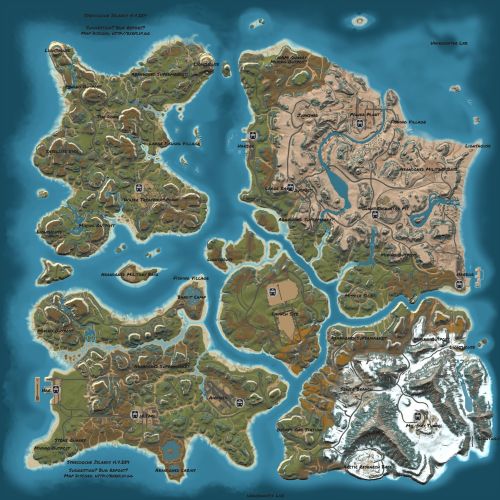 Awesome, thanks... once I see the updated revision I'll grab it.
 -
Absolutely love this map, its on my WISHLIST for now ... I want it, but in order for it to really work for my player base there needs to be more flat land or flat shallow water for larger clan bases. I've played this map elsewhere roughly 3-4 months ago and thoroughly went all over this map, there was really only 1 spot for larger bases. If you do any revisions in the future, could you utilize the shorelines a bit more ... extend the available flat areas to accommodate larger 5 - 8 man clan base? Pretty please ...
-
I stopped using it bud, at least until the NPC inside terrain issue has been resolved. Did you fix this issue, if so I can have it tested again ...
-
Since force wipe, players have complained that random items will be missing from kits. It's never the same item, always seems to be 1 item though missing, haven't heard of anymore than than that.
-
I'm using a host, not sure what they're using on the backend ... but it is Linux, that much I know. However I don't have config files resetting, the only issue I have right now ... is with ShopController DATA file "ItemsList". Reminds me of the same problem your SkinController had for awhile... would add custom skins, on server restart all those custom skins we added would disappear. Very similar issue, now with Shop items. I restart nightly, so this is going to be a pain.
-
I've nothing wiping this file, nothing has changed except force wipe.
-
Never mind, there is still an issue ... My servers restart themselves nightly. I fixed the shop on both servers yesterday, today ... shops are blank again. I went and looked at the items list and everything I had setup yesterday reverted back to inactive with 0 price 0 qnty... basically default. Why would this happen? ... this plugin worked great up until force wipe, now issues.
-
@AminoI figured it out ... it was indeed that Item List mismatch. I redid the Shop on the one server... if fixed the problem. I copied that updated Item List over to the other server, reloaded... and shop is working fine now. So there is your take away ... if items are being added to the Item List via updates (in this case it was motorbikes, tricycles etc.) then it has the potential to break someone's existing Shop and display nothing. Not sure how you can account for this going forward, but I'm happy... things are back up again, you can close ticket and take this into account for future releases.
-
Observation... My backup Items List is 10150 lines in editor, and the NEW Items list that was generated on shop reload is 10216, so clearly some stuff has been added... would this cause issues with what the .cs is expecting and maybe its ignoring it?
-
I would agree, it should ... but it does not. I'm using Oxide, not Carbon. I completely tore the Shop out, deleted all files and folders... reloaded it, then copied over my Items List again, reloaded plugin again ... was still empty. So its not populating the shop, based on the Items List that exists. No idea why not ???
-
@Amino So it looks like Shop works, but everything I had preset to ACTIVE, became inactive and or disappeared out of the Shop completely with this last facepunch update. I had a backup from before the update, I copied over the Items List which had my preset prices and which items were set to be "InUse" and reloaded the plugin and it did not automatically re-add the active items or prices I had set from my data file. But if I manually add an item again, set it as active and set a price again it stays. This is going to be tedious to set it all up again, why is the plugin ignoring the Item List data file that already exists? I already tried ripping out the Shop completely, unloaded it ... deleted absolutely everything related to shop. Reloaded it... then copied over my Items List again, checked perms ... shop still shows up as empty. It's like unload and reload is ignoring my Items List. Does your plugin on load check Items List and refresh it? ... if not, then this makes sense why its ignoring my Items List file.
-
07/06 12:05:36 | MissingFieldException: Field not found: ulong .BasePlayer.userID Due to: Could not find field in class 07/06 12:05:36 | MissingFieldException: Field not found: ulong .BasePlayer.userID Due to: Could not find field in class 07/06 12:05:36 | MissingFieldException: Field not found: ulong .BasePlayer.userID Due to: Could not find field in class 07/06 12:05:36 | MissingFieldException: Field not found: ulong .BasePlayer.userID Due to: Could not find field in class 07/06 12:05:36 | MissingFieldException: Field not found: ulong .BasePlayer.userID Due to: Could not find field in class 07/06 12:05:37 | MissingFieldException: Field not found: ulong .BasePlayer.userID Due to: Could not find field in class 07/06 12:05:37 | MissingFieldException: Field not found: ulong .BasePlayer.userID Due to: Could not find field in class 07/06 12:05:37 | MissingFieldException: Field not found: ulong .BasePlayer.userID Due to: Could not find field in class 07/06 12:05:38 | MissingFieldException: Field not found: ulong .BasePlayer.userID Due to: Could not find field in class 07/06 12:05:38 | MissingFieldException: Field not found: ulong .BasePlayer.userID Due to: Could not find field in class Got this after applying your latest patch, any idea why?
-
I did reload it, just before I messaged with the console error. I unloaded it for now, I will reload it tomorrow and let you know if I'm still getting the errors.
-
Failed to call hook 'OnWCRequestedUIPanel' on plugin 'CalendarController v1.0.0' (ArgumentOutOfRangeException: Index was out of range. Must be non-negative and less than the size of the collection. Parameter name: index) at System.Collections.Generic.List`1[T].get_Item (System.Int32 index) [0x00009] in <e3aa8db986d7457ca73f10110f1283f5>:0 at Oxide.Plugins.CalendarController.UIShowDays (BasePlayer player, System.Int32 year, System.Int32 month, System.Int32 day, System.Boolean isAdmin) [0x0005d] in <73c9086abc7c475c844e2537776a4dce>:0 at Oxide.Plugins.CalendarController.UIOpenCalendar (BasePlayer player, System.Int32 index) [0x0012e] in <73c9086abc7c475c844e2537776a4dce>:0 at Oxide.Plugins.CalendarController.CMDOpenCalendar (BasePlayer player, System.String command, System.String[] args) [0x0000a] in <73c9086abc7c475c844e2537776a4dce>:0 at Oxide.Plugins.CalendarController.OnWCRequestedUIPanel (BasePlayer player, System.String panelName, System.String neededPlugin) [0x00016] in <73c9086abc7c475c844e2537776a4dce>:0 at Oxide.Plugins.CalendarController.DirectCallHook (System.String name, System.Object& ret, System.Object[] args) [0x001cf] in <73c9086abc7c475c844e2537776a4dce>:0 at Oxide.Plugins.CSharpPlugin.InvokeMethod (Oxide.Core.Plugins.HookMethod method, System.Object[] args) [0x00079] in <795304323ac74a298b8ed190a1dfa739>:0 at Oxide.Core.Plugins.CSPlugin.OnCallHook (System.String name, System.Object[] args) [0x000de] in <beb2b64691c64e2b95b99491bd85442c>:0 at Oxide.Core.Plugins.Plugin.CallHook (System.String hook, System.Object[] args) [0x00060] in <beb2b64691c64e2b95b99491bd85442c>:0 Getting the above error in console, don't recall seeing this prior to force wipe... is this a result of the update?
-
No, doesn't look like anything is missing, I compared to a backup and they look the same except a difference in # of playeroptions, which appears to be a list by SteamID's. Any other ideas?
-
After today's force wipe, shop items no longer show ... checked on 2 servers, both show the Shop GUI in the menu but none of the actual shop items are displaying.
-
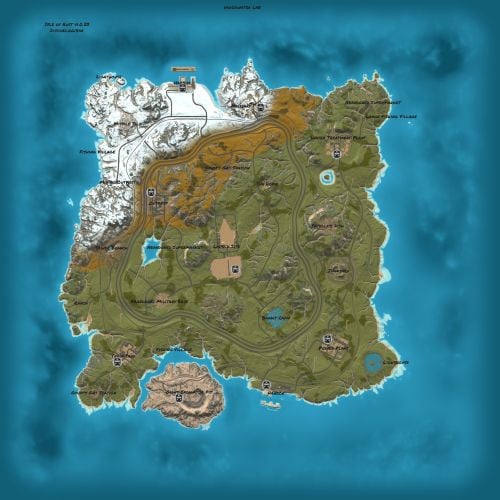 If you end up doing a revision at some point... players have asked for more places to build larger bases... like 5 - 10 man clan type bases. IE. shallow water that extends out a bit further in more places around the map would probably do it, maybe an larger ice lake somewhere. Right now seems to be catering to small - medium size bases only so really limits this map IMO to Official, Vanilla or 2-3x servers. Anything higher than a 3x where players tend to utilize those extra resources for larger builds, this map doesn't really accommodate. Just a thought .. some feedback. Otherwise everyone loving it.
- 13 comments
-
- 2
-

-
- #custom procedural
- #custom cliffs
- (and 3 more)
-
Digging the new map, looks good ... I picked it up earlier today for wipe. So far positive reviews from the players. But there is one common complaint... and maybe something to consider for future version updates... maybe leave few of those dried up creeks / streams with active fresh water so there is more pumpkins and corn. Some players like to build close to renewable food sources and this map lacks that ... unless building up around S9/S10, that's the only place I've really seen any sort of renewable pumpkin and corn food sources. But aside from that, so far so good man. Another request as well, I enjoyed playing Synecdoche one of your other maps. Why is it not here on Codefling, can you bring it here???
- 13 comments
-
- 2
-
-
- #custom procedural
- #custom cliffs
- (and 3 more)
-
This issue has actually been around for at least 2 versions, just never stuck a ticket in for it... if someone who built close to any sort of mountainous terrain calls on an npc raid, some of those npc's spawn inside the terrain and attempt to continue shooting and attacking from within the terrain. Making it impossible for those players to kill all the npc's, it causes a lot of confusion. Can this be fixed please?
-
Brand new server as well, no residual data from any previous wipes. Fresh install of all your plugins around WelcomeController... truly surprised you couldn't replicate. It's wipe for now, will let you know in a couple weeks if it does the same.
-
Unloading and deleting worked. Thanks ... Not sure why it didn't auto delete on its own. Could it be that it attempts to delete the data file while the plugin is loaded... therefor just does what happened to me when I tried to manually do it (reloads the data) vs. unloading and deleting?
-
Clear Data on Wipe is set to true... it did not clear data on wipe. I even tried deleting the statscontroller data file and reloaded and it reloaded that data file, with last wipes stats. lol What am I missing, is there a global chat command I can run to clear it when this happens?
-
 @CASHRPossible to make it so players can sell items for server rewards points or economics as well? So if player doesn't want to sell wood, for stone... or whatever... they could sell wood or guns etc. for set # of server reward points (RP) or economic $ (ECO) instead.
 -
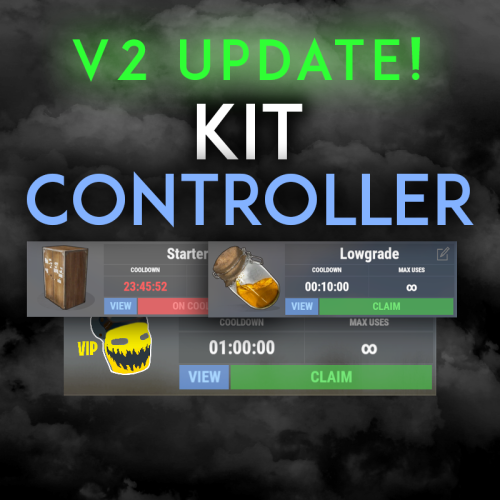 @AminoI recently switched to Kitcontroller... noticed though that notes do not save any TEXT that may be written on them when attached to a KIT. Previously, using free Kits plugin for my auto (spawn) kit, I had a note that would remind them to redeem free kit, visit the discord channel and had a link. Although the note shows in the spawn kit, the text I had does written in it not. Not a big deal, I can go without and just add the information into the welcome panel... but might be worth fixing / adding.
 -
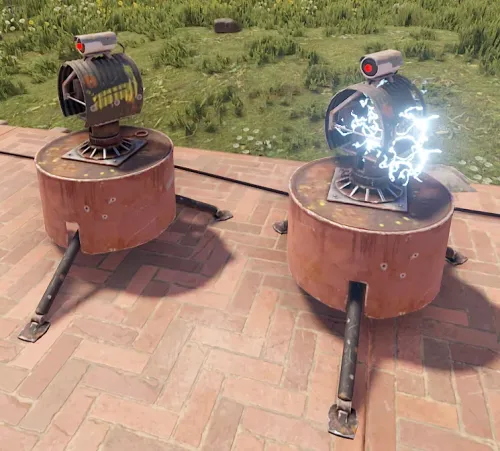 Great plugin, and with the new addition to this plugin where you can limit the number of turrets a player or clan places, fantastic work and the dev is super quick to respond, and or listen to feedback. Look forward to seeing what else he puts out ... maybe one that limits TC's, to stop TC spamming. lol
- 109 comments
-
- 1
-
-
- #auto turret interference
- #auto turret
- (and 22 more)