-
Posts
2,287 -
Joined
-
Last visited
-
Days Won
25
Content Type
Profiles
Warranty Claims
Downloads
Forums
Store
Services
Downloads Plus Support
DOWNLOADS EXTRA
Reels
Everything posted by Scalbox
-
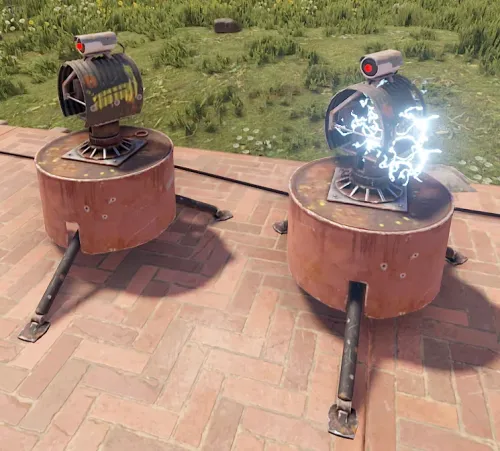 Thanks, let me know if there are any problems or you want anything changed
- 109 comments
-
- 1
-

-
- #auto turret interference
- #auto turret
- (and 23 more)
-
Hi, plugin released now
- 109 comments
-
- 2
-
-
- #auto turret interference
- #auto turret
- (and 23 more)
-
Version 1.0.5
81 downloads
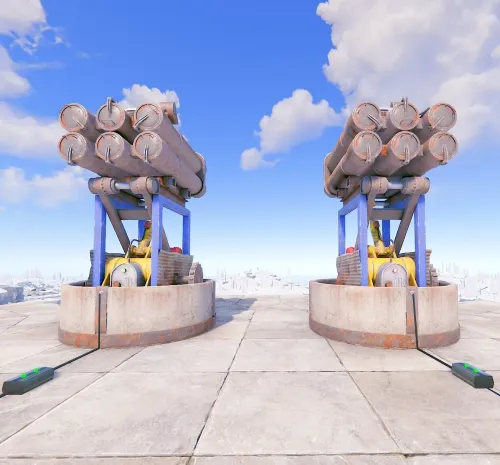
SamSiteLimiter allows you to change the SAM site turret limit for the individual player or for the entire CLAN/TEAM, based on the configurations and assigned roles. You can limit the number of SAM site turrets per TC (Tool Cupboard) or by range. You can configure the plugin to disable all server and/or player SAM site turrets with the ability to bypass these limitations via roles and/or configurations. It also offers commands to view SAM site turret statistics and the ability to turn SAM site turrets on and off via commands. Basically, 4 groups are configured: Default, VIP1, VIP2, VIP3, in this way you can decide the limit of the SAM site turrets based on the TC (Tool Cupboard) or the radius, based on the group assigned to the player or CLAN/TEAM. Permissions: samsitelimiter.admin -- Allows you to execute some commands reserved for administrators samsitelimiter.bypass.force -- Allows you to bypass limits forcibly, regardless of configuration samsitelimiter.default -- Assign configurations: Default samsitelimiter.vip1 -- Assign configurations: VIP1 samsitelimiter.vip2 -- Assign configurations: VIP2 samsitelimiter.vip3 -- Assign configurations: VIP3 COMMANDS Commands can be typed in chat (by putting the / character in front of the command), or from console. /ssl status or /ssl st -- This command allows the player to see his SAM site turret statistics and limits /ssl status <steamID> or /ssl st <steamID> -- This command allows the administrator to see another player's SAM site turret and limit statistics. To use this command you must have permission: samsitelimiter.admin /ssl start or /ssl stop -- This command allows the player to turn all of your SAM site turrets ON or OFF. To use this command, you must enable the AllowCommandsToStartAndStop = true property in your configuration or have permission: samsitelimiter.admin /ssl start <steamID> or /ssl stop <steamID> -- This command allows you to turn ON or OFF all SAM site turrets of a player based on its SteamID. To use this command you must have permission: samsitelimiter.admin NB: The commands start or stop turns all player SAM site turrets ON or OFF. If the player is part of a clan/team, all SAM site turrets of all members of the clan/team will be turned ON or OFF. Commands can be added or modified in the configuration file: /oxide/config/SamSiteLimiter.json Command output example (/ssl status or /ssl st) CLAN/TEAM If you are part of a clan/team and there are 1 more members who have the VIP/ROLE, then all members of the clan/team will benefit. Example: a clan/team member has the VIP/ROLE to be able to place 5 SAM site turrets, in this case all clan/team members will be able to place 5 SAM site turrets, but this does not mean that the total number of turrets you can place are added, the limit in in this case there are still 5 SAM site turrets, but they can be positioned by all members of the clan/team, rather than just the player who has the VIP/ROLE (in this case we assumed that the VIP/ROLE limited to 5 SAM site turrets). If there are multiple clan/team members who have different VIPs/ROLEs, the best VIP/ROLE will be taken, usually VIP3 You can enable this setting from the configuration file: "Share Group With Clan/Team members. Default FALSE": false": true Configuration The settings and options can be configured in the SamSiteLimiter under the config directory. The use of an editor and validator is recommended to avoid formatting issues and syntax errors. { "Share Group With Clan/Team members. Default FALSE": false, "DisableAllServerSamSite (Disables all server SAM Site turrets). Default False.)": false, "DisableAllPlayerSamSite (Disables all player SAM Site turrets). Default False.)": false, "AllowAdminBypass (Allows admin to bypass SAM Site turret limitations). Default False.)": false, "PlayerShowSamSiteCountInfoMessage (Show the player, when he places a SAM site, a message with the number of turrets that are placed in the TC range or Radius he is in. Default true.)": true, "AllowCommandsToStartAndStop (If set to TRUE, enables commands to allow the player or clan/team to turn their all SAM site ON or OFF. Default FALSE)": false, "EnableMessageInfo (If set to TRUE, it shows a message info to the player, when he takes hold of an electricity cable or SAM Site, of the commands that the plugin makes available to him)": true, "Chat Command": [ "ssl", "samsitelimiter" ], "RolePermission": { "default": { "Type of limitation, Global, TC-based or Radius-based. Value [Global | Tc | Radius] (Default RADIUS)": "Tc", "SAM Site limit for global limitation. Maximum number of SAM sites that can be deployed.": 0, "SAM Site limit for TC-based limitation": 2, "SAM Site limit for Radius-based limitation": 0, "Radius (meters) within which the system checks for other SAM Site (lower = more SAM sites in the same area) (Default 40)": 0 }, "vip1": { "Type of limitation, Global, TC-based or Radius-based. Value [Global | Tc | Radius] (Default RADIUS)": "Radius", "SAM Site limit for global limitation. Maximum number of SAM sites that can be deployed.": 0, "SAM Site limit for TC-based limitation": 0, "SAM Site limit for Radius-based limitation": 4, "Radius (meters) within which the system checks for other SAM Site (lower = more SAM sites in the same area) (Default 40)": 40 }, "vip2": { "Type of limitation, Global, TC-based or Radius-based. Value [Global | Tc | Radius] (Default RADIUS)": "Radius", "SAM Site limit for global limitation. Maximum number of SAM sites that can be deployed.": 0, "SAM Site limit for TC-based limitation": 0, "SAM Site limit for Radius-based limitation": 8, "Radius (meters) within which the system checks for other SAM Site (lower = more SAM sites in the same area) (Default 40)": 20 }, "vip3": { "Type of limitation, Global, TC-based or Radius-based. Value [Global | Tc | Radius] (Default RADIUS)": "Global", "SAM Site limit for global limitation. Maximum number of SAM sites that can be deployed.": 40, "SAM Site limit for TC-based limitation": 0, "SAM Site limit for Radius-based limitation": 0, "Radius (meters) within which the system checks for other SAM Site (lower = more SAM sites in the same area) (Default 40)": 40 } }, "VersionNumber": { "Major": 1, "Minor": 0, "Patch": 4 } } Share Group With Clan/Team members: If set to TRUE, the group assigned to a player is shared with all members of the clan/team. The group with the lowest priority is shared, then all members of the clan/team will benefit. Default FALSE DisableAllServerSamSite (Disables all server SAM Site turrets). Default False.): Disables all server SAM site turrets but not player SAM turrets. Default: FALSE DisableAllPlayerSamSite (Disables all player SAM Site turrets). Default False.): Disables all player SAM site turrets. Default: FALSE AllowAdminBypass (Allows admin to bypass SAM Site turret limitations). Default False.): If enabled you can bypass the SAM site turret limit with the role: samsitelimiter.admin. However, if you have the samsitelimiter.bypass.force role, you can forcibly bypass the SAM site turret limit, regardless of this configuration. Default: FALSE PlayerShowSamSiteCountInfoMessage (Show the player, when he places a SAM site, a message with the number of turrets that are placed in the TC range or Radius he is in. Default true.): Show the player, when he places a SAM site turret, a message with the number of SAM site turrets that are placed. Default: TRUE. AllowCommandsToStartAndStop (If set to TRUE, enables commands to allow the player or clan/team to turn their all SAM site ON or OFF. Default FALSE): If set to TRUE, enables commands to allow the player or clan/team to turn their all SAM site turrets ON or OFF. Default FALSE. EnableMessageInfo (If set to TRUE, it shows a message info to the player, when he takes hold of an electricity cable or SAM Site, of the commands that the plugin makes available to him): If set to TRUE, it shows a message info to the player, when he takes hold of an electricity cable or SAM site turret, of the commands that the plugin makes available to him. Default: TRUE. Chat Command: Here you can add, edit or delete Commands can be typed in chat (by putting the / character in front of the command), or from console. RolePermission Type of limitation, Global, TC-based or Radius-based. Value [Global | Tc | Radius] (Default RADIUS): Specify the type of limitation: enable limitation based on Global, TC (Tool Cupboard) or Radius. SAM Site limit for global limitation. Maximum number of SAM sites that can be deployed: Maximum number of SAM sites that can be deployed globally. SAM Site limit for TC-based limitation: If TC (Tool Cupboard) limit is enabled, specifies how many SAM site turrets can be placed around that TC (the entire building covered by the TC). SAM Site limit for Radius-based limitation: If Radius Limiting is enabled, specifies how many SAM site turrets can be placed in that specific Radius. Radius (meters) within which the system checks for other SAM Site (lower = more SAM sites in the same area) (Default 40): Set the radius size in meters. PlayerShowSamSiteCountInfoMessage EXAMPLE: EnableMessageInfo EXAMPLE: Localization The plugin, therefore the automatic messages and statistics, are translated into the following languages: English Italian Spanish French German Dutch Turkish Russian Ukrainian Translation files are located in the /oxide/lang folder, here is an example of a /oxide/lang/en/SamSiteLimiter.json translation file. You can add translations for other languages by adding them to the folder: /oxide/lang$8.99 -
 Just use and create button whit this plugin
-
@JET SLAP @HighOnTek HI I created the plugin to limit the number of SAM turrets. At the moment the plugin is available on my personal store, you will find it here and on other stores shortly, after the approval phase is over (usually 1 or 2 weeks). Good day
- 109 comments
-
- 2
-
-
- #auto turret interference
- #auto turret
- (and 23 more)
-
I was already thinking about creating a new plugin for SAMs. The plugin will have the same functionality as this one but will only be for SAMs. Furthermore, perhaps it is better to keep the limit of SAM turrets based on the radius, this way even bases that have many TCs can still set a limit of turrets limited by the radius. Otherwise based on TCs, they would still be able to put a lot of them. Alternatively I can apply both methods and you can choose in the configurations whether to use the limit based on the TC or the radius
- 109 comments
-
- 1
-
-
- #auto turret interference
- #auto turret
- (and 23 more)
-
I added 2 new commands and also the configuration you need. Just download the latest update and set the EnableAutomaticsStartAndStop = true property in the configurations. Let me know if everything works as expected or if you encounter any problems. Good evening
- 109 comments
-
- 1
-
-
- #auto turret interference
- #auto turret
- (and 23 more)
-
If you play alone, they turn off when you go offline, if you play in a clan/team, the turrets turn off when the whole clan/team goes offline. Is this okay?
-
Hi, regarding this functionality, do you want an option to add in the configuration file? Something like: Turn off turrets when game goes offline = true Another thing, if the player is in a clan, I make the turrets turn off only when all clan members are offline ok?
-
Changed Status from Pending to Closed Changed Fixed In to 1.0.2
-
 Is everything else working or are you having problems?
-
Yes you can choose as you want, and enable the BuildingBlocked you told me and leave only cooldown. You set the rest of the limits to -1
-
to add multiple command: { "Enabled":true, "Command":"cmd", "BlockCommand (If set to TRUE players will no longer be able to use this command. Default FALSE)":false, "SafeZone. Value [AllowOnly | Allow | Block] (Default Allow)":"Allow", "BuildingBlocked. Value [AllowOnly | Allow | Block] (Default Allow)":"Allow", "CanBeBypassed (If set to TRUE the command block can be bypassed. It depends on the user permissions)":false, "CooldownSeconds (-1 infinite)":5, "MaxUsagePerMinute (-1 infinite)":5, "MaxUsagePerHour (-1 infinite)":10, "MaxUsagePerDay (-1 infinite)":20, "MaxUsagePerWipe (-1 infinite)":100 }, { "Enabled":true, "Command":"cmd", "BlockCommand (If set to TRUE players will no longer be able to use this command. Default FALSE)":false, "SafeZone. Value [AllowOnly | Allow | Block] (Default Allow)":"Allow", "BuildingBlocked. Value [AllowOnly | Allow | Block] (Default Allow)":"Allow", "CanBeBypassed (If set to TRUE the command block can be bypassed. It depends on the user permissions)":false, "CooldownSeconds (-1 infinite)":5, "MaxUsagePerMinute (-1 infinite)":5, "MaxUsagePerHour (-1 infinite)":10, "MaxUsagePerDay (-1 infinite)":20, "MaxUsagePerWipe (-1 infinite)":100 }, { "Enabled":true, "Command":"cmd", "BlockCommand (If set to TRUE players will no longer be able to use this command. Default FALSE)":false, "SafeZone. Value [AllowOnly | Allow | Block] (Default Allow)":"Allow", "BuildingBlocked. Value [AllowOnly | Allow | Block] (Default Allow)":"Allow", "CanBeBypassed (If set to TRUE the command block can be bypassed. It depends on the user permissions)":false, "CooldownSeconds (-1 infinite)":5, "MaxUsagePerMinute (-1 infinite)":5, "MaxUsagePerHour (-1 infinite)":10, "MaxUsagePerDay (-1 infinite)":20, "MaxUsagePerWipe (-1 infinite)":100 }, { "Enabled":true, "Command":"cmd", "BlockCommand (If set to TRUE players will no longer be able to use this command. Default FALSE)":false, "SafeZone. Value [AllowOnly | Allow | Block] (Default Allow)":"Allow", "BuildingBlocked. Value [AllowOnly | Allow | Block] (Default Allow)":"Allow", "CanBeBypassed (If set to TRUE the command block can be bypassed. It depends on the user permissions)":false, "CooldownSeconds (-1 infinite)":5, "MaxUsagePerMinute (-1 infinite)":5, "MaxUsagePerHour (-1 infinite)":10, "MaxUsagePerDay (-1 infinite)":20, "MaxUsagePerWipe (-1 infinite)":100 }
-
{ "Enabled":true, "Command":"cmd", "BlockCommand (If set to TRUE players will no longer be able to use this command. Default FALSE)":false, "SafeZone. Value [AllowOnly | Allow | Block] (Default Allow)":"Allow", "BuildingBlocked. Value [AllowOnly | Allow | Block] (Default Allow)":"Allow", "CanBeBypassed (If set to TRUE the command block can be bypassed. It depends on the user permissions)":false, "CooldownSeconds (-1 infinite)":5, "MaxUsagePerMinute (-1 infinite)":5, "MaxUsagePerHour (-1 infinite)":10, "MaxUsagePerDay (-1 infinite)":20, "MaxUsagePerWipe (-1 infinite)":100 } This is the basic example. Replace Command: cmd with your command, and then apply the limits you want. If you tell me what limit you need, I'll send you a conf for the command
-
Released plugin 1.0.2
-
Your container is missing this package: tzdata It should add your provider. But if it doesn't work, I can put a fix for it
-
Hi, where is your server located? In which country? This is a problem of the provider not having that timezone
-
Let me know if that's OK or if you run into any problems
-
Update released
-
I'm adding it to the plugin, I should release it between now and tomorrow along with other new changes
- 16 comments
-
- 1
-
-
- #command
- #command limiter
- (and 3 more)
-
I got it, I'll try to implement this command, I hope to be able to release it this week.
- 109 comments
-
- 1
-
-
- #auto turret interference
- #auto turret
- (and 23 more)
-
HI so would you like me to add an option to block the command in case of building blocked? Yes, it is possible, let me know if this is what you need and I will add it to the plugin
-
Version 1.0.7
40 downloads
Command Limiter Info Command Limiter allows you to limit the use of commands that players can use. For each command you can set the cooldown, minute, hourly, daily and wipe usage limits. It also allows you to apply limits in case of Building Blocks, Safe Zones, block the command permanently, etc... Command Limiter is useful for limiting the use of commands from plugins that do not implement a blocking system or implement an inflexible blocking system. Commands Commands can be typed in chat (by putting the / character in front of the command), or from console. /cl reset <steamID> -- This command allows you to reset usage limits for a specific player. To use this command you must have permission: commandlimiter.admin /cl wipe -- This command allows reset all usage limits for all players. To use this command you must have permission: commandlimiter.admin Commands can be added or modified in the configuration file: /oxide/config/CommandLimiter.json Permissions commandlimiter.admin -- Allows the use of commands reserved for administrators commandlimiter.bypass -- Allows you to bypass the command usage limit, but only for commands that have the CanBeBypassed field set to TRUE commandlimiter.bypass.force -- Allows you to easily bypass the command usage limit, regardless of the CanBeBypassed field Default Configuration { "TimeZone": "Europe/London", "Clear data on map wipe": true, "Print usage limits when command is blocked": true, "Chat Command": [ "cl", "commandlimiter" ], "Command Setting": [ { "Enabled": true, "Command": "cmd", "Commands alias": [], "BlockCommand (If set to TRUE players will no longer be able to use this command. Default FALSE)": false, "SafeZone. Value [AllowOnly | Allow | Block] (Default Allow)": "Allow", "BuildingBlocked. Value [AllowOnly | Allow | Block] (Default Allow)": "Allow", "CanBeBypassed (If set to TRUE the command block can be bypassed. It depends on the user permissions)": false, "CooldownSeconds (-1 infinite)": 30, "MaxUsagePerMinute (-1 infinite)": -1, "MaxUsagePerHour (-1 infinite)": -1, "MaxUsagePerDay (-1 infinite)": -1, "MaxUsagePerWipe (-1 infinite)": -1, "BypassPermission (Permissions to bypass the block even if [CanBeBypassed] is set to false)": [] }, { "Enabled": true, "Command": "cmd_2", "Commands alias": [ "alias 1", "alias 2" ], "BlockCommand (If set to TRUE players will no longer be able to use this command. Default FALSE)": false, "SafeZone. Value [AllowOnly | Allow | Block] (Default Allow)": "Allow", "BuildingBlocked. Value [AllowOnly | Allow | Block] (Default Allow)": "Allow", "CanBeBypassed (If set to TRUE the command block can be bypassed. It depends on the user permissions)": false, "CooldownSeconds (-1 infinite)": 30, "MaxUsagePerMinute (-1 infinite)": -1, "MaxUsagePerHour (-1 infinite)": -1, "MaxUsagePerDay (-1 infinite)": -1, "MaxUsagePerWipe (-1 infinite)": -1, "BypassPermission (Permissions to bypass the block even if [CanBeBypassed] is set to false)": [] } ], "VersionNumber": { "Major": 1, "Minor": 0, "Patch": 7 } } TimeZone -- Set the time zone with which the dates will be saved: Default: Europe/London. Clear data on map wipe -- Clear command usage data after a wipe. Default TRUE. Print usage limits when command is blocked -- Prints the command usage limits when a player uses one of the configured commands. Default TRUE. Chat Command -- Here you can add, edit or delete commands can be typed in chat (by putting the / character in front of the command), or from console. Command Setting -- The list of commands on which to apply the usage and cooldown limits must be inserted here. Enabled -- If set to TRUE, limits and cooldowns for this command will be enabled. Command -- The command on which to apply limits and cooldowns. Commands alias -- Here you can specify other commands to block with the same configurations. Useful to block a command, which has several similar or differently named commands, to do the same thing. Or alternatively to block multiple commands without creating different configurations. BlockCommand -- If set to TRUE, the command cannot be used by any player, except for players with the permissions: commandlimiter.admin or commandlimiter.bypass.force. SafeZone. Value [AllowOnly | Allow | Block] (Default Allow) -- Sets whether the command can be used in safe zones: AllowOnly: The command can only be used in safe zones. Block: The command cannot be used in safe zones. Allow: No restrictions for safe zones. BuildingBlocked. Value [AllowOnly | Allow | Block] (Default Allow) -- Sets whether the command can be used in areas where you have building permissions: AllowOnly: The command can only be used where you do not have building permissions. Block: The command can only be used where you have building permissions. Allow: No restrictions for building zones. CanBeBypassed -- If set to TRUE the command can be bypassed by players with permission: commandlimiter.bypass. CooldownSeconds -- Cooldown for command reuse. MaxUsagePerMinute -- Limit the use of the command for each minute. MaxUsagePerHour -- Limit the use of the command for each hour. MaxUsagePerDay -- Limit the use of the command for each day. MaxUsagePerWipe -- Limit the use of the command for wipe. BypassPermission (Permissions to bypass the block even if [CanBeBypassed] is set to false) -- Here you can specify one or more names, to create permissions to bypass the limit. If the player has at least 1 of these permissions, he can bypass the limit even if the CanBeBypassed property is set to false. Example: if you enter "vip1” as permission, a command called commandlimiter.bypass.vip1 will be created that you can assign to players. Order Application Limits The usage and cooldown limits of the various commands are applied in the following order: Wipe limits -- If the wipe limits have not been exceeded, proceed to the next check, otherwise the command will be blocked. Daily limits -- If the daily limits have not been exceeded, proceed to the next check, otherwise the command will be blocked. Hourly limits -- If the time limits have not been exceeded, proceed to the next check, otherwise the command will be blocked. Limits per minute -- If the minute limits have not been exceeded, proceed to the next check, otherwise the command will be blocked. CooldownSeconds -- The command will be executed if the cooldown has expired, otherwise you will have to wait for the cooldown to reset. LOCALIZATION The plugin are translated into the following languages: English Italian Translation files are located in the /oxide/lang folder, here is an example of a /oxide/lang/en/CommandLimiter.json translation file. You can add translations for other languages by adding them to the folder: /oxide/lang$4.99 -
but are they normal turrets? or special turrets? Tell me the name of the plugin you use so I can see if I can add this option
-
Hi, not at the moment but I might add it. I just don't understand why turrets should turn off when a player goes offline?