Jump to content

7 Screenshots

  • 128.2k
  • 3.1k
  • 391.19 kB

This area is for discussion and questions. Please use the support area for reporting issues or getting help.

Recommended Comments


irchaz20

Posted

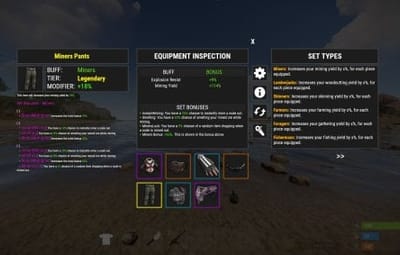
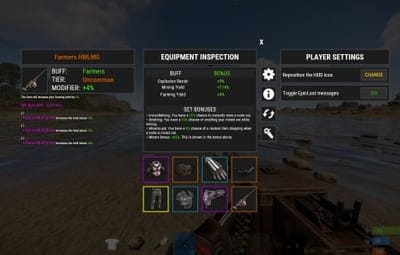
I have a suggestion for the plugin, if you could possibly add a highlight border around the epic loot item icons so that players know the item is epic loot and not just a regular item.

  • Curator
imthenewguy

Posted

3 hours ago, irchaz20 said:

I have a suggestion for the plugin, if you could possibly add a highlight border around the epic loot item icons so that players know the item is epic loot and not just a regular item.

That would involve creating a custom icon for every single item type.

Noel2997

Posted

Hi
When you defeat a Boss in BossMonster, I think Epic loot drops — but is it possible to configure which items can appear yourself?
If not, does it pull from some kind of crate?
Right now, it seems like only the max and min counts can be set, right?

  • Curator
imthenewguy

Posted

57 minutes ago, Noel2997 said:

Hi
When you defeat a Boss in BossMonster, I think Epic loot drops — but is it possible to configure which items can appear yourself?
If not, does it pull from some kind of crate?
Right now, it seems like only the max and min counts can be set, right?

You would need to add specific items to the boss monsters loot table directly, rather than handling it in EpicLoot


  • Like 1
Wave

Posted

Hi, could you add a clothing set that increases protection from NPCs, tanks, and helicopters? Or is there a way to add such sets myself? I'm on a PVE server, and I really need clothing that protects players from NPCs. Unfortunately, right now there are only clothes that increase damage to NPCs.

  • Curator
imthenewguy

Posted

You could build it out from a mixture.

BulletProof reduces damage from bullets

Demo reduces damage from explosions

Tamers reduces damage from animals.

Make a set bonus using these.


  • Like 1
Jordan_P90

Posted

BonusMultiplier
This permission does not exist. All permissions listed on this site are invalid, but please post the correct permission.

  • Curator
imthenewguy

Posted (edited)

7 hours ago, Jordan_P90 said:

BonusMultiplier
This permission does not exist. All permissions listed on this site are invalid, but please post the correct permission.

BonusMultiplier is not a permission, it's a setbonust.

You can add it as a set bonus to any buff under the buffs list.


Please create a support ticket if you are still having issues.


Edited by imthenewguy
shaggless

Posted

does this let you choose the rarity to find an item from a crate/box?


  • Curator
imthenewguy

Posted

On 9/26/2025 at 5:50 PM, shaggless said:

does this let you choose the rarity to find an item from a crate/box?


Crates allow for specific chances to be set (different chances for different crates).

The rarity is also chance based, but not adjustable for each drop source. All drop sources have the same chance of rolling the rarities.

For example, getting an S tier would be the same chance from a crate, as it would be from an NPC, but the rate at which you get items can be different.

  "Loot crate info": {
    "Should we use the default item loot table for the below containers?": true,
    "Containers and their chance for an enhanced item to spawn": {
      "crate_normal_2": 1.0,
      "crate_normal": 3.0,
      "crate_elite": 15.0,
      "crate_underwater_basic": 6.0,
      "crate_underwater_advanced": 12.0,
      "heli_crate": 10.0,
      "bradley_crate": 10.0,
      "codelockedhackablecrate": 10.0,
      "codelockedhackablecrate_oilrig": 10.0,
      "crate_tools": 1.5
    },
    "Barrels and their chance for an enhanced item to spawn": {
      "loot-barrel-1": 1.0,
      "loot_barrel_1": 1.0,
      "loot-barrel-2": 2.0,
      "loot_barrel_2": 2.0
    },
    "Roll chances for armor slots for looted epic items": [
      0.3,
      0.2,
      0.1,
      0.05
    ]
  },

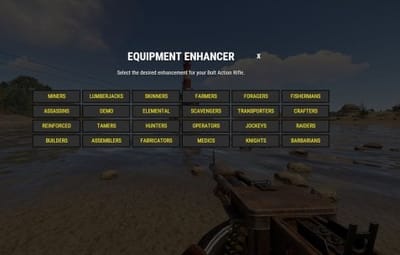
Tierinfo is attached to each enhancement type, (such as Miners, Lumberjacks, Skinners etc).

      "tierInfo": {
        "s": {
          "chance_weight": 10,
          "min_value": 0.15,
          "max_value": 0.25,
          "required_crafting_perm": null
        },
        "a": {
          "chance_weight": 20,
          "min_value": 0.1,
          "max_value": 0.17,
          "required_crafting_perm": null
        },
        "b": {
          "chance_weight": 50,
          "min_value": 0.05,
          "max_value": 0.12,
          "required_crafting_perm": null
        },
        "c": {
          "chance_weight": 100,
          "min_value": 0.03,
          "max_value": 0.08,
          "required_crafting_perm": null
        }
      },


taco

Posted

So i have this all set up no problems with it at all but now we added an event, Team Deathmatch, when players join they are stripped of all inventory and thrown into the event. when its over they get their stuff back but the kits no longer epic. anyone ever run into this?

JeffG

Posted

2 hours ago, taco said:

So i have this all set up no problems with it at all but now we added an event, Team Deathmatch, when players join they are stripped of all inventory and thrown into the event. when its over they get their stuff back but the kits no longer epic. anyone ever run into this?

i bet the plugin only keeps short name what makes the problem it needs to save all of the item for it to come back if i recall.

  • Like 2
  • Curator
imthenewguy

Posted

3 hours ago, taco said:

So i have this all set up no problems with it at all but now we added an event, Team Deathmatch, when players join they are stripped of all inventory and thrown into the event. when its over they get their stuff back but the kits no longer epic. anyone ever run into this?

The developer needs to persist the item.name field for EpicLoot and item.text field for ItemPerks or the items break.


  • Like 1
taco

Posted

im new to all of this can you break it down to slow guy terms lol

  • Curator
Wrecks

Posted

21 minutes ago, taco said:

im new to all of this can you break it down to slow guy terms lol

Whoever developed your team deathmatch event plugin, will need to save the item.name and .text field and restore them upon redistributing them. 

  • Love 1
Papa Bear

Posted

UI Button (Shirt Icon) Position Placement.

I need help with moving my default config placement to another area in the screen, but I am not sure how to do so.  I didn't garner any info on the video that was so kindly provided.

My settings in my config is 
  "Offset Min": "-251.4 20.7",
    "Offset Max": "-215.4 56.7"
And it shows left of the equipment bar, but unfortunately this is where my Shop GUI button is located.  I would like to move it as far left as I can, by default, so the player doesn't have to.  Also, each time I do make this adjustment and reload the plugin, the position goes back to the original.  This is the reason I would just like to go ahead and change it, since we do twice daily restarts.

Thank you for your time,

Papa Bear
 

  • Curator
imthenewguy

Posted

15 hours ago, Papa Bear said:

UI Button (Shirt Icon) Position Placement.

I need help with moving my default config placement to another area in the screen, but I am not sure how to do so.  I didn't garner any info on the video that was so kindly provided.

My settings in my config is 
  "Offset Min": "-251.4 20.7",
    "Offset Max": "-215.4 56.7"
And it shows left of the equipment bar, but unfortunately this is where my Shop GUI button is located.  I would like to move it as far left as I can, by default, so the player doesn't have to.  Also, each time I do make this adjustment and reload the plugin, the position goes back to the original.  This is the reason I would just like to go ahead and change it, since we do twice daily restarts.

Thank you for your time,

Papa Bear
 

The anchor position is set to the bottom-middle of the screen. Offset min is the top left of the icon (x,y) and the offset max is the bottom right (x,y).

The difference between the min/max values dictates the size of the button.

For example:

Min: "-100 25"
Max: "-50 -25"

This would make the icon slightly to the left of the middle-bottom, and have a size of 50.

The challenge you will face with the current setup is that players resolution will make moving it to the left look very different, since it anchors from the middle. You are better off finding a spot for it that is closer to the hotbars. You can make it smaller by minimizing the amount between the min and max values.

Create an account or sign in to comment

You need to be a member in order to leave a comment

Create an account

Sign up for a new account in our community. It's easy!

Register a new account

Sign in

Already have an account? Sign in here.

Sign In Now
  • Like 2
  • Love 8

User Feedback

2.1m

Downloads

Total number of downloads.

10k

Customers

Total customers served.

145.4k

Files Sold

Total number of files sold.

3.1m

Payments Processed

Total payments processed.

×
×
  • Create New...

Important Information

We have placed cookies on your device to help make this website better. You can adjust your cookie settings, otherwise we'll assume you're okay to continue.