
Vinni_TV_'s Wishlist
-
$32.99
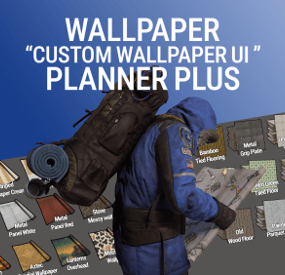
Wallpaper Planner Plus
Welcome to Wallpaper Planner Plus — a lightweight, fast, and user-friendly extension for Rust that enhances the default wallpaper tool with a powerful custom skin selector, favourites, flexible sets, permissions, advanced admin management tools, and ongoing content updates.
As part of the Plus version, I will add new custom wallpapers every month for at least one year, giving your server a growing collection of fresh designs and more variety over time.
📐 Features
🔳 Custom UI:
Access a sleek, in-game wallpaper selector while holding the wallpaper tool. The plugin automatically handles Walls, Floors, and Ceilings, making it quick and easy to find and apply the wallpaper you want.
🎨 Wallpaper Sets:
Create custom sets by combining Walls, Floors, and Ceilings into complete themes or flexible collections.
Wallpaper Planner Plus supports two types of sets:
Presets:
A Preset contains exactly 1 Wall, 1 Floor, and 1 Ceiling. Equipping the Preset assigns all three items to the wallpaper tool at once, making it ideal for complete, ready-to-use themes.
Collections:
A Collection contains an open mix of wallpaper items. You can add multiple Walls, Floors, or Ceilings, create partial sets, or use any custom combination you want. Collections are ideal for grouping related wallpapers without requiring one item from every category.
Players can browse available Presets and Collections directly from the wallpaper UI and equip them quickly while using the wallpaper tool.
⭐ Favorites System:
Mark your favorite wallpapers and quickly switch between viewing all available skins or only your favorites.
🆕 Monthly Skin Updates:
Plus includes ongoing content updates with new custom wallpapers added every month for at least one year.
These monthly additions will expand the available collection with fresh designs for Walls, Floors, and Ceilings, giving players new options to discover and use throughout the year.
New skins can be organized into Presets and Collections, assigned to permission groups, and managed through the built-in admin tools.
🔐 Advanced Permission System:
Control exactly which wallpapers players can access.
Create custom permission groups and assign specific Wall, Floor, and Ceiling skins to each permission. Players automatically see the skins they have permission to use, while restricted skins remain hidden from the UI. This allows you to create anything from supporter rewards to staff-only, event, or special-access wallpaper collections.
🛠️ Admin Editors:
Admins can manage your wallpaper library directly through the in-game UI.
Add new custom skins Edit existing skins Rename wallpapers Delete wallpapers Create and manage Presets and Collections Create and manage permission groups Assign specific skins to permissions Organise Walls, Floors, and Ceilings No need to manually edit configuration files for everyday skin, set, and permission management.
🌐 Workshop & Custom Skins:
Use your own custom Workshop skins alongside the included wallpaper collection, giving your server complete control over the wallpapers available to players.
🎨 100% Custom
The included custom wallpapers are created specifically for use with Wallpaper Planners.
The plugin can also display official Rust/DLC wallpapers that the player actually owns, automatically filtering them based on their available ownership.
📦 Built for Server Owners
Wallpaper Planner Plus gives server owners much more control over their wallpaper system while keeping the experience simple for players.
Create your own wallpaper library, organize skins into Presets and Collections, control access with permissions, and let players quickly find the wallpapers they want.
With the Plus version, your wallpaper library will continue to grow through monthly skin updates for at least one year.
🔐 Permissions
wallpaperplannerplus.use — Grants access to the Wallpaper Planner UI. wallpaperplannerplus.outside — Allows wallpapers to be used outside a player's base. wallpaperplannerplus.admin — Enables the advanced admin tools for managing skins, Sets, and permissions. Custom permissions can also be created and linked to specific wallpapers Like VIP etc etc. 💬 Chat Commands
/wallpaperplanner — Opens the custom wallpaper menu while holding the wallpaper tool.
You can also configure a custom keybind to open the UI instead.
Example: Bind to H
Open the Rust console with F1 and enter:
bind H "chat.say /wallpaperplanner"
⚡ Wallpaper Planner Plus
A complete custom wallpaper management system for Rust — fast, simple for players, powerful for admins, and continuously expanding with new skins every month for at least one year.
List of input keys to use in config that rust accepts.
BACKWARD LEFT RIGHT JUMP DUCK SPRINT USE FIRE_PRIMARY FIRE_SECONDARY RELOAD FIRE_THIRD DISABLED DISABLE Input Key:
Server owners can now disable the UI keybind system entirely. In the config, set: "UI input key": "DISABLED" This prevents the menu from opening with FIRE_THIRD, allowing admins to enforce custom binds (e.g. /wallpaperplanner only).- #custom ui
- #wallpapers
- (and 9 more)
-

$7.98$5.00Economy Repair
Compliment your in game economy system by allowing players to repair weapons using their currency.
Economy Repair offers a solution that lets players repair their damaged weapons using in-game currency of your choice. With this plugin, your worn-out AKs, tools, and gear can be repaired through a simple new option in the repair bench, making sure you're always prepared for the next battle!
Key Features:
Multiple Currency Support: Use popular Rust plugins like Economics or ServerRewards to pay for repairs using your in-game currency. You can even set up custom item-based currencies for repairs!
Condition Loss: Condition loss can be disabled, or the scale of it modified.
VIP Discounts: Offer VIP players reduced repair costs, providing an extra incentive for premium members of your community.
Customizable Repair Costs: Tailor the repair prices for different items, ensuring fair costs for everything from weapons to tools. Repair cost can be set globally, and per item.
Clean UI: Enjoy a sleek almost vanilla like repair button that appears when interacting with a repair bench. Instantly know the cost to restore your item and confirm the repair with just a click.
Repair Blacklist: Administrators can blacklist certain items from being repaired, maintaining control over game balance and preventing unintended item restorations.
How It Works:
1. Interact with a repair bench.
2. Insert item normally into the repair bench
3. See the cost, click the repair button!
Economy Repair is your perfect choice for expanding the usefulness of economy on your server. Keep your equipment in top shape without the hassle of searching through boxes to try and find the correct components.
PERMISSIONS:
economyrepair.use - Required to see and use the economy repair option economyrepair.VIP - Required for VIP discount feature CONFIG EXAMPLE:
{ "Default Max Repair Cost": 100.0, // default repair cost for all items "Reduce Durability On Repair": true, // should the item lose durability if repaired with currency? "Durability Loss Scaling Factor": 1.0, // play with this to increase/reduce how much durability is lost "Currency System (Economics, ServerRewards, Item, TCBank)": "Economics", //which currency system to use "VIP Discount Percentage": 0.0, // percentage discount for players with VIP permission "Currency Item": { // If using "Item" as currency, specify item details here "ItemID": 0, "SkinID": 0, "Display Name": "Currency" }, "Custom Repair Costs": { // customize repair cost for individual items "hatchet": 50.0, "pickaxe": 75.0 }, "Repair Blacklist": [ // list of items which cannot be repaired using currency "minigun", "fuse" ], "Blacklisted SkinIDs": [ 3380502905, 987654321 ], "Debug Messages Enabled": false }
LANG EXAMPLE:
{ "RepairCostLabel": "Economy Repair: {0} {1}", "CurrencyLabel": "$", "RepairButtonLabel": "Repair", "NoValidItem": "No valid item to repair.", "MaxDurability": "This item is already at full durability.", "NotEnoughCurrency": "You do not have enough {0} to repair this item.", "RepairSuccess": "Item successfully repaired.", "RepairFailed": "Failed to repair the item. Please try again.", "ItemBlacklisted": "This item cannot be repaired." }
-
.thumb.png.e88f28f1c66c6591dd89b4a4b76239e5.png)
$16.98$10.00WoundedNPC
Introducing WoundedNPC — where NPCs don't just die; they make a scene!
Watch in amusement as your NPCs go from tough guys to crybabies, collapsing and crying out in pain. They'll lie there, whining and wailing, giving you a show worth watching!
Perfect for adding a touch of humor to your Rust world. Your NPCs will now collapse similar to players, with customizable scream (or other sound of your choice!) with a configurable chance to get back up for a second chance.
Get ready for the most entertaining and theatrical NPC deaths ever with WoundedNPC!
Features:
NPCs will enter a wounded state Configurable % chance for them to get back up Configurable wounded timer for them Configurable scream sounds Lightweight format sounds stored in data for minimal delay Automatically checks if screams listed in config exist, if not, it's downloaded. Ability to exclude specific NPCs by either prefab path, or partial name matching (useful to exclude zombies or any other NPC which you wish to die immediately) Notes:
Dependency plugin - TapeLibrary by Nikedemos - Included 5 scream sound files included Audio file format .ogg Mono channel (can convert mp3 to a mono .ogg here , then upload to a file host of your choice ensuring link leads directly to downloading the file) Sound Loops - worth ensuring your wounded timer is around the same length as sound files.
Example config
{ "Enabled: ": true, // can disable the plugin features from the config if needed "Wounded timer: ": 20, // how long will the NPC stay in wounded state "Chance to die after wounded timer: ": 50, // percentage chance NPC will NOT get back up after being wounded "NPC Prefab paths to exclude: ": [], // can exclude an entire prefab path for an npc (eg for scarecrow) "Exclude NPC where their displayname contains: ": [ "Marauder", "Zombie" ], // can exclude NPCs by their full or partial display name. "Boombox Prefab Path: ": "assets/prefabs/voiceaudio/boombox/boombox.deployed.prefab", // don't need to touch unless boombox prefab path ever changes or there's a new boombox type item introduced. "Wounded Sounds URLs: ": [ "https://www.dropbox.com/scl/fi/vyhsne1efaictwl39oqgu/Scream-Medium-C1-www.fesliyanstudios.com.ogg?rlkey=7ae1rnbtwj662puo874t823y6&st=svp1qa0x&dl=1", "https://www.dropbox.com/scl/fi/j6zo85v7uuwje4scenmm3/longpain1.ogg?rlkey=7cmumo9z40no1xkdzkcwzxl36&st=gef2dhc7&dl=1", "https://www.dropbox.com/scl/fi/gb2jkxu1gxfsqjxmtum32/longpain2.ogg?rlkey=81iwgqqw9j26t7f7vfbzg1diw&st=f5s5k1to&dl=1", "https://www.dropbox.com/scl/fi/04o1ukje93tly4rjx9dvu/longpain3.ogg?rlkey=cjkv5ks97307yadnah0pvua8b&st=ns0tqygh&dl=1", "https://www.dropbox.com/scl/fi/e6ey5eqevqwey43b16xj2/longpain4.ogg?rlkey=28vksom5xd5o82rhvy5kmiaj7&st=wgo8v7ue&dl=1" ], // Direct URL to scream sound files "Enable Debug Messages: ": true // debug messages in console. Turn off to reduce spam. Turn on for troubleshooting }
-
$15.00$12.00HumanNPC Pro
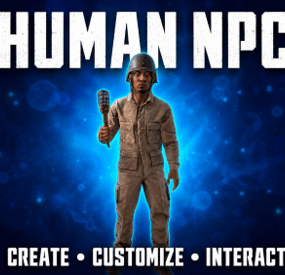
HumanNPC adds interactive human NPCs to your Rust server and provides hooks that allow other plugins to interact with them.
Npc can retain monument positions threw out map wipes and play/talk sound files converted with the included audio converter.
This plugin is my remake of the original Human NPC plugin on umod and is compadable with any plugin that can use it.
These NPCs are designed for interaction and atmosphere. They do not fight players or use firearms.
Permission
humannpc.admin — Allows administrators to create, edit, remove, and manage NPCs.
Commands
/npc_add — Creates a new NPC and opens the configuration menu.
/npc_edit — Opens the NPC manager, where you can select an NPC to edit or teleport to.
/npc_edit <ID> — Opens the configuration menu for the specified NPC.
/npc_remove — Removes the NPC you are currently looking at.
/npc_remove <ID> — Removes the NPC with the specified ID.
/humannpctestsound <sound name> — Spawns a temporary test NPC and plays the selected sound file.
Convert your audio here https://converter.myvector.xyz/
Convert Your Midi's here https://midi.myvector.xyz/
You can use any MIDI its hit and miss with some i found this BAND pack here designed for rust witch works very well https://rustmidi.sellfy.store/
- #interactive
- #npc
- (and 1 more)
-
$15.00
Rust Valley GP
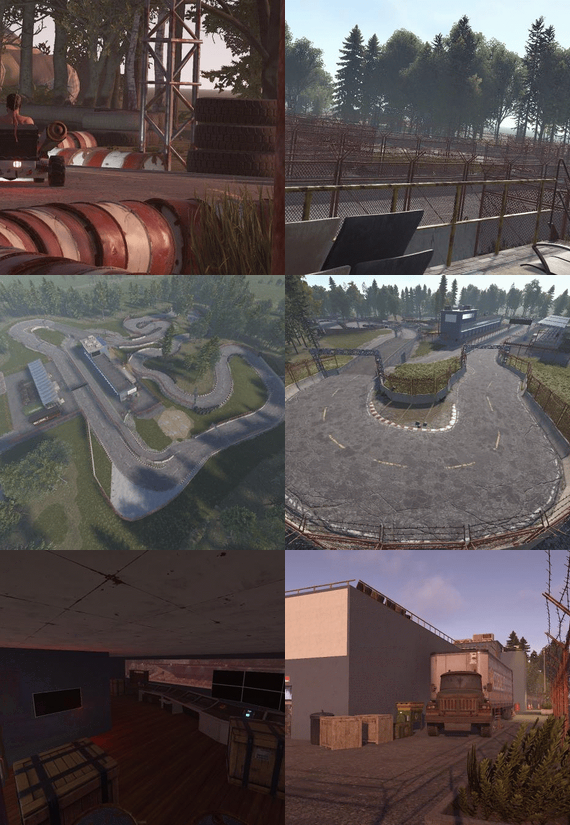
First of all this is my first real Monument i hope u will enjoy it.
Its Perfect for Karuza's Custom Vehicles, Motorbike, Pedalbike ... everything that will fit, wont recommend if ur using Modular Cars.
Prefab Count: 2412
Height Mask, Splat Mask, Topology Mask and Paths are all there.
Try it now on our Test Server u will find it at Grid:
connect kpc.karuza.dev
Race Track Preview:
Pitlane Preview: