Vinni_TV_'s Wishlist
-
Admin Warn
AdminWarn is designed for situations where players clearly violate server rules or require a direct and serious warning.
With the latest update, an optional popup warning mode has been added alongside the mandatory acknowledgment GUI.
This allows admins to send clean, non-intrusive messages displayed at the top of the screen.
News: To avoid disrupting gameplay (such as PvP), you can use:
/warnpopup <SteamID> <message>
/warnpopupall <message>
The core purpose of AdminWarn remains unchanged: forcing players to acknowledge warnings.
Each mandatory warning includes a single confirmation button, ensuring the player has read and accepted it.
Acknowledgment events are tracked via Discord webhook logs, including whether the warning was confirmed while the player was online or after reconnecting.
AdminWarn is built for manual use only.
It is not an automated warning system.
All warnings are intentionally sent by admins using commands.
At the same time, the system works intelligently in the background:
- Warnings sent to offline players are stored and automatically shown when they next join, even days later.
- For online players, warnings remain active until acknowledged, then are automatically cleared.
- All data is fully wipe-aware and automatically cleaned on server wipes.
Each warning includes built-in in-game sound effects.
No external or custom audio files are used.
This is not a chat message.
Warnings are delivered as visual UI elements that require acknowledgment or appear as optional popup notifications.
Even if a player closes the game, mandatory warnings will reappear on the next login until confirmed.
No movement restrictions are applied.
Warnings can be sent via:
- RCON
- Server console
- In-game admin console (F1)
🚀 Performance:
AdminWarn is built with an optimized and efficient code structure, making its presence virtually unnoticeable on the server.
It runs smoothly during long uptimes and maintains stable hook memory and performance values under normal server conditions.
🔄 Wipe Behavior:
- Restarts: Data preserved (approved warnings are auto-deleted for data optimization)
- Server wipe: All warning data automatically cleared
- No manual cleanup needed (Most of the time, it is not necessary)
🔧 Commands Chat & Rcon:
Note: Player names are not unique and may include different alphabets or special characters. To avoid ambiguity, using Steam64ID is strongly recommended when sending warnings.
warn <SteamID> <message>
warn <PlayerName> <message>
warn <SteamID1>,<SteamID2>,<SteamID3> <message>
warn <Name1>,<Name2>,<Name3> <message>
warnall <message>
warnpopup <SteamID> <message>
warnpopup <PlayerName> <message>
warnpopup <SteamID1>,<SteamID2>,<SteamID3> <message>
warnpopup <Name1>,<Name2>,<Name3> <message>
warnpopupall <message>
🔐 Permissions Oxide/Carbon
oxide.grant group admin adminwarn.admin c.grant group admin adminwarn.admin
📊 Discord Webhook Logging
- Player name/steamid and SteamURL
- Warning message / Timestamp
- Read status (online/after reconnect)
- Logs warning sending
- Logs individual warning acknowledgements
📁 Config:
{ "Warning sound": "assets/prefabs/building/wall.frame.shopfront/effects/metal_transaction_complete.prefab", "Clear data on wipe": true, "Discord Webhook URL": "https://support.discord.com/hc/en-us/articles/228383668-Intro-to-Webhooks", "Discord Log Enabled": true, "Log Global Warnings (warnall)": true, "Log Warning Sent (single + multi)": true, "Show Date in GUI": true, "Show logo in warning GUI": true, "Logo size (px) — local image should be a square PNG, recommended 75-120": 90, "Use local images (false = use Web URL below)": true, "Web image URL for logo (128x128 transparent PNG recommended, used only when Use local images is false)": "", "Popup duration (seconds)": 10 }
- #admin
- #admin tools
-
(and 47 more)
Tagged with:
- #admin
- #admin tools
- #admin warn
- #warn
- #warning
- #warn players
- #admins
- #message
- #rust
- #rust admin
- #admin tool
- #admin warning
- #staff
- #rules
- #send message
- #chat
- #chat message
- #broadcast
- #ui
- #gui
- #ui message
- #gui message
- #admin gui message
- #admin warnings
- #adminwarn
- #moderation
- #moderation tools
- #admin control
- #staff tools
- #server management
- #gui warning
- #mandatory gui
- #ui notification
- #offline warning
- #rejoin message
- #manual warning
- #admin command
- #attention warning
- #rule
- #messages
- #notice
- #notices
- #admin notice
- #admin message
- #server warn
- #server warning
- #messaging
- #admin plugin
- #admin plugins
-
Animal Levels
By The_Kiiiing in Plugins
Animal Levels adds a fresh twist to Rust’s wildlife by giving animals their own levels, stats, and behaviors. Instead of every encounter feeling the same, you’ll run into creatures with different health, gather yields, and even unique abilities. Some might be easy prey, others a real threat — making hunting and exploring a lot more unpredictable and rewarding.
Features:
Animals have different levels Animals can have different mutations Fully configurable loot and gather rates Supports all animals in the game Configurable speed & damage Fully customizable
Commands:
The following command can be used to spawn an animal with a specific mutation and level. The mutation index is the number position of the mutation entry in the config file, starting at 0.
mutation <animal name> <mutation index> <level> The command requires the permission
animallevels.spawn
Loot Configurations:
The gather rates of the corpse can be adjusted with the config fields BaseGatherFraction and GatherFractionPerLevel. BaseGatherFraction is the gather rate for a level 1 animal. For every level, the value of GatherFractionPerLevel is added to the final gather rate.
It is also possible to configure additional loot drops for animals using the Loottable plugin or in the config file. All additional loot will drop after the corpse has been destroyed.
Rarities:
Each animal has a rarity. The rarity does not change the properties of an animal, it only changes the color of the displayed info card. You can choose from 4 different rarities:
Common (grey) Rare (blue) Epic (pink) Legendary (gold)
Classes:
ExplosiveAnimal: Animals glow red and explode on death. The config options BaseGatherFraction and GatherFractionPerLevel have no effect here.
BigAnimal: Makes the animal larger. Use the SizeFactor config option to change scaling.
WolfLeader: Spawns a big wolf with torch on its head.
... more classes will be added in future updates
Helpful information:
The table below shows the vanilla stats for each animal.
Animal Health Speed Damage ------------------------------------- wolf 150 9 20 bear 325 8 35 polarbear 420 8 45 stag 150 11 10 boar 150 7 12 chicken 25 2 3 tiger 240 8.25 60 panther 240 8 60 crocodile 450 8 30/40 player 100 7 n/a
Default Configuration:
{ "Animal mutations": { "boar": [ { "Class": null, "DisplayName": "Boar", "Rarity": "Common", "MaxLevel": 15, "SpawnWeight": 100, "BaseHealth": 75.0, "HealthPerLevel": 15.0, "BaseGatherFraction": 0.5, "GatherFractionPerLevel": 0.1, "Damage": 12.0, "Speed": 7.0, "ExtraLootTable": null }, { "Class": "ExplosiveAnimal", "DisplayName": "Explosive Boar", "Rarity": "Rare", "MaxLevel": 10, "SpawnWeight": 30, "BaseHealth": 75.0, "HealthPerLevel": 15.0, "Damage": 15.0, "Speed": 6.0, "ExplosionDamage": 80.0, "ExtraLootTable": "explosive_boar" } ], "wolf": [ { "Class": null, "DisplayName": "Wolf", "Rarity": "Common", "MaxLevel": 15, "SpawnWeight": 100, "BaseHealth": 75.0, "HealthPerLevel": 15.0, "BaseGatherFraction": 0.5, "GatherFractionPerLevel": 0.1, "Damage": null, "Speed": null, "ExtraLootTable": null }, { "Class": "ExplosiveAnimal", "DisplayName": "Explosive Wolf", "Rarity": "Rare", "MaxLevel": 10, "SpawnWeight": 40, "BaseHealth": 200.0, "HealthPerLevel": 50.0, "Damage": null, "Speed": null, "ExplosionDamage": 50.0, "ExtraLootTable": "explosive_wolf" }, { "Class": "WolfLeader", "DisplayName": "Wolf Leader", "Rarity": "Epic", "MaxLevel": 10, "SpawnWeight": 15, "BaseHealth": 300.0, "HealthPerLevel": 20.0, "BaseGatherFraction": 1.5, "GatherFractionPerLevel": 0.1, "Damage": null, "Speed": null, "ExtraLootTable": "wolf_leader" } ], "bear": [ { "Class": null, "DisplayName": "Bear", "Rarity": "Common", "MaxLevel": 15, "SpawnWeight": 100, "BaseHealth": 175.0, "HealthPerLevel": 25.0, "BaseGatherFraction": 0.5, "GatherFractionPerLevel": 0.1, "Damage": null, "Speed": null, "ExtraLootTable": null }, { "Class": "BigAnimal", "DisplayName": "Big Bear", "Rarity": "Epic", "MaxLevel": 5, "SpawnWeight": 10, "BaseHealth": 375.0, "HealthPerLevel": 25.0, "BaseGatherFraction": 1.25, "GatherFractionPerLevel": 0.25, "Damage": null, "Speed": 5.0, "ExtraLootTable": "big_bear", "SizeFactor": 1.3 } ], "polarbear": [ { "Class": null, "DisplayName": "Polar Bear", "Rarity": "Common", "MaxLevel": 10, "SpawnWeight": 100, "BaseHealth": 300.0, "HealthPerLevel": 25.0, "BaseGatherFraction": 0.5, "GatherFractionPerLevel": 0.1, "Damage": null, "Speed": null, "ExtraLootTable": null }, { "Class": "BigAnimal", "DisplayName": "Big Polar Bear", "Rarity": "Epic", "MaxLevel": 5, "SpawnWeight": 10, "BaseHealth": 400.0, "HealthPerLevel": 20.0, "BaseGatherFraction": 1.25, "GatherFractionPerLevel": 0.25, "Damage": null, "Speed": 5.0, "ExtraLootTable": "big_bear", "SizeFactor": 1.3 } ], "stag": [ { "Class": null, "DisplayName": "Deer", "Rarity": "Common", "MaxLevel": 10, "SpawnWeight": 100, "BaseHealth": 75.0, "HealthPerLevel": 15.0, "BaseGatherFraction": 0.5, "GatherFractionPerLevel": 0.1, "Damage": null, "Speed": null, "ExtraLootTable": null }, { "Class": "ExplosiveAnimal", "DisplayName": "Explosive Deer", "Rarity": "Rare", "MaxLevel": 10, "SpawnWeight": 30, "BaseHealth": 100.0, "HealthPerLevel": 20.0, "Damage": null, "Speed": null, "ExplosionDamage": 80.0, "ExtraLootTable": "explosive_deer" } ], "chicken": [ { "Class": null, "DisplayName": "Chicken", "Rarity": "Common", "MaxLevel": 10, "SpawnWeight": 100, "BaseHealth": 30.0, "HealthPerLevel": 10.0, "BaseGatherFraction": 0.8, "GatherFractionPerLevel": 0.1, "Damage": null, "Speed": null, "ExtraLootTable": null }, { "Class": "ExplosiveAnimal", "DisplayName": "Explosive Chicken", "Rarity": "Rare", "MaxLevel": 5, "SpawnWeight": 30, "BaseHealth": 20.0, "HealthPerLevel": 20.0, "Damage": null, "Speed": null, "ExplosionDamage": 50.0, "ExtraLootTable": "explosive_chicken" }, { "Class": "BigAnimal", "DisplayName": "Fat Chicken", "Rarity": "Epic", "MaxLevel": 5, "SpawnWeight": 10, "BaseHealth": 100.0, "HealthPerLevel": 25.0, "BaseGatherFraction": 1.25, "GatherFractionPerLevel": 0.25, "Damage": null, "Speed": null, "ExtraLootTable": "fat_chicken", "SizeFactor": 1.5 } ] }, "Animal info UI settings": { "Default view settings": { "ViewDistance": 20.0, "LookAtRadius": 1.3 }, "View settings while aiming": { "ViewDistance": 50.0, "LookAtRadius": 1.0 }, "View settings while using binoculars": { "ViewDistance": 200.0, "LookAtRadius": 0.7 } }, "Extra loot tables": { "explosive_boar": { "Enabled": true, "Item list": [ { "Short name": "meat.pork.burned", "Min amount": 1, "Max amount": 5, "Chance (1 = 100%)": 1.0, "Skin id": 0, "Custom name": "" }, { "Short name": "charcoal", "Min amount": 10, "Max amount": 300, "Chance (1 = 100%)": 0.8, "Skin id": 0, "Custom name": "" }, { "Short name": "sulfur", "Min amount": 10, "Max amount": 200, "Chance (1 = 100%)": 0.5, "Skin id": 0, "Custom name": "" }, { "Short name": "gunpowder", "Min amount": 10, "Max amount": 50, "Chance (1 = 100%)": 0.2, "Skin id": 0, "Custom name": "" }, { "Short name": "explosives", "Min amount": 1, "Max amount": 2, "Chance (1 = 100%)": 0.05, "Skin id": 0, "Custom name": "" } ] }, "explosive_wolf": { "Enabled": true, "Item list": [ { "Short name": "wolfmeat.burned", "Min amount": 1, "Max amount": 3, "Chance (1 = 100%)": 1.0, "Skin id": 0, "Custom name": "" }, { "Short name": "charcoal", "Min amount": 10, "Max amount": 300, "Chance (1 = 100%)": 0.8, "Skin id": 0, "Custom name": "" }, { "Short name": "sulfur", "Min amount": 10, "Max amount": 200, "Chance (1 = 100%)": 0.5, "Skin id": 0, "Custom name": "" }, { "Short name": "gunpowder", "Min amount": 10, "Max amount": 50, "Chance (1 = 100%)": 0.2, "Skin id": 0, "Custom name": "" }, { "Short name": "explosives", "Min amount": 1, "Max amount": 2, "Chance (1 = 100%)": 0.05, "Skin id": 0, "Custom name": "" } ] }, "explosive_deer": { "Enabled": true, "Item list": [ { "Short name": "deermeat.burned", "Min amount": 1, "Max amount": 3, "Chance (1 = 100%)": 1.0, "Skin id": 0, "Custom name": "" }, { "Short name": "charcoal", "Min amount": 10, "Max amount": 300, "Chance (1 = 100%)": 0.8, "Skin id": 0, "Custom name": "" }, { "Short name": "sulfur", "Min amount": 10, "Max amount": 200, "Chance (1 = 100%)": 0.5, "Skin id": 0, "Custom name": "" }, { "Short name": "gunpowder", "Min amount": 10, "Max amount": 50, "Chance (1 = 100%)": 0.2, "Skin id": 0, "Custom name": "" }, { "Short name": "explosives", "Min amount": 1, "Max amount": 2, "Chance (1 = 100%)": 0.05, "Skin id": 0, "Custom name": "" } ] }, "explosive_chicken": { "Enabled": true, "Item list": [ { "Short name": "chicken.burned", "Min amount": 1, "Max amount": 2, "Chance (1 = 100%)": 1.0, "Skin id": 0, "Custom name": "" }, { "Short name": "charcoal", "Min amount": 10, "Max amount": 100, "Chance (1 = 100%)": 0.8, "Skin id": 0, "Custom name": "" }, { "Short name": "sulfur", "Min amount": 10, "Max amount": 50, "Chance (1 = 100%)": 0.5, "Skin id": 0, "Custom name": "" }, { "Short name": "gunpowder", "Min amount": 10, "Max amount": 30, "Chance (1 = 100%)": 0.2, "Skin id": 0, "Custom name": "" }, { "Short name": "explosives", "Min amount": 1, "Max amount": 1, "Chance (1 = 100%)": 0.02, "Skin id": 0, "Custom name": "" } ] }, "wolf_leader": { "Enabled": true, "Item list": [ { "Short name": "scrap", "Min amount": 50, "Max amount": 10, "Chance (1 = 100%)": 1.0, "Skin id": 0, "Custom name": "" }, { "Short name": "pie.hunters", "Min amount": 1, "Max amount": 2, "Chance (1 = 100%)": 0.5, "Skin id": 0, "Custom name": "" } ] }, "big_bear": { "Enabled": true, "Item list": [ { "Short name": "scrap", "Min amount": 20, "Max amount": 50, "Chance (1 = 100%)": 0.8, "Skin id": 0, "Custom name": "" }, { "Short name": "bearmeat.spoiled", "Min amount": 1, "Max amount": 10, "Chance (1 = 100%)": 0.8, "Skin id": 0, "Custom name": "" }, { "Short name": "pie.bear", "Min amount": 1, "Max amount": 2, "Chance (1 = 100%)": 0.5, "Skin id": 0, "Custom name": "" }, { "Short name": "keycard_green", "Min amount": 1, "Max amount": 1, "Chance (1 = 100%)": 0.4, "Skin id": 0, "Custom name": "" }, { "Short name": "keycard_blue", "Min amount": 1, "Max amount": 1, "Chance (1 = 100%)": 0.2, "Skin id": 0, "Custom name": "" } ] }, "fat_chicken": { "Enabled": true, "Item list": [ { "Short name": "egg", "Min amount": 1, "Max amount": 4, "Chance (1 = 100%)": 0.9, "Skin id": 0, "Custom name": "" }, { "Short name": "pie.chicken", "Min amount": 1, "Max amount": 2, "Chance (1 = 100%)": 0.8, "Skin id": 0, "Custom name": "" }, { "Short name": "chicken.spoiled", "Min amount": 1, "Max amount": 4, "Chance (1 = 100%)": 0.5, "Skin id": 0, "Custom name": "" }, { "Short name": "chicken.costume", "Min amount": 1, "Max amount": 1, "Chance (1 = 100%)": 0.01, "Skin id": 0, "Custom name": "" } ] } } }
-
Monument Events (All in One Events)
By Iftebinjan in Plugins
The Monument Events plugin creates amazing events on the monument from preconfigured presets from config. It creates CustomNPCs around the monument which will roam the monument during the event. Then it will spawn CH47 Helicopter which will drop Hackable crates & spawn configured Patrol Helicopters which will roam the monument vicinity. When players try to unlock the Hackable Crate there will be a CH47 Helicopter which will carry NPC and drop on the monument and will give players an amazing raged experience.
⭐ Key Features
10+ Monument preset preconfigured (Radtown, Oxum's Gas Station, Abandoned Supermarket, Water Treatment Plant, Power Plant, Ferry Terminal, Small Harbor, Large Harbor, Junkyard, The Dome, Airfield, Train Yard, Satellite Dish, Sewer Branch, Launch Site) PVE/PVP support Easy setup everything is pre-configured, so drag and drop and it will auto start from the selected time Massive configure option for individual monuments (Except a few not added) Monument Owner control based on damage Editable Monument Setting, Npc Settings, Npc Loottable Amazing event for engaging players with monuments NEW • CUSTOM VITAL STATUS 📌 Commands
/mestart Preset_Name | monumentID - Starts any specific event (Console & Chat command) /mestop Preset_Name | monumentID - Stops the event (Console & Chat command) /melist - Shows all available monument events on the map /mestartrandom - Starts a random from presets (Console & Chat command) /meadd edit PRESET_NAME - Select a monument for editing spawn points (Chat command) /meadd npcspawn - Creates NPC spawn points for the selected monument (Chat command) /meadd wavespawn - Creates Wave Npc spawn points for the selected monument (Chat command) /meadd cratespawn - Creates Crates spawn points for the selected monument (Chat command) /meadd stopedit - Deselect the current editing monument (Chat command) 📜 Permissions
MonumentEvents.admin - Permission required for using commands 🎬 Video Showcase
⚙️ Configuration
🗃️Monument Settings
🗃️Npc Setting
🗃️Npc Loottable
🗃️Lang
🚀 API & Hooks
💬 Support
-
Cargo Convoy Event
The Cargo Convoy plugin creates a Cargo Ship with three different levels of defensive escorts. In addition to this, the Cargo ship is equipped with a samsite, an autoturret, and a raidable door. If any of the escort ship's captains dies, that ship will stop. If the someone kills the Cargo ship's captain, the Cargo will stop, and if the PveMode plugin is enabled, they will become the owner of the event.
Supports the PveMode plugin.
Console Commands:
ccstart (random difficult event started)
ccstart.easy
ccstart.medium
ccstart.hard
ccstop
Contact:
Additional free plugins created by me are available on Discord: https://discord.gg/C5CehdJMdK
If you want to try out this plugin, you can do so on the test server. IP: 212.73.137.3:27195
My public Rust server IP: 136.243.135.46:28050
Video:
Config:
{ "Plugin version": { "Major": 1, "Minor": 0, "Patch": 0 }, "Automatic event start": true, "Minimum time for event start": 3600.0, "Maximum time for event start": 7200.0, "Duration of the event": 3600.0, "Warning messages before event start": 300.0, "Warning messages before event end": 300.0, "Facepunch cargoship event enabled?": false, "Chat icon": 0, "Event Locked crates hack time": 900.0, "Autoturret setting Easy difficult": { "Health": 200.0, "Weapon ShortName": "smg.2", "Ammo ShortName": "ammo.pistol", "Number of ammo": 5000 }, "Autoturret setting Medium difficult": { "Health": 300.0, "Weapon ShortName": "rifle.lr300", "Ammo ShortName": "ammo.rifle", "Number of ammo": 5000 }, "Autoturret setting Hard difficult": { "Health": 400.0, "Weapon ShortName": "rifle.ak", "Ammo ShortName": "ammo.rifle", "Number of ammo": 5000 }, "Medium difficult door setting.": { "Door SkinID (0 - default, TugBoat and Medium difficult only use Sheet Metal Door skinID, Hard difficult only use Armored Door skinID! )": 1443957299, "Door Health": 250.0 }, "Hard difficult door setting.": { "Door SkinID (0 - default, TugBoat and Medium difficult only use Sheet Metal Door skinID, Hard difficult only use Armored Door skinID! )": 1130245250, "Door Health": 1000.0 }, "TugBoat door setting.": { "Door SkinID (0 - default, TugBoat and Medium difficult only use Sheet Metal Door skinID, Hard difficult only use Armored Door skinID! )": 1447958101, "Door Health": 250.0 }, "Elit crates setting on Easy difficult": { "Delete the Rust loottable loot?": false, "Add custom loot?": false, "CustomLoot": { "Minimum items": 1, "Maximum items": 1, "Use minimum - maxium?": false, "List of items": [ { "ShortName": "xmas.present.small", "Minimum": 3, "Maximum": 6, "Chance": 100.0, "Give blueprint?": false, "SkinID": 0, "Displayname": "" } ] } }, "Elit crates setting on Medium difficult": { "Delete the Rust loottable loot?": false, "Add custom loot?": false, "CustomLoot": { "Minimum items": 1, "Maximum items": 1, "Use minimum - maxium?": false, "List of items": [ { "ShortName": "xmas.present.small", "Minimum": 3, "Maximum": 6, "Chance": 100.0, "Give blueprint?": false, "SkinID": 0, "Displayname": "" } ] } }, "Locked crates setting on Medium difficult": { "Delete the Rust loottable loot?": false, "Add custom loot?": false, "CustomLoot": { "Minimum items": 1, "Maximum items": 1, "Use minimum - maxium?": false, "List of items": [ { "ShortName": "xmas.present.small", "Minimum": 3, "Maximum": 6, "Chance": 100.0, "Give blueprint?": false, "SkinID": 0, "Displayname": "" } ] } }, "Elit crates setting on Hard difficult": { "Delete the Rust loottable loot?": false, "Add custom loot?": false, "CustomLoot": { "Minimum items": 1, "Maximum items": 1, "Use minimum - maxium?": false, "List of items": [ { "ShortName": "xmas.present.small", "Minimum": 3, "Maximum": 6, "Chance": 100.0, "Give blueprint?": false, "SkinID": 0, "Displayname": "" } ] } }, "Locked crates setting on Hard difficult": { "Delete the Rust loottable loot?": false, "Add custom loot?": false, "CustomLoot": { "Minimum items": 1, "Maximum items": 1, "Use minimum - maxium?": false, "List of items": [ { "ShortName": "xmas.present.small", "Minimum": 3, "Maximum": 6, "Chance": 100.0, "Give blueprint?": false, "SkinID": 0, "Displayname": "" } ] } }, "Elit crates setting on TugBoats": { "Delete the Rust loottable loot?": false, "Use custom loot?": false, "CustomLoot": { "Minimum items": 1, "Maximum items": 1, "Use minimum - maxium?": false, "List of items": [ { "ShortName": "xmas.present.small", "Minimum": 3, "Maximum": 6, "Chance": 100.0, "Give blueprint?": false, "SkinID": 0, "Displayname": "" } ] } }, "Setting the Captains": { "Name": "Captain", "Health": 300.0, "Attack Range Multiplier": 1.0, "Target Memory Duration [sec.]": 20.0, "Scale damage": 0.7, "Aim Cone Scale": 1.5, "Sense Range": 0.0, "Wear items": [ { "ShortName": "shoes.boots", "SkinID (0 - default)": 2454376365 }, { "ShortName": "burlap.trousers", "SkinID (0 - default)": 3027295270 }, { "ShortName": "burlap.shirt", "SkinID (0 - default)": 3027301658 }, { "ShortName": "burlap.gloves", "SkinID (0 - default)": 2454377972 }, { "ShortName": "hat.boonie", "SkinID (0 - default)": 3112171056 } ], "Belt items": [ { "ShortName": "syringe.medical", "Amount": 3, "SkinID (0 - default)": 0, "Mods": [], "Ammo": "" } ] }, "Setting the EASY Npc's": { "Name": "Cargo Soldier", "Health": 125.0, "Attack Range Multiplier": 4.0, "Target Memory Duration [sec.]": 20.0, "Scale damage": 0.7, "Aim Cone Scale": 1.5, "Sense Range": 150.0, "Wear items": [ { "ShortName": "shoes.boots", "SkinID (0 - default)": 800967386 }, { "ShortName": "pants", "SkinID (0 - default)": 681804489 }, { "ShortName": "hoodie", "SkinID (0 - default)": 963496340 }, { "ShortName": "burlap.gloves", "SkinID (0 - default)": 0 }, { "ShortName": "wood.armor.pants", "SkinID (0 - default)": 0 }, { "ShortName": "wood.armor.jacket", "SkinID (0 - default)": 0 }, { "ShortName": "bucket.helmet", "SkinID (0 - default)": 2929522461 } ], "Belt items": [ { "ShortName": "smg.thompson", "Amount": 1, "SkinID (0 - default)": 0, "Mods": [ "weapon.mod.flashlight", "weapon.mod.holosight" ], "Ammo": "" }, { "ShortName": "pistol.m92", "Amount": 1, "SkinID (0 - default)": 0, "Mods": [], "Ammo": "" }, { "ShortName": "syringe.medical", "Amount": 3, "SkinID (0 - default)": 0, "Mods": [], "Ammo": "" } ] }, "Setting the MEDIUM Npc's": { "Name": "Cargo Soldier", "Health": 200.0, "Attack Range Multiplier": 4.0, "Target Memory Duration [sec.]": 20.0, "Scale damage": 0.7, "Aim Cone Scale": 1.5, "Sense Range": 150.0, "Wear items": [ { "ShortName": "shoes.boots", "SkinID (0 - default)": 3251246600 }, { "ShortName": "pants", "SkinID (0 - default)": 3246192739 }, { "ShortName": "hoodie", "SkinID (0 - default)": 3246191692 }, { "ShortName": "burlap.gloves", "SkinID (0 - default)": 0 }, { "ShortName": "roadsign.kilt", "SkinID (0 - default)": 3260691772 }, { "ShortName": "roadsign.jacket", "SkinID (0 - default)": 3260693328 }, { "ShortName": "coffeecan.helmet", "SkinID (0 - default)": 3260694842 } ], "Belt items": [ { "ShortName": "smg.mp5", "Amount": 1, "SkinID (0 - default)": 0, "Mods": [ "weapon.mod.flashlight", "weapon.mod.holosight" ], "Ammo": "" }, { "ShortName": "syringe.medical", "Amount": 3, "SkinID (0 - default)": 0, "Mods": [], "Ammo": "" } ] }, "Setting the HARD Npc's": { "Name": "Cargo Soldier", "Health": 350.0, "Attack Range Multiplier": 4.0, "Target Memory Duration [sec.]": 20.0, "Scale damage": 0.7, "Aim Cone Scale": 1.5, "Sense Range": 180.0, "Wear items": [ { "ShortName": "shoes.boots", "SkinID (0 - default)": 2936561559 }, { "ShortName": "pants", "SkinID (0 - default)": 2933205831 }, { "ShortName": "hoodie", "SkinID (0 - default)": 2933205232 }, { "ShortName": "burlap.gloves", "SkinID (0 - default)": 2936561057 }, { "ShortName": "roadsign.kilt", "SkinID (0 - default)": 1624102935 }, { "ShortName": "metal.plate.torso", "SkinID (0 - default)": 2601631390 }, { "ShortName": "metal.facemask", "SkinID (0 - default)": 2601630796 } ], "Belt items": [ { "ShortName": "rifle.lr300", "Amount": 1, "SkinID (0 - default)": 0, "Mods": [ "weapon.mod.flashlight", "weapon.mod.holosight" ], "Ammo": "" }, { "ShortName": "rocket.launcher", "Amount": 1, "SkinID (0 - default)": 0, "Mods": [], "Ammo": "" }, { "ShortName": "syringe.medical", "Amount": 3, "SkinID (0 - default)": 0, "Mods": [], "Ammo": "" } ] }, "NPC Turret Damage Multiplier": 1.0, "Messages setting": { "GameTip message": "Cargo Convoy Inbound", "Message before the event starts.": "<color=#ff0000>Cargo Convoy</color> will start soon", "Message before the event stop.": "Cargo Convoy will end soon!!", "Message when someone stopped Cargo Convoy": "Someone stopped the Cargo Convoy", "Start message": "Cargo Convoy Event start! Kill the <color=#2296ff>Cargo Captain</color> to stop the cargo convoy and you will be the event owner", "Stop message": "Cargo Convoy Event end!", "Map marker name": "Cargo Convoy", "Map marker radius": 0.6, "Color": { "r": 1.0, "g": 0.0, "b": 0.0 } }, "PVE Mode Setting (only for users PveMode plugin)": { "Use PveMode plugin?": false, "Non owner can loot the crates?": false, "Non owner can loot the Npc's?": false, "Non owner can damage Npc's?": false, "Non owner can be attacked by Npc's?": false, "Non owner, can you enter the event zone?": false, "Allow a player who has an active cooldown of the Event Owner to enter the event zone?": true, "The time that the Event Owner may not be inside the event zone.": 300, "The time until the event owner can return to the event zone.": 60, "Block the RestoreUponDeath plugin in the event zone.": true, "After all this time, an event owner can be an event owner again.": 86400.0, "Darkening the sphere.": 15 } }
-
Mini (Cargo Ship) Harbor
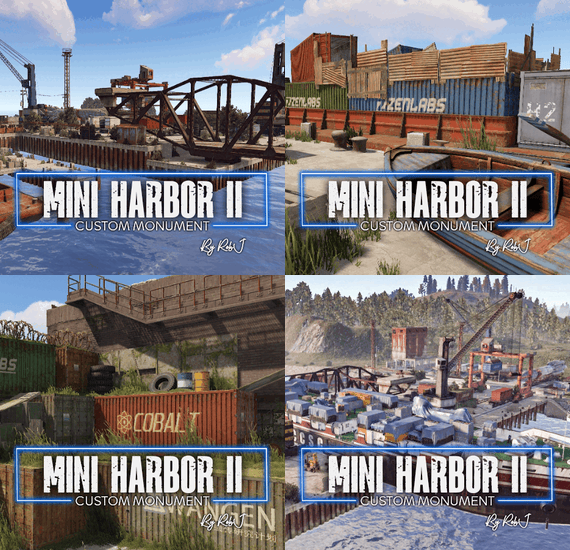
Welcome to my Mini Harbor II, a compact yet fully functional harbor for cargo ships. Ships follow custom path into the harbor, where the swing bridge opens to allow entry. Once docked, the loading process begins, transferring shipping containers from trailers and train wagons onto the ship. After 10 minutes, the ship departs, and the bridge closes behind it.
I redesigned the harbor puzzle and relocated it to require entering the harbor shipping offices to find your loot and a blue card spawn. Despite its small size, this mini monument is highly efficient with space. I've significantly reduced the amount of valuable land space used up compared to my previous mini harbor and a huge amount over the default FP harbors, ensuring most of the monument's mass is over water Even after reducing its size in many different areas, I like to think it still feels quite large to the player.
Included Plugin
The harbor is equipped with a plugin that manages the navigation of ships as they enter and exit the harbor, as well as most docking operations and bridge controls.
Quick Start
Extract the zip file into your RustEdit install folder. Start Rust Edit. Click on Prefabs at the top & open up your Prefab List. Under the Custom category, you will now find RobJs Premium Prefabs. Double-click on the prefab file, which will spawn it into the map for you. Drag it to the general area you want to place it Use the barge algae water line to match sea level. Apply the Height Mask, Topology Mask, and Splat Mask. Contact And Help
If you need to contact me discord is best: RobJ2210#2553
For help/support my discord group is best: Join RobJ Maps Discord
- #robj mini collection
- #robj2210
- (and 8 more)