
Tikomatura's Wishlist
-
$24.95$21.95Skills
Introducing Skills, the ultimate skill progression system for Rust servers featuring 71+ pre-configured skills across 13 categories! Complete with 4 UI templates, modal windows system, automatic migration from SkillTree/Skills V1, and comprehensive API. Transform your server into a world of specialization where players can master every aspect of Rust - from elite resource gathering and crafting to combat dominance and survival expertise. With intuitive progression, stunning visuals, and seamless integration, Skills delivers endless replayability and keeps players engaged for months!
📈 Why Choose Skills?
Massive Skill Library - 71+ pre-configured skills covering every gameplay aspect Ready to Deploy - All skills are balanced and ready to use immediately Deep Progression - 10 levels per skill with meaningful advancement Visual Editor - Easy customization without coding knowledge Server Integration - Native support for ServerPanel V1/V2/V4, Notify/UINotify, and all major economy plugins Performance Focused - Optimized for high-population servers Seamless Migration - Automatic data conversion from SkillTree and Skills V1 Modal Windows - Advanced modal system for custom interfaces Multi-Template Support - Fullscreen, V1, V2, V4 ServerPanel templates Real-time Notifications - Integrated Notify/UINotify support
📬 Video Overview
🖼️ Showcase
Templates
Fullscreen Template
ServerPanel V1 Template
ServerPanel V2 Template
ServerPanel V4 Template
Modal Windows & Editor
Modal Windows System
⭐ Complete Skill Arsenal (71+ Skills)
Skills comes with a massive library of pre-configured skills covering every aspect of Rust gameplay. All skills are ready to use with balanced 10-level progression systems!
⛏️ Mining Skills
All Ores Mining - Boosts yields from stone, sulfur, metal, and HQM ore by up to 50% Stone Mining - Specialized stone gathering with up to 50% bonus Sulfur Mining - Enhanced sulfur ore collection up to 50% Metal Mining - Increased metal ore yields up to 50% HQM Mining - High-quality metal ore bonuses up to 50% Instant Ore Destruction - Chance to instantly destroy ore nodes (up to 20%)
🔧 Durability Skills
Tool Durability - Reduces wear on gathering tools Weapon Durability - Preserves weapon condition in combat Clothing Durability - Maintains armor integrity
🌳 Wood Skills
Wood Gathering - Increased wood collection from trees Instant Tree Chopping - Chance to fell trees instantly Coal Chance - Bonus coal drops from woodcutting
🔨 Resources Skills
Smelted Ore Chance - Bonus metal from ore smelting Animal Butchering - More meat from animal carcasses Instant Butchering - Chance to butcher animals instantly Plant Gathering - Better yields from bushes and hemp Crop Harvest - Increased vegetable production Fishing - Improved fishing success and rare catches Instant Barrel Destruction - Instant barrel breaking chance
⚒️ Crafting Skills
Craft Duplicate - Chance for double crafted items Craft Speed - Faster crafting times Recycler Speed - Quicker recycling Furnace Smelting Speed - Faster ore smelting Component Find Chance - Bonus components from scrapping Cooking Speed - Faster food preparation
🛡️ Defense Skills
Fire Resistance - Reduced fire damage Fall Damage Resistance - Less fall damage Temperature Resistance - Better cold/heat protection Radiation Resistance - Reduced radiation damage Explosive Resistance - Protection from explosions Stand Up Chance - Higher chance to stand when wounded Melee Damage Resistance - Less melee damage taken Damage From Scientists Resistance - Reduced scientist damage Damage From Players Resistance - PvP damage reduction
🐾 Animal & Shark Defense
Animal Damage Resistance - Protection from animal attacks Shark Damage Resistance - Reduced shark damage
🍖 Metabolism Skills
Hunger Metabolism - Slower hunger depletion Thirst Metabolism - Reduced thirst buildup Health Regeneration - Faster natural healing
🐎 Horse Skills
Horse Speed - Faster horse movement Horse Damage Resistance - Horse takes less damage Horse Fall Resistance - Better horse fall survival
🌊 Underwater Skills
Underwater Breathing - Extended underwater time
📦 Crate Skills
Crate Unlocking Speed - Faster locked crate opening Crate Extra Loot - Bonus items from containers
🏗️ Building Skills
Building Upgrade Cost - Reduced building upgrade costs
🚗 Vehicle Skills
Fuel Consumption - Reduced vehicle fuel usage Vehicle Repair Cost - Cheaper vehicle repairs Air Vehicle Takeoff Speed - Faster helicopter takeoff
⚔️ Damage Skills
Damage To Scientists - Increased damage to scientists Damage To Animals - More damage to animals Damage To Players - Bonus PvP damage output Trap Damage - Increased trap and turret damage
🎯 Combat Skills
Magazine Size - Larger weapon magazines Effect Duration - Longer buff/debuff effects Revive Healing - More health from revives
🎁 Special Skills
Teleportation VIP - VIP teleport permissions Wipe Protection - Data protection across wipes
🔄 Migration & Conversion
Skills supports seamless data migration from popular skill plugins:
SkillTree Plugin - Automatic conversion of player XP and skill levels Skills V1 - Full data transfer including custom skills and configurations
🔌 Advanced Features
Modal Windows System - Create custom modal interfaces for additional functionality Multi-Template UI - Support for Fullscreen, ServerPanel V1/V2/V4 templates Real-time Notifications - Integrated Notify/UINotify system for skill progression alerts Advanced API - Comprehensive developer API for third-party integrations ImageLibrary Integration - Offline image mode with automatic fallback Custom Economy Hooks - Flexible economy integration with plugin hooks XP Transfer System - Transfer XP between players on death (configurable) Cooldown System - Configurable action cooldowns to prevent spam
🎮 Commands
/skills or /skill - Opens the skills interface skills.modal <modalID> - Open specific modal window Admin Console Commands:
skills.manage addxp <player> <amount> - Add XP to player skills.manage takexp <player> <amount> - Take XP from player skills.manage setxp <player> <amount> - Set player's XP balance skills.manage setskill <player> <skillId> <level> - Set skill level skills.manage giveskill <player> <skillId> <levels> - Increase skill level skills.manage resetskill <player> <skillId> - Reset specific skill skills.manage resetall <player> - Reset all skills skills.manage info <player> - Show player skill information
🛡️ Permissions
skills.use - Access to skills interface (set in config as "Permission") skills.edit - Access to visual skill editor skills.xprate.vip - 1.5x XP rate bonus skills.xprate.premium - 2x XP rate bonus skills.xptransfer.vip - 75% XP transfer on death skills.xptransfer.premium - 100% XP transfer on death skills.gathering.level6-10 - Access to advanced gathering levels
💻 Developer API
Skills provides a comprehensive API for developers:
Methods:
API_GetPlayerSkillLevel(ulong playerId, int skillId) - Get player's skill level API_AddPlayerXP(ulong playerId, float amount) - Grant XP to player API_GetSkillInfo(int skillId) - Get skill configuration data API_OnGather(BasePlayer player, Item item) - Handle gather events API_OnSkillLevelUp(BasePlayer player, int skillId, int level) - Skill level up events API_GetSkillLevel(BasePlayer player, int skillId) → int - Skill level API_GetSkillValue(BasePlayer player, int skillId) → float - Skill effect value API_GetPlayerSkills(BasePlayer player) → Dictionary<int, int> - All skill levels API_IsPlayerLoaded(BasePlayer player) → bool - Player data loaded API_SetSkillLevel(BasePlayer player, int skillId, int level) - Set skill level API_ResetPlayerSkills(BasePlayer player) - Reset all skills Hooks:
OnSkillsPlayerLoaded(BasePlayer player) - Player data loaded OnSkillsXPEarned(BasePlayer player, float amount) - XP earned from gameplay (not admin commands) OnSkillsXPBalanceChanged(BasePlayer player, float amount, float balance) - Calls on every XP balance change, from any source (signed amount + resulting balance) OnSkillsSkillLevelUp(BasePlayer player, int skillId, int newLevel) - Skill upgraded. Return null to allow, string to deny
📨 Web Config Editor
Easily manage your Skills settings with our web-based configuration editor. This tool allows you to adjust plugin configurations through a user-friendly interface, eliminating the need to manually edit files on your server.
P.S. Join our Discord at https://discord.gg/mevent and request the "Skills" group for access to the web configuration editor.
📚 FAQ
Q: How many skills come with Skills?
A: Skills includes 71+ pre-configured skills across 13 categories, all ready to use with balanced progression systems.
Q: Do I need to configure anything?
A: No! All skills are pre-configured and balanced. Simply install, enable desired skills, and grant permissions.
Q: How does the XP system work?
A: Players earn XP through gameplay activities (mining, combat, crafting, etc.) and spend it to unlock skill levels.
Q: Can I customize skills?
A: Yes! Use the visual editor to modify skill costs, bonuses, requirements, and create new custom skills.
Q: What happens on server wipe?
A: Fully configurable - you can preserve skills/XP, reset everything, or choose selective wipe protection.
Q: Does it work with economy plugins?
A: Yes! Full integration with ServerRewards, Economics, BankSystem, IQEconomic, and custom economy systems.
Q: Can I migrate from SkillTree or Skills V1?
A: Absolutely! Skills automatically converts data from both plugins. All player progress is preserved.
Q: What are modal windows?
A: Modal windows are custom popup interfaces you can create for additional features like shops, information displays, or mini-games.
Q: Which ServerPanel versions are supported?
A: Skills supports ServerPanel V1, V2, V4, and Fullscreen templates - all with dedicated banner images and layouts.
Q: Can I use custom images?
A: Yes! Skills supports ImageLibrary integration with offline image mode for custom skill icons and backgrounds.
Q: Is there a cooldown system?
A: Yes, configurable cooldowns prevent spam actions and maintain server performance.
Q: How does XP transfer work?
A: When enabled, defeated players can transfer a percentage of their XP to the killer, adding competitive depth.
Q: Can I limit skill access?
A: Yes! Skills support permission requirements, playtime requirements, and other prerequisites.
Q: What's the performance impact?
A: Skills is highly optimized with caching, batch processing, and efficient data structures for minimal server load.
Q: How do I add Skills to the ServerPanel menu?
A: You can do this directly from the ServerPanel in-game:
1. Open the ServerPanel menu in-game.
2. If you have permission to edit, switch the panel to edit mode so you can see the blue "EDIT CATEGORY" and "EDIT PAGES" buttons.
3. Choose the category where you want Skills to appear and click the "EDIT CATEGORY" button for that category.
4. While you are in this category in the ServerPanel, click the "EDIT PAGES" button to create a new page (or edit an existing one) for Skills.
5. For that page, set these exact parameters:
Type: Plugin Plugin Name: Skills Plugin Hook: API_OpenPlugin 6. Save the changes. The Skills button will now appear in the ServerPanel in the category you selected.
-
$40.00
Train Bases
By LeroyJenkins420 in Plugins
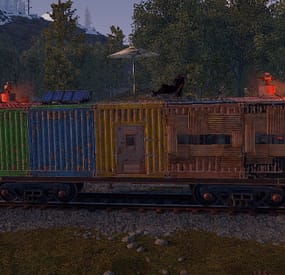
This plugin allows any player to find and build on a train directly on the rails in either a 1x5 or 1x3 configuration.
Features:
Throttle syncing for trains (syncs throttles when updated) Build anything almost anywhere (on trains) Limited to 2x1 or 5x1 carts Can be built inside of some monument (Trainyard, etc) Can be built inside underground tunnels Electrical entities powered by the train Configurable Health Preset Support NO MAP EDITING REQUIRED!!!
How To Use:
To use this plugin you need to:
1. Put the plugin in your plugins folder and enjoy!
Chat Commands:
/blacklist: Admin only, will blacklist items in your inventory, this will prevent these items from being placed on the train.
/killtrains: Admin only, will kill all trains on the server.
Args: All - kills all trains Built - kills only built trains Unbuilt - kills only unbuilt trains
Config:
Bounds defines the buildable area on the train, default is 1x5 or 1x2 for work carts. Larger building bounds may or may not be supported in the future.
Building grade support 0-4
0: twigs 1: wood 2: stone 3: metal 4: high quality { "Version Number": { "Major": 1, "Minor": 1, "Patch": 7 }, "Upgrade Chance (0-100 = %0-100 chance)": 50.0, "Building Grade to spawn as": 3, "Train Wagon Start Health": 5000.0, "Train Engine Force": 250000.0, "Blacklisted Entities (shortnames)": [ "example1", "example2", "For ShortNames Go to:", "https://docs.carbonmod.gg/references/items/", "https://www.corrosionhour.com/rust-item-list/" ], "Sync Train Throttles": true, "Max Train Pop": 24.0, "Max coupled trains": 12, "Max Train Couple Speed": 9.0, "Message Prefix": "<size=18px><color=#51a3f5>[</color><color=#FFFFFF>T</color><color=#FF0000>B</color><color=#51a3f5>]</color></size>" } Note: Presets can be found in a seperate folder (TrainBases > TrainPresets)
Please also be aware that at this time bounds are only setup for default types. EX: you can create presets for WagonC, however if you create presets for locomotive the player will be able to build infinitely off the train. Default types meaning train types that come with presets by default (wagonc, wagonb, etc).
The bounding system will be re-engineered shortly to allow for dynamic bound creation.
Note: weighted chance modifiers can be modified for each preset valid arguments for these modifiers are 0-100 and affect the likelihood of that preset spawning.
- #trainserver
- #train
- (and 11 more)
-

$20.00$14.00Heavy Rig
HeavyRig is a event plugin that adds PushButton's to the oilrigs and a special Card to activate a wave of heavy scientist to come to Oil Rig
Note : hacktimer is recommended at 10min or more to avoid timing issues
Normal Mode: ------------ Large Oilrig 4 extra Hack Crates 55 Heavy Scientists Small Oilrig 2 Extra Hack Crates 18 Heavy Scientists Hard Mode Wave Card in one of the extra crates ----------- Hard Mode: ----------- Normal mode Hack Cycle Adds 3 extra events on 50% , 25% and 10% left on main Crate timer Extreme Mode Wave Card in one of the extra crates ------------- Extreme Mode: ------------- Normal Mode Hack Cycle Adds 2 more Hack Crates to hack Cycle Adds 5 extra events on 50% , 37.5% , 25% , 17.5% and 10% left on main Crate timer ------------- Extra Events: ------------- 1. Extra Heavy Scientists comming in with CH47 2. Radiation attack with F15 3. Patrol Helicopter Attacking Oilrig top deck 4. 30 MLRS rocket attack on Oilrig top deck 5. Bradley APC spawn on Helipad
Card need to be in Inventory to use button or swipe red room with card to activate event Button Press for Wave event needs to happen before hacking main crate
NormalCard = 3431997187 HardCard = 3431996394 Both still the redcard prefab for the servers that uses a GUI Shop
Console Commands
givecard <Steamid> // gives player a Normal Wave Card givehardcard <Steamid> // gives player a Hard Wave Card giveextremecard <Steamid> // gives player a Extreme wave card
Chat Commands
/hrconfig --- alows player to access config with ingame and do changes without reloading plugin(Admin only)
Config
{ "Enable HardMode mode?": true, "Enable Patrol heli Hard Mode?": true, "Enable Card spawn?": true, "Drop Settings": [ { "Object Short prefab name": "crate_elite", "Minimum item to drop": 1, "Maximum item to drop": 1, "Item Drop Chance": 10.0 }, { "Object Short prefab name": "codelockedhackablecrate", "Minimum item to drop": 1, "Maximum item to drop": 1, "Item Drop Chance": 20.0 } ], "Card Name": "Normal Wave Card", "Hard Card Name": "Hard Wave Card", "Extreme Card Name": "Extreme Wave Card", "Remove Npc Corpses?": true, "Presentage chance to drop loot bag?": 40.0, "Remove Heavy Scientists after Oilrig reset?": false, "Use Extra Loot System?": true, // NOT compatible with loot table pluging like AlphaLoot "Spawn HardCard In Normal Mode only?": true, "Spawn Cards in ExtraLoot?": true, "Use Extra Loot only in HardMode?": true, "Set all crate to Extra Loot? (False will pick one)": false, "Only use Extra Loot On Large OilRig?": true, "Extra Events Config": { "Mlrsrocketamount": 30 }, "Hard Mode Extra Loot Table": [ { "Short Prefab Name": "scrap", "Minimum Amount": 500, "Maximum Amount": 1500, "Skin ID": 0, "Chance": 75 }, { "Short Prefab Name": "ammo.rocket.basic", "Minimum Amount": 2, "Maximum Amount": 4, "Skin ID": 0, "Chance": 20 } ], "Extreme Mode Extra Loot Table": [ { "Short Prefab Name": "explosive.timed", "Minimum Amount": 5, "Maximum Amount": 10, "Skin ID": 0, "Chance": 15 }, { "Short Prefab Name": "m249", "Minimum Amount": 1, "Maximum Amount": 1, "Skin ID": 0, "Chance": 10 }, { "Short Prefab Name": "l96", "Minimum Amount": 1, "Maximum Amount": 1, "Skin ID": 0, "Chance": 10 } ] } Lang file
{ "CrateNotReady": "Main Crate not Active or Hacked", "ActivateEvent": "A Player Activated the Wave Event at :", "ActivateEventPlayerMessage": "You have 5min's to hack main crate , or event will fail", "EventActiveMessage": "Event already running", "Rad": "WARNING !!!! Incoming Radiation!!", "Heavy": "WARNING !!!! Incoming Heavy Scientists!!", "Patrol": "WARNING !!!! Incoming Patrol Helicopter!!", "Mlrs": "WARNING !!!! Incoming MLRS Rockets!!", "Bradley": "WARNING !!!! Incoming Bradley spawn on PAD!!" }
Developer API
void HeavyOilRigWaveEventStarted(bool hardmode, bool extrememode,Vector3 monumentpos) void HeavyOilRigWaveEventStopped()
Credit
Thanks to @Chill Roleplay and Chill Roleplay Server for the Avatar
Quick show and tell
New hardmode addon . my server first attempt
-
$30.00
BetterTC
Fed up with the need to use multiple addons on my server for functions that players could execute from within the game, and considering the constant increase of new Skins for builds, I found myself dissatisfied with the limited supply of automatic upgrades on the market.
For this reason, I have reworked the most used TC-related features on my server into a single plugin, which has been enriched with ideas contributed by players and other Rust administrators.
All this under an attractive graphical interface, inspired by the item store of the game itself.
Video Update 1.5.0
Video Update 1.4.9
Video Update 1.4.0
Old Video
Features
AUTOMATIC CONSTRUCTION SKINS
With BetterTC your players will be able to improve their builds to any level of improvement, but they will also be able to choose their favorite Skin (if you enable it) completely free of charge or offering it to the VIPS on your server. Update system: I have added a small system that checks for new skins to automatically add them to the configuration. When you install the plugin for the first time and once you obtain permission from bettertc.admin, you must click on "Check Update" so that it performs an internal check and adds all the skins and options that exist to date.
LIST OF AUTHORIZED PLAYERS
It allows players or simply the rest of the Staff to easily see which players are authorized in the locker. Except for the administrators themselves, if you activate it in the config. (I don't think any player needs to know that the admin was authorized in their locker to check something) You can also allow authorizations to be deleted individually.
AUTOMATIC IMPROVEMENT SYSTEM
Allows your players to upgrade the grade of their bases automatically by obtaining resources directly from the TC. As long as they don't have RaidBlock (if you use NoEscape/RaidBlock plugin of course). You can configure different speed levels and costs depending on the player's permission from the plugin's own settings. That is, you can have players improve a building every 5 seconds for free and VIPs can improve every 2 or 1... Use your imagination! In addition, you can also calculate the cost of materials that will be required to carry out said improvement by clicking on the info button.
A new setting has been added to disable the Container skin's multi-color option. Disabling this option, which is enabled by default, will slightly improve frame rates in builds using this skin: Fewer colors = Better performance (FPS Client).
AUTOMATIC RESKIN OF EXTERNAL WALLS
The plugin also includes an automatic reskin system for external walls.
Previously, it was only compatible with standard stone external walls and their adobe variant. Now, it also includes the ability to switch wooden walls to Frontier and vice versa. Ice walls have also been added as a variant for stone.
If you place regular stone external walls (the usual ones), you can change their appearance to adobe or ice by clicking on the corresponding wall icon.
When changing the skin, the original wall's health will be preserved, so if it’s damaged, it won’t be fully restored. This prevents players from abusing the system.
Important:
I recommend using the system for external walls as an appearance modification system, not as an upgrade system. In other words, with the following configuration: "Only reskin on wall of the same grade": true
If you disable this parameter, you will be able to change from wood to stone, or vice versa, completely free of charge. Since the wall system doesn’t have a cost mechanism for players, I recommend keeping this option enabled.
AUTOMATIC REPAIR SYSTEM
Allows your players to repair their bases automatically by obtaining resources directly from the TC. As long as they don't have RaidBlock (if you use NoEscape of course). Now since version 1.4.0 it will also repair damaged objects such as doors, trapdoors, windows, boxes!
With configurable cooling system to prevent repair abuse during raids. ("Repair Cooldown After Recent Damage (seconds)": 30.0)
AUTOMATIC CONSTRUCTION DEGRADATION
It allows players to regret upgrading their huge base to metal and not being able to afford it anymore. Of course, it will charge them resources as if they improved it from 0. However, if you do not want to allow downgrade you can disable it from the config.
AUTOMATIC WALLPAPER PLACEMENT
Allows your players to place any available wallpaper in the game automatically based on the building type. Support for wallpapers on walls, ceilings, and floors.
Wallpapers are always kept up-to-date automatically. So if FacePunch adds new wallpapers, they will be instantly added to the list.
You'll also enjoy my exclusive wallpapers. Since update 1.5.0, you can also add and remove custom wallpapers with the following commands.
Chat Command:
Usage: /addwp <skinid> <Wall|Floor|Ceiling>, Example: /addwp 3356517390 Wall, Usage: /wpb (It allows you to place wallpapers on boats. To do this, you must first sit at the boat’s steering wheel.) Console Command:
Usage: addwp <skinid> <Wall|Floor|Ceiling>, Example: addwp 3356517390 Wall I've added a new parameter to the config: "Wallpaper Damage": true Setting this parameter to false prevents wallpapers from being broken in melee or with ammunition. However, you can still break them with C4 or missiles. Blocking damage completely is more complex and, in my opinion, unnecessary.
In addition, with BetterTC you can place wallpapers on both sides of the walls, even if they are on the outside of the building, as it includes an option in the configuration to force this placement.
TC SKINS
Give your players the ability to change the appearance of their TC.
ALLOWS TO SAVE OLD ITEMS
A new configuration option has been added to allow saving items back to the TC.
"Allow items in TC inventory": { "gunpowder": false, "sulfur": false, "sulfur.ore": false, "explosives": false, "diesel_barrel": false, "cctv.camera": false, "targeting.computer": false }
CONSTRUCTION EFFECTS
Allows players to disable auto-build buff effects and reduces headaches.However, if you do not want to allow them to disable this, you can disable it from the config.
BETTER GUI
The plugin's interface has been programmed so that it maintains its size regardless of the interface scaling settings of each player. It has also been taken into account that perhaps not everyone wants to enable all options for their players. Therefore, the buttons that appear at the top of the TC have been programmed so that if a player does not have permission for a specific function, instead of leaving the space empty, the buttons adapt their position automatically. The player list GUI and construction SKINS have also been prepared with a pagination system if necessary. 95% of the images used in the plugin are loaded directly from the client side, thus optimizing the loading and rendering of the interface and reducing the use of Image Library. Carbon Image Module support. If your server is running Carbon instead of Oxide, it will now use the built-in module instead of the Image Library.
Permissions
bettertc.admin Exclusive for Admin. It allows you to check if there are new skins to add. You will not appear in the list of authorized players if the option in the settings is activated. bettertc.authlist Shows a button at the top of the TC to check which players are authorized. bettertc.deleteauth Allows you to individually revoke an authorized player. You can give this permission to players if you want them to be able to delete individually. bettertc.use It is the basic degree of use found in the configuration. bettertc.vip It is the level of use for advanced that is found in the configuration. Depending on how you configure it, it makes players with this permission improve/repair/change skin faster. Or it simply costs them less resources. bettertc.repair Displays a button on top of the TC to repair the build automatically. bettertc.repair.nocost No explanation needed I think. (USE WITH CAUTION) bettertc.reskin Allows players to change the skin of their build automatically. Imagine one day you upgrade your entire foundation to container and the next day you regret losing FPS and would like to leave it on normal metal. bettertc.reskin.nocost No explanation needed I think. bettertc.updefault Shows players the default upgrade options. Without SKINS. bettertc.upskin Show players upgrade options with SKINS. bettertc.upwall Allows players to change the skin of external walls. bettertc.upgrade Permission to evade blocking of all items. bettertc.upgrade.nocost No explanation needed I think. (USE WITH CAUTION) bettertc.wallpaper Allows players to place Wallpaper. bettertc.wallpaper.nocost No explanation needed I think. (USE WITH CAUTION) bettertc.wallpaper.custom Display custom wallpapers to players with this permission. bettertc.tcskinchange Allows players to change the TC skin. bettertc.tcskindeployed Allows players to place TC with Skin.
Commands
Chat Command:
Usage: /addwp <skinid> <Wall|Floor|Ceiling>, Example: /addwp 3356517390 Wall, Console Command:
Usage: addwp <skinid> <Wall|Floor|Ceiling>, Example: addwp 3356517390 Wall
Configuration
DEFAULT CONFIGURATION
{ "Check for updates when loading": true, "Bypass DLC ownership check (⚠ only allowed on creative/test servers per Facepunch rules)": false, "Use NoEscape Plugin": false, "Use RaidBlock Plugin": true, "GUI Buttons TC - Color Default": "0.3 0.40 0.3 0.60", "GUI Buttons TC - Color Active": "0.90 0.20 0.20 0.50", "GUI Buttons TC - OffsetMin": "280 621", "GUI Buttons TC - OffsetMax": "573 643", "GUI Buttons TC - AnchorMin": "0.5 0", "GUI Buttons TC - AnchorMax": "0.5 0", "Alert Gametip": true, "Alert Chat": true, "Alert Notify Plugin": false, "Notify: select what notification type to be used": { "error": 0, "info": 0 }, "Color Prefix Chat": "#f74d31", "Show Admin Auth List": false, "Show SteamID Auth List": true, "Upgrade Effect": true, "Colour Selection MultiColor Option": false, "Reskin Enable": true, "Reskin Wall Enable": true, "Only reskin on wall of the same grade": true, "Reskin Wall TC Distance (Default: 100)": 100.0, "Deployables Repair": true, "Repair Cooldown After Recent Damage (seconds)": 30.0, "Downgrade Enable": true, "Downgrade only Owner Entity Build": false, "Upgrade only Owner Entity Build": false, "Upgrade / Downgrade only Owner and Team": true, "Wallpaper Enable": true, "Wallpaper placement Cost (Cloth)": 5, "Wallpaper Damage": true, "Wallpaper both sides": true, "Force both sides including external sides": true, "Cooldown Frequency Upgrade (larger number is slower)": { "bettertc.use": 2.0, "bettertc.vip": 1.0 }, "Cooldown Frequency Reskin (larger number is slower)": { "bettertc.use": 2.0, "bettertc.vip": 1.0 }, "Cooldown Frequency Repair (larger number is slower)": { "bettertc.use": 2.0, "bettertc.vip": 1.0 }, "Cooldown Frequency Wallpaper (larger number is slower)": { "bettertc.use": 2.0, "bettertc.vip": 1.0 }, "Cost Modifier for repairs": { "bettertc.use": 1.5, "bettertc.vip": 1.0 }, "Allow Items in TC Inventory": { "gunpowder": false, "sulfur": false, "sulfur.ore": false, "explosives": false, "diesel_barrel": true, "cctv.camera": true, "targeting.computer": true }, ... ] }
Bonus
KNOWN ISSUES
Random spawn of default (blue) wallpapers in constructions. If this happens on your server, it's likely because you have the TruePVE plugin or a similar one installed. Make sure to disable the configuration option that protects wallpaper damage in that plugin.
Instead, enable wallpaper damage protection in BetterTC. While it won't prevent 100% of the damage to wallpapers, it will significantly reduce it—especially from melee weapons.
For any problem, doubt, suggestion or assistance do not hesitate to contact me by Discord ninco90#6219
If you need me to configure everything from scratch, according to your tastes, for your server I can also do it for an additional fee. Although you should be able to configure everything yourself 😊
- #builder
- #automation
- (and 9 more)
-
$16.49
IQSorter
IQSorter - an item sorter for your players! A simple and compact UI designed in the style and colors of RUST. A special UI layout that won't interfere with the standard UI functions in RUST and won't obscure any important information!
Supports a large list of storage options
No configuration needed - the plugin is fully automated and will work immediately after being uploaded to the server!
With the introduction of new items into the game, the plugin will not require updates. If they have storage capabilities, they will automatically work with the sorter, such as the cabinet and new cabinet with a skin.
Permissions :
iqsorter.use - permission to use sorter functions
Supports functions in :
Red Also supports functions in vehicles (boats, minicopters, etc.)
API :
OnStartSortedContainer(BasePlayer player, ItemContainer container) // Called when the player starts sorting the container OnSortedContainer(BasePlayer player, ItemContainer container) // Called when the player has sorted the container OnStartMoveAllItems(BasePlayer player, ItemContainer fromContainer, ItemContainer toContainer) // Called when the player starts moving all items from one container to another OnMovedAllItems(BasePlayer player, ItemContainer fromContainer, ItemContainer toContainer) // Called when the player has moved all items from one container to another OnStartMoveSimilarItems(BasePlayer player, ItemContainer fromContainer, ItemContainer toContainer) // Called when the player starts moving "similar" items from one container to another OnMovedSimilarItems(BasePlayer player, ItemContainer fromContainer, ItemContainer toContainer) // Called when the player has moved "similar" items from one container to another