
Luuxen's Wishlist
-
$16.00
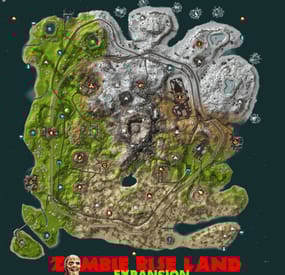
Zombie Rise Land
By Explorer One in Maps
Hello everyone,
Zombie Rise Land Map Description
This is a custom map made entirely of Rustedit depicting a zombie rising land, whose volcanic center is overrun by zombies protecting its energy fortress. Going around the map you will find a complete world of many monuments and natural wonders with ordered paths and connected with each monument to advance in land vehicles at full speed, search or find the resources and build your fortresses where you can finally invade the center of zombie origin with your friends.
The map will continue to be renewed based on new rust updates with no download limits and free editing. Password is included in a text file for you to customize as you wish.
Play as you want, have fun and enjoy.
Thank you!
Need some tour?
You can visit our Discord and request a tour to see the map completely:
https://discord.com/invite/EUSuDuTFYN
With this ticket you will be able to see it completely in its entirety.
Map Features
Entity count estimate 99k
Map Size 3700
File dependencies for your server:
RustEdit DLL: https://github.com/k1lly0u/Oxide.Ext.RustEdit
Map Custom Monuments and Roads:
Volcano with zombie ceremonial center
Custom Lake
2 railway bridges
New! Control Center monument on new expansion island.
Map Rust Monuments:
Power Plant
Launch Site
Train Yard
Harbor
Military Base
Arctic Base
Junkyard
Water Treatment Plant
Airfield
Outpost
Lighthouse
Satellite Dish
Artic Research
Nuclear Missile Silo
Ferry Terminal
Oil Rigs
Underwater Labs
Bandit Camp
The Dome
Quarry HQM, Stone and Sulfur
Warehouse
Stable
Gas Station
Supermarket
Underwater Labs
-
$8.00
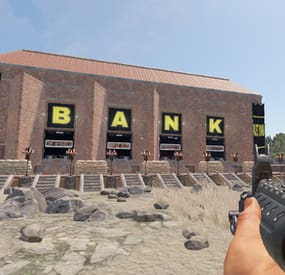
Bank Heist Bases
Looking for a new and exciting event for your server? Consider the bank heist event plugin and add some of our bank bases to your server, specifically designed for this event.
These 12 bases are ready to add to your server and boost your players' experience.
bank heist pack include 12 bases
(use zone manager )
Traps that can be avoid
automatic doors
good design
enough place for npc's
small maze with Codes around the bank hidden ( up to you to fill the loot boxes )
-

$5.00
Better Metabolism
By ThePitereq in Plugins
RUST Plugin Test Server
TEST MY PLUGINS THERE!
connect play.thepitereq.ovh:28050
Better Metabolism plugin allows you to surpass the limits of calories, hydration, and health.
Adjust the maximum values for hunger, hydration, and health. Flexibility to modify respawn metabolism values. Configure the functionality of health tea when the health bonus is active.
bettermetabolism.default - Permission for first default plugin configuration. Can be removed/modified. bettermetabolism.vip - Permission for second default plugin configuration. Can be removed/modified.
object OnModifyHealth(BasePlayer player) - Ran when player health is getting updated. Cancellable. float GetBetterMetabolismHealth(ulong userId) - Returns how much player health value is modified. Returns 0 if not modified. object OnHealthModified(BasePlayer player, float setHealth) - If returns float, overrides the maxHealthOverride with return value.
{ "Enable Max Health Option": true, "Metabolism Permissions": { "bettermetabolism.default": { "Health": 60.0, "Max Health": 100.0, "Max Calories": 500.0, "Calories": 250.0, "Max Hydration": 250.0, "Hydration": 100.0 }, "bettermetabolism.vip": { "Health": 100.0, "Max Health": 100.0, "Max Calories": 1000.0, "Calories": 600.0, "Max Hydration": 250.0, "Hydration": 100.0 } } } -
$21.95$15.95ObjectStacks
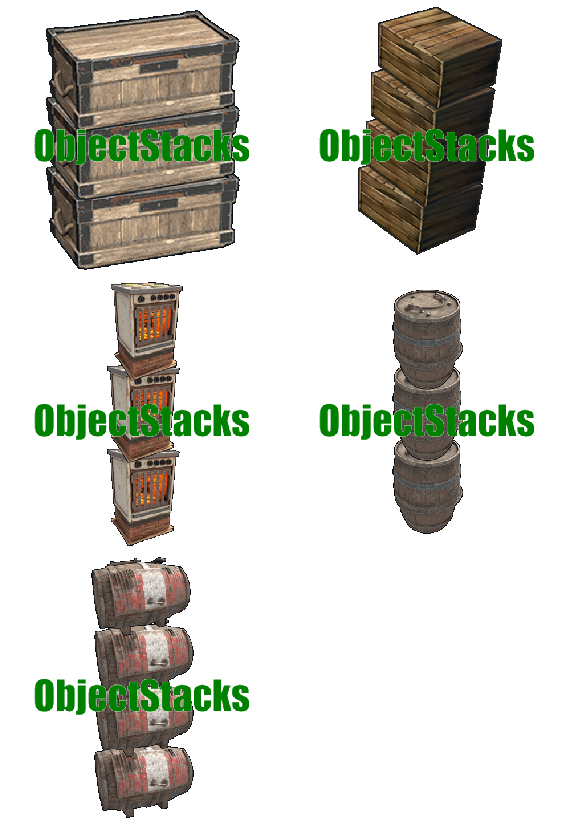
Tired of cluttered bases? ObjectStacks allows players to stack deployable objects vertically, creating organized, space-efficient storage areas and base layouts. Simply right-click while holding a deployable item to stack it on top of an existing object of the same type. Perfect for organizing furnaces, storage containers, generators, and more!
⭐ Features of ObjectStacks
One-Click Stacking: Right-click to stack objects - no commands needed, just intuitive gameplay Precise Vertical Spacing: Customizable Y-Offset for each object type ensures perfect alignment and prevents clipping Permission-Based Stacking Limits: Control how many objects each player group can stack (e.g., regular users: 2, VIPs: 4) Building Privilege Restriction: Optional restriction to Tool Cupboard zones to maintain game balance Smart Stability System: Automatic stability checking prevents floating structures and ensures realistic placement Skin Blacklist System: Prevent stacking of specific item skins that might cause visual or gameplay issues Tugboat Integration: Full support for stacking on tugboats with automatic parenting and stability bypass Ground Protection: Prevents stacked objects from falling when base objects are removed, maintaining structural integrity Automatic Permission Management: All permissions are automatically registered based on your configuration Comprehensive Logging: Optional logging system with multiple levels (None, File, Console, All) for debugging Wide Compatibility: Supports storage containers, electrical items, composters, and many more deployable objects Easy Configuration: Simple JSON configuration file - add new objects in minutes
🎮 Usage
To stack an object:
Hold the deployable item you want to stack in your hands Look at an existing object of the same type (must be within 3 meters) Press right-click (secondary fire button) The item will be automatically placed on top at the correct height Cooldown: There's a 0.5 second cooldown between stacking attempts to prevent spam-clicking.
🛡️ Permissions
Permissions follow the format: objectstacks.<shortname>.<group>
Permission Format Explanation:
objectstacks - Plugin prefix <shortname> - The shortname defined in the object's configuration (e.g., "box_wooden", "electric_furnace") <group> - Your custom group name (e.g., "use", "vip", "premium") Examples:
objectstacks.storage_barrel_b.use - Regular users can stack up to 2 storage barrels (limit set in config) objectstacks.storage_barrel_b.vip - VIP users can stack up to 4 storage barrels objectstacks.electric_furnace.use - Regular users can stack up to 2 furnaces objectstacks.electric_furnace.vip - VIP users can stack up to 4 furnaces Important: The plugin uses the highest limit among all permissions the player has. If a player has both objectstacks.box_wooden.use (limit: 2) and objectstacks.box_wooden.vip (limit: 4), they will be able to stack up to 4 boxes.
📈 Supported Objects
Storage Containers:
Wooden Box (small) Large Wooden Box Storage Barrel B Storage Barrel C Coffin Storage Medieval Large Wooden Box Bamboo Barrel Wicker Barrel Abyss Barrel (Vertical and Horizontal) Electrical Items:
Electric Furnace Small Generator Small Fuel Generator Rechargeable Battery (Small, Medium, Large) Other:
Composter Note: You can add any deployable object to the configuration. Simply find its prefab path and configure the Y-Offset and permissions.
🔧 Configuration Guide
Logging Level:
None - Disable all logging File - Log to files in oxide/logs (or carbon/logs) Console - Log to server console All - Log to both files and console Can stack only in Building Privileged zones?: When set to true, players can only stack objects within Tool Cupboard zones (or on tugboats). This prevents excessive stacking in public areas and maintains game balance. Set to false to allow stacking anywhere.
Blacklisted Skins: Array of skin IDs that cannot be used for stacking. Add skin IDs here to prevent stacking of problematic skins. Example: [123, 1223]
Permissions & their amount of stacked objects allowed: Dictionary mapping permission names to stacking limits. The limit represents the maximum number of objects that can be stacked in a single stack.
Objects and offsets: Dictionary mapping object prefab paths to their configuration:
YOffset - Vertical spacing between stacked objects (in meters) Shortname - Used for permission names (format: objectstacks.<shortname>.<group>)
📚 FAQ
Q: How do I stack objects?
A: Hold the item in your hands, look at an existing object of the same type (within 3 meters), and right-click. The item will be automatically stacked on top.
Q: Why isn't stacking working for me?
A: Check these requirements:
The object type must be configured in the plugin You need the appropriate permission (e.g., objectstacks.box_wooden.use) You must not have exceeded your stacking limit If "Only in Building Privileged zones" is enabled, you must be in a Tool Cupboard zone The item skin must not be blacklisted There must be enough stability at the placement location You must be looking at the object (within 3 meters) The object you're looking at must be the same type as the item in your hands Q: How do I add a new object to the configuration?
A: Follow these steps:
Find the object's prefab path (use spawn command in F1 console or check Rust documentation) Add an entry to "Objects and offsets": "assets/prefabs/path/to/object.prefab": { "YOffset": 1.0, "Shortname for permissions (objectstacks.THISNAME.[use/vip/etc.])": "my_object" } Add permissions with limits: "objectstacks.my_object.use": 2, "objectstacks.my_object.vip": 4 Reload the plugin: o.reload ObjectStacks (Oxide) or c.reload ObjectStacks (Carbon) Q: What is Y-Offset and how do I determine the right value?
A: Y-Offset is the vertical spacing between stacked objects, measured in meters. To determine the right value:
Check the object's height in-game or in Unity Set Y-Offset slightly larger than the object's height to prevent clipping Common values: 0.5-0.7 for small objects, 1.0-1.5 for medium objects, 1.5-2.0 for large objects Test and adjust as needed - you can see the spacing immediately when stacking Q: How do stacking limits work?
A: Limits control the maximum number of objects that can be stacked in a single stack. The plugin counts all objects of the same type in the vertical column and prevents stacking beyond the limit. The plugin uses the highest limit from all permissions the player has.
Q: Can I stack objects outside Tool Cupboard zones?
A: Yes, if you set "Can stack only in Building Privileged zones?": false in the config. By default, this is set to true to maintain game balance.
Q: Does stacking work on tugboats?
A: Yes! ObjectStacks fully supports tugboats. When stacking on a tugboat:
Stability checks are bypassed Objects are automatically parented to the tugboat Building privilege restrictions don't apply Q: What happens if I remove a base object from a stack?
A: The plugin includes ground protection via the OnEntityGroundMissing hook. If you remove a base object, stacked objects above will check if there's another object of the same type below them. If found within the Y-Offset range, they won't fall, preventing accidental destruction.
Q: How do I find the prefab path for an object?
A: Several methods:
Use spawn command in F1 console - it shows prefab paths as you type Check the default config for examples of similar objects Look up Rust prefab documentation online Use server console commands that list prefabs Q: Can I prevent specific skins from being stacked?
A: Yes! Add the skin ID to the "Blacklisted Skins" array in the config. For example: "Blacklisted Skins": [123, 1223, 4567]
Q: What does the error message "Building blocked!" mean?
A: This means "Can stack only in Building Privileged zones?" is enabled, and you're trying to stack outside a Tool Cupboard zone. Either move to a TC zone, or disable this setting in the config.
Q: What does "Not enough stability to place the entity" mean?
A: The plugin checks if the placement location has enough structural support. If you see this message, try stacking in a different location or ensure there's proper foundation below.
Q: Where can I see an example configuration?
A: The default config file generated by the plugin contains comprehensive examples of all supported objects. You can use it as a template when adding new objects.
-

$14.99
Prime
About Prime
Prime is a plugin that allows the players to accumilate coins and then spend them at the dedicated vending machine at Outpost for items,weapons & armour.
Coins gathered depends on a Risk VS Reward setup with Prime items providing BUFFS as the player progresses and buys bigger/better gear.
Includes a lottery system,gambling, powerful Stones to collect & upgrade and all fully configurable!
Hardcore Mode Activation
When hardcore is active a Prime Vending Machine will spawn at Out Post allowing players access to Items to earn Prime Coins and Buffs ranging from increase in coins, incoming damage reduction, output damage increase.
Players will only be able to progress thier Prime accounts by using items purchased from this vending machine, however if hardcore is NOT active.. players are free to use normal items
and weapons to progress accounts and still have lottery active. With hardcore set to 'false' there is no vending machine, no items and no HOF.. you will also not be able to aquire stones.
Stones: Requires Green Berries
With each tier increase the stones provide a buff in coin yield starting at a base rate of 5% and maxing out at 75%, along with this in the later tiers the stones also provide the
user with a increase in damage output.. however the stone needs to be in your inventory.. so it can be taken from you or lost.
GREEN -[ Emerald I (5%) , Emerald II (10%), Emerald III (15%), Emerald IV (20%), Emerald V (25%) ] - Hidden Perks = Metabolism & Environment Buffs
PURPLE - [ Mystic I (30%) , Mystic II (35%) , Mystic III (40%), Mystic IV (45%), Mystic V (50%) ] - Hidden Perks = Increase in Lottery Chance
RED/BLACK - [ Unstable I (55%), Unstable II (60%), Unstable III (65%), Unstable IV (70%), Unstable V (75%) ] - Hidden Perks = Increase in Outgoing Damage by X%
Fusion : In order to create the next type of stone youll need x2 Tier 5 Stones
The higher the type and tier of the stone the more likely of a failure will occur in ther proccess resulting in the stones exploding..and you losing them..having to restart the process again.
Config : Setting up Vending costs & Reward System
The config file covers everything from:
- Prime item costs at the vending maching
- Coins rewarded for each individual task from smashing a barrel to killing an NPC
- Coins rewarded for looting
- Stone Drop Chance
- Amount of Berries required to polish stones
- Personal ID for chat (set to server icon)
- Lottery chance %
Plus much more
Discord - Nferno#7163