
kz998651's Wishlist
-
$14.99
Team Spawner
Team Spawner makes regrouping with your team fast, simple, and player-friendly. Its clean, auto-generated UI lets players quickly select teammates directly from the death screen—no manual commands or reliance on beds and sleeping bags required. Perfect for fast-paced, action-packed team PvP.
Features powerful restriction controls:
🚫 Monument Blocking – Prevent team spawning near key monuments.
🚫 Player State Blocking – Restrict spawning when swimming, sleeping, mounted, inside elevators, or on the cargo ship.
🚫 Condition Blocking – Prevent usage while raid-blocked, combat-blocked, building-blocked, or on cooldown.
Whether you’re running a casual or competitive server, Team Spawner gives server owners full flexibility while providing players with a seamless team experience.
You can also create various permission based cool-down restrictions inside the config and simply grant players there permission based cool-down restriction.
Notes:
Requires Monument Finder from umod for monument blocking to work.
( Simply add the plugin )
Permissions
teamspawner.use - needed to use the plugin. config cool down permissions will look like this: teamspawner.cooldown.vip
Config
{ "GUI Settings": { "Main Panel Default: #000000, 0f": { "A": 0.0, "Hex": "#000000" }, "Content Panel Default: #000000, 0f": { "A": 0.0, "Hex": "#000000" }, "Buttons Default: #000000, 0.4f": { "A": 0.4, "Hex": "#000000" }, "Text Default: #FFFFFF, 0.7f": { "A": 0.7, "Hex": "#FFFFFF" } }, "Block Types": { "swimming": true, "sleeping": true, "mounted": true, "monument": true, "cargo ship": true, "elevator": true, "raid blocked": true, "combat blocked": true, "building blocked": true, "cooldown blocked": true }, "Permission Based CoolDown times in seconds": { "vip": 150, "default": 300 }, "Blocked Monuments": { "airfield_1": false, "arctic_research_base_a": false, "bandit_town": false, "cave_large_hard": false, "cave_large_medium": false, "cave_large_sewers_hard": false, "cave_medium_easy": false, "cave_medium_hard": false, "cave_medium_medium": false, "cave_small_easy": false, "cave_small_hard": false, "cave_small_medium": false, "compound": false, "desert_military_base_a": false, "desert_military_base_b": false, "desert_military_base_c": false, "desert_military_base_d": false, "excavator_1": false, "ferry_terminal_1": false, "fishing_village_a": false, "fishing_village_b": false, "fishing_village_c": false, "gas_station_1": false, "harbor_1": false, "harbor_2": false, "ice_lake_1": false, "ice_lake_2": false, "ice_lake_3": false, "ice_lake_4": false, "junkyard_1": false, "launch_site_1": false, "lighthouse": false, "military_tunnel_1": false, "mining_quarry_a": false, "mining_quarry_b": false, "mining_quarry_c": false, "nuclear_missile_silo": false, "oilrig_1": false, "oilrig_2": false, "powerplant_1": false, "radtown_small_3": false, "satellite_dish": false, "sphere_tank": false, "stables_a": false, "stables_b": false, "supermarket_1": false, "swamp_a": false, "swamp_b": false, "swamp_c": false, "trainyard_1": false, "underwater_lab_a": false, "underwater_lab_b": false, "underwater_lab_c": false, "underwater_lab_d": false, "warehouse": false, "water_treatment_plant_1": false, "water_well_a": false, "water_well_b": false, "water_well_c": false, "water_well_d": false, "water_well_e": false } }
Supports the ability to add more Languages using oxides multi language file system:
{ "Unavailable": "team member is dead or wounded.", "Sleeping": "team member is sleeping.", "Swimming": "team member is swimming.", "Mounted": "team member is mounted.", "Cargo": "team member is aboard cargo.", "Elevator": "team member is using an elevator.", "BuildingBlocked": "team member is building blocked.", "RaidBlocked": "team member is raid blocked.", "CombatBlocked": "team member is combat blocked.", "MonumentBlocked": "team member is monument blocked.", "CoolDownBlocked": "cooldown blocked: {0}" }
- #team spawner
- #team
- (and 7 more)
-
![More information about "Raidable Sleeper Event [Works with HallOfShame]"](https://codefling.com/cdn-cgi/image/width=285,height=275,quality=80,fit=cover,format=webp/https://codefling.com/uploads/monthly_2025_12/RaidableSleeper_Ico.thumb.jpg.3237bb1a5776dcc724aa1f0af7a481da.jpg)
$4.99
Raidable Sleeper Event [Works with HallOfShame]
The RaidableSleepers plugin allows players to loot sleeping players that appear on the map. These sleepers appear randomly and contain valuable loot that can be stolen by the active players. The sleepers spawn automatically at set intervals and disappear again after a certain amount of time.
Features:
Random Sleeper Spawns: Sleeping players spawn at random locations on the map.
Loot distribution: Each sleeper is filled with random items from the preconfigured loot list.
Cooldown mechanism: There is a configurable cooldown time between sleeper spawns.
Loot Notification: Players will receive a notification when a Sleeper has been looted.
Admin commands: Admins can manually spawn, test or delete sleepers.
Cluster spawns: Multiple sleepers can be spawned in a certain radius around a central position.
Commands:
/spawnsleepers - Spawns a random sleeper on the map cooldown 5 minutes for this command
/testsleepers - Spawn a test sleeper at your position
/clearallsleepers - Removes all sleepers on the map
/clearsleepers - Removes the sleeper you are looking at
Permissions:
raidablesleepers.admin - Allows admins to spawn, test and delete sleepers.
raidablesleepers.raid - Allows players to raid sleeping players.
Config:
{ "NumberOfSleepers": 10, // Maximum number of sleepers on the map "AvailabilityDuration": 600.0, // Minutes when position change if not found "CooldownDuration": 300.0, // Minutes when a new sleeper should spawn if the NumberOfSleepers is not reached "EnableLootNotification": true, // Chat message who loots a sleeper? "ItemsToSpawn": [ { "Shortname": "ammo.rifle.explosive", "SkinId": 0, "MinimumAmount": 100, "MaximumAmount": 256 }, { "Shortname": "explosive.timed", "SkinId": 0, "MinimumAmount": 1, "MaximumAmount": 2 }, { "Shortname": "wood", "SkinId": 0, "MinimumAmount": 2000, "MaximumAmount": 6000 } ] } ---
load, run, enjoy💝
Support Discord
- #raidable base
- #raidable
- (and 8 more)
-
$32.99$28.99Metropolis
By Silent Creations in Maps
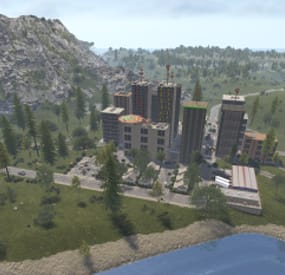
🌃 Metropolis: Where Concrete Meets Carnage
Dive into Metropolis, a densely packed, abandoned city map where danger lurks on every street corner and the highest loot awaits the bold. This 4700-sized environment transforms the survival sandbox into an intense urban battleground, perfect for players craving high-stakes PVP and intricate exploration.
The heart of the map is the vast Metropolis itself—an urban labyrinth heavily patrolled by two formidable Bradleys and overseen by airborne Scientists. Navigate the city's depths to find multiple puzzle rooms (2 Red, 1 Blue, 2 Green) and unlock the abundant loot scattered throughout its concrete canyons.
Custom Safe Zone: New Haven Outpost
This once-abandoned locale has been meticulously re-energized by a team of Cobalt scientists, providing the starting population with an abundance of supplies and services. This monument retains all the essential features of the original Outpost—and delivers much more:
Striking Architecture: The central compound is now secured by large, custom glass walls, creating a visually stunning and unique aesthetic. Custom Water Features: A tranquil, custom-built lake and an elegant fountain enhance the environment. Functional water catchers are installed, providing players with a reliable source of hydration. Expanded Services: A custom Air Wolf vendor has been integrated for convenient helicopter purchases. High-Stakes Casino: An all-new, dedicated casino allows players to safely gamble their riches, adding a fun and high-risk activity to the safe zone. Ample Safe Loot: Players can safely gather a generous amount of loot scattered throughout the outpost.
Thrills and Exploration
Experience the map's unique flair with a custom-built, fully working rollercoaster that is plug-in controlled to spawn a vehicle for your player with the press of a button! Explore intricate infrastructure including underground train tunnels, underground roads, and custom bridges, as well as two Heli Towers offering verticality to the fight.
💧 Water Treatment & Sewer Branch Reimagined
Welcome to the New Sewer Treatment Plant, a monument that takes the best features of both Water Treatment Plant and Sewer Branch to create one incredible, high-value loot location. This massive, abandoned facility is loaded with features and rewards.
Cobalt's Control: Don't be fooled by the ruin; Cobalt Scientists still maintain control over the facility's sewer drains. Underground Puzzles: Navigate two new, exclusive puzzles deep within the piping, featuring a dedicated Blue and Green keycard room. Lurking Danger: Keep your guard up—a scientist or two may still be lurking in the shadows, guarding their subterranean assets.
Map Prefabs Count: 25249 | Map Size: 4700
Monument List
Custom Monuments and Prefabs
Metropolis New Haven Outpost Murder Farm The Roller Coaster Sewage Treatment Plant 19 custom build locations Underground Train Tunnels Underground Roads Custom Bridges 2x Heli Towers Mod Room For Staff Facepunch Monuments
Bandit Camp Launch Site Artic Research Stone, Hqm, & Sulfer Quarry Rad Town Power Plant Airfield Trainyard Jungle Ziggurat 2x Mining Outpost Large Harbor Small Harbor 3x Oxums gas Station 2x lighthouse Supermarket Large Barn Ranch Military Tunnel Ferry Terminal Giant Excavator Abandoned Cabins Large Fishing Village 2x Small Fishing Village Large Oil Rig Small Oil Rig 2x WaterWell For any Assistance or questions Please contact me on Discord @silent_creations
Acknowledgements
Shoutout to Substrata for helping with making the plugin for the rollercoaster.
Shoutout to MrLiquid and the Luffy Map Testing team for their help polishing this map.
Shoutout to Milky for help with making the video.
- #rust
- #rust edit
- (and 13 more)
-

$24.99
Item Perks
By imthenewguy in Plugins
Item Perks is a plugin that enhances everyday weapons, tools and armour with over 50 different types of perks.
Items with perks can be obtained a variety of ways, including:
Finding them randomly in crates or barrels during your morning scrap farm. Randomly crafting an enhanced version of your equipment while you roof camp noobs from your base. Recycling enhanced equipment and finding enhancement kits stuck in the teeth of the recycler. Using a console or chat command that can be ran through seedy plugin traders like GUIShop.
The plugin gives a large amount of control to server owners when it comes to implementation. You can:
Enable/disable perks, or modify the minimum and maximum values that they roll when applied to gear. Blacklist or whitelist items to each perk, so they will be exclusively excluded or included (based on the list you choose). Adjust the weight of each perk, so it is more or less likely to be seen on gear., or adjust the chances amount of perks that items can potentially have. Fully adjust or disable the chance for item drops to be found, or enable the enhancement kit system so players can recycle gear. So much more (watch the configuration section of the video below to see the full extent).
There are over 50 perks included with the plugin. The following list will describe briefly what each perk does.
Name: Prospector Description: This perk increases your mining yield when mining stone, metal and sulfur nodes. Name: Lumberjack Description: This perk increases your woodcutting yield when chopping living or dead trees. Name: Butcher Description: This perk increases the resources gained from skinning humans and animals. Name: Horticulture Description: This perk increases the amount of resources gained when harvesting grown plants. Name: Forager Description: This perk increases the amount of resources gained when picking up map generated collectibles. Name: Angler Description: This perk increases the amount of fish you receive upon a successful catch. Name: BeastBane Description: This perk increases the damage dealt to animals. Name: ScientistBane Description: This perk increases the damage dealt to scientists. Name: FlakJacket Description: This perk reduces the damage received from explosions. Name: Elemental Description: This perk reduces damage from received from cold and heat sources. Name: Scavenger Description: This perk provides you with a chance to find additional scrap from crates and barrels. Name: Manufacture Description: This perk increases the speed of your crafting. Name: Durable Description: This peark reduces the durability damage of all equipped items. Name: BeastWard Description: This perk reduces the damage received from animals. Name: ScientistWard Description: This perk reduces the damage received from scientists. Name: Builder Description: This perk provides you with a chance for your building upgrades to be free. Name: Thrifty Description: This perk provides you with a chance for your crafting components to be refunded upon a successful craft. Name: Fabricate Description: This perk provides you with a chance to duplicate an item upon a successful craft. Name: Pharmaceutical Description: This perk increases the amount of healing received from all sources. Name: MeleeWard Description: This perk reduces the damage received from melee weapons. Name: Academic Description: This perk provides you with a chance to receive a scrap refund when researching an item at the research bench. Name: FallDamage Description: This perk reduces the impact damage received from falling. Name: Lead Description: This perk reduces the damage from radiation. Name: Smasher Description: This perk will provide you with a chance to instantly destroy barrels with any amount of damage. Name: Environmentalist Description: This perk will increase the speed of recyclers that you activate. Name: Smelter Description: This perk will increase the smelting speed of furnaces you activate. Name: Paramedic Description: This perk provides players that you revive with additional health. Name: Prepper Description: This perk provides you with a chance to not consume food when eating. Name: Regeneration Description: This perk will passively regenerate you. Name: SharkWard Description: This perk will reduce the amount of damage received from sharks. Name: SharkBane Description: This perk will increase the amount of damage dealt to sharks. Name: Deforest Description: This perk provides you with a chance to cut down nearby trees when successfully cutting a tree down. Name: BlastMine Description: This perk provides you with a chance to mine out nearby nodes when successfully mining out a node. Name: Tanner Description: This perk provides you with a chance to skin nearby corpses when successfully skinning out a corpse. Name: Vampiric Description: This perk will heal you for a percentage of the damage dealt to certain enemies. Name: Reinforced Description: This perk will reduce the the amount of damage that your vehicles receive when mounted. Name: ComponentLuck Description: This perk will provide you with a chance to receive additional components when looting barrels and crates. Name: ElectronicsLuck Description: This perk will provide you with a chance to receive additional electronics when looting barrels and crates. Name: UncannyDodge Description: This perk provides you with a chance to dodge incoming damage, reducing it to 0. Name: LineStrength Description: This perk increases the tensile strength of your fishing line. Name: HealShare Description: This perk will share healing effects with nearby players. Name: Attractive Description: This perk will provide you with a chance to automatically pick up components when destroying barrels. Name: WoodcuttingLuck Description: This perk provides you with a chance to find a random item when you cut down a tree. Name: MiningLuck Description: This perk provides you with a chance to find a random item when you mine out a node. Name: SkinningLuck Description: This perk provides you with a chance to find a random item when you skin out a corpse. Name: FishingLuck Description: This perk provides you with a chance to find a random item when you catch a fish. Name: Sated Description: This perk will increase the amount of calories and hydration you receive from food and water sources. Name: IronStomach Description: This perk provides you with a chance to negate negative effects when consuming food. Name: TreePlanter Description: This perk will provide a chance for a tree to instantly regrow when cut down. Name: RockCycler Description: This perk will provide a chance for a node to instantly respawn when mined out. Name: BradleyDamage Description: This perk increases the damage dealt to Bradley Tanks. Name: HeliDamage Description: This perk increases the damage dealt to Patrol Helicopters. Name: Thorns Description: This perk reflects a % of the damage done back to the attacker
Command: ipgive
Type: console/chat
Parameters: <target ID/Name> <optional: shortname> <optional: perks>
Description: Gives the target player an enhanced item. If shortname is specified, it will base the enhancement off of that item. If perks are specified, it will add only those perks to the item.
Command: ipgivekit
Type: console/chat
Parameters: <target ID/Name> <perk>
Description: Gives an enhancement kit to the target.
itemperks.use - Required to receive any benefit from enhanced items. itemperks.loot - Required to loot enhanced items from crates and barrels. itemperks.craft - Required for a chance to received enhanced versions of crafted gear. itemperks.admin - Required to use admin commands. itemperks.enhance - Required to add enhancement kits to items via the workbench. itemperks.recycle - Required to receive enhancement kits from recycling enhanced items.
IPAPI_CreateItem - creates and returns an enhanced item using the details fed into the method. If shortname is left blank, it will pick a random valid item. If api_perks is null it will pick random perk(s) and add them.
Returns Item
[HookMethod("IPAPI_CreateItem")] public object IPAPI_CreateItem(string shortname = null, ulong skin = 0, Dictionary<string, float> api_perks = null) { List<KeyValuePair<Perk, float>> perks = Pool.GetList<KeyValuePair<Perk, float>>(); foreach (var perk in api_perks) { Perk _perk; if (parsedEnums.TryGetValue(perk.Key, out _perk)) perks.Add(new KeyValuePair<Perk, float>(_perk, perk.Value)); } var result = CreateItem(shortname, skin, perks); Pool.FreeList(ref perks); // Returns an Item class return result; } Example usage:
[ChatCommand("testipapi")] void TestIPAPI(BasePlayer player) { Dictionary<string, float> perks = new Dictionary<string, float>() { ["Prospector"] = 1f, ["Lumberjack"] = 1f, ["Butcher"] = 1f, ["Horticulture"] = 0.5f }; var item = (Item)ItemPerks.Call("IPAPI_CreateItem", "hammer.salvaged", (ulong)2830083288, perks); if (item == null) { Puts("Failed"); return; } item.name = "tool of the trade"; player.GiveItem(item); }
- #items
- #enhancement
- (and 6 more)
-

$11.99
Item Perks: Legendary Items
By imthenewguy in Plugins
Item Perks: Legendary items is a plugin that allows you to create and fully customize legendary named items on your rust server.
It uses the perk sets available from the Item Perks plugin, allowing for the creation of some very unique items in Rust.
The fields for creating a new item are:
Name: Give the item a unique name that captures it's essence Skin: Assign a skin that matches what the item does. Description/Story: Add some flavor to the item and write a short blurb or backstory for the item, which will display when the player mouses over the ownership banner, along with the buffs. Buffs: Add as many or as few ItemPerk buffs as you would like, with any amount of buff values. Restrict enhancement: Prevent or allow enhancement kits to affect each Legendary item. Global chat announcement: Announce in chat when a player finds a really rare or powerful item. Amour slots: Set the amount of armor slots the item spawns with (if applicable).
There are a number of drop sources that can be selected for your legendary items to drop. Along with the source, you can specify which item/prefab shortname you want to restrict the drop to, or which shortnames you want it to exclude.
The shortname will depend on the loot source. Loot sources with the type "Prefab" will need to use the prefab shortname, where as those with the "Item" type will need to use item shortnames.
Type: Prefab
Example: crate_normal_2, heli_crate, crate_elite.
Type: Prefab
Example: loot-barrel-2, loot-barrel-1
Type: Boss name
Example: scarecrow the destroyer.
Type: Event name
Supports:
Harbor Event: "Harbor" Junkyard Event: "Junkyard" Satellite Dish Event: "SatDish" Water Event: "Water" Air Event: "Air" Arctive Base Event: "Arctic" Gas Station Event: "GasStation" Sputnik Event: "Sputnik" Shipwreck Event: "Shipwreck" Triangulation Event: "Triangulation" Supermarket Event: "Supermarket" Caravan Event: "Caravan" Powerplant Event: "Powerplant" Armored Train Event: "ArmoredTrain" Convoy Event: "Convoy" Ferry Terminal Event: "FerryTerminal" SurvivalArena: "SurvivalArena"
Type: Prefab
Example: scientistnpc_arena, scientistnpc_heavy.
Type: Prefab
Example: npc_tunneldweller, npc_underwaterdweller.
Type: Npc name
Example: military defenders.
Type: Prefab
Example: oak_b, swamp_tree_a, pine_dead_snow_c.
Type: Prefab
Example: stone-ore, sulfur-ore, metal-ore.
Type: Prefab
Example: chicken.corpse, shark.corpse, player_corpse.
Type: Prefab
Example: hemp-collectable, berry-red-collectable, corn-collectable.
Type: Prefab
Example: hemp.entity, pumpkin.entity, wheat.entity.
Type: Item
Example: rifle.ak, axe.salvaged, icepick.salvaged.