
KD Gaming 5x's Wishlist
-

$10.00
Firework Builder
Create Custom Firework’s with Firework Builder.
HOW IT WORKS
The config comes preset with 7 fireworks.
Viewing the examples you can see how positions, can be tweaked to create a custom build on your specified firework, with certain skins.
Base path, is the Main firework you set.
Additions, spawn after main is set.
Auto ignite is toggleable.
Delay is settable for initial and each part you add.
PERMISSION
fireworkbuilder.admin
COMMANDS
/GFW - GIVES ADMIN ALL FIREWORK BUILDS
/STARTSHOW FIREWORKNAME X Y Z OPTIONALROTATION - THIS WORKS THROUGH RCON OR IN GAME - BE SURE TO ESCAPE QUOTES WHEN USING IN GAME AND TO INCLUDE QOUTES WHEN USING RCON IF MULTI WORD
XYZ IS REQUIRED WHEN USING RCON
FIND USABLE PREFABS HERE
Corrosion Hour
Demo Video
CONFIG
{ "Firework Builds": [ { "Firework Name": "Red Y Boomer", "Firework SkinID": 3376839515, "Firework BasePath": "assets/prefabs/deployable/fireworks/mortarred.prefab", "Auto Ignite": true, "Ignite Delay": 0, "Additions": [ { "Firework Path": "assets/prefabs/deployable/fireworks/mortarred.prefab", "Ignite Delay": 0, "Position": { "x": 0, "y": 0.18, "z": 0 }, "Rotation": { "x": 30, "y": 90, "z": 0 } }, { "Firework Path": "assets/prefabs/deployable/fireworks/mortarred.prefab", "Ignite Delay": 0, "Position": { "x": 0, "y": 0.18, "z": 0 }, "Rotation": { "x": -30, "y": 90, "z": 0 } }, { "Firework Path": "assets/prefabs/deployable/fireworks/romancandle.prefab", "Ignite Delay": 0, "Position": { "x": 0, "y": 0, "z": 0 }, "Rotation": { "x": 0, "y": 0, "z": 0 } }, { "Firework Path": "assets/prefabs/deployable/fireworks/romancandle.prefab", "Ignite Delay": 0, "Position": { "x": 0, "y": 0.18, "z": 0 }, "Rotation": { "x": 30, "y": 90, "z": 0 } }, { "Firework Path": "assets/prefabs/deployable/fireworks/romancandle.prefab", "Ignite Delay": 0, "Position": { "x": 0, "y": 0.18, "z": 0 }, "Rotation": { "x": -30, "y": 90, "z": 0 } } ] }, { "Firework Name": "Blue Y Boomer", "Firework SkinID": 3376857049, "Firework BasePath": "assets/prefabs/deployable/fireworks/mortarblue.prefab", "Auto Ignite": true, "Ignite Delay": 0, "Additions": [ { "Firework Path": "assets/prefabs/deployable/fireworks/mortarblue.prefab", "Ignite Delay": 0, "Position": { "x": 0, "y": 0.18, "z": 0 }, "Rotation": { "x": 30, "y": 90, "z": 0 } }, { "Firework Path": "assets/prefabs/deployable/fireworks/mortarblue.prefab", "Ignite Delay": 0, "Position": { "x": 0, "y": 0.18, "z": 0 }, "Rotation": { "x": -30, "y": 90, "z": 0 } }, { "Firework Path": "assets/prefabs/deployable/fireworks/romancandleblue.prefab", "Ignite Delay": 0, "Position": { "x": 0, "y": 0, "z": 0 }, "Rotation": { "x": 0, "y": 0, "z": 0 } }, { "Firework Path": "assets/prefabs/deployable/fireworks/romancandleblue.prefab", "Ignite Delay": 0, "Position": { "x": 0, "y": 0.18, "z": 0 }, "Rotation": { "x": 30, "y": 90, "z": 0 } }, { "Firework Path": "assets/prefabs/deployable/fireworks/romancandleblue.prefab", "Ignite Delay": 0, "Position": { "x": 0, "y": 0.18, "z": 0 }, "Rotation": { "x": -30, "y": 90, "z": 0 } } ] }, { "Firework Name": "Green Y Boomer", "Firework SkinID": 3376856584, "Firework BasePath": "assets/prefabs/deployable/fireworks/mortargreen.prefab", "Auto Ignite": true, "Ignite Delay": 0, "Additions": [ { "Firework Path": "assets/prefabs/deployable/fireworks/mortargreen.prefab", "Ignite Delay": 0, "Position": { "x": 0, "y": 0.18, "z": 0 }, "Rotation": { "x": 30, "y": 90, "z": 0 } }, { "Firework Path": "assets/prefabs/deployable/fireworks/mortargreen.prefab", "Ignite Delay": 0, "Position": { "x": 0, "y": 0.18, "z": 0 }, "Rotation": { "x": -30, "y": 90, "z": 0 } }, { "Firework Path": "assets/prefabs/deployable/fireworks/romancandlegreen.prefab", "Ignite Delay": 0, "Position": { "x": 0, "y": 0, "z": 0 }, "Rotation": { "x": 0, "y": 0, "z": 0 } }, { "Firework Path": "assets/prefabs/deployable/fireworks/romancandlegreen.prefab", "Ignite Delay": 0, "Position": { "x": 0, "y": 0.18, "z": 0 }, "Rotation": { "x": 30, "y": 90, "z": 0 } }, { "Firework Path": "assets/prefabs/deployable/fireworks/romancandlegreen.prefab", "Ignite Delay": 0, "Position": { "x": 0, "y": 0.18, "z": 0 }, "Rotation": { "x": -30, "y": 90, "z": 0 } } ] }, { "Firework Name": "Violet Y Boomer", "Firework SkinID": 3376856830, "Firework BasePath": "assets/prefabs/deployable/fireworks/mortarviolet.prefab", "Auto Ignite": true, "Ignite Delay": 0, "Additions": [ { "Firework Path": "assets/prefabs/deployable/fireworks/mortarviolet.prefab", "Ignite Delay": 0, "Position": { "x": 0, "y": 0.18, "z": 0 }, "Rotation": { "x": 30, "y": 90, "z": 0 } }, { "Firework Path": "assets/prefabs/deployable/fireworks/mortarviolet.prefab", "Ignite Delay": 0, "Position": { "x": 0, "y": 0.18, "z": 0 }, "Rotation": { "x": -30, "y": 90, "z": 0 } }, { "Firework Path": "assets/prefabs/deployable/fireworks/romancandleviolet.prefab", "Ignite Delay": 0, "Position": { "x": 0, "y": 0, "z": 0 }, "Rotation": { "x": 0, "y": 0, "z": 0 } }, { "Firework Path": "assets/prefabs/deployable/fireworks/romancandleviolet.prefab", "Ignite Delay": 0, "Position": { "x": 0, "y": 0.18, "z": 0 }, "Rotation": { "x": 30, "y": 90, "z": 0 } }, { "Firework Path": "assets/prefabs/deployable/fireworks/romancandleviolet.prefab", "Ignite Delay": 0, "Position": { "x": 0, "y": 0.18, "z": 0 }, "Rotation": { "x": -30, "y": 90, "z": 0 } } ] }, { "Firework Name": "Orange Y Boomer", "Firework SkinID": 3376857264, "Firework BasePath": "assets/prefabs/deployable/fireworks/mortarorange.prefab", "Auto Ignite": true, "Ignite Delay": 0, "Additions": [ { "Firework Path": "assets/prefabs/deployable/fireworks/mortarorange.prefab", "Ignite Delay": 0, "Position": { "x": 0, "y": 0.18, "z": 0 }, "Rotation": { "x": 30, "y": 90, "z": 0 } }, { "Firework Path": "assets/prefabs/deployable/fireworks/mortarorange.prefab", "Ignite Delay": 0, "Position": { "x": 0, "y": 0.18, "z": 0 }, "Rotation": { "x": -30, "y": 90, "z": 0 } }, { "Firework Path": "assets/prefabs/deployable/fireworks/romancandle.prefab", "Ignite Delay": 0, "Position": { "x": 0, "y": 0, "z": 0 }, "Rotation": { "x": 0, "y": 0, "z": 0 } }, { "Firework Path": "assets/prefabs/deployable/fireworks/romancandle.prefab", "Ignite Delay": 0, "Position": { "x": 0, "y": 0.18, "z": 0 }, "Rotation": { "x": 30, "y": 90, "z": 0 } }, { "Firework Path": "assets/prefabs/deployable/fireworks/romancandle.prefab", "Ignite Delay": 0, "Position": { "x": 0, "y": 0.18, "z": 0 }, "Rotation": { "x": -30, "y": 90, "z": 0 } } ] }, { "Firework Name": "Champagne Y Boomer", "Firework SkinID": 3376857610, "Firework BasePath": "assets/prefabs/deployable/fireworks/mortarchampagne.prefab", "Auto Ignite": true, "Ignite Delay": 0, "Additions": [ { "Firework Path": "assets/prefabs/deployable/fireworks/mortarchampagne.prefab", "Ignite Delay": 0, "Position": { "x": 0, "y": 0.18, "z": 0 }, "Rotation": { "x": 30, "y": 90, "z": 0 } }, { "Firework Path": "assets/prefabs/deployable/fireworks/mortarchampagne.prefab", "Ignite Delay": 0, "Position": { "x": 0, "y": 0.18, "z": 0 }, "Rotation": { "x": -30, "y": 90, "z": 0 } }, { "Firework Path": "assets/prefabs/deployable/fireworks/romancandle.prefab", "Ignite Delay": 0, "Position": { "x": 0, "y": 0, "z": 0 }, "Rotation": { "x": 0, "y": 0, "z": 0 } }, { "Firework Path": "assets/prefabs/deployable/fireworks/romancandle.prefab", "Ignite Delay": 0, "Position": { "x": 0, "y": 0.18, "z": 0 }, "Rotation": { "x": 30, "y": 90, "z": 0 } }, { "Firework Path": "assets/prefabs/deployable/fireworks/romancandle.prefab", "Ignite Delay": 0, "Position": { "x": 0, "y": 0.18, "z": 0 }, "Rotation": { "x": -30, "y": 90, "z": 0 } } ] }, { "Firework Name": "Wrecks 2025 Boomer", "Firework SkinID": 3379519345, "Firework BasePath": "assets/prefabs/deployable/fireworks/mortarchampagne.prefab", "Auto Ignite": true, "Ignite Delay": 0, "Additions": [ { "Firework Path": "assets/prefabs/deployable/fireworks/mortarred.prefab", "Ignite Delay": 0, "Position": { "x": 0, "y": 0, "z": 0 }, "Rotation": { "x": 0, "y": 0, "z": 0 } }, { "Firework Path": "assets/prefabs/deployable/fireworks/volcanofirework.prefab", "Ignite Delay": 0, "Position": { "x": 0, "y": 0, "z": 0 }, "Rotation": { "x": 0, "y": 0, "z": 0 } }, { "Firework Path": "assets/prefabs/deployable/fireworks/mortarred.prefab", "Ignite Delay": 0, "Position": { "x": 0, "y": 0.18, "z": 0 }, "Rotation": { "x": 30, "y": 90, "z": 0 } }, { "Firework Path": "assets/prefabs/deployable/fireworks/volcanofirework.prefab", "Ignite Delay": 0, "Position": { "x": 0, "y": 0.18, "z": 0 }, "Rotation": { "x": 30, "y": 90, "z": 0 } }, { "Firework Path": "assets/prefabs/deployable/fireworks/mortarorange.prefab", "Ignite Delay": 0, "Position": { "x": 0, "y": 0.14, "z": 0 }, "Rotation": { "x": 45, "y": 90, "z": 0 } }, { "Firework Path": "assets/prefabs/deployable/fireworks/volcanofirework.prefab", "Ignite Delay": 0, "Position": { "x": 0, "y": 0.14, "z": 0 }, "Rotation": { "x": 45, "y": 90, "z": 0 } }, { "Firework Path": "assets/prefabs/deployable/fireworks/mortarred.prefab", "Ignite Delay": 0, "Position": { "x": 0, "y": 0.18, "z": 0 }, "Rotation": { "x": -30, "y": 90, "z": 0 } }, { "Firework Path": "assets/prefabs/deployable/fireworks/mortarorange.prefab", "Ignite Delay": 0, "Position": { "x": 0, "y": 0.14, "z": 0 }, "Rotation": { "x": -45, "y": 90, "z": 0 } }, { "Firework Path": "assets/prefabs/deployable/fireworks/volcanofirework.prefab", "Ignite Delay": 0, "Position": { "x": 0, "y": 0.18, "z": 0 }, "Rotation": { "x": -30, "y": 90, "z": 0 } }, { "Firework Path": "assets/prefabs/deployable/fireworks/volcanofirework.prefab", "Ignite Delay": 0, "Position": { "x": 0, "y": 0.14, "z": 0 }, "Rotation": { "x": -45, "y": 90, "z": 0 } }, { "Firework Path": "assets/prefabs/deployable/fireworks/romancandle.prefab", "Ignite Delay": 0, "Position": { "x": 0, "y": 0, "z": 0 }, "Rotation": { "x": 0, "y": 0, "z": 0 } }, { "Firework Path": "assets/prefabs/deployable/fireworks/romancandle.prefab", "Ignite Delay": 0, "Position": { "x": 0, "y": 0.18, "z": 0 }, "Rotation": { "x": 30, "y": 90, "z": 0 } }, { "Firework Path": "assets/prefabs/deployable/fireworks/romancandle.prefab", "Ignite Delay": 0, "Position": { "x": 0, "y": 0.18, "z": 0 }, "Rotation": { "x": -30, "y": 90, "z": 0 } }, { "Firework Path": "assets/prefabs/deployable/fireworks/romancandle.prefab", "Ignite Delay": 0, "Position": { "x": 0, "y": 0.14, "z": 0 }, "Rotation": { "x": 45, "y": 90, "z": 0 } }, { "Firework Path": "assets/prefabs/deployable/fireworks/romancandle.prefab", "Ignite Delay": 0, "Position": { "x": 0, "y": 0.18, "z": 0 }, "Rotation": { "x": -30, "y": 90, "z": 0 } }, { "Firework Path": "assets/prefabs/deployable/fireworks/romancandle.prefab", "Ignite Delay": 0, "Position": { "x": 0, "y": 0.14, "z": 0 }, "Rotation": { "x": -45, "y": 90, "z": 0 } } ] } ] }
-

$14.99
Chest Stacks
Chest Stacks is a Rust plugin that allows players to stack chests on top of each other!
Configuration:
{ "Building privilege required": true, "Blacklisted Skins": [ 2618923347 ], "Permissions & their amount of stacked chests lmits": { "cheststacks.use": { "Chest type limits": { "SmallBox": 10, "LargeBox": 10 } }, "cheststacks.vip": { "Chest type limits": { "SmallBox": 5, "LargeBox": 10 } } }, "Supported box prefab offsets": { "assets/prefabs/deployable/woodenbox/woodbox_deployed.prefab": { "x": 0.0, "y": 0.57, "z": 0.0 }, "assets/prefabs/deployable/large wood storage/box.wooden.large.prefab": { "x": 0.0, "y": 0.75, "z": 0.0 }, "assets/prefabs/deployable/large wood storage/skins/medieval_large_wood_box/medieval.box.wooden.large.prefab": { "x": 0.0, "y": 0.76, "z": 0.0 }, "assets/prefabs/deployable/large wood storage/skins/abyss_dlc_large_wood_box/abyss_dlc_storage_vertical/abyss_barrel_vertical.prefab": { "x": 0.0, "y": 1.2, "z": 0.0 }, "assets/prefabs/deployable/large wood storage/skins/abyss_dlc_large_wood_box/abyss_dlc_storage_horizontal/abyss_barrel_horizontal.prefab": { "x": 0.0, "y": 0.9, "z": 0.0 }, "assets/prefabs/deployable/large wood storage/skins/jungle_dlc_large_wood_box/jungle_dlc_storage_horizontal/wicker_barrel.prefab": { "x": 0.0, "y": 0.8, "z": 0.0 }, "assets/prefabs/deployable/large wood storage/skins/warhammer_dlc_large_wood_box/krieg_storage_vertical/krieg_storage_vertical.prefab": { "x": 0.0, "y": 1.25, "z": 0.0 }, "assets/prefabs/misc/decor_dlc/storagebarrel/storage_barrel_b.prefab": { "x": 0.0, "y": 1.3, "z": 0.0 }, "assets/prefabs/misc/decor_dlc/storagebarrel/storage_barrel_c.prefab": { "x": 0.0, "y": 0.9, "z": 0.0 } }, "Supported prefab path offsets": { "assets/prefabs/deployable/large wood storage/skins/component_storage_boxes_dlc": { "x": 0.0, "y": 0.76, "z": 0.0 } } }
Language:
{ "MaxStackAmount": "You are trying to stack more than {0} boxes!", "OnlyStackSameType": "You can only stack the same type of chests!", "CeilingBlock": "A ceiling is blocking you from stacking this chest!", "BuildingBlock": "You need to be Building Privileged in order to stack chests!" }
Permissions:
cheststacks.use (Always grant this permission for usage, grant additional permissions for different maximum stack amounts)
In order to stack the chests you have to press RIGHT CLICK while looking at the placed chest and being near it!
- #rust
- #rust plugin
- (and 9 more)
-
$9.99
Hardy Planters
By imthenewguy in Plugins
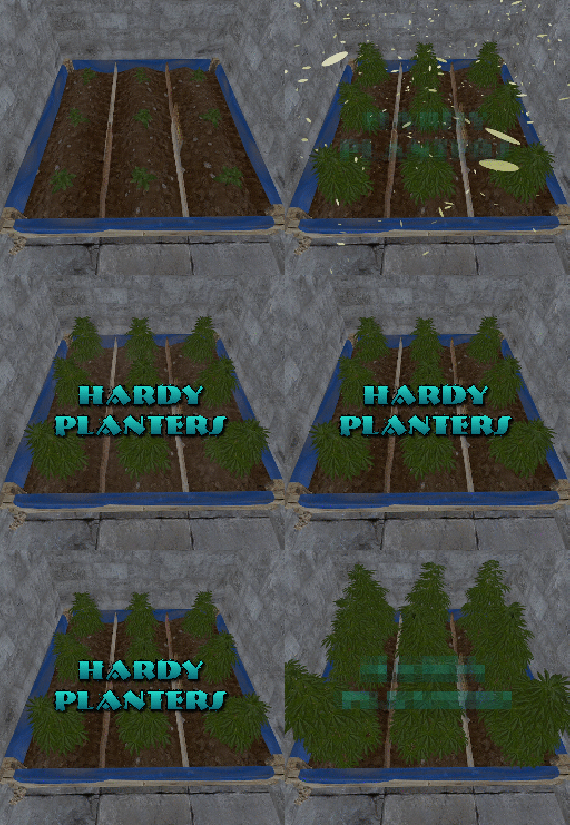
Hardy Planters creates customizable planter boxes that do not require water, sunlight, fertilizer or temperature to grow.
The plugin allows server owners to create their own profiles for planter boxes, allowing for the modification of overall quality and growth gene multiplier, directly affecting how quickly all plants will grow.
This allows for some unnaturally fast plant growth, if set above the default value.
The plugin works by preventing the default logic on the planter boxes, and instead adds it's own behavior to control it.
It is compatible with servers that adjust the "planttick" and "planttickscale" convars as well.
The following video show cases and explains how the plugin's functionality.
Command (chat): giveplanters
Parameters: Nil
Description: Gives the user one of each planterbox from the config
Command (console): givehardyplanter
Parameters: <target player ID or name> <profile skin ID or display name>
Description: Gives the target player a planterbox that matches the specified profile. Useful in shops etc.
hardyplanters.admin - Required to use the commands. hardyplanters.use - Required to find the planter boxes in loot containers. hardyplanters.drop - Required to find planterboxes while looting.
-

$19.99
Epic Loot
By imthenewguy in Plugins
Epic Loot is a plugin that adds additional RPG style loot to crates, NPC corpses, barrels and crafting.
There is a configurable chance that an enhanced piece with varying set types and modifiers will appear in a loot crate, barrel or corpse.
Players also have a chance to receive an enhanced version of their crafted items, rather than the plain old vanilla armor/weapon/tool.
Wearing more than 1 of the same type of item will provide the user with a set bonus. Depending on the set type, they may get access to higher mining yields, more damage to scientists or even access to exclusive loot tables that proc while gathering.
The plugin is incredibly configurable, supports language conversions and allows users to modify and design their own set bonuses.
There are currently 24 different set types and 27 unique set bonuses!
Set types are added to the name of the item and are responsible for providing the user with a buff.
Miners, - Increases the wearers mining yield. Lumberjacks, - Increases the wearers woodcutting yield. Skinners, - Increases the wearers skinning yield. Farmers, - Increases the wearers farming yield. Foragers, - Increases the wearers collection yield. Fishermans, - Increases the wearers fishing yield. Assassins, - Increases damage done to players. Demo, - Decreases damage from explosives. Elemental - Reduces cold and fire damage. Scavengers - Offers the wearer a chance to obtain additional scrap from barrels and crates. Transporters - Reduces the fuel costs for helicopters and boats. Crafters - Increases crafting speed. Reinforced - Reduces durability loss on all equipped items. Tamers - Reduces damage taken from animals. Hunters - Increase damage done to animals. Operators - Increases damage done to humanoid NPCs. Jockeys - Increases speed of the wearers mounted horse. Raiders - Offers the wearer a chance for their fired rocket/thrown explosive to be refunded. Builders - Offers the wearer a chance for their building/upgrade costs to be refunded. Assemblers - Offers the wearer a chance for their crafting materials to be refunded. Fabricators - Offers the wearer a chance for an additional crafted item to be produced. Medics - Increases healing received. Knights - Decreases damage received from melee attacks. Barbarians - Increased damage done with melee attacks. Smelting - Chance to receive a refined ore, instead of a raw ore, while mining. InstantMining - Chance to instantly mine the rest of a node out on hit. InstantWoodcutting - Chance to instantly cut down the rest of the tree on hit. Regrowth - Chance for the felled tree to respawn. InstantSkinning - Chance to instantly skin the rest of an animal on hit. InstantCook - Chance to receive cooked meat instead of raw meat while skinning. PVPCrit - Chance to critically damage a player, adding an additional 10-30% damage. Reflexes - Reduces damage taken from PVP. IncreasedBoatSpeed - Increases the speed of all watercraft. FreeVehicleRepair - Removes the repair cost for repairing vehicles of all kinds. Survivalist - Increases calories and hydration from all food sources. Researcher - Chance to receive your scrap back while researching. Feline - Reduces fall damage. Lead, - Reduces radiation damage. Gilled - Underwater breathing. Smasher - % Chance to destroy barells and roadsigns instantly. WoodcuttersLuck - Access to a loot table for woodcutting. MinersLuck - Access to a loot table for mining. SkinnersLuck - Access to a loot table for skinning. RockCycle - Chance to spawn a new rock once mined out. Attractive - Chance for loot to be instantly moved to your inventory. FishersLuck - Access to a loot table for fishing. TeamHeal - Shares heals with nearby team mates. HealthShot - Heals team mates for damage that would have been done when shot. BulletProof - Reduces the damage received from bullets. FishingRodModifier - Adjusts the tensile strenght of the cast fishing rod, making it harder to snap the line. UncannyDodge - Chance to dodge a projectile and negate its damage. Ranchers - Increases the milk and wool you collect from livestock by x% for each piece equipped. Wranglers - Increases how quickly livestock become familiar with you by x% for each piece equipped. Herders - Reduces the milk cooldown and wool regrowth time of livestock you milk or shear by x% for each piece equipped.
When a user wears enough pieces of the same set, they will get access to extra set bonuses, depending on the number of pieces worn.
Any of the buffs from the set types can be added as set bonuses to any set. You can also add the BonusMultiplier set bonus if you want to increase the set bonus percentage based on the number of pieces worn.
BonusMultiplier - Add an additional bonus on top of the existing modifier.
Type: chat
Command: genitem
Parameters: <optional: item shortname> <optional: set type> <optional: tier>
Usage:
/genitem pants miners s - will spawn a pair of pants with the miners set type and a random modifier from s tier range. /genitem transporters c - will spawn a random item with the transporters set type and a random modifier from the c tier range. /genitem pants b - will spawn a pair of pants with a random set type and a random modifier from the b tier range. /genitem pants - will spawn a pair of pants with a random set type and a random set modifier.
Type: console
Command: genitem
Parameters: <target name/steam ID> <optional: item shortname> <optional: set type> <optional: tier>
Usage:
/genitem "new guy" pants miners s - will spawn a pair of pants with the miners set type and a random modifier from s tier range. /genitem "new guy" transporters c - will spawn a random item with the transporters set type and a random modifier from the c tier range. /genitem "new guy" pants b - will spawn a pair of pants with a random set type and a random modifier from the b tier range. /genitem 76561197988695317 pants - will spawn a pair of pants with a random set type and a random set modifier.
Type: chat
Command: eladdskin
Parameters: <set type> <item shortname>
Usage:
/eladdskin Transporters pants 2533474346 - Adds the specified skin ID to the list of skins for the transporters pants.
Type: chat
Command: givescrappercurrency
Parameters: <quantity>
Usage:
/givescrappercurrency 100 - gives 100 scrapper currency to the player.
Type: console
Command: givescrappercurrency
Parameters: <target name/ID> <quantity>
Usage:
givescrappercurrency new 100 - gives new guy 100 scrapper currency.
Type: console
Command: elprintitems
Parameters: none
Usage:
/elprintitems - will print a list of items that can be enhanced into console.
Type: chat
Command: el
Parameters: none
Usage:
/el - opens up the EpicLoot menu.
Type: chat
Command: reseticonpositions
Parameters: none
Usage:
/reseticonpositions - forces all player icon positions to be set to the default config value.
Type: console
Command: genspecificitem
Parameters: <target id> <item shortname> <buff> <value> <tier> <skin>
Usage:
/genspecificitem - Create a specific item for the target player.
epicloot.use - Required to access the menu.
epicloot.admin - Required to use the genitem commands.
epicloot.drop - Required for items to drop from crates, barrels and corpses.
epicloot.salvage - Required to access the salvager menu.
epicloot.enhance - Required to access the enhancement menu.
epicloot.enhance.free - Enhancements have no cost.
epicloot.craft - Required to randomly craft epic loot items.
void GenerateItem(BasePlayer player, string type = null, List<string> item_shortname = null, string tier = null, bool msg = false) Type must be a set type (miners, transporters etc).
Item_shortname can contain a number of item shortnames. The hook will pick a random item from the list.
Tier must be either s, a, b or c.
- #enhanced
- #custom loot
- (and 7 more)
-
$30.00$20.00Abandoned Bases
Allows bases to become raidable when all players in a base become inactive.
Compatible with TruePVE and NextGenPVE servers. This plugin is not compatible with servers that have server.pve set true. It is possible to implement this, but I see no reason to do so as TruePVE provides the same protection and more.
Abandoned Bases checks each building on the server in order to determine which bases are inactive. Bases become inactive when all players authorized on the tool cupboard have been offline for the configured amount of days. When a base becomes inactive there are one of two outcomes.
1.) It will be immediately destroyed if it does not meet the configured minimum requirements.
2) It will become raidable for a configurable period of time, and when the time expires the base will be destroyed.
Each zone has a map marker, allows PVP and is surrounded by a dome that protects it from being attacked from the outside. Players who zone hop will be flagged with a PVP delay where they can still be attacked for a configurable amount of time.
Command /sar - requires abandonedbases.convert permission and converts a base into an abandoned base - this can be used on any base that you are authorized to and will cause the base to be destroyed when the timer expires
Command /sab - starts a manual check for each building on the server in order to determine which bases are inactive (requires abandonedbases.admin permission)
Command /sar radius - requires abandonedbases.convert permission and converts a base into an abandoned base and uses the specified radius for the dome / zone radius. Min and max radius are configurable.
Command /sar cancel - requires abandonedbases.convert and abandonedbases.convert.cancel permissions - completely cancels an event (destroys map marker and dome, disables PVP and prevents base from being despawned) effectively allowing the base to be taken over
Command /sar claim - requires abandonedbases.convert and abandonedbases.convert.claim permissions and converts a finished abandoned base into a claimed base that can be taken over by players
"Loot Required (SAR)"
"Foundations Required (SAR)"
"Walls Required (SAR)"
These options should be set realistically so that players cannot exploit the /sar command. I recommend Loot Required 100, Foundations Required 10, Walls Required 10 at minimum Command /sar purge - converts all bases on the server into abandoned bases for purge day (requires abandonedbases.convert, abandonedbases.admin and abandonedbases.purgeday permissions)
This is a two part command that requires you type /sab afterwards to begin. Requires abandonedbases.purgeday, abandonedbases.convert, and abandonedbases.admin permissions. Announcements are muted during purge to prevent spam. Time To Wait Between Spawns (15) will delay how quickly every base is converted Permissions (ADMINS REQUIRE PERMISSIONS TOO)
abandonedbases.convert - required to use /sar command
abandonedbases.convert.free - converting is free for users that have this permission
abandonedbases.convert.claim - required to use /sar claim command
abandonedbases.purgeday - required to use /sar purge command
abandonedbases.admin - required to use /sab and purge commands
abandonedbases.notices - users with this command can see event-opened notices from the plugin
abandonedbases.attack - lets players hunt bases and convert them by attacking if they're abandoned
abandonedbases.attack.time - shows players how much time is left before a base becomes abandoned when they attack it
abandonedbases.attack.lastseen - required to see the last time the player was online when attacking a base
Auto-add abandonedbases.immune to configuration if one does not exist already (lifetime set to "none")
- abandonedbases.immune will not be automatically added if the configuration contains a different immunity permission already
- abandonedbases.immune will give the user immunity to any base they've built at or are authed at from becoming abandoned
- abandonedbases.exclude does not provide immunity and is explicitly intended for the plugin to ignore the player only
- abandonedbases.exclude is intended for admins, mods, staff or helpers to be able to freely make repairs or auth at bases without interfering with the abandoned timer
abandonedbases.exclude:
excludes the user from being checked as an authorized user to a TC this permission should not be used to exempt users - exempt users with immunity by assigning them a permission from a role that has the lifetime set to "none" example roles that includes permission abandonedbases.immune and lifetime set to "none" to properly exempt a user or group by granting abandonedbases.immune to a user or group:
"Purge Settings": [ { "Permission": "abandonedbases.immune", "Lifetime (Days)": "none" }, { "Permission": "abandonedbases.vip", "Lifetime (Days)": "7" }, { "Permission": "abandonedbases.veteran", "Lifetime (Days)": "5" }, { "Permission": "abandonedbases.basic", "Lifetime (Days)": "3" } ], Purge Settings
Permission - The permission to use with this setting Lifetime (Days) - The amount of time in days before a base is considered abandoned. Set to none to not consider players with this permission as inactive. Conversions Before Destroying Base (1) - The amount of times a base can become abandoned before it is finally destroyed when the Despawn Timer expires. Comes with 3 configured permissions and lifetime days by default Abandoned Settings
Blacklisted Commands (command1, command2, command3) - Commands players are not allowed using at a raid or marked with PVP delay Marker Name (Minutes) (Abandoned Player Base [{time}m]) - Text shown on map marker for minutes Marker Name (Seconds) (Abandoned Player Base [{time}s]) - Text shown on map marker for seconds Foundations Required (4) - Minimum amount of foundations required to become raidable Walls Required (3) - Minimum amount of walls required to become raidable Sphere Amount (10) - Increase to darken the dome, or decrease to brighten it Sphere Radius (50) - How big the dome is in meters Use Dynamic Sphere Radius (false) - Allow the dome to detect the best dome size Max Dynamic Radius (75.0) - How maximum size of the dynamic radius Min Custom Sphere Radius - The minimum radius allowed when using /sar <radius> Max Custom Sphere Radius - The maximum radius allowed when using /sar <radius> PVP Delay (15.0) - The amount of time in seconds that players can take damage after leaving the dome Despawn Timer (1800.0) - The amount of time in seconds that players have to finish the raid Reset Despawn Timer When Base Is Attacked (true) - When enabled this will reset the above despawn timer back to 1800 seconds by default Do Not Destroy Base When Despawn Timer Expires (false) - Use this to override and prevent a base from being destroyed when Despawn Timer expires Backpacks Can Be Opened (true) - When enabled players will be allowed to open their backpacks while inside of the dome Backpacks Can Be Looted By Anyone (false) - Bypass PreventLooting plugin and allow backpacks to be lootable if enabled Corpses Can Be Looted By Anyone (true) - Bypass PreventLooting plugin and allow backpacks to be lootable if enabled Allow PVP (true) - Allows PVP while inside of the dome, and when flagged with a PVP delay Seconds Until Despawn After Looting (600) Seconds Until Despawn After Looting Resets When Damaged (true) Cancel Automated Events If Abandoned Owner Comes Online (false) Message Raiders When Event Ends During Automated Cancellation (true) Change Marker Color On First Entity Destroyed (true) Cooldown Between Conversions (3600) - Time required between each manual conversion of a base using /sar Cooldown Between Events (3600) - Time between each event - prevents looting, damage and using /sar claim Cooldown Between Cancel (3600) - Time the player must wait to use /sar cancel Cooldown Between Conversions Ignored During Purge (true) Cooldown Between Cancel Ignored During Purge (true) Cooldown Between Events Ignored During Purge (true) Prevent Hogging Ignored During Purge (false) Run Once On Server Startup (false) - Check for abandoned bases immediately after server startup is complete Run Every X Seconds (0.0) - The time in seconds to check for each building on the server in order to determine which bases are inactive Kill Inactive Sleepers (false) - When enabled players with a permission from purge settings will be executed when they are offline for the configured amount of lifetime days Let Players Kill Abandoned Sleepers (false) - Allows players to kill anyone sleeping inside of an abandoned base rather than the server killing them automatically Economics/ServerRewards Cost To Manually Convert (0 = disabled) - Used with /sar command to convert any base into an abandoned base Use Map Marker (true) Require Event Be Finished Before It Can Be Canceled (true) Various auto turret settings
Hooks
void OnAbandonedBaseSkipped(Vector3 v, ulong userid, HashSet<ulong> owners, string reason, BuildingManager.Building building) { } void OnAbandonedTugboatSkipped(Vector3 v, ulong userid, HashSet<ulong> owners, string reason, BaseEntity entity) { } void OnAbandonedShelterSkipped(Vector3 v, ulong userid, HashSet<ulong> owners, string reason, BaseEntity entity) { } void OnAbandonedPlayerBoatSkipped(Vector3 v, ulong userid, HashSet<ulong> owners, string reason, BaseEntity entity) { } void OnAbandonedBaseStarted(Vector3 center, float radius, bool AllowPVP, List<BasePlayer> intruders, List<ulong> intruderIds, List<BaseEntity> entities, List<BuildingPrivlidge> privs, bool canDropBackpack, bool automatedEvent, bool attackEvent, Guid guid) { } void OnAbandonedBaseEnded(Vector3 center, float radius, bool AllowPVP, List<BasePlayer> participants, List<ulong> participantIds, List<BaseEntity> entities, List<BuildingPrivlidge> privs, bool canDropBackpack, bool automatedEvent, bool attackEvent, Guid guid) { } void OnAbandonedBaseTurretsInitialized(System.Collections.IList turrets, Vector3 center, float radius, bool AllowPVP, ulong raiderId, bool canDropBackpack, bool automatedEvent, bool attackEvent, Guid guid) { } void OnRaidableDespawnUpdate(Vector3 center, float radius, bool AllowPVP, ulong raiderId, DateTime DespawnDateTime, List<BasePlayer> intruders, List<ulong> intruderIds, bool canDropBackpack, bool automatedEvent, bool attackEvent, Guid guid) { } void OnPlayerEnteredAbandonedBase(BasePlayer player, Vector3 center, float radius, bool AllowPVP, List<BasePlayer> intruders, List<ulong> intruderIds, bool canDropBackpack, bool automatedEvent, bool attackEvent, Guid guid) { } void OnPlayerExitAbandonedBase(BasePlayer player, Vector3 center, float radius, bool AllowPVP, List<BasePlayer> intruders, List<ulong> intruderIds, bool canDropBackpack, bool automatedEvent, bool attackEvent, Guid guid) { } void OnAbandonedBaseCompleted(Vector3 center, float radius, bool AllowPVP, List<BasePlayer> intruders, List<ulong> intruderIds, List<BaseEntity> entities, List<BuildingPrivlidge> privs, bool canDropBackpack, bool automatedEvent, bool attackEvent, Guid guid) { } void OnAbandonedBaseClaimed(BasePlayer player, Vector3 center, float radius, bool AllowPVP, List<BasePlayer> participants, List<ulong> participantIds, bool canDropBackpack, bool automatedEvent, bool attackEvent, Guid guid) { } void OnAbandonedBaseClaimFailed(BasePlayer player, Vector3 center, float radius, bool AllowPVP, List<BasePlayer> participants, List<ulong> participantIds, bool canDropBackpack, bool automatedEvent, bool attackEvent, Guid guid) { } object OnBlockRaidableBasesTeleport(BasePlayer player, Vector3 to) => null; // return true to allow the blocked teleport, return a string to block with your message instead void OnAbandonedBasePrivilegeDestroyed(BuildingPrivlidge priv, List<BuildingPrivlidge> privs, bool areCupboardsTaken, Vector3 center, float radius, bool AllowPVP, List<BasePlayer> intruders, List<ulong> intruderIds, bool canDropBackpack, bool automatedEvent, bool attackEvent, Guid guid) { } void OnPlayerPvpDelayStart(BasePlayer player, ulong userid, string pluginName, Vector3 eventPos, float radius, List<BasePlayer> intruders, List<ulong> intruderIds, bool canDropBackpack, bool automatedEvent, bool attackEvent, Guid guid) { } void OnPlayerPvpDelayExpired(BasePlayer player, ulong userid, string pluginName, Vector3 eventPos, float radius, List<BasePlayer> intruders, List<ulong> intruderIds, bool canDropBackpack, bool automatedEvent, bool attackEvent, Guid guid) { } void OnPlayerPvpDelayReset(BasePlayer player, ulong userid, string pluginName, Vector3 eventPos, float radius, List<BasePlayer> intruders, List<ulong> intruderIds, bool canDropBackpack, bool automatedEvent, bool attackEvent, Guid guid) { } object OnProcessPlayerEntity(BaseEntity entity, HitInfo info) => null; // return any non-null value to skip ProcessPlayerEntity; existing event damage is handled separately void OnAbandonedBaseDespawn(List<BaseEntity> entities) { } // called by UndoLoop when no event hook data is supplied (failed building requirements) void OnAbandonedBaseDespawn(Vector3 center, float radius, bool AllowPVP, List<BasePlayer> intruders, List<ulong> intruderIds, List<BaseEntity> entities, List<BuildingPrivlidge> privs, bool canDropBackpack, bool automatedEvent, bool attackEvent, Guid guid) { } void OnAbandonedBaseStart(Vector3 center, float radius, bool allowPVP, List<BasePlayer> intruders, List<ulong> intruderIds, List<BaseEntity> entities, bool canDropBackpack, bool automatedEvent, bool attackEvent, Guid guid) { } void OnEntityEnteredAbandonedBase(BaseEntity entity, Vector3 center, float radius, bool allowPVP, List<BasePlayer> intruders, List<ulong> intruderIds, bool canDropBackpack, bool automatedEvent, bool attackEvent, Guid guid) { }
participants - anyone that has actively participated (excludes admin if configured, and those in noclip or vanish) - this should not contain null elements
participantIds - contains the userid of all participants - this list is better as anyone offline and dead will be included in this but not in the participants list because they would be null!
intruders - anyone currently inside of the event (does not exclude anyone) - this should not contain null elements
intruderIds - contains the userid of everyone inside of the event (does not exclude anyone) - this list is better as anyone offline and dead will be included in the list but not in the intruders list because they would be null!Convert Bases and/or Claim Bases
Credits:
misticos for giving permission to use some of his code 🙂- #rust
- #rust plugin
- (and 6 more)