
G_SAPLING's Wishlist
-
$11.99
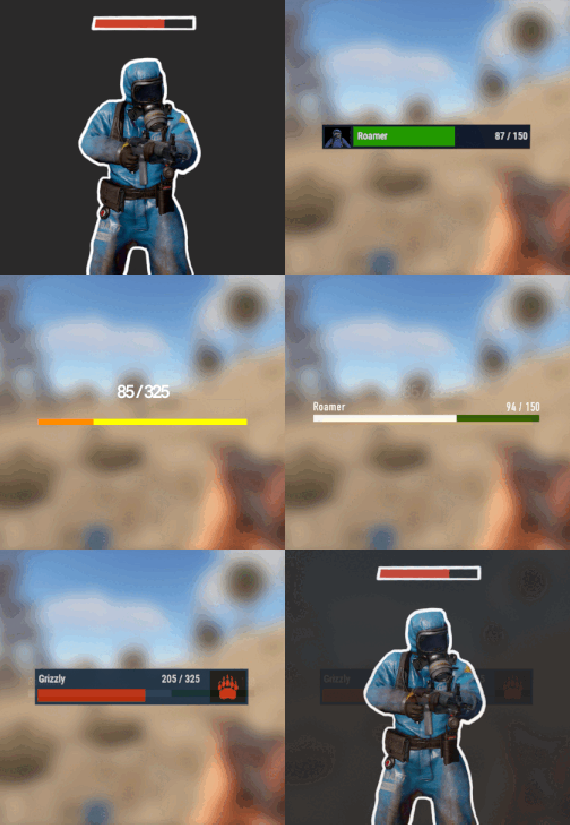
NPC Health Bar
NPC Health Bar is plugin compatible with all NPCs in Rust game, to provide its Health status info.
This also comes with few, already custom made, layouts that can be used straight away upon provided configuration file have been copied and pasted.
Nonetheless, these layouts and its parameters are customizable.
USE
/npcbar - opens up a menu to set up Your health bar
Features
health info text in-game EDIT MODE for players to resize, move and choose their own layout in some layout cases, also NPC name text Images , that are being made custom for some layout options or Images of your own customizable names of entities customizable position of the bar itself
Setup
- Copy and paste file into the .../oxide/plugins directory , configuration file will be created after first load of plugin, but main changes can be made through in-game Options menu or Edit mode menu.
-
$20.00
Trade
Trade with other players using shopfront interface
Features:
Smooth rust interface (shopfront) Moving items with right-click Rust trade logic (that means no bugs) Permission support (size, cooldown, etc) Items blacklist Config:
{ "Command": [ "trade", "t" ], "Extra accept command": [ "ta", "taccept" ], "Extra decline command": [ "td", "tcancel" ], "Effect on completing trade": "assets/prefabs/building/wall.frame.shopfront/effects/metal_transaction_complete.prefab", "Effect on pending request": "assets/bundled/prefabs/fx/invite_notice.prefab", "Log trades": false, "Block trade in raidblock": true, "Block in building privilege": true, "Start cooldown after accepting trade": false, "Effects volume": 1.0, "Chat sender id": 0, "Permissions": [ { "Permission": "trade.default", "Priority": 1, "Size": 2, "Cooldown": 600 }, { "Permission": "trade.vip", "Priority": 2, "Size": 6, "Cooldown": 300 }, { "Permission": "trade.top", "Priority": 3, "Size": 12, "Cooldown": 60 } ], "Items black list": [ "rifle.ak", "stones" ] } Language:
{ "Usage": "Usage:\n/trade playerName\n/trade yes\n/trade no", "NoPending": "There are no pending trades!", "RequestAlreadyPending": "That player already have pending requests!", "TradeBegins": "Trade between {name1} and {name2} begins!", "RequestSent": "You sent trade request to {name}", "RequestReceived": "You received trade request from {name}", "TradeCancelled": "Trade was cancelled", "CantRightNow": "You can't do that right now", "Cooldown": "Cooldown for {seconds}", "Permission": "You don't have permission to do that!", "NoPlayers": "There are no players with that 'Name' or 'Steam ID' ({name})", "MultiplePlayers": "There are multiple players with that 'Name' :\n{list}" } Commands:
trade <name or steamID> - request trade trade accept/+/yes/y/a - accept trade from player trade cancel/-/no/n/c - decline trade from player Video:
Contacts:
Need help or custom plugin for your server?
Contact me using Discord: metangerine
----------------------------------------------------------------------
-

$20.00$13.99Admin Eye
This plugin adds logs of players action and convenient control panel for viewing them.
Features
Logs KIlls + Destruction of buildings (detailed description of the killed / destroyed, distance and what killed 'weapon, damage type etc.') Death (detailed description of the killer, the distance and how player was killed 'weapon, damage type etc.') Respawn (location of respawn and on the sleeping bag or not) Teams (create, invite, accept, leave) Loot (crates, personal boxes, wounded players and all other "lootable" entities) Authorization (in code locks, tool cups, turrets) Construction (everything that builds) Transport (the moment of boarding the transport) Convenient and functional control panel Convenient search for online players Search by name or steam ID throughout the database The ability to conveniently select the date and time, as well as view individual categories of logs Teleport to the log location and its visualization (available only for admins) The history of searching and viewing profiles Save of all the nicknames of the player with whom he logged into the server The first and last connection The database is optimized as much as possible, the data is split, which allows you to store a large number of logs for a long time The ability to clear the database on wipe and players who have not logged on server for a long time, in automatic mode The ability to turn off the log globally and turn it on for certain players Filters for logs The plugin is fully localized for EN and RU languages Permission
admineye.usemenu - for open and use panel Command
/ae - for open panel Time Zones
Time zone its different time between 0 UTC and player time UTC.
You need add to configuration all time zones of your admins in seconds.
How do it? Go to site UTC Time Standart select city, then you will get the difference in hours
behind its + ahead its - Then you need multiply hours to second ( -6 * 3600 )
Done - its difference between zones. Write in config "Washington" : -21600
Then administrator must select (only once) his zone in menu "Time Zones", else plugin use default time zone config
Discord
At first you must create and copy discord Webhook, then paste url at config (you can use different channels)
if you want change color, choose Colors, copy 0xNNNNNN, then paste Here, copy number and paste at config ^_^
Filters
If you dont want use filters, set it EMPTY
If you want have specific logs, then add short prefabs names to filter
EX.
For kills - player, scientistnpc_bradley, wall and etc. For loots - names of crates, names of looting ents and etc. For auths - turrets, toolcups For builts - wall, floor and other deployeble entities
🧪TEST SERVER
Join our test server to view and experience all our unique features yourself!
Copy the IP Address below to start playing!
connect 194.147.90.147:28015
Future plans
Add console commands for search logs Add discord support for send logs (implemented) Add more logs I am waiting for your suggestions for improvement in the discussions
Video
Config
{ "Main settings": { "Enable delete all data on wipe": false, "Delete old players data every X hours [0 - off](It works on server startup or plugin reload)": 40, "After how many days the player's data is considered old": 14, "Time zone difference in seconds (set automatically by server zone)": 10800.0, "Time zone of counties (in seconds)": { "New York": -18000, "Moscow": 10800, "Berlin": 3600, "Paris": 3600, "Canberra": 39600, "London": 0, "Beijing": 28800, "Rome": 3600, "Washington": -21600 }, "Permission for use menu": "admineye.usemenu" }, "Log settings": { "Enable logging of kill for all": true, "Enable logging of death for all": true, "Enable logging of respawn for all": true, "Enable logging of team for all": true, "Enable logging of loot for all": true, "Enable logging of auth for all": true, "Enable logging of buildings for all": true, "Enable logging of mount for all": true, "Discord webhooks for logs": { "kills": { "Webhook url": "", "Color": 15105570 }, "deaths": { "Webhook url": "", "Color": 15548997 }, "respawns": { "Webhook url": "", "Color": 2067276 }, "teams": { "Webhook url": "", "Color": 3066993 }, "loots": { "Webhook url": "", "Color": 3447003 }, "auths": { "Webhook url": "", "Color": 9807270 }, "builts": { "Webhook url": "", "Color": 15658993 }, "mounts": { "Webhook url": "", "Color": 10181046 } } }, "Config version": { "Major": 1, "Minor": 2, "Patch": 0 } }
-
$9.99$7.99Stack Everything - Stack all entities, Chest Stacks, Farm Stacks, and more
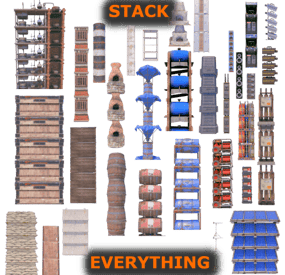
Stack Everything - Stack all entities, Chest Stacks, Farm Stacks, and more, allows you to stack all entities, such as: Stack Chest, Barricade, Large Water Catcher, Small Water Catcher, Locker, Barbeque, Water Barrel, Storage Box, Wood Box, Storage Barrel, Composter, Furnace, Legacy Furnace , Electric Furnace, Hobo Barrel, Mixing Table, Cooking Workbench, Battery, Generator, Test Generator, Water Purifier, Chippy Arcade, Boom Box, Farming entities, etc...
Naval Deep Sea support, stack entities.
Support for: Storage Box Pack DLC (https://rust.facepunch.com/news/shipshape#StorageBoxPackDLC)
Support for: Industrial Decor Pack DLC (https://rust.facepunch.com/news/built-different#IndustrialDecorPack)
Allows you to add new entities to stack, set stack size limits, and limit which entities can be stacked based on player permissions. Stack as many entities as you want with just one plugin!
Oxide/Carbon compatibility
PERMISSIONS:
To be able to stack entities, the player must have the permission:
stackeverything.use - Allows to use the plugin. In addition, 4 other permissions are created (Default, VIP1, VIP2, VIP3), each of which allows you to create different configurations to assign to the various players.
stackeverything.default - Assign configurations: Default. stackeverything.vip1 - Assign configurations: VIP1. stackeverything.vip2 - Assign configurations: VIP2. stackeverything.vip3 - Assign configurations: VIP3. These are the groups that are created by default, but you can add and/or edit groups as you wish.
For example, if you change the group vip1 to vip_elite, the permission stackeverything.vip_elite will be created
If you create a new group, for example vipvanilla, the permission stackeverything.vipvanilla will be created.
If you are part of a clan/team and there are 1 more members who have the VIP/ROLE, then all members of the clan/team will benefit.
You can enable this setting from the configuration file: "Share Group With Clan/Team members. Default FALSE": false": true
CONFIGURATION:
The settings and options can be configured in the StackEverything.json under the config directory. The use of an editor and validator is recommended to avoid formatting issues and syntax errors. { "Use Clan/Team": true, "Share Group With Clan/Team members. Default FALSE": false, "Spawn SkinID Blacklist. Skin IDs that cannot be used for Spawned Entity": [], "Stacking SkinID Blacklist. Block stacking of entities that have these skin IDs": [], "Role Permission": { "default": { "Priority. (lower = higher priority)": 100, "Maximum number of stackable entities": 2, "Exclude stacking of these entities": [], "Maximum stack number per entity": {} }, "vip1": { "Priority. (lower = higher priority)": 1, "Maximum number of stackable entities": 4, "Exclude stacking of these entities": [], "Maximum stack number per entity": {} }, "vip2": { "Priority (lower = higher priority)": 2, "Maximum number of stackable entities": 6, "Exclude stacking of these entities": [], "Maximum stack number per entity": {} }, "vip3": { "Priority. (lower = higher priority)": 3, "Maximum number of stackable entities": 10, "Exclude stacking of these entities": [], "Maximum stack number per entity": {} } }, "Stackable Items": [ { "Display Name": "Concrete Barricade", "Item Name": "barricade.concrete", "Item Id": -1950721390, "Enable Stacking": true, "Prefab Name": "assets/prefabs/deployable/barricades/barricade.concrete.prefab", "Radius Check": 0.1, "Collider Height": 1.5, "YOffset": 1.24, "Effect Name": "assets/prefabs/deployable/barricades/effects/barricade-concrete-deploy.prefab" }, { "Display Name": "Stone Barricade", "Item Name": "barricade.stone", "Item Id": 15388698, "Enable Stacking": true, "Prefab Name": "assets/prefabs/deployable/barricades/barricade.stone.prefab", "Radius Check": 0.1, "Collider Height": 1.4, "YOffset": 1.24, "Effect Name": "assets/prefabs/deployable/barricades/effects/barricade-stone-deploy.prefab" }, { "Display Name": "Sandbag Barricade", "Item Name": "barricade.sandbags", "Item Id": -559599960, "Enable Stacking": true, "Prefab Name": "assets/prefabs/deployable/barricades/barricade.sandbags.prefab", "Radius Check": 0.1, "Collider Height": 1.4, "YOffset": 1.18, "Effect Name": "assets/prefabs/deployable/barricades/effects/barricade-sandbags-deploy.prefab" }, { "Display Name": "Large Water Catcher", "Item Name": "water.catcher.large", "Item Id": -1100168350, "Enable Stacking": true, "Prefab Name": "assets/prefabs/deployable/water catcher/water_catcher_large.prefab", "Radius Check": 0.1, "Collider Height": 4.168319, "YOffset": 4.1, "Effect Name": "assets/prefabs/deployable/water catcher/effects/water-catcher-large-deploy.prefab" }, { "Display Name": "Small Water Catcher", "Item Name": "water.catcher.small", "Item Id": -132247350, "Enable Stacking": true, "Prefab Name": "assets/prefabs/deployable/water catcher/water_catcher_small.prefab", "Radius Check": 0.1, "Collider Height": 2.67044, "YOffset": 2.5, "Effect Name": "assets/prefabs/deployable/water catcher/effects/water-catcher-deploy.prefab" }, { "Display Name": "Locker", "Item Name": "locker", "Item Id": -110921842, "Enable Stacking": true, "Prefab Name": "assets/prefabs/deployable/locker/locker.deployed.prefab", "Radius Check": 0.1, "Collider Height": 2.3, "YOffset": 2.238, "Effect Name": "assets/prefabs/deployable/locker/effects/locker-deploy.prefab" }, { "Display Name": "Barbeque", "Item Name": "bbq", "Item Id": 1099314009, "Enable Stacking": true, "Prefab Name": "assets/prefabs/deployable/bbq/bbq.deployed.prefab", "Radius Check": 0.1, "Collider Height": 1.2, "YOffset": 0.84, "Effect Name": "assets/prefabs/deployable/bbq/effects/barbeque-deploy.prefab" }, { "Display Name": "Water Barrel", "Item Name": "water.barrel", "Item Id": -1863559151, "Enable Stacking": true, "Prefab Name": "assets/prefabs/deployable/liquidbarrel/waterbarrel.prefab", "Radius Check": 0.1, "Collider Height": 2.67044, "YOffset": 1.594, "Effect Name": "assets/prefabs/deployable/liquidbarrel/effects/liquid-barrel-deploy.prefab" }, { "Display Name": "Wood Storage Box", "Item Name": "box.wooden", "Item Id": -180129657, "Enable Stacking": true, "Prefab Name": "assets/prefabs/deployable/woodenbox/woodbox_deployed.prefab", "Radius Check": 0.1, "Collider Height": 0.5552952, "YOffset": 0.5552952, "Effect Name": "assets/prefabs/deployable/woodenbox/effects/wooden-box-deploy.prefab" }, { "Display Name": "Large Wood Box", "Item Name": "box.wooden.large", "Item Id": 833533164, "Enable Stacking": true, "Prefab Name": "assets/prefabs/deployable/large wood storage/box.wooden.large.prefab", "Radius Check": 0.1, "Collider Height": 0.790511, "YOffset": 0.76, "Effect Name": "assets/prefabs/deployable/large wood storage/effects/large-wood-box-deploy.prefab" }, { "Display Name": "Storage Barrel Horizontal", "Item Name": "storage_barrel_c", "Item Id": -1421257350, "Enable Stacking": true, "Prefab Name": "assets/prefabs/misc/decor_dlc/storagebarrel/storage_barrel_c.prefab", "Radius Check": 0.1, "Collider Height": 0.94, "YOffset": 0.94, "Effect Name": "assets/prefabs/misc/decor_dlc/storagebarrel/effects/storage-barrel-deploy.prefab" }, { "Display Name": "Storage Barrel Vertical", "Item Name": "storage_barrel_b", "Item Id": 1307626005, "Enable Stacking": true, "Prefab Name": "assets/prefabs/misc/decor_dlc/storagebarrel/storage_barrel_b.prefab", "Radius Check": 0.1, "Collider Height": 1.3, "YOffset": 1.3, "Effect Name": "assets/prefabs/misc/decor_dlc/storagebarrel/effects/storage-barrel-deploy.prefab" }, { "Display Name": "Fridge", "Item Name": "fridge", "Item Id": 1413014235, "Enable Stacking": true, "Prefab Name": "assets/prefabs/deployable/fridge/fridge.deployed.prefab", "Radius Check": 0.1, "Collider Height": 2.0, "YOffset": 2.0, "Effect Name": "assets/prefabs/deployable/fridge/effects/fridge-deploy.prefab" }, { "Display Name": "Salvaged Shelves", "Item Name": "shelves", "Item Id": 1950721418, "Enable Stacking": true, "Prefab Name": "assets/prefabs/deployable/shelves/shelves.prefab", "Radius Check": 0.1, "Collider Height": 2.8, "YOffset": 2.8, "Effect Name": "assets/prefabs/deployable/shelves/effects/shelves-deploy.prefab" }, { "Display Name": "Stone Fireplace", "Item Name": "fireplace.stone", "Item Id": -1535621066, "Enable Stacking": true, "Prefab Name": "assets/prefabs/deployable/fireplace/fireplace.deployed.prefab", "Radius Check": 0.1, "Collider Height": 2.9, "YOffset": 2.9, "Effect Name": "assets/prefabs/deployable/campfire/effects/campfire-deploy.prefab" }, { "Display Name": "Composter", "Item Name": "composter", "Item Id": -1488398114, "Enable Stacking": true, "Prefab Name": "assets/prefabs/deployable/composter/composter.prefab", "Radius Check": 0.1, "Collider Height": 1.64, "YOffset": 1.54, "Effect Name": "assets/prefabs/deployable/furnace/effects/furnace-deploy.prefab" }, { "Display Name": "Furnace", "Item Name": "furnace", "Item Id": -1999722522, "Enable Stacking": true, "Prefab Name": "assets/prefabs/deployable/furnace/furnace.prefab", "Radius Check": 0.1, "Collider Height": 1.6, "YOffset": 1.44, "Effect Name": "assets/prefabs/deployable/furnace/effects/furnace-deploy.prefab" }, { "Display Name": "Legacy Furnace", "Item Name": "legacyfurnace", "Item Id": -1310391395, "Enable Stacking": true, "Prefab Name": "assets/prefabs/deployable/legacyfurnace/legacy_furnace.prefab", "Radius Check": 0.1, "Collider Height": 1.6, "YOffset": 1.44, "Effect Name": "assets/prefabs/deployable/furnace/effects/furnace-deploy.prefab" }, { "Display Name": "Electric Furnace", "Item Name": "electric.furnace", "Item Id": -1196547867, "Enable Stacking": true, "Prefab Name": "assets/prefabs/deployable/playerioents/electricfurnace/electricfurnace.deployed.prefab", "Radius Check": 0.1, "Collider Height": 1.2, "YOffset": 1.15, "Effect Name": "assets/prefabs/deployable/playerioents/electricfurnace/effects/electric-furnace-deploy.prefab" }, { "Display Name": "Cursed Cauldron", "Item Name": "cursedcauldron", "Item Id": 1242522330, "Enable Stacking": true, "Prefab Name": "assets/prefabs/misc/halloween/cursed_cauldron/cursedcauldron.deployed.prefab", "Radius Check": 0.1, "Collider Height": 1.1, "YOffset": 0.95, "Effect Name": "assets/prefabs/deployable/campfire/effects/campfire-deploy.prefab" }, { "Display Name": "Hobo Barrel", "Item Name": "hobobarrel", "Item Id": -1442559428, "Enable Stacking": true, "Prefab Name": "assets/prefabs/misc/twitch/hobobarrel/hobobarrel.deployed.prefab", "Radius Check": 0.1, "Collider Height": 1.2, "YOffset": 1.13, "Effect Name": "assets/prefabs/deployable/campfire/effects/campfire-deploy.prefab" }, { "Display Name": "Mixing Table", "Item Name": "mixingtable", "Item Id": 1259919256, "Enable Stacking": true, "Prefab Name": "assets/prefabs/deployable/mixingtable/mixingtable.deployed.prefab", "Radius Check": 0.1, "Collider Height": 1.64, "YOffset": 0.9, "Effect Name": "assets/prefabs/deployable/mixingtable/effects/mixing-table-deploy.prefab" }, ............................................................ ], "VersionNumber": { "Major": 1, "Minor": 2, "Patch": 3 } }
Chat Prefix: Chat message prefix.
Enable Chat Messages: Enable sending messages in chat. Default: TRUE
Enable Toast Messages: Enable Toast display for the player. Default: TRUE
Use Clan/Team: If set to TRUE and the player is part of the clan/team, he can stack entities on entities owned by his teammates. Default: TRUE
Share Group With Clan/Team members: If set to TRUE, the group assigned to a player is shared with all members of the clan/team. The group with the lowest priority is shared, then all members of the clan/team will benefit. Default FALSE
Spawn SkinID Blacklist. Skin IDs that cannot be used for Spawned Entity: Here you can enter skins that are prohibited. When an entity is stacked, if it has one of these skins, the skin will be removed.
Configuration example:
"Spawn SkinID Blacklist. Skin IDs that cannot be used for Spawned Entity": [ 3429684712, 3429687195 ]
Stacking SkinID Blacklist. Block stacking of entities that have these skin IDs: If the entity to be stacked has one of these skin ids, the entity cannot be stacked.
Configuration example:
"Stacking SkinID Blacklist. Block stacking of entities that have these skin IDs": [ 3429688031, 3429685478 ]
Role Permission: Here you can set the configurations for the various roles: Priority. (lower = higher priority) -- Each group has its own property, the lower this number is, the more important the group is. This is useful in the case where a player has more roles assigned. In this case, the group with the lowest priority will be assigned, the most important group. Negative numbers are also allowed.
Maximum number of stackable entities: Maximum number of entities that can be stacked. Number of entities that can be placed on top of each other in the stack. Exclude stacking of these entities: Entities that cannot be stacked even if they have been enabled in the configuration file. Here you must enter the PrefabName that you can find in the configuration file in the section: Stackable Items.
Configuration example:
"Exclude stacking of these entities": [ "assets/prefabs/deployable/bbq/bbq.deployed.prefab", "assets/prefabs/misc/decor_dlc/storagebarrel/storage_barrel_c.prefab" ]
Maximum stack number per entity: Here you can configure the maximum stack size for the single entity bypassing the base limit: Maximum number of stackable entities Also if an entity is disabled in the configuration file, if it is entered here, the entity will now be enabled for the players that are part of this configuration.
Configuration example:
"Maximum stack number per entity": { "assets/prefabs/deployable/woodenbox/woodbox_deployed.prefab": 4, "assets/prefabs/misc/decor_dlc/storagebarrel/storage_barrel_c.prefab": 3, "assets/prefabs/deployable/composter/composter.prefab": 4, "assets/prefabs/deployable/furnace/furnace.prefab": 6 }
Stackable Items: Here all the entities that can be stacked are defined. You can add new ones manually or open a support request to request a new entity to be added to the plugin. Enable Stacking: If set to TRUE, the entity can be stacked, otherwise not. If the entity is not enabled, you can always bypass the block by configuring: Maximum stack number per entity LOCALIZATION
The plugin, therefore the automatic messages and statistics, are translated into the following languages:
English Italian Spanish Russian Translation files are located in the /oxide/lang folder, here is an example of a /oxide/lang/en/StackEverything.json translation file.
You can add translations for other languages by adding them to the folder: /oxide/lang
AVAILABLE ENTITIES:
Concrete Barricade, Stone Barricade, Sandbag Barricade, Large Water Catcher, Small Water Catcher, Locker, Barbeque, Water Barrel, Wood Storage Box, Large Wood Box, Ammo Storage Box, Armor Storage Box, Charcoal Storage Box, Clothing Storage Box, Comps Storage Box, Explosives Storage Box, Food Storage Box, Guns Storage Box, Meds Storage Box, Metal Storage Box, Ore Storage Box, Scrap Storage Box, Stone Storage Box, Sulfur Storage Box, Tools Storage Box, Wood Storage Box, Medieval Large Wood Box, Storage Barrel Horizontal, Storage Barrel Vertical, Black Box, Abyss Horizontal Storage Tank, Abyss Vertical Storage Tank, Bamboo Barrel, Wicker Barrel, Krieg Storage Crates, Krieg Storage Barrel, Industrial Storage Horizontal Barrel, Industrial Storage Vertical Barrel, Industrial Electric Furnace, Half Height Industrial Shelves, Salvaged Industrial Shelves, Fridge, Mini Fridge, Salvaged Shelves, Bamboo Salvaged Shelves, Stone Fireplace, Composter, Furnace, Legacy Furnace, Small Oil Refinery (Available in the next plugin update), Electric Furnace, Cursed Cauldron, Hobo Barrel, Mixing Table, Cooking Workbench, Command Block, Test Generator, Large Rechargeable Battery, Medium Rechargeable Battery, Small Rechargeable Battery, Large Solar Panel, Small Generator, Powered Water Purifier, RF Broadcaster, RF Receiver, Chippy Arcade Game, Strobe Light, Laser Light, Snow Machine, Fogger-3000, Audio Alarm, Spooky Speaker, Boom Box, Pookie Bear, Large Planter Box, Small Planter Box, Triangle Planter Box, Rail Road Planter, Triangle Rail Road Planter, Minecart Planter, Bath Tub Planter, Single Plant Pot, Beehive.
NAVAL DEEP SEA:
Small Boat Engine, Sail.
NEW ENTITIES:
New entities will be added with future releases.
If you want to request the addition of a specific entity, feel free to open a support request and it will be added to the plugin.
ENTITY IMAGE PREVIEW:
Concrete Barricade Stone Barricade Sandbag Barricade Large Water Catcher Small Water Catcher Locker Barbeque Water Barrel Wood Storage Box Large Wood Box Storage Barrel Horizontal Storage Barrel Vertical Ammo Storage Box Armor Storage Box Charcoal Storage Box Clothing Storage Box Comps Storage Box Explosives Storage Box Food Storage Box Guns Storage Box Meds Storage Box Metal Storage Box Ore Storage Box Scrap Storage Box Stone Storage Box Sulfur Storage Box Tools Storage Box Wood Storage Box Abyss Horizontal Storage Tank Abyss Vertical Storage Tank Black Box Krieg Storage Crates Krieg Storage Barrel Mini Fridge Industrial Storage Horizontal Barrel Industrial Storage Vertical Barrel Industrial Electric Furnace Half Height Industrial Shelves Salvaged Industrial Shelves Bamboo Barrel Wicker Barrel Bamboo Salvaged Shelves Cooking Workbench Fridge Salvaged Shelves Stone Fireplace Composter Furnace Legacy Furnace Small Oil Refinery (Available in the next plugin update) Electric Furnace Cursed Cauldron Hobo Barrel Mixing Table Test Generator Large Rechargeable Battery Medium Rechargeable Battery Small Rechargeable Battery Large Solar Panel Command Block Sail Small Boat Engine Small Generator Powered Water Purifier RF Broadcaster RF Receiver Chippy Arcade Game Strobe Light Laser Light Snow Machine Fogger-3000 Audio Alarm Spooky Speaker Boom Box Pookie Bear Medieval Large Wood Box Large Planter Box Small Planter Box Triangle Planter Box Rail Road Planter Triangle Rail Road Planter Minecart Planter Bath Tub Planter Single Plant Pot Beehive Propane Explosive Bomb Firebomb
- #stack everything
- #stack entity
- (and 54 more)
-
$24.00
XDStatistics
XDStatistics - The most advanced statistics!
It has great functionality and a nice design that will please the eyes of your players.
Some useful information about the plugin:
Opportunities:
The plugin has very detailed statistics. In it, the player will be able to see everything that he will be interested in! Players can hide their statistics from other players , for this you need to issue permissions and enable this feature in the config Players can reset their statistics, for this you need to issue permissions and enable this feature in the config The administrator can add (remove) a player to the ignore list, the player's statistics will not be deleted, it will only be hidden and will not be visible to other players. There is an opportunity to award top 1 players in each category or in a certain one. The reward is given when the player enters the server after the vape. It is possible to issue awards in Economics | Server Rewards | IQEconomic | You can also grant a privilege or something else with the command There is also a points system in the plugin. The glasses are configured in the config in a very detailed and convenient way. The best player is the one with the most points. The plugin also knows how to clean data when wiping (configured in the configuration) Interface:
Very nice and simple interface Some parts of the interface can be configured in the config At the moment there are 3 main pages (my statistics, top 10, search) The player can view the pages of other players if they have not hidden them Chat Alerts:
Also in the configuration, you can set up chat alerts with the top 5 players in different categories, which are selected using random Messages can be configured in detail in the lang file You can also configure the frequency of alerts in the configuration Commands:
[CHAT] /stat - (Open statistics (can be changed in the config)) [CONSOLE] stat - (Open statistics (can be changed in the config)) [CONSOLE] stat.ignore <add/remove> <Steam ID|Name> - (Adds the player to the ignore list. Also removes it from the statistics) [CONSOLE] stat.wipe - To clear progress and distribute rewards (if it didn't happen automatically) Permissions:
XDStatistics.admin - (To use the stat.ignore command) XDStatistics.reset - (Allows the player to reset his stats. You need to enable this feature in the config) XDStatistics.availability - (Allows the player to hide his stats from other players. Need to enable in the configuration) What is planned in the future:
[Discord] - Add the ability to send a message at the end of the wipe with the best players behind the wipe Add a tab with weapons so that players can view their detailed statistics on certain weapons API:
private JObject API_GetAllPlayerStat(ulong id) private JObject API_GetPlayerPlayedTime(ulong id) private Dictionary<string, int> API_GetGathered(ulong id) private int? API_GetAllGathered(ulong id) private int? API_GetGathered(ulong id, string shortname) The lang file is available in English and Russian
Configuration example -
{ "Basic plugin settings": { "Chat command for opening statistics": "stat", "Console command to open statistics": "stat", "Send chat messages with top 5 players in different categories": true, "Once in how many seconds will a message be sent ?": 600, "Enable the ability to reset your stats ? (requires XDStatistics.reset)": false, "Enable the ability to hide your statistics from users ? (requires XDStatistics.availability)": true, "Clear data when wiped": true, "Once in a rowman, the data will be saved.": 30 }, "Setting up the issuance of points": { "Points for crafting": 1.0, "Points for barrels": 1.0, "Points for installing building blocks": 1.0, "Points for using explosive items": { "explosive.timed": 2.0, "explosive.satchel": 0.7, "grenade.beancan": 0.3, "grenade.f1": 0.1, "ammo.rocket.basic": 1.0, "ammo.rocket.hv": 0.5, "ammo.rocket.fire": 0.7 }, "Points for resource extraction": { "wood": 0.3, "stones": 0.6, "metal.ore": 1.0, "sulfur.ore": 1.5, "hq.metal.ore": 2.0 }, "Points for found scraps": 0.5, "Points for harvesting (from the plantation)": 0.2, "Points for killing animals": 1.0, "Points for shooting down a helicopter": 5.0, "Points for tank explosion": 5.0, "Points for killing NPCs": 5.0, "Points for killing players": 10.0, "Points for time (for every minute of the game on the server)": 0.2, "How many points to take away for suicide ?": 2.0, "How many points to take away for death ?": 1.0 }, "Customize rewards for top 1 players in each category": { "Reward the best players at the end of the wipe": false, "Award for the top 1 in the SCORE category": { "Use command as a prize ?": true, "[RU]Использовать магазин GameStore для выдачи награды": false, "[RU]Использовать магазин MoscowOVH для выдачи награды": false, "Use [IQEconomic or Economics or Server Rewards] to issue a reward": false, "Command for the prize": [ "say %STEAMID%" ], "[RU][GameStores] ID магазина": "", "[RU][GameStores] ID сервера": "", "[RU][GameStores] Секретный ключ": "", "[RU][GameStores или MoscowOVH] Сколько начислять денег на баланс": 30, "[IQEconomic or Economics or ServerRewards] How much money to add to the balance": 100 }, "Award for the top 1 in the Killer category": { "Use command as a prize ?": true, "[RU]Использовать магазин GameStore для выдачи награды": false, "[RU]Использовать магазин MoscowOVH для выдачи награды": false, "Use [IQEconomic or Economics or Server Rewards] to issue a reward": false, "Command for the prize": [ "say %STEAMID%" ], "[RU][GameStores] ID магазина": "", "[RU][GameStores] ID сервера": "", "[RU][GameStores] Секретный ключ": "", "[RU][GameStores или MoscowOVH] Сколько начислять денег на баланс": 30, "[IQEconomic or Economics or ServerRewards] How much money to add to the balance": 100 }, "Award for the top 1 in the gathering category": { "Use command as a prize ?": true, "[RU]Использовать магазин GameStore для выдачи награды": false, "[RU]Использовать магазин MoscowOVH для выдачи награды": false, "Use [IQEconomic or Economics or Server Rewards] to issue a reward": false, "Command for the prize": [ "say %STEAMID%" ], "[RU][GameStores] ID магазина": "", "[RU][GameStores] ID сервера": "", "[RU][GameStores] Секретный ключ": "", "[RU][GameStores или MoscowOVH] Сколько начислять денег на баланс": 30, "[IQEconomic or Economics or ServerRewards] How much money to add to the balance": 100 }, "Award for the top 1 in the raider category": { "Use command as a prize ?": true, "[RU]Использовать магазин GameStore для выдачи награды": false, "[RU]Использовать магазин MoscowOVH для выдачи награды": false, "Use [IQEconomic or Economics or Server Rewards] to issue a reward": false, "Command for the prize": [ "say %STEAMID%" ], "[RU][GameStores] ID магазина": "", "[RU][GameStores] ID сервера": "", "[RU][GameStores] Секретный ключ": "", "[RU][GameStores или MoscowOVH] Сколько начислять денег на баланс": 30, "[IQEconomic or Economics or ServerRewards] How much money to add to the balance": 100 }, "Award for the top 1 in the Big Online category": { "Use command as a prize ?": true, "[RU]Использовать магазин GameStore для выдачи награды": false, "[RU]Использовать магазин MoscowOVH для выдачи награды": false, "Use [IQEconomic or Economics or Server Rewards] to issue a reward": false, "Command for the prize": [ "say %STEAMID%" ], "[RU][GameStores] ID магазина": "", "[RU][GameStores] ID сервера": "", "[RU][GameStores] Секретный ключ": "", "[RU][GameStores или MoscowOVH] Сколько начислять денег на баланс": 30, "[IQEconomic or Economics or ServerRewards] How much money to add to the balance": 100 } }, "Interface Settings": { "Background color in the top 10 for 1st place": "1 0.8431373 0 0.49", "Background color in the top 10 for 2st place": "0.7529412 0.7529412 0.7529412 0.49", "Background color in the top 10 for 3st place": "0.8039216 0.4980392 0.1960784 0.49" } } I also accept any ideas for improving this plugin. You can offer me ideas and I will implement them in the future.
My discord for communication! DezLife#1480
- #stats
- #statistic
- (and 3 more)