
CoreSnap's Wishlist
-

$19.99
Custom Item Vending
By imthenewguy in Plugins
This plugin allows your players to list and sell custom items through their vending machines.
By creating a store via the back of the vending machine, players can list any item (custom or vanilla) for sale through their machines.
Players can then interact with the players vending machine to purchase their wares, just like vanilla rust.
This is ideal for any server, but especially for servers with heavy role play elements, or servers that use a lot of custom items.
Custom Item Vending can receive data from other plugins for both a currency and an item properties.
Custom items can be added manually through the config, or sent via an API directly from another plugin.
Allows players to sell items for vanilla items, custom items, economics and server rewards. Customizable limit on how many listings each vending machine can have. A map marker that will display what is currently being sold (and is in stock) in the machine. Floating text at the front of each custom item machine indicating what is being sold and its stock level. Supports almost every custom item, identifying them uniquely based on skin, name, text field, slot count and condition. Economics and Server rewards are withdrawn from the back of the machine.
The only requirement to use this plugin is the permission: customitemvending.create.
This is require to turn a regular vending machine into a Custom Item Vending machine.
Please note that due to the nature of the plugin and the way the map's vending listings are handled via client side, it is not possible to use market drones to obtain items using this plugin.
-
$4.99
Buttons
By dFxPhoeniX in Plugins
Buttons is a Rust plugin that allows server owners to add customizable buttons to the in-game user interface.
These buttons can be used to trigger commands, open menus, send messages, or execute any server-side action, offering a more interactive and user-friendly experience for players. With support for custom positioning, styling, and permissions, Buttons makes it easy to enhance gameplay and streamline interactions through intuitive UI elements.
Permissions:
buttons.use - Allows group/player to use the buttons. buttons.toggle - Allows group/player to toggle the buttons. Each button can optionally define its own permission. An empty permission requires only buttons.use, when configured, the player must have both buttons.use and the button permission.
Configured button permissions are registered automatically. The UI is refreshed when relevant player or group permissions change. Chat Commands:
/buttons - Toggle the buttons (require buttons.toggle). Console Commands:
buttons.open <index> - Execute the button command. Image Handling:
ImageLibrary is optional and is detected dynamically when loaded or unloaded. Buttons automatically refreshes active interfaces when the integration changes and falls back to local images or direct URLs when ImageLibrary is unavailable.
Image priority: local image, ImageLibrary cached image, direct URL.
Configuration:
{ "Settings": { "Buttons": [ { "Image Url": "https://i.ibb.co/Gv8YKB8g/info.png", "Local Image (oxide/data/Buttons/images - eg: image.png)": "", "Command": "info", "Permission (Empty = No Permission Required)": "", "Background Color": "0.65 0.65 0.65 0.3", "Always Show": false, "Display Types (Hud/Overlay/Under/Inventory/TechTree/Crafting/Contacts/Clans/Map)": [ "Overlay" ], "Show Overlay Only In (Looting/Vending/NpcConversation/Mounted/MLRS - Empty = Disabled)": [], "Enable Hybrid Display Types": false, "Hybrid Contexts (Looting/Vending/NpcConversation/Mounted/MLRS - Empty = Looting)": [ "Looting" ], "Hybrid Fallback Display Types When No Context Is Active (Hud/Overlay/Under/Inventory/TechTree/Crafting/Contacts/Clans/Map)": [ "Hud" ], "Alignment": { "Anchor Min": "0 1", "Anchor Max": "0 1", "Offset Min": "18 -60", "Offset Max": "56 -22" } }, { "Image Url": "https://i.ibb.co/VYz1NcLL/leaderboard.png", "Local Image (oxide/data/Buttons/images - eg: image.png)": "", "Command": "leaderboard", "Permission (Empty = No Permission Required)": "", "Background Color": "0.65 0.65 0.65 0.3", "Always Show": false, "Display Types (Hud/Overlay/Under/Inventory/TechTree/Crafting/Contacts/Clans/Map)": [ "Overlay" ], "Show Overlay Only In (Looting/Vending/NpcConversation/Mounted/MLRS - Empty = Disabled)": [], "Enable Hybrid Display Types": false, "Hybrid Contexts (Looting/Vending/NpcConversation/Mounted/MLRS - Empty = Looting)": [ "Looting" ], "Hybrid Fallback Display Types When No Context Is Active (Hud/Overlay/Under/Inventory/TechTree/Crafting/Contacts/Clans/Map)": [ "Hud" ], "Alignment": { "Anchor Min": "0 1", "Anchor Max": "0 1", "Offset Min": "58 -60", "Offset Max": "96 -22" } }, { "Image Url": "https://i.ibb.co/V06FLK38/shop.png", "Local Image (oxide/data/Buttons/images - eg: image.png)": "", "Command": "shop", "Permission (Empty = No Permission Required)": "", "Background Color": "0.65 0.65 0.65 0.3", "Always Show": false, "Display Types (Hud/Overlay/Under/Inventory/TechTree/Crafting/Contacts/Clans/Map)": [ "Overlay" ], "Show Overlay Only In (Looting/Vending/NpcConversation/Mounted/MLRS - Empty = Disabled)": [], "Enable Hybrid Display Types": false, "Hybrid Contexts (Looting/Vending/NpcConversation/Mounted/MLRS - Empty = Looting)": [ "Looting" ], "Hybrid Fallback Display Types When No Context Is Active (Hud/Overlay/Under/Inventory/TechTree/Crafting/Contacts/Clans/Map)": [ "Hud" ], "Alignment": { "Anchor Min": "0 1", "Anchor Max": "0 1", "Offset Min": "98 -60", "Offset Max": "136 -22" } }, { "Image Url": "https://i.ibb.co/ksjLcnx5/kits.png", "Local Image (oxide/data/Buttons/images - eg: image.png)": "", "Command": "kits", "Permission (Empty = No Permission Required)": "", "Background Color": "0.65 0.65 0.65 0.3", "Always Show": false, "Display Types (Hud/Overlay/Under/Inventory/TechTree/Crafting/Contacts/Clans/Map)": [ "Overlay" ], "Show Overlay Only In (Looting/Vending/NpcConversation/Mounted/MLRS - Empty = Disabled)": [], "Enable Hybrid Display Types": false, "Hybrid Contexts (Looting/Vending/NpcConversation/Mounted/MLRS - Empty = Looting)": [ "Looting" ], "Hybrid Fallback Display Types When No Context Is Active (Hud/Overlay/Under/Inventory/TechTree/Crafting/Contacts/Clans/Map)": [ "Hud" ], "Alignment": { "Anchor Min": "0 1", "Anchor Max": "0 1", "Offset Min": "138 -60", "Offset Max": "176 -22" } } ], "Open By Default": true } } Languages:
Buttons have two languages by default (English and Romanian), but you can add more in Oxide lang folder.
-
$14.99
BGrade
Built from the ground up with pure performance as a drop in replacement for umods bgrade. Players can Auto Build with there Specified Grade when using the building planner or simply tap with the hammer!
Features:
BGrade supports using both the Planner & Hammer.
Native Game Popups to indicate missing resources.
Supports Rust Backpacks.
Works well with 3rd party plugins, like remover tools, etc
Chat & Console Commands:
/bg /bgrade Grades 0 - 4 ( Wood > Stone > Metal > Armored )
Configuration
{ "Enable On Active Item Changed Notification": false, "Console & Chat Commands": [ "bg", "bgrade" ], "Sound Effects: Set Empty string to disable": { "Ok": "assets/prefabs/misc/halloween/lootbag/effects/gold_open.prefab", "Ko": "assets/prefabs/weapons/toolgun/effects/repairerror.prefab" } }
Included Languages:
English > French > German > Simplified Chinese > Russian
//Default English { "ToggledGrade": "Toggled Grade to {0}.", "NoAccess": "You do not have permission to use {0} level of BGrade.", "Off": "Toggled BGrade Off.", "GradePerm": "You do not have permission for grade: {0}", "NoEscape": "NoEscape Blocked: BGrade Disabled.", "Notify": "BGrade is available using {0}" }
- #bgrade
- #building grades
- (and 7 more)
-
$9.99$7.99CustomC4&RocketTiers
By Blackmatic in Plugins
🚀 CustomC4 & RocketTiers
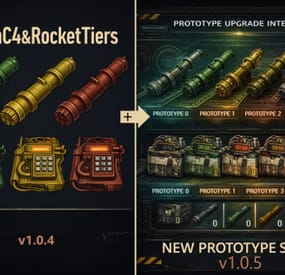
CustomC4 & RocketTiers is a Rust plugin that expands explosive gameplay with fully configurable C4, Rocket Launcher, Rocket Tier and Prototype systems.
Each tier can have its own damage values, skins, magazine size, condition loss and upgrade progression.
⚠️ Important Notice
The showcase video is outdated.
━━━━━━━━━━━━━━━━━━━━━━━━━━━━━━━━━━━━━━
🆕 NEW in v 1.1.0
* Fixed SkillTree Extended_Mag compatibility.
* Prototype Rocketlauncher and Rocketlauncher Tiers magazine size is now also re-applied on equip and fire.
* If you experience any issues with magazine size or magazine behavior, please set ForceMagazineOverride to true in the config.
* More information about my Rust projects, free releases, and other Blackmatic projects can be found on my official website: blackmatic.de
🆕 NEW in v1.0.9
✅ Added: Visual Raid Rank System
Players can now earn visual raid XP by using plugin explosives.
The Raid Rank System is visual only.
It does not unlock items or gameplay advantages and can be disabled in the config.
Player Commands:
/raidrank
Shows the player’s current raid rank, level, XP and personal statistics.
/raidtop
Shows the top raiders list.
✅ Added: Admin Balance Stats
Admins can now view global and player-specific raid statistics.
Admin Chat Commands:
/c4rtstats
Shows global raid statistics.
/c4rtstats <player/steamid>
Shows statistics for a specific player.
/c4rtxp add <player> <amount>
Adds XP to a player.
/c4rtxp remove <player> <amount>
Removes XP from a player.
/c4rtxp reset <player>
Resets a player’s XP.
/c4rtstatsreset
Resets all raid statistics.
Admin Console Commands:
c4rtstats
Shows global raid statistics.
c4rtstats <player/steamid>
Shows statistics for a specific player.
c4rtxp add <player> <amount>
Adds XP to a player.
c4rtxp remove <player> <amount>
Removes XP from a player.
c4rtxp reset <player>
Resets a player’s XP.
✅ Fixed: Normal Rocket Damage Fallback
Fixed an issue where normal rockets or HV rockets could incorrectly use the last stored rocket tier damage.
✅ Fixed: Weapons Turbo Compatibility
Fixed a compatibility issue with Weapons Turbo where excess rockets could be consumed when reloading Rocketlauncher Tier or Prototype Rocketlauncher weapons.
⚙️ Config Notice
This update adds new config options for the Raid Rank System and Admin Balance Stats.
The existing config should update automatically when the plugin is loaded.
If any new settings are missing or something does not work correctly, please back up your config and let the plugin generate a fresh one.
━━━━━━━━━━━━━━━━━━━━━━━━━━━━━━━━━━━━━━
🆕 NEW in v1.0.5
✅ Added: Prototype Rocket Launcher System
Added 5 Prototype Rocket Launcher tiers:
proto0 → proto4
Features:
Independent prototype tier config and progression
Separate damage system per prototype tier
Basic rocket damage per tier
HV rocket damage per tier, if enabled
Configurable upgrade path
Configurable upgrade costs
Optional stack upgrades
Optional conversion from normal Rocket Launcher to proto0
✅ Added: Prototype C4 System
Added 5 Prototype C4 tiers:
proto_c4_0 → proto_c4_4
Features:
Independent prototype C4 config and progression
Separate from normal C4 tiers
Configurable damage values per prototype tier
Configurable upgrade path
Configurable upgrade costs
Optional stack upgrades
Optional conversion from normal C4 to proto_c4_0
🖥 Added: Prototype Upgrade UI
Open the UI with:
/prototype
/proto
UI Features:
Prototype Launcher tab
Prototype C4 tab
Shows Current → Next preview
Shows stats and upgrade costs
Upgrade buttons perform upgrades directly
Supports paging for multiple items
🎁 Added: Loot Spawns / Spawn Table Support
Added LootSpawnsConfig to allow tier items and prototype items to spawn in loot containers with a chance.
Features:
Optional loot spawn system
Optional container whitelist via ContainerPrefabs
Empty container list = all loot containers
Safety limit with MaxExtraItemsPerContainer
Configurable spawn rules with LootSpawnRule
Supported ItemTypes:
c4
rocketlauncher
proto_launcher
proto_c4
Example Tiers:
c4_tier1
rocket_tier1
proto0
proto_c4_0
Each loot rule supports:
Chance
MinAmount
MaxAmount
Added: Optional Damage Display in Item Names
The plugin can show damage values directly in item names.
Supported regular tier items:
C4 tiers
Rocketlauncher tiers
Prototype items are not affected by this feature.
Name Formats:
C4_TIERX [DMG:####]
Rocketlauncher TierX [DMG:#### | HV:####]
HV damage is only shown if EnableHvRocketTiers is enabled.
If HV rocket tiers are disabled, the HV value is not shown.
Config Toggles:
ShowDamageInC4TierName
ShowDamageInRocketLauncherTierName
🧰 Console Give Commands / Shop / RCON Support
customc4rockettiers.giverocket <player|steamid> <tier1|tier2|tier3>
customc4rockettiers.givec4 <player|steamid> <tier1|tier2|tier3> [amount]
c4rt.give.proto.launcher <player|steamid> <0|1|2|3|4|proto0-proto4>
c4rt.give.proto.c4 <player|steamid> <0|1|2|3|4|proto_c4_0..proto_c4_4> [amount]
Examples:
customc4rockettiers.giverocket Blackmatic tier1
customc4rockettiers.givec4 Blackmatic tier3 5
c4rt.give.proto.launcher Blackmatic proto0
c4rt.give.proto.c4 Blackmatic proto_c4_0 5
🔁 Optional Convert: Normal → Prototype 0
If enabled in the config:
Normal Rocket Launcher → proto0
Normal C4 → proto_c4_0
Both conversions use configurable costs.
⚙️ Config Overhaul: Categorized & Cleaner Layout
The configuration is grouped into cleaner categories:
General
Name Display
Base C4
Base Rockets
Normal Launcher
Prototype Launcher
Prototype C4
Loot Spawns
UI
Raid Rank System
━━━━━━━━━━━━━━━━━━━━━━━━━━━━━━━━━━━━━━
📌 Main Features
✅ C4 Tiers
Multiple configurable C4 tiers
Custom explosion damage per tier
Optional skins per tier
✅ Basic Rocket Tiers
Configurable damage for normal rockets
Separate damage values per tier
✅ HV Rocket Tiers
Configurable damage for High Velocity rockets
Can be enabled or disabled in the config
✅ Rocket Launcher Tiers
Custom Rocketlauncher tiers
Custom magazine size per tier
Custom wear / condition loss per shot
Optional damage display in item names
✅ Prototype Rocketlaunchers
Separate prototype launcher progression
Separate Basic and HV damage values
Configurable magazine size per prototype tier
Configurable condition loss per prototype tier
Configurable upgrade costs
Optional stack upgrades
Optional conversion system
✅ Prototype C4
Separate prototype C4 progression
Custom damage per prototype tier
Configurable upgrade costs
Optional stack upgrades
Optional conversion system
✅ Loot Spawn Support
Optional spawning of tier and prototype items inside loot containers
Configurable chances
Configurable min/max amounts
Optional container whitelist
✅ Visual Raid Rank System
Visual player progression based on plugin explosive usage
Player rank, level, XP and stats
Top raider list
Can be disabled in the config
✅ Admin Balance Stats
Global raid statistics
Player-specific raid statistics
Tracks plugin C4 tier usage
Tracks plugin Rocketlauncher tier usage
Tracks Prototype C4 usage
Tracks Prototype Rocketlauncher usage
Tracks total plugin raid damage
Tracks damage to buildings
Tracks damage to Bradley
Tracks damage to Patrol Heli
━━━━━━━━━━━━━━━━━━━━━━━━━━━━━━━━━━━━━━
🧰 Admin Chat Commands
/givec4 [tier1|tier2|tier3]
Gives a tiered C4.
/giverocket [tier1|tier2|tier3]
Gives a tiered Rocket Launcher.
/giveproto
Gives a Prototype Rocketlauncher 0.
/c4rtstats
Shows global raid statistics.
/c4rtstats <player/steamid>
Shows statistics for a specific player.
/c4rtxp add <player> <amount>
Adds XP to a player.
/c4rtxp remove <player> <amount>
Removes XP from a player.
/c4rtxp reset <player>
Resets a player’s XP.
/c4rtstatsreset
Resets all raid statistics.
━━━━━━━━━━━━━━━━━━━━━━━━━━━━━━━━━━━━━━
🧰 Player Commands
/raidrank
Shows the player’s current raid rank, level, XP and personal statistics.
/raidtop
Shows the top raiders list.
/prototype
Opens the Prototype Upgrade UI.
/proto
Opens the Prototype Upgrade UI.
━━━━━━━━━━━━━━━━━━━━━━━━━━━━━━━━━━━━━━
🧰 Console Commands
customc4rockettiers.giverocket <player|steamid> <tier1|tier2|tier3> [amount]
Gives a tiered Rocket Launcher.
customc4rockettiers.givec4 <player|steamid> <tier1|tier2|tier3> [amount]
Gives tiered C4.
customc4rockettiers.giveproto <player|steamid>
Gives a Prototype Rocketlauncher 0.
c4rt.give.proto.launcher <player|steamid> <0|1|2|3|4|proto0-proto4>
Gives a specific Prototype Rocketlauncher tier.
c4rt.give.proto.c4 <player|steamid> <0|1|2|3|4|proto_c4_0..proto_c4_4> [amount]
Gives a specific Prototype C4 tier.
c4rtstats
Shows global raid statistics.
c4rtstats <player/steamid>
Shows statistics for a specific player.
c4rtxp add <player> <amount>
Adds XP to a player.
c4rtxp remove <player> <amount>
Removes XP from a player.
c4rtxp reset <player>
Resets a player’s XP.
━━━━━━━━━━━━━━━━━━━━━━━━━━━━━━━━━━━━━━
🔐 Permission
customc4rockettiers.admin
Required for admin commands and management features.
Players do not need this permission to use tiered or prototype items once they have them.
-
$9.99
Simple Kits
Simple Kits is a Kits plugin for Rust that offers a simple and easy to navigate UI while maintaining good server performance.
Key Features
UI for Kit Management: A custom, in-game user interface for players to view and redeem available kits. Admins can also use the UI to create and edit kits without manually editing the config file. Highly Customizable: Each kit can be configured with a specific name, short name, description, image, and items. It also supports item attachments, allowing for pre-modded weapons and tools, and autokit support. Built-in Cooldown and Usage Limits: You can define cooldown periods (global and per-player) and set a maximum number of uses for each kit, providing a balanced experience. There is also an option to automatically clear all cooldowns and use counts upon a server wipe. Permission Restricted Access: Kits can be restricted to specific players or groups using permissions, allowing for VIP kits or donor perks. API: The plugin exposes a comprehensive API that is compatible with the uMod Kits plugin's API. It allows other plugins to interact with the kit system, including giving kits, checking their existence, retrieving kit data, and managing player cooldowns and uses. Lightweight: stripped down features and more optimized to guarantee good performance.
Performance Overview
Commands and Permissions
/kit - Open the kits menu. /kit {shortname} - Redeem any kit via it's shortname without opening the menu.
No admin permission required, ownerid and moderatorid gain access the admin menu hassle free.
Config
{ "VIP Store URL (Wthout https://)": "", "Enable Auto-Kits": true, "Clear Cooldowns and Redeem Limits on wipe": true, "Main Color RGBA (Use https://colors.misticos.dev/ (RUST Color))": "0 1 1 1", "Kits": { "starter": { "Name": "STARTER", "ShortName": "starter", "Description": "A simple kit to get your <color=#00ceff>base</color> going! \n24 Hour cooldown between redeems.", "Image": "https://files.tryhard.cloud/s/RygdtjDamAXHKwQ/preview", "Cooldown": 86400.0, "WipeCooldown": 0.0, "MaxUses": -1, "Perm": "", "Items": [ { "Id": 1079279582, "ShortName": "medkit", "Amount": 2, "SkinId": 0, "Slot": 1, "Container": 1, "Attachments": null }, { "Id": 1079279582, "ShortName": "bandage", "Amount": 2, "SkinId": 0, "Slot": 2, "Container": 1, "Attachments": null } ], "Hide": false } } }
API (for developers)
// Attempts to give a kit to the specified player. // Returns a string containing a failure message, otherwise returns the result of the internal GiveLoadout method. object GiveKit(BasePlayer player, string name); // Checks if a kit with the given name exists. // Returns a boolean value. bool IsKit(string name); // Populates a provided list with the names of all available kits. // This method does not return a value. void GetKitNames(List<string> list); // Retrieves the image URL for the specified kit. // Returns an empty string if no URL is set. string GetKitImage(string name); // Retrieves the description text for the specified kit. // Returns an empty string if no description is set. string GetKitDescription(string name); // Returns the maximum number of uses for a kit per player. // Returns 0 if no maximum is set. int GetKitMaxUses(string name); // Returns the cooldown period (in seconds) for a kit. // Returns 0 if there is no cooldown. int GetKitCooldown(string name); // Gets the number of times a specific player has used a specific kit. // Returns 0 if the player or kit data is not found. int GetPlayerKitUses(ulong playerId, string name); // Sets the number of uses for a specific kit for the given player. // This method does not return a value. void SetPlayerKitUses(ulong playerId, string name, int amount); // Retrieves the remaining cooldown time (in seconds) for a player's kit. // Returns 0 if the kit is not on cooldown. double GetPlayerKitCooldown(ulong playerId, string name); // Sets a new cooldown time (in seconds) for the specified kit for a player. // This method does not return a value. void SetPlayerCooldown(ulong playerId, string name, double seconds); Support and More
Checkout my discord server here.
Showcase Video
- #simplekits simple kits
- #tryhard
- (and 34 more)