

.png.cedaa93371778b1b77fd5c6500ed96e7.png)
0xF
-
Posts
878 -
Joined
-
Last visited
-
Days Won
8
Content Type
Profiles
Warranty Claims
Downloads
Forums
Store
Services
Downloads Plus Support
DOWNLOADS EXTRA
Reels
Everything posted by 0xF
-
Hello, that is possible, please message me on Discord. .0xf.
-
Version 1.0.0
19 downloads
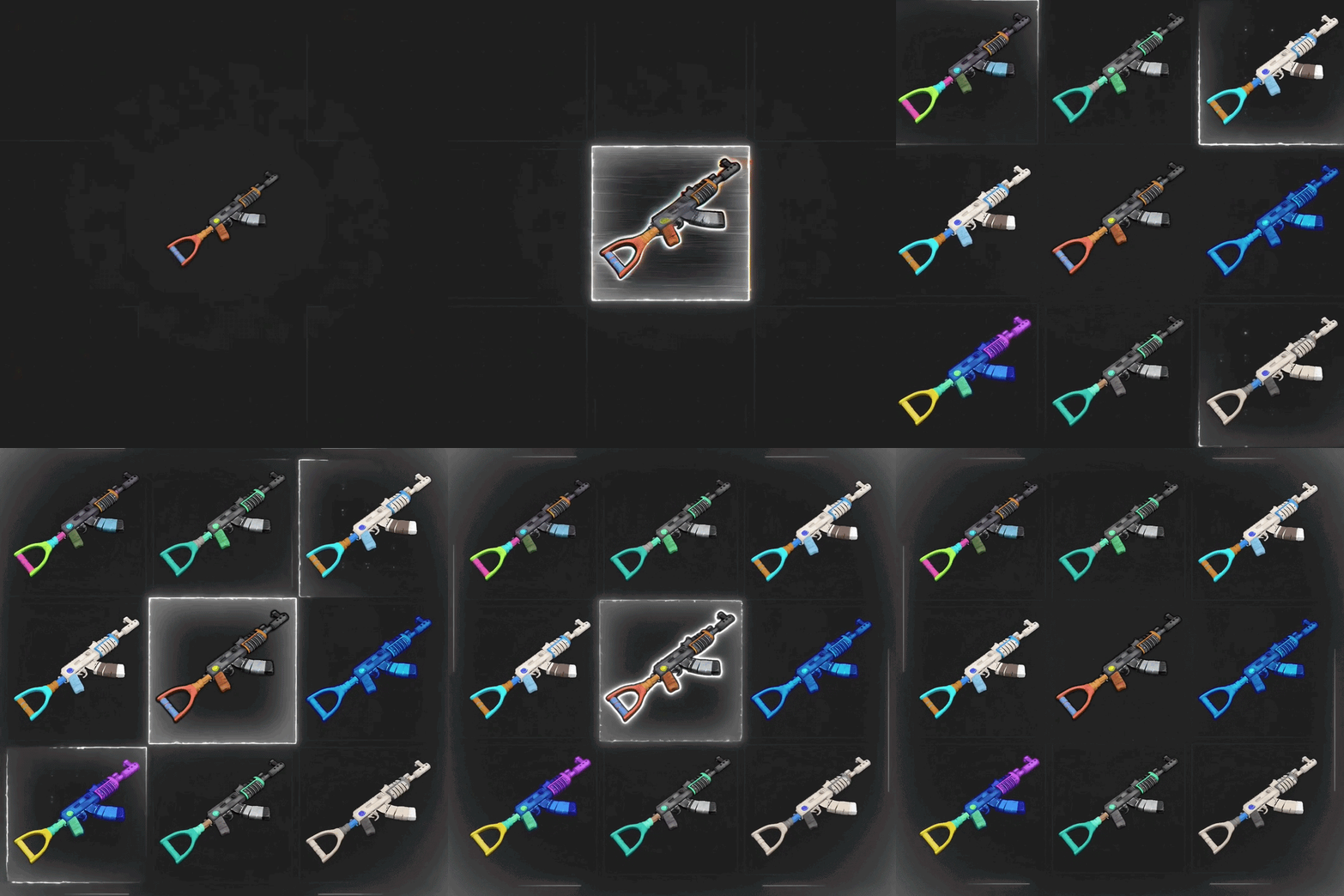
Custom & animated item icons, rendered server-side Give any item on your server a custom or animated icon — rendered server-side, streamed to players, no client mods needed. DynamicItemIcon repaints the icons of any item — vanilla items pulled from the CDN, Workshop skins fetched straight from Steam, or your own PNG files — and animates them right on the server. Effects, presets, keyframe clips and per-frame rendering all run off-thread, so your TPS won't feel it. 22 effects 11 presets 30+ API methods 25 commands zero config Features Any icon, any source Vanilla items · Workshop skins by ID · your own PNG files Every icon streams to players as a server-side sprite — nothing to install on the client. Effect chain language Chain effects with commas, tune each with named args: fx=glitch:3,neon:0x00ffcc From invert to pixelsort — 22 built-in effects, stacks compose freely. 11 ready presets corrupted · cursed · retro · golden · frozen · cartoon · vhs · cyber · void · holo · inferno One name — a tuned stack of effects. Mix presets into chains as building blocks. Keyframe clips Author animations as keyframe timelines: Per-key effect clips · frame indices · 5 easing types · loop / once / ping-pong Persistent bindings A bound animation rests on its frame 0 — players see the animated icon immediately on relog, dedup per session. Warm cache Frame-0 icons regenerate instantly at wipe/recompile — no cold stutter. Cache invalidation tracks code edits via IL-signature + MVID. Compositing Stack layers from item, skin or crc sources. 5 blend modes — over · add · multiply · screen · subtract — plus per-layer fx and opacity. CustomItemDefinitions support Overrides sprites for custom items out of the box. Batch export di.batchfx <png> runs any PNG through all 22 effects and 11 presets in one shot. 34 PNG files written to disk — preview every look before you bind. Targeted export & hue recolors di.exportfx rifle.ak hueshift:60 hueshift:120 — each fx argument lands as its own PNG file. one command → many variants for icon packs and skin shops. Wipe-safe OnNewSave clears state, icons restore at next boot. Atomic writes · debounced saves · data files stay clean. Installation Drop DynamicItemIcon.cs into your plugins/ folder. Get a GSLT token (required for Workshop skin sources): log in at steamcommunity.com/dev/managegameservers, create a token for App ID 252490 (Rust). Add it to your launch script: +server.login_token <YOUR_TOKEN> Restart the server. The token is read once at Steam login — a hot reload will not pick up a newly added launch argument. Start adding icons: di.skin <workshopId> to preview a Workshop skin, di.fx rifle.ak invert to test an effect. Steam auth fallback: token missing or invalid → the plugin still boots with a warning, server stays on anonymous login; Workshop fetching degrades gracefully to the vanilla icon. Vanilla icons and your own PNGs work without any token. For developers 30+ API methods, all callable from other plugins: Fetch & process: API_GetSkinIcon, API_GetItemIcon, API_ProcessSkinIcon, API_ProcessItemIcon, API_ProcessItem Composite: API_CompositeIcon, API_CompositeItem Animate: API_AnimateItem, API_PlayClip, API_BindClip, API_BindAnimation, API_UnbindAnimation, API_StopAnimation, API_StopAllAnimations Author clips: API_RecordClip (×2 variants), API_DeleteClip Register effects/presets: API_RegisterEffect (×2, owned), API_RegisterPreset (×2) Query: API_GetCRC, API_GetStoredIcons, API_ListEffects, API_ListPresets, API_ListClips, API_ListAnimations Admin commands 25 console commands under di.*: Items & skins: di.item, di.skin, di.fx, di.skinfx, di.processitem, di.compose Registry: di.effects, di.icons Animations: di.animate, di.animbind*, di.animstop, di.animlist, di.warmbind Clips: di.cliprecord, di.cliprecordkeys, di.clipplay, di.clipbind, di.cliplist, di.clipshow, di.clipdelete Exports: di.batchfx <png> — every effect, di.exportfx <png> <fx...> — targeted variants Permissions dynamicitemicon.admin — grants the full di.* command set. Configuration Deliberately minimal: one config option. Zero-config by design — everything interesting is done over the API and commands. Data lives under data/DynamicItemIcon/: processed/, vanilla/, skinned/, batch/ and export/. Compatibility & limits Source fetches time out and fall back to the vanilla icon — a failed download never bricks your items. Effect owners pause/resume cleanly: owner plugin unloads → its bound animations keep playing from cache. Max 1024 animation frames per clip; client preload throttled (≈40 PNG/s) so relogs don't spike players. FAQ Do players need to install anything? No — icons are server-rendered PNGs streamed through Rust's native icon pipeline. Will it break my server without the Steam token? No — falls back to anonymous login with a warning; only Workshop fetching degrades. What happens after a wipe? Bindings clear on the new save, cached icons restore automatically at boot. Does it lag the server? Frame generation and PNG encoding run on the thread pool; the main thread only decodes the source once. Can other plugins add effects? Yes — API_RegisterEffect accepts their own delegates; ownership tracking handles their reloads. Support & credits Written by 0xF. Join https://discord.gg/8nztXhvgDe for support and updates.$10.00-
- 3
-

-
- #custom icons
- #animated icons
- (and 10 more)
-

Version 0.1.0
77 downloads
Stop writing plugin code in a single file. Alloy is a folder-plugin compiler for Oxide/uMod and Carbon. It turns a folder of C# source files into a single living plugin — compiled in-memory with Roslyn, loaded without a restart, and hot-reloaded in under a second every time you save. Write code in your IDE. Hit save. The plugin is already running the new version. What Is Alloy? Alloy is a developer toolchain — it does nothing for players on its own. Everything it does is for you: faster iteration, real project structure, and debuggable code on a live server. A regular Rust plugin is one .cs file. That works until it doesn't — 5,000 lines in, navigating the file becomes the slowest part of development. Alloy adds the folder plugin format: multiple files, nested folders (Core/, UI/, …), conditional compilation, dependencies and assembly references — all described in a single alloy.json manifest. Edit any .cs file in the folder and Alloy recompiles and hot-reloads the plugin automatically. Classic single-file plugins keep working untouched. Alloy only manages folders that contain an alloy.json. Core Features Folder Plugins A plugin is a folder, not a file. Split code across as many .cs files and subfolders as you want — Alloy compiles them into one plugin. Hot Reload on File Change A file watcher rebuilds the plugin ~300–500 ms after you save. No restart, no console commands, no waiting. Atomic Reload with Rollback A broken edit never kills the running version — the last good build keeps working until you fix the errors. In-Memory Roslyn Compilation The real Roslyn compiler, in-process: full C# language features, #if directives, glob-based file selection. Real Stack Traces PDBs are generated for every build, so exceptions show the actual File.cs(42,17) — no more guessing from a merged blob. Manifest-Driven Configuration alloy.json controls included/excluded files (globstar patterns), plugin dependencies (requires), assembly references and conditional-compilation symbols (define). Dependency-Aware Lifecycle requires plugins load in dependency order. A plugin whose dependency is missing waits instead of failing — and loads itself the moment the dependency appears. Unloading a dependency unloads everything that depends on it. Conditional Compilation Alloy always defines ALLOY plus OXIDE or CARBON depending on the framework — one codebase targets both. One Core, Both Frameworks A shared Alloy.Core (netstandard2.0) with thin adapters per framework — identical behavior and manifest format on Oxide and Carbon. Console Commands alloy.list, alloy.load, alloy.unload, alloy.reload, alloy.build, alloy.verbose — full lifecycle control without leaving the console. The Folder Format oxide/plugins/MyPlugin/ ├── alloy.json ← manifest (required) ├── MyPlugin.cs ← entry class ├── Core/ │ └── Storage.cs └── UI/ └── Panels.cs { "name": "MyPlugin", "files": ["**/*.cs"], "exclude": ["Tests/**"], "requires": ["ServerPrefabs"], "references": ["0Harmony", "Facepunch.Steamworks"], "define": ["DEBUG"], "reload": { "watch": true, "debounceMs": 500 } } Dependencies and assembly references are declared only in the manifest — Alloy does not parse // Requires: / // Reference: directives in sources. [Info]/[Description] attributes remain the source of plugin metadata — the manifest never duplicates them. Debugging Compiler Diagnostics Real folder-relative paths: MyPlugin/UI/Panels.cs(42,17): error CS1002: ; expected — in the console and in the log. Runtime Exceptions Exceptions point to real files and lines thanks to generated PDBs. Log File logs/Alloy.log — Carbon FileLogger format: [yyyy.MM.dd HH:mm:ss] message. Verbose Mode alloy.verbose on — detailed pipeline logging: scan, globs, compilation, registration, watcher events. Installation Download Alloy.zip from this page and extract it. Inside are two folders — Oxide/ and Carbon/ — that mirror your server's directory layout. Pick the one for your framework and copy its contents into your server's root folder, then restart the server. The two folders never conflict. Oxide Copy the contents of Oxide/RustDedicated_Data/Managed/ into RustDedicated_Data/Managed/: Oxide.Ext.Alloy.dll, Alloy.Core.dll and the bundled Roslyn assemblies (Microsoft.CodeAnalysis.dll, Microsoft.CodeAnalysis.CSharp.dll, System.Collections.Immutable.dll, System.Reflection.Metadata.dll, …). Restart the server — the log will show Alloy initialized. Carbon Copy the contents of Carbon/carbon/extensions/ into carbon/extensions/: Alloy.dll and Alloy.Core.dll. Roslyn is already loaded by Carbon — no extra DLLs needed. Restart the server. Alloy plugins are registered in their own Alloy ModLoader package — one group in Carbon's plugin lists, never mixed with single-file plugins. Console Commands Command Action alloy.list Folder plugins: state, folder name, file count, build time alloy.load <name> Build and register the plugin alloy.unload <name> Disable and unload alloy.reload <name> Rebuild with atomic rollback alloy.build <name> Compile only — verify errors without loading alloy.verbose on|off Toggle detailed pipeline logging Perfect For Plugins that have outgrown a single .cs file Iterating on a live server without restarts Sharing one codebase between Oxide and Carbon builds of the same plugin Structured plugin projects with internal modules (Core, UI, Data…) Debugging with real file/line stack traces Framework and library plugins with complex internals Good to Know Alloy is a development tool — run it on your dev/staging server, not as a player-facing feature. Only folders with an alloy.json are managed; everything else behaves exactly as before. No // Requires: / // Reference: comment parsing — the manifest is the single source of truth by design. Alloy is a core developer tool for Rust plugin authors who want real project structure and instant feedback on a live server. Folder plugins. One-second iteration. Real stack traces. Development the way it should have been.Free -
The update may have installed incorrectly.
-
Hello. Are there any compilation errors when loading the plugin? Also, check if your user account has the necessary permissions. When did the plugin stop working?
-
 Unfortunately, I cannot link what you described to a specific part of the code; could you please record a video and submit it in a new ticket?
 -
Hello, I fixed the error you mentioned; please give it a try.
-
Hello, thanks for letting me know; I'll look into it.
-
Changed Status from Pending to Closed
-
Changed Status from Pending to Closed
-
Changed Status from Pending to Fixed Changed Fixed In to 2.2.7
-
Changed Status from Pending to Closed
-
I’m sorry you had to deal with this; which version of the plugin are you using? I removed that functionality a long time ago.
-
Changed Status from Pending to Fixed Changed Fixed In to 1.1.14
-
Hello, thanks for letting me know; I’ve just updated the plugin to the same version.
-
You've written the algorithm. Is there something wrong? Tell me the error, and I'll fix it. Suggestions will be implemented at my discretion.
-
Select the layer you want on the left and right-click on the marker or in the list; this will open the interaction menu. You can also teleport around the map using DUCK+RMB if you have the necessary permission. What problems are you having?
-
Hello, It is not functionally possible to assign the left-click action, as that button is responsible for the marker editing function on the client side.
-
Changed Status from Pending to Closed
-
Did any players appear on your list after the server restarted?
-
Do you use Oxide or Carbon? Are you using the teleport correctly — by holding down DUCK (CTRL by default) first, and then clicking the right mouse button?
-
I didn't find any issues with the library; the problem might be with your `lang`.
-
Changed Status from Pending to Fixed Changed Fixed In to 1.6.8
-
Fixed under the same version; thanks for reporting it.
-
Changed Status from Pending to Fixed
.thumb.png.ccf8a947948c9eb1445ad21a7931247b.png)