
-
Posts
121 -
Joined
-
Last visited
Content Type
Profiles
Warranty Claims
Downloads
Forums
Store
Services
Downloads Plus Support
DOWNLOADS EXTRA
Everything posted by Mat993hew
-
Version 1.0.1
13 downloads
Control Center is designed to make managing your base easier and more efficient by providing you with a user-friendly interface for interacting with key base elements such as Tool Cupboards, Code Locks, and Auto Turrets. 1. Tool Cupboard Management: Authorize Players Easily: With Control Center, you can easily authorize or deauthorize players from Tool Cupboard. Simply use the GUI to manage access in a few clicks. View Owners and Resources: You can check who currently has access to your Tool Cupboard and even view a detailed breakdown of the upkeep costs for your base. This helps you stay on top of your resource needs and ensure that your base remains protected from decay. The Owner is the first person to gain auth on Tool Cupboard and will have control over who can have full access to control center for that TC area if players have limited access the can view Control Center but not make any changes. 2. Code Lock Management: Authorize Friends: No need to give your friends the code for your Code Locks and have them go all over to find every lock, just add them to the lock you want them to access from inside the GUI. Lock and Unlock with Ease: Players can lock or unlock any Code Locks directly through the Control Center interface, which makes it faster to manage secure doors and boxes in your base. Set Custom Names: You can set custom names for each Code Lock, making it easier to identify which lock belongs to which part of your base. 3. Auto Turret Management: Authorize Friends: Easily add your team to every Auto Turret inside your base without the need of shutting you turrets down and going around each one. Switch Modes Quickly: Control your Auto Turrets through the GUI. You can easily switch between hostile and passive modes. Assign Custom Names: Similar to Code Locks, you can assign custom names to your turrets for easier management and identification. Control Center adds an easy-to-use interface that allows you to manage all these elements from one central location. You can open the interface to see a clear overview of your Tool Cupboards, Code Locks, and Auto Turrets. The GUI also allows you to add or remove friends or other players from these entities with just a few clicks, instead of having to manually interact with each one. If enabled, the plugin integrates with Steam to display your friends directly in the management interface, making it simple to add them to your base’s Tool Cupboards, Code Locks, or Turrets. With Control Center players have a powerful tool at their fingertips to better manage base security, access, and upkeep—providing a smoother and more convenient Rust experience. Chat Commands: /cc Opens Control Center. /name Used near a Code Lock or Auto Turret to add a name. Permissions controlcenter.useGui To allow players to use /cc command. controlcenter.useName To allow players to use /name command. Supported Language: English, French, German, Polish, Russian and Spanish Feel free to join my Discord! Stay up to date with the latest updates, report bugs, share suggestions, and get support for my plugins. You can also promote your Rust server or just hang out and chat! Join here: https://discord.gg/AkwHUs8Qma ControlCenter.json$15.00 -
I am extremely impressed with the Skinner plugin! It is, without a doubt, the best skinning plugin available for Rust. The performance is outstanding, with everything loading incredibly fast. The functionality is vast and versatile, catering to all skinning needs and more. The developer has done an excellent job, and I couldn't be happier with it. Highly recommended for anyone looking to enhance their Rust experience with a top-tier skinning plugin!
-
I understand your concerns about the potential interference with your custom stack settings. I’m considering adding an option to disable certain sections of the plugin to provide more flexibility. As for the stack sizes, could you please elaborate on your specific needs or preferences? My goal with Total Control is to create a user-friendly experience and consolidate as many features as possible into one comprehensive tool. This way, it simplifies the process for any admin to set up and modify servers as needed.
-
Version 2.0.0
1,321 downloads
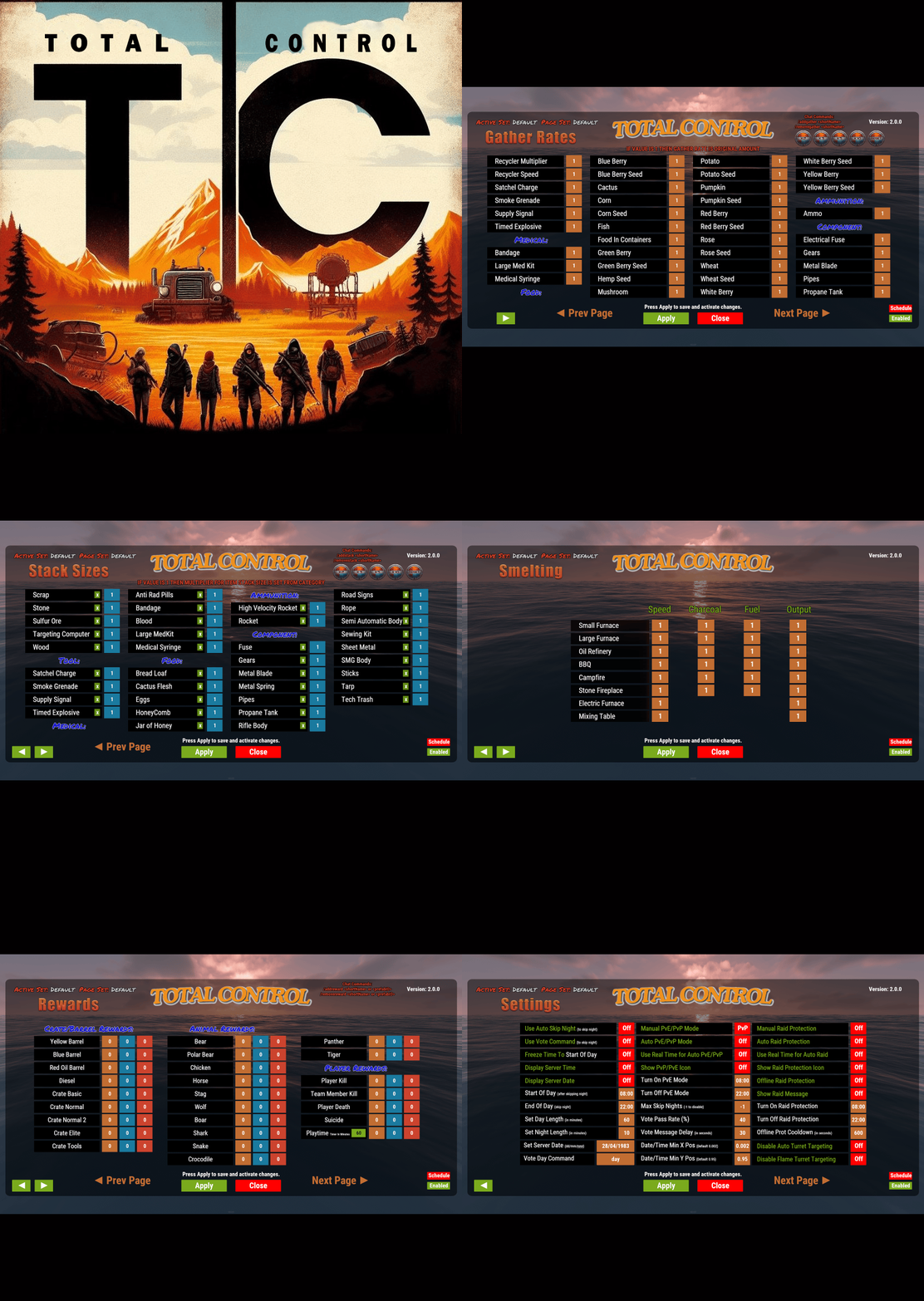
Introducing Total Control – The Ultimate Rust Server Admin Tool Total Control is a powerful full GUI admin plugin for Rust servers. Whether you run hardcore PvP or relaxed PvE, Total Control gives you complete live control over every major system directly in-game, with zero config files or reloading after changes. Dynamic Schedule System: •Plan your entire wipe and let the plugin do the work for you. •Create up to 5 scheduled sets (plus the default) Automatically change gather rates, stack sizes, smelting, rewards, PvE/PvP mode, raid protection, and more at exact dates and times. •Use real-world time or server time. •Enable only the pages you want for each set everything else stays on your default settings. •Run your server exactly how you want. Gather Rates & Stack Sizes: •Full control over every item (ore, plants, crates, quarries, excavator, etc.) Quick multiplier buttons or type exact values. •Category multipliers with individual item overrides. •Add or remove any item instantly with chat commands. Smelting & Cooking: •Adjust speed, charcoal output, fuel usage, and resource output for every furnace type. •Full control over the Mixing Table and Cooking Workbench. Rewards System: •Reward players for gathering, killing animals/NPCs/players, destroying barrels, emptying crates, Bradley/Heli loot, and playtime. •Support for Scrap, Economics, and ServerRewards (use any or all three) Optional UI Notify integration with custom message styles. Settings Page: •Auto or voted night skip. Time freeze, custom day/night lengths, and server date. •PvE/PvP mode switching (manual or timed). •Full raid protection (manual or timed). •Offline raid protection (with adjustable cooldown timer). •Option to disable shotgun traps, flame turrets, auto turrets, and SAM sites. Any admin with the correct permission can open the Total Control GUI with /tc and modify everything, without requiring data file access or plugin reload. Ideal for administrators worldwide. Permissions & Commands: Permission: TotalControl.OpenGui Chat Commands: /tc Open the GUI /addgather <shortname> /removegather <shortname> Add/Remove items to GatherRates page. /addstack <shortname> /removestack <shortname> Add/Remove items to StackSize page. /addreward <shortname or prefab> /removereward <shortname or prefab> Add/Remove items to Rewards page. (Shortnames list: https://www.corrosionhour.com/rust-item-list) Join the Community Stay up to date, get support, make suggestions, report bugs, or promote your server. https://discord.gg/AkwHUs8Qma$29.99 -
if the admin gives players permission then players can upload their own image. there is also an option in the config file for the admin to change all 20 images to whatever they want. I'm still learning and have not yet figured out how to correctly use a player's Steam avatar as their profile pic if you have any advice I'd be happy to hear it. thanks
-
Thanks. Yes i made it so only players with correct permission can upload their own images and even with that the admins can remove any unwanted images from the playerinfo data file. are you still having issues with commands on your main server if so what issues are you having and ill look into it. Thanks again and im glad you like it.
-
Version 2.0.3
81 downloads
Take your Rust server to the next level with Profiler! This powerful plugin allows players to track and view their own and others' stats in real-time. Whether you're analyzing your performance or getting a sense of another player's play style, Profiler offers valuable insights into their kills, deaths, resource gathering, playtime, and more. Use this data to make smarter decisions in the game, whether you're avoiding a high-skilled PvP player or teaming up with someone who specializes in gathering resources. Comprehensive Player Stats & Tracking Profiler tracks and displays detailed player statistics in real-time. Whether you're analyzing your performance or studying your enemies' play styles, Profiler provides a sleek and customizable UI for an enhanced experience. Interactive & Customizable UI Profiler features an easy-to-navigate GUI with six customizable panels: Kills Panel: Logs detailed kill counts for players, NPCs, animals, Bradley APC, and Attack Heli. Deaths Panel: Tracks how players die, whether from NPCs, animals, other players, Bradley APC, or Attack Heli. Harvesting Panel: Records gathered materials like stone, metal, sulfur, mushrooms, and more. Stats Panel: Displays personal performance stats, including accuracy, favorite weapon, and total playtime. Travel Panel: Tracks movement across different transportation types. Commands Panel: Admins can add up to 12 interactive buttons for players to run chat commands (e.g., open shop plugin, kits, vote day, etc.). Choose from 20 included profile pictures. Admins can change the default images directly from the config file. Players can personalize their profiles with a custom image using /img "URL" (with proper permissions). Customize the text and player name colors in the UI. Enable or disable specific panels to fit your server’s needs. Automatically remove inactive players after a set number of days (players with "VIP" permissions are exempt). Chat Commands /prof: Open the Profiler GUI (requires "use" permission). /Load: Reloads the Profiler plugin (requires "admin" permission). /deleteimg: Delete your profiler image (requires "use" permission). /img "URL": Upload a custom image (requires "imgUrl" permission). Permissions profiler.use: Access to the GUI and the /deleteimg command. profiler.imageurl: Allows players to use /img "URL". profiler.admin: Grants access to the /load command for in-game plugin reloads (designed for admin use). profiler.vip: Prevents inactive player data from being automatically deleted. Feel free to join my Discord! Stay up to date with the latest updates, report bugs, share suggestions, and get support for my plugins. You can also promote your Rust server or just hang out and chat! Join here: https://discord.gg/AkwHUs8Qma$10.00 -
- 56 comments
-
- #statistics
- #leaderboard
-
(and 12 more)
Tagged with: