
-
Posts
1,211 -
Joined
-
Last visited
-
Days Won
18
Content Type
Profiles
Warranty Claims
Downloads
Forums
Store
Services
Downloads Plus Support
DOWNLOADS EXTRA
Everything posted by AhigaO
-
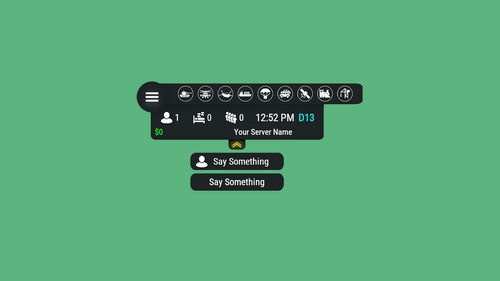 Do you want to replace the $ sign with €?
 -
 Will add it in next update
 -
 I'll see. If the author of said plugin has left any API for this implementation, I will add it.
 -
Hello. What value are you setting?
-
I don't know how the plugins you listed are made, but I don't think they will work with my plugin
-
Sorry, but I still can't understand you, what exactly do you want my plugin to do in conjunction with TruePVE?
-
-
Send me the plugin and a screenshot of the error (if any) on discord, if the plugin is not complete crap (although this is likely, since I have already dealt with plugins from it), then I will fix it
-
How exactly should the plugin work with TruePVE?
-
What exactly and where do you need to fix?
-
Will add with next update
-
I will add this feature in the next update (During the next week)
-
Added these functions
-
Yes, the plugin update is already on my list. I will release it next week
-
You can set the raid/safe time in two ways. 1) By days of the week - the set time by day of the week is used as standard, that is, if you do as I said earlier, then this time will work for any Monday - Tuesday 2) The second way is to assign a specific date - in this case, instead of the time for a given day of the week, what you set will be used
-
You can do like this: For example, on Monday, set from 23:00 to 24:00 and on Tuesday from 00:00 to 08:00
-
Version 1.3.12
2,005 downloads
Features: Setting up safe and raid times 6 variations of GUI display for players Ability to configure blocked activities during safe time Ability to set the time for the day of the week (Used by default), and for a specific date Flexible and intuitive plugin settings Real-time UI(Has 6 variations) with date, time and raid/safe time info. A menu where players can find out the safe and raid times for any given day Convenient in-game menu for plugin settings You can set safe days after wipe How to open setup RTM UI Default command for open setup RTM UI: /rtm Configuration: { "Command for open Raid Time Managment UI": "rtm", "Timezone(Difference between UTC and your time)": 60, "Time format for UI(True - 24H format, False - 12H format)": false, "Display UI": true, "Enable Alerts": true, "Allow players to close the UI": true, "[RaidableBases] Allow raiding RB bases in SafeTime": true, "[TruePVE] Safe Time RuleSet": "default", "[TruePVE] Raid Time RuleSet": "default", "[ZoneManager] The plugin will work on entities in the zones": "DISABLED", "[ZoneManager] Zone ID List": [], "UI Position": "UPPER_LEFT", "NPP amount": 0, "Block only offline raids": true, "Add safe days after wipe": 1, "Commands to be executed when raid time starts": [], "Commands to be executed when safe time starts": [], "Forbidden actions during the blocking of the raid": { "Default Raid By Player": true, "Damage Own Buildings": false, "Raid By Patrol Helicopter": true, "Raid By MLRS": true, "Using Ladders In Building Block": true, "Damage By Fire": true, "Build Ceiling In Building Block": true, "Build Turrets In 2x Building Block Radius": true, "Break down twig buildings": false }, "List of prefabs that can always be damaged": [], "Manage raids by day of the week (Used by default)": { "Monday": [ { "Start Raid Block(Hours)": 18, "Start Raid Block(Minutes)": 0, "Stop Raid Block(Hours)": 22, "Stop Raid Block(Minutes)": 0 } ], "Tuesday": [ { "Start Raid Block(Hours)": 14, "Start Raid Block(Minutes)": 0, "Stop Raid Block(Hours)": 22, "Stop Raid Block(Minutes)": 0 } ], "Wednesday": [ { "Start Raid Block(Hours)": 18, "Start Raid Block(Minutes)": 0, "Stop Raid Block(Hours)": 22, "Stop Raid Block(Minutes)": 0 } ], "Thursday": [ { "Start Raid Block(Hours)": 18, "Start Raid Block(Minutes)": 0, "Stop Raid Block(Hours)": 22, "Stop Raid Block(Minutes)": 0 } ], "Friday": [ { "Start Raid Block(Hours)": 18, "Start Raid Block(Minutes)": 0, "Stop Raid Block(Hours)": 22, "Stop Raid Block(Minutes)": 0 } ], "Saturday": [ { "Start Raid Block(Hours)": 10, "Start Raid Block(Minutes)": 0, "Stop Raid Block(Hours)": 22, "Stop Raid Block(Minutes)": 0 } ], "Sunday": [ { "Start Raid Block(Hours)": 8, "Start Raid Block(Minutes)": 0, "Stop Raid Block(Hours)": 22, "Stop Raid Block(Minutes)": 0 } ] }, "Raid management for specific days(Takes precedence over raid management by day of the week)": {} } Explanation of some options: "Default Raid by Player" : players will be able to use items for the raid Lang: { "UI_ALERT": "ALERT", "UI_TURRETBLOCK": "You cannot place turrets in double TC radius during safe time", "UI_LADDERBLOCK": "You may not place ladders in a Building Block during safe times.", "UI_CEILINGBLOCK": "You cannot place ceilings in the Building Block during safe times.", "UI_CANDAMAGE": "You cannot damage other people's buildings during safe times", "UI_CANDAMAGEOWN": "You cannot damage own buildings during safe times", "UI_START_RAID_TIME": "Raid time has begun! All restrictions removed", "UI_STOP_RAID_TIME": "The raid time is over. Restrictions are in effect!", "CM_CLOSE_HUD": "You closed the RTM HUD, to open it again use the /rtm hud command", "UI_RAIDTIMESCHEDULE": "RAID TIME SCHEDULE", "UI_SAFE_TIME": "Safe Time", "UI_RAID_TIME": "Raid Time", "UI_Monday": "Monday", "UI_Tuesday": "Tuesday", "UI_Wednesday": "Wednesday", "UI_Friday": "Friday", "UI_Saturday": "Saturday", "UI_Sunday": "Sunday", "UI_AM": "AM", "UI_PM": "PM", "UI_January": "January", "UI_February": "February", "UI_March": "March", "UI_April": "April", "UI_May": "May", "UI_June": "June", "UI_July": "July", "UI_August": "August", "UI_September": "September", "UI_October": "October", "UI_November": "November", "UI_December": "December", "UI_Thursday": "Thursday" }$14.99 -
 Yes, you can buy it after approval. Wait some days
 -
The plugin is pending approval.