Jump to content

1 Screenshot

  • 23.5k
  • 1.8k
  • 784.96 kB
  • Update details
    v1.5.5
    Released
    Download size784.96 kB
    Total versions58
    Time between versions 6 days
    Typical update pace About every 8 days
    Freshness 13 days ago

This area is for discussion and questions. Please use the support area for reporting issues or getting help.

Recommended Comments


Bertice

Posted

OK


Scalbox

Posted

Plugin updated
 

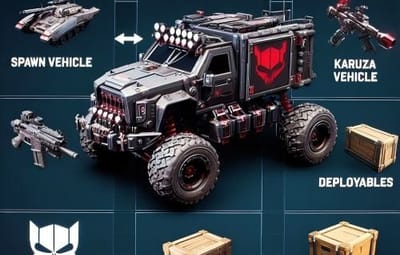
1) Added: Added: New Karuza vehicles

2) Updated: Updated Karuza vehicle SkinIds

3) Removed: Removed no longer existing Karuza vehicles

----------------------------------------------------------------------------------------------------
 

The plugin has been updated with the new Karuza vehicles and various changes. A list of all vehicles is available here:

https://dl.scalbox.com/shared/SpawnEverything_Items.html
 

In addition, some Karuza vehicle SkinIDs have been changed and obsolete Karuza vehicles have been removed. A table with all the changes made can be found here:

https://docs.google.com/spreadsheets/d/1d_Y5ai_xyFKOcXda7LP-qWydn91uK_Kh8Llr6DpkPK4/edit?usp=sharing

NB: All vehicle spawn items will no longer work for vehicles with a changed SkinID. Simply respawn these items using the new SkinID, and everything will work as before.

  • Like 1
Bertice

Posted

Great update, although it doesn't affect me at all. Yesterday I spoke with karuza to buy vehicles and he refused to sell to me because my server isn't publicly available.


AlaEddineYahia

Posted

Sorry but is this where I can find these Karuza custom véhicules and planes ? 

Scalbox

Posted

3 hours ago, AlaEddine Yahia said:

Sorry but is this where I can find these Karuza custom véhicules and planes ? 

My plugin allows you to generate Karuza vehicles.
Karuza vehicles must be purchased separately:
https://karuza.dev/

  • Like 1
snetzer

Posted

Hello


Can you insert the New Karuza Limousine , pink black and white?


best regards

Scalbox

Posted

35 minutes ago, snetzer said:

Hello


Can you insert the New Karuza Limousine , pink black and white?


best regards

Hi,

yes the plugin will be updated soon with the latest karuza vehicles,

I'm finishing making a modification to the plugin

  • Love 1
snetzer

Posted

59 minutes ago, Scalbox said:

Hi,

yes the plugin will be updated soon with the latest karuza vehicles,

I'm finishing making a modification to the plugin

Ok nice and thx

Scalbox

Posted

On 12/1/2025 at 5:10 PM, snetzer said:

Hello


Can you insert the New Karuza Limousine , pink black and white?


best regards

The plugin with the new Karuza vehicles will be released in a few hours

  • Love 1
Scalbox

Posted

On 12/1/2025 at 5:10 PM, snetzer said:

Hello


Can you insert the New Karuza Limousine , pink black and white?


best regards

Plugin updated: Version 1.4.3

1) Added: New Karuza vehicles

2) Improved: Control of aerodynamic drag, slowing down the entity's fall after spawning, preventing it from falling too quickly to the ground

  • Like 1
user_404

Posted

Hello Scalbox, can u add to "nature" deployable wild animals ? like chickens,boars,wolfs,bears, tigers, crocos etc. etc. 

Scalbox

Posted

2 hours ago, venda_vole said:

Hello Scalbox, can u add to "nature" deployable wild animals ? like chickens,boars,wolfs,bears, tigers, crocos etc. etc. 

Hello,
Yes, we're planning to add animals, which can be classic (wild) animals or non-aggressive animals.

This change is planned.

  • Like 1
user_404

Posted

Hello there, me again 😄 
i have question: if i want to add my own extra deployable items like more desks,chairs etc. what they are in assets ... it will work if i add them in config or it need to be addded in source code of plugin by u ? 

Scalbox

Posted

12 minutes ago, venda_vole said:

Hello there, me again 😄 
i have question: if i want to add my own extra deployable items like more desks,chairs etc. what they are in assets ... it will work if i add them in config or it need to be addded in source code of plugin by u ? 

you can add them directly in the configuration

  • Like 1
Scalbox

Posted

1 hour ago, venda_vole said:

Hello there, me again 😄 
i have question: if i want to add my own extra deployable items like more desks,chairs etc. what they are in assets ... it will work if i add them in config or it need to be addded in source code of plugin by u ? 

If you make me a list of things you want to have, I'll add them to the plugin as soon as possible

user_404

Posted

56 minutes ago, Scalbox said:

If you make me a list of things you want to have, I'll add them to the plugin as soon as possible

if u want i can send it to you later, i just working on it bcs im in hurry so i dont want to bother you with when i can do it by myself. 
but i can send u later my edited config file if u want ...

Scalbox

Posted

1 hour ago, venda_vole said:

if u want i can send it to you later, i just working on it bcs im in hurry so i dont want to bother you with when i can do it by myself. 
but i can send u later my edited config file if u want ...

yes that's fine, send me the file when you're done, and I'll add them to the plugin

haluk

Posted

merhaba , base olusturma olayını çözemedim yardımcı olurmusun ?


Scalbox

Posted (edited)

40 minutes ago, haluk said:

merhaba , base olusturma olayını çözemedim yardımcı olurmusun ?


Hi
the plugin allows you to generate entities or execute commands.

Just create a new item in your configuration file, and have it execute the command to paste the base.

You can use the CopyPaste plugin.

Here is an example of a configuration for spawning a base


{
      "Enabled": true,
      "DisplayName": "Spawn Home 1",
      "Description": "Spawn Home 1",
      "Item name (That will be used to spawn the entity. Default grenade.flashbang)": "grenade.flashbang",
      "Spawn PrefabName": "",
      "SkinID": 3419609271,
      "Entity Type. Default Rust": "Custom",
      "Can Pick Up Entity. Default false": false,
      "Spawn Offset Y": 0.0,
      "Spawn Rotate Y": 0.0,
      "Custom Radius Check": 0.0,
      "Execute Commands": [
        "chat.say \"/paste scalbox1_1 auth true autoheight true position %%spawnCoordinateX%%,%%spawnCoordinateY%%,%%spawnCoordinateZ%%\""
      ],
      "Execute Commands As Admin": true,
      "Spawn Cooldown (seconds)": 0,
      "Requires Building Privilege to Spawn Entity. (Default: TRUE)": false,
      "Minimum spawn distance from any Tool Cupboard (TC). [0 = Disabled] (Default: 0)": 100,
      "Allow Spawn in Monuments. (Default: FALSE)": false,
      "Disable Spawn in Monuments and Monuments radius. (Default: FALSE)": false,
      "Disable Spawn On Road/Rails. (Default: FALSE)": true,
      "Minimum spawn distance from Road/Rails. (Default: 0)": 20,
      "Spawn Only Outside": true,
      "Dont Spawn In Water": false,
      "Requires Water": false,
      "Minimum Water Depth": 0.0,
      "Armored": false,
      "Unlimited Fuel": false,
      "Fuel Amount": 0
    }


I created a new skin with the house design, you can also find them on steam, and when the item is launched the base will be pasted by running this command


"Execute Commands": [
  "chat.say \"/paste scalbox1_1 auth true autoheight true position %%spawnCoordinateX%%,%%spawnCoordinateY%%,%%spawnCoordinateZ%%\""
],


for skin

You can search for them here
https://steamcommunity.com/workshop/browse/?appid=252490&browsesort=toprated&section=readytouseitems&requiredtags[]=version3

or there are 6 created by me
https://steamcommunity.com/sharedfiles/filedetails/?id=3419609271
https://steamcommunity.com/sharedfiles/filedetails/?id=3419609489
https://steamcommunity.com/sharedfiles/filedetails/?id=3419609668
https://steamcommunity.com/sharedfiles/filedetails/?id=3419609965
https://steamcommunity.com/sharedfiles/filedetails/?id=3419610246
https://steamcommunity.com/sharedfiles/filedetails/?id=3419610437

or you can create your own icons with this tool
https://codefling.com/tools/custom-icon-creator

maybe if you search there are also free tools

----------------------------------------------------------------------------------------------------

An update will be released soon to make base spawning much easier.

Edited by Scalbox
  • Love 1
Drexl

Posted

Hi there, alot of the entity spawns i use dont persist through a server restart. is there a way to customize entity persistence to save entity data and have it reload everything on restart?  I was also wondering if its possible to have instant item placement instead of a 1 second spawn rate? maybe a way to place and have a 1 second cooldown instead?  Still new to this plugin and not sure if this is possible or not, but I am enjoying it so far! very customizable!

Scalbox

Posted

1 hour ago, Drexl said:

Hi there, alot of the entity spawns i use dont persist through a server restart. is there a way to customize entity persistence to save entity data and have it reload everything on restart?  I was also wondering if its possible to have instant item placement instead of a 1 second spawn rate? maybe a way to place and have a 1 second cooldown instead?  Still new to this plugin and not sure if this is possible or not, but I am enjoying it so far! very customizable!

This isn't a plugin issue; the entities persist after restarting. Open the configuration file and make sure you've set::


"Enable Cleanup System. Default: FALSE": false,


Drexl

Posted

The config has this set as you stated already.  unfortunately some entities I want to use for example ( spawn underwaterlab_dwelling_600_corner_a.prefab) and other underwaterlab spawnables amongst a handful of other entities do not persist.  this particular prefab spawns a stack of lab barrels i use for a decor item. I have made it an item in my shopui and it spawns and places correctly.  tested 3 times to confirm it is despawned after a restart.

Scalbox

Posted

open ticket and send config

Scalbox

Posted

underwaterlab_dwelling_600_corner_a: This is not an entity managed by my plugin.

Create an account or sign in to comment

You need to be a member in order to leave a comment

Create an account

Sign up for a new account in our community. It's easy!

Register a new account

Sign in

Already have an account? Sign in here.

Sign In Now
  • Like 4
  • Love 2

User Feedback

2.3m

Downloads

Total number of downloads.

10.6k

Customers

Total customers served.

152.8k

Files Sold

Total number of files sold.

3.3m

Payments Processed

Total payments processed.

×
×
  • Create New...

Important Information

We have placed cookies on your device to help make this website better. You can adjust your cookie settings, otherwise we'll assume you're okay to continue.