
Works with
Optional integrations and compatible files.



Rust / Server Plugins
Recoil Viewer
Player MonitoringRecoil & Training
See the pattern. Follow the shots. Review the context.
Monitor a player’s recoil on your screen while spectating or selecting them by name or SteamID. View shot statistics, accuracy and player information alongside the pattern, or let permitted players view their own recoil while training.
|
Live recoil Track shooting as it happens |
Spectator tools Player details, belt view and TP |
Optional integrations AimTrain, ZoneManager and Arkan |
01 / Video demo
See Recoil Viewer in action
This video demonstrates an older version of the plugin. The current interface and available features may differ.
02 / Live monitoring
Follow recoil and shooting information
- Display the weapon pattern and the player’s recoil as they shoot.
- Track shots, hits and headshots, with an optional hit-accuracy bar.
- Recognize the active weapon automatically. Unsupported items display a customizable language-file message.
- Show the player’s name, SteamID and optional Rust Premium Status for recordings and reports.
- Display standing or crouched stance, and optionally clear the display when the weapon is reloaded.
- Support multiple administrators viewing players at the same time.
- Collect shooting and hit information for players currently being viewed.
03 / Spectator & belt view
Keep the player’s actions in view
Use Recoil Viewer while spectating, including first-person spectating, or select a player directly with the chat command. With the appropriate permission, the belt panel shows items carried by other players the monitored player is looking at.
Configure belt-target distance, view angle and abrupt direction-change thresholds. The TP button returns you to the monitored player; EXIT lets you leave spectator mode quickly.
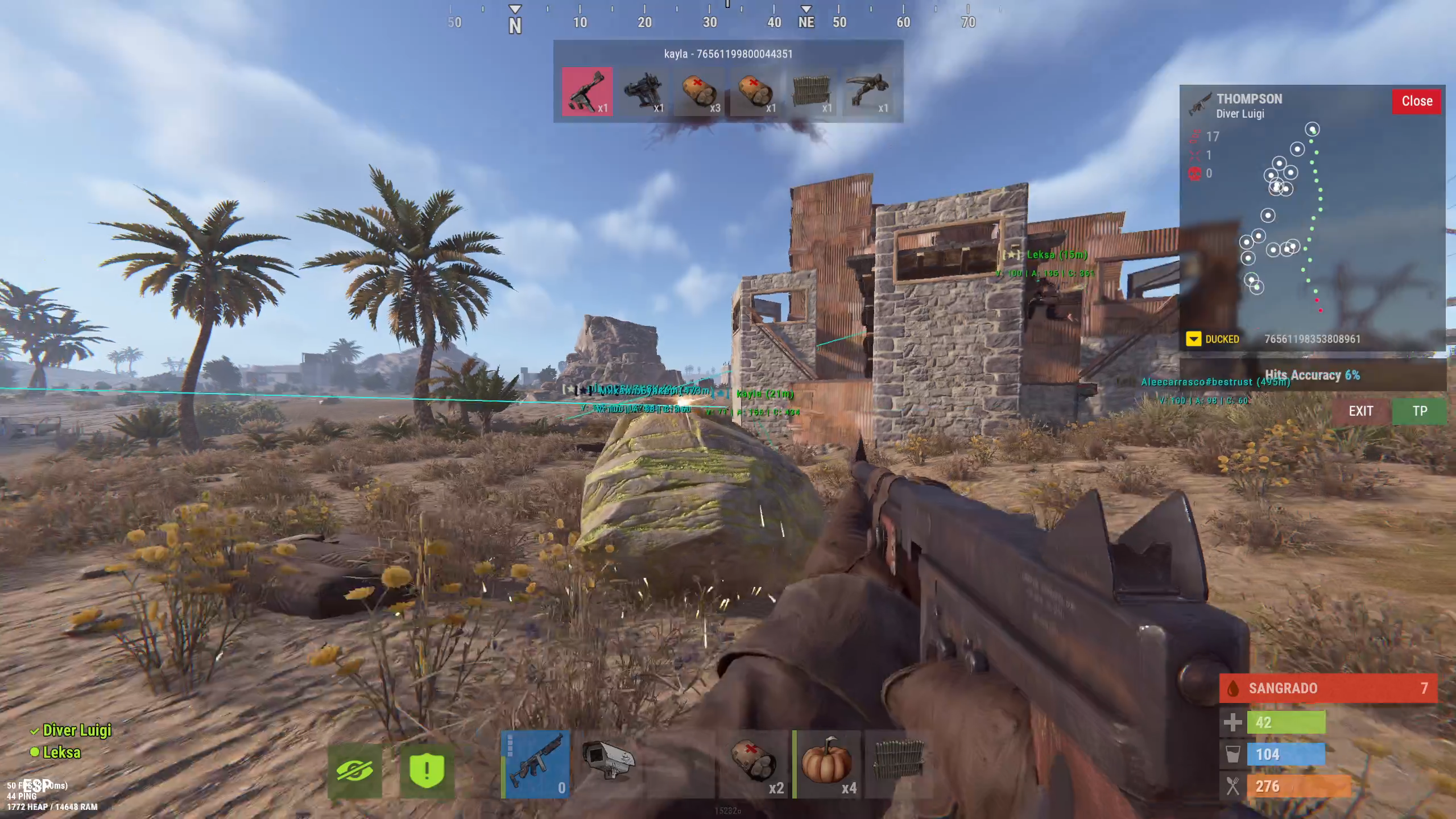
First-person spectating with recoil and target belt information
04 / Training & integrations
Open the viewer when it is needed
Self-view and AimTrain
Players with recoilviewer.player can toggle their own recoil display. With AimTrain installed and training integration enabled, permitted players automatically enter and leave the viewer as they enter or leave the training area.
ZoneManager
List the ZoneIDs where the self-view should activate. Players with recoilviewer.zonemanager automatically open or close the viewer when entering or leaving those configured zones.
Arkan NoRecoil alerts
Enable Arkan integration and use /recoil arkan to opt in to automatic viewing when Arkan reports a NoRecoil violation. This requires recoilviewer.admin and recoilviewer.autoarkan. Use the command again to turn alert tracking off.
05 / Additional panels
Optional monitoring panels in version 1.6.2
The reviewed local 1.6.2 build also includes an optional real date/time display using server-local time, mount-pose information and a ground-state panel. Availability depends on the installed plugin version.
The ground-state panel can show native ground/air flags, distance to nearby support and the duration of an inconsistent state. Configure its support tolerance and warning delay; the panel is disabled by default.
06 / Supported weapons
Nine supported automatic weapons
| Item shortname | Weapon |
|---|---|
| rifle.ak | Assault Rifle |
| rifle.lr300 | LR-300 |
| smg.mp5 | MP5 |
| smg.2 | Custom SMG |
| smg.thompson | Thompson |
| lmg.m249 | M249 |
| hmlmg | HMLMG |
| minigun | Minigun |
| t1_smg | Handmade SMG |
Pattern availability depends on the data file supplied with the plugin. Upload the matching pattern data when weapons or patterns are updated.
07 / Permissions
Control access to each viewing mode
| Permission | Purpose |
|---|---|
| recoilviewer.player | Toggle your own recoil display with /recoil. |
| recoilviewer.admin | Select other players and access administrator commands. |
| recoilviewer.spectate | Automatically open the viewer while spectating when enabled. |
| recoilviewer.training | Automatic self-view in AimTrain areas when enabled. |
| recoilviewer.zonemanager | Automatic self-view in configured ZoneManager zones. |
| recoilviewer.autoarkan | Opt in to automatic viewing from Arkan NoRecoil alerts. |
| recoilviewer.beltinfo | Show the belt of players the monitored player is looking at. |
| recoilviewer.tp | Show the TP button for the monitored player when configured. |
08 / Chat & F1 commands
Select a player or control automatic viewing
| Command | Purpose |
|---|---|
| /recoil <name|SteamID> | Chat: select another player; partial names are supported. Requires recoilviewer.admin. |
| /recoil | Chat: toggle your own viewer, or close the active viewer. Requires recoilviewer.player. |
| /rc | Chat: request the nearest player. Requires recoilviewer.admin. |
| /recoil arkan | Chat: toggle Arkan alert tracking. Requires admin and autoarkan permissions, plus enabled integration. |
| recoil | F1: close an active viewer. Requires recoilviewer.admin. |
| recoil off | F1: close the viewer and temporarily disable automatic spectator viewing. |
| recoil arkan | F1: toggle Arkan alert tracking when enabled and permitted. |
| recoil <name|SteamID> | Documented F1 target syntax; use the chat equivalent in the reviewed build (see note below). |
After using recoil off, select a player again with /recoil <name|SteamID> in chat to restore automatic spectator viewing.
09 / Installation & pattern data
Upload the weapon patterns included in the ZIP
Copy the included weapon-pattern data file to oxide/data/ or carbon/data/, preserving its name and folder structure. The reviewed plugin reads RecoilViewer.json from the server’s data directory.
10 / Configuration
Customize the display and automatic activation
- Enable or disable spectating, AimTrain, ZoneManager and Arkan integrations.
- Replace the example ZoneIDs with zones from your own server.
- Customize positions, backgrounds, buttons, text sizes, colors and recoil-point symbols.
- Configure shot counters, the accuracy bar, stance colors, premium checks and belt-target checks.
- On 1.6.2, configure optional server-local date/time and ground-state information.
The following example preserves the supplied settings and includes the optional panels from the reviewed local 1.6.2 build. Edit the configuration generated by your installed version.
{
  "Use Spectate": true,
  "Use Arkan (Mod External: Arkan)": true,
  "Use Training (Mod External: AimTrain)": true,
  "Use ZoneManager (Mod External: ZoneManager)": true,
  "Active Zones (ZoneID)": [
    "91109370",
    "1013570"
  ],
  "Clean when reloading weapon": true,
  "Target Check (Belt Viewer)": {
    "Enabled": true,
    "Max Distance (Default 300)": 300.0,
    "Angle of view (Default 20)": 20.0,
    "Threshold of abrupt change in degrees (Default 10)": 10.0,
    "Minimum time between sudden changes (Default 10)": 10.0
  },
  "Windows Config": {
    "Show Shooting Info": true,
    "Show SteamID": true,
    "Show Button TP": true,
    "Position AnchorMin": "0.810 0.571",
    "Position AnchorMax": "0.992 0.895",
    "Background Color": "0.0 0.0 0.0 0.75",
    "Button: Close Background Color": "0.87 0.0 0.0 0.9",
    "Button: TP Background Color": "0.3 0.5 0.3 0.9",
    "Button: exit Background Color": "0.5 0.3 0.3 0.7",
    "Show Real Date and Time (Server Local Time)": false
  },
  "Text Display": {
    "Weapon - AnchorMin": "0.14 0.91",
    "Weapon - AnchorMax": "0.5 0.98",
    "Weapon - Size": 12,
    "Weapon - Color": "0.8 0.8 0.8 1",
    "Player Name - AnchorMin": "0.14 0.84",
    "Player Name - AnchorMax": "0.75 0.94",
    "Player Name - Size": 10,
    "Player Name - Color": "1 1 1 0.8",
    "No Pattern - Size": 15,
    "No Pattern - Color": "1 0 0.38 1"
  },
  "Info Display": {
    "Shoots Counter": {
      "Icon AnchorMin": "0.03 0.78",
      "Icon AnchorMax": "0.08 0.83",
      "Text AnchorMin": "0.1 0.870",
      "Text AnchorMax": "0.4 0.960",
      "Font Size": 12,
      "Font Color": "0.8 0.8 0.8 0.7"
    },
    "Hit Counter": {
      "Icon AnchorMin": "0.03 0.705",
      "Icon AnchorMax": "0.08 0.755",
      "Text AnchorMin": "0.1 0.815",
      "Text AnchorMax": "0.4 0.885",
      "Font Size": 11,
      "Font Color": "0.8 0.8 0.8 0.7"
    },
    "HeadShoot Counter": {
      "Icon AnchorMin": "0.03 0.64",
      "Icon AnchorMax": "0.08 0.69",
      "Text AnchorMin": "0.1 0.75",
      "Text AnchorMax": "0.4 0.82",
      "Font Size": 11,
      "Font Color": "0.8 0.8 0.8 0.7"
    },
    "Accuracy Display": {
      "Show Bar": true,
      "BG Color 30%": "0.00 0.52 0.29 0.72",
      "BG Color 60%": "0.97 0.51 0.14 0.72",
      "BG Color 80%": "0.97 0.06 0.20 0.72",
      "Font Color": "0.9 0.9 0.9 0.7"
    }
  },
  "Pattern Weapons": {
    "Sets the point of the pattern": "•",
    "Point Size": 14,
    "Point Color": "1 0 0.38 1",
    "Point Fire Color": "0.63 0.98 0.63 1.0"
  },
  "Recoil Player": {
    "Sets the point of the recoil": "⦿",
    "Point Size": 14,
    "Point Color": "1 1 1 1"
  },
  "Stance Display": {
    "Ducked Color": "1 0.85 0 1",
    "Standing Color": "0.6 1 0.6 1"
  },
  "Premium Check": true,
  "Ground State Panel": {
    "Enabled": false,
    "Support Tolerance (meters)": 0.2,
    "Warning After (seconds)": 2.0
  }
}

Original Recoil Viewer product artwork
11 / Support
Questions or a feature suggestion?
Contact ninco90 on Discord for questions, suggestions or assistance.
Custom configuration tailored to your server is available for an additional fee.