


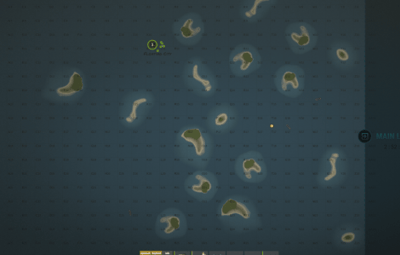


About Deep Sea Options
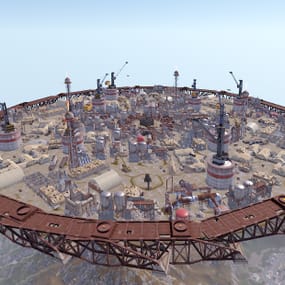
Deep Sea Options is a single config control plugin for Rust’s new Deep Sea feature.
It lets server owners fully control when Deep Sea opens, what spawns inside it, what vehicles can enter, and how access rules are enforced. You can also configure if players can build inside deep sea.
 Building Control
- Enforce building allowed / blocked inside Deep Sea *
- Limit how many foundations a player can build in Deep Sea
* Buildings persist restart, as long as the deep sea isnt being closed.
 Deep Sea Behavior Control
Configure defaults:
- Whether the deep sea should always remain open, be on timers, or disabled
- Whether deepsea will auto open on server wipe (facepunch disables this by default)
- Control all phase timers
- GameTip messages to announce deep sea openinig/closing
 Deep Sea Content Control
Configure procedural spawns:
- Island counts
- Ghost Ships counts
- RHIB counts
Control:
- count
- spacing radius
- minimum distance between spawns
- distance from Deep Sea edges
- Settings are grouped and explained in the config
 Loot spawn
- Configurable respawn option for crates/ore/npc
- Respawn for scientist boat groups
 Access & Teleport Rules
Control:
- Allow all vehicles (including planes and helis) or only an allow-listed set
- players can enter without a boat
- flying (noclip/admin) players can bypass checks
- NPC passengers are allowed on vehicles
- Prevent or allow “vehicle stacking” (boats/helis on deck)
Chat Commands
/deepsea status Shows current Deep Sea state
/deepsea open Opens deep sea if not alrady open
/deepsea close Closes current Deep Sea
Console Commands
dso open - to open the deepsea through the plugin
dso close - to close the deepsea through the plugin
dso forceclose - to force close the deepsea in case you need it closed but 'AlwaysOpen' is reopening it
Note if you make changes to some config values (such as the procedural spawns, you will need to close the deep sea and reopen.)
Config options:
=== GENERAL CONTROLS ===

Control - Schedule
If ON: Plugin controls when Deep Sea opens/closes and how long it stays open.

Control - Content
If ON: Plugin controls how many islands, ghost ships, RHIB patrol groups, and initial loot scale Deep Sea uses.

Control - Travel Rules
If ON: Plugin controls who/what is allowed to use Deep Sea portals (vehicles, NPCs, players without vehicle, etc).

Control - Building
If ON: Plugin controls whether players can build while inside Deep Sea.

Force Apply On Reload
If ON: When plugin reloads, it forces Deep Sea to close and reopen so spawn changes apply immediately.
If OFF: Changes apply next time Deep Sea opens normally.


=== SCHEDULE SETTINGS ===

Mode
Vanilla = Normal Rust Deep Sea cycle.
AlwaysOpen = Deep Sea never closes.
Disabled = Deep Sea never opens. Plugin keeps pushing the next opening far into the future.

Open Time Seconds
How long Deep Sea stays open before closing.

Cooldown Seconds
How long Deep Sea stays closed before opening again.

Final Phase Seconds
End-of-cycle phase used for weather / atmosphere effects.

Radiation Warning Phase Seconds
When time left is below this, new entry is normally blocked unless late entry is allowed.

AlwaysOpen - Keep Time Left Around Seconds
In AlwaysOpen mode, plugin keeps the remaining open time around this value.

AlwaysOpen - Refill When Below Seconds
If time left drops below this, it refills back up to the target above.

Disabled - Push Next Opening To Seconds
In Disabled mode, pushes next open time far into the future.

Entrance Portal Direction
Forces the entrance portal direction.
0 = Map-based
1 = North
2 = East
3 = South
4 = West

Set Open On Server Wipe
If ON: Plugin controls the vanilla wipe setting.

Open On Server Wipe
Only used if above is ON.
If enabled, Deep Sea is allowed to auto-open on server wipe.

Set Generation Pacing
If ON: Plugin controls Deep Sea generation pacing values. Increasing these delays can help if you experience long lag spikes when Deep Sea is opening.

Entities Spawn Interval Seconds
Only used if above is ON.
Controls delay between general Deep Sea entity spawns during generation.
Lower = faster generation.

Spawn Groups Spawn Interval Seconds
Only used if above is ON.
Controls delay between Deep Sea spawn-group waves during generation.
Lower = faster generation.

NavMesh Spawn Interval Seconds
Only used if above is ON.
Controls delay between Deep Sea island navmesh generation steps.
Lower = faster generation.


=== CONTENT SPAWNING ===

These control placement spacing for each Deep Sea content type.

Islands / Ghost Ships / RHIB Groups all use the same logic:

Count
How many spawn each time Deep Sea opens.

Spacing Size
General spacing radius. Bigger = more spread out.

Edge Buffer
How far from the outer Deep Sea border spawns must stay.
Bigger = more toward the center.

Minimum Spacing
Hard minimum distance between spawns.
Overrides spacing size if larger.

Loot

Initial Loot Scale
Controls the initial vanilla Deep Sea loot population multiplier when Deep Sea generates.
1.0 = vanilla amount.
Higher = more initial loot spawned.
Lower = less initial loot spawned.


=== RESPAWN (CRATES / NPCs / HACKABLES / RHIBS) ===

Enable Respawn System
If ON: Plugin respawns eligible Deep Sea crates, ores, island scientists, hackable crates, and optional RHIB/PT boat patrol groups.

Enable Debug Logging
If ON: Plugin prints debug messages for entity removal, queueing, cleanup, and respawning.

Check Interval Minutes
How often the respawn system runs.

Min Distance From Players To Allow Respawn
Entities only respawn if no players are within this distance.

Respawn Hackable Crates Via Ghostship
If ON: Hackable crates respawn through ghost ship crate spawning.

Hackable Crates Count
How many hackable crates the plugin wants available through ghost ship spawning.

Respawn RHIB Patrol Groups When None Remain
If ON: Plugin maintains Deep Sea RHIB/PT patrol groups by checking current live patrol boats and respawning missing groups up to the configured boat count.


=== TRAVEL RULES ===

Allow Any Vehicle
If ON: Any vehicle can use the portal.

Allowed Vehicle Prefabs
If Allow Any Vehicle is OFF, only vehicles matching these prefab names/partial names are allowed.

If Any Vehicle, Require Boat Type Only?
If ON: Even allowed vehicles must still be boat-type vehicles.

Allow Players Without Vehicle
If ON: Players can teleport without standing on a vehicle.

Allow Noclip Players
If ON: Flying/admin players bypass normal vehicle checks.

Allow Non-Player Passengers (NPCs)
If OFF: Vehicles with NPC passengers cannot teleport.

Allow Non-Player Entity Teleport (NPCs)
If ON: NPC player-type entities themselves can teleport.

Allow Entry During Radiation Warning Phase
If ON: Players can still enter even when Deep Sea is near closing.

Modify DeepSea Portal Height?
If ON: Plugin enlarges the Deep Sea portal height to help high-flying or tall custom vehicles enter more reliably.

Ignore Extra Vehicle Onboard Check
If ON: Skips checks for extra vehicles being carried/on top of another vehicle, such as helicopters on boats.

Log Entry/Exit
If ON: Logs allow/deny travel decisions for debugging.


=== BUILDING ===

Allow Building In Deep Sea
If OFF: Players cannot build inside Deep Sea.
If ON: Building is allowed.

DeepSea - Limit Foundations
If ON: Limits how many foundations each player can place inside Deep Sea only.

DeepSea - Max Foundations Per Player
Maximum number of foundations a player can place inside Deep Sea.

DeepSea - GameTip: Show Remaining On Successful Place
If ON: When a player places a foundation in Deep Sea, shows how many they can still place.

DeepSea - GameTip: Show Message When Denied
If ON: When a player hits the Deep Sea foundation limit, shows a GameTip.


=== NOTIFICATIONS ===

GameTip - Deep Sea Opening
If ON: Shows a GameTip when Deep Sea starts opening.

GameTip - Deep Sea Opened
If ON: Shows a GameTip when Deep Sea is fully open.

GameTip - Deep Sea Closing
If ON: Shows a GameTip when Deep Sea starts closing.

GameTip - Deep Sea Closed
If ON: Shows a GameTip when Deep Sea is fully closed.









.thumb.png.e88f28f1c66c6591dd89b4a4b76239e5.png)
.thumb.png.2e1c81ea8e1396446c9e56ed38408572.png)