

About Death Recap
Death Recap shows players a clean panel when they die: killer, weapon, distance, health left, gear, body hit map, damage timeline and rivalry score, plus admin tools to review kills.

DEATH RECAP · FIGHT REVIEW · ADMIN TOOL
Know exactly how you died
A clean recap opens the moment you die: who killed you, with what, from how far, where you got hit and how much health they had left. No more how did I lose that fight?
And for admins, a powerful tool to review fights and spot suspicious kills.
-
12 things shown on death
-
5 deaths kept in history
-
1 click to review a kill
-
0 dependencies
-
Killer, weapon, distance: with attachments, health left and the killer's gear
-
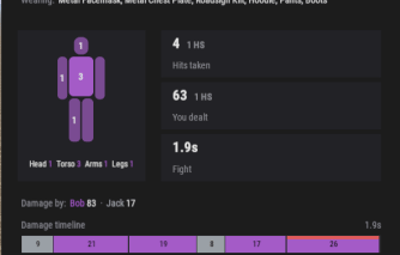
Body hit map: head, torso, arms and legs light up with the hits taken
-
Damage timeline: every hit in order, headshots in red
-
Rivalry score: you 2 · them 5, this wipe
-
Admin kill review: check any player's victims in one click, plus Discord logs

Every detail of the fight
The killer
Name, weapon with its attachments, distance, health left (or also dead if you traded), and their gear: helmet, chest plate, kilt. You finally understand why your bullets did so little.
Body hit map
Each body part gets brighter the more bullets it took, with the number of hits.
The fight in numbers
Hits taken, headshots, damage dealt back to the killer, fight duration and damage per attacker when several enemies shot you.
Damage timeline and hit list
Every hit in order with its timing (+0.4s, +1.2s...) and body part. Bleeding is credited to the player who caused it, so you never see unknown damage.
Rivalry score
If the same player keeps killing you, the recap shows the score between you this wipe.
Not only PvP
Optional recap for scientists, helicopter, Bradley, turrets, traps, animals, fall, radiation, cold, drowning... (off by default).

Comfortable, never in the way
- Death history: the last 5 deaths by default, with arrows to browse them
- Your choice: turn off the automatic recap and open it with /recap instead (optional)
- Your last kill: /recap kill: You killed X, 4 hits, 2 headshots, or automatic if you enable it

Settle the cheating reports
/recap view <player>
See the last recap of any player.
/recap kills <player>
See a player's last victims (10 by default) with weapon, distance, hits, headshots and time. Click a victim to open the full recap of that kill.
Discord log
Optional post for every PvP death, with weapon, distance, hits, headshots, damage and the killer's gear.
Fully configurable
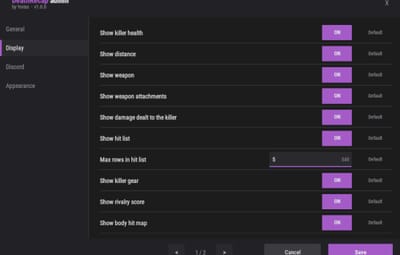
Show or hide each element if you want to keep some mystery, panel position (right, left, center), display duration, accent color. Every setting in game, English and French included, and it plugs into the free Yorixx Hub.

-
/recap: Open your last death recaps -
/recap auto: Turn the automatic recap on or off -
/recap kill: Short summary of your last kill -
/recap admin: Open the settings panel -
/recap view <player>: See a player's last recap -
/recap kills <player>: See a player's last victims -
/recap test [pvp|npc|fall|kills]: Preview the panels with test data -
deathrecap.info: Plugin status (console)
Player commands accept a name or a SteamID. The chat command can be renamed in the settings.
Permissions
-
deathrecap.admin: Settings panel, /recap view and /recap kills -
deathrecap.use: See the recap (only if Require permission to see the recap is on)

1. Create the webhook
In your Discord channel settings: Integrations, Webhooks, New Webhook, then Copy Webhook URL.
2. Paste it in the plugin
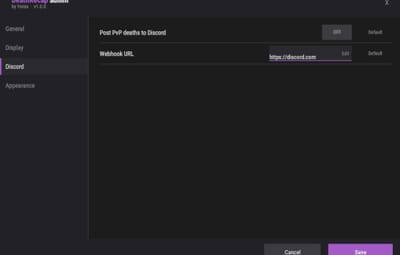
In game: /recap admin, Discord tab, click Webhook URL, paste with Ctrl + V, press Enter, turn Post PvP deaths ON and Save.
Keep your webhook URL private, and use a staff-only channel: busy servers post a lot.
Network use
Death Recap only contacts Discord, and only if you paste a webhook URL and turn PvP death posts on. No analytics, no tracking, no license check.
Configuration
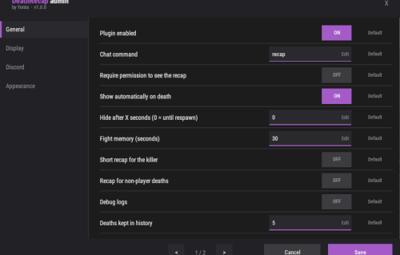
Everything below can also be edited in game.
{
  "General: Enabled": true,
  "General: Chat command": "recap",
  "General: Require permission to see the recap": false,
  "General: Show automatically on death": true,
  "General: Hide after X seconds (0 = until respawn)": 0,
  "General: Fight memory (seconds)": 30,
  "General: Send a short recap to the killer automatically": false,
  "General: Recap for deaths not caused by players (traps, animals, fall, suicide...)": false,
  "General: Deaths kept in history per player": 5,
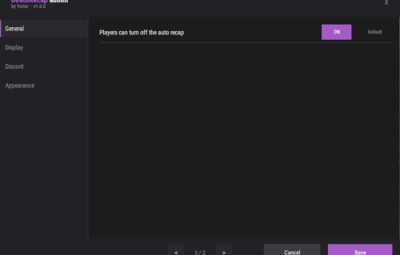
  "General: Players can turn off the automatic recap": true,
  "General: Debug logs": false,
  "Display: Show killer health": true,
  "Display: Show distance": true,
  "Display: Show weapon": true,
  "Display: Show weapon attachments": true,
  "Display: Show damage dealt to the killer": true,
  "Display: Show hit list": true,
  "Display: Max rows in hit list": 5,
  "Display: Show killer gear": true,
  "Display: Show rivalry score (kills between you and the killer this wipe)": true,
  "Display: Show body hit map": true,
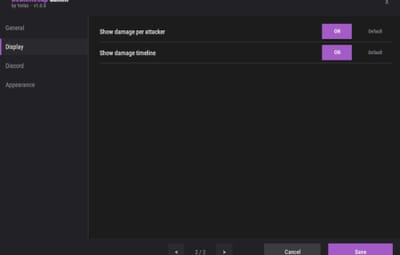
  "Display: Show damage per attacker": true,
  "Display: Show damage timeline": true,
  "Admin: Victims kept per player for /recap kills": 10,
  "Discord: Post PvP deaths": false,
  "Discord: Webhook URL": "https://discord.com/api/webhooks/...",
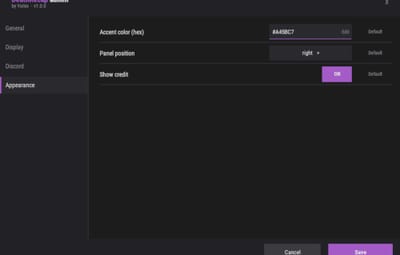
  "UI: Accent color (hex)": "#A45BC7",
  "UI: Position (right, left, center)": "right",
  "UI: Show credit": true,
  "Config version": {
    "Major": 1,
    "Minor": 0,
    "Patch": 0
  }
}
Support
Questions, bugs or ideas: join our Discord.