Jump to content

BotReSpawn 1.5.6

$40.00
   (43 reviews)

10 Screenshots

  • 534.8k
  • 18.6k
  • 356.93 kB
  • Update details
    v1.5.6
    Released
    Download size356.93 kB
    Total versions58
    Time between versions 15 days
    Typical update pace About every 30 days
    Freshness 14 days ago

This area is for discussion and questions. Please use the support area for reporting issues or getting help.

Recommended Comments


Explosive_Shart

Posted (edited)

On the new version I can't get custom proflies to load. It just resets back to false.

False alarm it was my permissions that got changed to use it.

Edited by Explosive_Shart
  • Like 1
  • Administrator
Steenamaroo

Posted

oof. We're all good?

  • Like 1
MrIce

Posted (edited)

Same here them dont spawn, I do true and reload profile and close it and do it again an d them are on False

This are in Tower at Airfield


Edited by MrIce
  • Like 1
  • Administrator
Steenamaroo

Posted (edited)

Just that one profile, @MrIce?
Are you reloading the plugin?
If you are, make sure you close the UI first, because that's when it saves.

Edited by Steenamaroo
Explosive_Shart

Posted

Yea its good, when I updated the PermissionManager it removed permissions for botrespawn

  • Confused 1
  • Administrator
Steenamaroo

Posted (edited)

Oof. That shouldn't have happened.


Edit: That shouldn't be possible. lol.
PermissionsManager is a front end so it doesn't actually store permissions anywhere.
Something weird going on.

Edited by Steenamaroo
MrIce

Posted (edited)

No Have that on all most all profiles 

It is Working now Thankz

Edited by MrIce
  • Like 1
  • Administrator
Steenamaroo

Posted

"It is Working now Thankz"
Why? 😂
What changed?

MrIce

Posted

Reload the plugin after that it was working hmm


  • Like 1
  • Administrator
Steenamaroo

Posted

Weird.
Ok..Please let me know if anything else strange happens. 👍

  • Like 1
hairybeanstalk

Posted

weird. botrespawn wont load after this recent update.

22:47 [Error] Error while compiling BotReSpawn: There is no argument given that corresponds to the required parameter 'flagsUpdateMode' of 'Chainsaw.SetEngineStatus(bool, BaseEntity.FlagsUpdateMode)' | Line: 1598, Pos: 20

  • Administrator
Steenamaroo

Posted

@hairybeanstalk- Looks like you're not running the most recent version.
Redownload from here and watch for 1.5.6 in console, not 1.5.5.

  • Administrator
Steenamaroo

Posted

On 6/27/2026 at 3:08 PM, Dr.D.Bug said:

Have you perhaps had a chance to check the Scarecrow NPC loot profile yet?

Yes, found and solved.
This will be in the next update.
Thanks for flagging it, and for your patience. 🙂

Papa Bear

Posted

So, today I found all my bots at Mil tunnels above ground, even though I had placed spawn points within the tunnels.  I'm not sure how long (past wipes) this is been going on?  

I checked my spawn points and they are buried below the tunnels in empty space.   I suppose, since they are that far down, that's why they are spawning above the tunnels.

Is there a fix for this?  Could it just be confused from where this months Military Tunnels are located?  For now, I'm just going to shut them off and I will make my rounds to the other monuments.  This is my only underground monument that I add NPCs to.


MichuX

Posted

7 hours ago, Papa Bear said:

So, today I found all my bots at Mil tunnels above ground, even though I had placed spawn points within the tunnels.  I'm not sure how long (past wipes) this is been going on?  

I checked my spawn points and they are buried below the tunnels in empty space.   I suppose, since they are that far down, that's why they are spawning above the tunnels.

Is there a fix for this?  Could it just be confused from where this months Military Tunnels are located?  For now, I'm just going to shut them off and I will make my rounds to the other monuments.  This is my only underground monument that I add NPCs to.


Military Tunnels and Missile Silo as well. Since Facepunch changed coordenates from monuments wipes ago this has been going like that.

  • Administrator
Steenamaroo

Posted

Assuming you both have custom spawn points placed down there and UseCustomSpawns set to true,
is either of you able to confirm that there's still navmesh there?

If there isn't (and they aren't stationary) they just won't spawn.

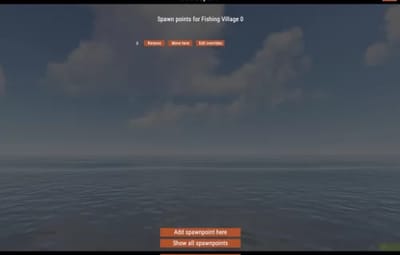
Viewing all spawnpoints via UI button will tell you - Red = no navmesh. 

Create an account or sign in to comment

You need to be a member in order to leave a comment

Create an account

Sign up for a new account in our community. It's easy!

Register a new account

Sign in

Already have an account? Sign in here.

Sign In Now
  • Like 14
  • Sad 5
  • Haha 1
  • Love 30

User Feedback

About Us

Codefling is the largest marketplace for plugins, maps, tools, and more, making it easy for customers to discover new content and for creators to monetize their work.

Downloads
2.7m
Total downloads
Customers
11.6k
Customers served
Files Sold
165.9k
Total sales
Payments
3.6m
Processed total
×
×
  • Create New...

Important Information

We have placed cookies on your device to help make this website better. You can adjust your cookie settings, otherwise we'll assume you're okay to continue.