

About Shop Theme V4 Windowed
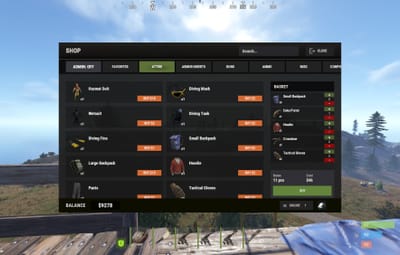
Shop Theme V4 is a complete visual theme for the Shop plugin by Mevent, designed in a dark Rust-inspired UI style.
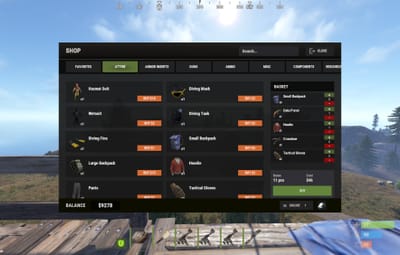
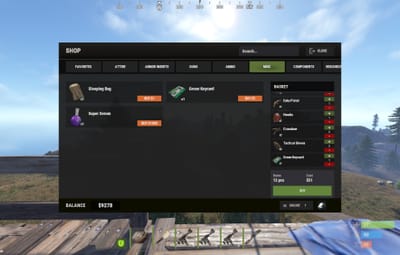
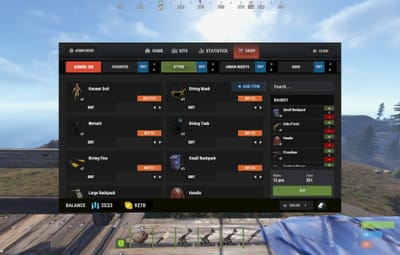
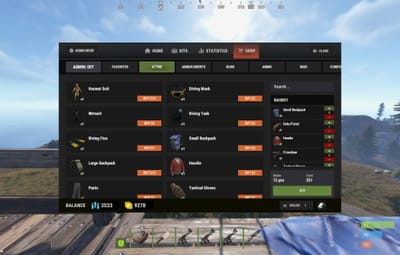
The theme replaces the default interface with compact horizontal product cards, convenient category navigation, a redesigned shopping basket, styled modal windows, and an informative footer.
Both included layouts use the same visual style and product card design.
INCLUDED VERSIONS
• ServerPanel / V4 Windowed — designed to integrate with the V4 Windowed Theme for ServerPanel.
• Standalone / Windowed — an independent 800×480 Shop window that can be used without ServerPanel.
COMPACT PRODUCT CARDS
Products are displayed as compact horizontal cards in a two-column layout.
Depending on the item configuration, each product card can display:
• A custom product image
• Product name
• Available amount
• BUY and SELL controls
• Buy and sell prices displayed directly inside the buttons
• Favorite button
• Item information or description button
• Discount indicator
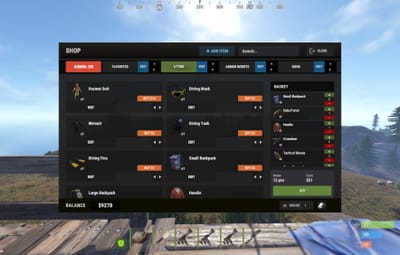
• Administrative controls when Admin Mode is enabled
The compact design allows more products to remain visible without making the important information difficult to read.
BUYING AND SELLING
The interface supports the original buying and selling functionality provided by Shop.
Products can use:
• BUY only
• SELL only
• Separate BUY and SELL buttons
• Direct purchases
• Shopping basket purchases
• Free products
• Custom currencies and economy providers supported by Shop
The theme changes the visual presentation while preserving the original Shop product, economy, permission, limit, cooldown, and transaction logic.
CATEGORIES AND NAVIGATION
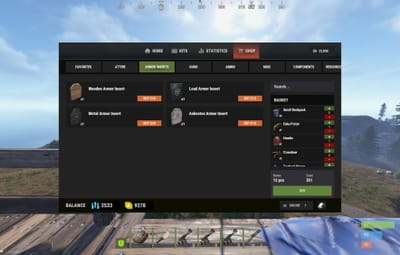
Products are organized into horizontal category tabs above the product area.
The category interface includes:
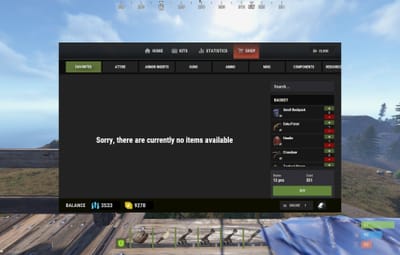
• Favorites category
• Custom product categories
• Horizontal category scrolling
• Automatic category list width calculation
• Additional spacing at the end of the category list
• Clearly highlighted selected category
• Automatic handling of additional categories
• ADMIN: ON/OFF displayed as the first category-style button for administrators
In the ServerPanel version, categories are placed inside the secondary header area to match the rest of the V4 Windowed interface.
PRODUCT NAVIGATION
The product area includes:
• Two-column product card layout
• Vertical product scrolling
• Automatic handling of additional products
• Configurable card size and spacing
• Separate spacing rules for normal and administrative modes
• Product search field
The ServerPanel version places the search field above the shopping basket, keeping the main product area clear.
SHOPPING BASKET
The redesigned shopping basket matches the appearance of the product cards and the rest of the interface.
The basket can display:
• Product image
• Product name
• Selected amount
• Quantity increase button
• Quantity decrease button
• Item removal control when enabled
• Total number of products
• Total purchase cost
• Final purchase button
• Vertical scrolling when additional products are added
The basket remains compact when only a few products are present and becomes scrollable only when necessary.
ADMIN MODE
Administrators can activate Admin Mode directly from the category list.
When enabled, the interface provides dedicated space for Shop management controls, including:
• Category editing
• Category reordering
• Adding new categories
• Product editing
• Product reordering
• Adding new products
• Other administrative actions supported by Shop
The category list automatically reserves additional horizontal space for administrative controls, preventing them from overlapping neighboring categories.
Product cards also receive additional vertical spacing only while Admin Mode is enabled.
MODAL WINDOWS
The theme includes redesigned modal windows matching the main interface style.
Supported windows include:
• Purchase menu
• Sell menu
• Purchase confirmation
• Item information and description
• Other confirmation windows supported by Shop
Modal windows use a darkened background and compact centered panels to keep the player focused on the selected action.
FOOTER
The standalone version includes a custom footer that can display:
• Current player balance
• Selected currency or economy
• Currency switching button
• Real online player count
• Player avatar
The ServerPanel version uses the outer header and footer provided by ServerPanel, creating a consistent appearance across all integrated pages.
LOCAL IMAGES
All custom V4 theme images are included in the package and configured for Offline Image Mode.
The package contains the required interface icons, navigation arrows, header image, favorite states, and other visual elements used by the theme.
PACKAGE CONTENTS
• Ready-to-use Shop UI configuration containing both interface versions
• Standalone / Windowed Shop layout
• ServerPanel / V4 Windowed Shop layout
• Optional example Shop data
• All required custom UI images
NOTE
After purchasing this theme, please send me proof that you own the original Shop plugin by Mevent. Once your purchase has been verified, I will provide you with a slightly modified version of the plugin required for all theme UI elements to display and function correctly.
IMPORTANT
The Shop plugin is not included in the theme package and must be purchased separately from Mevent.
The ServerPanel plugin and V4 Windowed Theme for ServerPanel are required only if you want to use the integrated ServerPanel version. The standalone version can be used independently.
Always create a backup of your existing Shop files before installation.
INSTALLATION
Install the supported version of the Shop plugin.
If you plan to use the ServerPanel version, install and configure ServerPanel with the V4 Windowed Theme.
Create a backup of:
• Your Shop configuration
• Your Shop UI configuration
• Your existing product and category data
Send proof of ownership of the original Shop plugin by Mevent to receive the modified plugin file required by the theme.
Install the provided modified plugin file and copy the included configuration, data, and image files to their corresponding Carbon or Oxide directories.
Use the included Shop/Shops/Default.json only for a new installation, or manually transfer the required examples into your existing data file. Replacing an existing file will overwrite your previously configured categories and products.
Reload the plugin:
c.reload Shop — Carbon
o.reload Shop — Oxide
If you are using the integrated version, reload ServerPanel after reloading Shop.
COMPATIBILITY
Designed for Shop v2.5.3.
Compatible with Carbon and Oxide.
The ServerPanel version is visually compatible with the V4 Windowed Theme for ServerPanel, while the standalone version can be used independently.
Support is available through Codefling private messages and Discord.
Discord: Simil3x