
Tikomatura's Wishlist
-
$14.99
Reputation Rewards
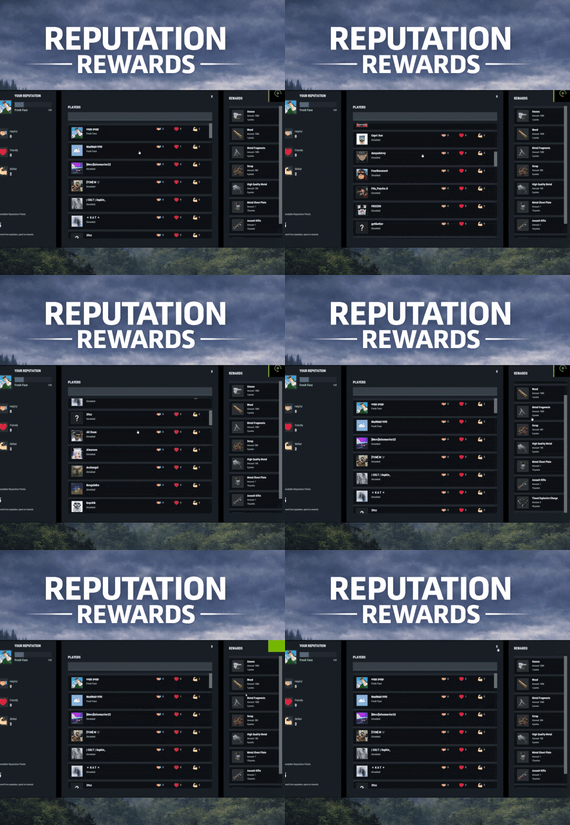
ReputationRewards is built to encourage positive community behaviors by adding an in-game reputation system to your Rust server with a clean 3-column UI, built-in reward shop, and rank progression.
Players can reward each other for being Helpful, Friendly, or Skilled, earning spendable reputation points that can be redeemed instantly for configured items. As players gain reputation, they climb ranks and can trigger configurable server commands on rank-up for additional rewards or other triggers (kits, mail, permissions, VIP perks, etc.).
Key features
📱 In-game UI
One command opens a polished reputation interface. Three-column layout: Your Reputation (rep totals, rank, progress bar, spendable points) Players List (searchable, sorted by total rep) Built in Rewards Shop 💞 Three reputation categories
Helpful Friendly Skilled These can easily be renamed to something else via the Lang files. 👮 Anti-abuse limits (configurable)
Per-target cooldown: limit how often someone can rep the same player. Total giving limit per window: cap how many reps a player can give during a configurable time window (default 24h). 👛 Spendable reputation points
Configurable points awarded to: The target (for receiving rep) The giver (for giving rep) Points are spent in the built in reward shop. 🛒 Built-in reward shop
Configure any Rust item shortname + amount + optional skin + optional custom display name. Players select quantity and see the total cost before purchase. 📈 Rank system with automatic rewards
Define unlimited ranks with a required total reputation threshold. Run server commands on rank-up (supports placeholders like %steamid%). Compatible with all plugins that can trigger a console command against a player, such as my Mail System 🎇 Visual feedback
FX plays when rep is received. FX plays on rank-up to make progression feel rewarding. 🔗 Integrations
BetterChat: If you wish to display player's reputation rank next to their chat name
ImageLibrary (recommended): for image loading reliability.
⚙️ Configuration highlights
Set cooldown time per target player Set total give limit window (seconds) + max reps per window Configure how many spendable points are earned per rep (giver and target) Configure wipe behavior on new save (rep/rank and/or spendable points) Define ranks and rank-up commands Define reward shop items and pricing Customize UI colors + icon URLs
__________________________________
⌨️ Commands (configurable):
/rep or /reputation - Opens the reputation UI
__________________________________
Sample/Default Config:
{ "Commands to open UI": [ "rep", "reputation" ], "How often can a player give rep to the same player": 86400, "How often to reset player's total rep give limit": 86400, "Max reputation gives per total window (per player)": 5, "Spendable points awarded to TARGET per rep received": 2, "Spendable points awarded to GIVER per rep given": 1, "Wipe reputation + rank on new save?": false, "Wipe spendable points on new save?": false, "Ranks / Levels": [ { "Rank Name": "Fresh Face", "Points Required (total rep)": 1, "Commands On Reach (optional)": [ "mail.send %steamid% \"Rank Up: Fresh Face!\" \"Welcome to the community! Here are some starting supplies to help you settle in.\" -img 0 -item wood 1000 0 -item stones 1000 0" ] }, { "Rank Name": "Promising Sapling", "Points Required (total rep)": 5, "Commands On Reach (optional)": [ "mail.send %steamid% \"Rank Up: Promising Sapling!\" \"You're showing great potential! Here are some resources to help you grow.\" -img 0 -item sulfur.ore 1000 0 -item metal.ore 1000 0" ] }, { "Rank Name": "Positive Force", "Points Required (total rep)": 10, "Commands On Reach (optional)": [ "mail.send %steamid% \"Rank Up: Positive Force!\" \"Your positive impact is being felt! Here are some refined materials for your efforts.\" -img 0 -item sulfur 1000 0 -item metal.fragments 1000 0" ] }, { "Rank Name": "Reliable Member", "Points Required (total rep)": 20, "Commands On Reach (optional)": [ "mail.send %steamid% \"Rank Up: Reliable Member!\" \"Your reliability has been noticed! Here are some higher quality materials for your continued contributions.\" -img 0 -item hq.metal.ore 1000 0 -item lowgradefuel 1000 0" ] }, { "Rank Name": "Community Pillar", "Points Required (total rep)": 35, "Commands On Reach (optional)": [ "mail.send %steamid% \"Rank Up: Community Pillar!\" \"You've become a pillar of our community! Here are some valuable processed materials.\" -img 0 -item metal.refined 1000 0 -item charcoal 1000 0" ] }, { "Rank Name": "Guiding Presence", "Points Required (total rep)": 55, "Commands On Reach (optional)": [ "mail.send %steamid% \"Rank Up: Guiding Presence!\" \"Your guidance helps others find their way! Here are materials for advanced crafting.\" -img 0 -item scrap 1000 0 -item gunpowder 1000 0" ] }, { "Rank Name": "Foundation Stone", "Points Required (total rep)": 80, "Commands On Reach (optional)": [ "mail.send %steamid% \"Rank Up: Foundation Stone!\" \"You are a foundational part of our community! Here are some advanced munitions for your dedication.\" -img 0 -item ammo.rifle.hv 500 0 -item ammo.rifle.explosive 500 0" ] }, { "Rank Name": "The Beloved", "Points Required (total rep)": 110, "Commands On Reach (optional)": [ "mail.send %steamid% \"Rank Up: The Beloved!\" \"You are the heart and soul of our community! Here are powerful munitions for a true leader.\" -img 0 -item ammo.rocket.basic 12 0 -item ammo.rocket.hv 12 0" ] } ], "Enable Title In BetterChat (optional, requires BetterChat)": false, "BetterChat Title Format ({0} will place the rank name)": "<color=yellow>{0}</color>", "Rewards": [ { "Shortname": "wood", "Amount": 1000, "SkinId": 0, "DisplayName (blank = default)": "", "Cost (points)": 1 }, { "Shortname": "stones", "Amount": 1000, "SkinId": 0, "DisplayName (blank = default)": "", "Cost (points)": 1 }, { "Shortname": "metal.fragments", "Amount": 1000, "SkinId": 0, "DisplayName (blank = default)": "", "Cost (points)": 3 }, { "Shortname": "metal.refined", "Amount": 100, "SkinId": 0, "DisplayName (blank = default)": "", "Cost (points)": 5 }, { "Shortname": "scrap", "Amount": 500, "SkinId": 0, "DisplayName (blank = default)": "", "Cost (points)": 4 }, { "Shortname": "rifle.ak", "Amount": 1, "SkinId": 0, "DisplayName (blank = default)": "", "Cost (points)": 10 }, { "Shortname": "metal.plate.torso", "Amount": 1, "SkinId": 0, "DisplayName (blank = default)": "", "Cost (points)": 10 }, { "Shortname": "explosive.timed", "Amount": 6, "SkinId": 0, "DisplayName (blank = default)": "", "Cost (points)": 40 } ], "Colors": { "Overlay Background (dim)": "0 0 0 0.35", "Main Panel Background": "0.12 0.14 0.16 0.95", "Inner Panel Background": "0.15 0.17 0.20 0.96", "Modal Frame (border)": "0.06 0.07 0.08 0.98", "Modal Background": "0.10 0.12 0.14 0.995", "Row Background": "0.10 0.12 0.14 0.92", "Row Hover Background": "0.16 0.18 0.21 0.95", "Row Pressed Background": "0.14 0.16 0.19 0.95", "Row Border": "0.06 0.07 0.08 0.98", "Text - Title": "0.95 0.96 0.97 1", "Text - Main": "0.88 0.90 0.92 1", "Text - Sub": "0.72 0.76 0.80 1", "Text - Dark": "0.10 0.10 0.10 1", "Button Background": "0.28 0.32 0.36 1", "Button Hover Background": "0.34 0.39 0.44 1", "Button Pressed Background": "0.31 0.35 0.40 1", "Accent Button Background": "0.36 0.40 0.46 1", "Input Field Background": "0.22 0.25 0.29 1", "Input Field Border Strip": "0.55 0.58 0.62 0.25", "Avatar Backing Plate/Border": "0.18 0.20 0.22 0.98", "Rank Progress Fill Color": "0.36 0.40 0.46 1", "Rank Title Text Color": "0.55 0.90 0.70 1", "Scrollbar Handle": "0.45 0.46 0.47 0.95", "Scrollbar Track": "0.10 0.10 0.10 0.35", "Scrollbar Highlight": "0.55 0.56 0.57 0.98", "Scrollbar Pressed": "0.62 0.63 0.64 0.98", "Positive Text Accent": "0.55 0.90 0.70 1", "Negative Text Accent": "0.90 0.55 0.55 1" }, "Images": { "Helpful Icon URL": "https://i.ibb.co/Y7CFpTLV/handshake.png", "Friendly Icon URL": "https://i.ibb.co/7dsJFVN5/heart-1.png", "Skilled Icon URL": "https://i.ibb.co/3QTJJgt/muscle.png" }, "Use ImageLibrary (recommended)": true }
-

$14.99$9.99Title Selector
TITLE SELECTOR
Customize Chat Titles Without Losing Permission Groups
by romzar.games
Description
TitleSelector provides an intuitive UI for players to select, hide, or show their chat titles from BetterChat. It also integrates seamlessly with SkillTree, giving players independent control over their Level and Prestige indicators. Players can customize which titles appear in chat without losing their permission groups.
Key Features
Visual Title Selection — Clean modal UI with green/gray/orange/locked states Title Presets — 5 slots, quick-switch via buttons or keybinds Collectible Display — Shows locked titles players can work towards SkillTree Integration — Independent toggle for Level/Prestige indicators Hide All Option — One-click hide all titles, keep SkillTree/Clan visible Clan Tag Preservation — Clan tags always visible, even with Hide All Emoji Toggle — Hide emoji-only titles or strip emojis from mixed titles Permission-Based Title Limits — Different max titles per group/VIP tier Title Exclusion System — Prevent conflicting titles simultaneously Pagination — Handles large title collections with configurable pages Multi-language Support — Fully translatable via Oxide lang system Persistent Data — Auto-saved per-player, survives restarts/reloads BetterChatGradients Support — Native gradient color support Installation
Upload TitleSelector.cs to oxide/plugins/ or carbon/plugins/ Ensure BetterChat is installed and configured Grant permission: o.grant group default titleselector.use Reload the plugin if needed: o.reload TitleSelector (Optional) Customize the config and lang files Dependencies
Required:
BetterChat — hooks into BetterChat to modify title display Optional:
SkillTree — toggle Level/Prestige visibility Clans (Reborn) — clan tags forced visible BetterChatGradients — gradient colors render natively Permissions
titleselector.use — Access to the title selector UI titleselector.default — Grants "default" max title limit (default: 3) titleselector.vip1 — Grants "vip1" max title limit (default: 4) titleselector.vip2 — Grants "vip2" max title limit (default: 5) Permission names match keys in "Max titles per permission" config. Player gets the HIGHEST limit from all matching permissions.
Permission Examples:
# Grant to all players o.grant group default titleselector.use o.grant group default titleselector.default # Grant VIP tiers o.grant group vip titleselector.vip1 o.grant group vip+ titleselector.vip2 # Grant to specific player o.grant user PlayerName titleselector.use o.grant user 76561198000000000 titleselector.use Commands
/title — Opens the Title Selector UI (main command) /titulo — Alternative command (configurable) /titulos — Alternative command (configurable) /titlepreset <1-5> — Switch to a specific preset titleselector.preset <1-5> — Console/bind command for preset switching Configuration
File: oxide/config/TitleSelector.json or carbon/configs/TitleSelector.json
{ "Allow hide all titles": true, "Allow toggle SkillTree (level + prestige)": true, "Allow toggle emoji titles": true, "Force show clan tags (Clans)": false, "Emoji patterns (regex)": [ "\\s*:\\w+:\\s*" ], "Extra patterns (regex) - applied with emoji toggle": [ "\\s*\\[#[\\w,\\s#]+\\]\\[\\+\\d+\\]\\s*:\\w+:\\s*\\[/\\+\\]\\[/#\\]\\s*", "\\s*\\[#[\\w,\\s#]+\\]\\s*:\\w+:\\s*\\[/#\\]\\s*", "\\s*<color=[^>]*>:\\w+:</color>\\s*" ], "Max titles per permission": { "default": 3, "master1": 4, "master2": 4, "master3": 5, "fullmaster": 5 }, "Default max titles (no permission)": 2, "Main command": "title", "Alternative commands": [ "titulo", "titulos" ], "Ignored groups (hidden from UI)": [ "default", "player", "guest" ], "Permanent groups (always shown)": [ "admin" ], "Title exclusion groups (mutual exclusion)": [ [ "master1", "master2", "master3", "master4", "master5" ], [ "bradleymaster1", "bradleymaster2" ], [ "helimaster1", "helimaster2" ] ], "Items per page": 8, "UI - Background color": "0.1 0.1 0.1 0.95", "UI - Header color": "0.15 0.15 0.15 1", "UI - Available item color": "0.2 0.2 0.2 0.9", "UI - Locked item color": "0.12 0.12 0.12 0.7", "UI - Selected item color": "0.1 0.4 0.1 0.9", "UI - Close button color": "0.8 0.2 0.2 1", "UI - Active checkbox color": "0.3 0.8 0.3 1", "UI - Restricted item color": "0.35 0.25 0.1 0.9", "UI - Inactive checkbox color": "0.3 0.3 0.3 1", "UI - Edit mode button color": "0.4 0.35 0.15 1", "UI - Edit mode active color": "0.6 0.5 0.1 1", "Max preset name length": 16, "PlayerRanks integration": { "Enable PlayerRanks titles (requires AddTitleHoldersToGroup=true in PlayerRanks)": false, "Title color (hex)": "#FFD700", "Title size": 15, "Title prefix": "", "Title suffix": "", "Priority (lower = higher in list)": 500, "Suppress PlayerRanks third-party title in chat (recommended: also set MaxDisplayedTitles=0 in PlayerRanks)": true, "Refresh interval (seconds)": 60.0 }, "UltimateLeaderboard integration": { "Enable UltimateLeaderboard titles (requires 'Custom Titles' enabled in UltimateLeaderboard)": true, "Title color (hex)": "#7FFFD4", "Title size": 15, "Title prefix": "", "Title suffix": "", "Base priority (lower = higher in list; each title adds its own UltimateLeaderboard priority)": 600, "Suppress UltimateLeaderboard third-party title in chat (recommended: keeps only the titles the player selected)": true, "Refresh interval (seconds)": 60.0 }, "Title categories (filter dropdown) - group: [titles]": { "VIP": [ "vip1", "vip2", "vip3", "vip_diamond" ], "Mestres": [ "master1", "master2", "master3", "master4", "master5", "fullmaster" ], "Bradley": [ "bradleyeasy", "bradleymedium", "bradleyhard", "bradleyexpert", "bradleyelite", "bradleynightmare", "bradleyinferno", "bradleyarmageddon", "bradleyapocalipse", "bradleyromzar", "bradleymaster1", "bradleymaster2" ], "Heli": [ "helieasy", "helimedium", "helihard", "heliexpert", "helielite", "helinightmare", "heliinferno", "heliarmageddon", "heliultimato", "heliapocalipse", "helimaster1", "helimaster2" ], "Raid": [ "raideasy", "raidmedium", "raidhard", "raidexpert", "raidnightmare" ], "Conquistas": [ "bosskiller", "npcslayer", "dgmaster2", "semigod", "explorer", "tryhard" ], "Profissoes": [ "farmer", "wildhunter", "rareminer", "fisherman" ], "Ranking": [ "king", "prince", "noble", "admin" ], "Comunidade": [ "discord", "legacy", "mentorado" ], "Temporadas": [ "season012026", "season022026", "season032026", "season042026", "season052026" ] } } Configuration Options:
Allow hide all titles — Enable/disable the "Hide All" button Allow toggle SkillTree — Enable/disable SkillTree toggle Allow toggle emoji titles — Enable/disable Emoji toggle Force show clan tags — Keep clan tags visible when hiding Emoji/Extra patterns — Regex patterns for emoji detection Max titles per permission — Named permission entries with limits Default max titles — Fallback when no permission matches Main/Alternative commands — Chat commands to open UI Ignored groups — BetterChat groups hidden from UI Permanent groups — Always-displayed groups Title exclusion groups — Mutually exclusive title lists Items per page — Titles per page in UI UI colors — Customize interface appearance Title Exclusion System
Prevents conflicting titles from being active simultaneously.
{ "Title exclusion groups (mutual exclusion)": [ ["vip", "mvp", "elite"], ["admin", "moderator"] ] } A player cannot have "vip" and "mvp" active simultaneously Selecting "mvp" when "vip" is active auto-deselects "vip" Player receives a chat notification about the conflict Restricted titles show in orange in the UI Title Presets
Players can save up to 5 different title configurations:
Each preset stores: selected titles, hide all, emoji toggle, skilltree toggle Switch via numbered buttons (1-5) in the UI header Active preset highlighted in green Chat: /titlepreset 3 Keybind: bind f5 titleselector.preset 1 Hook events fire for changed titles when switching How It Works
Player with titleselector.use permission types /title UI opens showing all available titles Titles organized by status: Active (green) | Available (gray) | Restricted (orange) | Locked Click titles to enable/disable them Use preset buttons (1-5) to save/switch configurations When no titles selected, BetterChat displays by priority Preferences saved automatically Title States
Available — Player owns it, interactive checkbox, click to toggle Selected — Green checkbox, displays in chat Restricted — Orange indicator, conflicts with selected title Locked — Collectible/goal, locked icon, cannot select SkillTree Integration
Toggle button in the Filters row of the UI Controls Level [Lv.X] and Prestige [Pr.X] visibility Uses skilltree.notitles permission internally Emoji Toggle
Controls emoji-only titles (:coffeecan:, 🎖️, etc.) Strips emojis from mixed titles (e.g., "Admin :star:" becomes "Admin") Works with selected titles and Hide All mode Extra patterns applied when emoji toggle is OFF Gradient Collors Support
Gradient colors render correctly when selecting titles Supports hex colors: #ff0000, #00ff00, #0000ff Supports named colors: red, green, blue, yellow, orange, purple, pink, cyan, white, black, gray, gold, silver Multi-color gradients: red,orange,yellow,green No additional configuration required Clan Tag Preservation
Clan tags remain visible even with "Hide All" Don't count towards max title limit Prevents hiding clan identity on solo/trio servers Requires Clans Reborn plugin Hide All Feature
One-click hide all BetterChat titles Respects SkillTree and Emoji toggle settings Clan tags preserved when configured "Show All" button reverses the action Player Workflow
Type /title to open the UI Browse titles using pagination Click checkboxes to select titles (up to max limit) Toggle SkillTree/Emoji visibility Use "Hide All" for quick hiding Save configurations using presets (1-5) Close UI — preferences saved automatically Admin Workflow
Install plugin with BetterChat dependency Configure ignored groups Set up permission-based max titles Configure exclusion groups if needed Set permanent groups Customize UI colors Grant permissions to groups Translate lang file if needed API Methods
API_GetSelectedTitles(string odId) — Returns List<string> of selected titles API_IsHidingTitles(string odId) — Returns bool hide status API_SetSelectedTitles(string odId, List<string> titles) — Set titles programmatically API_RefreshTitles() — Refresh title cache after config changes Developer Hooks
OnTitleSelected(BasePlayer player, string groupName) — Fires on select and preset switch OnTitleDeselected(BasePlayer player, string groupName) — Fires on deselect, exclusion, and preset switch OnTitlesCleared(BasePlayer player, List<string> previousTitles) — Fires on Clear button API Usage Example
[PluginReference] private Plugin TitleSelector; void Example(BasePlayer player) { var titles = TitleSelector?.Call<List<string>>( "API_GetSelectedTitles", player.UserIDString); var isHiding = TitleSelector?.Call<bool>( "API_IsHidingTitles", player.UserIDString) ?? false; TitleSelector?.Call("API_SetSelectedTitles", player.UserIDString, new List<string> { "vip", "donator" }); TitleSelector?.Call("API_RefreshTitles"); } Localization
File: oxide/lang/en/TitleSelector.json or carbon/lang/en/TitleSelector.json
{ "NoPermission": "<color=#ff5555>You do not have permission.</color>", "BetterChatNotLoaded": "<color=#ff5555>BetterChat is not loaded!</color>", "TitleLocked": "<color=#ff5555>You do not own this title!</color>", "MaxTitlesReached": "<color=#ff5555>Maximum of {max} titles reached!</color>", "UITitle": "TITLE SELECTOR", "UIStatusHidden": "All titles are hidden", "UIStatusDefault": "Showing default titles (by priority)", "UIStatusSelected": "{count}/{max} titles selected", "UILocked": "Locked", "UISelected": "Active", "UIAvailable": "Available", "UIRestricted": "Restricted", "UIClear": "Clear", "UIHideAll": "Hide All", "UIShowAll": "Show All", "UIClose": "Close", "PresetSwitched": "<color=#55ff55>Preset {num} activated!</color>", "TitleExclusionRemoved": "<color=#ffaa55>Title removed (conflicts).</color>" } Troubleshooting
UI not opening? — Check titleselector.use permission Titles not showing in chat? — Ensure BetterChat is loaded SkillTree toggles missing? — Install SkillTree + enable in config Titles missing from UI? — Check "Ignored groups" config Can't select more titles? — Max limit reached, check permissions Changes not saving? — Check data folder permissions Emoji toggle not working? — Enable in config Gradients broken? — Ensure hex colors are right Title shows "Restricted"? — Conflicts with selected title (exclusion groups) Preset not switching? — Needs titleselector.use permission Performance
Lightweight and optimized Per-player data files with lazy loading UI rendered on-demand only Safe for high-population servers Compatibility
Requires BetterChat (mandatory) Optional: SkillTree, Clans Works with Oxide and Carbon No conflicts with other chat plugins Use Cases
VIP Customization — Let VIP players customize chat appearance VIP Tiers — Different limits per donation level Roleplay Servers — Choose titles that fit character Clean Chat — Minimalist players hide all titles Quick Switching — Presets for instant config swaps Exclusive Ranks — Exclusion groups prevent conflicts Clan Identity — Force clan tags for accountability Gradient Titles — Beautiful color gradients Collectibles — Motivate players to unlock titles UltimateLeaderboard Integration
Leaderboard titles ([Hunter], [Killer], ...) become selectable entries in the
title menu, so players choose which one to display instead of having them all
forced into chat.
## Setup
**1. UltimateLeaderboard config** (`UltimateLeaderboard.json`)
```json
"Custom Titles": {
"Enabled": true,
"Working with BetterChat?": true,
"Max Titles": 5
}
2. TitleSelector config (TitleSelector.json)
"UltimateLeaderboard integration": {
"Enable UltimateLeaderboard titles ...": true
}
Reload both plugins. Titles are read straight from UltimateLeaderboard's config —
nothing to duplicate.
Set Max Titles to the number of titles you have
This is the one setting that decides whether the integration is worth anything.
Max Titles limits how many titles a player owns, not how many are shown.
Left at the default 1, a player only ever owns the highest-priority title —
every other title stays locked, and there is nothing to choose from.
Set it to the number of titles in your list. Players then own everything they
earned, and TitleSelector controls what actually appears in chat (using its own
titleselector.max.* permissions).
Expect a delay
Titles are only recalculated when UltimateLeaderboard finishes a leaderboard
cache cycle. With the default Leaderboard Cache Interval of 600, a player who
takes first place waits up to 10 minutes.
Do not drop that interval to a very low value to compensate — each cycle aborts
the one still running, so on a populated server the cycle never completes and
titles stop being assigned entirely. 300–600 is a safe range.
Grouping them in the filter
Leaderboard titles work with the category dropdown like any other title:
"Title categories (filter dropdown) - group: [titles]": {
"Leaderboard": [ "ul_Hunter", "ul_Builder", "ul_Gatherer", "ul_Killer" ],
"Ranks": [ "vip", "vip2" ]
}
© 2025-2026 romzar.games — All rights reserved.
Thank you for using Title Selector! Give your players control over their chat identity!
- #title
- #betterchat
- (and 16 more)
-
$25.00
Chat Nations
By ThePitereq in Plugins
RUST Plugin Test Server
TEST MY PLUGINS THERE!
connect play.thepitereq.ovh:28050
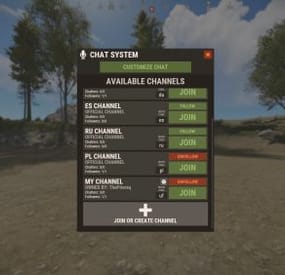
Chat Nations creates new connection between players on chat by splitting chat into more channels that can be assigned for languages, teams and more.
It contains detailed RUST-like UI, private messages, huge chat customization tool, private channels and many other useful features.
Split your chat into smaller language channels Add private chats for your teams, friends, admins and more Customize which channels you want to see Select which channels you want to follow and see messages Global chat for server-wide messages Local chat for players near you RUST-like UI design Channel selection based on your localization Customizable primary rank display on chat Toggleable clan tag visibility option (Clans plugin) Nickname and message color customization with gradient support Titles support (PlayerChallenges plugin) Customizable prefix option for each individual player, also with full color support Voice and chat mute with full UI support Different chat message sizes based on permission Highly customizable chat display Full language support Private messages to other players Secured chat formatting Nickname re-format with ads in nickname removal API for developers
/ch - Main chat customization menu (Configurable) /pm <nick> <message> - Private message command (Configurable) /r - Respond to last private message (Configurable) /mute /unmute - Opens mute UI mute <c/v/b> <userId> <duration> <reason> - Console mute command (c - chat, v - voice, b - both) (duration in format: d h m s)
Example: mute b 76561198083939668 3d Test Mute unmute <c/v/b> <userId> - Console unmute command (c - chat, v - voice, b - both)
Example: mute b 76561198083939668 3d Test Mute
Switchable (Requirement of them can be disabled/enabled in config file)
chatnations.option.prefix - Allows user to change prefix chatnations.option.clantag - Allows user to change clan tag visibility chatnations.option.colorclantag.static - Allows user to change clan tag color to static color chatnations.option.colorclantag.custom - Allows user to change clan tag color to static custom color chatnations.option.colorclantag.gradient - Allows user to change clan tag color to gradient color chatnations.option.colornick.static - Allows user to change nickname color to static color chatnations.option.colornick.custom - Allows user to change nickname color to static custom color chatnations.option.colornick.gradient - Allows user to change nickname color to gradient color chatnations.option.colormessage.static - Allows user to change message color to static color chatnations.option.colormessage.custom - Allows user to change message color to static custom color chatnations.option.colormessage.gradient - Allows user to change message color to gradient color chatnations.option.titles - Allows user to change and select title (Requires PlayerLeaderboards or PlayerChallenges) chatnations.option.customprefix - Allows user to set custom chat prefix chatnations.option.customprefix.custom - Allows user to set custom chat prefix color Other permissions
chatnations.mute - Allows to use the mute and unmute command
Plugin fully support plugins like Clans and PlayerChallenges.
If you need some plugin implementation, feel free to ask!
WARNING! This plugin doesn't work with BetterChat!
PlayerChallenges
Set "Maximum tags to display (Requires BetterChat)" to high value like 30 so all player tags will be available in configuration section.
Dictionary<string, int> API_GetPlayersInChannels() - Returns Dictionary<string, int> with channel code as Key and online player count as Value. List<ulong> API_GetChannelPlayers(string channel) - Returns list of playerIds from channel. List<BasePlayer> API_GetChannelPlayersFull(string channel) - Returns players that belong to channel. bool IsMuted(ulong userId, bool chat = true) - Returns if player is muted. object OnNationsChat(BasePlayer player, string modifiedMessage, int channel, string channelKey, bool global, bool isOfficial) - Ran on each chat message sent. If non null returned, cancels sending message. If you need anything more, message me! 🙂
{ "Commands": [ "chat", "ch" ], "Private Message Commands": [ "pm", "msg" ], "Private Message Respond Commands": [ "r", "respond" ], "PopUpAPI Profile Name": "ChatNations", "Message Start Symbol": " »", "Clan Tag Default Color": "#aaee32", "Clan Tag Format": "[{0}]", "Different Tags For Clan Stages": true, "Enable Local Chat": true, "Leader Clan Tag Format": "[**{0}]", "Council Clan Tag Format": "[**{0}]", "Mod Clan Tag Format": "[*{0}]", "Leader Title Default Color": "#f2db74", "Leader Title Format": "[{0}]", "Channel Format": "<color=#aaee32>[{0}]</color>", "Global Format": "<color=#aaee32>[Global]</color>", "Team Format": "<color=#aaee32>[Team]</color>", "Local Format": "<color=#aaee32>[Local]</color>", "Private Channel Format": "<color=#aaee32>[{0}]</color>", "Custom Prefix Format": "[{0}]", "Custom Prefix Default Color": "#55aaff", "Default Custom Prefix": "CUSTOM", "Check Custom Prefix For Formatting Abuse": true, "Require Permission For": { "Switch Prefix": false, "Switch Clan Tag Visibility": false, "Nickname Color - Gradient": true, "Nickname Color - Static": true, "Nickname Color - Static Custom": true, "Message Color - Gradient": true, "Message Color - Static": true, "Message Color - Static Custom": true, "Clan Tag Color - Gradient": true, "Clan Tag Color - Static": true, "Clan Tag Color - Static Custom": true, "Switch Title": false, "Custom Prefix - Text": true, "Custom Prefix - Color Input": true, "Custom Prefix - Color": true }, "Max Custom Channels Created Per Player": 1, "Max Custom Channel Name Length": 24, "Max Custom Prefix Length": 24, "Permission Chat Message Sizes": { "chatnations.fontsize.15": 15, "chatnations.fontsize.16": 16, "chatnations.fontsize.17": 17 }, "Max Private Channel Ownership Permissions": { "chatnations.privchannels.2": 2, "chatnations.privchannels.3": 3, "chatnations.privchannels.4": 4 }, "Remove Ads In Nicknames": true, "Nick Ads List": [ "hellcase.com", "rustypot.com", "Rustchance.com" ], "Options Display Order": [ "displayed_rank", "clan_tag_visibility", "clan_tag_color", "nickname_color", "message_color", "displayed_title", "custom_prefix" ], "Static Colors - Clan Tag": [ "#eb4d4d", "#ebae4d", "#bceb4d", "#72eb4d", "#4deb5f", "#4debc1", "#4dceeb", "#4d72eb", "#6d4deb", "#bc4deb", "#eb4de0", "#eb4d94", "#eb4d50", "#e8e8e8", "#a6a6a6", "#737373" ], "Static Colors - Nickname": [ "#eb4d4d", "#ebae4d", "#bceb4d", "#72eb4d", "#4deb5f", "#4debc1", "#4dceeb", "#4d72eb", "#6d4deb", "#bc4deb", "#eb4de0", "#eb4d94", "#eb4d50", "#e8e8e8", "#a6a6a6", "#737373" ], "Static Colors - Message": [ "#ffbaba", "#ffdaba", "#f2ffba", "#d1ffba", "#baffc8", "#baffed", "#bae7ff", "#bac4ff", "#c6baff", "#debaff", "#ffbafe", "#ffbae0", "#ffbacf" ], "Static Colors - Custom Prefix": [ "#eb4d4d", "#ebae4d", "#bceb4d", "#72eb4d", "#4deb5f", "#4debc1", "#4dceeb", "#4d72eb", "#6d4deb", "#bc4deb", "#eb4de0", "#eb4d94", "#eb4d50", "#e8e8e8", "#a6a6a6", "#737373" ], "Valid Title Keys": [ "treesCut", "rocksDestroyed", "barrelsDestroyed", "botsKilled", "animalKills", "boxesLooted", "plantsGathered", "fishesCaught", "levelUps", "headshots", "helicopterKills", "bradleyKills", "dungeonsRan", "giftsOpened", "airDropsThrown", "collectiblesGathered", "rocketsFired", "explosivesThrown", "longestKill", "ammoUsed", "customCrafts", "craftedItems", "structuresBuilt", "structuresRepaired" ], "Default Channels": { "en": { "Default Follow": true, "Default Quick Code": "en", "Channel Format": "<color=#aaee32>[EN]</color>" }, "de": { "Default Follow": false, "Default Quick Code": "de", "Channel Format": "<color=#aaee32>[DE]</color>" }, "es": { "Default Follow": false, "Default Quick Code": "es", "Channel Format": "<color=#aaee32>[ES]</color>" }, "ru": { "Default Follow": false, "Default Quick Code": "ru", "Channel Format": "<color=#aaee32>[RU]</color>" }, "pl": { "Default Follow": false, "Default Quick Code": "pl", "Channel Format": "<color=#aaee32>[PL]</color>" } }, "Group Chat Formatting": { "admin": { "Is Enabled": true, "Prefix": "<color=#00e0e8>[ADMIN]</color>", "Nickname Color": "#55aaff", "Message Color": "white" }, "mod": { "Is Enabled": true, "Prefix": "<color=#00e0e8>[MOD]</color>", "Nickname Color": "#55aaff", "Message Color": "white" }, "helper": { "Is Enabled": true, "Prefix": "<color=#00e0e8>[HELPER]</color>", "Nickname Color": "#55aaff", "Message Color": "white" }, "vip": { "Is Enabled": true, "Prefix": "<color=#00e0e8>[VIP]</color>", "Nickname Color": "#55aaff", "Message Color": "white" }, "default": { "Is Enabled": true, "Prefix": "", "Nickname Color": "#55aaff", "Message Color": "white" } }, "Channel Country Assign": { "en": [ "United Kingdom", "Australia", "New Zealand", "United States", "India", "Pakistan", "Nigeria", "Philippines", "South Africa", "Tanzania", "Kenya", "Sudan", "Canada", "Ghana", "Cameroon", "Malawi", "Zambia", "Zimbabwe", "South Sudan", "Burundi", "Papua New Guinea", "Sierra Leone", "Singapore", "Ireland", "Liberia", "Jamaica", "Cyprus" ], "ru": [ "Russian Federation", "Russia", "Belarus", "Kazakhstan", "Kyrgyzstan", "Tajikistan", "Ukraine", "Moldova", "Uzbekistan" ], "de": [ "Germany", "Belgium", "Austria", "Switzerland", "Luxemburg", "Liechtenstein" ], "es": [ "Spain", "Mexico", "Colombia", "Argentina", "Peru", "Venezuela", "Chile", "Guatemala", "Ecuador", "Bolivia", "Cuba", "Dominican Republic", "Honduras", "Paraguay", "El Salvador", "Nicaragua", "Costa Rica", "Panama", "Uruguay", "Puerto Rico" ], "pl": [ "Poland" ] } }
-
$24.99$14.99Chat Styles (Names, Messages & Prefixes)
By xNullPointer95 in Plugins
xChatStyles
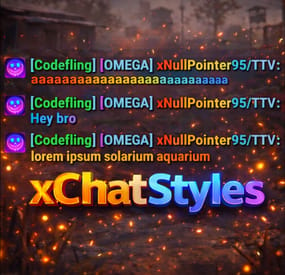
xChatStyles adds smooth gradient colors to player names, prefixes, and chat messages, giving your server a premium, modern look without clutter or spam.
It’s clean, readable, and designed to enhance chat - not overpower it.
It lets you customize how players appear in chat using animated-looking color gradients. Perfect for VIPs, staff, donators, or special roles. No flashy UI. No complicated setup. Just beautiful chat.
⭐ Features
🎨 Gradient Names & Messages
Smooth color gradients instead of flat colors, but you can also use a solid color Player names Chat messages Prefixes (VIP, Admin, etc.) Looks great without hurting readability Styled Mentions (@PLAYERNAME) 🏷️ Multiple Prefix Support
Players can have more than one prefix Each prefix can have its own color style 👑 Great for VIP & Donator Perks
Instantly makes VIP ranks feel premium Visual reward without gameplay imbalance Easy to sell as a cosmetic perk 🪙 Trade System for Prefixes (REQUIRES Economics if you want to use trade feature)
⚡Server Friendly
No lag or spam Optimized to run smoothly on live servers Works quietly in the background 🔑 Supports permission-based style, not just permanent chat style.
🌍 xChatStyles Web Editor
📌 Plugin Preview
🔐 Permissions (Custom Tab)
xchatstyles.customtab - Ability to see the "Custom" Tab in /xcs xchatstyles.customprefix - Ability to see and select "Prefix" in "Custom" Tab xchatstyles.custommessagecolor - Ability to see and select "Message" in "Custom" Tab xchatstyles.customusernamecolor - Ability to see and select "Username" in "Custom" Tab
💬 Chat Commands (Player)
/xcs - Opens the Ui /xcs <PLAYERNAME/STEMAID> - Opens the Ui with the view of the target player and you can remove owned styles from that user.
💬 Chat & Console Commands (Admin)
/* Add chat styles without permission */ /addprefix <STEAMID> <PREFIXNAME> <#HEX> <#HEX> <#HEX>... /addmessagecolor <STEAMID> <#HEX> <#HEX> <#HEX>... /addusernamecolor <STEAMID> <#HEX> <#HEX> <#HEX>... /addall <STEAMID> <PREFIXNAME> <#HEX> <#HEX> <#HEX>... [This will add a prefix with provided color(s), message style with provided color(s) and username style with provided color(s) with just 1 command.] /* Add chat styles without permission */ /* Add chat styles WITH permission */ /addprefix <xchatstyles.PERMISSIONNAME> <PrefixName> <#HEX> <#HEX> <#HEX> ... /addall <xchatstyles.PERMISSIONNAME> <PrefixName> <#HEX> <#HEX> <#HEX> ... /addmessagecolor <xchatstyles.PERMISSIONNAME> <#HEX> <#HEX> <#HEX> ... /addusernamecolor <xchatstyles.PERMISSIONNAME> <#HEX> <#HEX> <#HEX> ... /* Add chat styles WITH permission */ ---> As long as the player has permission, they can select it with /xcs ---> Automatically removed when permission is revoked ---> Permission-Based ChatStyles has (Permission) indicator in /xcs ---> The permission must start with 'xchatstyles.*'. Example: /addall <xchatstyles.vip> VIP <#HEX> <#HEX> <#HEX> ... /*********************************************************************************************************/ /* Use 1 #HEX Color (Example: #fcba03) for a single color, use multiple #HEX Colors for a color gradient */ /* */ /* Example: /addprefix 76561198412496844 OMEGA #32a852 #71a67f */ /* */ /*********************************************************************************************************/ /removeprefix <steamid> <index|PrefixName> /removemessagecolor <steamid> <index> /removeusernamecolor <steamid> <index>
⏳ Recommended Plugin for >TIMED< PERMISSION:
⚙️ Config
{ "MaxPrefixes": 3, "DefaultUsernameColor": "#55aaff", "DefaultMessageColor": "#ffffff", "DefaultSize": 15, "AllowSelectingDuplicatePrefixNames": true, "NotifyOnStyleReceived": true, "PrefixBrackets": "[]", "ShowPrefixBracketsWithSizeTag": true, "Trade": { "AllowTrading": false, "PlayerCanSellPermissionBasedPrefix": false, "UseCurrencySign": true, "CurrencySign": "$", "AnnounceNewPrefixSaleGlobally": true, "AnnouncePrefixPriceUpdateGlobally": true }, "PermissionStyles": {} } -
$26.49$14.59IQTeleportation
IQTeleportation - is an advanced, optimized teleportation system that provides a wide range of features to improve player comfort and convenience.
Only the necessary, user-friendly features — the plugin isn’t overloaded with extras.
All capabilities are designed for stability and maximum player convenience.
Plugin Installation :
When you download the resource, you receive an archive with plugins and data folders. Move the file from data strictly following the archive path: oxide/data/IQSystem/IQTeleportation. If any of these files don’t exist on your server, create them. Move IQTeleportation.cs from plugins strictly following the archive path: oxide/plugins. Note for users who use a “web editor” on hosting panels. Before uploading, unpack the archive locally in any convenient place, then upload the files from there. Feature List :
Minimalist UI for the player :
The plugin supports UI for teleport requests and for setting a home point. These are optional and configured in the config.
Teleport directly into vehicles :
Optional feature.
Allows accepting a teleport while controlling a vehicle. The player will be teleported into a free seat; if there are no free seats, the teleport is canceled.
Sound effects :
Built-in sound effects for teleportation.
Players can feel the timer through sound: as teleport time approaches, the sound frequency increases.
This makes it clear when a teleport to a friend or home point will occur, without distracting from gameplay and keeping focus.
Home points on G-Map :
Optional feature.
Displays the last 6 home points the player teleported to directly on the G-Map, with the ability to teleport to them via the UI.
It fits the Rust and G-Map style nicely and is very convenient for players!
Teleport requests via G-Map :
Now you can simply right-click on a friend’s nickname (or near it) on the G-Map, and a teleport request will be sent automatically.
This helps players stay focused on gameplay and simplifies team interactions.
Automatic teleport between friends :
The plugin supports automatically accepting teleport requests from friends.
This feature can be toggled with the /atp command.
Players in a team no longer need to confirm requests manually — friend teleports will happen automatically, making co-op play even more comfortable.
Block teleporting from monuments :
You can forbid teleporting from specific monuments.
This improves gameplay and prevents using monument structures as a hideout followed by teleporting away from an opponent, creating a more balanced experience for everyone.
Home point marker :
After setting a home point, the player automatically gets a duplicate marker with the point’s name on their G-Map.
This improves visibility, helps orientation, and simplifies coordination with home points.
A temporary mark with a visual effect is also shown at the placement location.
Simplified commands :
The goal is to simplify usage and add convenience for players — commands weren’t overlooked:
/sethome has a shorter alias /sh
/removehome has a shorter alias /rh
/tpr has “built-in memory,” making player interaction easier.
You no longer need to specify a nickname every time you send a teleport request.
The command remembers the last player you teleported to, and when you run /tpr again without a name, it will send the request to that player.
This makes teleporting even faster and more convenient.
See the full command list in the “Commands” section.
WARP system :
The plugin includes a warp system with multiple points and convenient commands.
What is this system for?
For example, you want players to teleport to Outpost (or any other monument) with /compound — you can do this with the system: just create the points, and the commands will be registered automatically and will persist every server wipe!
Other uses?
Use it however you like: for events, create a teleport point for the event, then remove the warp after it’s over.
Points placed outside standard monuments will not be saved after a map change.
Logging system :
If you want to monitor the plugin and know about your players’ teleports to analyze activity, there’s an optional logging feature for teleport requests, accepted teleports, and home teleports.
There are many simple, clear configuration options — you can preview them in the “Configuration” section.
Permissions :
iqteleportation.gmap — permission to use /gmap and instant admin teleports via G-Map to any point on the map
iqteleportation.tp — permission to use /tp for instant teleport to a player
iqteleportation.warpadmin — for using WARP features and the /warp command
These permissions are intended for administrators only and do not affect player features.
Do not grant them to regular players!
Command List :
Chat Commands :
/atp – toggle automatic acceptance of teleport requests from friends /sethome Name – set a home point at your current position /sh Name – shorthand alias for /sethome /removehome Name – remove a previously set home point /rh Name – shorthand alias for /removehome /home NameHome – teleport to your home point /home NameHome FriendName – teleport to a friend’s home point /homelist – view all your home points /tpr Name – send a teleport request to a player /tpr – send a teleport request to the last player who accepted your request /tpa – accept a teleport request /tpc – cancel a teleport request Warp System :
/warp list – show all available warps /warp points WarpName – show all teleport points for the specified warp /warp add WarpName – create a new warp or add an extra teleport point to that warp /warp edit WarpName PointNumber – edit a specific teleport point for the warp /warp remove WarpName – remove the warp and all its teleport points /warp remove WarpName PointNumber – remove the specified teleport point of the warp /NAMEWARP – command to teleport to a warp; created automatically based on your warp name
For Administrators :
/gmap – enable teleporting to any position via G-Map by right-clicking the map /tp Name – instantly teleport to a player /tp Name NameTwo – instantly teleport player “Name” to player “NameTwo” /mblock – block teleportation from the monument where the admin is currently standing /a.home points NameOrID – show all named home points of the specified player /a.home clear NameOrID – delete all home points of the specified player Console Commands :
atp – toggle automatic acceptance of teleport requests from friends sethome Name – set a home point at your current position sh Name – shorthand alias for sethome removehome Name – remove a previously set home point rh Name – shorthand alias for removehome home NameHome – teleport to your home point home NameHome FriendName – teleport to a friend’s home point homelist – view all your home points tpr Name – send a teleport request to a player tpr – send a teleport request to the last player who accepted your request tpa – accept a teleport request tpc – cancel a teleport request For Administrators :
gmap – enable teleporting to any position via G-Map by right-clicking the map tp Name – instantly teleport to a player tp Name NameTwo – instantly teleport player “Name” to player “NameTwo”
Configuration :
{ "General plugin settings": { "Log player actions to file (true = yes / false = no)": false, "Use sound effects (true = yes / false = no)": true, "Use GameTip messages instead of chat (true = yes / false = no)": false, "Wake the player immediately after teleport (otherwise they remain 'sleeping') (true = yes / false = no)": false, "List of monuments where teleportation is forbidden (applies to home points / teleport-to-player / warps)": [], "IQChat settings": { "IQChat : Custom prefix in the chat": "[IQTeleportation]", "IQChat : Custom avatar in the chat (Steam64ID) (If required)": "0" }, "SimpleStatus settings": { "SimpleStatus: Enable plugin support": false, "SimpleStatus: UI settings for teleportation": { "SimpleStatus: Background panel color": "0.3 0.3 0.3 0.5", "SimpleStatus: Prefix translations [LanguageKey] = Text": { "ru": "Телепортация", "en": "Teleporation" }, "SimpleStatus: Prefix color": "0.5647059 0.5490196 0.5333334 1", "SimpleStatus: UI sprite": "assets/icons/stopwatch.png", "SimpleStatus: Sprite color": "0.5647059 0.5490196 0.5333334 1" } } }, "Teleport-to-player settings": { "Teleport request settings": { "Offer to accept teleport requests in the UI (true = yes / false = no)": true, "Teleportation mode: true — teleport the player to the position where the request was accepted; false — teleport the player to the other player regardless of where it was accepted": false, "Allow players to send teleport requests via G-Map (true = yes / false = no)": true, "Use instant teleport to a point via G-Map (true = yes / false = no) (requires admin rights or the iqteleportation.gmap permission)": true, "Disable teleportation features on the server (tpr and tpa will be unavailable) (true = yes / false = no)": false, "Forbid sending and accepting teleport requests while the player is in a vehicle (true); otherwise teleport directly into the vehicle if a seat is free (false)": true, "Block sending and accepting teleport requests in a safe zone (true = yes / false = no)": false, "Block sending and accepting teleport requests during raid block (true = yes / false = no)": true, "Block sending and accepting teleport requests while the player is in the subway (train tunnels) (true = yes / false = no)": true, "Block sending and accepting teleport requests while the player is in the Underwater Lab (true = yes / false = no)": true, "Block sending and accepting teleport requests while the player is on the Cargo Ship (true = yes / false = no)": true, "Block sending and accepting teleport requests while the player is in a hot air balloon (true = yes / false = no)": true, "Block sending and accepting teleport requests while the player is cold (freezing) (true = yes / false = no)": true, "Block sending and accepting teleport requests while the player is swimming (true = yes / false = no)": true, "Block sending and accepting teleport requests while the player is under radiation (true = yes / false = no)": true, "Block sending and accepting teleport requests while the player is bleeding (true = yes / false = no)": true, "Block sending and accepting teleport requests while the player is in another player's building privilege area (building blocked) (true = yes / false = no)": true, "Allow teleportation only to friends (true = yes / false = no)": false }, "Teleport-to-player cooldown settings": { "Default count for players without permissions": 60, "Count overrides for players with permissions [Permission] = Count": { "iqteleportation.vip": 45, "iqteleportation.premium": 35, "iqteleportation.gold": 25 } }, "Teleport-to-player countdown settings": { "Default count for players without permissions": 20, "Count overrides for players with permissions [Permission] = Count": { "iqteleportation.vip": 15, "iqteleportation.premium": 10, "iqteleportation.gold": 5 } }, "Teleport-to-player limit settings": { "Use player teleport-to-player limits (true = yes / false = no)": false, "Hours until player limits are reset": 24, "Player teleport limit settings": { "Default count for players without permissions": 15, "Count overrides for players with permissions [Permission] = Count": { "iqteleportation.vip": 20, "iqteleportation.premium": 25, "iqteleportation.gold": 30 } } } }, "Home points settings": { "Allow teleporting to a friend's home point (true = yes / false = no)": true, "Enable UI with recent home points on G-Map (true = yes / false = no)": true, "Offer setting a home point in the UI after placing a bed or sleeping bag (true = yes / false = no)": true, "Allow players to teleport to a home point via G-Map (true = yes / false = no)": false, "Block home teleports in a safe zone (true = yes / false = no)": false, "Add a visual ping effect to the home point after it’s set (true = yes / false = no)": true, "Add a marker on the player’s G-Map after setting a home (true = yes / false = no)": true, "Permissions for setting home points": { "Block setting a home point during raid block (true = yes / false = no)": true, "Allow setting home points on tugboats (true = yes / false = no)": false, "Allow setting home points only when building privilege is present (true = yes / false = no)": true, "Allow setting home points only when authorized in the building privilege area (true = yes / false = no)": true }, "Home point count settings": { "Default count for players without permissions": 2, "Count overrides for players with permissions [Permission] = Count": { "iqteleportation.vip": 3, "iqteleportation.premium": 4, "iqteleportation.gold": 5 } }, "Home teleport cooldown settings": { "Default count for players without permissions": 30, "Count overrides for players with permissions [Permission] = Count": { "iqteleportation.vip": 25, "iqteleportation.premium": 20, "iqteleportation.gold": 15 } }, "Home teleport countdown settings": { "Default count for players without permissions": 20, "Count overrides for players with permissions [Permission] = Count": { "iqteleportation.vip": 15, "iqteleportation.premium": 10, "iqteleportation.gold": 5 } }, "Home teleport limit settings": { "Use player home-teleport limits (true = yes / false = no)": false, "Hours until player limits are reset": 12, "Home teleport limit settings": { "Default count for players without permissions": 15, "Count overrides for players with permissions [Permission] = Count": { "iqteleportation.vip": 20, "iqteleportation.premium": 25, "iqteleportation.gold": 30 } } } }, "Warp system settings": { "Enable warp support (true = yes / false = no)": false, "Block teleport to a warp if the player is hostile (safe-zone aggression) (true = yes / false = no)": true, "Teleport-to-warp cooldown settings": { "Default count for players without permissions": 120, "Count overrides for players with permissions [Permission] = Count": { "iqteleportation.vip": 100, "iqteleportation.premium": 80, "iqteleportation.gold": 60 } }, "Teleport-to-warp countdown settings": { "Default count for players without permissions": 30, "Count overrides for players with permissions [Permission] = Count": { "iqteleportation.vip": 25, "iqteleportation.premium": 20, "iqteleportation.gold": 15 } }, "Permissions for teleporting to specific warps: [WarpKey] = Permission (otherwise available to everyone)": { "warpName": "iqteleportation.warpPermission" }, "Teleport-to-warp limit settings": { "Use player teleport-to-warp limits (true = yes / false = no)": false, "Hours until player limits are reset": 6, "Teleport-to-warp limit settings": { "Default count for players without permissions": 15, "Count overrides for players with permissions [Permission] = Count": { "iqteleportation.vip": 20, "iqteleportation.premium": 25, "iqteleportation.gold": 30 } } } } }
For Developers :
API :
private void ClearHomesPlayer(UInt64 userID, String pluginName) // Clears all home points of the player. private Boolean API_HavePendingRequest(BasePlayer player) // Returns true if the player has an active (pending) teleport request. private Dictionary<String, Vector3> GetHomes(UInt64 userID) // Returns all home points of the player. Hooks :
private Object CanTeleport(BasePlayer player) // Called when attempting to teleport to a player. // Return a string with the reason to cancel the teleport. private Object canTeleport(BasePlayer player) // Same as above (alternate hook name). // Return a string with the reason to cancel the teleport. private Object OnTeleportRequested(BasePlayer player, BasePlayer requester) // Called when a teleport request is sent to a player. // You can cancel by returning false (bool) or a String (your message). private Object CanTeleportHome(BasePlayer player, Vector3 positionHome) // Called when attempting to teleport home. // You can cancel by returning a String with the reason. private Object OnHomeAdd(BasePlayer player, String homeName, Vector3 positionHome) // Called when attempting to set a home point. // You can cancel by returning a String with the reason. private void OnTeleportRejected(BasePlayer player, BasePlayer requester) // Called when a teleport request to a player is canceled/rejected. private void OnTeleportAccepted(BasePlayer player, BasePlayer requester, Int32 countdown) // Called when a teleport request is accepted. private void OnPlayerTeleported(BasePlayer player, Vector3 playerPos, Vector3 teleportationPos) // Called after the player has been teleported. private void OnHomeAccepted(BasePlayer player, String homeName, Int32 countdown) // Called after the player has sent a teleport-home request. private void OnHomeAdded(BasePlayer player, Vector3 positionHome, String homeName) // Called after a home point has been set. private void OnHomeRemoved(BasePlayer player, Vector3 positionHome, String homeName) // Called after a home point has been removed. private Object CanTeleportWarp(BasePlayer player) // Called when a player tries to teleport to a warp. // Return a string to cancel; return null to ignore (allow). private Object CanTeleportHome(BasePlayer player, Vector3 positionHome) // Called when a player tries to teleport to a home point. // Return a string to cancel; return null to ignore (allow). private Object CanTeleportPlayer(BasePlayer player) // Called when a player tries to teleport to another player. // Return a string to cancel; return null to ignore (allow). private void OnPlayerTeleported(BasePlayer player, BasePlayer target) // Called when a player has teleported to another player. private void OnPlayerTeleportedWarp(BasePlayer player, Vector3 positionWarp) // Called when a player has teleported to a warp. private void OnPlayerTeleportedHome(BasePlayer player, Vector3 positionHome) // Called when a player has teleported to a home point.
- #teleportation
- #warp
- (and 12 more)