
JeffG's Wishlist
-
$19.90
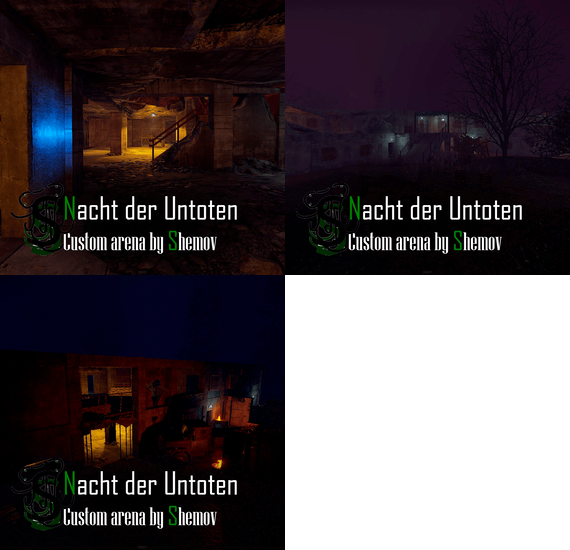
Nacht Der Untoten ARENA | Rust Custom Arena by Shemov
This custom Rust arena is a faithful recreation of Nacht Der Untoten from COD Zombies. Perfectly designed for FFA battles and other potential game modes, it offers players an immersive and nostalgic experience with intricate details and authentic atmosphere. Test your skills in this iconic setting and bring a new level of excitement to your gameplay.
FEATURES
- Great detail;
- Easy installation on the map;
- Copy of Nacht Der Untoten ( COD Zombies )
- Optimized fps;
- Perfect for FFA mode.
GENERAL INFO
- Prefabs count: ~2.2k;
- Type: arena;
- Modifiers: -.
Other works:
- #rust custom
- #custom arena
- (and 9 more)
-
$15.00
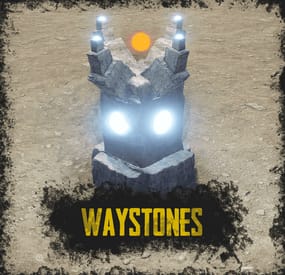
Waystones
By ThePitereq in Plugins
RUST Plugin Test Server
TEST MY PLUGINS THERE!
connect play.thepitereq.ovh:28050
Waystones plugin gives you the ability to quickly move from one position to another.
It creates a waystone on desired monuments that can be used by players for quick movement around the map.
It also allows players for creating their own waystones in their homes.
Automatically place waystones on monuments for player teleportation. Supports waystones in player bases with ground, wall and empty space checks. Custom monument support. Configurable marker on map. Easy command waystone placement. Optional command for waystone crafting. RUST-like UI design. A lot of VIP permission options. (points gather, max points, max waystones saved) Auto data clear on map wipe. NoEscape PvP support. Pre-configured default RUST monuments.
waystones.admin - Gives access to /placeway, tppoints and givewaystone commands. waystones.craft - Gives ability to craft waystone. (Configurable) Any other permission added in config file.
/waystone - Command to craft waystone. (Configurable) /placeway [Optional: MonumentName] - Sets new position for nearest [set] monument waystone. /placestaticway <name> - Sets new position for <name> static waystone. Displayed name of waystone can be changed in settings. tppoints - Command for giving teleport points to players. (Console Command) givewaystone [Optional: userId] - Gives you [user] an waystone for placement. (Console Command)
{ "PopUpAPI Preset Name": "Inventory", "Waystone Craft Command": "waystone", "Waystone Placeable Shortname": "composter", "Waystone Placeable Display Name": "Waystone", "Waystone Marker - Enabled": true, "Waystone Marker - Marker Alpha": 0.7, "Waystone Marker - Marker Radius": 0.05, "Waystone Marker - Marker Color #1": "#ffd342", "Waystone Marker - Marker Color #2": "#a38729", "Waystone Marker - Enable On Monuments": true, "Waystone Marker - Show Player Waystones By Default": false, "Waystone Marker - Lock Player Waystone Visibility Change": false, "Waystone Crafting - Enable Crafting": true, "Waystone Crafting - Require Permission": true, "Waystone Crafting - Required Workbench Level": 2, "Waystone Crafting - Craft Cost": [ { "Shortname": "stones", "Amount": 5000, "Skin": 0 }, { "Shortname": "targeting.computer", "Amount": 10, "Skin": 0 }, { "Shortname": "industrial.wall.light", "Amount": 4, "Skin": 0 }, { "Shortname": "industrial.wall.light.red", "Amount": 1, "Skin": 0 } ], "NoEscape - Lock Teleporting When PvP Blocked": true, "NoEscape - Lock Teleporting When Raid Blocked": true, "Teleport Cost Per Kilometer": 25.0, "Initial Point Amount": 100, "Initial Point Amount Permissions": { "waystones.admin": 1000, "waystones.svip": 500, "waystones.vip": 250 }, "Teleport Points Default Cap": 1000, "Teleport Points Cap Permissions": { "waystones.admin": 100000, "waystones.svip": 5000, "waystones.vip": 2500 }, "Teleport Points Refill Interval (in seconds, 0 to disable)": 60.0, "Teleport Points Refill Amount": 2, "Teleport Points Refill Amount Permissions": { "waystones.admin": 20, "waystones.svip": 5, "waystones.vip": 3 }, "Max Waystones Saved Default Cap": 6, "Max Waystones Saved Permissions": { "waystones.admin": 100, "waystones.svip": 18, "waystones.vip": 12 }, "God Mode After Teleport (in seconds, 0 to disable)": 0.0, "Waystone Destroy Entity Names": [ "rocket_basic", "explosive.timed.deployed" ], "Generate New Map Market Config Sections": true, "Map Marker Waystones": { "arctic_research_base_a": { "Enabled": true, "Offset": { "x": -34.46, "y": 0.0, "z": -54.53 }, "Rotation": { "x": 0.0, "y": 24.0, "z": 0.0 }, "Teleport Price Multiplier": 1.0 }, "fishing_village_a": { "Enabled": true, "Offset": { "x": 19.59, "y": 1.99, "z": -10.79 }, "Rotation": { "x": 0.0, "y": 0.33, "z": 0.0 }, "Teleport Price Multiplier": 0.3 }, "fishing_village_b": { "Enabled": true, "Offset": { "x": -6.4, "y": 2.0, "z": 15.36 }, "Rotation": { "x": 0.0, "y": 180.4, "z": 0.0 }, "Teleport Price Multiplier": 0.3 }, "fishing_village_c": { "Enabled": true, "Offset": { "x": -7.62, "y": 2.02, "z": 16.37 }, "Rotation": { "x": 0.0, "y": 178.85, "z": 0.0 }, "Teleport Price Multiplier": 0.3 }, "ferry_terminal_1": { "Enabled": true, "Offset": { "x": 11.35, "y": 5.19, "z": 7.14 }, "Rotation": { "x": 0.0, "y": 86.81, "z": 0.0 }, "Teleport Price Multiplier": 1.0 }, "harbor_1": { "Enabled": true, "Offset": { "x": 100.56, "y": 4.28, "z": -59.3 }, "Rotation": { "x": 0.0, "y": 273.79, "z": 0.0 }, "Teleport Price Multiplier": 1.0 }, "harbor_2": { "Enabled": true, "Offset": { "x": -54.15, "y": 4.02, "z": -0.02 }, "Rotation": { "x": 0.0, "y": 88.02, "z": 0.0 }, "Teleport Price Multiplier": 1.0 }, "airfield_1": { "Enabled": true, "Offset": { "x": -163.78, "y": 0.26, "z": -104.47 }, "Rotation": { "x": 0.0, "y": 3.34, "z": 0.0 }, "Teleport Price Multiplier": 1.0 }, "excavator_1": { "Enabled": true, "Offset": { "x": -94.42, "y": 0.61, "z": -57.44 }, "Rotation": { "x": 0.0, "y": 138.7, "z": 0.0 }, "Teleport Price Multiplier": 1.0 }, "military_tunnel_1": { "Enabled": true, "Offset": { "x": -76.77, "y": 19.47, "z": 63.1 }, "Rotation": { "x": 0.0, "y": 91.46, "z": 0.0 }, "Teleport Price Multiplier": 1.0 }, "powerplant_1": { "Enabled": true, "Offset": { "x": -40.84, "y": 0.29, "z": -89.01 }, "Rotation": { "x": 0.0, "y": 90.4, "z": 0.0 }, "Teleport Price Multiplier": 1.0 }, "trainyard_1": { "Enabled": true, "Offset": { "x": -82.86, "y": 0.28, "z": 15.5 }, "Rotation": { "x": 0.0, "y": 91.62, "z": 0.0 }, "Teleport Price Multiplier": 1.0 }, "water_treatment_plant_1": { "Enabled": true, "Offset": { "x": -5.19, "y": 0.28, "z": -152.01 }, "Rotation": { "x": 0.0, "y": 0.08, "z": 0.0 }, "Teleport Price Multiplier": 1.0 }, "lighthouse": { "Enabled": true, "Offset": { "x": 2.3, "y": 5.96, "z": 13.91 }, "Rotation": { "x": 0.0, "y": 84.95, "z": 0.0 }, "Teleport Price Multiplier": 1.0 }, "bandit_town": { "Enabled": true, "Offset": { "x": 27.92, "y": 1.76, "z": -21.08 }, "Rotation": { "x": 0.0, "y": 20.9, "z": 0.0 }, "Teleport Price Multiplier": 0.1 }, "compound": { "Enabled": true, "Offset": { "x": 14.35, "y": 0.19, "z": 32.57 }, "Rotation": { "x": 0.0, "y": 92.0, "z": 0.0 }, "Teleport Price Multiplier": 0.1 }, "junkyard_1": { "Enabled": true, "Offset": { "x": 48.98, "y": 0.07, "z": 46.16 }, "Rotation": { "x": 0.0, "y": 190.78, "z": 0.0 }, "Teleport Price Multiplier": 1.0 }, "nuclear_missile_silo": { "Enabled": true, "Offset": { "x": 41.7, "y": -5.91, "z": -58.81 }, "Rotation": { "x": 0.0, "y": 322.75, "z": 0.0 }, "Teleport Price Multiplier": 1.0 }, "radtown_small_3": { "Enabled": true, "Offset": { "x": -46.11, "y": 19.79, "z": -48.73 }, "Rotation": { "x": 0.0, "y": 82.24, "z": 0.0 }, "Teleport Price Multiplier": 1.0 }, "desert_military_base_a": { "Enabled": true, "Offset": { "x": 26.62, "y": 0.0, "z": -41.89 }, "Rotation": { "x": 0.0, "y": 359.57, "z": 0.0 }, "Teleport Price Multiplier": 1.0 }, "desert_military_base_b": { "Enabled": true, "Offset": { "x": -45.48, "y": 0.0, "z": -21.53 }, "Rotation": { "x": 0.0, "y": 80.83, "z": 0.0 }, "Teleport Price Multiplier": 1.0 }, "desert_military_base_c": { "Enabled": true, "Offset": { "x": -44.95, "y": 0.0, "z": 9.5 }, "Rotation": { "x": 0.0, "y": 89.92, "z": 0.0 }, "Teleport Price Multiplier": 1.0 }, "desert_military_base_d": { "Enabled": true, "Offset": { "x": -63.3, "y": 0.0, "z": 2.77 }, "Rotation": { "x": 0.0, "y": 89.52, "z": 0.0 }, "Teleport Price Multiplier": 1.0 }, "gas_station_1": { "Enabled": true, "Offset": { "x": 6.77, "y": 3.03, "z": -10.93 }, "Rotation": { "x": 0.0, "y": -180.04, "z": 0.0 }, "Teleport Price Multiplier": 1.0 }, "radtown_1": { "Enabled": true, "Offset": { "x": 49.19, "y": 0.24, "z": 10.03 }, "Rotation": { "x": 0.0, "y": 180.21, "z": 0.0 }, "Teleport Price Multiplier": 1.0 }, "supermarket_1": { "Enabled": true, "Offset": { "x": -1.26, "y": 0.0, "z": -18.49 }, "Rotation": { "x": 0.0, "y": 0.29, "z": 0.0 }, "Teleport Price Multiplier": 1.0 }, "warehouse": { "Enabled": true, "Offset": { "x": -18.34, "y": 0.03, "z": -8.99 }, "Rotation": { "x": 0.0, "y": 90.56, "z": 0.0 }, "Teleport Price Multiplier": 1.0 }, "mining_quarry_a": { "Enabled": true, "Offset": { "x": 10.34, "y": 3.6, "z": 24.88 }, "Rotation": { "x": 0.0, "y": 81.5, "z": 0.0 }, "Teleport Price Multiplier": 1.0 }, "mining_quarry_b": { "Enabled": true, "Offset": { "x": 0.8, "y": 0.0, "z": 12.63 }, "Rotation": { "x": 0.0, "y": 159.67, "z": 0.0 }, "Teleport Price Multiplier": 1.0 }, "mining_quarry_c": { "Enabled": true, "Offset": { "x": -11.03, "y": 2.99, "z": 32.86 }, "Rotation": { "x": 0.0, "y": 171.85, "z": 0.0 }, "Teleport Price Multiplier": 1.0 }, "satellite_dish": { "Enabled": true, "Offset": { "x": -0.94, "y": 6.05, "z": -1.25 }, "Rotation": { "x": 0.0, "y": 187.49, "z": 0.0 }, "Teleport Price Multiplier": 1.0 }, "sphere_tank": { "Enabled": true, "Offset": { "x": -33.94, "y": 5.76, "z": -12.03 }, "Rotation": { "x": 0.0, "y": 78.7, "z": 0.0 }, "Teleport Price Multiplier": 1.0 }, "stables_a": { "Enabled": true, "Offset": { "x": 19.44, "y": 3.05, "z": -2.58 }, "Rotation": { "x": 0.0, "y": 271.67, "z": 0.0 }, "Teleport Price Multiplier": 0.5 }, "stables_b": { "Enabled": true, "Offset": { "x": 16.64, "y": 2.99, "z": 2.14 }, "Rotation": { "x": 0.0, "y": 271.24, "z": 0.0 }, "Teleport Price Multiplier": 0.5 }, "launch_site_1": { "Enabled": true, "Offset": { "x": 208.42, "y": 3.25, "z": 54.73 }, "Rotation": { "x": 0.0, "y": 181.44, "z": 0.0 }, "Teleport Price Multiplier": 1.0 } } }
- #teleport
- #teleporting
- (and 14 more)
-
$9.99
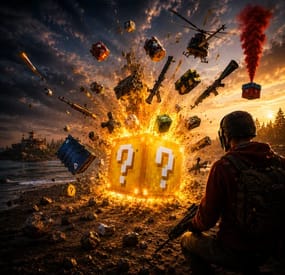
LuckyBlock
Random events with rarity A crate that owes you nothing Looting is the most predictable part of a wipe: you know what a barrel holds before you break it. Lucky Blocks fix that. Any container on the map can quietly turn into one, wrapped on all six faces in the texture of its rarity, and opening it doesn't give loot — it rolls. A Common block pays a few scrap; a Legendary one drops an airdrop on your head. A Cursed one has nothing good inside it at all, and the player can see that before deciding to touch it.
31 Event types built in 5 Tiers, Common to Cursed 35 Events preconfigured 0 Dependencies ✓Rarity you can read across the field — every tier carries its own workshop decal, colour and name ✓The Cursed tier only hurts — a visible risk your players choose to take, and no competitor has one ✓Hand blocks out as an item — a shop reward the player places where they want and opens when they want ✓Any event is a list of server commands — whatever your other plugins can do belongs on the wheel too ✓Rare blocks announce themselves — chat with a grid reference, a marker on the map, an embed in Discord 01 — Tiers Five rarities, five different wheels A block belongs to a tier from the moment it spawns until somebody opens it. The tier decides how the block looks, how often it appears, who is allowed to open it and which events can come out of it. Common, Rare, Epic, Legendary and Cursed ship configured, with the events already spread across them by weight.
The block tells you what it is Each tier has its own Steam Workshop decal, published with the plugin and set in the config, plus a name in its own colour. A player crossing a field sees a gold block and a black one and knows the difference without opening either. Cursed: the whole point of looking first Ten events, all of them bad: the concrete box with C4 counting down, a patrol helicopter aimed at the opener, meteors, bears, radiation, a wound, an inventory dropped on the ground. Walk past it or gamble that the roll lands on the least painful one. Weights, not percentages Spawn weight per tier, event weight inside a tier. Raise one number and everything else rebalances itself; set it to zero and that tier or event stops appearing. Adding a sixth tier is a copy of a block in the config. A tier can belong to a group Give a tier a permission and only that group can open its blocks. Legendary for VIPs, Cursed for everyone, the rest open to the server — blocks still spawn for all players, they just don't open for the wrong hands. 02 — Events Thirty-one ways it can end An event is a list of server commands with a weight and a description, so the built-in ones and yours sit in the same table and roll against each other. %steamid% in a command is replaced with the player who opened the block.
Reward Money through Economics, ServerRewards, BankSystem or IQEconomic. A kit by name. An item with a skin, a rain of items landing around the player, an airdrop, a blueprint unlocked, every piece of gear repaired, full health with the boosters running, or any vehicle and entity spawned by its prefab name. Chaos A patrol helicopter sent straight at the opener. Meteors falling over the area. Lightning. Bears or scientists in a ring around the player, a wall of fireballs, radiation, a teleport to a random point or to a monument, a swap of positions with the closest player, everything stripped off, or the sealed concrete cube with nine C4 counting down inside it. Trolling The camera spinning for half a minute. An explosion with no damage behind it. Heavy armour that cannot be taken off. Night vision goggles for a while, an inventory dropped at the player's feet. Server wide An airdrop called in for every player online, and Lucky Rain: a ring of fresh blocks around the one just opened, which turns a single find into a crowd within a minute. 03 — Blocks as an item Sell one, let the player open it where they like Fill the item skin id on a tier and that tier becomes a box in the inventory. One console command hands it out, so your shop, your cases and your event plugin can all give lucky blocks as a reward without knowing anything about this plugin.
Placed like any deployable The player deploys the box the usual way, so the game itself checks building privilege, the surface and the slope. The plugin only replaces what was placed with a block of that tier. It waits as long as it has to A block a player placed ignores the despawn timer and comes back after a restart, in the same spot. It is never announced and never appears on the map either, so buying one doesn't paint a target on the buyer's base. One way in A placed block cannot be picked back up. Once it is on the ground the only thing left to do with it is open it. 04 — What the server sees A rare block is an event, not a private find Announcements are set per tier, so Common blocks stay quiet and a Legendary one starts a race. Spawn and opening are separate switches — announce the find without telling everyone what came out of it, or the other way round.
Chat with a grid reference The message names the tier in its own colour and the grid square it landed in, which is enough to send half the server running and not enough to lead them to the exact rock. A marker for as long as it lives A circle in the colour of the tier sits on the map while the block is there and disappears with it, whether it was opened or despawned. The same news in Discord One webhook url in the config and every announcement is mirrored as an embed coloured like the tier, so the players who are not online still see the server is alive. Who opens the most The plugin counts openings per player and per tier and shows the top ten in chat. Statistics reset themselves on a wipe. Reliability Nothing left in the map save ✓Blocks are never written into the save, so a restart leaves no leftovers — only blocks placed by players come back, from the plugin's own data file ✓A block costs seven network entities, and a limit in the config keeps that budget where you put it ✓Configs from 1.x upgrade themselves: the old event list becomes the Common tier and keeps its skin ✓Hooks the setup does not need stay unsubscribed, so a server that gives out no blocks as items never listens for deployables ✓Spawns can be blocked underwater, above the ocean and inside any monument — the monument list fills itself from your map ✓Runs on Oxide and Carbon, needs no other plugin, and every message lives in the language files, English and Russian included Commands and permissions Three commands, and one of them is for players /lbtop Top ten openers on the server. Open to everyone. /lbtest [tier] Puts a block of that tier where you are looking, or a random one. Needs luckyblock.admin. luckyblock.give Console or RCON: luckyblock.give <steamID|name> <tier> [amount], the line your shop calls. luckyblock.admin Spawning blocks and handing them out. luckyblock.<tier> Whatever you write in a tier's permission field, registered on load. Leave it empty and the tier is open to everyone. For developers Four methods, three hooks A tier is always named by its key in the config, Common, Rare, Legendary and so on: that is what the hooks hand you and what every method takes. Everything goes through a plain plugin reference, LuckyBlock?.Call<bool>("GiveLuckyBlock", player, "Legendary", 1), nothing to add as a dependency.
Methods IsLuckyBlock (BaseEntity entity) → bool
True for a live lucky block of this plugin, so your loot or damage rules can step around it. GetLuckyBlockTier (BaseEntity entity) → string
Tier name of that block, null when the entity is not one. SpawnLuckyBlock (Vector3 position, string tier) → bool
Puts a block of that tier at the position, an empty tier rolls a random one by weight. It behaves like a natural spawn: despawns by the timer, gets announced and marked on the map when the tier says so. False when the tier is not in the config, or nothing can roll because every weight is zero. GiveLuckyBlock (BasePlayer player, string tier, int amount) → bool
Hands the block over as an item, amount clamped to 1..100. False when the tier does not exist or has no item skin id, such a tier can only spawn on the map. Hooks OnLuckyBlockSpawned (LootContainer block, string tier)
A block appeared: spawned on the map, placed by a player, or restored after a restart. CanOpenLuckyBlock (BasePlayer player, LootContainer block, string tier) → object
A player is trying to open one. Return anything but null to veto. It runs after the tier permission and before the cooldown and the daily limit, so your refusal shows before the built-in ones. OnLuckyBlockOpened (BasePlayer player, LootContainer block, string tier)
The tier event has already fired, the block is about to vanish. Questions Before you buy I am on 1.x. What happens to my config? It migrates on the first load. Your event list becomes the Common tier with the skin you were using, and the other four tiers arrive next to it, ready to be tuned or deleted. Can I add my own events? That is the main way to use it. An event is a list of server commands with a weight, and %steamid% stands for the player who opened the block. Anything with a console command belongs on the wheel. Can I use my own artwork? Yes. Five decals come with the plugin and are set in the config out of the box; a skin id is just a config value, so your own decal from the Spray Decal Creator takes its place in one line. What does it cost the server? Seven network entities per block, and the block limit in the config caps the total. Blocks replace loot containers that already exist, so nothing is added to the map that wasn't going to be there. Will the deadly events wreck bases? No. The C4 in the concrete cube is a visual: it kills the player who opened the block and leaves the neighbourhood standing. What happens on a restart or a wipe? Spawned blocks are gone and new ones appear as loot respawns. Blocks players placed themselves come back where they were. Statistics start over on a new save.- #luckyblock
- #lucky block
- (and 27 more)
-
$5.00
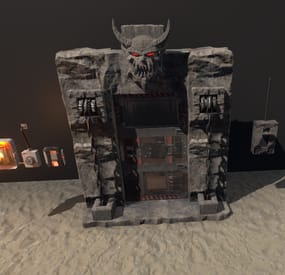
Pack Medieval Door
By Zero Absoluto in Prefabs
Pack of two medieval style doors, intended for those most fond of medieval architecture, this is intended for people who have knowledge of RustEdit since breaking the prefab and manipulating it can lead to some complications, anyway if you decide to buy this product and you don't know how to place it, I encourage you to enter my discord and I will gladly help you.
Prefab total : 588
Devil Door 552 prefab
Garage door 36 prefab
-

$45.90
Sea Skull
Sea Skull is a custom map full of islands surrounded by multiple places to build. Get ready for survival in a world with creature wreckage, tornado and the legendary Kraken. Build your home in caves, land and air platforms, under bridges and in multiple locations that will surprise you.
- FEATURES
Size: 6000. Objects: 36561. Map protection plugin included. Editable map: Yes.
- CONTAINS ALL OFFICIAL MONUMENTS
Apartment complex • Ziggurat temple • Jungle ruins • Radtown • Ferry Terminal • Nuclear missile silo • Large oil platform • Small oil platform • Submarine laboratories • Harbor • Large fishing villages • Fishing villages • Launch site • Satellite dish • The Dome • HQM Quarry • Stone quarry • Sulfur quarry • Arctic Research Base • Sewer Branch • Train yard • Junkyard • Abandoned military bases • Military tunnel • Caves • Large barns • Ranch • Bandit camp • Power plant • Swamp • Airfield • Giant excavation • Outpost • Lighthouse
- PREFABRICATED AND CUSTOMIZED MONUMENTS
Large oil platform (This monument contains a subway access, this monument can be reached by train). Small oil platform (This monument contains a subway access, this monument can be reached from the train). Heli Tower. Airfield with Bradley Patrol and railroad tracks. Bradley tank patrolling the map. Aerial platforms. The dome (with train tracks). Bridges with Construction Area. Missile launching with train tracks. Kraken creature in town. Tornado. Remains of mythological creatures. Sand. Caves with construction area and electricity. Quidditch Pitch (Harry Potter). Gigantic area with multiple Oilrig. H1Z1 Lab. Aircraft carrier. Six islands for events, Located around the map. You can use the islands for the Raidable Bases plugin. Islands (Oasis).
- TIPS
Setting your server to Survival mode will add an extra fun mode to this map (Optional). Have fun 🙂
- #seaskull
- #sea skull
- (and 56 more)