-
Posts
1,698 -
Joined
-
Last visited
-
Days Won
29
Content Type
Profiles
Warranty Claims
Downloads
Forums
Store
Services
Downloads Plus Support
DOWNLOADS EXTRA
Reels
Support Center
Everything posted by Mr01sam
-
Changed Status from Pending to Not a Bug
-
Changed Status from Pending to Closed Changed Fixed In to 1.3.0
-
In v1.3.0 I added a config option for the Z13 Virus so that you can specify only melee damage will inflict it. I also added the entity for zombie hordes to the condition config so it should in theory work by default in v1.3.0. I'd love it if someone could confirm though!
-
I just tested this, and it looks like you are correct in that it is not showing up automatically when you reconnect. Its actually not asleep, if you were to walk out of the building priv and then walk back in, it should update correctly (without having to reload). Regardless, I think I have a fix for it, I'll DM it to you and you can try it out if you would like
- 307 comments
-
- #protection
- #base
- (and 5 more)
-
- 307 comments
-
- 2
-
-
- #protection
- #base
- (and 5 more)
-
- 307 comments
-
- #protection
- #base
- (and 5 more)
-
- 307 comments
-
- #protection
- #base
- (and 5 more)
-
Version 1.3.4
10,595 downloads
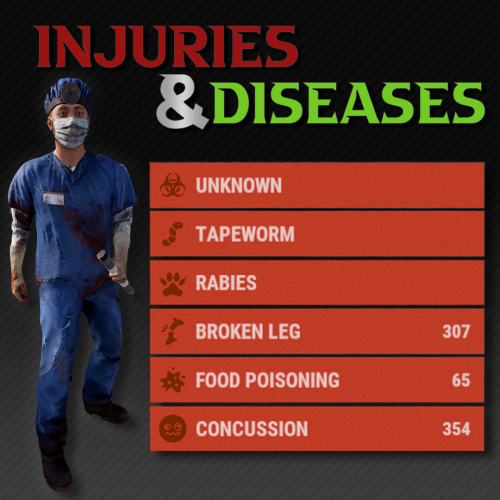
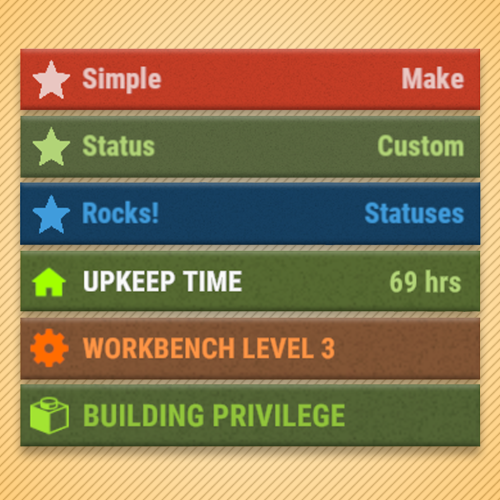
Overview Provides an API for adding custom status messages that fit alongside the vanilla Rust status UI. Simple Status does not add gameplay statuses on its own; it provides an API that other plugins can use to display them. As of version 1.3.0, Simple Status supports Facepunch's native CustomVitals system. Compatible statuses are rendered using the native Rust status UI, while unsupported features automatically fall back to the Legacy CUI renderer when required. Simple Status also supports Advanced Status integration and can automatically switch between Advanced Status, native CustomVitals, and Legacy CUI depending on the server configuration and the features used by each status. Commands /ts Toggles the visibility of statuses for a player. This command can be changed in the config settings. Configuration { "ChatMessageSteamId": 0, "ToggleStatusCommand": "ts", "UseCustomVitals": true, "UseInternalCustomVitalsWrapper": true, "ForceCustomVitalsForUnsupportedStatuses": false, "IgnoreAdvancedStatus": false } UseCustomVitals - Enables the native Facepunch CustomVitals renderer when available. UseInternalCustomVitalsWrapper - Uses Simple Status' built-in Facepunch CustomVitals wrapper. This does not require Carbon. If disabled, Simple Status will attempt to use the Carbon/CarbonAliases CustomVitalManager provider instead. ForceCustomVitalsForUnsupportedStatuses - Forces statuses to remain on CustomVitals even when they use unsupported features. Unsupported features such as progress bars or asset-path icons will not be rendered. IgnoreAdvancedStatus - When enabled, Simple Status will not use Advanced Status as its renderer and will instead use CustomVitals or Legacy CUI. Custom Status Framework This plugin is a sequel to Custom Status Framework and features much better performance. They do the same thing, but are NOT compatible with each other. Do not load both on your server or you may run into issues. Plugins that require Custom Status Framework will need to be updated to support Simple Status, it is not backwards compatible. If you are a plugin developer and need help writing your plugin to use Simple Status, please reach out to me! Advanced Status Simple Status can integrate automatically with Advanced Status. When Advanced Status is installed and IgnoreAdvancedStatus is disabled, it remains the preferred renderer for traditional Simple Status statuses. If Advanced Status is not being used, Simple Status can render compatible statuses through Facepunch's native CustomVitals system and automatically fall back to Legacy CUI when required. Developers using the regular Simple Status API do not need to explicitly support each renderer. API void CreateStatus(Plugin plugin, string statusId, Dictionary<string, object> properties) // Registers a status definition. // OnSimpleStatusReady() is recommended when Simple Status may load after your plugin. // See the Properties section for supported values. void SetStatus(string userId, string statusId, int duration = int.MaxValue, bool pauseOffline = true) // Assigns a player a status with a duration. Set duration to int.MaxValue for an infinite status. Set to 0 to clear a status. void SetStatusProperty(string userId, string statusId, Dictionary<string, object> properties) // Set multiple properties for a player status with a single API call. Will minimize the number of redraws, so its better than individually setting properties. // See the properties section for a list of properties to set. int GetDuration(string userId, string statusId) // Returns the duration in seconds of a status that a player has. Returns 0 if the player does not have that status. Hooks void OnStatusSet(string userId, string statusId, int duration) // Called when a status is initially set for a player. void OnStatusEnd(string userId, string statusId, int duration) // Called when a status is removed for a player. (When the duration reaches 0). void OnStatusUpdate(string userId, string statusId, string property, string value) // Called when a status property is updated. // See the properties section for a list of properties to set. Properties // The following are valid property keys that are used in multiple API methods var properties = new Dictionary<string, object> { ["color"] = "1 1 1 1", // Background color ["title"] = "hello", // Left-side text. Localization keys are supported. ["titleColor"] = "0 0 0 1", // Left-side text color ["text"] = "subtext", // Right-side text. Set null to use the duration counter for timed statuses. ["textColor"] = "0 0 0 1", // Right-side text color ["icon"] = "star", // ImageLibrary key, direct URL, raw image key, asset path, or itemid. See Image Types. ["iconColor"] = "0 0 0 1", // Icon color ["progress"] = 0.0, // Progress value between 0.0 and 1.0. Progress bars require Legacy CUI. ["progressColor"] = "0 0 0 0.5", // Progress bar color ["rank"] = 0 // Lower ranks are rendered before higher ranks. }; Image Types Simple Status supports several icon formats: ImageLibrary key ["icon"] = "my_icon" The image must already be registered with ImageLibrary. Direct image URL ["icon"] = "https://example.com/icon.png" As of 1.3.0, direct URLs are automatically downloaded through ImageLibrary. Once the image becomes available, Simple Status automatically refreshes affected players. Raw ImageLibrary key ["icon"] = "raw:my_icon" Rust asset path ["icon"] = "assets/icons/example.png" Asset paths can be found here and item ids can be found here. Item ID ["icon"] = "itemid:123456789" Rust asset paths and itemid: icons are supported by the Legacy CUI renderer, but Facepunch CustomVitals does not currently support these formats directly. When CustomVitals is enabled and a status uses an unsupported icon type, Simple Status automatically falls back to Legacy CUI for that player's Simple Status statuses and prints a one-time compatibility warning. ImageLibrary keys and direct image URLs are recommended for plugins that want to remain compatible with native CustomVitals. Native CustomVitals Version 1.3.0 adds native support for Facepunch CustomVitals. Standard Simple Status properties map automatically to the native Rust status UI, including: background color title/left text text/right text text colors compatible icons icon color rank native countdown timers Some Simple Status features do not currently have a native CustomVitals equivalent: progress bars Rust assets/... icon paths itemid: icons By default, if any active Simple Status status for a player requires one of these features, all regular Simple Status statuses for that player are temporarily rendered through Legacy CUI. This keeps status ordering and layout consistent. A one-time console warning identifies which plugin, status, and unsupported feature caused the fallback. Setting ForceCustomVitalsForUnsupportedStatuses to true disables this automatic fallback, but unsupported features will not be displayed. Public CustomVitals API bool IsInternalCustomVitalsWrapperAvailable() bool SetCustomVital(Plugin plugin, ulong userId, string vitalId, Dictionary<string, object> properties) bool RemoveCustomVital(Plugin plugin, ulong userId, string vitalId) bool RemoveCustomVitals(Plugin plugin, ulong userId) bool RemoveAllCustomVitals(Plugin plugin) bool HasCustomVital(Plugin plugin, ulong userId, string vitalId) The Public CustomVitals API provides direct access to Simple Status' internal Facepunch CustomVitals wrapper. It is available when UseCustomVitals and UseInternalCustomVitalsWrapper are enabled and the internal wrapper is available. This API is separate from the regular Simple Status API and is intended for plugins that specifically need direct native CustomVitals access. Code Example This is an example of a plugin that utilizes Simple Status to produce the image in the thumbnail. For plugin developer reference. Download link below: SimpleStatusDemo.csFree -
Working on a big rewrite for this!
-
- 307 comments
-
- #protection
- #base
- (and 5 more)
-
- 307 comments
-
- #protection
- #base
- (and 5 more)
-
This is an awesome, an extensive solution to chest sorting. If you're like me, you want to just dump all of your inventory into a chest and be done with it... but at the same time have everything organized when you're looking for it. There are other plugins that do sorting, but this adds an extra layer of customization for players to configure not only what's in their chests but where exactly those items are in the chests as well, and it is done with a pretty intuitive UI. I hope to see this running on more servers, as clearly a lot of thought has gone into it.
- 2 comments
-
- #conveyor
- #industrial
-
(and 8 more)
Tagged with:
-
Just an update, the solution is currently being tested
-
Changed Status from Pending to Not a Bug
-
Sweet!
-
Changed Status from Pending to Gremlins
-
I think if I'm understanding what you're asking, raid protection would have to communicate with timed permissions. It currently doesn't do this, but it's a possible thing that could be added.
-
Based on your settings it should pop up in the top center of the screen when you're holding a hammer or within a building zone. You have to also make sure that the TC has protection time on it. If it's still not working try a different position in the csf config, like vanilla. You may also need to reload both CSF and Raid Protection when making these config changes. I will load up your config first thing in the morning see if I can reproduce the issue. Ultimately, I will be moving away from using CSF in the future, but the replacement plugin is still in the works... So keep an eye out for that.
-
- 307 comments
-
- #protection
- #base
- (and 5 more)
-
- 307 comments
-
- #protection
- #base
- (and 5 more)
-
Okay I DMd you with a tool that can help.
-
Do you have a plugin that lets you see the "owner" of the cupboard, like Admin Hammer or something similar? If Raid Protection doesnt have a founder saved it should try to assume its whoever the "owner" of the cupboard is. Let me know if you don't have a plugin like that, I can send you one that I made.
-
Would you mind posting your config?