
-
Posts
4 -
Joined
-
Last visited
Content Type
Profiles
Warranty Claims
Downloads
Forums
Store
Services
Downloads Plus Support
DOWNLOADS EXTRA
Reels
Everything posted by N4TIVE
-
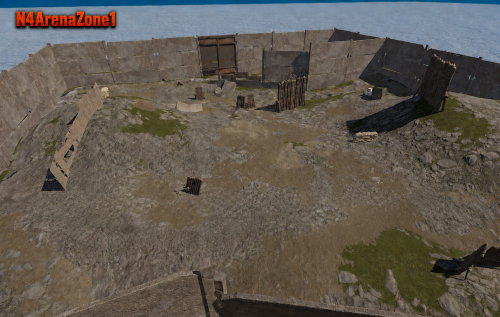
Version 1.0.0
2 downloads
N4 Arena Zone 1 is a ready-to-place custom PvP arena prefab designed for Rust server owners who want a flexible combat area they can configure around their own gameplay system. The arena includes two dedicated spawn areas positioned on opposite sides of the fighting area. These spaces have intentionally been left empty, giving you complete freedom to add kit rooms, storage, decorations, teleporters, signs, or anything else your server needs. They can also be left empty—the arena works perfectly well without additional decoration. Spawn configuration is not included, allowing you to choose the solution that best suits your server and gameplay requirements. For the most balanced setup, we recommend placing at least one player spawn on each side of the arena. Package Contents The complete N4 Arena Zone 1 RustEdit prefab All required height, biome, splat, alpha, and topology files A detailed installation and configuration guide Requirements PC Rust dedicated server Oxide/uMod Monument Finder Zone Manager RustEdit for adding the prefab to your map Oxide RustEdit Extension Optional Features Zone Manager can be used to create safe zones around the two designated spawn areas, helping prevent players from attacking while spawning or preparing for a fight. A compatible Kits plugin can also be used to provide free replacement equipment after death. You can create as many kits as you want and configure their costs, cooldowns, and redemption limits to match your server. Flexible by Design This prefab provides the arena itself without forcing you to use a particular event, spawn, teleportation, or kit system. You decide how players enter, where they spawn, what equipment they receive, and how the arena fits into your server. Please read the Installation Guide provided below before purchase. If you need assistance or encounter a problem, contact me through the Codefling support section or the RUSTICATION Discord server. Installation_Guide.txt$5.00 -
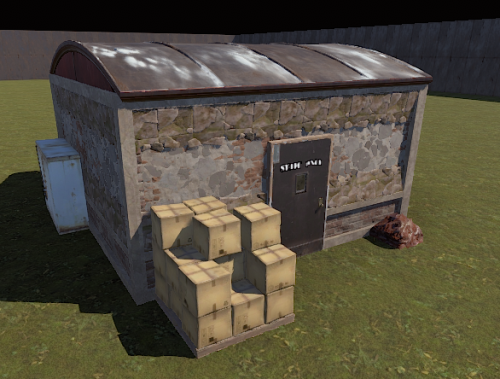
Version 1.0.0
2 downloads
N4 Industrial Staff Only This is a static, small industrial building. The door doesn’t open and the inside is empty. This will work well in a themed industrial monument or an arena. There are two sets of cover if used for an arena. The wooden shed structure attached to the back of the building which has a forklift inside. The other spot is by the front door behind the boxes. Enjoy! Get map making! Any queries or issues, do not hesitate to get in contact. Either on here under the support tab, or via the RUSTICATION Discord server$2.99 -
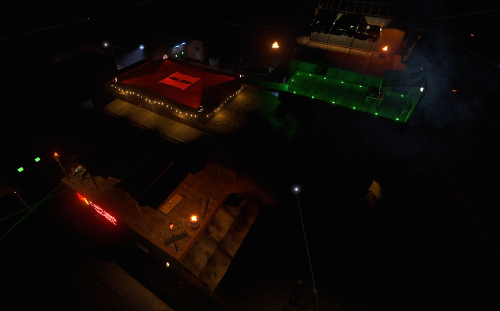
Version 1.0.0
1 download
Bring your Outpost and Bandit Camp setup together with N4 Merged Outpost. Use the supplied RustEdit prefab on an existing world, or add the included map to RustMaps as a reusable custom Outpost for future map generations. Features Vending machines ready to customise with Custom Vending Setup. 15 included vending presets: Ammo, Armour, Build, Cloth Exchange, Combat, Decor, Electrical, Farming, Food, Key Cards, Meds, Starter Kit, Teas, Vehicle Parts and Weapons. Included Airwolf Monument Addons profile for the helicopter vendor and spawner. RustEdit prefab with companion terrain files. Included .map file for RustMaps custom Outpost uploads. Installation guide covering both setup methods. This is an Oxide tested prefab. I cannot assure this will work the same for Carbon based servers. Two Ways to Install Use the included vending presets Place the prefab over an existing Outpost on a generated world in RustEdit, save the complete world, and upload it to RustMaps as a custom map upload. Reuse your custom vending setup across generated maps Upload the included .map file to RustMaps as a custom Outpost monument, then select it in the custom map generator. The vending machines keep their positions relative to Outpost, allowing your Custom Vending Setup configuration to carry across maps when Monument Finder is configured correctly and your plugin data is retained. Important: RustMaps Vending Presets Due to a current RustMaps issue, the included vending presets only work using the complete custom map upload method described above. Generating a map with the uploaded custom Outpost monument retains the vending machines, but does not retain the included vending presets. With this method, configure your own offers using Custom Vending Setup. Plugin Requirements Custom Vending Setup Monument Addons Monument Finder Rust Edit Extension Plugins are available separately and are not included in the download. InstallationGuide.txt$14.00 -
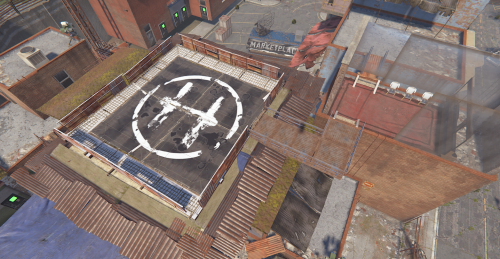
Version 1.0.3
10 downloads
N4 Custom Outpost Transform the standard Outpost into a dense, lived-in urban compound with new buildings, rooftop areas, vendor spaces, entertainment areas and a dedicated Airwolf helipad. N4 Custom Outpost retains the familiar functionality of Outpost while giving the monument a significantly expanded appearance and more places for players to explore. Features Detailed custom Outpost redesign Dense urban-style layout Rooftop Airwolf helipad Working Airwolf vendor and helicopter spawn point Casino and gambling areas Multiple vending-machines ready to be configured with Custom vending setup plugin if desired. But there are Vending Presets Included Rooftop seating and social areas Additional alleys, walkways and elevated spaces Compound detailing Terrain, biome, splat, topology, height and alpha masks included Monument Addons profile included Installation guide included Included Files Complete RustEdit prefab and mask set Monument Addons Airwolf profile Detailed installation and troubleshooting guide Vending Presets Installation Options RustEdit Place the included prefab manually using RustEdit. Due to some rustmaps issues, you will need to create your base map first before uploading the custom outpost. Then take that generated/created map and align the outpost prefab correctly. Afterwards, you can upload your map to rustmaps or a hosting site. Copy that url and paste it after server.levelurl Requirements To use all included functionality, you will need: Monument Addons Monument Finder An Oxide/uMod-compatible Rust server RustEdit Server Extension — There are vending presets attached to the extra vending machines. Optional Compatibility Custom Vending Setup can be used to replace the default inventories Telekinesis can be used by administrators to reposition Monument Addons entities in-game Important The Airwolf vendor and helicopter spawner are provided through the included Monument Addons profile and are not embedded directly into the map or prefab. Do not enable another Airwolf profile at Outpost simultaneously, as this may create duplicate vendors or helicopter spawn points. Please read the included installation guide before installing. Support For assistance, create a support request through the Support tab on this Codefling product page. Alternatively, join the RUSTICATION Discord, verify in #verify, and open a ticket in #create-a-ticket InstallationGuide.txt$10.00